Compare commits
164 Commits
v7.4.1
...
Fix-Import
| Author | SHA1 | Date | |
|---|---|---|---|

|
ebdfd3d090 | ||
|
|
a1986de292 | ||
|
|
30f2597f0d | ||
|
|
09c22654ab | ||
|
|
63f6543784 | ||
|
|
306e10c348 | ||
|
|
970febd6d3 | ||

|
e703a21dec | ||
|
|
c1be6a8d82 | ||
|
|
201b9cd984 | ||
|
|
559bfa2a7f | ||
|
|
4bd3efa1ef | ||
|
|
926042e5b6 | ||

|
be1e55cf8d | ||
|
|
a86c55b3ac | ||
|
|
fa14695fb9 | ||

|
6322bafaed | ||
|
|
c7a6f4ba35 | ||
|
|
49a6805727 | ||
|
|
c124ee199d | ||
|
|
858cf60a2f | ||

|
fcde64780e | ||
|
|
be5d270f44 | ||
|
|
f9fb49ad04 | ||
|
|
4727bb3b2b | ||
|
|
ac435fc1e1 | ||
|
|
340ffc560b | ||
|
|
069c227391 | ||

|
fa4f3a23cd | ||
|
|
f54db0e2d9 | ||
|
|
8c1388a799 | ||
|
|
7c473d1fb6 | ||
|
|
31366057df | ||
|
|
f102ece700 | ||
|
|
950b9ab078 | ||
|
|
869ab59a8a | ||
|
|
1e9a73d176 | ||

|
37e6896741 | ||
|
|
c39e6cc24c | ||
|
|
5ab9d6f23f | ||

|
81e60be51d | ||
|
|
943ca7e6d1 | ||
|
|
513ff59ba8 | ||

|
45fc5a2631 | ||
|
|
8b30fce81a | ||
|
|
0990c0ef09 | ||

|
724ed6b197 | ||
|
|
087feedde6 | ||
|
|
b92ea56fe9 | ||
|
|
c4eed8c25d | ||
|
|
9051ffc0e5 | ||
|
|
050613eede | ||
|
|
84f51c4823 | ||
|
|
f2544ed1ec | ||
|
|
5b4857d7a0 | ||
|
|
45449650c7 | ||
|
|
d7348250fc | ||
|
|
b53881fd02 | ||
|
|
632bb263cc | ||
|
|
658a6b543a | ||
|
|
0f301ff619 | ||
|
|
115fbb23a7 | ||
|
|
2b30537c20 | ||
|
|
22f50d2659 | ||
|
|
f0a2d076e3 | ||
|
|
835a11bbb3 | ||
|
|
701b8e2062 | ||
|
|
6f2bfaff4e | ||
|
|
ba6cee12d9 | ||
|
|
5d36945708 | ||
|
|
6cbf4efd1d | ||
|
|
4feaee46d2 | ||
|
|
89f90b77fb | ||
|
|
98256c61e8 | ||
|
|
ebde9269aa | ||
|
|
e3149b7b40 | ||
|
|
64ff97b486 | ||
|
|
12f1f23d51 | ||
|
|
e279cd785e | ||
|
|
04b5a9a096 | ||
|
|
c6a06cc325 | ||
|
|
a4bed31e1e | ||
|
|
c385ca9012 | ||
|
|
2a8cbbba7c | ||
|
|
b789db9ba3 | ||
|
|
89a4cfde0d | ||
|
|
ab56ae4409 | ||
|
|
ef35c4fca8 | ||
|
|
9fad33c7a6 | ||
|
|
8bb3d50052 | ||
|
|
d5b807d3cb | ||
|
|
e2053e4998 | ||
|
|
8c6c7eeaf6 | ||
|
|
31abd215dc | ||
|
|
cafaafd53d | ||
|
|
ee3c8e7680 | ||
|
|
0b207548e0 | ||
|
|
6628b55ce5 | ||
|
|
f6bfabd96a | ||
|
|
980631df8b | ||
|
|
4f9b83f0e6 | ||
|
|
59cf89b451 | ||
|
|
5777d907c4 | ||
|
|
d7c516d35e | ||
|
|
27d69e7531 | ||
|
|
8ae92fba54 | ||
|
|
aa0f0cf4e2 | ||
|
|
6e38d97498 | ||
|
|
ef7c8331f5 | ||
|
|
267d15f99a | ||
|
|
390aca0496 | ||
|
|
4fa34ae257 | ||
|
|
0b3b382c4e | ||
|
|
415be5bca3 | ||
|
|
79e5bdf8ba | ||
|
|
b03d9b048a | ||
|
|
aea90aa8d6 | ||
|
|
d4ebc9e95d | ||
|
|
6ece4483e2 | ||
|
|
ba14511254 | ||
|
|
964cf9e9c6 | ||
|
|
8d56a351ff | ||
|
|
b2119f08f5 | ||
|
|
634aaacc55 | ||
|
|
61b44f826d | ||
|
|
9273261b34 | ||
|
|
e55dfdd10e | ||
|
|
59e40d62d0 | ||
|
|
f478e8a134 | ||
|
|
b634bf9d93 | ||
|
|
a10ade898a | ||
|
|
eb10364722 | ||
|
|
b0024cf2c4 | ||
|
|
91b0e8b0ed | ||
|
|
b997e90e78 | ||
|
|
4d8710d017 | ||
|
|
7f36b44fa8 | ||
|
|
483f761016 | ||
|
|
d55f0e64d4 | ||
|
|
f83f654c4a | ||
|
|
6a956dbd7e | ||
|
|
0929a442a5 | ||
|
|
895a5c0cb2 | ||
|
|
d7901af8f3 | ||
|
|
34f55a3659 | ||
|
|
606988bcf6 | ||

|
441f2ada22 | ||
|
|
29ea7012d7 | ||
|
|
67ac63ddcf | ||

|
c939c6ecb0 | ||
|
|
96493e059b | ||
|
|
cb7f2a06f4 | ||
|
|
99beda7a10 | ||
|
|
0c8bb2300a | ||
|
|
c09083d350 | ||
|
|
556f0ac51e | ||
|
|
1e4fc59a25 | ||
|
|
5ab6a9116d | ||

|
f33215382a | ||
|
|
cf5d3f83d6 | ||
|
|
91da711635 | ||
|
|
eec5e343d4 | ||
|
|
d69b640edc | ||
|
|
f348088b62 |
27
.github/workflows/ci.yml
vendored
Normal file
@@ -0,0 +1,27 @@
|
|||||||
|
on:
|
||||||
|
push:
|
||||||
|
branches:
|
||||||
|
- master
|
||||||
|
- Set-up-GHA-CI/CD
|
||||||
|
|
||||||
|
pull_request:
|
||||||
|
|
||||||
|
jobs:
|
||||||
|
validate:
|
||||||
|
runs-on: ${{ matrix.os }}
|
||||||
|
strategy:
|
||||||
|
matrix:
|
||||||
|
os: [windows-latest, ubuntu-latest, macos-latest]
|
||||||
|
steps:
|
||||||
|
- uses: actions/checkout@v1
|
||||||
|
- name: Run Continuous Integration
|
||||||
|
shell: pwsh
|
||||||
|
run : |
|
||||||
|
if($PSVersionTable.Platform -eq 'Win32NT') {
|
||||||
|
$null = mkdir ./ace
|
||||||
|
Invoke-Restmethod https://download.microsoft.com/download/3/5/C/35C84C36-661A-44E6-9324-8786B8DBE231/accessdatabaseengine_X64.exe -OutFile ./ace/ace.exe
|
||||||
|
Start-Process ./ace/ace.exe -Wait -ArgumentList "/quiet /passive /norestart"
|
||||||
|
}
|
||||||
|
|
||||||
|
cd ./__tests__
|
||||||
|
Invoke-Pester -Output Detailed
|
||||||
133
Add-Subtotals.ps1
Normal file
@@ -0,0 +1,133 @@
|
|||||||
|
Function Add-Subtotals {
|
||||||
|
param(
|
||||||
|
[Parameter(Mandatory=$true, Position=0)]
|
||||||
|
$ChangeColumnName , # = "Location"
|
||||||
|
|
||||||
|
[Parameter(Mandatory=$true, Position=1)]
|
||||||
|
[hashtable]$AggregateColumn , #= @{"Sales" = "SUM" }
|
||||||
|
|
||||||
|
[Parameter(Position=2)]
|
||||||
|
$ExcelPath = ([System.IO.Path]::GetTempFileName() -replace "\.tmp", ".xlsx") ,
|
||||||
|
|
||||||
|
[Parameter(Position=3)]
|
||||||
|
$WorksheetName = "Sheet1",
|
||||||
|
|
||||||
|
[Parameter(ValueFromPipeline=$true)]
|
||||||
|
$InputObject, #$DataToPivot | Sort location, product
|
||||||
|
|
||||||
|
[switch]$HideSingleRows,
|
||||||
|
[switch]$NoSort,
|
||||||
|
[switch]$NoOutLine,
|
||||||
|
[switch]$Show
|
||||||
|
|
||||||
|
)
|
||||||
|
begin {
|
||||||
|
if (-not $PSBoundParameters.ContainsKey('ExcelPath')) {$Show = $true}
|
||||||
|
$data = @()
|
||||||
|
$aggFunctions = [ordered]@{
|
||||||
|
"AVERAGE" = 1; "COUNT" = 2; "COUNTA" = 3 #(non empty cells) f
|
||||||
|
"MAX" = 4; "MIN" = 5; "PRODUCT" = 6; "STDEV" = 7 # (sample)
|
||||||
|
"STDEVP" = 8 # (whole population);
|
||||||
|
"SUM" = 9; "VAR" = 10 # (Variance sample)
|
||||||
|
"VARP" = 11 # (whole population) #add 100 to ignore hidden cells
|
||||||
|
}
|
||||||
|
}
|
||||||
|
process {
|
||||||
|
$data += $InputObject
|
||||||
|
}
|
||||||
|
end {
|
||||||
|
if (-not $NoSort) {$data = $data | Sort-Object $changeColumnName}
|
||||||
|
$Header = $data[0].PSObject.Properties.Name
|
||||||
|
#region turn each entry in $AggregateColumn "=SUBTOTAL(a,x{0}}:x{1})" where a is the aggregate function number and x is the column letter
|
||||||
|
$aggFormulas = @{}
|
||||||
|
foreach ($k in $AggregateColumn.Keys) {
|
||||||
|
$columnNo = 0 ;
|
||||||
|
while ($columnNo -lt $header.count -and $header[$columnNo] -ne $k) {$columnNo ++}
|
||||||
|
if ($columnNo -eq $header.count) {
|
||||||
|
throw "'$k' isn't a property of the first row of data."; return
|
||||||
|
}
|
||||||
|
if ($AggregateColumn[$k] -is [string]) {
|
||||||
|
$aggfn = $aggFunctions[$AggregateColumn[$k]]
|
||||||
|
if (-not $aggfn) {
|
||||||
|
throw "$($AggregateColumn[$k]) is not a valid aggregation function - these are $($aggFunctions.keys -join ', ')" ; return
|
||||||
|
}
|
||||||
|
}
|
||||||
|
else {$aggfn = $AggregateColumn[$k]}
|
||||||
|
$aggFormulas[$k] = "=SUBTOTAL({0},{1}{{0}}:{1}{{1}})" -f $aggfn , (Get-ExcelColumnName ($columnNo+1) ).ColumnName
|
||||||
|
}
|
||||||
|
if ($aggformulas.count -lt 1) {throw "We didn't get any aggregation formulas"}
|
||||||
|
$aggFormulas | out-string -Stream | Write-Verbose -Verbose
|
||||||
|
#endregion
|
||||||
|
$insertedRows = @()
|
||||||
|
$singleRows = @()
|
||||||
|
$previousValue = $data[0].$changeColumnName
|
||||||
|
$currentRow = $lastChangeRow = 2
|
||||||
|
#region insert subtotals and send to excel:
|
||||||
|
#each time there is a change in the column we're intetersted in.
|
||||||
|
#either Add a row with the value and subtotal(s) function(s) if there is more than one row to total
|
||||||
|
#or note the row if there was only one row with that value (we may hide it later.)
|
||||||
|
$excel = $data |
|
||||||
|
ForEach-Object -process {
|
||||||
|
if ($_.$changeColumnName -ne $previousValue) {
|
||||||
|
if ($lastChangeRow -lt ($currentrow - 1)) {
|
||||||
|
$NewObj = @{$changeColumnName = $previousValue}
|
||||||
|
foreach ($k in $aggFormulas.Keys) {
|
||||||
|
$newobj[$k] = $aggformulas[$k] -f $lastChangeRow, ($currentRow - 1)
|
||||||
|
}
|
||||||
|
$insertedRows += $currentRow
|
||||||
|
[pscustomobject]$newobj
|
||||||
|
$currentRow += 1
|
||||||
|
}
|
||||||
|
else {$singleRows += $currentRow }
|
||||||
|
$lastChangeRow = $currentRow
|
||||||
|
$previousValue = $_.$changeColumnName
|
||||||
|
}
|
||||||
|
$_
|
||||||
|
$currentRow += 1
|
||||||
|
} -end { # the process block won't output the last row
|
||||||
|
if ($lastChangeRow -lt ($currentrow - 1)) {
|
||||||
|
$NewObj = @{$changeColumnName = $previousValue}
|
||||||
|
foreach ($k in $aggFormulas.Keys) {
|
||||||
|
$newobj[$k] = $aggformulas[$k] -f $lastChangeRow, ($currentRow - 1)
|
||||||
|
}
|
||||||
|
$insertedRows += $currentRow
|
||||||
|
[pscustomobject]$newobj
|
||||||
|
}
|
||||||
|
else {$singleRows += $currentRow }
|
||||||
|
} | Export-Excel -Path $ExcelPath -PassThru -AutoSize -AutoFilter -AutoNameRange -BoldTopRow -WorksheetName $WorksheetName -Activate -ClearSheet #-MaxAutoSizeRows 10000
|
||||||
|
#endregion
|
||||||
|
#Put the subtotal rows in bold optionally hide rows where only one has the value of interest.
|
||||||
|
$ws = $excel.$WorksheetName
|
||||||
|
#We kept lists of the total rows Since 1 rows won't get expand/collapse we can hide them.
|
||||||
|
foreach ($r in $insertedrows) {$ws.Row($r).style.font.bold = $true }
|
||||||
|
if ($HideSingleRows) {
|
||||||
|
foreach ($r in $hideRows) { $ws.Row($r).hidden = $true}
|
||||||
|
}
|
||||||
|
$range = $ws.Dimension.Address
|
||||||
|
$ExcelPath = $excel.File.FullName
|
||||||
|
$SheetIndex = $ws.index
|
||||||
|
if ($NoOutline) {
|
||||||
|
Close-ExcelPackage $excel -show:$Show
|
||||||
|
return
|
||||||
|
}
|
||||||
|
else {
|
||||||
|
Close-ExcelPackage $excel
|
||||||
|
|
||||||
|
try { $excelApp = New-Object -ComObject "Excel.Application" }
|
||||||
|
catch { Write-Warning "Could not start Excel application - which usually means it is not installed." ; return }
|
||||||
|
|
||||||
|
try { $excelWorkBook = $excelApp.Workbooks.Open($ExcelPath) }
|
||||||
|
catch { Write-Warning -Message "Could not Open $ExcelPath." ; return }
|
||||||
|
$ws = $excelWorkBook.Worksheets.item($SheetIndex)
|
||||||
|
$null = $ws.Range($range).Select()
|
||||||
|
$null = $excelapp.ActiveCell.AutoOutline()
|
||||||
|
$null = $ws.Outline.ShowLevels(1,$null)
|
||||||
|
$excelWorkBook.Save()
|
||||||
|
if ($show) {$excelApp.Visible = $true}
|
||||||
|
else {
|
||||||
|
[void]$excelWorkBook.close()
|
||||||
|
$excelapp.Quit()
|
||||||
|
}
|
||||||
|
}
|
||||||
|
}
|
||||||
|
}
|
||||||
119
Examples/AddImage/Add-ExcelImage.ps1
Normal file
@@ -0,0 +1,119 @@
|
|||||||
|
function Add-ExcelImage {
|
||||||
|
<#
|
||||||
|
.SYNOPSIS
|
||||||
|
Adds an image to a worksheet in an Excel package.
|
||||||
|
.DESCRIPTION
|
||||||
|
Adds an image to a worksheet in an Excel package using the
|
||||||
|
`WorkSheet.Drawings.AddPicture(name, image)` method, and places the
|
||||||
|
image at the location specified by the Row and Column parameters.
|
||||||
|
|
||||||
|
Additional position adjustment can be made by providing RowOffset and
|
||||||
|
ColumnOffset values in pixels.
|
||||||
|
.EXAMPLE
|
||||||
|
$image = [System.Drawing.Image]::FromFile($octocat)
|
||||||
|
$xlpkg = $data | Export-Excel -Path $path -PassThru
|
||||||
|
$xlpkg.Sheet1 | Add-ExcelImage -Image $image -Row 4 -Column 6 -ResizeCell
|
||||||
|
|
||||||
|
Where $octocat is a path to an image file, and $data is a collection of
|
||||||
|
data to be exported, and $path is the output path for the Excel document,
|
||||||
|
Add-Excel places the image at row 4 and column 6, resizing the column
|
||||||
|
and row as needed to fit the image.
|
||||||
|
.INPUTS
|
||||||
|
[OfficeOpenXml.ExcelWorksheet]
|
||||||
|
.OUTPUTS
|
||||||
|
None
|
||||||
|
#>
|
||||||
|
[CmdletBinding()]
|
||||||
|
param(
|
||||||
|
# Specifies the worksheet to add the image to.
|
||||||
|
[Parameter(Mandatory, ValueFromPipeline)]
|
||||||
|
[OfficeOpenXml.ExcelWorksheet]
|
||||||
|
$WorkSheet,
|
||||||
|
|
||||||
|
# Specifies the Image to be added to the worksheet.
|
||||||
|
[Parameter(Mandatory)]
|
||||||
|
[System.Drawing.Image]
|
||||||
|
$Image,
|
||||||
|
|
||||||
|
# Specifies the row where the image will be placed. Rows are counted from 1.
|
||||||
|
[Parameter(Mandatory)]
|
||||||
|
[ValidateRange(1, [int]::MaxValue)]
|
||||||
|
[int]
|
||||||
|
$Row,
|
||||||
|
|
||||||
|
# Specifies the column where the image will be placed. Columns are counted from 1.
|
||||||
|
[Parameter(Mandatory)]
|
||||||
|
[ValidateRange(1, [int]::MaxValue)]
|
||||||
|
[int]
|
||||||
|
$Column,
|
||||||
|
|
||||||
|
# Specifies the name to associate with the image. Names must be unique per sheet.
|
||||||
|
# Omit the name and a GUID will be used instead.
|
||||||
|
[Parameter()]
|
||||||
|
[string]
|
||||||
|
$Name,
|
||||||
|
|
||||||
|
# Specifies the number of pixels to offset the image on the Y-axis. A
|
||||||
|
# positive number moves the image down by the specified number of pixels
|
||||||
|
# from the top border of the cell.
|
||||||
|
[Parameter()]
|
||||||
|
[int]
|
||||||
|
$RowOffset = 1,
|
||||||
|
|
||||||
|
# Specifies the number of pixels to offset the image on the X-axis. A
|
||||||
|
# positive number moves the image to the right by the specified number
|
||||||
|
# of pixels from the left border of the cell.
|
||||||
|
[Parameter()]
|
||||||
|
[int]
|
||||||
|
$ColumnOffset = 1,
|
||||||
|
|
||||||
|
# Increase the column width and row height to fit the image if the current
|
||||||
|
# dimensions are smaller than the image provided.
|
||||||
|
[Parameter()]
|
||||||
|
[switch]
|
||||||
|
$ResizeCell
|
||||||
|
)
|
||||||
|
|
||||||
|
begin {
|
||||||
|
if ($IsWindows -eq $false) {
|
||||||
|
throw "This only works on Windows and won't run on $([environment]::OSVersion)"
|
||||||
|
}
|
||||||
|
|
||||||
|
<#
|
||||||
|
These ratios work on my machine but it feels fragile. Need to better
|
||||||
|
understand how row and column sizing works in Excel and what the
|
||||||
|
width and height units represent.
|
||||||
|
#>
|
||||||
|
$widthFactor = 1 / 7
|
||||||
|
$heightFactor = 3 / 4
|
||||||
|
}
|
||||||
|
|
||||||
|
process {
|
||||||
|
if ([string]::IsNullOrWhiteSpace($Name)) {
|
||||||
|
$Name = (New-Guid).ToString()
|
||||||
|
}
|
||||||
|
if ($null -ne $WorkSheet.Drawings[$Name]) {
|
||||||
|
Write-Error "A picture with the name `"$Name`" already exists in worksheet $($WorkSheet.Name)."
|
||||||
|
return
|
||||||
|
}
|
||||||
|
|
||||||
|
<#
|
||||||
|
The row and column offsets of 1 ensures that the image lands just
|
||||||
|
inside the gray cell borders at the top left.
|
||||||
|
#>
|
||||||
|
$picture = $WorkSheet.Drawings.AddPicture($Name, $Image)
|
||||||
|
$picture.SetPosition($Row - 1, $RowOffset, $Column - 1, $ColumnOffset)
|
||||||
|
|
||||||
|
if ($ResizeCell) {
|
||||||
|
<#
|
||||||
|
Adding 1 to the image height and width ensures that when the
|
||||||
|
row and column are resized, the bottom right of the image lands
|
||||||
|
just inside the gray cell borders at the bottom right.
|
||||||
|
#>
|
||||||
|
$width = $widthFactor * ($Image.Width + 1)
|
||||||
|
$height = $heightFactor * ($Image.Height + 1)
|
||||||
|
$WorkSheet.Column($Column).Width = [Math]::Max($width, $WorkSheet.Column($Column).Width)
|
||||||
|
$WorkSheet.Row($Row).Height = [Math]::Max($height, $WorkSheet.Row($Row).Height)
|
||||||
|
}
|
||||||
|
}
|
||||||
|
}
|
||||||
39
Examples/AddImage/AddImage.ps1
Normal file
@@ -0,0 +1,39 @@
|
|||||||
|
if ($IsWindows -eq $false) {
|
||||||
|
throw "This only works on Windows and won't run on $([environment]::OSVersion)"
|
||||||
|
}
|
||||||
|
|
||||||
|
Add-Type -AssemblyName System.Drawing
|
||||||
|
|
||||||
|
. $PSScriptRoot\Add-ExcelImage.ps1
|
||||||
|
|
||||||
|
$data = ConvertFrom-Csv @"
|
||||||
|
Region,State,Units,Price
|
||||||
|
West,Texas,927,923.71
|
||||||
|
North,Tennessee,466,770.67
|
||||||
|
East,Florida,520,458.68
|
||||||
|
East,Maine,828,661.24
|
||||||
|
West,Virginia,465,053.58
|
||||||
|
North,Missouri,436,235.67
|
||||||
|
South,Kansas,214,992.47
|
||||||
|
North,North Dakota,789,640.72
|
||||||
|
South,Delaware,712,508.55
|
||||||
|
"@
|
||||||
|
|
||||||
|
$path = "$PSScriptRoot/Add-Picture-test.xlsx"
|
||||||
|
Remove-Item $path -ErrorAction SilentlyContinue
|
||||||
|
|
||||||
|
|
||||||
|
try {
|
||||||
|
$octocat = "$PSScriptRoot/Octocat.jpg"
|
||||||
|
$image = [System.Drawing.Image]::FromFile($octocat)
|
||||||
|
$xlpkg = $data | Export-Excel -Path $path -PassThru
|
||||||
|
$xlpkg.Sheet1 | Add-ExcelImage -Image $image -Row 4 -Column 6 -ResizeCell
|
||||||
|
}
|
||||||
|
finally {
|
||||||
|
if ($image) {
|
||||||
|
$image.Dispose()
|
||||||
|
}
|
||||||
|
if ($xlpkg) {
|
||||||
|
Close-ExcelPackage -ExcelPackage $xlpkg -Show
|
||||||
|
}
|
||||||
|
}
|
||||||
BIN
Examples/AddImage/Octocat.jpg
Normal file

|
After Width: | Height: | Size: 6.1 KiB |
33
Examples/AddImage/README.md
Normal file
@@ -0,0 +1,33 @@
|
|||||||
|
# Add-ExcelImage Example
|
||||||
|
|
||||||
|
Adding pictures to an Excel worksheet is possible by calling the `AddPicture(name, image)`
|
||||||
|
method on the `Drawings` property of an `ExcelWorksheet` object.
|
||||||
|
|
||||||
|
The `Add-ExcelImage` example here demonstrates how to add a picture at a given
|
||||||
|
cell location, and optionally resize the row and column to fit the image.
|
||||||
|
|
||||||
|
## Running the example
|
||||||
|
|
||||||
|
To try this example, run the script `AddImage.ps1`. The `Add-ExcelImage`
|
||||||
|
function will be dot-sourced, and an Excel document will be created in the same
|
||||||
|
folder with a sample data set. The Octocat image will then be embedded into
|
||||||
|
Sheet1.
|
||||||
|
|
||||||
|
The creation of the Excel document and the `System.Drawing.Image` object
|
||||||
|
representing Octocat are properly disposed within a `finally` block to ensure
|
||||||
|
that the resources are released, even if an error occurs in the `try` block.
|
||||||
|
|
||||||
|
## Note about column and row sizing
|
||||||
|
|
||||||
|
Care has been taken in this example to get the image placement to be just inside
|
||||||
|
the cell border, and if the `-ResizeCell` switch is present, the height and width
|
||||||
|
of the row and column will be increased, if needed, so that the bottom right of
|
||||||
|
the image also lands just inside the cell border.
|
||||||
|
|
||||||
|
The Excel row and column sizes are measured in "point" units rather than pixels,
|
||||||
|
and a fixed multiplication factor is used to convert the size of the image in
|
||||||
|
pixels, to the corresponding height and width values in Excel.
|
||||||
|
|
||||||
|
It's possible that different DPI or text scaling options could result in
|
||||||
|
imperfect column and row sizing and if a better strategy is found for converting
|
||||||
|
the image dimensions to column and row sizes, this example will be updated.
|
||||||
21
Examples/ConditionalFormatting/GetConditionalFormatting.ps1
Normal file
@@ -0,0 +1,21 @@
|
|||||||
|
try { Import-Module $PSScriptRoot\..\..\ImportExcel.psd1 } catch { throw ; return}
|
||||||
|
|
||||||
|
# This example is using Excel generated by Highlight-DiffCells.ps1
|
||||||
|
# The displayed rule should be the same as in the PS script
|
||||||
|
|
||||||
|
function Get-ConditionalFormatting {
|
||||||
|
param (
|
||||||
|
[string] $xlSourcefile
|
||||||
|
)
|
||||||
|
$excel = Open-ExcelPackage -Path $xlSourcefile
|
||||||
|
|
||||||
|
$excel.Workbook.Worksheets | ForEach-Object {
|
||||||
|
$wsNme = $_.Name
|
||||||
|
$_.ConditionalFormatting | ForEach-Object {
|
||||||
|
"Add-ConditionalFormatting -Worksheet `$excel[""$wsNme""] -Range '$($_.Address)' -ConditionValue '=$($_.Formula)' -RuleType $($_.Type) "
|
||||||
|
}
|
||||||
|
}
|
||||||
|
}
|
||||||
|
|
||||||
|
$xlSourcefile = "$PSScriptRoot\GetConditionalFormatting.xlsx"
|
||||||
|
Get-ConditionalFormatting -xlSourcefile $xlSourcefile
|
||||||
BIN
Examples/ConditionalFormatting/GetConditionalFormatting.xlsx
Normal file
26
Examples/ConditionalFormatting/Highlight-DiffCells.ps1
Normal file
@@ -0,0 +1,26 @@
|
|||||||
|
try { Import-Module $PSScriptRoot\..\..\ImportExcel.psd1 } catch { throw ; return }
|
||||||
|
|
||||||
|
$xlSourcefile = "$env:TEMP\ImportExcelExample.xlsx"
|
||||||
|
|
||||||
|
Write-Verbose -Verbose -Message "Save location: $xlSourcefile"
|
||||||
|
Remove-Item $xlSourcefile -ErrorAction Ignore
|
||||||
|
|
||||||
|
$data = ConvertFrom-Csv @"
|
||||||
|
Region,State,Units2021,Units2022
|
||||||
|
West,Texas,927,925
|
||||||
|
North,Tennessee,466,466
|
||||||
|
East,Florida,520,458
|
||||||
|
East,Maine,828,661
|
||||||
|
West,Virginia,465,465
|
||||||
|
North,Missouri,436,235
|
||||||
|
South,Kansas,214,214
|
||||||
|
North,North Dakota,789,640
|
||||||
|
South,Delaware,712,508
|
||||||
|
"@
|
||||||
|
|
||||||
|
$excel = $data | Export-Excel $xlSourcefile -AutoSize -PassThru
|
||||||
|
|
||||||
|
Add-ConditionalFormatting -Worksheet $excel.sheet1 -Range "C2:D10" -ConditionValue '=$C2=$D2' -RuleType Expression -BackgroundColor ([System.Drawing.Color]::Thistle) -Bold
|
||||||
|
Add-ConditionalFormatting -Worksheet $excel.sheet1 -Range "A2:D10" -ConditionValue '=$C2=$D2' -RuleType Expression -BackgroundColor ([System.Drawing.Color]::LavenderBlush)
|
||||||
|
|
||||||
|
Close-ExcelPackage $excel -Show
|
||||||
23
Examples/CustomNumbers/ShortenNumbers.ps1
Normal file
@@ -0,0 +1,23 @@
|
|||||||
|
# How to convert abbreviate or shorten long numbers in Excel
|
||||||
|
|
||||||
|
Remove-Item .\custom.xlsx -ErrorAction SilentlyContinue
|
||||||
|
|
||||||
|
$data = $(
|
||||||
|
12000
|
||||||
|
1000
|
||||||
|
2000
|
||||||
|
3000
|
||||||
|
2400
|
||||||
|
3600
|
||||||
|
6000
|
||||||
|
13000
|
||||||
|
40000
|
||||||
|
400000
|
||||||
|
1000000
|
||||||
|
)
|
||||||
|
|
||||||
|
$excel = $data | Export-Excel .\custom.xlsx -PassThru
|
||||||
|
|
||||||
|
Set-ExcelRange -Worksheet $excel.Sheet1 -Range "A:A" -NumberFormat '[>999999]#,,"M";#,"K"'
|
||||||
|
|
||||||
|
Close-ExcelPackage $excel -Show
|
||||||
@@ -6,15 +6,16 @@
|
|||||||
#>
|
#>
|
||||||
|
|
||||||
param(
|
param(
|
||||||
[Parameter(Mandatory=$true)]
|
$moduleName = "ImportExcel",
|
||||||
$moduleName,
|
|
||||||
[ValidateSet('Column','Bar','Line','Pie')]
|
[ValidateSet('Column','Bar','Line','Pie')]
|
||||||
$chartType="Line"
|
$chartType="Line"
|
||||||
)
|
)
|
||||||
|
|
||||||
$galleryUrl = "https://www.powershellgallery.com/packages/$moduleName"
|
$download = Get-HtmlTable "https://www.powershellgallery.com/packages/$moduleName" -FirstDataRow 1 |
|
||||||
$nolegend = '-nolegend'
|
Select-Object @{n="Version";e={$v = $Null ; if ($_.version -is [valuetype]) {[string][version]($_.version.tostring("0.0")) }
|
||||||
if($chartType -eq 'pie') {$nolegend = $null}
|
elseif ($_.version -is [string] -and [version]::TryParse($_.version.trim(),[ref]$v)) {$v}
|
||||||
$code = "$($chartType)Chart (Get-HtmlTable $galleryUrl 0 | sort lastupdated -desc) -title 'Download stats for $moduleName' $nolegend"
|
else {$_.Version.trim() -replace "\s+"," " } }},
|
||||||
|
Downloads, @{n="LastUpdated";e={[datetime]$_.last_updated}} |
|
||||||
|
Sort-Object lastupdated -Descending
|
||||||
|
|
||||||
$code | Invoke-Expression
|
& "$($chartType)Chart" $download "Download stats for $moduleName" -nolegend:($chartype -ne 'pie')
|
||||||
|
|||||||
10
Examples/FormatResults/GetAsMarkdownTable.ps1
Normal file
@@ -0,0 +1,10 @@
|
|||||||
|
param(
|
||||||
|
[Alias('FullName')]
|
||||||
|
[String[]]$Path
|
||||||
|
)
|
||||||
|
|
||||||
|
if ($PSVersionTable.PSVersion.Major -gt 5 -and -not (Get-Command Format-Markdown -ErrorAction SilentlyContinue)) {
|
||||||
|
throw "This requires EZOut. Install-Module EZOut -AllowClobber -Scope CurrentUser"
|
||||||
|
}
|
||||||
|
|
||||||
|
Import-Excel $Path | Format-Markdown
|
||||||
10
Examples/FormatResults/GetAsYaml.ps1
Normal file
@@ -0,0 +1,10 @@
|
|||||||
|
param(
|
||||||
|
[Alias('FullName')]
|
||||||
|
[String[]]$Path
|
||||||
|
)
|
||||||
|
|
||||||
|
if ($PSVersionTable.PSVersion.Major -gt 5 -and -not (Get-Command Format-YAML -ErrorAction SilentlyContinue)) {
|
||||||
|
throw "This requires EZOut. Install-Module EZOut -AllowClobber -Scope CurrentUser"
|
||||||
|
}
|
||||||
|
|
||||||
|
Import-Excel $Path | Format-YAML
|
||||||
11
Examples/FormatResults/Sample.csv
Normal file
@@ -0,0 +1,11 @@
|
|||||||
|
"OrderId","Category","Sales","Quantity","Discount"
|
||||||
|
"1","Cosmetics","744.01","7","0.7"
|
||||||
|
"2","Grocery","349.13","25","0.3"
|
||||||
|
"3","Apparels","535.11","88","0.2"
|
||||||
|
"4","Electronics","524.69","60","0.1"
|
||||||
|
"5","Electronics","439.1","41","0"
|
||||||
|
"6","Apparels","56.84","54","0.8"
|
||||||
|
"7","Electronics","326.66","97","0.7"
|
||||||
|
"8","Cosmetics","17.25","74","0.6"
|
||||||
|
"9","Grocery","199.96","39","0.4"
|
||||||
|
"10","Grocery","731.77","20","0.3"
|
||||||
|
BIN
Examples/FormatResults/Sample.xlsx
Normal file
54
Examples/Freeze/FreezePane.ps1
Normal file
@@ -0,0 +1,54 @@
|
|||||||
|
# Freeze the columns/rows to left and above the cell
|
||||||
|
|
||||||
|
$data = ConvertFrom-Csv @"
|
||||||
|
Region,State,Units,Price,Name,NA,EU,JP,Other
|
||||||
|
West,Texas,927,923.71,Wii Sports,41.49,29.02,3.77,8.46
|
||||||
|
West,Texas,927,923.71,Wii Sports,41.49,29.02,3.77,8.46
|
||||||
|
West,Texas,927,923.71,Wii Sports,41.49,29.02,3.77,8.46
|
||||||
|
West,Texas,927,923.71,Wii Sports,41.49,29.02,3.77,8.46
|
||||||
|
West,Texas,927,923.71,Wii Sports,41.49,29.02,3.77,8.46
|
||||||
|
West,Texas,927,923.71,Wii Sports,41.49,29.02,3.77,8.46
|
||||||
|
West,Texas,927,923.71,Wii Sports,41.49,29.02,3.77,8.46
|
||||||
|
West,Texas,927,923.71,Wii Sports,41.49,29.02,3.77,8.46
|
||||||
|
West,Texas,927,923.71,Wii Sports,41.49,29.02,3.77,8.46
|
||||||
|
West,Texas,927,923.71,Wii Sports,41.49,29.02,3.77,8.46
|
||||||
|
West,Texas,927,923.71,Wii Sports,41.49,29.02,3.77,8.46
|
||||||
|
West,Texas,927,923.71,Wii Sports,41.49,29.02,3.77,8.46
|
||||||
|
West,Texas,927,923.71,Wii Sports,41.49,29.02,3.77,8.46
|
||||||
|
West,Texas,927,923.71,Wii Sports,41.49,29.02,3.77,8.46
|
||||||
|
West,Texas,927,923.71,Wii Sports,41.49,29.02,3.77,8.46
|
||||||
|
West,Texas,927,923.71,Wii Sports,41.49,29.02,3.77,8.46
|
||||||
|
West,Texas,927,923.71,Wii Sports,41.49,29.02,3.77,8.46
|
||||||
|
West,Texas,927,923.71,Wii Sports,41.49,29.02,3.77,8.46
|
||||||
|
West,Texas,927,923.71,Wii Sports,41.49,29.02,3.77,8.46
|
||||||
|
West,Texas,927,923.71,Wii Sports,41.49,29.02,3.77,8.46
|
||||||
|
West,Texas,927,923.71,Wii Sports,41.49,29.02,3.77,8.46
|
||||||
|
West,Texas,927,923.71,Wii Sports,41.49,29.02,3.77,8.46
|
||||||
|
West,Texas,927,923.71,Wii Sports,41.49,29.02,3.77,8.46
|
||||||
|
West,Texas,927,923.71,Wii Sports,41.49,29.02,3.77,8.46
|
||||||
|
West,Texas,927,923.71,Wii Sports,41.49,29.02,3.77,8.46
|
||||||
|
West,Texas,927,923.71,Wii Sports,41.49,29.02,3.77,8.46
|
||||||
|
West,Texas,927,923.71,Wii Sports,41.49,29.02,3.77,8.46
|
||||||
|
West,Texas,927,923.71,Wii Sports,41.49,29.02,3.77,8.46
|
||||||
|
West,Texas,927,923.71,Wii Sports,41.49,29.02,3.77,8.46
|
||||||
|
West,Texas,927,923.71,Wii Sports,41.49,29.02,3.77,8.46
|
||||||
|
West,Texas,927,923.71,Wii Sports,41.49,29.02,3.77,8.46
|
||||||
|
West,Texas,927,923.71,Wii Sports,41.49,29.02,3.77,8.46
|
||||||
|
West,Texas,927,923.71,Wii Sports,41.49,29.02,3.77,8.46
|
||||||
|
West,Texas,927,923.71,Wii Sports,41.49,29.02,3.77,8.46
|
||||||
|
West,Texas,927,923.71,Wii Sports,41.49,29.02,3.77,8.46
|
||||||
|
West,Texas,927,923.71,Wii Sports,41.49,29.02,3.77,8.46
|
||||||
|
West,Texas,927,923.71,Wii Sports,41.49,29.02,3.77,8.46
|
||||||
|
West,Texas,927,923.71,Wii Sports,41.49,29.02,3.77,8.46
|
||||||
|
West,Texas,927,923.71,Wii Sports,41.49,29.02,3.77,8.46
|
||||||
|
West,Texas,927,923.71,Wii Sports,41.49,29.02,3.77,8.46
|
||||||
|
"@
|
||||||
|
|
||||||
|
$xlfilename = "test.xlsx"
|
||||||
|
Remove-Item $xlfilename -ErrorAction SilentlyContinue
|
||||||
|
|
||||||
|
<#
|
||||||
|
Freezes the top two rows and the two leftmost column
|
||||||
|
#>
|
||||||
|
|
||||||
|
$data | Export-Excel $xlfilename -Show -Title 'Sales Data' -FreezePane 3, 3
|
||||||
13
Examples/Grouping/GroupDateColumn.ps1
Normal file
@@ -0,0 +1,13 @@
|
|||||||
|
try {Import-Module $PSScriptRoot\..\..\ImportExcel.psd1} catch {throw ; return}
|
||||||
|
|
||||||
|
#Get rid of pre-exisiting sheet
|
||||||
|
$xlSourcefile = "$env:TEMP\ImportExcelExample.xlsx"
|
||||||
|
Write-Verbose -Verbose -Message "Save location: $xlSourcefile"
|
||||||
|
Remove-Item $xlSourcefile -ErrorAction Ignore
|
||||||
|
|
||||||
|
$PivotTableDefinition = New-PivotTableDefinition -Activate -PivotTableName Points `
|
||||||
|
-PivotRows Driver -PivotColumns Date -PivotData @{Points = "SUM"} -GroupDateColumn Date -GroupDatePart Years, Months
|
||||||
|
|
||||||
|
Import-Csv "$PSScriptRoot\First10Races.csv" |
|
||||||
|
Select-Object Race, @{n = "Date"; e = {[datetime]::ParseExact($_.date, "dd/MM/yyyy", (Get-Culture))}}, FinishPosition, Driver, GridPosition, Team, Points |
|
||||||
|
Export-Excel $xlSourcefile -Show -AutoSize -PivotTableDefinition $PivotTableDefinition
|
||||||
13
Examples/Grouping/GroupNumericColumn.ps1
Normal file
@@ -0,0 +1,13 @@
|
|||||||
|
try {Import-Module $PSScriptRoot\..\..\ImportExcel.psd1} catch {throw ; return}
|
||||||
|
|
||||||
|
#Get rid of pre-exisiting sheet
|
||||||
|
$xlSourcefile = "$env:TEMP\ImportExcelExample.xlsx"
|
||||||
|
Write-Verbose -Verbose -Message "Save location: $xlSourcefile"
|
||||||
|
Remove-Item $xlSourcefile -ErrorAction Ignore
|
||||||
|
|
||||||
|
$PivotTableDefinition = New-PivotTableDefinition -Activate -PivotTableName Places `
|
||||||
|
-PivotRows Driver -PivotColumns FinishPosition -PivotData @{Date = "Count"} -GroupNumericColumn FinishPosition -GroupNumericMin 1 -GroupNumericMax 25 -GroupNumericInterval 3
|
||||||
|
|
||||||
|
Import-Csv "$PSScriptRoot\First10Races.csv" |
|
||||||
|
Select-Object Race, @{n = "Date"; e = {[datetime]::ParseExact($_.date, "dd/MM/yyyy", (Get-Culture))}}, FinishPosition, Driver, GridPosition, Team, Points |
|
||||||
|
Export-Excel $xlSourcefile -Show -AutoSize -PivotTableDefinition $PivotTableDefinition
|
||||||
7
Examples/Import-Excel/ImportMultipleSheetsAsArray.ps1
Normal file
@@ -0,0 +1,7 @@
|
|||||||
|
Import-Module $PSScriptRoot\..\..\ImportExcel.psd1 -Force
|
||||||
|
|
||||||
|
$xlfile = "$PSScriptRoot\yearlySales.xlsx"
|
||||||
|
|
||||||
|
$result = Import-Excel -Path $xlfile -WorksheetName * -Raw
|
||||||
|
|
||||||
|
$result | Measure-Object
|
||||||
@@ -0,0 +1,9 @@
|
|||||||
|
Import-Module $PSScriptRoot\..\..\ImportExcel.psd1 -Force
|
||||||
|
|
||||||
|
$xlfile = "$PSScriptRoot\yearlySales.xlsx"
|
||||||
|
|
||||||
|
$result = Import-Excel -Path $xlfile -WorksheetName *
|
||||||
|
|
||||||
|
foreach ($sheet in $result.Values) {
|
||||||
|
$sheet
|
||||||
|
}
|
||||||
BIN
Examples/Import-Excel/yearlySales.xlsx
Normal file
BIN
Examples/ImportByColumns/FruitCity.xlsx
Normal file
BIN
Examples/ImportByColumns/VM_Build_Example.xlsx
Normal file
146
Examples/ImportByColumns/import-by-columns.ps1
Normal file
@@ -0,0 +1,146 @@
|
|||||||
|
function Import-ByColumns {
|
||||||
|
<#
|
||||||
|
.synopsis
|
||||||
|
Works like Import-Excel but with data in columns instead of the conventional rows.
|
||||||
|
.Description.
|
||||||
|
Import-excel will read the sample file in this folder like this
|
||||||
|
> Import-excel FruitCity.xlsx | ft *
|
||||||
|
GroupAs Apple Orange Banana
|
||||||
|
------- ----- ------ ------
|
||||||
|
London 1 4 9
|
||||||
|
Paris 2 4 10
|
||||||
|
NewYork 6 5 11
|
||||||
|
Munich 7 8 12
|
||||||
|
Import-ByColumns transposes it
|
||||||
|
> Import-Bycolumns FruitCity.xlsx | ft *
|
||||||
|
GroupAs London Paris NewYork Munich
|
||||||
|
------- ------ ----- ------- ------
|
||||||
|
Apple 1 2 6 7
|
||||||
|
Orange 4 4 5 8
|
||||||
|
Banana 9 10 11 12
|
||||||
|
.Example
|
||||||
|
C:\> Import-Bycolumns -path .\VM_Build_Example.xlsx -StartRow 7 -EndRow 21 -EndColumn 7 -HeaderName Desc,size,type,
|
||||||
|
cpu,ram,NetAcc,OS,OSDiskSize,DataDiskSize,LogDiskSize,TempDbDiskSize,BackupDiskSize,ImageDiskDize,AzureBackup,AzureReplication | ft -a *
|
||||||
|
|
||||||
|
This reads a spreadsheet which has a block from row 7 to 21 containing 14 properties of virtual machines.
|
||||||
|
The properties names are in column A and the 6 VMS are in columns B-G
|
||||||
|
Because the property names are written for easy reading by the person completing the spreadsheet, they are replaced with new names.
|
||||||
|
All the parameters work as they would for Import-Excel
|
||||||
|
#>
|
||||||
|
|
||||||
|
[Diagnostics.CodeAnalysis.SuppressMessageAttribute("PSAvoidUsingPlainTextForPassword", "")]
|
||||||
|
param(
|
||||||
|
[Alias('FullName')]
|
||||||
|
[Parameter(ParameterSetName = "PathA", Mandatory, ValueFromPipelineByPropertyName, ValueFromPipeline, Position = 0 )]
|
||||||
|
[Parameter(ParameterSetName = "PathB", Mandatory, ValueFromPipelineByPropertyName, ValueFromPipeline, Position = 0 )]
|
||||||
|
[Parameter(ParameterSetName = "PathC", Mandatory, ValueFromPipelineByPropertyName, ValueFromPipeline, Position = 0 )]
|
||||||
|
[String]$Path,
|
||||||
|
|
||||||
|
[Parameter(ParameterSetName = "PackageA", Mandatory)]
|
||||||
|
[Parameter(ParameterSetName = "PackageB", Mandatory)]
|
||||||
|
[Parameter(ParameterSetName = "PackageC", Mandatory)]
|
||||||
|
[OfficeOpenXml.ExcelPackage]$ExcelPackage,
|
||||||
|
|
||||||
|
[Alias('Sheet')]
|
||||||
|
[Parameter(Position = 1)]
|
||||||
|
[ValidateNotNullOrEmpty()]
|
||||||
|
[String]$WorksheetName,
|
||||||
|
|
||||||
|
[Parameter(ParameterSetName = 'PathB' , Mandatory)]
|
||||||
|
[Parameter(ParameterSetName = 'PackageB', Mandatory)]
|
||||||
|
[String[]]$HeaderName ,
|
||||||
|
[Parameter(ParameterSetName = 'PathC' , Mandatory)]
|
||||||
|
[Parameter(ParameterSetName = 'PackageC', Mandatory)]
|
||||||
|
[Switch]$NoHeader,
|
||||||
|
|
||||||
|
[Alias('TopRow')]
|
||||||
|
[ValidateRange(1, 9999)]
|
||||||
|
[Int]$StartRow = 1,
|
||||||
|
|
||||||
|
[Alias('StopRow', 'BottomRow')]
|
||||||
|
[Int]$EndRow ,
|
||||||
|
|
||||||
|
[Alias('LeftColumn','LabelColumn')]
|
||||||
|
[Int]$StartColumn = 1,
|
||||||
|
|
||||||
|
[Int]$EndColumn,
|
||||||
|
[switch]$DataOnly,
|
||||||
|
[switch]$AsHash,
|
||||||
|
|
||||||
|
[ValidateNotNullOrEmpty()]
|
||||||
|
[String]$Password
|
||||||
|
)
|
||||||
|
function Get-PropertyNames {
|
||||||
|
<#
|
||||||
|
.SYNOPSIS
|
||||||
|
Create objects containing the row number and the row name for each of the different header types.
|
||||||
|
#>
|
||||||
|
[Diagnostics.CodeAnalysis.SuppressMessageAttribute('PSUseSingularNouns', '', Justification = "Name would be incorrect, and command is not exported")]
|
||||||
|
param(
|
||||||
|
[Parameter(Mandatory)]
|
||||||
|
[Int[]]$Rows,
|
||||||
|
[Parameter(Mandatory)]
|
||||||
|
[Int]$StartColumn
|
||||||
|
)
|
||||||
|
if ($HeaderName) {
|
||||||
|
$i = 0
|
||||||
|
foreach ($h in $HeaderName) {
|
||||||
|
$h | Select-Object @{n='Row'; e={$rows[$i]}}, @{n='Value'; e={$h} }
|
||||||
|
$i++
|
||||||
|
}
|
||||||
|
}
|
||||||
|
elseif ($NoHeader) {
|
||||||
|
$i = 0
|
||||||
|
foreach ($r in $rows) {
|
||||||
|
$i++
|
||||||
|
$r | Select-Object @{n='Row'; e={$_}}, @{n='Value'; e={"P$i"} }
|
||||||
|
}
|
||||||
|
}
|
||||||
|
else {
|
||||||
|
foreach ($r in $Rows) {
|
||||||
|
#allow "False" or "0" to be headings
|
||||||
|
$Worksheet.Cells[$r, $StartColumn] | Where-Object {-not [string]::IsNullOrEmpty($_.Value) } | Select-Object @{n='Row'; e={$r} }, Value
|
||||||
|
}
|
||||||
|
}
|
||||||
|
}
|
||||||
|
|
||||||
|
#region open file if necessary, find worksheet and ensure we have start/end row/columns
|
||||||
|
if ($Path -and -not $ExcelPackage -and $Password) {
|
||||||
|
$ExcelPackage = Open-ExcelPackage -Path $Path -Password $Password
|
||||||
|
}
|
||||||
|
elseif ($Path -and -not $ExcelPackage ) {
|
||||||
|
$ExcelPackage = Open-ExcelPackage -Path $Path
|
||||||
|
}
|
||||||
|
if (-not $ExcelPackage) {
|
||||||
|
throw 'Could not get an Excel workbook to work on' ; return
|
||||||
|
}
|
||||||
|
|
||||||
|
if (-not $WorksheetName) { $Worksheet = $ExcelPackage.Workbook.Worksheets[1] }
|
||||||
|
elseif (-not ($Worksheet = $ExcelPackage.Workbook.Worksheets[$WorkSheetName])) {
|
||||||
|
throw "Worksheet '$WorksheetName' not found, the workbook only contains the worksheets '$($ExcelPackage.Workbook.Worksheets)'. If you only wish to select the first worksheet, please remove the '-WorksheetName' parameter." ; return
|
||||||
|
}
|
||||||
|
|
||||||
|
if (-not $EndRow ) { $EndRow = $Worksheet.Dimension.End.Row }
|
||||||
|
if (-not $EndColumn) { $EndColumn = $Worksheet.Dimension.End.Column }
|
||||||
|
#endregion
|
||||||
|
|
||||||
|
$Rows = $Startrow .. $EndRow ;
|
||||||
|
$Columns = (1 + $StartColumn)..$EndColumn
|
||||||
|
|
||||||
|
if ((-not $rows) -or (-not ($PropertyNames = Get-PropertyNames -Rows $Rows -StartColumn $StartColumn))) {
|
||||||
|
throw "No headers found in left coulmn '$Startcolumn'. "; return
|
||||||
|
}
|
||||||
|
if (-not $Columns) {
|
||||||
|
Write-Warning "Worksheet '$WorksheetName' in workbook contains no data in the rows after left column '$StartColumn'"
|
||||||
|
}
|
||||||
|
else {
|
||||||
|
foreach ($c in $Columns) {
|
||||||
|
$NewColumn = [Ordered]@{ }
|
||||||
|
foreach ($p in $PropertyNames) {
|
||||||
|
$NewColumn[$p.Value] = $Worksheet.Cells[$p.row,$c].text
|
||||||
|
}
|
||||||
|
if ($AsHash) {$NewColumn}
|
||||||
|
elseif (($NewColumn.Values -ne "") -or -not $dataonly) {[PSCustomObject]$NewColumn}
|
||||||
|
}
|
||||||
|
}
|
||||||
|
}
|
||||||
28
Examples/OpenExcelPackage/EnableFeatures.ps1
Normal file
@@ -0,0 +1,28 @@
|
|||||||
|
# How to use Enable-ExcelAutoFilter and Enable-ExcelAutofit
|
||||||
|
|
||||||
|
try { Import-Module $PSScriptRoot\..\..\ImportExcel.psd1 } catch { throw ; return }
|
||||||
|
|
||||||
|
$data = ConvertFrom-Csv @"
|
||||||
|
RegionInfo,StateInfo,Units,Price
|
||||||
|
West,Texas,927,923.71
|
||||||
|
North,Tennessee,466,770.67
|
||||||
|
East,Florida,520,458.68
|
||||||
|
East,Maine,828,661.24
|
||||||
|
West,Virginia,465,053.58
|
||||||
|
North,Missouri,436,235.67
|
||||||
|
South,Kansas,214,992.47
|
||||||
|
North,North Dakota,789,640.72
|
||||||
|
South,Delaware,712,508.55
|
||||||
|
"@
|
||||||
|
|
||||||
|
$xlfile = "$PSScriptRoot\enableFeatures.xlsx"
|
||||||
|
Remove-Item $xlfile -ErrorAction SilentlyContinue
|
||||||
|
|
||||||
|
$data | Export-Excel $xlfile
|
||||||
|
|
||||||
|
$excel = Open-ExcelPackage $xlfile
|
||||||
|
|
||||||
|
Enable-ExcelAutoFilter -Worksheet $excel.Sheet1
|
||||||
|
Enable-ExcelAutofit -Worksheet $excel.Sheet1
|
||||||
|
|
||||||
|
Close-ExcelPackage $excel -Show
|
||||||
64
Examples/VBA/AddModuleMultipleWorksheetVBA.ps1
Normal file
@@ -0,0 +1,64 @@
|
|||||||
|
$xlfile = "$env:temp\test.xlsm"
|
||||||
|
Remove-Item $xlfile -ErrorAction SilentlyContinue
|
||||||
|
|
||||||
|
ConvertFrom-Csv @"
|
||||||
|
Region,Item,TotalSold
|
||||||
|
West,screwdriver,98
|
||||||
|
West,kiwi,19
|
||||||
|
North,kiwi,47
|
||||||
|
West,screws,48
|
||||||
|
West,avocado,52
|
||||||
|
East,avocado,40
|
||||||
|
South,drill,61
|
||||||
|
North,orange,92
|
||||||
|
South,drill,29
|
||||||
|
South,saw,36
|
||||||
|
"@ | Export-Excel $xlfile -TableName 'Sales' -WorksheetName 'Sales' -AutoSize
|
||||||
|
|
||||||
|
$Excel = ConvertFrom-Csv @"
|
||||||
|
Supplier,Item,TotalBought
|
||||||
|
Hardware,screwdriver,98
|
||||||
|
Groceries,kiwi,19
|
||||||
|
Hardware,screws,48
|
||||||
|
Groceries,avocado,52
|
||||||
|
Hardware,drill,61
|
||||||
|
Groceries,orange,92
|
||||||
|
Hardware,drill,29
|
||||||
|
HArdware,saw,36
|
||||||
|
"@ | Export-Excel $xlfile -TableName 'Purchases' -WorksheetName 'Purchases' -PassThru -AutoSize
|
||||||
|
|
||||||
|
$wb = $Excel.Workbook
|
||||||
|
$wb.CreateVBAProject()
|
||||||
|
|
||||||
|
# Create a module with a sub to highlight the selected row & column of the active table.
|
||||||
|
# https://docs.microsoft.com/en-gb/office/vba/excel/Concepts/Cells-and-Ranges/highlight-the-active-cell-row-or-column
|
||||||
|
$codeModule = @"
|
||||||
|
Public Sub HighlightSelection(ByVal Target As Range)
|
||||||
|
' Clear the color of all the cells
|
||||||
|
Cells.Interior.ColorIndex = 0
|
||||||
|
If Target.Cells.Count > 1 Then Exit Sub
|
||||||
|
Application.ScreenUpdating = False
|
||||||
|
With ActiveCell
|
||||||
|
' Highlight the row and column that contain the active cell, within the current region
|
||||||
|
Range(Cells(.Row, .CurrentRegion.Column), Cells(.Row, .CurrentRegion.Columns.Count + .CurrentRegion.Column - 1)).Interior.ColorIndex = 38
|
||||||
|
Range(Cells(.CurrentRegion.Row, .Column), Cells(.CurrentRegion.Rows.Count + .CurrentRegion.Row - 1, .Column)).Interior.ColorIndex = 24
|
||||||
|
End With
|
||||||
|
Application.ScreenUpdating = True
|
||||||
|
End Sub
|
||||||
|
"@
|
||||||
|
|
||||||
|
$module = $wb.VbaProject.Modules.AddModule("PSExcelModule")
|
||||||
|
$module.Code = $codeModule
|
||||||
|
|
||||||
|
# Add a call to the row & column highlight sub on each worksheet.
|
||||||
|
$codeSheet = @"
|
||||||
|
Private Sub Worksheet_SelectionChange(ByVal Target As Range)
|
||||||
|
HighlightSelection Target
|
||||||
|
End Sub
|
||||||
|
"@
|
||||||
|
|
||||||
|
foreach ($sheet in $wb.Worksheets) {
|
||||||
|
$sheet.CodeModule.Code = $codeSheet
|
||||||
|
}
|
||||||
|
|
||||||
|
Close-ExcelPackage $Excel -Show
|
||||||
41
Examples/VBA/AddWorksheetVBA.ps1
Normal file
@@ -0,0 +1,41 @@
|
|||||||
|
$xlfile = "$env:temp\test.xlsm"
|
||||||
|
Remove-Item $xlfile -ErrorAction SilentlyContinue
|
||||||
|
|
||||||
|
$Excel = ConvertFrom-Csv @"
|
||||||
|
Region,Item,TotalSold
|
||||||
|
West,screwdriver,98
|
||||||
|
West,kiwi,19
|
||||||
|
North,kiwi,47
|
||||||
|
West,screws,48
|
||||||
|
West,avocado,52
|
||||||
|
East,avocado,40
|
||||||
|
South,drill,61
|
||||||
|
North,orange,92
|
||||||
|
South,drill,29
|
||||||
|
South,saw,36
|
||||||
|
"@ | Export-Excel $xlfile -TableName 'Sales' -WorksheetName 'Sales' -AutoSize -PassThru
|
||||||
|
|
||||||
|
$wb = $Excel.Workbook
|
||||||
|
$sheet = $wb.Worksheets["Sales"]
|
||||||
|
$wb.CreateVBAProject()
|
||||||
|
|
||||||
|
# Add a sub to the 'Worksheet_SelectionChange' event of the worksheet to highlight the selected row & column of the active table.
|
||||||
|
# https://docs.microsoft.com/en-gb/office/vba/excel/Concepts/Cells-and-Ranges/highlight-the-active-cell-row-or-column
|
||||||
|
$code = @"
|
||||||
|
Private Sub Worksheet_SelectionChange(ByVal Target As Range)
|
||||||
|
' Clear the color of all the cells
|
||||||
|
Cells.Interior.ColorIndex = 0
|
||||||
|
If Target.Cells.Count > 1 Then Exit Sub
|
||||||
|
Application.ScreenUpdating = False
|
||||||
|
With ActiveCell
|
||||||
|
' Highlight the row and column that contain the active cell, within the current region
|
||||||
|
Range(Cells(.Row, .CurrentRegion.Column), Cells(.Row, .CurrentRegion.Columns.Count + .CurrentRegion.Column - 1)).Interior.ColorIndex = 38
|
||||||
|
Range(Cells(.CurrentRegion.Row, .Column), Cells(.CurrentRegion.Rows.Count + .CurrentRegion.Row - 1, .Column)).Interior.ColorIndex = 24
|
||||||
|
End With
|
||||||
|
Application.ScreenUpdating = True
|
||||||
|
End Sub
|
||||||
|
"@
|
||||||
|
|
||||||
|
$sheet.CodeModule.Code = $code
|
||||||
|
|
||||||
|
Close-ExcelPackage $Excel -Show
|
||||||
62
Examples/VBA/ChangePivotTablesVBA.ps1
Normal file
@@ -0,0 +1,62 @@
|
|||||||
|
<#
|
||||||
|
Excel VBA macro which changes all PivotTables in the workbook to Tabular form, disables subtotals and repeats item labels.
|
||||||
|
https://github.com/dfinke/ImportExcel/issues/1196#issuecomment-1156320581
|
||||||
|
#>
|
||||||
|
$ExcelFile = "$ENV:TEMP\test.xlsm"
|
||||||
|
Remove-Item -Path $ExcelFile -ErrorAction SilentlyContinue
|
||||||
|
|
||||||
|
$Macro = @"
|
||||||
|
Private Sub Workbook_Open()
|
||||||
|
'
|
||||||
|
' ChangePivotTables Macro
|
||||||
|
' Runs when the Excel workbook is opened.
|
||||||
|
'
|
||||||
|
' Changes all PivotTables in the workbook to Tabular form, repeats labels
|
||||||
|
' and disables Subtotals.
|
||||||
|
'
|
||||||
|
' Declare variables
|
||||||
|
Dim Ws As Worksheet
|
||||||
|
Dim Pt As PivotTable
|
||||||
|
Dim Pf As PivotField
|
||||||
|
' Disable screen updates
|
||||||
|
Application.ScreenUpdating = False
|
||||||
|
' Continue even if an error occurs
|
||||||
|
On Error Resume Next
|
||||||
|
For Each Ws In ActiveWorkbook.Worksheets
|
||||||
|
For Each Pt In Ws.PivotTables
|
||||||
|
Pt.RowAxisLayout xlTabularRow
|
||||||
|
Pt.RepeatAllLabels xlRepeatLabels
|
||||||
|
For Each Pf In Pt.PivotFields
|
||||||
|
Pf.Subtotals(1) = False
|
||||||
|
Next
|
||||||
|
Next
|
||||||
|
Next
|
||||||
|
Application.ScreenUpdating = True
|
||||||
|
End Sub
|
||||||
|
"@
|
||||||
|
|
||||||
|
$Data = ConvertFrom-Csv -InputObject @"
|
||||||
|
Region,Item,TotalSold
|
||||||
|
West,screwdriver,98
|
||||||
|
West,kiwi,19
|
||||||
|
North,kiwi,47
|
||||||
|
West,screws,48
|
||||||
|
West,avocado,52
|
||||||
|
East,avocado,40
|
||||||
|
South,drill,61
|
||||||
|
North,orange,92
|
||||||
|
South,drill,29
|
||||||
|
South,saw,36
|
||||||
|
"@
|
||||||
|
|
||||||
|
$ExcelPackage = $Data | Export-Excel -Path $ExcelFile -TableName "Sales" -WorksheetName "Sales" -AutoSize -PassThru
|
||||||
|
# Add Macro to the ThisWorkbook module
|
||||||
|
$ExcelPackage.Workbook.CreateVBAProject()
|
||||||
|
$VBAThisWorkbookModule = $ExcelPackage.Workbook.VbaProject.Modules | Where-Object -FilterScript { $_.Name -eq "ThisWorkbook" }
|
||||||
|
$VBAThisWorkbookModule.Code = $Macro
|
||||||
|
|
||||||
|
# Create PivotTable example
|
||||||
|
Add-PivotTable -PivotTableName "SalesPivot" -Address $ExcelPackage.Sales.Cells["E1"] -SourceWorksheet $ExcelPackage.Sales `
|
||||||
|
-SourceRange $ExcelPackage.Sales.Tables[0].Address -PivotRows "Region", "Item" -PivotData @{ "TotalSold" = "Sum" }
|
||||||
|
|
||||||
|
Close-ExcelPackage -ExcelPackage $ExcelPackage -Show
|
||||||
@@ -1,52 +0,0 @@
|
|||||||
|
|
||||||
Function Import-Bycolumns {
|
|
||||||
Param(
|
|
||||||
[Parameter(Mandatory=$true)]
|
|
||||||
[OfficeOpenXml.ExcelPackage]$ExcelPackage,
|
|
||||||
[Int]$StartRow = 1,
|
|
||||||
[String]$WorksheetName,
|
|
||||||
[Int]$EndRow ,
|
|
||||||
[Int]$StartColumn = 1,
|
|
||||||
[Int]$EndColumn
|
|
||||||
)
|
|
||||||
Function Get-RowNames {
|
|
||||||
[Diagnostics.CodeAnalysis.SuppressMessageAttribute('PSUseSingularNouns', '', Justification = "Name would be incorrect, and command is not exported")]
|
|
||||||
param(
|
|
||||||
[Parameter(Mandatory)]
|
|
||||||
[Int[]]$Rows,
|
|
||||||
[Parameter(Mandatory)]
|
|
||||||
[Int]$StartColumn
|
|
||||||
)
|
|
||||||
foreach ($R in $Rows) {
|
|
||||||
#allow "False" or "0" to be headings
|
|
||||||
$Worksheet.Cells[$R, $StartColumn] | Where-Object {-not [string]::IsNullOrEmpty($_.Value) } | Select-Object @{N = 'Row'; E = { $R } }, Value
|
|
||||||
}
|
|
||||||
}
|
|
||||||
|
|
||||||
if (-not $WorksheetName) { $Worksheet = $ExcelPackage.Workbook.Worksheets[1] }
|
|
||||||
elseif (-not ($Worksheet = $ExcelPackage.Workbook.Worksheets[$WorkSheetName])) {
|
|
||||||
throw "Worksheet '$WorksheetName' not found, the workbook only contains the worksheets '$($ExcelPackage.Workbook.Worksheets)'. If you only wish to select the first worksheet, please remove the '-WorksheetName' parameter." ; return
|
|
||||||
}
|
|
||||||
|
|
||||||
if (-not $EndRow ) { $EndRow = $Worksheet.Dimension.End.Row }
|
|
||||||
if (-not $EndColumn) { $EndColumn = $Worksheet.Dimension.End.Column }
|
|
||||||
|
|
||||||
$Rows = $Startrow .. $EndRow ;
|
|
||||||
$Columns = (1 + $StartColumn)..$EndColumn
|
|
||||||
|
|
||||||
if ((-not $rows) -or (-not ($PropertyNames = Get-RowNames -Rows $Rows -StartColumn $StartColumn))) {
|
|
||||||
throw "No headers found in left coulmn '$Startcolumn'. "; return
|
|
||||||
}
|
|
||||||
if (-not $Columns) {
|
|
||||||
Write-Warning "Worksheet '$WorksheetName' in workbook contains no data in the rows after left column '$StartColumn'"
|
|
||||||
}
|
|
||||||
else {
|
|
||||||
foreach ($c in $Columns) {
|
|
||||||
$NewColumn = [Ordered]@{ }
|
|
||||||
foreach ($p in $PropertyNames) {
|
|
||||||
$NewColumn[$p.Value] = $Worksheet.Cells[$p.row,$c].text
|
|
||||||
}
|
|
||||||
[PSCustomObject]$NewColumn
|
|
||||||
}
|
|
||||||
}
|
|
||||||
}
|
|
||||||
@@ -6,7 +6,7 @@
|
|||||||
RootModule = 'ImportExcel.psm1'
|
RootModule = 'ImportExcel.psm1'
|
||||||
|
|
||||||
# Version number of this module.
|
# Version number of this module.
|
||||||
ModuleVersion = '7.4.1'
|
ModuleVersion = '7.8.2'
|
||||||
|
|
||||||
# ID used to uniquely identify this module
|
# ID used to uniquely identify this module
|
||||||
GUID = '60dd4136-feff-401a-ba27-a84458c57ede'
|
GUID = '60dd4136-feff-401a-ba27-a84458c57ede'
|
||||||
@@ -48,11 +48,14 @@ Check out the How To Videos https://www.youtube.com/watch?v=U3Ne_yX4tYo&list=PL5
|
|||||||
'ConvertTo-ExcelXlsx',
|
'ConvertTo-ExcelXlsx',
|
||||||
'Copy-ExcelWorksheet',
|
'Copy-ExcelWorksheet',
|
||||||
'DoChart',
|
'DoChart',
|
||||||
|
'Enable-ExcelAutoFilter',
|
||||||
|
'Enable-ExcelAutofit',
|
||||||
'Expand-NumberFormat',
|
'Expand-NumberFormat',
|
||||||
'Export-Excel',
|
'Export-Excel',
|
||||||
'Export-ExcelSheet',
|
'Export-ExcelSheet',
|
||||||
'Get-ExcelColumnName',
|
'Get-ExcelColumnName',
|
||||||
'Get-ExcelFileSummary',
|
'Get-ExcelFileSummary',
|
||||||
|
'Get-ExcelSheetDimensionAddress',
|
||||||
'Get-ExcelSheetInfo',
|
'Get-ExcelSheetInfo',
|
||||||
'Get-ExcelWorkbookInfo',
|
'Get-ExcelWorkbookInfo',
|
||||||
'Get-HtmlTable',
|
'Get-HtmlTable',
|
||||||
@@ -63,8 +66,8 @@ Check out the How To Videos https://www.youtube.com/watch?v=U3Ne_yX4tYo&list=PL5
|
|||||||
'Import-UPS',
|
'Import-UPS',
|
||||||
'Import-USPS',
|
'Import-USPS',
|
||||||
'Invoke-AllTests',
|
'Invoke-AllTests',
|
||||||
'Invoke-Sum',
|
|
||||||
'Invoke-ExcelQuery',
|
'Invoke-ExcelQuery',
|
||||||
|
'Invoke-Sum',
|
||||||
'Join-Worksheet',
|
'Join-Worksheet',
|
||||||
'LineChart',
|
'LineChart',
|
||||||
'Merge-MultipleSheets',
|
'Merge-MultipleSheets',
|
||||||
@@ -80,8 +83,8 @@ Check out the How To Videos https://www.youtube.com/watch?v=U3Ne_yX4tYo&list=PL5
|
|||||||
'PieChart',
|
'PieChart',
|
||||||
'Pivot',
|
'Pivot',
|
||||||
'Read-Clipboard',
|
'Read-Clipboard',
|
||||||
'ReadClipboardImpl',
|
|
||||||
'Read-OleDbData',
|
'Read-OleDbData',
|
||||||
|
'ReadClipboardImpl',
|
||||||
'Remove-Worksheet',
|
'Remove-Worksheet',
|
||||||
'Select-Worksheet',
|
'Select-Worksheet',
|
||||||
'Send-SQLDataToExcel',
|
'Send-SQLDataToExcel',
|
||||||
@@ -128,9 +131,8 @@ Check out the How To Videos https://www.youtube.com/watch?v=U3Ne_yX4tYo&list=PL5
|
|||||||
'.\Charting\Charting.ps1',
|
'.\Charting\Charting.ps1',
|
||||||
'.\InferData\InferData.ps1',
|
'.\InferData\InferData.ps1',
|
||||||
'.\Pivot\Pivot.ps1',
|
'.\Pivot\Pivot.ps1',
|
||||||
'.\spikes\ConvertFrom-ExcelColumnName.ps1',
|
'.\Examples',
|
||||||
'.\Examples', '.\images', '.\Testimonials'
|
'.\Testimonials'
|
||||||
|
|
||||||
)
|
)
|
||||||
|
|
||||||
# Private data to pass to the module specified in RootModule/ModuleToProcess
|
# Private data to pass to the module specified in RootModule/ModuleToProcess
|
||||||
|
|||||||
@@ -7,5 +7,5 @@ if (-not $fullPath) {
|
|||||||
$fullPath = Join-Path $fullPath -ChildPath "ImportExcel"
|
$fullPath = Join-Path $fullPath -ChildPath "ImportExcel"
|
||||||
}
|
}
|
||||||
Push-location $PSScriptRoot
|
Push-location $PSScriptRoot
|
||||||
Robocopy . $fullPath /mir /XD .vscode .git CI __tests__ data mdHelp /XF appveyor.yml azure-pipelines.yml .gitattributes .gitignore filelist.txt install.ps1 InstallModule.ps1
|
Robocopy . $fullPath /mir /XD .vscode images .git .github CI __tests__ data mdHelp spikes /XF README.md README.original.md appveyor.yml azure-pipelines.yml .gitattributes .gitignore filelist.txt install.ps1 InstallModule.ps1 PublishToGallery.ps1
|
||||||
Pop-Location
|
Pop-Location
|
||||||
@@ -118,7 +118,7 @@
|
|||||||
Write-Warning -Message "The condition will look for the quotes at the start and end."
|
Write-Warning -Message "The condition will look for the quotes at the start and end."
|
||||||
}
|
}
|
||||||
if ($PSBoundParameters.ContainsKey("ConditionValue" ) -and
|
if ($PSBoundParameters.ContainsKey("ConditionValue" ) -and
|
||||||
$RuleType -match "Top|Botom" ) {$rule.Rank = $ConditionValue }
|
$RuleType -match "Top|Bottom" ) {$rule.Rank = $ConditionValue }
|
||||||
if ($PSBoundParameters.ContainsKey("ConditionValue" ) -and
|
if ($PSBoundParameters.ContainsKey("ConditionValue" ) -and
|
||||||
$RuleType -match "StdDev" ) {$rule.StdDev = $ConditionValue }
|
$RuleType -match "StdDev" ) {$rule.StdDev = $ConditionValue }
|
||||||
if ($PSBoundParameters.ContainsKey("ConditionValue" ) -and
|
if ($PSBoundParameters.ContainsKey("ConditionValue" ) -and
|
||||||
|
|||||||
@@ -18,8 +18,10 @@
|
|||||||
[String]$PivotTotals = "Both",
|
[String]$PivotTotals = "Both",
|
||||||
[Switch]$NoTotalsInPivot,
|
[Switch]$NoTotalsInPivot,
|
||||||
[String]$GroupDateRow,
|
[String]$GroupDateRow,
|
||||||
|
[String]$GroupDateColumn,
|
||||||
[OfficeOpenXml.Table.PivotTable.eDateGroupBy[]]$GroupDatePart,
|
[OfficeOpenXml.Table.PivotTable.eDateGroupBy[]]$GroupDatePart,
|
||||||
[String]$GroupNumericRow,
|
[String]$GroupNumericRow,
|
||||||
|
[String]$GroupNumericColumn,
|
||||||
[double]$GroupNumericMin = 0 ,
|
[double]$GroupNumericMin = 0 ,
|
||||||
[double]$GroupNumericMax = [Double]::MaxValue ,
|
[double]$GroupNumericMax = [Double]::MaxValue ,
|
||||||
[double]$GroupNumericInterval = 100 ,
|
[double]$GroupNumericInterval = 100 ,
|
||||||
@@ -139,11 +141,21 @@
|
|||||||
if (-not $r ) {Write-Warning -Message "Could not find a Row field named '$GroupNumericRow'; no numeric grouping will be done."}
|
if (-not $r ) {Write-Warning -Message "Could not find a Row field named '$GroupNumericRow'; no numeric grouping will be done."}
|
||||||
else {$r.AddNumericGrouping($GroupNumericMin, $GroupNumericMax, $GroupNumericInterval)}
|
else {$r.AddNumericGrouping($GroupNumericMin, $GroupNumericMax, $GroupNumericInterval)}
|
||||||
}
|
}
|
||||||
|
elseif ($GroupNumericColumn) {
|
||||||
|
$c = $pivotTable.ColumnFields.Where( {$_.name -eq $GroupNumericColumn })
|
||||||
|
if (-not $c ) {Write-Warning -Message "Could not find a Column field named '$GroupNumericColumn'; no numeric grouping will be done."}
|
||||||
|
else {$c.AddNumericGrouping($GroupNumericMin, $GroupNumericMax, $GroupNumericInterval)}
|
||||||
|
}
|
||||||
if ($GroupDateRow -and $PSBoundParameters.ContainsKey("GroupDatePart")) {
|
if ($GroupDateRow -and $PSBoundParameters.ContainsKey("GroupDatePart")) {
|
||||||
$r = $pivotTable.RowFields.Where( {$_.name -eq $GroupDateRow })
|
$r = $pivotTable.RowFields.Where( {$_.name -eq $GroupDateRow })
|
||||||
if (-not $r ) {Write-Warning -Message "Could not find a Row field named '$GroupDateRow'; no date grouping will be done."}
|
if (-not $r ) {Write-Warning -Message "Could not find a Row field named '$GroupDateRow'; no date grouping will be done."}
|
||||||
else {$r.AddDateGrouping($GroupDatePart)}
|
else {$r.AddDateGrouping($GroupDatePart)}
|
||||||
}
|
}
|
||||||
|
elseif ($GroupDateColumn -and $PSBoundParameters.ContainsKey("GroupDatePart")) {
|
||||||
|
$c = $pivotTable.ColumnFields.Where( {$_.name -eq $GroupDateColumn })
|
||||||
|
if (-not $c ) {Write-Warning -Message "Could not find a Column field named '$GroupDateColumn'; no date grouping will be done."}
|
||||||
|
else {$c.AddDateGrouping($GroupDatePart)}
|
||||||
|
}
|
||||||
}
|
}
|
||||||
catch {Write-Warning -Message "Failed adding PivotTable '$pivotTableName': $_"}
|
catch {Write-Warning -Message "Failed adding PivotTable '$pivotTableName': $_"}
|
||||||
}
|
}
|
||||||
|
|||||||
@@ -49,7 +49,7 @@ function Add-Worksheet {
|
|||||||
}
|
}
|
||||||
else {$ExcelWorkbook.Worksheets.MoveBefore($WorksheetName, $MoveBefore)}
|
else {$ExcelWorkbook.Worksheets.MoveBefore($WorksheetName, $MoveBefore)}
|
||||||
}
|
}
|
||||||
else {Write-Warning "Can't find worksheet '$MoveBefore'; worsheet '$WorksheetName' will not be moved."}
|
else {Write-Warning "Can't find worksheet '$MoveBefore'; worksheet '$WorksheetName' will not be moved."}
|
||||||
}
|
}
|
||||||
elseif ($MoveAfter ) {
|
elseif ($MoveAfter ) {
|
||||||
if ($MoveAfter -eq "*") {
|
if ($MoveAfter -eq "*") {
|
||||||
@@ -68,7 +68,7 @@ function Add-Worksheet {
|
|||||||
$ExcelWorkbook.Worksheets.MoveAfter($WorksheetName, $MoveAfter)
|
$ExcelWorkbook.Worksheets.MoveAfter($WorksheetName, $MoveAfter)
|
||||||
}
|
}
|
||||||
}
|
}
|
||||||
else {Write-Warning "Can't find worksheet '$MoveAfter'; worsheet '$WorksheetName' will not be moved."}
|
else {Write-Warning "Can't find worksheet '$MoveAfter'; worksheet '$WorksheetName' will not be moved."}
|
||||||
}
|
}
|
||||||
#endregion
|
#endregion
|
||||||
if ($Activate) {Select-Worksheet -ExcelWorksheet $ws }
|
if ($Activate) {Select-Worksheet -ExcelWorksheet $ws }
|
||||||
|
|||||||
@@ -16,12 +16,15 @@ function ConvertFrom-ExcelToSQLInsert {
|
|||||||
[switch]$NoHeader,
|
[switch]$NoHeader,
|
||||||
[switch]$DataOnly,
|
[switch]$DataOnly,
|
||||||
[switch]$ConvertEmptyStringsToNull,
|
[switch]$ConvertEmptyStringsToNull,
|
||||||
[switch]$UseMsSqlSyntax
|
[switch]$UseMsSqlSyntax,
|
||||||
|
[Parameter(Mandatory = $false)]
|
||||||
|
$SingleQuoteStyle
|
||||||
)
|
)
|
||||||
|
|
||||||
$null = $PSBoundParameters.Remove('TableName')
|
$null = $PSBoundParameters.Remove('TableName')
|
||||||
$null = $PSBoundParameters.Remove('ConvertEmptyStringsToNull')
|
$null = $PSBoundParameters.Remove('ConvertEmptyStringsToNull')
|
||||||
$null = $PSBoundParameters.Remove('UseMsSqlSyntax')
|
$null = $PSBoundParameters.Remove('UseMsSqlSyntax')
|
||||||
|
$null = $PSBoundParameters.Remove('SingleQuoteStyle')
|
||||||
|
|
||||||
$params = @{} + $PSBoundParameters
|
$params = @{} + $PSBoundParameters
|
||||||
|
|
||||||
@@ -38,11 +41,16 @@ function ConvertFrom-ExcelToSQLInsert {
|
|||||||
'NULL'
|
'NULL'
|
||||||
}
|
}
|
||||||
else {
|
else {
|
||||||
"'" + $record.$propertyName + "'"
|
if ( $SingleQuoteStyle ) {
|
||||||
|
"'" + $record.$propertyName.ToString().Replace("'",${SingleQuoteStyle}) + "'"
|
||||||
|
}
|
||||||
|
else {
|
||||||
|
"'" + $record.$propertyName + "'"
|
||||||
|
}
|
||||||
}
|
}
|
||||||
}
|
}
|
||||||
$targetValues = ($values -join ", ")
|
$targetValues = ($values -join ", ")
|
||||||
|
|
||||||
"INSERT INTO {0} ({1}) Values({2});" -f $TableName, $ColumnNames, $targetValues
|
"INSERT INTO {0} ({1}) Values({2});" -f $TableName, $ColumnNames, $targetValues
|
||||||
}
|
}
|
||||||
}
|
}
|
||||||
|
|||||||
16
Public/Enable-ExcelAutoFilter.ps1
Normal file
@@ -0,0 +1,16 @@
|
|||||||
|
function Enable-ExcelAutoFilter {
|
||||||
|
<#
|
||||||
|
.SYNOPSIS
|
||||||
|
Enable the Excel AutoFilter
|
||||||
|
|
||||||
|
.EXAMPLE
|
||||||
|
Enable-ExcelAutoFilter $targetSheet
|
||||||
|
#>
|
||||||
|
param(
|
||||||
|
[Parameter(Mandatory)]
|
||||||
|
[OfficeOpenXml.ExcelWorksheet]$Worksheet
|
||||||
|
)
|
||||||
|
|
||||||
|
$range = Get-ExcelSheetDimensionAddress $Worksheet
|
||||||
|
$Worksheet.Cells[$range].AutoFilter = $true
|
||||||
|
}
|
||||||
16
Public/Enable-ExcelAutofit.ps1
Normal file
@@ -0,0 +1,16 @@
|
|||||||
|
function Enable-ExcelAutofit {
|
||||||
|
<#
|
||||||
|
.SYNOPSIS
|
||||||
|
Make all text fit the cells
|
||||||
|
|
||||||
|
.EXAMPLE
|
||||||
|
Enable-ExcelAutofit $excel.Sheet1
|
||||||
|
#>
|
||||||
|
param(
|
||||||
|
[Parameter(Mandatory)]
|
||||||
|
[OfficeOpenXml.ExcelWorksheet]$Worksheet
|
||||||
|
)
|
||||||
|
|
||||||
|
$range = Get-ExcelSheetDimensionAddress $Worksheet
|
||||||
|
$Worksheet.Cells[$range].AutoFitColumns()
|
||||||
|
}
|
||||||
@@ -56,7 +56,7 @@
|
|||||||
[Alias('Table')]
|
[Alias('Table')]
|
||||||
$TableName,
|
$TableName,
|
||||||
[OfficeOpenXml.Table.TableStyles]$TableStyle = [OfficeOpenXml.Table.TableStyles]::Medium6,
|
[OfficeOpenXml.Table.TableStyles]$TableStyle = [OfficeOpenXml.Table.TableStyles]::Medium6,
|
||||||
[Switch]$Barchart,
|
[Switch]$BarChart,
|
||||||
[Switch]$PieChart,
|
[Switch]$PieChart,
|
||||||
[Switch]$LineChart ,
|
[Switch]$LineChart ,
|
||||||
[Switch]$ColumnChart ,
|
[Switch]$ColumnChart ,
|
||||||
|
|||||||
@@ -16,6 +16,7 @@ function Get-ExcelFileSummary {
|
|||||||
[PSCustomObject][Ordered]@{
|
[PSCustomObject][Ordered]@{
|
||||||
ExcelFile = Split-Path -Leaf $Path
|
ExcelFile = Split-Path -Leaf $Path
|
||||||
WorksheetName = $workSheet.Name
|
WorksheetName = $workSheet.Name
|
||||||
|
Visible = $workSheet.Hidden -eq 'Visible'
|
||||||
Rows = $workSheet.Dimension.Rows
|
Rows = $workSheet.Dimension.Rows
|
||||||
Columns = $workSheet.Dimension.Columns
|
Columns = $workSheet.Dimension.Columns
|
||||||
Address = $workSheet.Dimension.Address
|
Address = $workSheet.Dimension.Address
|
||||||
|
|||||||
15
Public/Get-ExcelSheetDimensionAddress.ps1
Normal file
@@ -0,0 +1,15 @@
|
|||||||
|
function Get-ExcelSheetDimensionAddress {
|
||||||
|
<#
|
||||||
|
.SYNOPSIS
|
||||||
|
Get the Excel address of the dimension of a sheet
|
||||||
|
|
||||||
|
.EXAMPLE
|
||||||
|
Get-ExcelSheetDimensionAddress $excel.Sheet1
|
||||||
|
#>
|
||||||
|
param(
|
||||||
|
[Parameter(Mandatory)]
|
||||||
|
[OfficeOpenXml.ExcelWorksheet]$Worksheet
|
||||||
|
)
|
||||||
|
|
||||||
|
$Worksheet.Dimension.Address
|
||||||
|
}
|
||||||
@@ -9,36 +9,75 @@ function Get-HtmlTable {
|
|||||||
[int]$FirstDataRow=0,
|
[int]$FirstDataRow=0,
|
||||||
[Switch]$UseDefaultCredentials
|
[Switch]$UseDefaultCredentials
|
||||||
)
|
)
|
||||||
|
if ($PSVersionTable.PSVersion.Major -gt 5 -and -not (Get-Command ConvertFrom-Html -ErrorAction SilentlyContinue)) {
|
||||||
|
# Invoke-WebRequest on .NET core doesn't have ParsedHtml so we need HtmlAgilityPack or similiar Justin Grote's PowerHTML wraps that nicely
|
||||||
|
throw "This version of PowerShell needs the PowerHTML module to process HTML Tables."
|
||||||
|
}
|
||||||
|
|
||||||
$r = Invoke-WebRequest $Url -UseDefaultCredentials: $UseDefaultCredentials
|
$r = Invoke-WebRequest $Url -UseDefaultCredentials: $UseDefaultCredentials
|
||||||
|
$propertyNames = $Header
|
||||||
|
|
||||||
$table = $r.ParsedHtml.getElementsByTagName("table")[$TableIndex]
|
if ($PSVersionTable.PSVersion.Major -le 5) {
|
||||||
$propertyNames=$Header
|
$table = $r.ParsedHtml.getElementsByTagName("table")[$TableIndex]
|
||||||
$totalRows=@($table.rows).count
|
$totalRows=@($table.rows).count
|
||||||
|
|
||||||
for ($idx = $FirstDataRow; $idx -lt $totalRows; $idx++) {
|
for ($idx = $FirstDataRow; $idx -lt $totalRows; $idx++) {
|
||||||
|
|
||||||
$row = $table.rows[$idx]
|
$row = $table.rows[$idx]
|
||||||
$cells = @($row.cells)
|
$cells = @($row.cells)
|
||||||
|
|
||||||
if(!$propertyNames) {
|
if(!$propertyNames) {
|
||||||
if($cells[0].tagName -eq 'th') {
|
if($cells[0].tagName -eq 'th') {
|
||||||
$propertyNames = @($cells | ForEach-Object {$_.innertext -replace ' ',''})
|
$propertyNames = @($cells | ForEach-Object {$_.innertext -replace ' ',''})
|
||||||
} else {
|
} else {
|
||||||
$propertyNames = @(1..($cells.Count + 2) | Foreach-Object { "P$_" })
|
$propertyNames = @(1..($cells.Count + 2) | Foreach-Object { "P$_" })
|
||||||
|
}
|
||||||
|
continue
|
||||||
}
|
}
|
||||||
continue
|
|
||||||
|
$result = [ordered]@{}
|
||||||
|
|
||||||
|
for($counter = 0; $counter -lt $cells.Count; $counter++) {
|
||||||
|
$propertyName = $propertyNames[$counter]
|
||||||
|
|
||||||
|
if(!$propertyName) { $propertyName= '[missing]'}
|
||||||
|
$result.$propertyName= $cells[$counter].InnerText
|
||||||
|
}
|
||||||
|
|
||||||
|
[PSCustomObject]$result
|
||||||
}
|
}
|
||||||
|
}
|
||||||
$result = [ordered]@{}
|
else {
|
||||||
|
$h = ConvertFrom-Html -Content $r.Content
|
||||||
for($counter = 0; $counter -lt $cells.Count; $counter++) {
|
if ($TableIndex -is [valuetype]) { $TableIndex += 1}
|
||||||
$propertyName = $propertyNames[$counter]
|
$rows = $h.SelectNodes("//table[$TableIndex]//tr")
|
||||||
|
if (-not $rows) {Write-Warning "Could not find rows for `"//table[$TableIndex]`" in $Url ."}
|
||||||
if(!$propertyName) { $propertyName= '[missing]'}
|
if ( -not $propertyNames) {
|
||||||
$result.$propertyName= $cells[$counter].InnerText
|
if ( $tableHeaders = $rows[$FirstDataRow].SelectNodes("th")) {
|
||||||
|
$propertyNames = $tableHeaders.foreach({[System.Web.HttpUtility]::HtmlDecode( $_.innerText ) -replace '\W+','_' -replace '(\w)_+$','$1' })
|
||||||
|
$FirstDataRow += 1
|
||||||
|
}
|
||||||
|
else {
|
||||||
|
$c = 0
|
||||||
|
$propertyNames = $rows[$FirstDataRow].SelectNodes("td") | Foreach-Object { "P$c" ; $c ++ }
|
||||||
|
}
|
||||||
|
}
|
||||||
|
Write-Verbose ("Property names: " + ($propertyNames -join ","))
|
||||||
|
foreach ($n in $FirstDataRow..($rows.Count-1)) {
|
||||||
|
$r = $rows[$n].SelectNodes("td|th")
|
||||||
|
if ($r -and $r.innerText -ne "" -and $r.count -gt $rows[$n].SelectNodes("th").count ) {
|
||||||
|
$c = 0
|
||||||
|
$newObj = [ordered]@{}
|
||||||
|
foreach ($p in $propertyNames) {
|
||||||
|
$n = $null
|
||||||
|
#Join descentandts for cases where the text in the cell is split (e.g with a <BR> ). We also want to remove HTML codes, trim and convert unicode minus sign to "-"
|
||||||
|
$cellText = $r[$c].Descendants().where({$_.NodeType -eq "Text"}).foreach({[System.Web.HttpUtility]::HtmlDecode( $_.innerText ).Trim()}) -Join " " -replace "\u2212","-"
|
||||||
|
if ([double]::TryParse($cellText, [ref]$n)) {$newObj[$p] = $n }
|
||||||
|
else {$newObj[$p] = $cellText }
|
||||||
|
$c ++
|
||||||
|
}
|
||||||
|
[pscustomObject]$newObj
|
||||||
|
}
|
||||||
}
|
}
|
||||||
|
|
||||||
[PSCustomObject]$result
|
|
||||||
}
|
}
|
||||||
}
|
}
|
||||||
|
|||||||
@@ -15,7 +15,7 @@
|
|||||||
[Alias('Sheet')]
|
[Alias('Sheet')]
|
||||||
[Parameter(Position = 1)]
|
[Parameter(Position = 1)]
|
||||||
[ValidateNotNullOrEmpty()]
|
[ValidateNotNullOrEmpty()]
|
||||||
[String]$WorksheetName,
|
[String[]]$WorksheetName,
|
||||||
[Parameter(ParameterSetName = 'PathB' , Mandatory)]
|
[Parameter(ParameterSetName = 'PathB' , Mandatory)]
|
||||||
[Parameter(ParameterSetName = 'PackageB', Mandatory)]
|
[Parameter(ParameterSetName = 'PackageB', Mandatory)]
|
||||||
[String[]]$HeaderName ,
|
[String[]]$HeaderName ,
|
||||||
@@ -23,7 +23,7 @@
|
|||||||
[Parameter(ParameterSetName = 'PackageC', Mandatory)]
|
[Parameter(ParameterSetName = 'PackageC', Mandatory)]
|
||||||
[Switch]$NoHeader ,
|
[Switch]$NoHeader ,
|
||||||
[Alias('HeaderRow', 'TopRow')]
|
[Alias('HeaderRow', 'TopRow')]
|
||||||
[ValidateRange(1, 9999)]
|
[ValidateRange(1, 1048576)]
|
||||||
[Int]$StartRow = 1,
|
[Int]$StartRow = 1,
|
||||||
[Alias('StopRow', 'BottomRow')]
|
[Alias('StopRow', 'BottomRow')]
|
||||||
[Int]$EndRow ,
|
[Int]$EndRow ,
|
||||||
@@ -36,7 +36,8 @@
|
|||||||
[string[]]$AsDate,
|
[string[]]$AsDate,
|
||||||
[ValidateNotNullOrEmpty()]
|
[ValidateNotNullOrEmpty()]
|
||||||
[String]$Password,
|
[String]$Password,
|
||||||
[Int[]]$ImportColumns
|
[Int[]]$ImportColumns,
|
||||||
|
[Switch]$Raw
|
||||||
)
|
)
|
||||||
end {
|
end {
|
||||||
$sw = [System.Diagnostics.Stopwatch]::StartNew()
|
$sw = [System.Diagnostics.Stopwatch]::StartNew()
|
||||||
@@ -64,7 +65,7 @@
|
|||||||
|
|
||||||
try {
|
try {
|
||||||
if ($ImportColumns) {
|
if ($ImportColumns) {
|
||||||
$end = $Worksheet.Dimension.End.Column
|
$end = $sheet.Dimension.End.Column
|
||||||
# Check $ImportColumns
|
# Check $ImportColumns
|
||||||
if ($ImportColumns[0] -le 0) { throw "The first entry in ImportColumns must be equal or greater 1" ; return }
|
if ($ImportColumns[0] -le 0) { throw "The first entry in ImportColumns must be equal or greater 1" ; return }
|
||||||
# Check $StartColumn and $EndColumn
|
# Check $StartColumn and $EndColumn
|
||||||
@@ -95,7 +96,7 @@
|
|||||||
|
|
||||||
foreach ($C in $Columns) {
|
foreach ($C in $Columns) {
|
||||||
#allow "False" or "0" to be column headings
|
#allow "False" or "0" to be column headings
|
||||||
$Worksheet.Cells[$StartRow, $C] | Where-Object { -not [string]::IsNullOrEmpty($_.Value) } | Select-Object @{N = 'Column'; E = { $C } }, Value
|
$sheet.Cells[$StartRow, $C] | Where-Object { -not [string]::IsNullOrEmpty($_.Value) } | Select-Object @{N = 'Column'; E = { $C } }, Value
|
||||||
}
|
}
|
||||||
}
|
}
|
||||||
}
|
}
|
||||||
@@ -125,108 +126,147 @@
|
|||||||
}
|
}
|
||||||
try {
|
try {
|
||||||
#Select worksheet
|
#Select worksheet
|
||||||
if (-not $WorksheetName) { $Worksheet = $ExcelPackage.Workbook.Worksheets[1] }
|
if ($WorksheetName -eq '*') { $Worksheet = $ExcelPackage.Workbook.Worksheets }
|
||||||
|
elseif (-not $WorksheetName) { $Worksheet = $ExcelPackage.Workbook.Worksheets[1] }
|
||||||
elseif (-not ($Worksheet = $ExcelPackage.Workbook.Worksheets[$WorksheetName])) {
|
elseif (-not ($Worksheet = $ExcelPackage.Workbook.Worksheets[$WorksheetName])) {
|
||||||
throw "Worksheet '$WorksheetName' not found, the workbook only contains the worksheets '$($ExcelPackage.Workbook.Worksheets)'. If you only wish to select the first worksheet, please remove the '-WorksheetName' parameter." ; return
|
throw "Worksheet '$WorksheetName' not found, the workbook only contains the worksheets '$($ExcelPackage.Workbook.Worksheets)'. If you only wish to select the first worksheet, please remove the '-WorksheetName' parameter." ; return
|
||||||
}
|
}
|
||||||
|
|
||||||
#region Get rows and columns
|
$xlBook = [Ordered]@{}
|
||||||
#If we are doing dataonly it is quicker to work out which rows to ignore before processing the cells.
|
foreach ($sheet in $Worksheet) {
|
||||||
if (-not $EndRow ) { $EndRow = $Worksheet.Dimension.End.Row }
|
if ($Worksheet.Count -gt 1 -or $Paths.Count -gt 1) {
|
||||||
if (-not $EndColumn) { $EndColumn = $Worksheet.Dimension.End.Column }
|
<#
|
||||||
$endAddress = [OfficeOpenXml.ExcelAddress]::TranslateFromR1C1("R[$EndRow]C[$EndColumn]", 0, 0)
|
Needed under these conditions to handle sheets of different number of Row/Col
|
||||||
if ($DataOnly) {
|
- When reading more than one xlsx file
|
||||||
#If we are using headers startrow will be the header-row so examine data from startRow + 1,
|
- When reading more than one worksheet in the same file
|
||||||
if ($NoHeader) { $range = "A" + ($StartRow ) + ":" + $endAddress }
|
#>
|
||||||
else { $range = "A" + ($StartRow + 1 ) + ":" + $endAddress }
|
$EndRow = $null
|
||||||
#We're going to look at every cell and build 2 hash tables holding rows & columns which contain data.
|
$EndColumn = $null
|
||||||
#Want to Avoid 'select unique' operations & large Sorts, becuse time time taken increases with square
|
|
||||||
#of number of items (PS uses heapsort at large size). Instead keep a list of what we have seen,
|
|
||||||
#using Hash tables: "we've seen it" is all we need, no need to worry about "seen it before" / "Seen it many times".
|
|
||||||
$colHash = @{ }
|
|
||||||
$rowHash = @{ }
|
|
||||||
foreach ($cell in $Worksheet.Cells[$range]) {
|
|
||||||
if ($null -ne $cell.Value ) { $colHash[$cell.Start.Column] = 1; $rowHash[$cell.Start.row] = 1 }
|
|
||||||
}
|
|
||||||
$rows = ( $StartRow..$EndRow ).Where( { $rowHash[$_] })
|
|
||||||
$columns = ($StartColumn..$EndColumn).Where( { $colHash[$_] })
|
|
||||||
}
|
|
||||||
else {
|
|
||||||
$Columns = $StartColumn .. $EndColumn ; if ($StartColumn -gt $EndColumn) { Write-Warning -Message "Selecting columns $StartColumn to $EndColumn might give odd results." }
|
|
||||||
if ($NoHeader) { $rows = $StartRow..$EndRow ; if ($StartRow -gt $EndRow) { Write-Warning -Message "Selecting rows $StartRow to $EndRow might give odd results." } }
|
|
||||||
elseif ($HeaderName) { $rows = $StartRow..$EndRow }
|
|
||||||
else {
|
|
||||||
$rows = (1 + $StartRow)..$EndRow
|
|
||||||
if ($StartRow -eq 1 -and $EndRow -eq 1) {
|
|
||||||
$rows = 0
|
|
||||||
}
|
|
||||||
}
|
}
|
||||||
|
|
||||||
# ; if ($StartRow -ge $EndRow) { Write-Warning -Message "Selecting $StartRow as the header with data in $(1+$StartRow) to $EndRow might give odd results." } }
|
$targetSheetname = $sheet.Name
|
||||||
}
|
$xlBook["$targetSheetname"] = @()
|
||||||
#endregion
|
#region Get rows and columns
|
||||||
#region Create property names
|
#If we are doing dataonly it is quicker to work out which rows to ignore before processing the cells.
|
||||||
if ((-not $Columns) -or (-not ($PropertyNames = Get-PropertyNames -Columns $Columns -StartRow $StartRow))) {
|
if (-not $EndRow ) { $EndRow = $sheet.Dimension.End.Row }
|
||||||
throw "No column headers found on top row '$StartRow'. If column headers in the worksheet are not a requirement then please use the '-NoHeader' or '-HeaderName' parameter."; return
|
if (-not $EndColumn) { $EndColumn = $sheet.Dimension.End.Column }
|
||||||
}
|
$endAddress = [OfficeOpenXml.ExcelAddress]::TranslateFromR1C1("R[$EndRow]C[$EndColumn]", 0, 0)
|
||||||
if ($Duplicates = $PropertyNames | Group-Object Value | Where-Object Count -GE 2) {
|
if ($DataOnly) {
|
||||||
throw "Duplicate column headers found on row '$StartRow' in columns '$($Duplicates.Group.Column)'. Column headers must be unique, if this is not a requirement please use the '-NoHeader' or '-HeaderName' parameter."; return
|
#If we are using headers startrow will be the header-row so examine data from startRow + 1,
|
||||||
}
|
if ($NoHeader) { $range = "A" + ($StartRow ) + ":" + $endAddress }
|
||||||
#endregion
|
else { $range = "A" + ($StartRow + 1 ) + ":" + $endAddress }
|
||||||
if (-not $rows) {
|
#We're going to look at every cell and build 2 hash tables holding rows & columns which contain data.
|
||||||
Write-Warning "Worksheet '$WorksheetName' in workbook '$Path' contains no data in the rows after top row '$StartRow'"
|
#Want to Avoid 'select unique' operations & large Sorts, becuse time time taken increases with square
|
||||||
}
|
#of number of items (PS uses heapsort at large size). Instead keep a list of what we have seen,
|
||||||
else {
|
#using Hash tables: "we've seen it" is all we need, no need to worry about "seen it before" / "Seen it many times".
|
||||||
#region Create one object per row
|
$colHash = @{ }
|
||||||
if ($AsText -or $AsDate) {
|
$rowHash = @{ }
|
||||||
<#join items in AsText together with ~~~ . Escape any regex special characters...
|
foreach ($cell in $sheet.Cells[$range]) {
|
||||||
|
if ($null -ne $cell.Value ) { $colHash[$cell.Start.Column] = 1; $rowHash[$cell.Start.row] = 1 }
|
||||||
|
}
|
||||||
|
$rows = ( $StartRow..$EndRow ).Where( { $rowHash[$_] })
|
||||||
|
$columns = ($StartColumn..$EndColumn).Where( { $colHash[$_] })
|
||||||
|
}
|
||||||
|
else {
|
||||||
|
$Columns = $StartColumn .. $EndColumn ; if ($StartColumn -gt $EndColumn) { Write-Warning -Message "Selecting columns $StartColumn to $EndColumn might give odd results." }
|
||||||
|
if ($NoHeader) { $rows = $StartRow..$EndRow ; if ($StartRow -gt $EndRow) { Write-Warning -Message "Selecting rows $StartRow to $EndRow might give odd results." } }
|
||||||
|
elseif ($HeaderName) { $rows = $StartRow..$EndRow }
|
||||||
|
else {
|
||||||
|
$rows = (1 + $StartRow)..$EndRow
|
||||||
|
if ($StartRow -eq 1 -and $EndRow -eq 1) {
|
||||||
|
$rows = 0
|
||||||
|
}
|
||||||
|
}
|
||||||
|
|
||||||
|
# ; if ($StartRow -ge $EndRow) { Write-Warning -Message "Selecting $StartRow as the header with data in $(1+$StartRow) to $EndRow might give odd results." } }
|
||||||
|
}
|
||||||
|
#endregion
|
||||||
|
#region Create property names
|
||||||
|
if ((-not $Columns) -or (-not ($PropertyNames = Get-PropertyNames -Columns $Columns -StartRow $StartRow))) {
|
||||||
|
throw "No column headers found on top row '$StartRow'. If column headers in the worksheet are not a requirement then please use the '-NoHeader' or '-HeaderName' parameter."; return
|
||||||
|
}
|
||||||
|
if ($Duplicates = $PropertyNames | Group-Object Value | Where-Object Count -GE 2) {
|
||||||
|
throw "Duplicate column headers found on row '$StartRow' in columns '$($Duplicates.Group.Column)'. Column headers must be unique, if this is not a requirement please use the '-NoHeader' or '-HeaderName' parameter."; return
|
||||||
|
}
|
||||||
|
#endregion
|
||||||
|
if (-not $rows) {
|
||||||
|
Write-Warning "Worksheet '$WorksheetName' in workbook '$Path' contains no data in the rows after top row '$StartRow'"
|
||||||
|
}
|
||||||
|
else {
|
||||||
|
#region Create one object per row
|
||||||
|
if ($AsText -or $AsDate) {
|
||||||
|
<#join items in AsText together with ~~~ . Escape any regex special characters...
|
||||||
# which turns "*" into "\*" make it ".*". Convert ~~~ to $|^ and top and tail with ^%;
|
# which turns "*" into "\*" make it ".*". Convert ~~~ to $|^ and top and tail with ^%;
|
||||||
So if we get "Week", "[Time]" and "*date*" ; make the expression ^week$|^\[Time\]$|^.*Date.*$
|
So if we get "Week", "[Time]" and "*date*" ; make the expression ^week$|^\[Time\]$|^.*Date.*$
|
||||||
$make a regex for this which is case insensitive (option 1) and compiled (option 8)
|
$make a regex for this which is case insensitive (option 1) and compiled (option 8)
|
||||||
#>
|
#>
|
||||||
$TextColExpression = ''
|
$TextColExpression = ''
|
||||||
if ($AsText) {
|
if ($AsText) {
|
||||||
$TextColExpression += '(?<astext>^' + [regex]::Escape($AsText -join '~~~').replace('\*', '.*').replace('~~~', '$|^') + '$)'
|
$TextColExpression += '(?<astext>^' + [regex]::Escape($AsText -join '~~~').replace('\*', '.*').replace('~~~', '$|^') + '$)'
|
||||||
|
}
|
||||||
|
if ($AsText -and $AsDate) {
|
||||||
|
$TextColExpression += "|"
|
||||||
|
}
|
||||||
|
if ($AsDate) {
|
||||||
|
$TextColExpression += '(?<asDate>^' + [regex]::Escape($AsDate -join '~~~').replace('\*', '.*').replace('~~~', '$|^') + '$)'
|
||||||
|
}
|
||||||
|
$TextColRegEx = New-Object -TypeName regex -ArgumentList $TextColExpression , 9
|
||||||
}
|
}
|
||||||
if ($AsText -and $AsDate) {
|
else { $TextColRegEx = $null }
|
||||||
$TextColExpression += "|"
|
foreach ($R in $rows) {
|
||||||
}
|
#Disabled write-verbose for speed
|
||||||
if ($AsDate) {
|
# Write-Verbose "Import row '$R'"
|
||||||
$TextColExpression += '(?<asDate>^' + [regex]::Escape($AsDate -join '~~~').replace('\*', '.*').replace('~~~', '$|^') + '$)'
|
$NewRow = [Ordered]@{ }
|
||||||
}
|
if ($TextColRegEx) {
|
||||||
$TextColRegEx = New-Object -TypeName regex -ArgumentList $TextColExpression , 9
|
foreach ($P in $PropertyNames) {
|
||||||
}
|
$MatchTest = $TextColRegEx.Match($P.value)
|
||||||
else { $TextColRegEx = $null }
|
if ($MatchTest.groups.name -eq "astext") {
|
||||||
foreach ($R in $rows) {
|
$NewRow[$P.Value] = $sheet.Cells[$R, $P.Column].Text
|
||||||
#Disabled write-verbose for speed
|
}
|
||||||
# Write-Verbose "Import row '$R'"
|
elseif ($MatchTest.groups.name -eq "asdate" -and $sheet.Cells[$R, $P.Column].Value -is [System.ValueType]) {
|
||||||
$NewRow = [Ordered]@{ }
|
$NewRow[$P.Value] = [datetime]::FromOADate(($sheet.Cells[$R, $P.Column].Value))
|
||||||
if ($TextColRegEx) {
|
}
|
||||||
foreach ($P in $PropertyNames) {
|
else { $NewRow[$P.Value] = $sheet.Cells[$R, $P.Column].Value }
|
||||||
$MatchTest = $TextColRegEx.Match($P.value)
|
|
||||||
if ($MatchTest.groups.name -eq "astext") {
|
|
||||||
$NewRow[$P.Value] = $Worksheet.Cells[$R, $P.Column].Text
|
|
||||||
}
|
}
|
||||||
elseif ($MatchTest.groups.name -eq "asdate" -and $Worksheet.Cells[$R, $P.Column].Value -is [System.ValueType]) {
|
}
|
||||||
$NewRow[$P.Value] = [datetime]::FromOADate(($Worksheet.Cells[$R, $P.Column].Value))
|
else {
|
||||||
|
foreach ($P in $PropertyNames) {
|
||||||
|
$NewRow[$P.Value] = $sheet.Cells[$R, $P.Column].Value
|
||||||
|
# Write-Verbose "Import cell '$($Worksheet.Cells[$R, $P.Column].Address)' with property name '$($p.Value)' and value '$($Worksheet.Cells[$R, $P.Column].Value)'."
|
||||||
}
|
}
|
||||||
else { $NewRow[$P.Value] = $Worksheet.Cells[$R, $P.Column].Value }
|
}
|
||||||
|
|
||||||
|
if ($WorksheetName -eq '*') {
|
||||||
|
$xlBook["$targetSheetname"] += [PSCustomObject]$NewRow
|
||||||
|
}
|
||||||
|
else {
|
||||||
|
[PSCustomObject]$NewRow
|
||||||
}
|
}
|
||||||
}
|
}
|
||||||
else {
|
#endregion
|
||||||
foreach ($P in $PropertyNames) {
|
|
||||||
$NewRow[$P.Value] = $Worksheet.Cells[$R, $P.Column].Value
|
|
||||||
# Write-Verbose "Import cell '$($Worksheet.Cells[$R, $P.Column].Address)' with property name '$($p.Value)' and value '$($Worksheet.Cells[$R, $P.Column].Value)'."
|
|
||||||
}
|
|
||||||
}
|
|
||||||
[PSCustomObject]$NewRow
|
|
||||||
}
|
}
|
||||||
#endregion
|
|
||||||
}
|
}
|
||||||
}
|
}
|
||||||
catch { throw "Failed importing the Excel workbook '$Path' with worksheet '$WorksheetName': $_"; return }
|
catch { throw "Failed importing the Excel workbook '$Path' with worksheet '$WorksheetName': $_"; return }
|
||||||
finally {
|
finally {
|
||||||
|
# $EndRow = 0
|
||||||
|
# $EndColumn = 0
|
||||||
if ($Path) { $stream.close(); $ExcelPackage.Dispose() }
|
if ($Path) { $stream.close(); $ExcelPackage.Dispose() }
|
||||||
|
|
||||||
|
if ($WorksheetName -eq '*') {
|
||||||
|
|
||||||
|
if ($Raw) {
|
||||||
|
foreach ($entry in $xlbook.GetEnumerator()) {
|
||||||
|
$entry.Value
|
||||||
|
}
|
||||||
|
}
|
||||||
|
elseif ($Worksheet.Count -eq 1) {
|
||||||
|
$xlBook["$targetSheetname"]
|
||||||
|
}
|
||||||
|
else {
|
||||||
|
$xlBook
|
||||||
|
}
|
||||||
|
}
|
||||||
}
|
}
|
||||||
}
|
}
|
||||||
}
|
}
|
||||||
|
|||||||
@@ -3,13 +3,13 @@ function Import-Html {
|
|||||||
[CmdletBinding()]
|
[CmdletBinding()]
|
||||||
param(
|
param(
|
||||||
$Url,
|
$Url,
|
||||||
$Index,
|
[int]$Index = 0,
|
||||||
$Header,
|
$Header,
|
||||||
[int]$FirstDataRow=0,
|
[int]$FirstDataRow = 0,
|
||||||
[Switch]$UseDefaultCredentials
|
[Switch]$UseDefaultCredentials
|
||||||
)
|
)
|
||||||
|
|
||||||
$xlFile = [System.IO.Path]::GetTempFileName() -replace "tmp","xlsx"
|
$xlFile = [System.IO.Path]::GetTempFileName() -replace "tmp", "xlsx"
|
||||||
Remove-Item $xlFile -ErrorAction Ignore
|
Remove-Item $xlFile -ErrorAction Ignore
|
||||||
|
|
||||||
Write-Verbose "Exporting to Excel file $($xlFile)"
|
Write-Verbose "Exporting to Excel file $($xlFile)"
|
||||||
|
|||||||
@@ -16,8 +16,10 @@ function New-PivotTableDefinition {
|
|||||||
[String]$PivotTotals = "Both",
|
[String]$PivotTotals = "Both",
|
||||||
[Switch]$NoTotalsInPivot,
|
[Switch]$NoTotalsInPivot,
|
||||||
[String]$GroupDateRow,
|
[String]$GroupDateRow,
|
||||||
|
[String]$GroupDateColumn,
|
||||||
[OfficeOpenXml.Table.PivotTable.eDateGroupBy[]]$GroupDatePart,
|
[OfficeOpenXml.Table.PivotTable.eDateGroupBy[]]$GroupDatePart,
|
||||||
[String]$GroupNumericRow,
|
[String]$GroupNumericRow,
|
||||||
|
[String]$GroupNumericColumn,
|
||||||
[double]$GroupNumericMin = 0 ,
|
[double]$GroupNumericMin = 0 ,
|
||||||
[double]$GroupNumericMax = [Double]::MaxValue ,
|
[double]$GroupNumericMax = [Double]::MaxValue ,
|
||||||
[double]$GroupNumericInterval = 100 ,
|
[double]$GroupNumericInterval = 100 ,
|
||||||
|
|||||||
@@ -110,7 +110,7 @@
|
|||||||
|
|
||||||
#region Apply formatting
|
#region Apply formatting
|
||||||
$params = @{}
|
$params = @{}
|
||||||
foreach ($p in @('Underline','Bold','Italic','StrikeThru', 'FontName', 'FontSize','FontShift','NumberFormat','TextRotation',
|
foreach ($p in @('Underline','UnderLineType','Bold','Italic','StrikeThru', 'FontName', 'FontSize','FontShift','NumberFormat','TextRotation',
|
||||||
'WrapText', 'HorizontalAlignment','VerticalAlignment', 'Autosize', 'Width', 'FontColor'
|
'WrapText', 'HorizontalAlignment','VerticalAlignment', 'Autosize', 'Width', 'FontColor'
|
||||||
'BorderAround', 'BackgroundColor', 'BackgroundPattern', 'PatternColor')) {
|
'BorderAround', 'BackgroundColor', 'BackgroundPattern', 'PatternColor')) {
|
||||||
if ($PSBoundParameters.ContainsKey($p)) {$params[$p] = $PSBoundParameters[$p]}
|
if ($PSBoundParameters.ContainsKey($p)) {$params[$p] = $PSBoundParameters[$p]}
|
||||||
|
|||||||
@@ -58,7 +58,7 @@
|
|||||||
elseif ($Worksheet -and ($Range -is [string] -or $Range -is [OfficeOpenXml.ExcelAddress])) {
|
elseif ($Worksheet -and ($Range -is [string] -or $Range -is [OfficeOpenXml.ExcelAddress])) {
|
||||||
$Range = $Worksheet.Cells[$Range]
|
$Range = $Worksheet.Cells[$Range]
|
||||||
}
|
}
|
||||||
elseif ($Range -is [string]) {Write-Warning -Message "The range pararameter you have specified also needs a worksheet parameter." ;return}
|
elseif ($Range -is [string]) {Write-Warning -Message "The range parameter you have specified also needs a worksheet parameter." ;return}
|
||||||
#else we assume $Range is a range.
|
#else we assume $Range is a range.
|
||||||
if ($ClearAll) {
|
if ($ClearAll) {
|
||||||
$Range.Clear()
|
$Range.Clear()
|
||||||
|
|||||||
1253
README.original.md
Normal file
@@ -1,6 +1,6 @@
|
|||||||
#Requires -Modules Pester
|
#Requires -Modules Pester
|
||||||
[Diagnostics.CodeAnalysis.SuppressMessageAttribute('PSUseDeclaredVarsMoreThanAssignments','',Justification='False Positives')]
|
[Diagnostics.CodeAnalysis.SuppressMessageAttribute('PSUseDeclaredVarsMoreThanAssignments', '', Justification = 'False Positives')]
|
||||||
[Diagnostics.CodeAnalysis.SuppressMessageAttribute('PSAvoidAssignmentToAutomaticVariable','',Justification='Only executes on versions without the automatic variable')]
|
[Diagnostics.CodeAnalysis.SuppressMessageAttribute('PSAvoidAssignmentToAutomaticVariable', '', Justification = 'Only executes on versions without the automatic variable')]
|
||||||
param()
|
param()
|
||||||
Describe ExportExcel -Tag "ExportExcel" {
|
Describe ExportExcel -Tag "ExportExcel" {
|
||||||
BeforeAll {
|
BeforeAll {
|
||||||
@@ -8,7 +8,7 @@ Describe ExportExcel -Tag "ExportExcel" {
|
|||||||
$WarningAction = "SilentlyContinue"
|
$WarningAction = "SilentlyContinue"
|
||||||
. "$PSScriptRoot\Samples\Samples.ps1"
|
. "$PSScriptRoot\Samples\Samples.ps1"
|
||||||
if (-not (Get-command Get-Service -ErrorAction SilentlyContinue)) {
|
if (-not (Get-command Get-Service -ErrorAction SilentlyContinue)) {
|
||||||
Function Get-Service {Import-Clixml $PSScriptRoot\Mockservices.xml}
|
Function Get-Service { Import-Clixml $PSScriptRoot\Mockservices.xml }
|
||||||
}
|
}
|
||||||
if (Get-process -Name Excel, xlim -ErrorAction SilentlyContinue) {
|
if (Get-process -Name Excel, xlim -ErrorAction SilentlyContinue) {
|
||||||
It "Excel is open" {
|
It "Excel is open" {
|
||||||
@@ -389,7 +389,7 @@ Describe ExportExcel -Tag "ExportExcel" {
|
|||||||
}
|
}
|
||||||
}
|
}
|
||||||
|
|
||||||
Context "#Example 5 # Adding a single conditional format "{
|
Context "#Example 5 # Adding a single conditional format " {
|
||||||
BeforeEach {
|
BeforeEach {
|
||||||
#Test New-ConditionalText builds correctly
|
#Test New-ConditionalText builds correctly
|
||||||
$ct = New-ConditionalText -ConditionalType GreaterThan 525 -ConditionalTextColor ([System.Drawing.Color]::DarkRed) -BackgroundColor ([System.Drawing.Color]::LightPink)
|
$ct = New-ConditionalText -ConditionalType GreaterThan 525 -ConditionalTextColor ([System.Drawing.Color]::DarkRed) -BackgroundColor ([System.Drawing.Color]::LightPink)
|
||||||
@@ -491,7 +491,7 @@ Describe ExportExcel -Tag "ExportExcel" {
|
|||||||
}
|
}
|
||||||
}
|
}
|
||||||
|
|
||||||
Context "#Examples 8 & 9 # Adding Pivot tables and charts from parameters" {
|
Context "#Examples 8 & 9 # Adding Pivot tables and charts from parameters" {
|
||||||
BeforeAll {
|
BeforeAll {
|
||||||
$path = "TestDrive:\test.xlsx"
|
$path = "TestDrive:\test.xlsx"
|
||||||
#Test -passthru and -worksheetName creating a new, named, sheet in an existing file.
|
#Test -passthru and -worksheetName creating a new, named, sheet in an existing file.
|
||||||
@@ -544,7 +544,7 @@ Describe ExportExcel -Tag "ExportExcel" {
|
|||||||
#Test appending data extends pivot chart (with a warning) .
|
#Test appending data extends pivot chart (with a warning) .
|
||||||
$warnVar = $null
|
$warnVar = $null
|
||||||
Get-Process | Select-Object -Last 20 -Property Name, cpu, pm, handles, company |
|
Get-Process | Select-Object -Last 20 -Property Name, cpu, pm, handles, company |
|
||||||
Export-Excel $path -WorkSheetname Processes -Append -IncludePivotTable -PivotRows Company -PivotData PM -IncludePivotChart -ChartType PieExploded3D -WarningAction SilentlyContinue -WarningVariable warnvar
|
Export-Excel $path -WorkSheetname Processes -Append -IncludePivotTable -PivotRows Company -PivotData PM -IncludePivotChart -ChartType PieExploded3D -WarningAction SilentlyContinue -WarningVariable warnvar
|
||||||
$Excel = Open-ExcelPackage $path
|
$Excel = Open-ExcelPackage $path
|
||||||
$pt = $Excel.Workbook.Worksheets["ProcessesPivotTable"].PivotTables[0]
|
$pt = $Excel.Workbook.Worksheets["ProcessesPivotTable"].PivotTables[0]
|
||||||
|
|
||||||
@@ -557,12 +557,12 @@ Describe ExportExcel -Tag "ExportExcel" {
|
|||||||
}
|
}
|
||||||
}
|
}
|
||||||
|
|
||||||
Context " # Add-Worksheet inserted sheets, moved them correctly, and copied a sheet" {
|
Context " # Add-Worksheet inserted sheets, moved them correctly, and copied a sheet" {
|
||||||
BeforeAll {
|
BeforeAll {
|
||||||
$path = "TestDrive:\test.xlsx"
|
$path = "TestDrive:\test.xlsx"
|
||||||
#Test the -CopySource and -Movexxxx parameters for Add-Worksheet
|
#Test the -CopySource and -Movexxxx parameters for Add-Worksheet
|
||||||
$Excel = Get-Process | Select-Object -first 20 -Property Name, cpu, pm, handles, company |
|
$Excel = Get-Process | Select-Object -first 20 -Property Name, cpu, pm, handles, company |
|
||||||
Export-Excel $path -WorkSheetname Processes -IncludePivotTable -PivotRows Company -PivotData PM -NoTotalsInPivot -PivotDataToColumn -Activate
|
Export-Excel $path -WorkSheetname Processes -IncludePivotTable -PivotRows Company -PivotData PM -NoTotalsInPivot -PivotDataToColumn -Activate
|
||||||
|
|
||||||
$Excel = Open-ExcelPackage $path
|
$Excel = Open-ExcelPackage $path
|
||||||
#At this point Sheets Should be in the order Sheet1, Processes, ProcessesPivotTable
|
#At this point Sheets Should be in the order Sheet1, Processes, ProcessesPivotTable
|
||||||
@@ -1081,4 +1081,55 @@ Describe ExportExcel -Tag "ExportExcel" {
|
|||||||
}
|
}
|
||||||
}
|
}
|
||||||
}
|
}
|
||||||
}
|
|
||||||
|
Context " # Check UnderLineType" -Tag CheckUnderLineType {
|
||||||
|
BeforeAll {
|
||||||
|
$Path = Join-Path (Resolve-Path 'TestDrive:').ProviderPath "testUnderLineType.xlsx"
|
||||||
|
Remove-Item -Path $Path -ErrorAction SilentlyContinue
|
||||||
|
|
||||||
|
$data = "
|
||||||
|
Set-ExcelRange,Set-ExcelColumn
|
||||||
|
Should be double underlined,Should be double underlined
|
||||||
|
Should be double underlined,Should be double underlined
|
||||||
|
" | ConvertFrom-Csv
|
||||||
|
|
||||||
|
$data | Export-Excel $Path -AutoSize
|
||||||
|
|
||||||
|
$excel = Open-ExcelPackage $Path
|
||||||
|
$ws = $excel.Workbook.Worksheets["sheet1"]
|
||||||
|
|
||||||
|
Set-ExcelRange -Range $ws.Cells["A2:A3"] -Underline -UnderLineType "Double"
|
||||||
|
Set-ExcelColumn -Worksheet $ws -Column 2 -StartRow 2 -Underline -UnderLineType "Double"
|
||||||
|
|
||||||
|
Close-ExcelPackage $excel
|
||||||
|
}
|
||||||
|
|
||||||
|
AfterAll {
|
||||||
|
Remove-Item -Path $Path -ErrorAction SilentlyContinue
|
||||||
|
}
|
||||||
|
|
||||||
|
it "Check Cell Style Font via Set-ExcelColumn".PadRight(87) {
|
||||||
|
$excel = Open-ExcelPackage $Path
|
||||||
|
$cell = $excel.Sheet1.Cells["B2"]
|
||||||
|
|
||||||
|
$actual = $cell.Style.Font
|
||||||
|
|
||||||
|
$actual.Underline | Should -BeTrue
|
||||||
|
$actual.UnderlineType | Should -Be "Double"
|
||||||
|
|
||||||
|
Close-ExcelPackage $excel -NoSave
|
||||||
|
}
|
||||||
|
|
||||||
|
it "Check Cell Style Font via Set-ExcelRange".PadRight(87) {
|
||||||
|
$excel = Open-ExcelPackage $Path
|
||||||
|
$cell = $excel.Sheet1.Cells["A2"]
|
||||||
|
|
||||||
|
$actual = $cell.Style.Font
|
||||||
|
|
||||||
|
$actual.Underline | Should -BeTrue
|
||||||
|
$actual.UnderlineType | Should -Be "Double"
|
||||||
|
|
||||||
|
Close-ExcelPackage $excel -NoSave
|
||||||
|
}
|
||||||
|
}
|
||||||
|
}
|
||||||
@@ -140,4 +140,72 @@ Describe "Creating small named ranges with hyperlinks" {
|
|||||||
$pt.RowFields[1].Grouping.Interval | Should -Be 3
|
$pt.RowFields[1].Grouping.Interval | Should -Be 3
|
||||||
}
|
}
|
||||||
}
|
}
|
||||||
|
Context "Adding group date column" -Tag GroupColumnTests {
|
||||||
|
it "Tests adding a group date column" {
|
||||||
|
$xlFile = "TestDrive:\Results.xlsx"
|
||||||
|
Remove-Item $xlFile -ErrorAction Ignore
|
||||||
|
|
||||||
|
$PivotTableDefinition = New-PivotTableDefinition -Activate -PivotTableName Points `
|
||||||
|
-PivotRows Driver -PivotColumns Date -PivotData @{Points = "SUM" } -GroupDateColumn Date -GroupDatePart Years, Months
|
||||||
|
|
||||||
|
$excel = Import-Csv "$PSScriptRoot\First10Races.csv" |
|
||||||
|
Select-Object Race, @{n = "Date"; e = { [datetime]::ParseExact($_.date, "dd/MM/yyyy", (Get-Culture)) } }, FinishPosition, Driver, GridPosition, Team, Points |
|
||||||
|
Export-Excel $xlFile -AutoSize -PivotTableDefinition $PivotTableDefinition -PassThru
|
||||||
|
|
||||||
|
$excel.Workbook.Worksheets.Count | Should -Be 2
|
||||||
|
$excel.Workbook.Worksheets[1].Name | Should -BeExactly 'Sheet1'
|
||||||
|
$excel.Workbook.Worksheets[2].Name | Should -BeExactly 'Points'
|
||||||
|
$excel.Points.PivotTables.Count | Should -Be 1
|
||||||
|
$pt = $excel.Points.PivotTables[0]
|
||||||
|
$pt.RowFields.Count | Should -Be 1
|
||||||
|
$pt.RowFields[0].name | Should -Be "Driver"
|
||||||
|
|
||||||
|
$pt.ColumnFields.Count | Should -Be 2
|
||||||
|
|
||||||
|
$pt.ColumnFields[0].name | Should -Be "Years"
|
||||||
|
$pt.ColumnFields[0].Grouping | Should -Not -BeNullOrEmpty
|
||||||
|
$pt.ColumnFields[0].Grouping.GroupBy | Should -Be "Years"
|
||||||
|
|
||||||
|
$pt.ColumnFields[1].name | Should -Be "Date"
|
||||||
|
$pt.ColumnFields[1].Grouping | Should -Not -BeNullOrEmpty
|
||||||
|
$pt.ColumnFields[1].Grouping.GroupBy | Should -Be "Months"
|
||||||
|
|
||||||
|
Close-ExcelPackage $excel
|
||||||
|
|
||||||
|
Remove-Item $xlFile -ErrorAction Ignore
|
||||||
|
}
|
||||||
|
}
|
||||||
|
Context "Adding group numeric column" -Tag GroupColumnTests {
|
||||||
|
it "Tests adding numeric group column" {
|
||||||
|
$xlFile = "TestDrive:\Results.xlsx"
|
||||||
|
Remove-Item $xlFile -ErrorAction Ignore
|
||||||
|
|
||||||
|
$PivotTableDefinition = New-PivotTableDefinition -Activate -PivotTableName Places `
|
||||||
|
-PivotRows Driver -PivotColumns FinishPosition -PivotData @{Date = "Count" } -GroupNumericColumn FinishPosition -GroupNumericMin 1 -GroupNumericMax 25 -GroupNumericInterval 3
|
||||||
|
|
||||||
|
$excel = Import-Csv "$PSScriptRoot\First10Races.csv" |
|
||||||
|
Select-Object Race, @{n = "Date"; e = { [datetime]::ParseExact($_.date, "dd/MM/yyyy", (Get-Culture)) } }, FinishPosition, Driver, GridPosition, Team, Points |
|
||||||
|
Export-Excel $xlFile -AutoSize -PivotTableDefinition $PivotTableDefinition -PassThru
|
||||||
|
|
||||||
|
$excel.Workbook.Worksheets.Count | Should -Be 2
|
||||||
|
$excel.Workbook.Worksheets[1].Name | Should -BeExactly 'Sheet1'
|
||||||
|
$excel.Workbook.Worksheets[2].Name | Should -BeExactly 'Places'
|
||||||
|
$excel.Places.PivotTables.Count | Should -Be 1
|
||||||
|
$pt = $excel.Places.PivotTables[0]
|
||||||
|
$pt.RowFields.Count | Should -Be 1
|
||||||
|
$pt.RowFields[0].name | Should -Be "Driver"
|
||||||
|
|
||||||
|
$pt.ColumnFields.Count | Should -Be 1
|
||||||
|
|
||||||
|
$pt.ColumnFields[0].name | Should -Be "FinishPosition"
|
||||||
|
$pt.ColumnFields[0].Grouping | Should -Not -BeNullOrEmpty
|
||||||
|
$pt.ColumnFields[0].Grouping.Start | Should -Be 1
|
||||||
|
$pt.ColumnFields[0].Grouping.End | Should -Be 25
|
||||||
|
$pt.ColumnFields[0].Grouping.Interval | Should -Be 3
|
||||||
|
|
||||||
|
Close-ExcelPackage $excel
|
||||||
|
|
||||||
|
Remove-Item $xlFile -ErrorAction Ignore
|
||||||
|
}
|
||||||
|
}
|
||||||
}
|
}
|
||||||
@@ -3,9 +3,7 @@
|
|||||||
[Diagnostics.CodeAnalysis.SuppressMessageAttribute('PSAvoidAssignmentToAutomaticVariable', '', Justification = 'Only executes on versions without the automatic variable')]
|
[Diagnostics.CodeAnalysis.SuppressMessageAttribute('PSAvoidAssignmentToAutomaticVariable', '', Justification = 'Only executes on versions without the automatic variable')]
|
||||||
param()
|
param()
|
||||||
|
|
||||||
if (-not (Get-command Import-Excel -ErrorAction SilentlyContinue)) {
|
Import-Module $PSScriptRoot\..\ImportExcel.psd1 -Force
|
||||||
Import-Module $PSScriptRoot\..\ImportExcel.psd1
|
|
||||||
}
|
|
||||||
|
|
||||||
Describe 'All tests for Get-ExcelFileSummary' -Tag "Get-ExcelFileSummary" {
|
Describe 'All tests for Get-ExcelFileSummary' -Tag "Get-ExcelFileSummary" {
|
||||||
Context "Test Get-ExcelFileSummary" {
|
Context "Test Get-ExcelFileSummary" {
|
||||||
@@ -14,6 +12,7 @@ Describe 'All tests for Get-ExcelFileSummary' -Tag "Get-ExcelFileSummary" {
|
|||||||
|
|
||||||
$actual.ExcelFile | Should -BeExactly 'TestData1.xlsx'
|
$actual.ExcelFile | Should -BeExactly 'TestData1.xlsx'
|
||||||
$actual.WorksheetName | Should -BeExactly 'Sheet1'
|
$actual.WorksheetName | Should -BeExactly 'Sheet1'
|
||||||
|
$actual.Visible | Should -BeTrue
|
||||||
$actual.Rows | Should -Be 3
|
$actual.Rows | Should -Be 3
|
||||||
$actual.Columns | Should -Be 2
|
$actual.Columns | Should -Be 2
|
||||||
$actual.Address | Should -BeExactly 'A1:B3'
|
$actual.Address | Should -BeExactly 'A1:B3'
|
||||||
@@ -26,6 +25,7 @@ Describe 'All tests for Get-ExcelFileSummary' -Tag "Get-ExcelFileSummary" {
|
|||||||
|
|
||||||
$actual[0].ExcelFile | Should -BeExactly 'MultipleSheets.xlsx'
|
$actual[0].ExcelFile | Should -BeExactly 'MultipleSheets.xlsx'
|
||||||
$actual[0].WorksheetName | Should -BeExactly 'Sheet1'
|
$actual[0].WorksheetName | Should -BeExactly 'Sheet1'
|
||||||
|
$actual[0].Visible | Should -BeTrue
|
||||||
$actual[0].Rows | Should -Be 1
|
$actual[0].Rows | Should -Be 1
|
||||||
$actual[0].Columns | Should -Be 4
|
$actual[0].Columns | Should -Be 4
|
||||||
$actual[0].Address | Should -BeExactly 'A1:D1'
|
$actual[0].Address | Should -BeExactly 'A1:D1'
|
||||||
@@ -33,11 +33,20 @@ Describe 'All tests for Get-ExcelFileSummary' -Tag "Get-ExcelFileSummary" {
|
|||||||
|
|
||||||
$actual[1].ExcelFile | Should -BeExactly 'MultipleSheets.xlsx'
|
$actual[1].ExcelFile | Should -BeExactly 'MultipleSheets.xlsx'
|
||||||
$actual[1].WorksheetName | Should -BeExactly 'Sheet2'
|
$actual[1].WorksheetName | Should -BeExactly 'Sheet2'
|
||||||
|
$actual[1].Visible | Should -BeTrue
|
||||||
$actual[1].Rows | Should -Be 2
|
$actual[1].Rows | Should -Be 2
|
||||||
$actual[1].Columns | Should -Be 2
|
$actual[1].Columns | Should -Be 2
|
||||||
$actual[1].Address | Should -BeExactly 'A1:B2'
|
$actual[1].Address | Should -BeExactly 'A1:B2'
|
||||||
$actual[1].Path | Should -Not -BeNullOrEmpty
|
$actual[1].Path | Should -Not -BeNullOrEmpty
|
||||||
}
|
}
|
||||||
|
|
||||||
|
It "Tests if sheet is hidden or not" {
|
||||||
|
$actual = Get-ExcelFileSummary "$PSScriptRoot\ImportExcelTests\SheetVisibleTesting.xlsx"
|
||||||
|
|
||||||
|
$actual[0].Visible | Should -BeTrue
|
||||||
|
$actual[1].Visible | Should -BeFalse
|
||||||
|
$actual[2].Visible | Should -BeTrue
|
||||||
|
$actual[3].Visible | Should -BeFalse
|
||||||
|
}
|
||||||
}
|
}
|
||||||
}
|
}
|
||||||
|
|||||||
@@ -63,6 +63,10 @@ Describe "Import-Excel on a sheet with no headings" {
|
|||||||
}
|
}
|
||||||
}
|
}
|
||||||
|
|
||||||
|
AfterAll {
|
||||||
|
Remove-Item $PSScriptRoot\testImportExcelSparse.xlsx -ErrorAction SilentlyContinue
|
||||||
|
}
|
||||||
|
|
||||||
It "Import-Excel should have this shape" {
|
It "Import-Excel should have this shape" {
|
||||||
$actual = @(Import-Excel $xlfile)
|
$actual = @(Import-Excel $xlfile)
|
||||||
|
|
||||||
@@ -230,6 +234,7 @@ Describe "Import-Excel on a sheet with no headings" {
|
|||||||
|
|
||||||
$actual.Count | Should -Be 1
|
$actual.Count | Should -Be 1
|
||||||
|
|
||||||
|
Remove-Item $xlfile
|
||||||
# Looks like -DataOnly does not handle empty columns
|
# Looks like -DataOnly does not handle empty columns
|
||||||
# $actual[0].FirstName | Should -BeExactly 'Jean-Claude'
|
# $actual[0].FirstName | Should -BeExactly 'Jean-Claude'
|
||||||
# $actual[0].SecondName | Should -BeExactly 'Vandamme'
|
# $actual[0].SecondName | Should -BeExactly 'Vandamme'
|
||||||
|
|||||||
BIN
__tests__/ImportExcelTests/DataInDiffRowCol.xlsx
Normal file
BIN
__tests__/ImportExcelTests/DataInDiffRowColMultipleSheets.xlsx
Normal file
@@ -0,0 +1,57 @@
|
|||||||
|
Import-Module $PSScriptRoot\..\..\ImportExcel.psd1 -Force
|
||||||
|
|
||||||
|
Describe 'Test' -Tag ImportExcelEndRowAndCols {
|
||||||
|
BeforeAll {
|
||||||
|
$script:xlFilename = "$PSScriptRoot\DataInDiffRowCol.xlsx"
|
||||||
|
}
|
||||||
|
|
||||||
|
Context 'Test reading a partial sheet' {
|
||||||
|
It 'Should read 2 rows and first 3 columns' {
|
||||||
|
$actual = Import-Excel $xlFilename -StartRow 5 -EndRow 7 -StartColumn 3 -EndColumn 5
|
||||||
|
|
||||||
|
# $actual | out-host
|
||||||
|
$actual.Count | Should -Be 2
|
||||||
|
|
||||||
|
$colNames = $actual[0].psobject.properties.Name
|
||||||
|
$colNames.Count | Should -Be 3
|
||||||
|
|
||||||
|
$colNames[0] | Should -Be 'Region'
|
||||||
|
$colNames[1] | Should -Be 'State'
|
||||||
|
$colNames[2] | Should -Be 'Units'
|
||||||
|
}
|
||||||
|
|
||||||
|
It 'Should read second 2 rows and last 2 columns' {
|
||||||
|
$actual = Import-Excel $xlFilename -StartRow 8 -EndRow 9 -StartColumn 5 -EndColumn 6 -HeaderName 'Units', 'Price'
|
||||||
|
|
||||||
|
# $actual | out-host
|
||||||
|
$actual.Count | Should -Be 2
|
||||||
|
|
||||||
|
$colNames = $actual[0].psobject.properties.Name
|
||||||
|
$colNames.Count | Should -Be 2
|
||||||
|
|
||||||
|
$colNames[0] | Should -Be 'Units'
|
||||||
|
$colNames[1] | Should -Be 'Price'
|
||||||
|
}
|
||||||
|
|
||||||
|
It 'Should read any row up to maximum allowed row' {
|
||||||
|
$xlMaxRows = "$PSScriptRoot\MaxRows.xlsx"
|
||||||
|
$actual = Import-Excel $xlMaxRows -StartRow 1048576 -EndRow 1048576 -NoHeader
|
||||||
|
$actual.P1 | Should -Be 1048576
|
||||||
|
}
|
||||||
|
}
|
||||||
|
|
||||||
|
Context 'Test reading multiple sheets with data in differnt rows and columns' {
|
||||||
|
It 'Should read 2 sheets same StartRow different dimensions' {
|
||||||
|
$xlFilename = "$PSScriptRoot\DataInDiffRowColMultipleSheets.xlsx"
|
||||||
|
|
||||||
|
$actual = Import-Excel $xlFilename -StartRow 5 -WorksheetName *
|
||||||
|
|
||||||
|
$actual.Keys.Count | Should -Be 2
|
||||||
|
$actual.Contains('Sheet1') | Should -BeTrue
|
||||||
|
$actual.Contains('Sheet2') | Should -BeTrue
|
||||||
|
|
||||||
|
$actual['Sheet1'].Count | Should -Be 9
|
||||||
|
$actual['Sheet2'].Count | Should -Be 12
|
||||||
|
}
|
||||||
|
}
|
||||||
|
}
|
||||||
82
__tests__/ImportExcelTests/ImportExcelReadSheets.tests.ps1
Normal file
@@ -0,0 +1,82 @@
|
|||||||
|
#Requires -Modules Pester
|
||||||
|
[Diagnostics.CodeAnalysis.SuppressMessageAttribute('PSUseDeclaredVarsMoreThanAssignments', '', Justification = 'False Positives')]
|
||||||
|
param()
|
||||||
|
|
||||||
|
Import-Module $PSScriptRoot\..\..\ImportExcel.psd1 -Force
|
||||||
|
|
||||||
|
Describe 'Different ways to import sheets' -Tag ImportExcelReadSheets {
|
||||||
|
BeforeAll {
|
||||||
|
$xlFilename = "$PSScriptRoot\yearlySales.xlsx"
|
||||||
|
}
|
||||||
|
|
||||||
|
Context 'Test reading sheets' {
|
||||||
|
It 'Should read one sheet' {
|
||||||
|
$actual = Import-Excel $xlFilename
|
||||||
|
|
||||||
|
$actual.Count | Should -Be 100
|
||||||
|
$actual[0].Month | Should -BeExactly "April"
|
||||||
|
$actual[99].Month | Should -BeExactly "April"
|
||||||
|
}
|
||||||
|
|
||||||
|
It 'Should read two sheets' {
|
||||||
|
$actual = Import-Excel $xlFilename march, june
|
||||||
|
|
||||||
|
$actual.keys.Count | Should -Be 2
|
||||||
|
$actual["March"].Count | Should -Be 100
|
||||||
|
$actual["June"].Count | Should -Be 100
|
||||||
|
}
|
||||||
|
|
||||||
|
It 'Should read all the sheets' {
|
||||||
|
$actual = Import-Excel $xlFilename *
|
||||||
|
|
||||||
|
$actual.keys.Count | Should -Be 12
|
||||||
|
|
||||||
|
$actual["January"].Count | Should -Be 100
|
||||||
|
$actual["February"].Count | Should -Be 100
|
||||||
|
$actual["March"].Count | Should -Be 100
|
||||||
|
$actual["April"].Count | Should -Be 100
|
||||||
|
$actual["May"].Count | Should -Be 100
|
||||||
|
$actual["June"].Count | Should -Be 100
|
||||||
|
$actual["July"].Count | Should -Be 100
|
||||||
|
$actual["August"].Count | Should -Be 100
|
||||||
|
$actual["September"].Count | Should -Be 100
|
||||||
|
$actual["October"].Count | Should -Be 100
|
||||||
|
$actual["November"].Count | Should -Be 100
|
||||||
|
$actual["December"].Count | Should -Be 100
|
||||||
|
}
|
||||||
|
|
||||||
|
It 'Should throw if it cannot find the sheet' {
|
||||||
|
{ Import-Excel $xlFilename april, june, notthere } | Should -Throw
|
||||||
|
}
|
||||||
|
|
||||||
|
It 'Should return an array not a dictionary' {
|
||||||
|
$actual = Import-Excel $xlFilename april, june -Raw
|
||||||
|
|
||||||
|
$actual.Count | Should -Be 200
|
||||||
|
$group = $actual | Group-Object month -NoElement
|
||||||
|
|
||||||
|
$group.Count | Should -Be 2
|
||||||
|
$group[0].Name | Should -BeExactly 'April'
|
||||||
|
$group[1].Name | Should -BeExactly 'June'
|
||||||
|
}
|
||||||
|
|
||||||
|
It "Should read multiple sheets with diff number of rows correctly" {
|
||||||
|
$xlFilename = "$PSScriptRoot\construction.xlsx"
|
||||||
|
|
||||||
|
$actual = Import-Excel $xlFilename 2015, 2016
|
||||||
|
$actual.keys.Count | Should -Be 2
|
||||||
|
|
||||||
|
$actual["2015"].Count | Should -Be 12
|
||||||
|
$actual["2016"].Count | Should -Be 1
|
||||||
|
}
|
||||||
|
|
||||||
|
It "Should read multiple sheets with diff number of rows correctly and flatten it" {
|
||||||
|
$xlFilename = "$PSScriptRoot\construction.xlsx"
|
||||||
|
|
||||||
|
$actual = Import-Excel $xlFilename 2015, 2016 -Raw
|
||||||
|
|
||||||
|
$actual.Count | Should -Be 13
|
||||||
|
}
|
||||||
|
|
||||||
|
}
|
||||||
|
}
|
||||||
12
__tests__/ImportExcelTests/ImportExcelTiming.tests.ps1
Normal file
@@ -0,0 +1,12 @@
|
|||||||
|
Import-Module $PSScriptRoot\..\..\ImportExcel.psd1 -Force
|
||||||
|
|
||||||
|
Describe "Tests Import-Excel Timings" -Tag Timing {
|
||||||
|
It "Should read the 20k xlsx in -le 2100 milliseconds" {
|
||||||
|
$timer = Measure-Command {
|
||||||
|
$data = Import-Excel $PSScriptRoot\TimingRows20k.xlsx
|
||||||
|
}
|
||||||
|
|
||||||
|
$timer.TotalMilliseconds | Should -BeLessOrEqual 2100
|
||||||
|
$data.Count | Should -Be 19999
|
||||||
|
}
|
||||||
|
}
|
||||||
BIN
__tests__/ImportExcelTests/MaxRows.xlsx
Normal file
57
__tests__/ImportExcelTests/ReadMultipleXLSXFiles.tests.ps1
Normal file
@@ -0,0 +1,57 @@
|
|||||||
|
[Diagnostics.CodeAnalysis.SuppressMessageAttribute('PSUseDeclaredVarsMoreThanAssignments', '', Justification = 'False Positives')]
|
||||||
|
Param()
|
||||||
|
|
||||||
|
Import-Module $PSScriptRoot\..\..\ImportExcel.psd1 -Force
|
||||||
|
|
||||||
|
Describe "Test reading multiple XLSX files of different row count" -Tag ReadMultipleXLSX {
|
||||||
|
It "Should find these xlsx files" {
|
||||||
|
Test-Path -Path $PSScriptRoot\rows05.xlsx | Should -BeTrue
|
||||||
|
Test-Path -Path $PSScriptRoot\rows10.xlsx | Should -BeTrue
|
||||||
|
}
|
||||||
|
|
||||||
|
It "Should find two xlsx files" {
|
||||||
|
(Get-ChildItem $PSScriptRoot\row*xlsx).Count | Should -Be 2
|
||||||
|
}
|
||||||
|
|
||||||
|
It "Should get 5 rows" {
|
||||||
|
(Import-Excel $PSScriptRoot\rows05.xlsx).Count | Should -Be 5
|
||||||
|
}
|
||||||
|
|
||||||
|
It "Should get 10 rows" {
|
||||||
|
(Import-Excel $PSScriptRoot\rows10.xlsx).Count | Should -Be 10
|
||||||
|
}
|
||||||
|
|
||||||
|
It "Should get 15 rows" {
|
||||||
|
$actual = Get-ChildItem $PSScriptRoot\row*xlsx | Import-Excel
|
||||||
|
|
||||||
|
$actual.Count | Should -Be 15
|
||||||
|
}
|
||||||
|
|
||||||
|
It "Should get 4 property names" {
|
||||||
|
$actual = Get-ChildItem $PSScriptRoot\row*xlsx | Import-Excel
|
||||||
|
|
||||||
|
$names = $actual[0].psobject.properties.name
|
||||||
|
$names.Count | Should -Be 4
|
||||||
|
|
||||||
|
$names[0] | Should -BeExactly "Region"
|
||||||
|
$names[1] | Should -BeExactly "State"
|
||||||
|
$names[2] | Should -BeExactly "Units"
|
||||||
|
$names[3] | Should -BeExactly "Price"
|
||||||
|
}
|
||||||
|
|
||||||
|
It "Should have the correct data" {
|
||||||
|
$actual = Get-ChildItem $PSScriptRoot\row*xlsx | Import-Excel
|
||||||
|
|
||||||
|
# rows05.xlsx
|
||||||
|
$actual[0].Region | Should -BeExactly "South"
|
||||||
|
$actual[0].Price | Should -Be 181.52
|
||||||
|
$actual[4].Region | Should -BeExactly "West"
|
||||||
|
$actual[4].Price | Should -Be 216.56
|
||||||
|
|
||||||
|
# rows10.xlsx
|
||||||
|
$actual[5].Region | Should -BeExactly "South"
|
||||||
|
$actual[5].Price | Should -Be 199.85
|
||||||
|
$actual[14].Region | Should -BeExactly "East"
|
||||||
|
$actual[14].Price | Should -Be 965.25
|
||||||
|
}
|
||||||
|
}
|
||||||
BIN
__tests__/ImportExcelTests/SheetVisibleTesting.xlsx
Normal file
BIN
__tests__/ImportExcelTests/TimingRows20k.xlsx
Normal file
BIN
__tests__/ImportExcelTests/construction.xlsx
Normal file
BIN
__tests__/ImportExcelTests/rows05.xlsx
Normal file
BIN
__tests__/ImportExcelTests/rows10.xlsx
Normal file
BIN
__tests__/ImportExcelTests/yearlySales.xlsx
Normal file
@@ -1,22 +1,22 @@
|
|||||||
#Requires -Modules Pester
|
#Requires -Modules Pester
|
||||||
[Diagnostics.CodeAnalysis.SuppressMessageAttribute('PSUseDeclaredVarsMoreThanAssignments','',Justification='False Positives')]
|
[Diagnostics.CodeAnalysis.SuppressMessageAttribute('PSUseDeclaredVarsMoreThanAssignments', '', Justification = 'False Positives')]
|
||||||
[Diagnostics.CodeAnalysis.SuppressMessageAttribute('PSAvoidUsingCmdletAliases','',Justification='Testing for presence of alias')]
|
[Diagnostics.CodeAnalysis.SuppressMessageAttribute('PSAvoidUsingCmdletAliases', '', Justification = 'Testing for presence of alias')]
|
||||||
param()
|
param()
|
||||||
|
|
||||||
describe "Consistent passing of ranges." {
|
describe "Consistent passing of ranges." {
|
||||||
BeforeAll {
|
BeforeAll {
|
||||||
$path = "TestDrive:\test.xlsx"
|
$path = "TestDrive:\test.xlsx"
|
||||||
if (-not (Get-command Get-Service -ErrorAction SilentlyContinue)) {
|
# if (-not (Get-command Get-Service -ErrorAction SilentlyContinue)) {
|
||||||
Function Get-Service {Import-Clixml $PSScriptRoot\Mockservices.xml}
|
Function Get-Service { Import-Clixml $PSScriptRoot\Mockservices.xml }
|
||||||
}
|
# }
|
||||||
}
|
}
|
||||||
Context "Conditional Formatting" {
|
Context "Conditional Formatting" {
|
||||||
it "accepts named ranges, cells['name'], worksheet + Name, worksheet + column " {
|
it "accepts named ranges, cells['name'], worksheet + Name, worksheet + column " {
|
||||||
Remove-Item -path $path -ErrorAction SilentlyContinue
|
Remove-Item -path $path -ErrorAction SilentlyContinue
|
||||||
$excel = Get-Service | Export-Excel -Path $path -WorksheetName Services -PassThru -AutoSize -DisplayPropertySet -AutoNameRange -Title "Services on $Env:COMPUTERNAME"
|
$excel = Get-Service | Export-Excel -Path $path -WorksheetName Services -PassThru -AutoSize -DisplayPropertySet -AutoNameRange -Title "Services on $Env:COMPUTERNAME"
|
||||||
{Add-ConditionalFormatting $excel.Services.Names["Status"] -StrikeThru -RuleType ContainsText -ConditionValue "Stopped" } | Should -Not -Throw
|
{ Add-ConditionalFormatting $excel.Services.Names["Status"] -StrikeThru -RuleType ContainsText -ConditionValue "Stopped" } | Should -Not -Throw
|
||||||
$excel.Services.ConditionalFormatting.Count | Should -Be 1
|
$excel.Services.ConditionalFormatting.Count | Should -Be 1
|
||||||
{Add-ConditionalFormatting $excel.Services.Cells["Name"] -Italic -RuleType ContainsText -ConditionValue "SVC" } | Should -Not -Throw
|
{ Add-ConditionalFormatting $excel.Services.Cells["Name"] -Italic -RuleType ContainsText -ConditionValue "SVC" } | Should -Not -Throw
|
||||||
$excel.Services.ConditionalFormatting.Count | Should -Be 2
|
$excel.Services.ConditionalFormatting.Count | Should -Be 2
|
||||||
$warnvar = $null
|
$warnvar = $null
|
||||||
Add-ConditionalFormatting $excel.Services.Column(3) `
|
Add-ConditionalFormatting $excel.Services.Column(3) `
|
||||||
@@ -25,25 +25,25 @@ describe "Consistent passing of ranges." {
|
|||||||
$excel.Services.ConditionalFormatting.Count | Should -Be 2
|
$excel.Services.ConditionalFormatting.Count | Should -Be 2
|
||||||
$warnvar = $null
|
$warnvar = $null
|
||||||
Add-ConditionalFormatting $excel.Services.Column(3) -Worksheet $excel.Services`
|
Add-ConditionalFormatting $excel.Services.Column(3) -Worksheet $excel.Services`
|
||||||
-underline -RuleType ContainsText -ConditionValue "Windows" -WarningVariable warnvar -WarningAction SilentlyContinue
|
-underline -RuleType ContainsText -ConditionValue "Windows" -WarningVariable warnvar -WarningAction SilentlyContinue
|
||||||
$warnvar | Should -BeNullOrEmpty
|
$warnvar | Should -BeNullOrEmpty
|
||||||
$excel.Services.ConditionalFormatting.Count | Should -Be 3
|
$excel.Services.ConditionalFormatting.Count | Should -Be 3
|
||||||
{Add-ConditionalFormatting "Status" -Worksheet $excel.Services `
|
{ Add-ConditionalFormatting "Status" -Worksheet $excel.Services `
|
||||||
-ForeGroundColor ([System.Drawing.Color]::Green) -RuleType ContainsText -ConditionValue "Running"} | Should -Not -Throw
|
-ForeGroundColor ([System.Drawing.Color]::Green) -RuleType ContainsText -ConditionValue "Running" } | Should -Not -Throw
|
||||||
$excel.Services.ConditionalFormatting.Count | Should -Be 4
|
$excel.Services.ConditionalFormatting.Count | Should -Be 4
|
||||||
Close-ExcelPackage -NoSave $excel
|
Close-ExcelPackage -NoSave $excel
|
||||||
}
|
}
|
||||||
|
|
||||||
it "accepts table, table.Address and worksheet + 'C:C' " {
|
it "accepts table, table.Address and worksheet + 'C:C' " {
|
||||||
$excel = Get-Service | Export-Excel -Path $path -WorksheetName Services -PassThru -AutoSize -DisplayPropertySet -TableName servicetable -Title "Services on $Env:COMPUTERNAME"
|
$excel = Get-Service | Export-Excel -Path $path -WorksheetName Services -PassThru -AutoSize -DisplayPropertySet -TableName servicetable -Title "Services on $Env:COMPUTERNAME"
|
||||||
{Add-ConditionalFormatting $excel.Services.Tables[0] `
|
{ Add-ConditionalFormatting $excel.Services.Tables[0] `
|
||||||
-Italic -RuleType ContainsText -ConditionValue "Svc" } | Should -Not -Throw
|
-Italic -RuleType ContainsText -ConditionValue "Svc" } | Should -Not -Throw
|
||||||
$excel.Services.ConditionalFormatting.Count | Should -Be 1
|
$excel.Services.ConditionalFormatting.Count | Should -Be 1
|
||||||
{Add-ConditionalFormatting $excel.Services.Tables["ServiceTable"].Address `
|
{ Add-ConditionalFormatting $excel.Services.Tables["ServiceTable"].Address `
|
||||||
-Bold -RuleType ContainsText -ConditionValue "windows" } | Should -Not -Throw
|
-Bold -RuleType ContainsText -ConditionValue "windows" } | Should -Not -Throw
|
||||||
$excel.Services.ConditionalFormatting.Count | Should -Be 2
|
$excel.Services.ConditionalFormatting.Count | Should -Be 2
|
||||||
{Add-ConditionalFormatting -Worksheet $excel.Services -Address "a:a" `
|
{ Add-ConditionalFormatting -Worksheet $excel.Services -Address "a:a" `
|
||||||
-RuleType ContainsText -ConditionValue "stopped" -ForeGroundColor ([System.Drawing.Color]::Red) } | Should -Not -Throw
|
-RuleType ContainsText -ConditionValue "stopped" -ForeGroundColor ([System.Drawing.Color]::Red) } | Should -Not -Throw
|
||||||
$excel.Services.ConditionalFormatting.Count | Should -Be 3
|
$excel.Services.ConditionalFormatting.Count | Should -Be 3
|
||||||
Close-ExcelPackage -NoSave $excel
|
Close-ExcelPackage -NoSave $excel
|
||||||
}
|
}
|
||||||
@@ -52,29 +52,29 @@ describe "Consistent passing of ranges." {
|
|||||||
Context "Formating (Set-ExcelRange or its alias Set-Format) " {
|
Context "Formating (Set-ExcelRange or its alias Set-Format) " {
|
||||||
it "accepts Named Range, cells['Name'], cells['A1:Z9'], row, Worksheet + 'A1:Z9'" {
|
it "accepts Named Range, cells['Name'], cells['A1:Z9'], row, Worksheet + 'A1:Z9'" {
|
||||||
$excel = Get-Service | Export-Excel -Path test2.xlsx -WorksheetName Services -PassThru -AutoSize -DisplayPropertySet -RangeName servicerange -Title "Services on $Env:COMPUTERNAME"
|
$excel = Get-Service | Export-Excel -Path test2.xlsx -WorksheetName Services -PassThru -AutoSize -DisplayPropertySet -RangeName servicerange -Title "Services on $Env:COMPUTERNAME"
|
||||||
{Set-format $excel.Services.Names["serviceRange"] -Bold } | Should -Not -Throw
|
{ Set-format $excel.Services.Names["serviceRange"] -Bold } | Should -Not -Throw
|
||||||
$excel.Services.cells["B2"].Style.Font.Bold | Should -Be $true
|
$excel.Services.cells["B2"].Style.Font.Bold | Should -Be $true
|
||||||
{Set-ExcelRange -Range $excel.Services.Cells["serviceRange"] -italic:$true } | Should -Not -Throw
|
{ Set-ExcelRange -Range $excel.Services.Cells["serviceRange"] -italic:$true } | Should -Not -Throw
|
||||||
$excel.Services.cells["C3"].Style.Font.Italic | Should -Be $true
|
$excel.Services.cells["C3"].Style.Font.Italic | Should -Be $true
|
||||||
{Set-format $excel.Services.Row(4) -underline -Bold:$false } | Should -Not -Throw
|
{ Set-format $excel.Services.Row(4) -underline -Bold:$false } | Should -Not -Throw
|
||||||
$excel.Services.cells["A4"].Style.Font.UnderLine | Should -Be $true
|
$excel.Services.cells["A4"].Style.Font.UnderLine | Should -Be $true
|
||||||
$excel.Services.cells["A4"].Style.Font.Bold | Should -Not -Be $true
|
$excel.Services.cells["A4"].Style.Font.Bold | Should -Not -Be $true
|
||||||
{Set-ExcelRange $excel.Services.Cells["A3:B3"] -StrikeThru } | Should -Not -Throw
|
{ Set-ExcelRange $excel.Services.Cells["A3:B3"] -StrikeThru } | Should -Not -Throw
|
||||||
$excel.Services.cells["B3"].Style.Font.Strike | Should -Be $true
|
$excel.Services.cells["B3"].Style.Font.Strike | Should -Be $true
|
||||||
{Set-ExcelRange -Worksheet $excel.Services -Range "A5:B6" -FontSize 8 } | Should -Not -Throw
|
{ Set-ExcelRange -Worksheet $excel.Services -Range "A5:B6" -FontSize 8 } | Should -Not -Throw
|
||||||
$excel.Services.cells["A5"].Style.Font.Size | Should -Be 8
|
$excel.Services.cells["A5"].Style.Font.Size | Should -Be 8
|
||||||
Close-ExcelPackage -NoSave $excel
|
Close-ExcelPackage -NoSave $excel
|
||||||
}
|
}
|
||||||
|
|
||||||
it "Accepts Table, Table.Address , worksheet + Name, Column," {
|
it "Accepts Table, Table.Address , worksheet + Name, Column," {
|
||||||
$excel = Get-Service | Export-Excel -Path test2.xlsx -WorksheetName Services -PassThru -AutoNameRange -AutoSize -DisplayPropertySet -TableName servicetable -Title "Services on $Env:COMPUTERNAME"
|
$excel = Get-Service | Export-Excel -Path test2.xlsx -WorksheetName Services -PassThru -AutoNameRange -AutoSize -DisplayPropertySet -TableName servicetable -Title "Services on $Env:COMPUTERNAME"
|
||||||
{Set-ExcelRange $excel.Services.Tables[0] -Italic } | Should -Not -Throw
|
{ Set-ExcelRange $excel.Services.Tables[0] -Italic } | Should -Not -Throw
|
||||||
$excel.Services.cells["C3"].Style.Font.Italic | Should -Be $true
|
$excel.Services.cells["C3"].Style.Font.Italic | Should -Be $true
|
||||||
{Set-format $excel.Services.Tables["ServiceTable"].Address -Underline } | Should -Not -Throw
|
{ Set-format $excel.Services.Tables["ServiceTable"].Address -Underline } | Should -Not -Throw
|
||||||
$excel.Services.cells["C3"].Style.Font.UnderLine | Should -Be $true
|
$excel.Services.cells["C3"].Style.Font.UnderLine | Should -Be $true
|
||||||
{Set-ExcelRange -Worksheet $excel.Services -Range "Name" -Bold } | Should -Not -Throw
|
{ Set-ExcelRange -Worksheet $excel.Services -Range "Name" -Bold } | Should -Not -Throw
|
||||||
$excel.Services.cells["B4"].Style.Font.Bold | Should -Be $true
|
$excel.Services.cells["B4"].Style.Font.Bold | Should -Be $true
|
||||||
{$excel.Services.Column(3) | Set-ExcelRange -FontColor ([System.Drawing.Color]::Red) } | Should -Not -Throw
|
{ $excel.Services.Column(3) | Set-ExcelRange -FontColor ([System.Drawing.Color]::Red) } | Should -Not -Throw
|
||||||
$excel.Services.cells["C4"].Style.Font.Color.Rgb | Should -Be "FFFF0000"
|
$excel.Services.cells["C4"].Style.Font.Color.Rgb | Should -Be "FFFF0000"
|
||||||
Close-ExcelPackage -NoSave $excel
|
Close-ExcelPackage -NoSave $excel
|
||||||
}
|
}
|
||||||
@@ -82,41 +82,41 @@ describe "Consistent passing of ranges." {
|
|||||||
}
|
}
|
||||||
|
|
||||||
Context "PivotTables" {
|
Context "PivotTables" {
|
||||||
it "Accepts Named range, .Cells['Name'], name&Worksheet, cells['A1:Z9'], worksheet&'A1:Z9' "{
|
it "Accepts Named range, .Cells['Name'], name&Worksheet, cells['A1:Z9'], worksheet&'A1:Z9' " {
|
||||||
$excel = Get-Service | Export-Excel -Path $path -WorksheetName Services -PassThru -AutoSize -DisplayPropertySet -RangeName servicerange -Title "Services on $Env:COMPUTERNAME"
|
$excel = Get-Service | Export-Excel -Path $path -WorksheetName Services -PassThru -AutoSize -DisplayPropertySet -RangeName servicerange -Title "Services on $Env:COMPUTERNAME"
|
||||||
$ws = $excel.Workbook.Worksheets[1] #can get a worksheet by name or index - starting at 1
|
$ws = $excel.Workbook.Worksheets[1] #can get a worksheet by name or index - starting at 1
|
||||||
$end = $ws.Dimension.End.Address
|
$end = $ws.Dimension.End.Address
|
||||||
#can get a named ranged by name or index - starting at zero
|
#can get a named ranged by name or index - starting at zero
|
||||||
{Add-PivotTable -ExcelPackage $excel -PivotTableName pt0 -SourceRange $ws.Names[0]`
|
{ Add-PivotTable -ExcelPackage $excel -PivotTableName pt0 -SourceRange $ws.Names[0]`
|
||||||
-PivotRows Status -PivotData Name } | Should -Not -Throw
|
-PivotRows Status -PivotData Name } | Should -Not -Throw
|
||||||
$excel.Workbook.Worksheets["pt0"] | Should -Not -BeNullOrEmpty
|
$excel.Workbook.Worksheets["pt0"] | Should -Not -BeNullOrEmpty
|
||||||
{Add-PivotTable -ExcelPackage $excel -PivotTableName pt1 -SourceRange $ws.Names["servicerange"]`
|
{ Add-PivotTable -ExcelPackage $excel -PivotTableName pt1 -SourceRange $ws.Names["servicerange"]`
|
||||||
-PivotRows Status -PivotData Name } | Should -Not -Throw
|
-PivotRows Status -PivotData Name } | Should -Not -Throw
|
||||||
$excel.Workbook.Worksheets["pt1"] | Should -Not -BeNullOrEmpty
|
$excel.Workbook.Worksheets["pt1"] | Should -Not -BeNullOrEmpty
|
||||||
#Can specify the range for a pivot as NamedRange or Table or TableAddress or Worksheet + "A1:Z10" or worksheet + RangeName, or worksheet.cells["A1:Z10"] or worksheet.cells["RangeName"]
|
#Can specify the range for a pivot as NamedRange or Table or TableAddress or Worksheet + "A1:Z10" or worksheet + RangeName, or worksheet.cells["A1:Z10"] or worksheet.cells["RangeName"]
|
||||||
{Add-PivotTable -ExcelPackage $excel -PivotTableName pt2 -SourceRange "servicerange" -SourceWorkSheet $ws `
|
{ Add-PivotTable -ExcelPackage $excel -PivotTableName pt2 -SourceRange "servicerange" -SourceWorkSheet $ws `
|
||||||
-PivotRows Status -PivotData Name } | Should -Not -Throw
|
-PivotRows Status -PivotData Name } | Should -Not -Throw
|
||||||
$excel.Workbook.Worksheets["pt2"] | Should -Not -BeNullOrEmpty
|
$excel.Workbook.Worksheets["pt2"] | Should -Not -BeNullOrEmpty
|
||||||
{Add-PivotTable -ExcelPackage $excel -PivotTableName pt3 -SourceRange $ws.cells["servicerange"]`
|
{ Add-PivotTable -ExcelPackage $excel -PivotTableName pt3 -SourceRange $ws.cells["servicerange"]`
|
||||||
-PivotRows Status -PivotData Name } | Should -Not -Throw
|
-PivotRows Status -PivotData Name } | Should -Not -Throw
|
||||||
$excel.Workbook.Worksheets["pt3"] | Should -Not -BeNullOrEmpty
|
$excel.Workbook.Worksheets["pt3"] | Should -Not -BeNullOrEmpty
|
||||||
{Add-PivotTable -ExcelPackage $excel -PivotTableName pt4 -SourceRange $ws.cells["A2:$end"]`
|
{ Add-PivotTable -ExcelPackage $excel -PivotTableName pt4 -SourceRange $ws.cells["A2:$end"]`
|
||||||
-PivotRows Status -PivotData Name } | Should -Not -Throw
|
-PivotRows Status -PivotData Name } | Should -Not -Throw
|
||||||
$excel.Workbook.Worksheets["pt4"] | Should -Not -BeNullOrEmpty
|
$excel.Workbook.Worksheets["pt4"] | Should -Not -BeNullOrEmpty
|
||||||
{Add-PivotTable -ExcelPackage $excel -PivotTableName pt5 -SourceRange "A2:$end" -SourceWorkSheet $ws `
|
{ Add-PivotTable -ExcelPackage $excel -PivotTableName pt5 -SourceRange "A2:$end" -SourceWorkSheet $ws `
|
||||||
-PivotRows Status -PivotData Name } | Should -Not -Throw
|
-PivotRows Status -PivotData Name } | Should -Not -Throw
|
||||||
$excel.Workbook.Worksheets["pt5"] | Should -Not -BeNullOrEmpty
|
$excel.Workbook.Worksheets["pt5"] | Should -Not -BeNullOrEmpty
|
||||||
Close-ExcelPackage -NoSave $excel
|
Close-ExcelPackage -NoSave $excel
|
||||||
}
|
}
|
||||||
it "Accepts Table, Table.Addres " {
|
it "Accepts Table, Table.Addres " {
|
||||||
$excel = Get-Service | Export-Excel -Path $path -WorksheetName Services -PassThru -AutoSize -DisplayPropertySet -TableName servicetable -Title "Services on $Env:COMPUTERNAME"
|
$excel = Get-Service | Export-Excel -Path $path -WorksheetName Services -PassThru -AutoSize -DisplayPropertySet -TableName servicetable -Title "Services on $Env:COMPUTERNAME"
|
||||||
$ws = $excel.Workbook.Worksheets["Services"] #can get a worksheet by name or index - starting at 1
|
$ws = $excel.Workbook.Worksheets["Services"] #can get a worksheet by name or index - starting at 1
|
||||||
#Can get a table by name or -stating at zero. Can specify the range for a pivot as or Table or TableAddress
|
#Can get a table by name or -stating at zero. Can specify the range for a pivot as or Table or TableAddress
|
||||||
{Add-PivotTable -ExcelPackage $excel -PivotTableName pt1 -SourceRange $ws.tables["servicetable"]`
|
{ Add-PivotTable -ExcelPackage $excel -PivotTableName pt1 -SourceRange $ws.tables["servicetable"]`
|
||||||
-PivotRows Status -PivotData Name } | Should -Not -Throw
|
-PivotRows Status -PivotData Name } | Should -Not -Throw
|
||||||
$excel.Workbook.Worksheets["pt1"] | Should -Not -BeNullOrEmpty
|
$excel.Workbook.Worksheets["pt1"] | Should -Not -BeNullOrEmpty
|
||||||
{Add-PivotTable -ExcelPackage $excel -PivotTableName pt2 -SourceRange $ws.tables[0].Address `
|
{ Add-PivotTable -ExcelPackage $excel -PivotTableName pt2 -SourceRange $ws.tables[0].Address `
|
||||||
-PivotRows Status -PivotData Name } | Should -Not -Throw
|
-PivotRows Status -PivotData Name } | Should -Not -Throw
|
||||||
$excel.Workbook.Worksheets["pt2"] | Should -Not -BeNullOrEmpty
|
$excel.Workbook.Worksheets["pt2"] | Should -Not -BeNullOrEmpty
|
||||||
Close-ExcelPackage -NoSave $excel
|
Close-ExcelPackage -NoSave $excel
|
||||||
}
|
}
|
||||||
|
|||||||
75
changelog.md
@@ -1,3 +1,78 @@
|
|||||||
|
# 7.8.2
|
||||||
|
|
||||||
|
- Fix docs [#1254](https://github.com/dfinke/ImportExcel/pull/1251)`Add-Worksheet` warning. Thank you [Wilson Stewart](https://github.com/WilsonStewart)
|
||||||
|
- Fix docs [#1251](https://github.com/dfinke/ImportExcel/pull/1251)`Add-Worksheet` warning. Thank you [Jeremiah Adams](https://github.com/JeremiahTheFirst)
|
||||||
|
- Fix docs [#1253](https://github.com/dfinke/ImportExcel/pull/1253) `convertfrom-exceltosqlinsert`. Thank you [Wes Stahler](https://github.com/stahler)
|
||||||
|
- Set Validate Range for rows to max rows available [#1273](https://github.com/dfinke/ImportExcel/pull/1273). Thank you [Stephen Brown](https://github.com/steve-daedilus)
|
||||||
|
- Extended Get-ExcelFileSummary to include more Visible -eq $true|$false
|
||||||
|
|
||||||
|
# 7.8.1
|
||||||
|
|
||||||
|
- Fixed conditional formatting so it recognizes 'Top and Bottom' as a rule type. Thanks [g-pearl](https://github.com/g-pearl)
|
||||||
|
* Update open-excelpackage.md. Thanks [stahler](https://github.com/stahler)
|
||||||
|
- Added Group Column tests
|
||||||
|
|
||||||
|
|
||||||
|
# 7.8.0
|
||||||
|
Thanks [James O'Neill](https://github.com/jhoneill)
|
||||||
|
|
||||||
|
- Updated example Get-ModuleStats that extracts module statistics on the PowerShell Gallery.
|
||||||
|
- Added GroupNumericColumn and GroupDateColumn to New-PivotTableDefinition and Add-PivotTable.
|
||||||
|
|
||||||
|
|GroupNumericColumn|GroupDateColumn|
|
||||||
|
|:---:|:---:|
|
||||||
|
|||
|
||||||
|
|
||||||
|
# Example added
|
||||||
|
|
||||||
|
Thank you [@kkazala](https://github.com/kkazala)
|
||||||
|
|
||||||
|
- Added an example reading a sheet, extracting the `ConditionalFormatting` and generating the PowerShell statements so you can re-create them.
|
||||||
|
- Added an example showing `ConditionalFormatting` using the `RuleType` `Expression` with a formula
|
||||||
|
- [Highlight-DiffCells.ps1](https://github.dev/kkazala/ImportExcel/blob/b53881fd023c052da1acc7812511da223bb2e40c/Examples/ConditionalFormatting/Highlight-DiffCells.ps1)
|
||||||
|
|
||||||
|
# 7.7.0
|
||||||
|
|
||||||
|
- Fix a bug with `-UnderLineType parameter is ignored in Set-ExcelColumn` [#1204](https://github.com/dfinke/ImportExcel/issues/1204)
|
||||||
|
|
||||||
|
# 7.6.0
|
||||||
|
|
||||||
|
- **_[Under investigation]_** Fix -StartRow and -StartColumn being ignored.
|
||||||
|
- James O'Neill:
|
||||||
|
- Update Get-HtmlTable to support to use PowerHTML (maintained by [Justin Grote](https://twitter.com/JustinWGrote)).
|
||||||
|
- Added example to including a new function Import-ByColumn. Works like Import-Excel but with data in columns instead of the conventional rows.
|
||||||
|
- Update Import-HTML with better defaults
|
||||||
|
- Fixed example `Get-ModuleStats.ps1` which reads the PowerShell Gallery page and extracts the stats table
|
||||||
|
|
||||||
|
|
||||||
|
# v7.5.2
|
||||||
|
- Changed the switch `-NotAsDictionary` to `-Raw`. Works with `-Worksheetname *` reads all the sheets in the xlsx file and returns an array.
|
||||||
|
|
||||||
|
# v7.5.1
|
||||||
|
- Fixed `Import-Excel` - Reset `EndRow` and `EndColumn` in the correct place.
|
||||||
|
# v7.5.0
|
||||||
|
## Fixes
|
||||||
|
|
||||||
|
- Importing multiple files with Import-Excel by pipeline uses only the first file for the row count https://github.com/dfinke/ImportExcel/issues/1172
|
||||||
|
|
||||||
|
## New Features
|
||||||
|
|
||||||
|
- Import-Excel now supports importing multiple sheets. It can either return a dictionary of all sheets, or as a single array of all sheets combined.
|
||||||
|
- `Import-Excel $xlfile *` # reads all sheets, returns all data in a dictionary
|
||||||
|
- `Import-Excel $xlfile * -NotAsDictionary` # reads all sheets, returns all data in a single array
|
||||||
|
- Added helper functions. Useful for working with an Excel package via `Open-ExcelPackage` or `-PassThru`
|
||||||
|
- `Enable-ExcelAutoFilter`
|
||||||
|
- `Enable-ExcelAutofit`
|
||||||
|
- `Get-ExcelSheetDimensionAddress`
|
||||||
|
|
||||||
|
# v7.4.2
|
||||||
|
|
||||||
|
- Thank you [James Mueller](https://github.com/jamesmmueller) Updated `ConvertFrom-ExcelToSQLInsert` to handle single quotes in the SQL statement.
|
||||||
|
|
||||||
|
- Thank you to Josh Hendricks
|
||||||
|
- Add images to spreadsheets. [Check it out](https://github.com/dfinke/ImportExcel/tree/master/Examples/AddImage)
|
||||||
|
- Catch up with him on [GitHub](https://github.com/joshooaj) and [Twitter](https://twitter.com/joshooaj) for the idea
|
||||||
|
|
||||||
# v7.4.1
|
# v7.4.1
|
||||||
|
|
||||||
- Implements: https://github.com/dfinke/ImportExcel/issues/1111
|
- Implements: https://github.com/dfinke/ImportExcel/issues/1111
|
||||||
|
|||||||
@@ -1,2 +0,0 @@
|
|||||||
# Examples
|
|
||||||
|
|
||||||
@@ -1,2 +0,0 @@
|
|||||||
# Charts
|
|
||||||
|
|
||||||
@@ -1,28 +0,0 @@
|
|||||||
# Multiplecharts
|
|
||||||
|
|
||||||
## PowerShell
|
|
||||||
|
|
||||||
```text
|
|
||||||
$xlFile = "$env:TEMP\ImportExcelExample.xlsx"
|
|
||||||
Remove-Item $xlFile -ErrorAction Ignore
|
|
||||||
|
|
||||||
$data = ConvertFrom-Csv @"
|
|
||||||
ID,Product,Quantity,Price,Total
|
|
||||||
12001,Nails,37,3.99,147.63
|
|
||||||
12002,Hammer,5,12.10,60.5
|
|
||||||
12003,Saw,12,15.37,184.44
|
|
||||||
12010,Drill,20,8,160
|
|
||||||
12011,Crowbar,7,23.48,164.36
|
|
||||||
"@
|
|
||||||
|
|
||||||
$chart1 = New-ExcelChartDefinition -YRange "Price" -XRange "Product" -Title "Item price" -NoLegend -Height 225
|
|
||||||
$chart2 = New-ExcelChartDefinition -YRange "Total "-XRange "Product" -Title "Total sales" -NoLegend -Height 225 -Row 9 -Column 15
|
|
||||||
$chart3 = New-ExcelChartDefinition -YRange "Quantity"-XRange "Product" -Title "Sales volume" -NoLegend -Height 225 -Row 15
|
|
||||||
|
|
||||||
$data | Export-Excel -Path $xlFile -AutoFilter -AutoNameRange -AutoSize -Show -ExcelChartDefinition $chart1,$chart2,$chart3
|
|
||||||
```
|
|
||||||
|
|
||||||
## Result
|
|
||||||
|
|
||||||
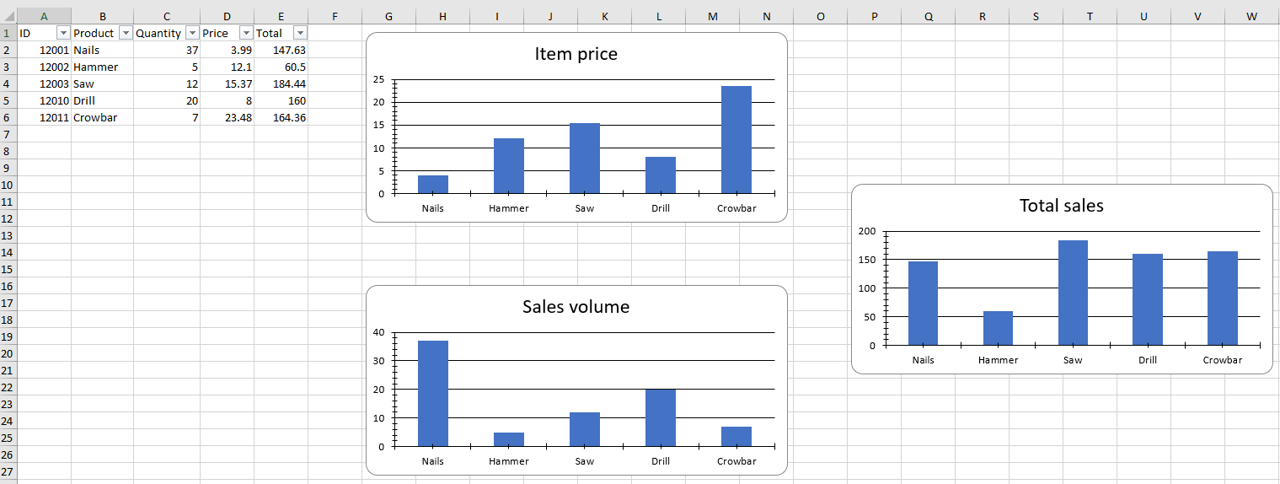
|
|
||||||
|
|
||||||
@@ -1,2 +0,0 @@
|
|||||||
# Untitled
|
|
||||||
|
|
||||||
BIN
images/GroupDateColumn.png
Normal file

|
After Width: | Height: | Size: 27 KiB |
BIN
images/GroupNumericColumn.png
Normal file

|
After Width: | Height: | Size: 23 KiB |
BIN
images/SalesData.png
Normal file

|
After Width: | Height: | Size: 10 KiB |
BIN
images/SalesDataChart.png
Normal file

|
After Width: | Height: | Size: 35 KiB |
BIN
images/SalesDataChartPivotTable.png
Normal file

|
After Width: | Height: | Size: 238 KiB |
BIN
images/logo.png
Normal file

|
After Width: | Height: | Size: 22 KiB |
BIN
images/logoWithInstall.png
Normal file

|
After Width: | Height: | Size: 35 KiB |
@@ -331,6 +331,22 @@ Accept pipeline input: False
|
|||||||
Accept wildcard characters: False
|
Accept wildcard characters: False
|
||||||
```
|
```
|
||||||
|
|
||||||
|
### -GroupDateColumn
|
||||||
|
|
||||||
|
The name of a Column field which should be grouped by parts of the date/time \(ignored if GroupDateRow is not specified\)
|
||||||
|
|
||||||
|
```yaml
|
||||||
|
Type: String
|
||||||
|
Parameter Sets: (All)
|
||||||
|
Aliases:
|
||||||
|
|
||||||
|
Required: False
|
||||||
|
Position: Named
|
||||||
|
Default value: None
|
||||||
|
Accept pipeline input: False
|
||||||
|
Accept wildcard characters: False
|
||||||
|
```
|
||||||
|
|
||||||
### -GroupDatePart
|
### -GroupDatePart
|
||||||
|
|
||||||
The Part\(s\) of the date to use in the grouping \(ignored if GroupDateRow is not specified\)
|
The Part\(s\) of the date to use in the grouping \(ignored if GroupDateRow is not specified\)
|
||||||
@@ -364,6 +380,22 @@ Accept pipeline input: False
|
|||||||
Accept wildcard characters: False
|
Accept wildcard characters: False
|
||||||
```
|
```
|
||||||
|
|
||||||
|
### -GroupNumericColumn
|
||||||
|
|
||||||
|
The name of a Column field which should be grouped by Number \(e.g. 0-99, 100-199, 200-299 \)
|
||||||
|
|
||||||
|
```yaml
|
||||||
|
Type: String
|
||||||
|
Parameter Sets: (All)
|
||||||
|
Aliases:
|
||||||
|
|
||||||
|
Required: False
|
||||||
|
Position: Named
|
||||||
|
Default value: None
|
||||||
|
Accept pipeline input: False
|
||||||
|
Accept wildcard characters: False
|
||||||
|
```
|
||||||
|
|
||||||
### -GroupNumericMin
|
### -GroupNumericMin
|
||||||
|
|
||||||
The starting point for grouping
|
The starting point for grouping
|
||||||
@@ -137,7 +137,7 @@ Accept wildcard characters: False
|
|||||||
|
|
||||||
### -Header
|
### -Header
|
||||||
|
|
||||||
Specifies custom property names to use, instead of the values defined in the column headers of the TopRow. If you provide fewr header names than there is data in the worksheet, then only the data with a corresponding header name will be imported and the data without header name will be disregarded. If you provide more header names than there is data in the worksheet, then all data will be imported and all objects will have all the property names you defined in the header names. As such, the last properties will be blank as there is no data for them.
|
Specifies custom property names to use, instead of the values defined in the column headers of the TopRow. If you provide fewer header names than there is data in the worksheet, then only the data with a corresponding header name will be imported and the data without header name will be disregarded. If you provide more header names than there is data in the worksheet, then all data will be imported and all objects will have all the property names you defined in the header names. As such, the last properties will be blank as there is no data for them.
|
||||||
|
|
||||||
```yaml
|
```yaml
|
||||||
Type: String[]
|
Type: String[]
|
||||||