
8.1 KiB
PowerShell Import-Excel
This PowerShell Module wraps the .NET EPPlus DLL (included). Easily integrate reading and writing Excel spreadsheets into PowerShell, without launching Excel in the background. You can also automate the creation of Pivot Tables and Charts.
Install
There are two ways to install this module. If you are running PowerShell V5
Install-Module -Name ImportExcel
Otherwise To install in your personal modules folder (e.g. ~\Documents\WindowsPowerShell\Modules), run:
iex (new-object System.Net.WebClient).DownloadString('https://raw.github.com/dfinke/ImportExcel/master/Install.ps1')
Know Issues
- Using
-IncludePivotTable, if that pivot table name exists, you'll get an error.- Investigating a solution
- Workaround delete the Excel file first, then do the export
What's new
10/1/2015
Merged ValidateSet for Encoding and Extension. Thank you Irwin Strachan.
9/30/2015
Export-Excel can now handle data that is not an object
echo a b c 1 $true 2.1 1/1/2015 | Export-Excel c:\temp\test.xlsx -Show
Or
dir -Name | Export-Excel c:\temp\test.xlsx -Show
9/25/2015
Hide worksheets Got a great request from forensicsguy20012004 to hide worksheets. You create a few pivotables, generate charts and then pivotable worksheets don't need to be visible.
Export-Excel now has a -HideSheet parameter that takes and array of worksheet names and hides them.
Example
Here, you create four worksheets named PM,Handles,Services and Files.
The last line creates the Files sheet and then hides the Handles,Services sheets.
$p = Get-Process

$p|select company, pm | Export-Excel $xlFile -WorkSheetname PM
$p|select company, handles| Export-Excel $xlFile -WorkSheetname Handles
Get-Service| Export-Excel $xlFile -WorkSheetname Services

dir -File | Export-Excel $xlFile -WorkSheetname Files -Show -HideSheet Handles, Services
Note There is a bug in EPPlus that does not let you hide the first worksheet created. Hopefully it'll resolved soon.
9/11/2015
Added Conditional formatting. See TryConditional.ps1 as an example.
Or, check out the short "How To" video.

8/21/2015
- Now import Excel sheets even if the file is open in Excel. Thank you Francois Lachance-Guillemette
7/09/2015
- For -PivotRows you can pass a
hashtablewith the name of the property and the type of calculation.Sum,Average,Max,Min,Product,StdDev,StdDevp,Var,Varp
Get-Service |
	Export-Excel "c:\temp\test.xlsx" `
		-Show `
		-IncludePivotTable `
		-PivotRows status `
		-PivotData @{status='count'}
6/16/2015 (Thanks Justin)
- Improvements to PivotTable overwriting
- Added two parameters to Export-Excel
- RangeName - Turns the data piped to Export-Excel into a named range.
- TableName - Turns the data piped to Export-Excel into an excel table.
Examples
Get-Process|Export-Excel foo.xlsx -Verbose -IncludePivotTable -TableName "Processes" -Show
Get-Process|Export-Excel foo.xlsx -Verbose -IncludePivotTable -RangeName "Processes" -Show
5/25/2015
- Fixed null header problem
5/17/2015
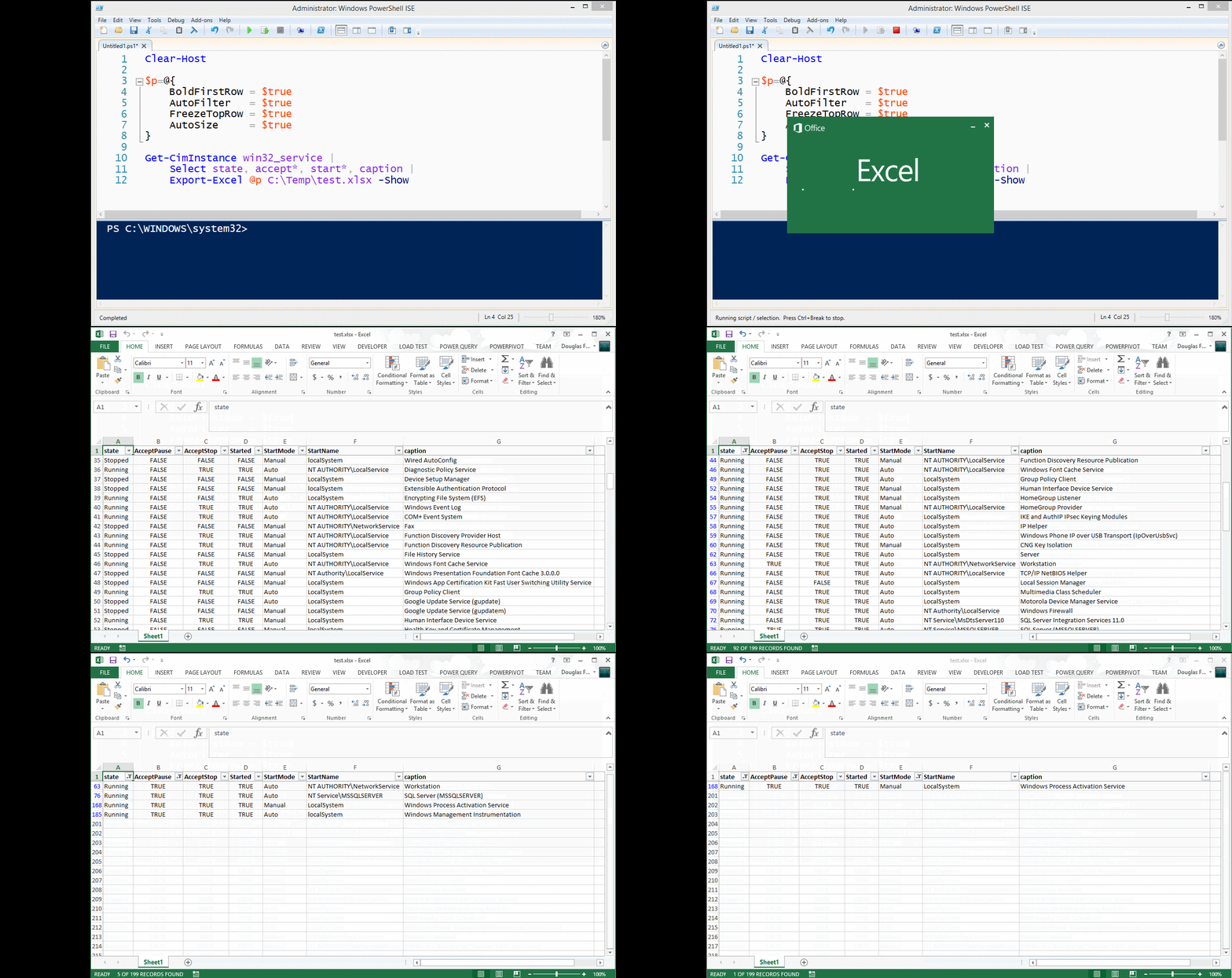
- Added three parameters:
- FreezeTopRow - Freezes the first row of the data
- AutoFilter - Enables filtering for the data in the sheet
- BoldTopRow - Bolds the top row of data, the column headers
Example
Get-CimInstance win32_service |
	select state, accept*, start*, caption |
	Export-Excel test.xlsx -Show -BoldTopRow -AutoFilter -FreezeTopRow -AutoSize
5/4/2015
- Published to PowerShell Gallery. In PowerShell v5 use
Find-Module importexcelthenFind-Module importexcel | Install-Module
4/27/2015
- datetime properties were displaying as ints, now are formatted
4/25/2015
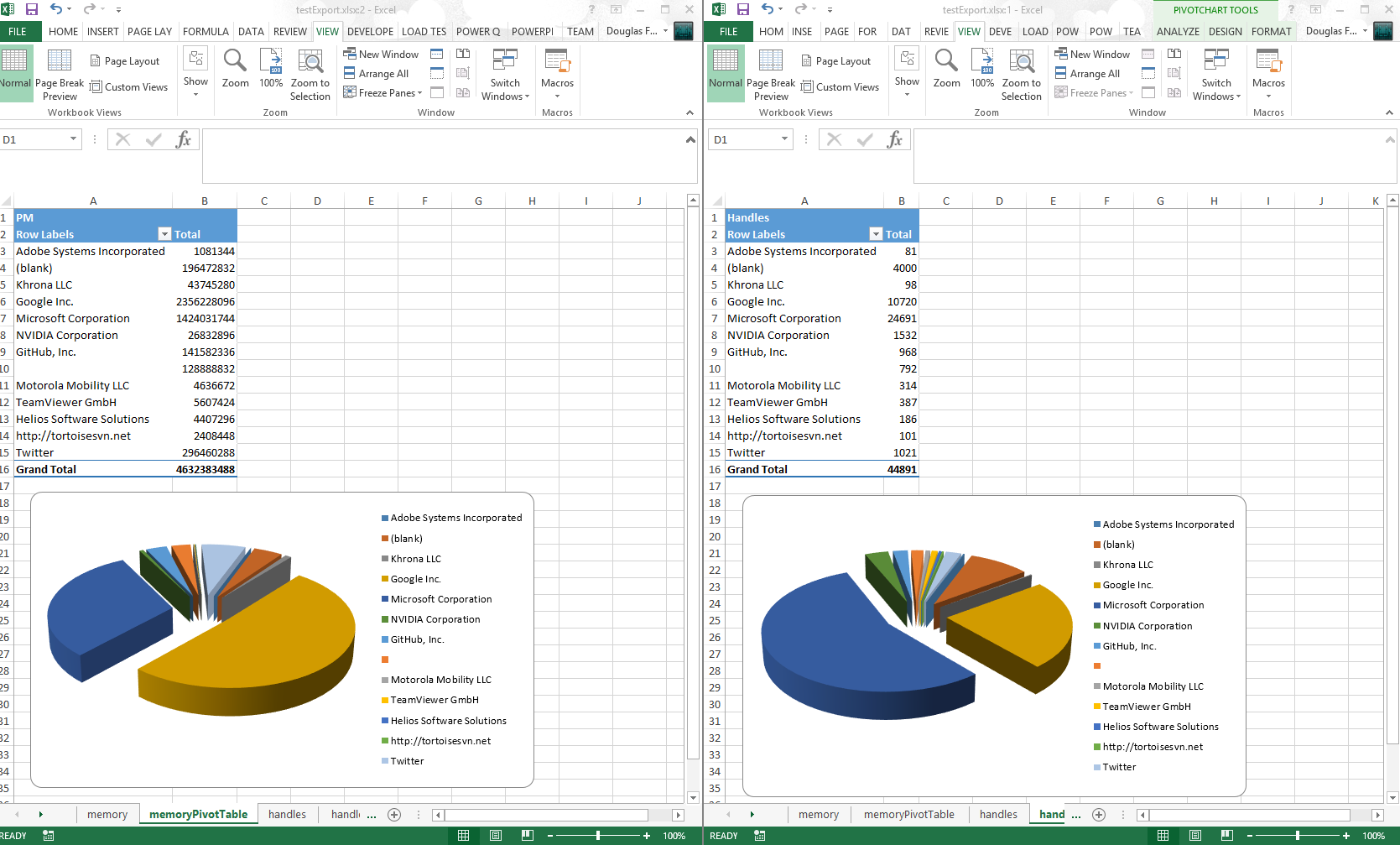
- Now you can create multiple Pivot tables in one pass
- Thanks to pscookiemonster, he submitted a repro case to the EPPlus CodePlex project and got it fixed
Example
$ps = ps

$ps |
    Export-Excel .\testExport.xlsx  -WorkSheetname memory `
        -IncludePivotTable -PivotRows Company -PivotData PM `
        -IncludePivotChart -ChartType PieExploded3D
$ps |
    Export-Excel .\testExport.xlsx  -WorkSheetname handles `
        -IncludePivotTable -PivotRows Company -PivotData Handles `
        -IncludePivotChart -ChartType PieExploded3D -Show
4/20/2015
- Included and embellished Claus Nielsen function to take all sheets in an Excel file workbook and create a text file for each
ConvertFrom-ExcelSheet - Renamed
Export-MultipleExcelSheetstoConvertFrom-ExcelSheet
4/13/2015
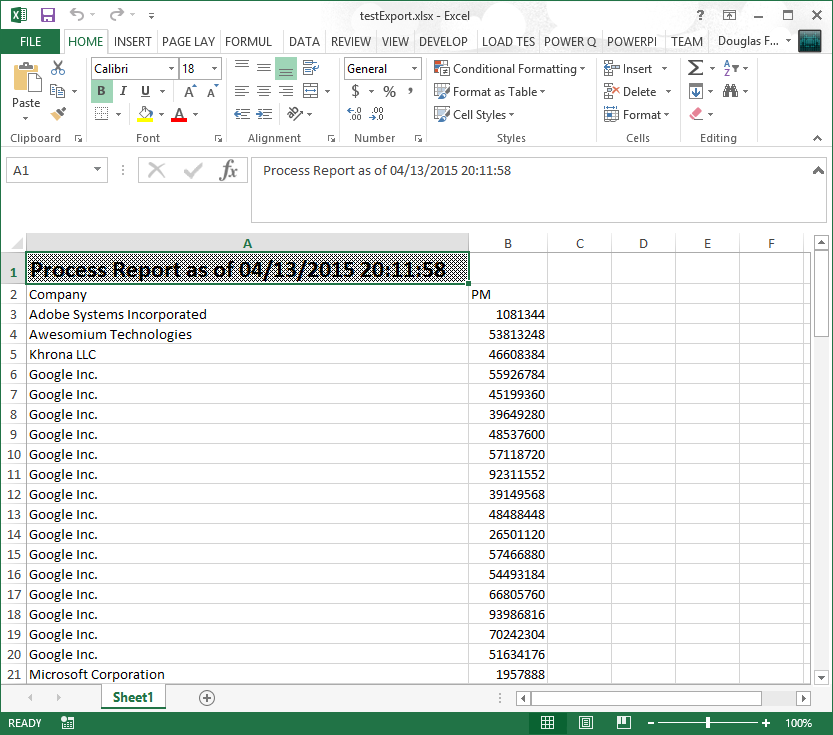
- You can add a title to the Excel "Report"
Title,TitleFillPattern,TitleBold,TitleSize,TitleBackgroundColor- Thanks to Irwin Strachan for this and other great suggestions, testing and more
4/10/2015
- Renamed
AutoFitColumnstoAutoSize - Implemented
Export-MultipleExcelSheets - Implemented
-Passwordfor a worksheet - Replaced
-Forceswitch with-NoClobberswitch - Added examples for
Get-Help - If Pivot table is requested, that sheet becomes the tab selected
4/8/2015
- Implemented exporting data to named sheets via the -WorkSheename parameter.
Examples
gsv | Export-Excel .\test.xlsx -WorkSheetname Services
dir -file | Export-Excel .\test.xlsx -WorkSheetname Files
ps | Export-Excel .\test.xlsx -WorkSheetname Processes -IncludePivotTable -Show -PivotRows Company -PivotData PM
Convert (All or Some) Excel Sheets to Text files
Reads each sheet in TestSheets.xlsx and outputs it to the data directory as the sheet name with the extension .txt
ConvertFrom-ExcelSheet .\TestSheets.xlsx .\data
Reads and outputs sheets like Sheet10 and Sheet20 form TestSheets.xlsx and outputs it to the data directory as the sheet name with the extension .txt
ConvertFrom-ExcelSheet .\TestSheets.xlsx .\data sheet?0
Example Adding a Title
You can set the pattern, size and of if the title is bold.
$p=@{
    Title = "Process Report as of $(Get-Date)"
    TitleFillPattern = "LightTrellis"
    TitleSize = 18
    TitleBold = $true

	Path  = "$pwd\testExport.xlsx"
    Show = $true
    AutoSize = $true
}

Get-Process |
    Where Company | Select Company, PM |
    Export-Excel @p
Example Export-MultipleExcelSheets
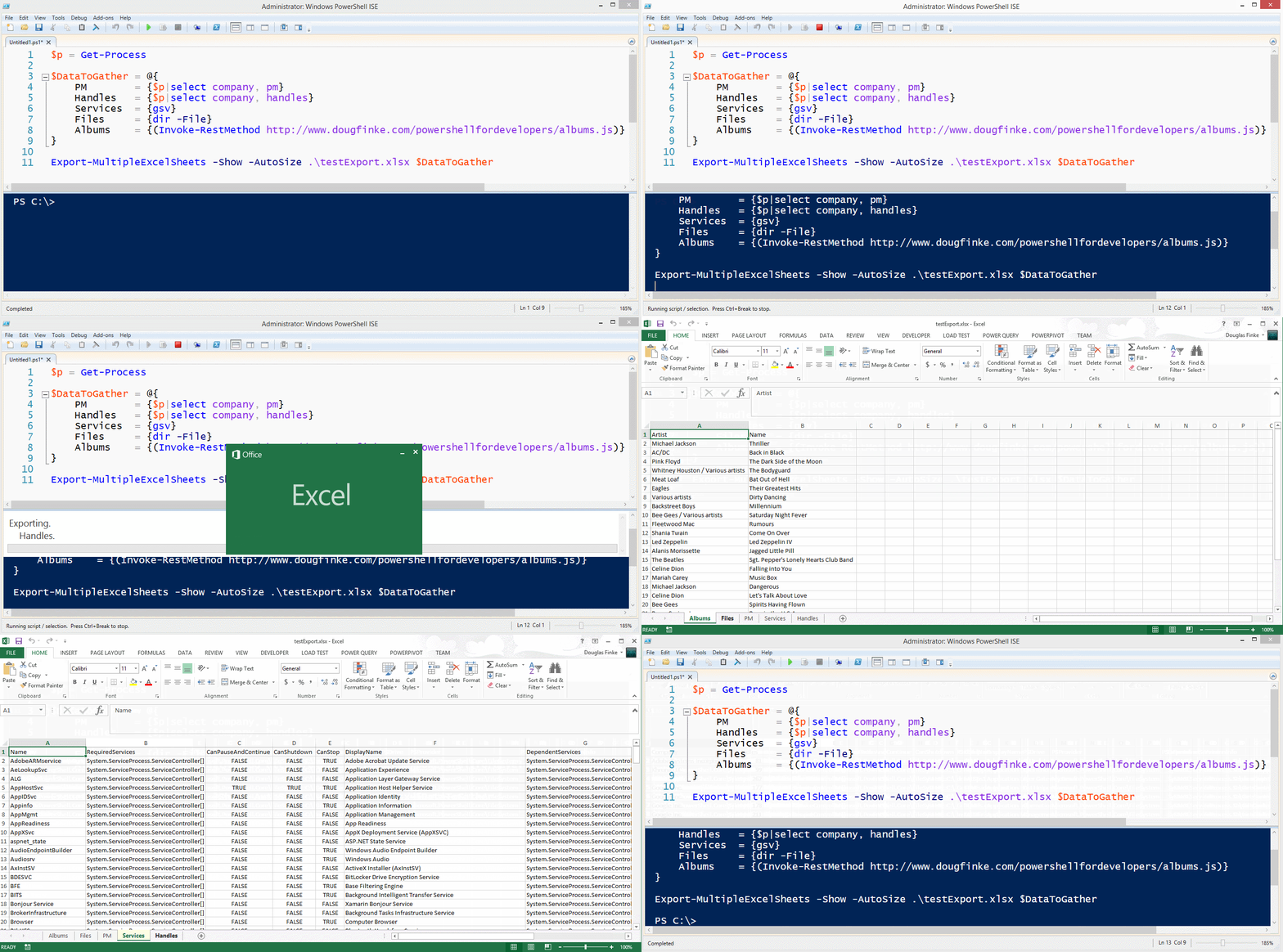
$p = Get-Process

$DataToGather = @{
    PM        = {$p|select company, pm}
    Handles   = {$p|select company, handles}
    Services  = {gsv}
    Files     = {dir -File}
    Albums    = {(Invoke-RestMethod http://www.dougfinke.com/powershellfordevelopers/albums.js)}
}

Export-MultipleExcelSheets -Show -AutoSize .\testExport.xlsx $DataToGather
NOTE If the sheet exists when using -WorkSheetname parameter, it will be deleted and then added with the new data.
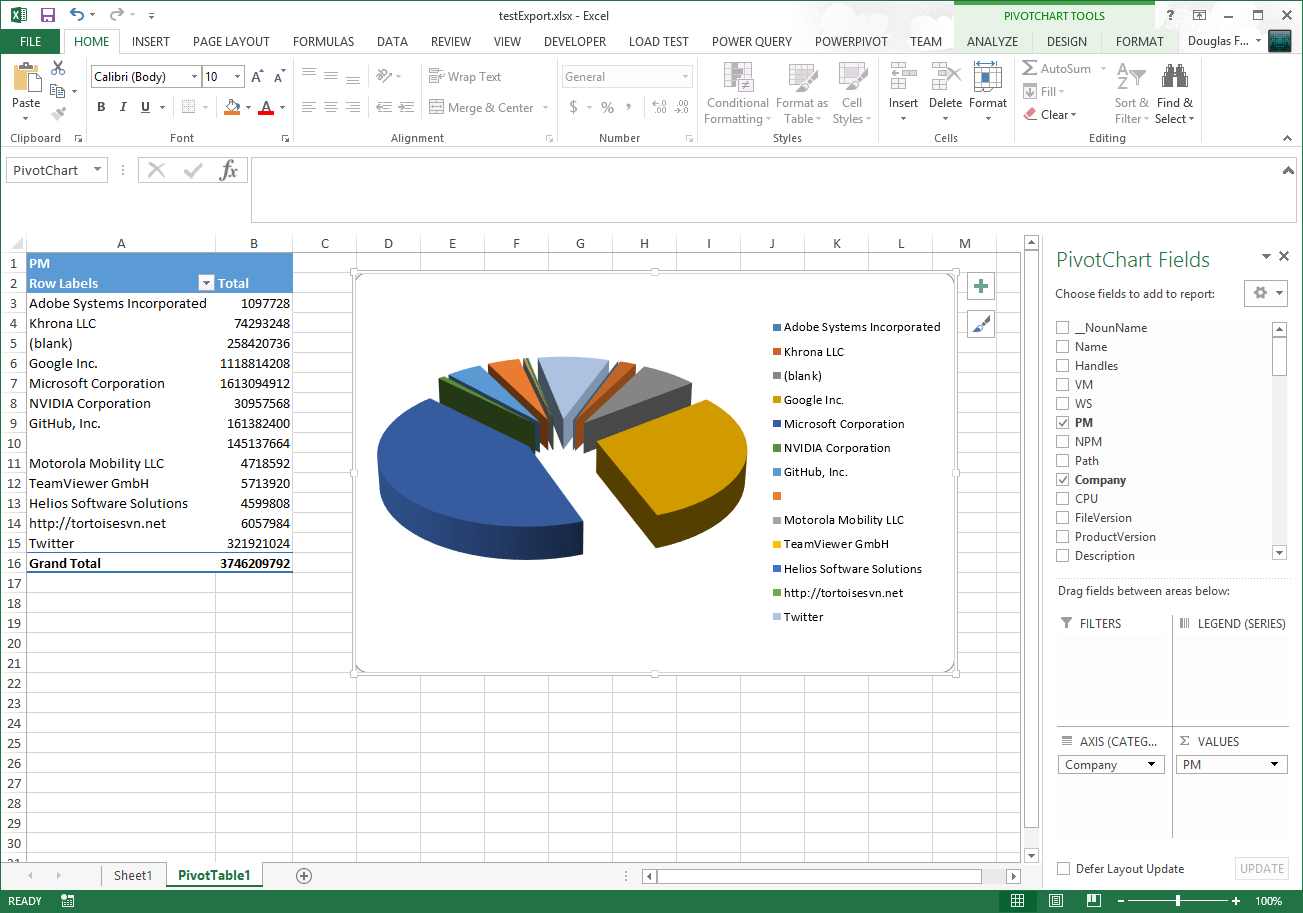
Get-Process Exported to Excel
Total Physical Memory Grouped By Company
PowerShell Excel EPPlus Video
Click on this image to watch the short video.

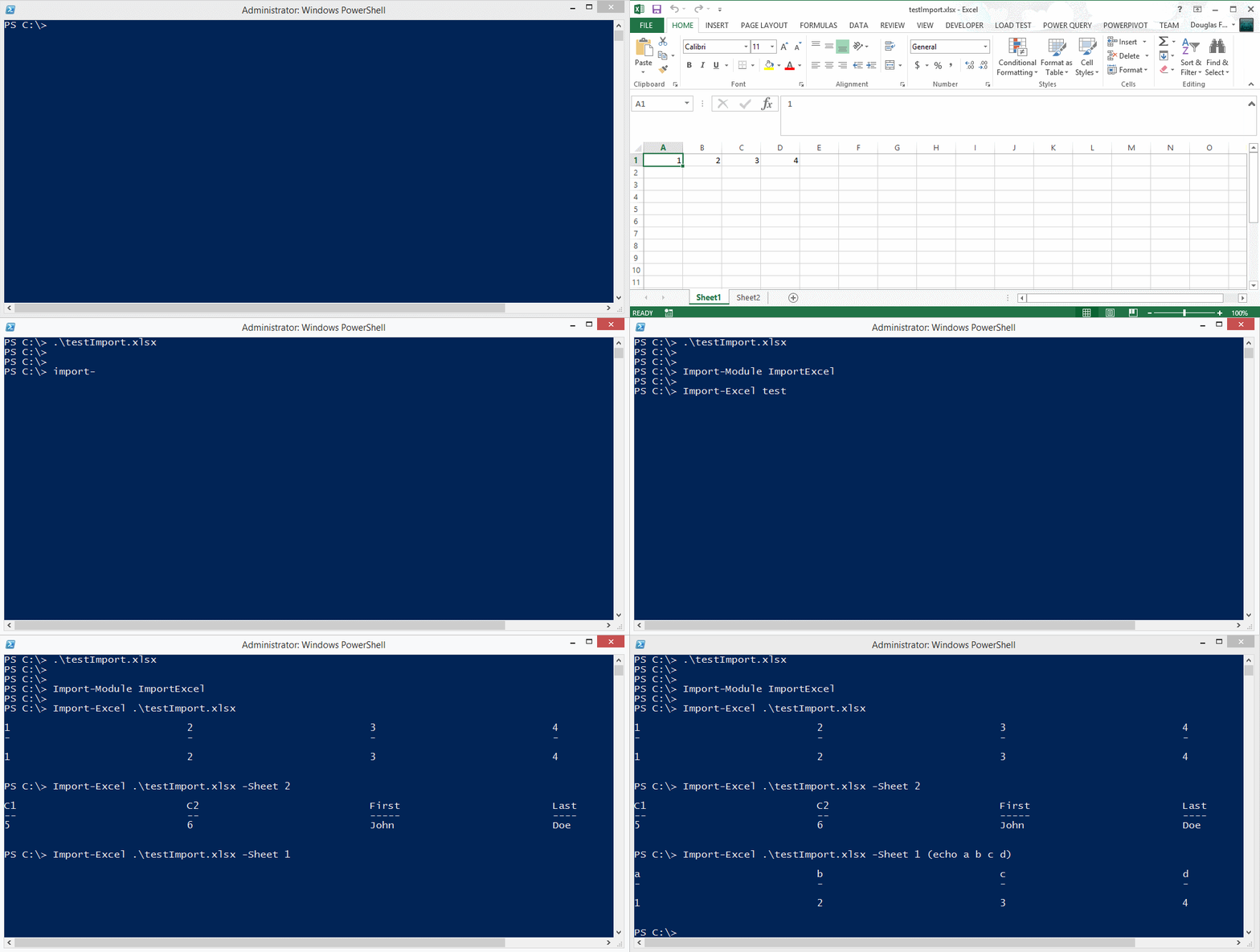
Importing data from an Excel spreadsheet
You can also find EPPLus on Nuget.