mirror of
https://github.com/dfinke/ImportExcel.git
synced 2025-12-15 15:53:32 +00:00
Compare commits
149 Commits
| Author | SHA1 | Date | |
|---|---|---|---|

|
bb1b413ada | ||
|
|
08078410dc | ||
|
|
3edcc0bdfb | ||
|
|
25081f84c1 | ||
|
|
668e3c982c | ||
|
|
98cf7e03c1 | ||
|
|
5b5c1c6fce | ||
|
|
4383916090 | ||

|
7c2bbf9595 | ||
|
|
48ca35b9ff | ||
|
|
68be3c3483 | ||
|
|
78326b4258 | ||
|
|
94b10b6f51 | ||
|
|
8ac9815e83 | ||
|
|
b3184d36a9 | ||
|
|
e58265075a | ||
|
|
453b2d8963 | ||
|
|
bc816851c9 | ||
|
|
b0a68e3445 | ||
|
|
8a1d0b0cf8 | ||
|
|
26f55251e2 | ||
|
|
0f9b308d53 | ||
|
|
847c9a1dc4 | ||
|
|
b488ffc700 | ||
|
|
3ec2481750 | ||
|
|
2d26c854d9 | ||
|
|
a4348ddca7 | ||
|
|
6bfdea6d3e | ||
|
|
cfd3db5803 | ||
|
|
f20a9de3df | ||
|
|
978e8d38b5 | ||
|
|
e7d2b528e5 | ||
|
|
899a8215e5 | ||
|
|
b06e9e35b7 | ||
|
|
6c7f00b031 | ||
|
|
337af82ae2 | ||
|
|
77ef2ebc40 | ||

|
92c97b25c3 | ||
|
|
52231254a5 | ||
|
|
494ac51ae5 | ||
|
|
0febb4a3c2 | ||
|
|
62f0faa5c5 | ||
|
|
1055bc41bf | ||
|
|
e100fa7a36 | ||
|
|
83bd387f98 | ||
|
|
caf0059ef5 | ||
|
|
965831ba57 | ||
|
|
a49cab5efc | ||
|
|
17bcea15e8 | ||
|
|
79fb29740d | ||
|
|
2984fe2ef5 | ||
|
|
8734dbd26c | ||
|
|
0211edf008 | ||
|
|
552552b93d | ||
|
|
2229bfb3ed | ||
|
|
25e7962100 | ||

|
6071f77218 | ||
|
|
52b9333d7c | ||
|
|
d3d8d76a71 | ||
|
|
f5f97fcd56 | ||
|
|
6665c2952d | ||
|
|
31444320cb | ||
|
|
d5734ff9b2 | ||
|
|
4481637c21 | ||
|
|
6caf247f5b | ||
|
|
65641955ba | ||
|
|
f2c13949a4 | ||
|
|
878ca570fb | ||
|
|
28fd5512bb | ||
|
|
7e465e3729 | ||
|
|
22283604f8 | ||
|
|
0c603afc0e | ||
|
|
a4a989c556 | ||
|
|
d94db666d7 | ||
|
|
438be760f7 | ||
|
|
2949ecc173 | ||
|
|
639ca738f6 | ||
|
|
736dd648f4 | ||
|
|
acdbd4a618 | ||
|
|
ad35d39850 | ||
|
|
e7afe166a4 | ||
|
|
37b076706e | ||
|
|
3303116658 | ||
|
|
89a8cb0469 | ||
|
|
bb9f4c31a6 | ||
|
|
996d1246cf | ||

|
0bb08fcb20 | ||
|
|
d004019761 | ||
|
|
a54ca228e9 | ||
|
|
bb6ff474a8 | ||
|
|
86b5c13543 | ||
|
|
c2525b0348 | ||
|
|
9625e4a8ac | ||
|
|
82177da695 | ||
|
|
b3f7a60be8 | ||
|
|
643610c267 | ||
|
|
bd7d70a050 | ||
|
|
d1f41012a1 | ||
|
|
0fbe9dbc9b | ||
|
|
e0b2d15c53 | ||
|
|
34c924ae19 | ||
|
|
9217962306 | ||
|
|
56acf56430 | ||
|
|
ef9be471ab | ||
|
|
9db2bc068e | ||
|
|
9560ea83f9 | ||
|
|
9c79ba573c | ||
|
|
894e645a47 | ||
|
|
f3dc390bfa | ||
|
|
f0f58f84a0 | ||
|
|
7ded24d2f9 | ||
|
|
cf964e3e4f | ||
|
|
8c5b3b2f5f | ||
|
|
8409adeeba | ||
|
|
153d4d8c45 | ||
|
|
69f9ba7d17 | ||
|
|
e4deb5801e | ||
|
|
1a74c0f0d0 | ||
|
|
72e44da219 | ||
|
|
bef2f29651 | ||
|
|
787dda70ee | ||
|
|
285e9e4949 | ||
|
|
01e3ea206d | ||
|
|
6f3420d11e | ||
|
|
2981bf23b1 | ||
|
|
c5cc018eb5 | ||
|
|
268d48ce3d | ||
|
|
eca631670c | ||
|
|
284560e109 | ||
|
|
234615dfdb | ||
|
|
d31cd04781 | ||
|
|
77481f2901 | ||
|
|
54fec69f88 | ||
|
|
1dc9a02d7d | ||

|
f86fdbab22 | ||
|
|
66937db040 | ||
|
|
80520299aa | ||
|
|
2753a6876a | ||
|
|
ade442b18c | ||
|
|
45ba112f73 | ||
|
|
e1fe36699b | ||
|
|
b3f4b188da | ||
|
|
0ce75794e6 | ||
|
|
3afe2059e5 | ||
|
|
66b7b64779 | ||
|
|
d90cd6d2d0 | ||
|
|
1d1f266fb6 | ||
|
|
4945b4d6e3 | ||
|
|
21b5a11aca |
2
.gitignore
vendored
2
.gitignore
vendored
@@ -61,4 +61,6 @@ testCCFMT.ps1
|
|||||||
testHide.ps1
|
testHide.ps1
|
||||||
ImportExcel.zip
|
ImportExcel.zip
|
||||||
.vscode/launch.json
|
.vscode/launch.json
|
||||||
|
.vscode/settings.json
|
||||||
|
|
||||||
|
~$*
|
||||||
|
|||||||
@@ -1,4 +1,9 @@
|
|||||||
Function Add-ConditionalFormatting {
|
try {
|
||||||
|
#ensure that color and font lookups are available
|
||||||
|
[void] [System.Reflection.Assembly]::LoadWithPartialName("System.Drawing")
|
||||||
|
}
|
||||||
|
catch {}
|
||||||
|
Function Add-ConditionalFormatting {
|
||||||
<#
|
<#
|
||||||
.Synopsis
|
.Synopsis
|
||||||
Adds conditional formatting to all or part of a worksheet.
|
Adds conditional formatting to all or part of a worksheet.
|
||||||
@@ -105,7 +110,7 @@
|
|||||||
[OfficeOpenXml.ConditionalFormatting.eExcelConditionalFormattingRuleType]$RuleType ,
|
[OfficeOpenXml.ConditionalFormatting.eExcelConditionalFormattingRuleType]$RuleType ,
|
||||||
#Text color for matching objects
|
#Text color for matching objects
|
||||||
[Parameter(ParameterSetName = "NamedRule")]
|
[Parameter(ParameterSetName = "NamedRule")]
|
||||||
[Alias("ForegroundColour")]
|
[Alias("ForegroundColour","FontColor")]
|
||||||
$ForegroundColor,
|
$ForegroundColor,
|
||||||
#Color for databar type charts
|
#Color for databar type charts
|
||||||
[Parameter(Mandatory = $true, ParameterSetName = "DataBar")]
|
[Parameter(Mandatory = $true, ParameterSetName = "DataBar")]
|
||||||
@@ -185,7 +190,7 @@
|
|||||||
$Address = "$($Address.Row):$($Address.Row)"
|
$Address = "$($Address.Row):$($Address.Row)"
|
||||||
}
|
}
|
||||||
elseif ($Address -is [OfficeOpenXml.ExcelColumn]) {
|
elseif ($Address -is [OfficeOpenXml.ExcelColumn]) {
|
||||||
$Address = [OfficeOpenXml.ExcelAddress]::new(1,$address.ColumnMin,1,$address.ColumnMax).Address -replace '1',''
|
$Address = (New-Object 'OfficeOpenXml.ExcelAddress' @(1, $address.ColumnMin, 1, $address.ColumnMax).Address) -replace '1',''
|
||||||
if ($Address -notmatch ':') {$Address = "$Address`:$Address"}
|
if ($Address -notmatch ':') {$Address = "$Address`:$Address"}
|
||||||
}
|
}
|
||||||
if ( $Address -is [string] -and $Address -match "!") {$Address = $Address -replace '^.*!',''}
|
if ( $Address -is [string] -and $Address -match "!") {$Address = $Address -replace '^.*!',''}
|
||||||
|
|||||||
99
AddDataValidation.ps1
Normal file
99
AddDataValidation.ps1
Normal file
@@ -0,0 +1,99 @@
|
|||||||
|
Function Add-ExcelDataValidationRule {
|
||||||
|
<#
|
||||||
|
.Synopsis
|
||||||
|
Adds data validation to a range of cells
|
||||||
|
.Example
|
||||||
|
>
|
||||||
|
>Add-ExcelDataValidationRule -WorkSheet $PlanSheet -Range 'E2:E1001' -ValidationType Integer -Operator between -Value 0 -Value2 100 `
|
||||||
|
-ShowErrorMessage -ErrorStyle stop -ErrorTitle 'Invalid Data' -ErrorBody 'Percentage must be a whole number between 0 and 100'
|
||||||
|
|
||||||
|
This defines a validation rule on cells E2-E1001; it is an integer rule and requires a number between 0 and 100
|
||||||
|
If a value is input with a fraction, negative number, or positive number > 100 a stop dialog box appears.
|
||||||
|
.Example
|
||||||
|
>
|
||||||
|
>Add-ExcelDataValidationRule -WorkSheet $PlanSheet -Range 'B2:B1001' -ValidationType List -Formula 'values!$a$2:$a$1000'
|
||||||
|
-ShowErrorMessage -ErrorStyle stop -ErrorTitle 'Invalid Data' -ErrorBody 'You must select an item from the list'
|
||||||
|
This defines a list rule on Cells B2:1001, and the posible values are in a sheet named "values" at cells A2 to A1000
|
||||||
|
Blank cells in this range are ignored. If $ signs are left out of the fomrmula B2 would be checked against A2-A1000
|
||||||
|
B3, against A3-A1001, B4 against A4-A1002 up to B1001 beng checked against A1001-A1999
|
||||||
|
.Example
|
||||||
|
>
|
||||||
|
>Add-ExcelDataValidationRule -WorkSheet $PlanSheet -Range 'I2:N1001' -ValidationType List -ValueSet @('yes','YES','Yes')
|
||||||
|
-ShowErrorMessage -ErrorStyle stop -ErrorTitle 'Invalid Data' -ErrorBody "Select Yes or leave blank for no"
|
||||||
|
Similar to the previous example but this time provides a value set; Excel comparisons are case sesnsitive, hence 3 versions of Yes.
|
||||||
|
#>
|
||||||
|
|
||||||
|
[CmdletBinding()]
|
||||||
|
Param(
|
||||||
|
#The range of cells to be validate, e.g. "B2:C100"
|
||||||
|
[Parameter(ValueFromPipeline = $true,Position=0)]
|
||||||
|
[Alias("Address")]
|
||||||
|
$Range ,
|
||||||
|
#The worksheet where the cells should be validated
|
||||||
|
[OfficeOpenXml.ExcelWorksheet]$WorkSheet ,
|
||||||
|
#An option corresponding to a choice from the 'Allow' pull down on the settings page in the Excel dialog. Any means "any allowed" i.e. no Validation
|
||||||
|
[ValidateSet('Any','Custom','DateTime','Decimal','Integer','List','TextLength','Time')]
|
||||||
|
$ValidationType,
|
||||||
|
#The operator to apply to Decimal, Integer, TextLength, DateTime and time fields, e.g. equal, between
|
||||||
|
[OfficeOpenXml.DataValidation.ExcelDataValidationOperator]$Operator = [OfficeOpenXml.DataValidation.ExcelDataValidationOperator]::equal ,
|
||||||
|
#For Decimal, Integer, TextLength, DateTime the [first] data value
|
||||||
|
$Value,
|
||||||
|
#When using the between operator, the second data value
|
||||||
|
$Value2,
|
||||||
|
#The [first] data value as a formula. Use absolute formulas $A$1 if (e.g.) you want all cells to check against the same list
|
||||||
|
$Formula,
|
||||||
|
#When using the between operator, the second data value as a formula
|
||||||
|
$Formula2,
|
||||||
|
#When using the list validation type, a set of values (rather than refering to Sheet!B$2:B$100 )
|
||||||
|
$ValueSet,
|
||||||
|
#Corresponds to the the 'Show Error alert ...' check box on error alert page in the Excel dialog
|
||||||
|
[switch]$ShowErrorMessage,
|
||||||
|
#Stop, Warning, or Infomation, corresponding to to the style setting in the Excel dialog
|
||||||
|
[OfficeOpenXml.DataValidation.ExcelDataValidationWarningStyle]$ErrorStyle,
|
||||||
|
#The title for the message box corresponding to to the title setting in the Excel dialog
|
||||||
|
[String]$ErrorTitle,
|
||||||
|
#The error message corresponding to to the Error message setting in the Excel dialog
|
||||||
|
[String]$ErrorBody,
|
||||||
|
#Corresponds to the the 'Show Input message ...' check box on input message page in the Excel dialog
|
||||||
|
[switch]$ShowPromptMessage,
|
||||||
|
#The prompt message corresponding to to the Input message setting in the Excel dialog
|
||||||
|
[String]$PromptBody,
|
||||||
|
#The title for the message box corresponding to to the title setting in the Excel dialog
|
||||||
|
[String]$PromptTitle,
|
||||||
|
#By default the 'Ignore blank' option will be selected, unless NoBlank is sepcified.
|
||||||
|
[String]$NoBlank
|
||||||
|
)
|
||||||
|
if ($Range -is [Array]) {
|
||||||
|
$null = $PSBoundParameters.Remove("Range")
|
||||||
|
$Range | Add-ExcelDataValidationRule @PSBoundParameters
|
||||||
|
}
|
||||||
|
else {
|
||||||
|
#We should accept, a worksheet and a name of a range or a cell address; a table; the address of a table; a named range; a row, a column or .Cells[ ]
|
||||||
|
if (-not $WorkSheet -and $Range.worksheet) {$WorkSheet = $Range.worksheet}
|
||||||
|
if ($Range.Address) {$Range = $Range.Address}
|
||||||
|
|
||||||
|
if ($Range -isnot [string] -or -not $WorkSheet) {Write-Warning -Message "You need to provide a worksheet and range of cells." ;return}
|
||||||
|
#else we assume Range is a range.
|
||||||
|
|
||||||
|
$validation = $WorkSheet.DataValidations."Add$ValidationType`Validation"($Range)
|
||||||
|
if ($validation.AllowsOperator) {$validation.Operator = $Operator}
|
||||||
|
if ($PSBoundParameters.ContainsKey('value')) {
|
||||||
|
$validation.Formula.Value = $Value
|
||||||
|
}
|
||||||
|
elseif ($Formula) {$validation.Formula.ExcelFormula = $Formula}
|
||||||
|
elseif ($ValueSet) {Foreach ($v in $ValueSet) {$validation.Formula.Values.Add($V)}}
|
||||||
|
if ($PSBoundParameters.ContainsKey('Value2')) {
|
||||||
|
$validation.Formula2.Value = $Value2
|
||||||
|
}
|
||||||
|
elseif ($Formula2) {$validation.Formula2.ExcelFormula = $Formula}
|
||||||
|
$validation.ShowErrorMessage = [bool]$ShowErrorMessage
|
||||||
|
$validation.ShowInputMessage = [bool]$ShowPromptMessage
|
||||||
|
$validation.AllowBlank = -not $NoBlank
|
||||||
|
|
||||||
|
if ($PromptTitle) {$validation.PromptTitle = $PromptTitle}
|
||||||
|
if ($ErrorTitle) {$validation.ErrorTitle = $ErrorTitle}
|
||||||
|
if ($PromptBody) {$validation.Prompt = $PromptBody}
|
||||||
|
if ($ErrorBody) {$validation.Error = $ErrorBody}
|
||||||
|
if ($ErrorStyle) {$validation.ErrorStyle = $ErrorStyle}
|
||||||
|
}
|
||||||
|
}
|
||||||
@@ -27,6 +27,10 @@ if (Get-Command -Name register-argumentCompleter -ErrorAction SilentlyContinue)
|
|||||||
Register-ArgumentCompleter -CommandName New-ConditionalText -ParameterName PatternColor -ScriptBlock $Function:ColorCompletion
|
Register-ArgumentCompleter -CommandName New-ConditionalText -ParameterName PatternColor -ScriptBlock $Function:ColorCompletion
|
||||||
Register-ArgumentCompleter -CommandName New-ConditionalText -ParameterName BackgroundColor -ScriptBlock $Function:ColorCompletion
|
Register-ArgumentCompleter -CommandName New-ConditionalText -ParameterName BackgroundColor -ScriptBlock $Function:ColorCompletion
|
||||||
Register-ArgumentCompleter -CommandName New-ConditionalText -ParameterName ConditionalTextColor -ScriptBlock $Function:ColorCompletion
|
Register-ArgumentCompleter -CommandName New-ConditionalText -ParameterName ConditionalTextColor -ScriptBlock $Function:ColorCompletion
|
||||||
|
Register-ArgumentCompleter -CommandName New-ExcelStyle -ParameterName BackgroundColor -ScriptBlock $Function:ColorCompletion
|
||||||
|
Register-ArgumentCompleter -CommandName New-ExcelStyle -ParameterName FontColor -ScriptBlock $Function:ColorCompletion
|
||||||
|
Register-ArgumentCompleter -CommandName New-ExcelStyle -ParameterName BorderColor -ScriptBlock $Function:ColorCompletion
|
||||||
|
Register-ArgumentCompleter -CommandName New-ExcelStyle -ParameterName PatternColor -ScriptBlock $Function:ColorCompletion
|
||||||
Register-ArgumentCompleter -CommandName Set-ExcelRange -ParameterName BackgroundColor -ScriptBlock $Function:ColorCompletion
|
Register-ArgumentCompleter -CommandName Set-ExcelRange -ParameterName BackgroundColor -ScriptBlock $Function:ColorCompletion
|
||||||
Register-ArgumentCompleter -CommandName Set-ExcelRange -ParameterName FontColor -ScriptBlock $Function:ColorCompletion
|
Register-ArgumentCompleter -CommandName Set-ExcelRange -ParameterName FontColor -ScriptBlock $Function:ColorCompletion
|
||||||
Register-ArgumentCompleter -CommandName Set-ExcelRange -ParameterName BorderColor -ScriptBlock $Function:ColorCompletion
|
Register-ArgumentCompleter -CommandName Set-ExcelRange -ParameterName BorderColor -ScriptBlock $Function:ColorCompletion
|
||||||
@@ -37,5 +41,4 @@ if (Get-Command -Name register-argumentCompleter -ErrorAction SilentlyContinue)
|
|||||||
Register-ArgumentCompleter -CommandName Set-ExcelRow -ParameterName BackgroundColor -ScriptBlock $Function:ColorCompletion
|
Register-ArgumentCompleter -CommandName Set-ExcelRow -ParameterName BackgroundColor -ScriptBlock $Function:ColorCompletion
|
||||||
Register-ArgumentCompleter -CommandName Set-ExcelRow -ParameterName FontColor -ScriptBlock $Function:ColorCompletion
|
Register-ArgumentCompleter -CommandName Set-ExcelRow -ParameterName FontColor -ScriptBlock $Function:ColorCompletion
|
||||||
Register-ArgumentCompleter -CommandName Set-ExcelRow -ParameterName PatternColor -ScriptBlock $Function:ColorCompletion
|
Register-ArgumentCompleter -CommandName Set-ExcelRow -ParameterName PatternColor -ScriptBlock $Function:ColorCompletion
|
||||||
|
|
||||||
}
|
}
|
||||||
@@ -35,15 +35,15 @@
|
|||||||
Write-Progress -Activity "Exporting $range of $workSheetname in $Path" -Status "Opening Workbook and copying data"
|
Write-Progress -Activity "Exporting $range of $workSheetname in $Path" -Status "Opening Workbook and copying data"
|
||||||
$xlWbk = $xlApp.Workbooks.Open($Path)
|
$xlWbk = $xlApp.Workbooks.Open($Path)
|
||||||
$xlWbk.Worksheets($workSheetname).Select()
|
$xlWbk.Worksheets($workSheetname).Select()
|
||||||
$xlWbk.ActiveSheet.Range($range).Select() | Out-Null
|
$null = $xlWbk.ActiveSheet.Range($range).Select()
|
||||||
$xlApp.Selection.Copy() | Out-Null
|
$null = $xlApp.Selection.Copy()
|
||||||
Write-Progress -Activity "Exporting $range of $workSheetname in $Path" -Status "Saving copied data"
|
Write-Progress -Activity "Exporting $range of $workSheetname in $Path" -Status "Saving copied data"
|
||||||
# Get-Clipboard came in with PS5. Older versions can use [System.Windows.Clipboard] but it is ugly.
|
# Get-Clipboard came in with PS5. Older versions can use [System.Windows.Clipboard] but it is ugly.
|
||||||
$image = Get-Clipboard -Format Image
|
$image = Get-Clipboard -Format Image
|
||||||
$image.Save($destination, $Format)
|
$image.Save($destination, $Format)
|
||||||
Write-Progress -Activity "Exporting $range of $workSheetname in $Path" -Status "Closing Excel"
|
Write-Progress -Activity "Exporting $range of $workSheetname in $Path" -Status "Closing Excel"
|
||||||
$xlWbk.ActiveSheet.Range("a1").Select() | Out-Null
|
$null = $xlWbk.ActiveSheet.Range("a1").Select()
|
||||||
$xlApp.Selection.Copy() | Out-Null
|
$null = $xlApp.Selection.Copy()
|
||||||
$xlApp.Quit()
|
$xlApp.Quit()
|
||||||
Write-Progress -Activity "Exporting $range of $workSheetname in $Path" -Completed
|
Write-Progress -Activity "Exporting $range of $workSheetname in $Path" -Completed
|
||||||
if ($show) {Start-Process -FilePath $destination}
|
if ($show) {Start-Process -FilePath $destination}
|
||||||
|
|||||||
@@ -3,7 +3,7 @@ function ConvertFrom-ExcelData {
|
|||||||
.SYNOPSIS
|
.SYNOPSIS
|
||||||
Reads data from a sheet, and for each row, calls a custom scriptblock with a list of property names and the row of data.
|
Reads data from a sheet, and for each row, calls a custom scriptblock with a list of property names and the row of data.
|
||||||
|
|
||||||
|
|
||||||
.EXAMPLE
|
.EXAMPLE
|
||||||
ConvertFrom-ExcelData .\testSQLGen.xlsx {
|
ConvertFrom-ExcelData .\testSQLGen.xlsx {
|
||||||
param($propertyNames, $record)
|
param($propertyNames, $record)
|
||||||
|
|||||||
@@ -50,7 +50,7 @@ Function ConvertTo-ExcelXlsx {
|
|||||||
}
|
}
|
||||||
|
|
||||||
$Excel.Visible = $false
|
$Excel.Visible = $false
|
||||||
$Excel.Workbooks.Open($xlsFile.FullName) | Out-Null
|
$null = $Excel.Workbooks.Open($xlsFile.FullName)
|
||||||
$Excel.ActiveWorkbook.SaveAs($xlsxPath, $xlFixedFormat)
|
$Excel.ActiveWorkbook.SaveAs($xlsxPath, $xlFixedFormat)
|
||||||
$Excel.ActiveWorkbook.Close()
|
$Excel.ActiveWorkbook.Close()
|
||||||
$Excel.Quit()
|
$Excel.Quit()
|
||||||
|
|||||||
@@ -29,12 +29,12 @@
|
|||||||
[CmdletBinding()]
|
[CmdletBinding()]
|
||||||
param(
|
param(
|
||||||
#An ExcelWorkbook or ExcelPackage object or the path to an XLSx file where the data is found.
|
#An ExcelWorkbook or ExcelPackage object or the path to an XLSx file where the data is found.
|
||||||
[Parameter(Mandatory=$true)]
|
[Parameter(Mandatory = $true)]
|
||||||
$SourceWorkbook,
|
$SourceWorkbook,
|
||||||
#Name or number (starting from 1) of the worksheet in the source workbook (defaults to 1).
|
#Name or number (starting from 1) of the worksheet in the source workbook (defaults to 1).
|
||||||
$SourceWorkSheet = 1 ,
|
$SourceWorkSheet = 1 ,
|
||||||
#An ExcelWorkbook or ExcelPackage object or the path to an XLSx file where the data should be copied.
|
#An ExcelWorkbook or ExcelPackage object or the path to an XLSx file where the data should be copied.
|
||||||
[Parameter(Mandatory=$true)]
|
[Parameter(Mandatory = $true)]
|
||||||
$DestinationWorkbook,
|
$DestinationWorkbook,
|
||||||
#Name of the worksheet in the destination workbook; by default the same as the source worksheet's name. If the sheet exists it will be deleted and re-copied.
|
#Name of the worksheet in the destination workbook; by default the same as the source worksheet's name. If the sheet exists it will be deleted and re-copied.
|
||||||
$DestinationWorkSheet,
|
$DestinationWorkSheet,
|
||||||
@@ -65,46 +65,47 @@
|
|||||||
}
|
}
|
||||||
}
|
}
|
||||||
else {
|
else {
|
||||||
if ($SourceWorkbook -is [OfficeOpenXml.ExcelWorkbook]) {$sourcews=$SourceWorkbook.Worksheets[$SourceWorkSheet]}
|
if ($SourceWorkbook -is [OfficeOpenXml.ExcelWorkbook]) {$sourcews = $SourceWorkbook.Worksheets[$SourceWorkSheet]}
|
||||||
elseif ($SourceWorkbook -is [OfficeOpenXml.ExcelPackage] ) {$sourcews=$SourceWorkbook.Workbook.Worksheets[$SourceWorkSheet]}
|
elseif ($SourceWorkbook -is [OfficeOpenXml.ExcelPackage] ) {$sourcews = $SourceWorkbook.Workbook.Worksheets[$SourceWorkSheet]}
|
||||||
else {
|
else {
|
||||||
$SourceWorkbook = (Resolve-Path $SourceWorkbook).ProviderPath
|
$SourceWorkbook = (Resolve-Path $SourceWorkbook).ProviderPath
|
||||||
try {
|
try {
|
||||||
Write-Verbose "Opening worksheet '$Worksheetname' in Excel workbook '$SourceWorkbook'."
|
Write-Verbose "Opening worksheet '$Worksheetname' in Excel workbook '$SourceWorkbook'."
|
||||||
$Stream = New-Object -TypeName System.IO.FileStream -ArgumentList $SourceWorkbook, 'Open', 'Read' ,'ReadWrite'
|
$Stream = New-Object -TypeName System.IO.FileStream -ArgumentList $SourceWorkbook, 'Open', 'Read' , 'ReadWrite'
|
||||||
$Package1 = New-Object -TypeName OfficeOpenXml.ExcelPackage -ArgumentList $Stream
|
$Package1 = New-Object -TypeName OfficeOpenXml.ExcelPackage -ArgumentList $Stream
|
||||||
$sourceWs = $Package1.Workbook.Worksheets[$SourceWorkSheet]
|
$sourceWs = $Package1.Workbook.Worksheets[$SourceWorkSheet]
|
||||||
}
|
}
|
||||||
catch {Write-Warning -Message "Could not open $SourceWorkbook" ; return}
|
catch {Write-Warning -Message "Could not open $SourceWorkbook" ; return}
|
||||||
}
|
}
|
||||||
if (-not $sourceWs) {Write-Warning -Message "Could not find worksheet '$Sourceworksheet' in the source workbook." ; return}
|
if (-not $sourceWs) {Write-Warning -Message "Could not find worksheet '$Sourceworksheet' in the source workbook." ; return}
|
||||||
else {
|
else {
|
||||||
try {
|
try {
|
||||||
if ($DestinationWorkbook -is [OfficeOpenXml.ExcelWorkbook]) {
|
if ($DestinationWorkbook -is [OfficeOpenXml.ExcelWorkbook]) {
|
||||||
$wb = $DestinationWorkbook
|
$wb = $DestinationWorkbook
|
||||||
}
|
|
||||||
elseif ($DestinationWorkbook -is [OfficeOpenXml.ExcelPackage] ) {
|
|
||||||
$wb = $DestinationWorkbook.workbook
|
|
||||||
if ($show) {$package2 =$DestinationWorkbook}
|
|
||||||
}
|
|
||||||
else {
|
|
||||||
$package2 = Open-ExcelPackage -Create -Path $DestinationWorkbook
|
|
||||||
$wb = $package2.Workbook
|
|
||||||
}
|
|
||||||
if (-not $DestinationWorkSheet) {$DestinationWorkSheet = $SourceWs.Name}
|
|
||||||
if ($wb.Worksheets[$DestinationWorkSheet]) {
|
|
||||||
Write-Verbose "Destination workbook already has a sheet named '$DestinationWorkSheet', deleting it."
|
|
||||||
$wb.Worksheets.Delete($DestinationWorkSheet)
|
|
||||||
}
|
|
||||||
Write-Verbose "Copying $($SourceWorkSheet) from $($SourceWorkbook) to $($DestinationWorkSheet) in $($DestinationWorkbook)"
|
|
||||||
$null = Add-WorkSheet -ExcelWorkbook $wb -WorkSheetname $DestinationWorkSheet -CopySource $sourceWs
|
|
||||||
if ($package1) {Close-ExcelPackage -ExcelPackage $Package1 -NoSave }
|
|
||||||
if ($package2) {Close-ExcelPackage -ExcelPackage $Package2 -Show:$show }
|
|
||||||
if ($show -and $DestinationWorkbook -is [OfficeOpenXml.ExcelWorkbook]) {
|
|
||||||
Write-Warning -Message "-Show only works if the Destination workbook is given as a file path or an ExcelPackage object."
|
|
||||||
}
|
|
||||||
}
|
}
|
||||||
catch {Write-Warning -Message "Could not write to sheet '$DestinationWorkSheet' in the destination workbook" ; return}
|
elseif ($DestinationWorkbook -is [OfficeOpenXml.ExcelPackage] ) {
|
||||||
|
$wb = $DestinationWorkbook.workbook
|
||||||
|
if ($show) {$package2 = $DestinationWorkbook}
|
||||||
|
}
|
||||||
|
else {
|
||||||
|
$package2 = Open-ExcelPackage -Create -Path $DestinationWorkbook
|
||||||
|
$wb = $package2.Workbook
|
||||||
|
}
|
||||||
|
if (-not $DestinationWorkSheet) {$DestinationWorkSheet = $SourceWs.Name}
|
||||||
|
if ($wb.Worksheets[$DestinationWorkSheet]) {
|
||||||
|
Write-Verbose "Destination workbook already has a sheet named '$DestinationWorkSheet', deleting it."
|
||||||
|
$wb.Worksheets.Delete($DestinationWorkSheet)
|
||||||
|
}
|
||||||
|
Write-Verbose "Copying $($SourceWorkSheet) from $($SourceWorkbook) to $($DestinationWorkSheet) in $($DestinationWorkbook)"
|
||||||
|
$null = Add-WorkSheet -ExcelWorkbook $wb -WorkSheetname $DestinationWorkSheet -CopySource $sourceWs
|
||||||
|
if ($Stream) {$Stream.Close() }
|
||||||
|
if ($package1) {Close-ExcelPackage -ExcelPackage $Package1 -NoSave }
|
||||||
|
if ($package2) {Close-ExcelPackage -ExcelPackage $Package2 -Show:$show }
|
||||||
|
if ($show -and $DestinationWorkbook -is [OfficeOpenXml.ExcelWorkbook]) {
|
||||||
|
Write-Warning -Message "-Show only works if the Destination workbook is given as a file path or an ExcelPackage object."
|
||||||
|
}
|
||||||
|
}
|
||||||
|
catch {Write-Warning -Message "Could not write to sheet '$DestinationWorkSheet' in the destination workbook" ; return}
|
||||||
}
|
}
|
||||||
}
|
}
|
||||||
}
|
}
|
||||||
@@ -10,7 +10,7 @@ $PSVersionTable.PSVersion
|
|||||||
|
|
||||||
## Create the zip before the tests run
|
## Create the zip before the tests run
|
||||||
## Otherwise the EPPlus.dll is in use after the Pester run
|
## Otherwise the EPPlus.dll is in use after the Pester run
|
||||||
$ModuleVersion = (Get-Content -Raw .\ImportExcel.psd1) | Invoke-Expression | ForEach-Object ModuleVersion
|
$ModuleVersion = (Invoke-Command -ScriptBlock ([scriptblock]::Create((Get-Content -Raw .\ImportExcel.psd1)))).moduleVersion
|
||||||
|
|
||||||
if (!$DontCreateZip) {
|
if (!$DontCreateZip) {
|
||||||
$dest = "ImportExcel-{0}-{1}.zip" -f $ModuleVersion, (Get-Date).ToString("yyyyMMddHHmmss")
|
$dest = "ImportExcel-{0}-{1}.zip" -f $ModuleVersion, (Get-Date).ToString("yyyyMMddHHmmss")
|
||||||
|
|||||||
@@ -1,6 +1,6 @@
|
|||||||
try {. $PSScriptRoot\..\..\LoadPSD1.ps1} catch {}
|
try {. $PSScriptRoot\..\..\LoadPSD1.ps1} catch {}
|
||||||
|
|
||||||
$f = ".\dashboard.xlsx"
|
$f = "$env:temp\dashboard.xlsx"
|
||||||
Remove-Item $f -ErrorAction Ignore
|
Remove-Item $f -ErrorAction Ignore
|
||||||
|
|
||||||
$data = @"
|
$data = @"
|
||||||
@@ -51,7 +51,7 @@ Set-Format -Address $sheet1.Cells["E2:G2"] -BorderBottom $BorderBottom -BorderCo
|
|||||||
Set-Format -Address $sheet1.Cells["I2:K2"] -BorderBottom $BorderBottom -BorderColor $BorderColor
|
Set-Format -Address $sheet1.Cells["I2:K2"] -BorderBottom $BorderBottom -BorderColor $BorderColor
|
||||||
Set-Format -Address $sheet1.Cells["M2:O2"] -BorderBottom $BorderBottom -BorderColor $BorderColor
|
Set-Format -Address $sheet1.Cells["M2:O2"] -BorderBottom $BorderBottom -BorderColor $BorderColor
|
||||||
|
|
||||||
Set-Format -Address $sheet1.Cells["A2:C8"] -FontColor GrayText
|
Set-Format -Address $sheet1.Cells["A2:C8"] -FontColor Gray
|
||||||
|
|
||||||
$HorizontalAlignment = "Center"
|
$HorizontalAlignment = "Center"
|
||||||
Set-Format -Address $sheet1.Cells["F1"] -HorizontalAlignment $HorizontalAlignment -Bold -Value Revenue
|
Set-Format -Address $sheet1.Cells["F1"] -HorizontalAlignment $HorizontalAlignment -Bold -Value Revenue
|
||||||
@@ -69,4 +69,4 @@ Set-Format -Address $sheet1.Cells["I10"] -Formula "=Sum(I3:I8)" -Bold
|
|||||||
Set-Format -Address $sheet1.Cells["M10"] -Formula "=Sum(M3:M8)" -Bold
|
Set-Format -Address $sheet1.Cells["M10"] -Formula "=Sum(M3:M8)" -Bold
|
||||||
Set-Format -Address $sheet1.Cells["O10"] -Formula "=Sum(O3:O8)" -Bold
|
Set-Format -Address $sheet1.Cells["O10"] -Formula "=Sum(O3:O8)" -Bold
|
||||||
|
|
||||||
Close-ExcelPackage $excel -Show
|
Close-ExcelPackage $excel -Show
|
||||||
|
|||||||
85
Examples/ExcelDataValidation/MutipleValidations.ps1
Normal file
85
Examples/ExcelDataValidation/MutipleValidations.ps1
Normal file
@@ -0,0 +1,85 @@
|
|||||||
|
#region Setup
|
||||||
|
<#
|
||||||
|
This examples demos three types of validation:
|
||||||
|
* Creating a list using a PowerShell array
|
||||||
|
* Creating a list data from another Excel Worksheet
|
||||||
|
* Creating a rule for numbers to be between 0 an 10000
|
||||||
|
|
||||||
|
Run the script then try"
|
||||||
|
* Add random data in Column B
|
||||||
|
* Then choose from the drop down list
|
||||||
|
* Add random data in Column C
|
||||||
|
* Then choose from the drop down list
|
||||||
|
* Add .01 in column F
|
||||||
|
#>
|
||||||
|
|
||||||
|
try {. $PSScriptRoot\..\..\LoadPSD1.ps1} catch {}
|
||||||
|
|
||||||
|
$path = "$Env:TEMP\DataValidation.xlsx"
|
||||||
|
Remove-Item $path -ErrorAction SilentlyContinue
|
||||||
|
|
||||||
|
$data = ConvertFrom-Csv -InputObject @"
|
||||||
|
ID,Region,Product,Quantity,Price
|
||||||
|
12001,North,Nails,37,3.99
|
||||||
|
12002,South,Hammer,5,12.10
|
||||||
|
12003,East,Saw,12,15.37
|
||||||
|
12010,West,Drill,20,8
|
||||||
|
12011,North,Crowbar,7,23.48
|
||||||
|
"@
|
||||||
|
|
||||||
|
# Export the raw data
|
||||||
|
$excelPackage = $Data |
|
||||||
|
Export-Excel -WorksheetName "Sales" -Path $path -PassThru
|
||||||
|
|
||||||
|
# Creates a sheet with data that will be used in a validation rule
|
||||||
|
$excelPackage = @('Chisel', 'Crowbar', 'Drill', 'Hammer', 'Nails', 'Saw', 'Screwdriver', 'Wrench') |
|
||||||
|
Export-excel -ExcelPackage $excelPackage -WorksheetName Values -PassThru
|
||||||
|
|
||||||
|
#endregion
|
||||||
|
|
||||||
|
#region Creating a list using a PowerShell array
|
||||||
|
$ValidationParams = @{
|
||||||
|
WorkSheet = $excelPackage.sales
|
||||||
|
ShowErrorMessage = $true
|
||||||
|
ErrorStyle = 'stop'
|
||||||
|
ErrorTitle = 'Invalid Data'
|
||||||
|
}
|
||||||
|
|
||||||
|
|
||||||
|
$MoreValidationParams = @{
|
||||||
|
Range = 'B2:B1001'
|
||||||
|
ValidationType = 'List'
|
||||||
|
ValueSet = @('North', 'South', 'East', 'West')
|
||||||
|
ErrorBody = "You must select an item from the list."
|
||||||
|
}
|
||||||
|
|
||||||
|
Add-ExcelDataValidationRule @ValidationParams @MoreValidationParams
|
||||||
|
#endregion
|
||||||
|
|
||||||
|
#region Creating a list data from another Excel Worksheet
|
||||||
|
$MoreValidationParams = @{
|
||||||
|
Range = 'C2:C1001'
|
||||||
|
ValidationType = 'List'
|
||||||
|
Formula = 'values!$a$1:$a$10'
|
||||||
|
ErrorBody = "You must select an item from the list.`r`nYou can add to the list on the values page" #Bucket
|
||||||
|
}
|
||||||
|
|
||||||
|
Add-ExcelDataValidationRule @ValidationParams @MoreValidationParams
|
||||||
|
#endregion
|
||||||
|
|
||||||
|
#region Creating a rule for numbers to be between 0 an 10000
|
||||||
|
$MoreValidationParams = @{
|
||||||
|
Range = 'F2:F1001'
|
||||||
|
ValidationType = 'Integer'
|
||||||
|
Operator = 'between'
|
||||||
|
Value = 0
|
||||||
|
Value2 = 10000
|
||||||
|
ErrorBody = 'Quantity must be a whole number between 0 and 10000'
|
||||||
|
}
|
||||||
|
|
||||||
|
Add-ExcelDataValidationRule @ValidationParams @MoreValidationParams
|
||||||
|
#endregion
|
||||||
|
|
||||||
|
#region Close Package
|
||||||
|
Close-ExcelPackage -ExcelPackage $excelPackage -Show
|
||||||
|
#endregion
|
||||||
24
Examples/FormatCellStyles/ApplyStyle.ps1
Normal file
24
Examples/FormatCellStyles/ApplyStyle.ps1
Normal file
@@ -0,0 +1,24 @@
|
|||||||
|
$data = ConvertFrom-Csv @'
|
||||||
|
Item,Quantity,Price,Total Cost
|
||||||
|
Footballs,9,21.95,197.55
|
||||||
|
Cones,36,7.99,287.64
|
||||||
|
Shin Guards,14,10.95,153.3
|
||||||
|
Turf Shoes,22,79.95,1758.9
|
||||||
|
Baseballs,68,7.99,543.32
|
||||||
|
Baseball Gloves,31,65.00,2015.00
|
||||||
|
Baseball Bats,38,159.00,6042.00
|
||||||
|
'@
|
||||||
|
|
||||||
|
$f = "$env:TEMP\styles.xlsx"
|
||||||
|
Remove-Item $f -ErrorAction SilentlyContinue
|
||||||
|
|
||||||
|
$pkg = $data | Export-Excel -Path $f -AutoSize -PassThru
|
||||||
|
|
||||||
|
$ws = $pkg.Workbook.Worksheets["Sheet1"]
|
||||||
|
|
||||||
|
Set-ExcelRange -WorkSheet $ws -Range "A2:C6" -BackgroundColor PeachPuff -FontColor Purple -FontSize 12 -Width 12
|
||||||
|
Set-ExcelRange -WorkSheet $ws -Range "D2:D6" -BackgroundColor WhiteSmoke -FontColor Orange -Bold -FontSize 12 -Width 12
|
||||||
|
Set-ExcelRange -WorkSheet $ws -Range "A1:D1" -BackgroundColor BlueViolet -FontColor Wheat -FontSize 12 -Width 12
|
||||||
|
Set-ExcelRange -WorkSheet $ws -Range "A:A" -Width 15
|
||||||
|
|
||||||
|
Close-ExcelPackage -ExcelPackage $pkg -Show
|
||||||
101
Examples/Grouping/First10Races.csv
Normal file
101
Examples/Grouping/First10Races.csv
Normal file
@@ -0,0 +1,101 @@
|
|||||||
|
Race,Date,FinishPosition,Driver,GridPosition,Team,Points
|
||||||
|
Australian,25/03/2018,1,Sebastian Vettel,3,Ferrari,25
|
||||||
|
Australian,25/03/2018,2,Lewis Hamilton,1,Mercedes,18
|
||||||
|
Australian,25/03/2018,3,Kimi Räikkönen,2,Ferrari,15
|
||||||
|
Australian,25/03/2018,4,Daniel Ricciardo,8,Red Bull Racing-TAG Heuer,12
|
||||||
|
Australian,25/03/2018,5,Fernando Alonso,10,McLaren-Renault,10
|
||||||
|
Australian,25/03/2018,6,Max Verstappen,4,Red Bull Racing-TAG Heuer,8
|
||||||
|
Australian,25/03/2018,7,Nico Hülkenberg,7,Renault,6
|
||||||
|
Australian,25/03/2018,8,Valtteri Bottas,15,Mercedes,4
|
||||||
|
Australian,25/03/2018,9,Stoffel Vandoorne,11,McLaren-Renault,2
|
||||||
|
Australian,25/03/2018,10,Carlos Sainz,9,Renault,1
|
||||||
|
Bahrain,08/04/2018,1,Sebastian Vettel,1,Ferrari,25
|
||||||
|
Bahrain,08/04/2018,2,Valtteri Bottas,3,Mercedes,18
|
||||||
|
Bahrain,08/04/2018,3,Lewis Hamilton,9,Mercedes,15
|
||||||
|
Bahrain,08/04/2018,4,Pierre Gasly,5,STR-Honda,12
|
||||||
|
Bahrain,08/04/2018,5,Kevin Magnussen,6,Haas-Ferrari,10
|
||||||
|
Bahrain,08/04/2018,6,Nico Hülkenberg,7,Renault,8
|
||||||
|
Bahrain,08/04/2018,7,Fernando Alonso,13,McLaren-Renault,6
|
||||||
|
Bahrain,08/04/2018,8,Stoffel Vandoorne,14,McLaren-Renault,4
|
||||||
|
Bahrain,08/04/2018,9,Marcus Ericsson,17,Sauber-Ferrari,2
|
||||||
|
Bahrain,08/04/2018,10,Esteban Ocon,8,Force India-Mercedes,1
|
||||||
|
Chinese,15/04/2018,1,Daniel Ricciardo,6,Red Bull Racing-TAG Heuer,25
|
||||||
|
Chinese,15/04/2018,2,Valtteri Bottas,3,Mercedes,18
|
||||||
|
Chinese,15/04/2018,3,Kimi Räikkönen,2,Ferrari,15
|
||||||
|
Chinese,15/04/2018,4,Lewis Hamilton,4,Mercedes,12
|
||||||
|
Chinese,15/04/2018,5,Max Verstappen,5,Red Bull Racing-TAG Heuer,10
|
||||||
|
Chinese,15/04/2018,6,Nico Hülkenberg,7,Renault,8
|
||||||
|
Chinese,15/04/2018,7,Fernando Alonso,13,McLaren-Renault,6
|
||||||
|
Chinese,15/04/2018,8,Sebastian Vettel,1,Ferrari,4
|
||||||
|
Chinese,15/04/2018,9,Carlos Sainz,9,Renault,2
|
||||||
|
Chinese,15/04/2018,10,Kevin Magnussen,11,Haas-Ferrari,1
|
||||||
|
Azerbaijan,29/04/2018,1,Lewis Hamilton,2,Mercedes,25
|
||||||
|
Azerbaijan,29/04/2018,2,Kimi Räikkönen,6,Ferrari,18
|
||||||
|
Azerbaijan,29/04/2018,3,Sergio Pérez,8,Force India-Mercedes,15
|
||||||
|
Azerbaijan,29/04/2018,4,Sebastian Vettel,1,Ferrari,12
|
||||||
|
Azerbaijan,29/04/2018,5,Carlos Sainz,9,Renault,10
|
||||||
|
Azerbaijan,29/04/2018,6,Charles Leclerc,13,Sauber-Ferrari,8
|
||||||
|
Azerbaijan,29/04/2018,7,Fernando Alonso,12,McLaren-Renault,6
|
||||||
|
Azerbaijan,29/04/2018,8,Lance Stroll,10,Williams-Mercedes,4
|
||||||
|
Azerbaijan,29/04/2018,9,Stoffel Vandoorne,16,McLaren-Renault,2
|
||||||
|
Azerbaijan,29/04/2018,10,Brendon Hartley,19,STR-Honda,1
|
||||||
|
Spanish,13/05/2018,1,Lewis Hamilton,1,Mercedes,25
|
||||||
|
Spanish,13/05/2018,2,Valtteri Bottas,2,Mercedes,18
|
||||||
|
Spanish,13/05/2018,3,Max Verstappen,5,Red Bull Racing-TAG Heuer,15
|
||||||
|
Spanish,13/05/2018,4,Sebastian Vettel,3,Ferrari,12
|
||||||
|
Spanish,13/05/2018,5,Daniel Ricciardo,6,Red Bull Racing-TAG Heuer,10
|
||||||
|
Spanish,13/05/2018,6,Kevin Magnussen,7,Haas-Ferrari,8
|
||||||
|
Spanish,13/05/2018,7,Carlos Sainz,9,Renault,6
|
||||||
|
Spanish,13/05/2018,8,Fernando Alonso,8,McLaren-Renault,4
|
||||||
|
Spanish,13/05/2018,9,Sergio Pérez,15,Force India-Mercedes,2
|
||||||
|
Spanish,13/05/2018,10,Charles Leclerc,14,Sauber-Ferrari,1
|
||||||
|
Monaco,27/05/2018,1,Daniel Ricciardo,1,Red Bull Racing-TAG Heuer,25
|
||||||
|
Monaco,27/05/2018,2,Sebastian Vettel,2,Ferrari,18
|
||||||
|
Monaco,27/05/2018,3,Lewis Hamilton,3,Mercedes,15
|
||||||
|
Monaco,27/05/2018,4,Kimi Räikkönen,4,Ferrari,12
|
||||||
|
Monaco,27/05/2018,5,Valtteri Bottas,5,Mercedes,10
|
||||||
|
Monaco,27/05/2018,6,Esteban Ocon,6,Force India-Mercedes,8
|
||||||
|
Monaco,27/05/2018,7,Pierre Gasly,10,STR-Honda,6
|
||||||
|
Monaco,27/05/2018,8,Nico Hülkenberg,11,Renault,4
|
||||||
|
Monaco,27/05/2018,9,Max Verstappen,20,Red Bull Racing-TAG Heuer,2
|
||||||
|
Monaco,27/05/2018,10,Carlos Sainz,8,Renault,1
|
||||||
|
Canadian,10/06/2018,1,Sebastian Vettel,1,Ferrari,25
|
||||||
|
Canadian,10/06/2018,2,Valtteri Bottas,2,Mercedes,18
|
||||||
|
Canadian,10/06/2018,3,Max Verstappen,3,Red Bull Racing-TAG Heuer,15
|
||||||
|
Canadian,10/06/2018,4,Daniel Ricciardo,6,Red Bull Racing-TAG Heuer,12
|
||||||
|
Canadian,10/06/2018,5,Lewis Hamilton,4,Mercedes,10
|
||||||
|
Canadian,10/06/2018,6,Kimi Räikkönen,5,Ferrari,8
|
||||||
|
Canadian,10/06/2018,7,Nico Hülkenberg,7,Renault,6
|
||||||
|
Canadian,10/06/2018,8,Carlos Sainz,9,Renault,4
|
||||||
|
Canadian,10/06/2018,9,Esteban Ocon,8,Force India-Mercedes,2
|
||||||
|
Canadian,10/06/2018,10,Charles Leclerc,13,Sauber-Ferrari,1
|
||||||
|
French,24/06/2018,1,Lewis Hamilton,1,Mercedes,25
|
||||||
|
French,24/06/2018,2,Max Verstappen,4,Red Bull Racing-TAG Heuer,18
|
||||||
|
French,24/06/2018,3,Kimi Räikkönen,6,Ferrari,15
|
||||||
|
French,24/06/2018,4,Daniel Ricciardo,5,Red Bull Racing-TAG Heuer,12
|
||||||
|
French,24/06/2018,5,Sebastian Vettel,3,Ferrari,10
|
||||||
|
French,24/06/2018,6,Kevin Magnussen,9,Haas-Ferrari,8
|
||||||
|
French,24/06/2018,7,Valtteri Bottas,2,Mercedes,6
|
||||||
|
French,24/06/2018,8,Carlos Sainz,7,Renault,4
|
||||||
|
French,24/06/2018,9,Nico Hülkenberg,12,Renault,2
|
||||||
|
French,24/06/2018,10,Charles Leclerc,8,Sauber-Ferrari,1
|
||||||
|
Austrian,01/07/2018,1,Max Verstappen,4,Red Bull Racing-TAG Heuer,25
|
||||||
|
Austrian,01/07/2018,2,Kimi Räikkönen,3,Ferrari,18
|
||||||
|
Austrian,01/07/2018,3,Sebastian Vettel,6,Ferrari,15
|
||||||
|
Austrian,01/07/2018,4,Romain Grosjean,5,Haas-Ferrari,12
|
||||||
|
Austrian,01/07/2018,5,Kevin Magnussen,8,Haas-Ferrari,10
|
||||||
|
Austrian,01/07/2018,6,Esteban Ocon,11,Force India-Mercedes,8
|
||||||
|
Austrian,01/07/2018,7,Sergio Pérez,15,Force India-Mercedes,6
|
||||||
|
Austrian,01/07/2018,8,Fernando Alonso,20,McLaren-Renault,4
|
||||||
|
Austrian,01/07/2018,9,Charles Leclerc,17,Sauber-Ferrari,2
|
||||||
|
Austrian,01/07/2018,10,Marcus Ericsson,18,Sauber-Ferrari,1
|
||||||
|
British,08/07/2018,1,Sebastian Vettel,2,Ferrari,25
|
||||||
|
British,08/07/2018,2,Lewis Hamilton,1,Mercedes,18
|
||||||
|
British,08/07/2018,3,Kimi Räikkönen,3,Ferrari,15
|
||||||
|
British,08/07/2018,4,Valtteri Bottas,4,Mercedes,12
|
||||||
|
British,08/07/2018,5,Daniel Ricciardo,6,Red Bull Racing-TAG Heuer,10
|
||||||
|
British,08/07/2018,6,Nico Hülkenberg,11,Renault,8
|
||||||
|
British,08/07/2018,7,Esteban Ocon,10,Force India-Mercedes,6
|
||||||
|
British,08/07/2018,8,Fernando Alonso,13,McLaren-Renault,4
|
||||||
|
British,08/07/2018,9,Kevin Magnussen,7,Haas-Ferrari,2
|
||||||
|
British,08/07/2018,10,Sergio Pérez,12,Force India-Mercedes,1
|
||||||
|
10
Examples/Grouping/GroupDate.ps1
Normal file
10
Examples/Grouping/GroupDate.ps1
Normal file
@@ -0,0 +1,10 @@
|
|||||||
|
$xlfile = "$env:TEMP\Points.xlsx"
|
||||||
|
|
||||||
|
Remove-Item $xlfile -ErrorAction SilentlyContinue
|
||||||
|
|
||||||
|
$PivotTableDefinition = New-PivotTableDefinition -Activate -PivotTableName Points `
|
||||||
|
-PivotRows Driver, Date -PivotData @{Points = "SUM"} -GroupDateRow Date -GroupDatePart Years, Months
|
||||||
|
|
||||||
|
Import-Csv "$PSScriptRoot\First10Races.csv" |
|
||||||
|
Select-Object Race, @{n = "Date"; e = {[datetime]::ParseExact($_.date, "dd/MM/yyyy", (Get-Culture))}}, FinishPosition, Driver, GridPosition, Team, Points |
|
||||||
|
Export-Excel $xlfile -Show -AutoSize -PivotTableDefinition $PivotTableDefinition
|
||||||
10
Examples/Grouping/GroupNumeric.ps1
Normal file
10
Examples/Grouping/GroupNumeric.ps1
Normal file
@@ -0,0 +1,10 @@
|
|||||||
|
$xlfile = "$env:TEMP\Places.xlsx"
|
||||||
|
|
||||||
|
Remove-Item $xlfile -ErrorAction SilentlyContinue
|
||||||
|
|
||||||
|
$PivotTableDefinition = New-PivotTableDefinition -Activate -PivotTableName Places `
|
||||||
|
-PivotRows Driver, FinishPosition -PivotData @{Date = "Count"} -GroupNumericRow FinishPosition -GroupNumericMin 1 -GroupNumericMax 25 -GroupNumericInterval 3
|
||||||
|
|
||||||
|
Import-Csv "$PSScriptRoot\First10Races.csv" |
|
||||||
|
Select-Object Race, @{n = "Date"; e = {[datetime]::ParseExact($_.date, "dd/MM/yyyy", (Get-Culture))}}, FinishPosition, Driver, GridPosition, Team, Points |
|
||||||
|
Export-Excel $xlfile -Show -AutoSize -PivotTableDefinition $PivotTableDefinition
|
||||||
39
Examples/Grouping/TimestampBucket.ps1
Normal file
39
Examples/Grouping/TimestampBucket.ps1
Normal file
@@ -0,0 +1,39 @@
|
|||||||
|
$data = ConvertFrom-Csv @"
|
||||||
|
Timestamp,Tenant
|
||||||
|
10/29/2018 3:00:00.123,1
|
||||||
|
10/29/2018 3:00:10.456,1
|
||||||
|
10/29/2018 3:01:20.389,1
|
||||||
|
10/29/2018 3:00:30.222,1
|
||||||
|
10/29/2018 3:00:40.143,1
|
||||||
|
10/29/2018 3:00:50.809,1
|
||||||
|
10/29/2018 3:01:00.193,1
|
||||||
|
10/29/2018 3:01:10.555,1
|
||||||
|
10/29/2018 3:01:20.739,1
|
||||||
|
10/29/2018 3:01:30.912,1
|
||||||
|
10/29/2018 3:01:40.989,1
|
||||||
|
10/29/2018 3:01:50.545,1
|
||||||
|
10/29/2018 3:02:00.999,1
|
||||||
|
"@ | Select-Object @{n = 'Timestamp'; e = {get-date $_.timestamp}}, tenant, @{n = 'Bucket'; e = { - (get-date $_.timestamp).Second % 30}}
|
||||||
|
|
||||||
|
$f = "$env:temp\pivottest.xlsx"
|
||||||
|
Remove-Item $f -ErrorAction SilentlyContinue
|
||||||
|
|
||||||
|
$pivotDefParams = @{
|
||||||
|
PivotTableName = 'Timestamp Buckets'
|
||||||
|
PivotRows = @('Timestamp', 'Tenant')
|
||||||
|
PivotData = @{'Bucket' = 'count'}
|
||||||
|
GroupDateRow = 'TimeStamp'
|
||||||
|
GroupDatePart = @('Hours', 'Minutes')
|
||||||
|
Activate = $true
|
||||||
|
}
|
||||||
|
|
||||||
|
$excelParams = @{
|
||||||
|
PivotTableDefinition = New-PivotTableDefinition @pivotDefParams
|
||||||
|
Path = $f
|
||||||
|
WorkSheetname = "Log Data"
|
||||||
|
AutoSize = $true
|
||||||
|
AutoFilter = $true
|
||||||
|
Show = $true
|
||||||
|
}
|
||||||
|
|
||||||
|
$data | Export-Excel @excelParams
|
||||||
26
Examples/InteractWithOtherModules/Pester/Analyze_that.ps1
Normal file
26
Examples/InteractWithOtherModules/Pester/Analyze_that.ps1
Normal file
@@ -0,0 +1,26 @@
|
|||||||
|
param(
|
||||||
|
$PesterTestsPath = "$PSScriptRoot\..\..\..\__tests__\"
|
||||||
|
)
|
||||||
|
|
||||||
|
$xlfile = "$env:Temp\testResults.xlsx"
|
||||||
|
Remove-Item $xlfile -ErrorAction SilentlyContinue
|
||||||
|
|
||||||
|
$xlparams = @{
|
||||||
|
Path = $xlfile
|
||||||
|
InputObject = (Invoke-Pester -Script $PesterTestsPath -PassThru).TestResult | Sort-Object describe
|
||||||
|
WorksheetName = 'FullResults'
|
||||||
|
|
||||||
|
IncludePivotTable = $true
|
||||||
|
PivotRows = 'Describe'
|
||||||
|
PivotColumns = 'Passed'
|
||||||
|
PivotData = @{'Passed' = 'Count' }
|
||||||
|
|
||||||
|
IncludePivotChart = $true
|
||||||
|
ChartType = 'BarClustered'
|
||||||
|
|
||||||
|
AutoSize = $true
|
||||||
|
AutoFilter = $true
|
||||||
|
Activate = $true
|
||||||
|
}
|
||||||
|
|
||||||
|
Export-Excel -Show @xlparams
|
||||||
@@ -0,0 +1,62 @@
|
|||||||
|
<#
|
||||||
|
.Synopsis
|
||||||
|
Runs PsScriptAnalyzer against one or more folders and pivots the results to form a report.
|
||||||
|
|
||||||
|
.Example
|
||||||
|
Analyze_this.ps1
|
||||||
|
Invokes script analyzer on the current directory; creates a file in $env:temp and opens it in Excel
|
||||||
|
.Example
|
||||||
|
Analyze_this.ps1 -xlfile ..\mymodule.xlsx -quiet
|
||||||
|
Invokes script analyzer on the current directory; creates a file in the parent directory but does not open it
|
||||||
|
.Example
|
||||||
|
"." , (dir 'C:\Program Files\WindowsPowerShell\Modules\ImportExcel\') | .\examples\ScriptAnalyzer\Analyze_this.ps1
|
||||||
|
run from a developemnt directory for importExcel it will produce a report for that directory compared against installed versions
|
||||||
|
this creates the file in the default location and opens it
|
||||||
|
#>
|
||||||
|
[CmdletBinding()]
|
||||||
|
param (
|
||||||
|
[parameter(ValueFromPipeline = $true)]
|
||||||
|
$Path = $PWD,
|
||||||
|
$xlfile = "$env:TEMP\ScriptAnalyzer.xlsx",
|
||||||
|
$ChartType = 'BarClustered' ,
|
||||||
|
$PivotColumns = 'Location',
|
||||||
|
[switch]$Quiet
|
||||||
|
)
|
||||||
|
|
||||||
|
begin {
|
||||||
|
Remove-Item -Path $xlfile -ErrorAction SilentlyContinue
|
||||||
|
$xlparams = @{
|
||||||
|
Path = $xlfile
|
||||||
|
WorksheetName = 'FullResults'
|
||||||
|
AutoSize = $true
|
||||||
|
AutoFilter = $true
|
||||||
|
Activate = $true
|
||||||
|
Show = (-not $Quiet)
|
||||||
|
}
|
||||||
|
$pivotParams = @{
|
||||||
|
PivotTableName = 'BreakDown'
|
||||||
|
PivotData = @{RuleName = 'Count' }
|
||||||
|
PivotRows = 'Severity', 'RuleName'
|
||||||
|
PivotColumns = 'Location'
|
||||||
|
PivotTotals = 'Rows'
|
||||||
|
}
|
||||||
|
$dirsToProcess = @()
|
||||||
|
}
|
||||||
|
process {
|
||||||
|
if ($path.fullName) {$dirsToProcess += $path.fullName}
|
||||||
|
elseif ($path.path) {$dirsToProcess += $path.Path}
|
||||||
|
else {$dirsToProcess += $path}
|
||||||
|
}
|
||||||
|
|
||||||
|
end {
|
||||||
|
$pivotParams['-PivotChartDefinition'] = New-ExcelChartDefinition -ChartType $chartType -Column (1 + $dirsToProcess.Count) -Title "Script analysis" -LegendBold
|
||||||
|
$xlparams['PivotTableDefinition'] = New-PivotTableDefinition @pivotParams
|
||||||
|
|
||||||
|
$dirsToProcess | ForEach-Object {
|
||||||
|
$dirName = (Resolve-Path -Path $_) -replace "^.*\\(.*?)\\(.*?)$", '$1-$2'
|
||||||
|
Write-Progress -Activity "Running Script Analyzer" -CurrentOperation $dirName
|
||||||
|
Invoke-ScriptAnalyzer -Path $_ -ErrorAction SilentlyContinue |
|
||||||
|
Add-Member -MemberType NoteProperty -Name Location -Value $dirName -PassThru
|
||||||
|
} | Export-Excel @xlparams
|
||||||
|
Write-Progress -Activity "Running Script Analyzer" -Completed
|
||||||
|
}
|
||||||
55
Examples/MortgageCalculator/MortgageCalculator.ps1
Normal file
55
Examples/MortgageCalculator/MortgageCalculator.ps1
Normal file
@@ -0,0 +1,55 @@
|
|||||||
|
<#
|
||||||
|
Fixed Rate Loan/Mortgage Calculator in Excel
|
||||||
|
#>
|
||||||
|
|
||||||
|
param(
|
||||||
|
$Amount = 400000,
|
||||||
|
$InterestRate = .065,
|
||||||
|
$Term = 30
|
||||||
|
)
|
||||||
|
|
||||||
|
function New-CellData {
|
||||||
|
param(
|
||||||
|
$Range,
|
||||||
|
$Value,
|
||||||
|
$Format
|
||||||
|
)
|
||||||
|
|
||||||
|
$setFormatParams = @{
|
||||||
|
WorkSheet = $ws
|
||||||
|
Range = $Range
|
||||||
|
NumberFormat = $Format
|
||||||
|
}
|
||||||
|
|
||||||
|
if ($Value -is [string] -and $Value.StartsWith('=')) {
|
||||||
|
$setFormatParams.Formula = $Value
|
||||||
|
}
|
||||||
|
else {
|
||||||
|
$setFormatParams.Value = $Value
|
||||||
|
}
|
||||||
|
|
||||||
|
Set-Format @setFormatParams
|
||||||
|
}
|
||||||
|
|
||||||
|
$f = "$PSScriptRoot\mortgage.xlsx"
|
||||||
|
Remove-Item $f -ErrorAction SilentlyContinue
|
||||||
|
|
||||||
|
$pkg = "" | Export-Excel $f -Title 'Fixed Rate Loan Payments' -PassThru -AutoSize
|
||||||
|
$ws = $pkg.Workbook.Worksheets["Sheet1"]
|
||||||
|
|
||||||
|
New-CellData A3 'Amount'
|
||||||
|
New-CellData B3 $Amount '$#,##0'
|
||||||
|
|
||||||
|
New-CellData A4 "Interest Rate"
|
||||||
|
New-CellData B4 $InterestRate 'Percentage'
|
||||||
|
|
||||||
|
New-CellData A5 "Term (Years)"
|
||||||
|
New-CellData B5 $Term
|
||||||
|
|
||||||
|
New-CellData D3 "Monthly Payment"
|
||||||
|
New-CellData F3 "=-PMT(F4, B5*12, B3)" '$#,##0.#0'
|
||||||
|
|
||||||
|
New-CellData D4 "Monthly Rate"
|
||||||
|
New-CellData F4 "=((1+B4)^(1/12))-1" 'Percentage'
|
||||||
|
|
||||||
|
Close-ExcelPackage $pkg -Show
|
||||||
23
Examples/OutTabulator/demo.txt
Normal file
23
Examples/OutTabulator/demo.txt
Normal file
@@ -0,0 +1,23 @@
|
|||||||
|
# ConvertFrom-Excel
|
||||||
|
''
|
||||||
|
|
||||||
|
.\test.xlsx
|
||||||
|
|
||||||
|
Import-Excel .\test.xlsx | ft
|
||||||
|
|
||||||
|
ConvertFrom-Excel -ExcelFile .\test.xlsx -outFile .\targetout.html
|
||||||
|
|
||||||
|
# Create a column definition
|
||||||
|
$columnOptions = @()
|
||||||
|
|
||||||
|
$columnOptions += New-ColumnOption -ColumnName Progress -formatter progress
|
||||||
|
ConvertFrom-Excel -ExcelFile .\test.xlsx -outFile .\targetout.html -columnOptions $columnOptions
|
||||||
|
|
||||||
|
$columnOptions += New-ColumnOption Activity -formatter lineFormatter
|
||||||
|
ConvertFrom-Excel -ExcelFile .\test.xlsx -outFile .\targetout.html -columnOptions $columnOptions
|
||||||
|
|
||||||
|
$columnOptions += New-ColumnOption -ColumnName Rating -formatter star
|
||||||
|
$columnOptions += New-ColumnOption Driver -formatter tickCross
|
||||||
|
ConvertFrom-Excel -ExcelFile .\test.xlsx -outFile .\targetout.html -columnOptions $columnOptions
|
||||||
|
|
||||||
|
ConvertFrom-Excel -ExcelFile .\test.xlsx -outFile .\targetout.html -columnOptions $columnOptions -groupBy Gender
|
||||||
216
Examples/OutTabulator/start-demo.ps1
Normal file
216
Examples/OutTabulator/start-demo.ps1
Normal file
@@ -0,0 +1,216 @@
|
|||||||
|
## Start-Demo.ps1
|
||||||
|
##################################################################################################
|
||||||
|
## This is an overhaul of Jeffrey Snover's original Start-Demo script by Joel "Jaykul" Bennett
|
||||||
|
##
|
||||||
|
## I've switched it to using ReadKey instead of ReadLine (you don't have to hit Enter each time)
|
||||||
|
## As a result, I've changed the names and keys for a lot of the operations, so that they make
|
||||||
|
## sense with only a single letter to tell them apart (sorry if you had them memorized).
|
||||||
|
##
|
||||||
|
## I've also been adding features as I come across needs for them, and you'll contribute your
|
||||||
|
## improvements back to the PowerShell Script repository as well.
|
||||||
|
##################################################################################################
|
||||||
|
## Revision History (version 3.3)
|
||||||
|
## 3.3.3 Fixed: Script no longer says "unrecognized key" when you hit shift or ctrl, etc.
|
||||||
|
## Fixed: Blank lines in script were showing as errors (now printed like comments)
|
||||||
|
## 3.3.2 Fixed: Changed the "x" to match the "a" in the help text
|
||||||
|
## 3.3.1 Fixed: Added a missing bracket in the script
|
||||||
|
## 3.3 - Added: Added a "Clear Screen" option
|
||||||
|
## - Added: Added a "Rewind" function (which I'm not using much)
|
||||||
|
## 3.2 - Fixed: Put back the trap { continue; }
|
||||||
|
## 3.1 - Fixed: No Output when invoking Get-Member (and other cmdlets like it???)
|
||||||
|
## 3.0 - Fixed: Commands which set a variable, like: $files = ls
|
||||||
|
## - Fixed: Default action doesn't continue
|
||||||
|
## - Changed: Use ReadKey instead of ReadLine
|
||||||
|
## - Changed: Modified the option prompts (sorry if you had them memorized)
|
||||||
|
## - Changed: Various time and duration strings have better formatting
|
||||||
|
## - Enhance: Colors are settable: prompt, command, comment
|
||||||
|
## - Added: NoPauseAfterExecute switch removes the extra pause
|
||||||
|
## If you set this, the next command will be displayed immediately
|
||||||
|
## - Added: Auto Execute mode (FullAuto switch) runs the rest of the script
|
||||||
|
## at an automatic speed set by the AutoSpeed parameter (or manually)
|
||||||
|
## - Added: Automatically append an empty line to the end of the demo script
|
||||||
|
## so you have a chance to "go back" after the last line of you demo
|
||||||
|
##################################################################################################
|
||||||
|
##
|
||||||
|
param(
|
||||||
|
$file=".\demo.txt",
|
||||||
|
[int]$command=0,
|
||||||
|
[System.ConsoleColor]$promptColor="Yellow",
|
||||||
|
[System.ConsoleColor]$commandColor="White",
|
||||||
|
[System.ConsoleColor]$commentColor="Green",
|
||||||
|
[switch]$FullAuto,
|
||||||
|
[int]$AutoSpeed = 3,
|
||||||
|
[switch]$NoPauseAfterExecute
|
||||||
|
)
|
||||||
|
|
||||||
|
$RawUI = $Host.UI.RawUI
|
||||||
|
$hostWidth = $RawUI.BufferSize.Width
|
||||||
|
|
||||||
|
# A function for reading in a character
|
||||||
|
function Read-Char() {
|
||||||
|
$_OldColor = $RawUI.ForeGroundColor
|
||||||
|
$RawUI.ForeGroundColor = "Red"
|
||||||
|
$inChar=$RawUI.ReadKey("IncludeKeyUp")
|
||||||
|
# loop until they press a character, so Shift or Ctrl, etc don't terminate us
|
||||||
|
while($inChar.Character -eq 0){
|
||||||
|
$inChar=$RawUI.ReadKey("IncludeKeyUp")
|
||||||
|
}
|
||||||
|
$RawUI.ForeGroundColor = $_OldColor
|
||||||
|
return $inChar.Character
|
||||||
|
}
|
||||||
|
|
||||||
|
function Rewind($lines, $index, $steps = 1) {
|
||||||
|
$started = $index;
|
||||||
|
$index -= $steps;
|
||||||
|
while(($index -ge 0) -and ($lines[$index].Trim(" `t").StartsWith("#"))){
|
||||||
|
$index--
|
||||||
|
}
|
||||||
|
if( $index -lt 0 ) { $index = $started }
|
||||||
|
return $index
|
||||||
|
}
|
||||||
|
|
||||||
|
$file = Resolve-Path $file
|
||||||
|
while(-not(Test-Path $file)) {
|
||||||
|
$file = Read-Host "Please enter the path of your demo script (Crtl+C to cancel)"
|
||||||
|
$file = Resolve-Path $file
|
||||||
|
}
|
||||||
|
|
||||||
|
Clear-Host
|
||||||
|
|
||||||
|
$_lines = Get-Content $file
|
||||||
|
# Append an extra (do nothing) line on the end so we can still go back after the last line.
|
||||||
|
$_lines += "Write-Host 'The End'"
|
||||||
|
$_starttime = [DateTime]::now
|
||||||
|
$FullAuto = $false
|
||||||
|
|
||||||
|
Write-Host -nonew -back black -fore $promptColor $(" " * $hostWidth)
|
||||||
|
Write-Host -nonew -back black -fore $promptColor @"
|
||||||
|
<Demo Started :: $(split-path $file -leaf)>$(' ' * ($hostWidth -(18 + $(split-path $file -leaf).Length)))
|
||||||
|
"@
|
||||||
|
Write-Host -nonew -back black -fore $promptColor "Press"
|
||||||
|
Write-Host -nonew -back black -fore Red " ? "
|
||||||
|
Write-Host -nonew -back black -fore $promptColor "for help.$(' ' * ($hostWidth -17))"
|
||||||
|
Write-Host -nonew -back black -fore $promptColor $(" " * $hostWidth)
|
||||||
|
|
||||||
|
# We use a FOR and an INDEX ($_i) instead of a FOREACH because
|
||||||
|
# it is possible to start at a different location and/or jump
|
||||||
|
# around in the order.
|
||||||
|
for ($_i = $Command; $_i -lt $_lines.count; $_i++)
|
||||||
|
{
|
||||||
|
# Put the current command in the Window Title along with the demo duration
|
||||||
|
$Dur = [DateTime]::Now - $_StartTime
|
||||||
|
$RawUI.WindowTitle = "$(if($dur.Hours -gt 0){'{0}h '})$(if($dur.Minutes -gt 0){'{1}m '}){2}s {3}" -f
|
||||||
|
$dur.Hours, $dur.Minutes, $dur.Seconds, $($_Lines[$_i])
|
||||||
|
|
||||||
|
# Echo out the commmand to the console with a prompt as though it were real
|
||||||
|
Write-Host -nonew -fore $promptColor "[$_i]$([char]0x2265) "
|
||||||
|
if ($_lines[$_i].Trim(" ").StartsWith("#") -or $_lines[$_i].Trim(" ").Length -le 0) {
|
||||||
|
Write-Host -fore $commentColor "$($_Lines[$_i]) "
|
||||||
|
continue
|
||||||
|
} else {
|
||||||
|
Write-Host -nonew -fore $commandColor "$($_Lines[$_i]) "
|
||||||
|
}
|
||||||
|
|
||||||
|
if( $FullAuto ) { Start-Sleep $autoSpeed; $ch = [char]13 } else { $ch = Read-Char }
|
||||||
|
switch($ch)
|
||||||
|
{
|
||||||
|
"?" {
|
||||||
|
Write-Host -Fore $promptColor @"
|
||||||
|
|
||||||
|
Running demo: $file
|
||||||
|
(n) Next (p) Previous
|
||||||
|
(q) Quit (s) Suspend
|
||||||
|
(t) Timecheck (v) View $(split-path $file -leaf)
|
||||||
|
(g) Go to line by number
|
||||||
|
(f) Find lines by string
|
||||||
|
(a) Auto Execute mode
|
||||||
|
(c) Clear Screen
|
||||||
|
"@
|
||||||
|
$_i-- # back a line, we're gonna step forward when we loop
|
||||||
|
}
|
||||||
|
"n" { # Next (do nothing)
|
||||||
|
Write-Host -Fore $promptColor "<Skipping Line>"
|
||||||
|
}
|
||||||
|
"p" { # Previous
|
||||||
|
Write-Host -Fore $promptColor "<Back one Line>"
|
||||||
|
while ($_lines[--$_i].Trim(" ").StartsWith("#")){}
|
||||||
|
$_i-- # back a line, we're gonna step forward when we loop
|
||||||
|
}
|
||||||
|
"a" { # EXECUTE (Go Faster)
|
||||||
|
$AutoSpeed = [int](Read-Host "Pause (seconds)")
|
||||||
|
$FullAuto = $true;
|
||||||
|
Write-Host -Fore $promptColor "<eXecute Remaining Lines>"
|
||||||
|
$_i-- # Repeat this line, and then just blow through the rest
|
||||||
|
}
|
||||||
|
"q" { # Quit
|
||||||
|
Write-Host -Fore $promptColor "<Quiting demo>"
|
||||||
|
$_i = $_lines.count;
|
||||||
|
break;
|
||||||
|
}
|
||||||
|
"v" { # View Source
|
||||||
|
$lines[0..($_i-1)] | Write-Host -Fore Yellow
|
||||||
|
$lines[$_i] | Write-Host -Fore Green
|
||||||
|
$lines[($_i+1)..$lines.Count] | Write-Host -Fore Yellow
|
||||||
|
$_i-- # back a line, we're gonna step forward when we loop
|
||||||
|
}
|
||||||
|
"t" { # Time Check
|
||||||
|
$dur = [DateTime]::Now - $_StartTime
|
||||||
|
Write-Host -Fore $promptColor $(
|
||||||
|
"{3} -- $(if($dur.Hours -gt 0){'{0}h '})$(if($dur.Minutes -gt 0){'{1}m '}){2}s" -f
|
||||||
|
$dur.Hours, $dur.Minutes, $dur.Seconds, ([DateTime]::Now.ToShortTimeString()))
|
||||||
|
$_i-- # back a line, we're gonna step forward when we loop
|
||||||
|
}
|
||||||
|
"s" { # Suspend (Enter Nested Prompt)
|
||||||
|
Write-Host -Fore $promptColor "<Suspending demo - type 'Exit' to resume>"
|
||||||
|
$Host.EnterNestedPrompt()
|
||||||
|
$_i-- # back a line, we're gonna step forward when we loop
|
||||||
|
}
|
||||||
|
"g" { # GoTo Line Number
|
||||||
|
$i = [int](Read-Host "line number")
|
||||||
|
if($i -le $_lines.Count) {
|
||||||
|
if($i -gt 0) {
|
||||||
|
# extra line back because we're gonna step forward when we loop
|
||||||
|
$_i = Rewind $_lines $_i (($_i-$i)+1)
|
||||||
|
} else {
|
||||||
|
$_i = -1 # Start negative, because we step forward when we loop
|
||||||
|
}
|
||||||
|
}
|
||||||
|
}
|
||||||
|
"f" { # Find by pattern
|
||||||
|
$match = $_lines | Select-String (Read-Host "search string")
|
||||||
|
if($match -eq $null) {
|
||||||
|
Write-Host -Fore Red "Can't find a matching line"
|
||||||
|
} else {
|
||||||
|
$match | % { Write-Host -Fore $promptColor $("[{0,2}] {1}" -f ($_.LineNumber - 1), $_.Line) }
|
||||||
|
if($match.Count -lt 1) {
|
||||||
|
$_i = $match.lineNumber - 2 # back a line, we're gonna step forward when we loop
|
||||||
|
} else {
|
||||||
|
$_i-- # back a line, we're gonna step forward when we loop
|
||||||
|
}
|
||||||
|
}
|
||||||
|
}
|
||||||
|
"c" {
|
||||||
|
Clear-Host
|
||||||
|
$_i-- # back a line, we're gonna step forward when we loop
|
||||||
|
}
|
||||||
|
"$([char]13)" { # on enter
|
||||||
|
Write-Host
|
||||||
|
trap [System.Exception] {Write-Error $_; continue;}
|
||||||
|
Invoke-Expression ($_lines[$_i]) | out-default
|
||||||
|
if(-not $NoPauseAfterExecute -and -not $FullAuto) {
|
||||||
|
$null = $RawUI.ReadKey("NoEcho,IncludeKeyUp") # Pause after output for no apparent reason... ;)
|
||||||
|
}
|
||||||
|
}
|
||||||
|
default
|
||||||
|
{
|
||||||
|
Write-Host -Fore Green "`nKey not recognized. Press ? for help, or ENTER to execute the command."
|
||||||
|
$_i-- # back a line, we're gonna step forward when we loop
|
||||||
|
}
|
||||||
|
}
|
||||||
|
}
|
||||||
|
$dur = [DateTime]::Now - $_StartTime
|
||||||
|
Write-Host -Fore $promptColor $(
|
||||||
|
"<Demo Complete -- $(if($dur.Hours -gt 0){'{0}h '})$(if($dur.Minutes -gt 0){'{1}m '}){2}s>" -f
|
||||||
|
$dur.Hours, $dur.Minutes, $dur.Seconds, [DateTime]::Now.ToLongTimeString())
|
||||||
|
Write-Host -Fore $promptColor $([DateTime]::now)
|
||||||
|
Write-Host
|
||||||
80
Examples/OutTabulator/targetout.html
Normal file
80
Examples/OutTabulator/targetout.html
Normal file
@@ -0,0 +1,80 @@
|
|||||||
|
<!doctype html>
|
||||||
|
|
||||||
|
<html lang="en">
|
||||||
|
<head>
|
||||||
|
<meta charset="UTF-8">
|
||||||
|
<meta name="viewport" content="width=device-width, initial-scale=1.0">
|
||||||
|
<meta http-equiv="X-UA-Compatible" content="ie=edge">
|
||||||
|
<title>Out-TabulatorView</title>
|
||||||
|
</head>
|
||||||
|
<body>
|
||||||
|
|
||||||
|
<script type="text/javascript" src="file:///C:\Program Files\WindowsPowerShell\Modules\OutTabulatorView\js\jquery-3.3.1.min.js"></script>
|
||||||
|
<script type="text/javascript" src="file:///C:\Program Files\WindowsPowerShell\Modules\OutTabulatorView\js\jquery-ui.min.js"></script>
|
||||||
|
<script type="text/javascript" src="file:///C:\Program Files\WindowsPowerShell\Modules\OutTabulatorView\js\tabulator.min.js"></script>
|
||||||
|
<script type="text/javascript" src="file:///C:\Program Files\WindowsPowerShell\Modules\OutTabulatorView\js\jquery.sparkline.min.js"></script>
|
||||||
|
|
||||||
|
<link href="file:///C:\Program Files\WindowsPowerShell\Modules\OutTabulatorView\css\tabulator.min.css" rel="stylesheet">
|
||||||
|
|
||||||
|
|
||||||
|
<div id="example-table"></div>
|
||||||
|
|
||||||
|
<script type="text/javascript">
|
||||||
|
var lineFormatter = function(cell, formatterParams){
|
||||||
|
setTimeout(function(){ //give cell enough time to be added to the DOM before calling sparkline formatter
|
||||||
|
cell.getElement().sparkline(cell.getValue(), {width:"100%", type:"line", disableTooltips:true});
|
||||||
|
}, 10);
|
||||||
|
};
|
||||||
|
|
||||||
|
var tabledata = [{"Name":"Alan Francis","Progress":90,"Activity":[4,17,11,7,6,12,14,13,11,10,9,6,11,12,0,5,12,14,18,11],"Gender":"male","Rating":3,"Color":"blue","dob":"07/08/1972","Driver":"true"},{"Name":"Brendon Philips","Progress":100,"Activity":[3,7,9,1,4,8,2,6,4,2,1,3,1,3,3,1,1,3,1,3],"Gender":"male","Rating":1,"Color":"orange","dob":"01/08/1980","Driver":""},{"Name":"Christine Lobowski","Progress":42,"Activity":[1,2,5,4,1,16,4,2,1,3,3,7,9,1,4,8,2,6,4,2],"Gender":"female","Rating":0,"Color":"green","dob":"22/05/1982","Driver":"true"},{"Name":"Ed White","Progress":70,"Activity":[20,17,15,11,16,9,4,17,11,12,0,5,12,14,18,11,12,14,20,12],"Gender":"male","Rating":0,"Color":"yellow","dob":"19/06/1976","Driver":""},{"Name":"Emily Sykes","Progress":42,"Activity":[11,15,19,20,17,16,16,5,3,2,1,2,3,4,5,4,2,5,9,8],"Gender":"female","Rating":1,"Color":"maroon","dob":"11/11/1970","Driver":""},{"Name":"Emma Netwon","Progress":40,"Activity":[3,7,9,1,4,8,3,7,9,1,4,8,2,6,4,2,2,6,4,2],"Gender":"female","Rating":4,"Color":"brown","dob":"07/10/1963","Driver":"true"},{"Name":"Frank Harbours","Progress":38,"Activity":[20,17,15,11,16,9,12,14,20,12,11,7,6,12,14,13,11,10,9,6],"Gender":"male","Rating":4,"Color":"red","dob":"12/05/1966","Driver":1},{"Name":"Gemma Jane","Progress":60,"Activity":[4,17,11,12,0,5,12,14,18,11,11,15,19,20,17,16,16,5,3,2],"Gender":"female","Rating":0,"Color":"red","dob":"22/05/1982","Driver":"true"},{"Name":"Hannah Farnsworth","Progress":30,"Activity":[1,2,5,4,1,16,10,12,14,16,13,9,7,11,10,13,4,2,1,3],"Gender":"female","Rating":1,"Color":"pink","dob":"11/02/1991","Driver":""},{"Name":"James Newman","Progress":73,"Activity":[1,20,5,3,10,13,17,15,9,11,1,2,3,4,5,4,2,5,9,8],"Gender":"male","Rating":5,"Color":"red","dob":"22/03/1998","Driver":""},{"Name":"Jamie Newhart","Progress":23,"Activity":[11,7,6,12,14,13,11,10,9,6,4,17,11,12,0,5,12,14,18,11],"Gender":"male","Rating":3,"Color":"green","dob":"14/05/1985","Driver":"true"},{"Name":"Jenny Green","Progress":56,"Activity":[11,15,19,20,17,15,11,16,9,12,14,20,12,20,17,16,16,5,3,2],"Gender":"female","Rating":4,"Color":"indigo","dob":"12/11/1998","Driver":"true"},{"Name":"John Phillips","Progress":80,"Activity":[11,7,6,12,14,1,20,5,3,10,13,17,15,9,1,13,11,10,9,6],"Gender":"male","Rating":1,"Color":"green","dob":"24/09/1950","Driver":"true"},{"Name":"Margret Marmajuke","Progress":16,"Activity":[1,3,1,3,3,1,1,3,1,3,20,17,15,11,16,9,12,14,20,12],"Gender":"female","Rating":5,"Color":"yellow","dob":"31/01/1999","Driver":""},{"Name":"Martin Barryman","Progress":20,"Activity":[1,2,3,4,5,4,11,7,6,12,14,13,11,10,9,6,2,5,9,8],"Gender":"male","Rating":5,"Color":"violet","dob":"04/04/2001","Driver":""},{"Name":"Mary May","Progress":1,"Activity":[10,12,14,16,13,9,7,11,10,13,1,2,5,4,1,16,4,2,1,3],"Gender":"female","Rating":2,"Color":"blue","dob":"14/05/1982","Driver":"true"},{"Name":"Oli Bob","Progress":12,"Activity":[1,20,5,3,10,13,17,15,9,11,10,12,14,16,13,9,7,11,10,13],"Gender":"male","Rating":1,"Color":"red","dob":"19/02/1984","Driver":1},{"Name":"Paul Branderson","Progress":60,"Activity":[1,3,1,3,3,1,11,15,19,20,17,16,16,5,3,2,1,3,1,3],"Gender":"male","Rating":5,"Color":"orange","dob":"01/01/1982","Driver":""},{"Name":"Victoria Bath","Progress":20,"Activity":[10,12,14,16,13,9,7,1,2,3,4,5,4,2,5,9,8,11,10,13],"Gender":"female","Rating":2,"Color":"purple","dob":"22/03/1986","Driver":null}]
|
||||||
|
|
||||||
|
$("#example-table").tabulator(
|
||||||
|
{
|
||||||
|
"outFile": ".\\targetout.html",
|
||||||
|
"columns": [
|
||||||
|
{
|
||||||
|
"field": "Name",
|
||||||
|
"title": "Name"
|
||||||
|
},
|
||||||
|
{
|
||||||
|
"field": "Progress",
|
||||||
|
"title": "Progress",
|
||||||
|
"formatter": "progress"
|
||||||
|
},
|
||||||
|
{
|
||||||
|
"field": "Activity",
|
||||||
|
"title": "Activity",
|
||||||
|
"formatter": lineFormatter
|
||||||
|
},
|
||||||
|
{
|
||||||
|
"field": "Gender",
|
||||||
|
"title": "Gender"
|
||||||
|
},
|
||||||
|
{
|
||||||
|
"field": "Rating",
|
||||||
|
"title": "Rating",
|
||||||
|
"formatter": "star"
|
||||||
|
},
|
||||||
|
{
|
||||||
|
"field": "Color",
|
||||||
|
"title": "Color"
|
||||||
|
},
|
||||||
|
{
|
||||||
|
"field": "dob",
|
||||||
|
"title": "dob"
|
||||||
|
},
|
||||||
|
{
|
||||||
|
"field": "Driver",
|
||||||
|
"title": "Driver",
|
||||||
|
"formatter": "tickCross"
|
||||||
|
}
|
||||||
|
],
|
||||||
|
"groupBy": "Gender"
|
||||||
|
|
||||||
|
});
|
||||||
|
|
||||||
|
$("#example-table").tabulator("setData", tabledata);
|
||||||
|
|
||||||
|
</script>
|
||||||
|
</body>
|
||||||
|
</html>
|
||||||
9
Examples/OutTabulator/tryConvertFromExcel.ps1
Normal file
9
Examples/OutTabulator/tryConvertFromExcel.ps1
Normal file
@@ -0,0 +1,9 @@
|
|||||||
|
[CmdletBinding()]
|
||||||
|
param($outFile = "$PSScriptRoot\targetout.html")
|
||||||
|
|
||||||
|
$columnOptions = @()
|
||||||
|
|
||||||
|
$columnOptions += New-ColumnOption -ColumnName Progress -formatter progress
|
||||||
|
$columnOptions += New-ColumnOption -ColumnName Activity -formatter lineFormatter
|
||||||
|
|
||||||
|
ConvertFrom-Excel -ExcelFile $PSScriptRoot\test.xlsx -outFile $PSScriptRoot\targetout.html -columnOptions $columnOptions
|
||||||
55
Examples/PivotTable/MultiplePivotTables.ps1
Normal file
55
Examples/PivotTable/MultiplePivotTables.ps1
Normal file
@@ -0,0 +1,55 @@
|
|||||||
|
$data = ConvertFrom-Csv @"
|
||||||
|
Region,Date,Fruit,Sold
|
||||||
|
North,1/1/2017,Pears,50
|
||||||
|
South,1/1/2017,Pears,150
|
||||||
|
East,4/1/2017,Grapes,100
|
||||||
|
West,7/1/2017,Bananas,150
|
||||||
|
South,10/1/2017,Apples,200
|
||||||
|
North,1/1/2018,Pears,100
|
||||||
|
East,4/1/2018,Grapes,200
|
||||||
|
West,7/1/2018,Bananas,300
|
||||||
|
South,10/1/2018,Apples,400
|
||||||
|
"@ | Select-Object -Property Region, @{n = "Date"; e = {[datetime]::ParseExact($_.Date, "M/d/yyyy", (Get-Culture))}}, Fruit, Sold
|
||||||
|
|
||||||
|
$xlfile = "$env:temp\multiplePivotTables.xlsx"
|
||||||
|
Remove-Item $xlfile -ErrorAction SilentlyContinue
|
||||||
|
|
||||||
|
$excel = $data | Export-Excel $xlfile -PassThru -AutoSize -TableName FruitData
|
||||||
|
|
||||||
|
$pivotTableParams = @{
|
||||||
|
PivotTableName = "ByRegion"
|
||||||
|
Address = $excel.Sheet1.cells["F1"]
|
||||||
|
SourceWorkSheet = $excel.Sheet1
|
||||||
|
PivotRows = echo Region Fruit Date
|
||||||
|
PivotData = @{'sold' = 'sum'}
|
||||||
|
PivotTableStyle = 'Light21'
|
||||||
|
GroupDateRow = "Date"
|
||||||
|
GroupDatePart = echo Years Quarters
|
||||||
|
}
|
||||||
|
|
||||||
|
$pt = Add-PivotTable @pivotTableParams -PassThru
|
||||||
|
#$pt.RowHeaderCaption ="By Region,Fruit,Date"
|
||||||
|
$pt.RowHeaderCaption = "By " + ($pivotTableParams.PivotRows -join ",")
|
||||||
|
|
||||||
|
$pivotTableParams.PivotTableName = "ByFruit"
|
||||||
|
$pivotTableParams.Address = $excel.Sheet1.cells["J1"]
|
||||||
|
$pivotTableParams.PivotRows = echo Fruit Region Date
|
||||||
|
|
||||||
|
$pt = Add-PivotTable @pivotTableParams -PassThru
|
||||||
|
$pt.RowHeaderCaption = "By Fruit,Region"
|
||||||
|
|
||||||
|
$pivotTableParams.PivotTableName = "ByDate"
|
||||||
|
$pivotTableParams.Address = $excel.Sheet1.cells["N1"]
|
||||||
|
$pivotTableParams.PivotRows = echo Date Region Fruit
|
||||||
|
|
||||||
|
$pt = Add-PivotTable @pivotTableParams -PassThru
|
||||||
|
$pt.RowHeaderCaption = "By Date,Region,Fruit"
|
||||||
|
|
||||||
|
$pivotTableParams.PivotTableName = "ByYears"
|
||||||
|
$pivotTableParams.Address = $excel.Sheet1.cells["S1"]
|
||||||
|
$pivotTableParams.GroupDatePart = echo Years
|
||||||
|
|
||||||
|
$pt = Add-PivotTable @pivotTableParams -PassThru
|
||||||
|
$pt.RowHeaderCaption = "By Years,Region"
|
||||||
|
|
||||||
|
Close-ExcelPackage $excel -Show
|
||||||
@@ -1,25 +1,24 @@
|
|||||||
<#
|
|
||||||
Revisit I think yahoo deprecated their service
|
|
||||||
#>
|
|
||||||
|
|
||||||
function Get-StockInfo {
|
function Get-StockInfo {
|
||||||
param(
|
param(
|
||||||
$stock,
|
[Parameter(Mandatory)]
|
||||||
[datetime]$startDate,
|
$symbols,
|
||||||
[datetime]$endDate
|
[ValidateSet('open', 'close', 'high', 'low', 'avgTotalVolume')]
|
||||||
|
$dataPlot = "close"
|
||||||
)
|
)
|
||||||
|
|
||||||
Process {
|
$xlfile = "$env:TEMP\stocks.xlsx"
|
||||||
|
rm $xlfile -ErrorAction Ignore
|
||||||
|
|
||||||
if (!$endDate) { $endDate = $startDate}
|
$result = Invoke-RestMethod "https://api.iextrading.com/1.0/stock/market/batch?symbols=$($symbols)&types=quote&last=1"
|
||||||
|
|
||||||
$baseUrl = "http://query.yahooapis.com/v1/public/yql?q="
|
$symbolCount = $symbols.Split(",").count
|
||||||
$q = @"
|
|
||||||
select * from yahoo.finance.historicaldata where symbol = "$($stock)" and startDate = "$($startDate.ToString('yyyy-MM-dd'))" and endDate = "$($endDate.ToString('yyyy-MM-dd'))"
|
|
||||||
"@
|
|
||||||
$suffix = "&env=store://datatables.org/alltableswithkeys&format=json"
|
|
||||||
$r = Invoke-RestMethod ($baseUrl + $q + $suffix)
|
|
||||||
$r.query.results.quote
|
|
||||||
|
|
||||||
}
|
|
||||||
}
|
$ecd = New-ExcelChartDefinition -Row 1 -Column 1 -SeriesHeader $dataPlot `
|
||||||
|
-XRange symbol -YRange $dataPlot `
|
||||||
|
-Title "$($dataPlot)`r`n As Of $((Get-Date).ToShortDateString())"
|
||||||
|
|
||||||
|
$(foreach ($name in $result.psobject.Properties.name) {
|
||||||
|
$result.$name.quote
|
||||||
|
}) | Export-Excel $xlfile -AutoNameRange -AutoSize -Show -ExcelChartDefinition $ecd -StartRow 21 -StartColumn 2
|
||||||
|
}
|
||||||
|
|||||||
@@ -1,20 +0,0 @@
|
|||||||
<#
|
|
||||||
Revisit I think yahoo deprecated their service
|
|
||||||
#>
|
|
||||||
|
|
||||||
# try {. $PSScriptRoot\..\..\LoadPSD1.ps1} catch {}
|
|
||||||
|
|
||||||
# $Symbol = "MSFT"
|
|
||||||
|
|
||||||
# . .\Get-StockInfo.ps1
|
|
||||||
|
|
||||||
# Remove-Item *.xlsx -ErrorAction Ignore
|
|
||||||
|
|
||||||
# $chart = New-ExcelChart -XRange Date -YRange Volume `
|
|
||||||
# -ChartType ColumnStacked `
|
|
||||||
# -Column 9 -Title "$Symbol Volume"
|
|
||||||
|
|
||||||
# Get-StockInfo $Symbol 11/2 11/30 |
|
|
||||||
# Export-Excel .\stocks.xlsx -Show `
|
|
||||||
# -AutoSize -AutoNameRange `
|
|
||||||
# -ExcelChartDefinition $chart
|
|
||||||
3
Examples/Stocks/GetStocksAvgTotVol.ps1
Normal file
3
Examples/Stocks/GetStocksAvgTotVol.ps1
Normal file
@@ -0,0 +1,3 @@
|
|||||||
|
. $PSScriptRoot\Get-StockInfo.ps1
|
||||||
|
|
||||||
|
Get-StockInfo -symbols "msft,ibm,ge,xom,aapl" -dataPlot avgTotalVolume
|
||||||
35
Examples/Styles/MultipleStyles.ps1
Normal file
35
Examples/Styles/MultipleStyles.ps1
Normal file
@@ -0,0 +1,35 @@
|
|||||||
|
try { . $PSScriptRoot\..\..\LoadPSD1.ps1 } catch { }
|
||||||
|
|
||||||
|
$xlfile = "$env:TEMP\test.xlsx"
|
||||||
|
Remove-Item $xlfile -ErrorAction SilentlyContinue
|
||||||
|
|
||||||
|
$data = ConvertFrom-Csv @"
|
||||||
|
Region,Item,TotalSold
|
||||||
|
North,melon,38
|
||||||
|
South,screwdriver,21
|
||||||
|
South,peach,33
|
||||||
|
South,saw,81
|
||||||
|
South,kiwi,70
|
||||||
|
North,orange,59
|
||||||
|
North,avocado,25
|
||||||
|
South,lime,48
|
||||||
|
South,nail,83
|
||||||
|
North,apple,2
|
||||||
|
"@
|
||||||
|
|
||||||
|
$styleParams = @{
|
||||||
|
FontSize = 13
|
||||||
|
Bold = $true
|
||||||
|
}
|
||||||
|
|
||||||
|
$styles = $(
|
||||||
|
New-ExcelStyle -BackgroundColor LightBlue -FontSize 14 -Bold -Range "A1:H1" -HorizontalAlignment Center -Merge
|
||||||
|
|
||||||
|
New-ExcelStyle -BackgroundColor LimeGreen -Range "B10" @styleParams
|
||||||
|
New-ExcelStyle -BackgroundColor PeachPuff -Range "B5" @styleParams
|
||||||
|
New-ExcelStyle -BackgroundColor Orange -Range "B8" @styleParams
|
||||||
|
New-ExcelStyle -BackgroundColor Red -Range "B12" @styleParams
|
||||||
|
)
|
||||||
|
|
||||||
|
$reportTitle = "This is a report Title"
|
||||||
|
$data | Export-Excel $xlfile -Show -AutoSize -AutoFilter -Title $reportTitle -Style $styles
|
||||||
23
Examples/Styles/NewExcelStyle.ps1
Normal file
23
Examples/Styles/NewExcelStyle.ps1
Normal file
@@ -0,0 +1,23 @@
|
|||||||
|
# https://raw.githubusercontent.com/dfinke/ImportExcel/master/images/NewExcelStyle.png
|
||||||
|
try { . $PSScriptRoot\..\..\LoadPSD1.ps1 } catch { }
|
||||||
|
|
||||||
|
$xlfile = "$env:TEMP\test.xlsx"
|
||||||
|
Remove-Item $xlfile -ErrorAction SilentlyContinue
|
||||||
|
|
||||||
|
$data = ConvertFrom-Csv @"
|
||||||
|
Region,Item,TotalSold
|
||||||
|
North,melon,38
|
||||||
|
South,screwdriver,21
|
||||||
|
South,peach,33
|
||||||
|
South,saw,81
|
||||||
|
South,kiwi,70
|
||||||
|
North,orange,59
|
||||||
|
North,avocado,25
|
||||||
|
South,lime,48
|
||||||
|
South,nail,83
|
||||||
|
North,apple,2
|
||||||
|
"@
|
||||||
|
|
||||||
|
$reportTitle = "This is a report Title"
|
||||||
|
$style = New-ExcelStyle -BackgroundColor LightBlue -FontSize 14 -Bold -Range "A1:H1" -HorizontalAlignment Center -Merge
|
||||||
|
$data | Export-Excel $xlfile -Show -AutoSize -AutoFilter -Title $reportTitle -Style $style
|
||||||
90
Examples/TestRestAPI/PSExcelPester.psm1
Normal file
90
Examples/TestRestAPI/PSExcelPester.psm1
Normal file
@@ -0,0 +1,90 @@
|
|||||||
|
function ConvertTo-PesterTest {
|
||||||
|
param(
|
||||||
|
[parameter(Mandatory)]
|
||||||
|
$XlFilename,
|
||||||
|
$WorksheetName = 'Sheet1'
|
||||||
|
)
|
||||||
|
|
||||||
|
$testFileName = "{0}.tests.ps1" -f (get-date).ToString("yyyyMMddHHmmss")
|
||||||
|
|
||||||
|
$records = Import-Excel $XlFilename
|
||||||
|
|
||||||
|
$params = @{}
|
||||||
|
|
||||||
|
$blocks = $(foreach ($record in $records) {
|
||||||
|
foreach ($propertyName in $record.psobject.properties.name) {
|
||||||
|
if ($propertyName -notmatch 'ExpectedResult|QueryString') {
|
||||||
|
$params.$propertyName = $record.$propertyName
|
||||||
|
}
|
||||||
|
}
|
||||||
|
|
||||||
|
if ($record.QueryString) {
|
||||||
|
$params.Uri += "?{0}" -f $record.QueryString
|
||||||
|
}
|
||||||
|
|
||||||
|
@"
|
||||||
|
|
||||||
|
it "Should have the expected result '$($record.ExpectedResult)'" {
|
||||||
|
`$target = '$($params | ConvertTo-Json -compress)' | ConvertFrom-Json
|
||||||
|
|
||||||
|
`$target.psobject.Properties.name | ForEach-Object {`$p=@{}} {`$p.`$_=`$(`$target.`$_)}
|
||||||
|
|
||||||
|
Invoke-RestMethod @p | Should Be '$($record.ExpectedResult)'
|
||||||
|
}
|
||||||
|
|
||||||
|
"@
|
||||||
|
})
|
||||||
|
|
||||||
|
@"
|
||||||
|
Describe "Tests from $($XlFilename) in $($WorksheetName)" {
|
||||||
|
$($blocks)
|
||||||
|
}
|
||||||
|
"@ | Set-Content -Encoding Ascii $testFileName
|
||||||
|
|
||||||
|
[PSCustomObject]@{
|
||||||
|
TestFileName = (Get-ChildItem $testFileName).FullName
|
||||||
|
}
|
||||||
|
}
|
||||||
|
|
||||||
|
function Show-PesterResult {
|
||||||
|
param(
|
||||||
|
[Parameter(ValueFromPipelineByPropertyName, Mandatory)]
|
||||||
|
$TestFileName
|
||||||
|
)
|
||||||
|
|
||||||
|
Begin {
|
||||||
|
$xlfilename = ".\test.xlsx"
|
||||||
|
Remove-Item $xlfilename -ErrorAction SilentlyContinue
|
||||||
|
|
||||||
|
$ConditionalText = @()
|
||||||
|
$ConditionalText += New-ConditionalText -Range "Result" -Text failed -BackgroundColor red -ConditionalTextColor black
|
||||||
|
$ConditionalText += New-ConditionalText -Range "Result" -Text passed -BackgroundColor green -ConditionalTextColor black
|
||||||
|
$ConditionalText += New-ConditionalText -Range "Result" -Text pending -BackgroundColor gray -ConditionalTextColor black
|
||||||
|
|
||||||
|
$xlParams = @{
|
||||||
|
Path = $xlfilename
|
||||||
|
WorkSheetname = 'PesterTests'
|
||||||
|
ConditionalText = $ConditionalText
|
||||||
|
PivotRows = 'Result', 'Name'
|
||||||
|
PivotData = @{'Result' = 'Count'}
|
||||||
|
IncludePivotTable = $true
|
||||||
|
AutoSize = $true
|
||||||
|
AutoNameRange = $true
|
||||||
|
AutoFilter = $true
|
||||||
|
Show = $true
|
||||||
|
}
|
||||||
|
}
|
||||||
|
|
||||||
|
End {
|
||||||
|
|
||||||
|
$(foreach ($result in (Invoke-Pester -Script $TestFileName -PassThru -Show None).TestResult) {
|
||||||
|
[PSCustomObject][Ordered]@{
|
||||||
|
Description = $result.Describe
|
||||||
|
Name = $result.Name
|
||||||
|
Result = $result.Result
|
||||||
|
Messge = $result.FailureMessage
|
||||||
|
StackTrace = $result.StackTrace
|
||||||
|
}
|
||||||
|
}) | Export-Excel @xlParams
|
||||||
|
}
|
||||||
|
}
|
||||||
@@ -1,40 +1,32 @@
|
|||||||
function Show-PesterResults {
|
function Show-PesterResults {
|
||||||
$xlfilename=".\test.xlsx"
|
$xlfilename = ".\test.xlsx"
|
||||||
rm $xlfilename -ErrorAction Ignore
|
Remove-Item $xlfilename -ErrorAction Ignore
|
||||||
|
|
||||||
$ConditionalText = @()
|
$ConditionalText = @()
|
||||||
$ConditionalText += New-ConditionalText -Range "Result" -Text failed -BackgroundColor red -ConditionalTextColor black
|
$ConditionalText += New-ConditionalText -Range "Result" -Text failed -BackgroundColor red -ConditionalTextColor black
|
||||||
$ConditionalText += New-ConditionalText -Range "Result" -Text passed -BackgroundColor green -ConditionalTextColor black
|
$ConditionalText += New-ConditionalText -Range "Result" -Text passed -BackgroundColor green -ConditionalTextColor black
|
||||||
$ConditionalText += New-ConditionalText -Range "Result" -Text pending -BackgroundColor gray -ConditionalTextColor black
|
$ConditionalText += New-ConditionalText -Range "Result" -Text pending -BackgroundColor gray -ConditionalTextColor black
|
||||||
|
|
||||||
$xlParams = @{
|
$xlParams = @{
|
||||||
Path=$xlfilename
|
Path = $xlfilename
|
||||||
WorkSheetname = 'PesterTests'
|
WorkSheetname = 'PesterTests'
|
||||||
ConditionalText=$ConditionalText
|
ConditionalText = $ConditionalText
|
||||||
PivotRows = 'Description'
|
PivotRows = 'Result', 'Name'
|
||||||
PivotColumns = 'Result'
|
PivotData = @{'Result' = 'Count'}
|
||||||
PivotData = @{'Result'='Count'}
|
IncludePivotTable = $true
|
||||||
IncludePivotTable = $true
|
AutoSize = $true
|
||||||
#IncludePivotChart = $true
|
AutoNameRange = $true
|
||||||
#NoLegend = $true
|
AutoFilter = $true
|
||||||
#ShowPercent = $true
|
Show = $true
|
||||||
#ShowCategory = $true
|
|
||||||
AutoSize = $true
|
|
||||||
AutoNameRange = $true
|
|
||||||
AutoFilter = $true
|
|
||||||
Show = $true
|
|
||||||
}
|
}
|
||||||
|
|
||||||
$(foreach($result in (Invoke-Pester -PassThru -Show None).TestResult) {
|
$(foreach ($result in (Invoke-Pester -PassThru -Show None).TestResult) {
|
||||||
|
[PSCustomObject]@{
|
||||||
[PSCustomObject]@{
|
Description = $result.Describe
|
||||||
Description = $result.Describe
|
Name = $result.Name
|
||||||
Name = $result.Name
|
Result = $result.Result
|
||||||
#Time = $result.Time
|
Messge = $result.FailureMessage
|
||||||
Result = $result.Result
|
StackTrace = $result.StackTrace
|
||||||
Messge = $result.FailureMessage
|
}
|
||||||
StackTrace = $result.StackTrace
|
}) | Sort-Object Description | Export-Excel @xlParams
|
||||||
}
|
|
||||||
|
|
||||||
}) | Sort Description | Export-Excel @xlParams
|
|
||||||
}
|
}
|
||||||
@@ -1,5 +1,3 @@
|
|||||||
try {. $PSScriptRoot\..\..\LoadPSD1.ps1} catch {}
|
|
||||||
|
|
||||||
function Test-APIReadXls {
|
function Test-APIReadXls {
|
||||||
param(
|
param(
|
||||||
[parameter(Mandatory)]
|
[parameter(Mandatory)]
|
||||||
@@ -7,6 +5,8 @@ function Test-APIReadXls {
|
|||||||
$WorksheetName = 'Sheet1'
|
$WorksheetName = 'Sheet1'
|
||||||
)
|
)
|
||||||
|
|
||||||
|
$testFileName = "{0}.tests.ps1" -f (get-date).ToString("yyyyMMddHHmmss")
|
||||||
|
|
||||||
$records = Import-Excel $XlFilename
|
$records = Import-Excel $XlFilename
|
||||||
|
|
||||||
$params = @{}
|
$params = @{}
|
||||||
@@ -35,15 +35,11 @@ function Test-APIReadXls {
|
|||||||
"@
|
"@
|
||||||
})
|
})
|
||||||
|
|
||||||
$testFileName = "{0}.tests.ps1" -f (get-date).ToString("yyyyMMddHHmmss.fff")
|
|
||||||
|
|
||||||
@"
|
@"
|
||||||
Describe "Tests from $($XlFilename) in $($WorksheetName)" {
|
Describe "Tests from $($XlFilename) in $($WorksheetName)" {
|
||||||
$($blocks)
|
$($blocks)
|
||||||
}
|
}
|
||||||
"@ | Set-Content -Encoding Ascii $testFileName
|
"@ | Set-Content -Encoding Ascii $testFileName
|
||||||
|
|
||||||
#Invoke-Pester -Script (Get-ChildItem $testFileName)
|
(Get-ChildItem $testFileName).FullName
|
||||||
Get-ChildItem $testFileName
|
}
|
||||||
}
|
|
||||||
|
|
||||||
Binary file not shown.
38
Examples/VBA/HelloWorldVBA.ps1
Normal file
38
Examples/VBA/HelloWorldVBA.ps1
Normal file
@@ -0,0 +1,38 @@
|
|||||||
|
$xlfile = "$env:temp\test.xlsm"
|
||||||
|
Remove-Item $xlfile -ErrorAction SilentlyContinue
|
||||||
|
|
||||||
|
$Excel = ConvertFrom-Csv @"
|
||||||
|
Region,Item,TotalSold
|
||||||
|
West,screwdriver,98
|
||||||
|
West,kiwi,19
|
||||||
|
North,kiwi,47
|
||||||
|
West,screws,48
|
||||||
|
West,avocado,52
|
||||||
|
East,avocado,40
|
||||||
|
South,drill,61
|
||||||
|
North,orange,92
|
||||||
|
South,drill,29
|
||||||
|
South,saw,36
|
||||||
|
"@ | Export-Excel $xlfile -PassThru -AutoSize
|
||||||
|
|
||||||
|
$wb = $Excel.Workbook
|
||||||
|
$sheet = $wb.Worksheets["Sheet1"]
|
||||||
|
$wb.CreateVBAProject()
|
||||||
|
|
||||||
|
$code = @"
|
||||||
|
Public Function HelloWorld() As String
|
||||||
|
HelloWorld = "Hello World"
|
||||||
|
End Function
|
||||||
|
|
||||||
|
Public Function DoSum() As Integer
|
||||||
|
DoSum = Application.Sum(Range("C:C"))
|
||||||
|
End Function
|
||||||
|
"@
|
||||||
|
|
||||||
|
$module = $wb.VbaProject.Modules.AddModule("PSExcelModule")
|
||||||
|
$module.Code = $code
|
||||||
|
|
||||||
|
Set-Format -WorkSheet $sheet -Range "h7" -Formula "HelloWorld()" -AutoSize
|
||||||
|
Set-Format -WorkSheet $sheet -Range "h8" -Formula "DoSum()" -AutoSize
|
||||||
|
|
||||||
|
Close-ExcelPackage $Excel -Show
|
||||||
424
Export-Excel.ps1
424
Export-Excel.ps1
@@ -17,7 +17,7 @@
|
|||||||
.PARAMETER ClearSheet
|
.PARAMETER ClearSheet
|
||||||
If specified Export-Excel will remove any existing worksheet with the selected name. The Default behaviour is to overwrite cells in this sheet as needed (but leaving non-overwritten ones in place).
|
If specified Export-Excel will remove any existing worksheet with the selected name. The Default behaviour is to overwrite cells in this sheet as needed (but leaving non-overwritten ones in place).
|
||||||
.PARAMETER Append
|
.PARAMETER Append
|
||||||
If specified dat,a will be added to the end of an existing sheet, using the same column headings.
|
If specified data will be added to the end of an existing sheet, using the same column headings.
|
||||||
.PARAMETER TargetData
|
.PARAMETER TargetData
|
||||||
Data to insert onto the worksheet - this is usually provided from the pipeline.
|
Data to insert onto the worksheet - this is usually provided from the pipeline.
|
||||||
.PARAMETER DisplayPropertySet
|
.PARAMETER DisplayPropertySet
|
||||||
@@ -84,9 +84,9 @@
|
|||||||
.PARAMETER RangeName
|
.PARAMETER RangeName
|
||||||
Makes the data in the worksheet a named range.
|
Makes the data in the worksheet a named range.
|
||||||
.PARAMETER TableName
|
.PARAMETER TableName
|
||||||
Makes the data in the worksheet a table with a name, and applies a style to it. Name must not contain spaces.
|
Makes the data in the worksheet a table with a name, and applies a style to it. The name must not contain spaces. If a style is specified without a name, table1, table2 etc. will be used.
|
||||||
.PARAMETER TableStyle
|
.PARAMETER TableStyle
|
||||||
Selects the style for the named table - defaults to 'Medium6'.
|
Selects the style for the named table - if a name is specified without a style, 'Medium6' is used as a default.
|
||||||
.PARAMETER BarChart
|
.PARAMETER BarChart
|
||||||
Creates a "quick" bar chart using the first text column as labels and the first numeric column as values
|
Creates a "quick" bar chart using the first text column as labels and the first numeric column as values
|
||||||
.PARAMETER ColumnChart
|
.PARAMETER ColumnChart
|
||||||
@@ -133,6 +133,8 @@
|
|||||||
Enables the Excel filter on the complete header row, so users can easily sort, filter and/or search the data in the selected column.
|
Enables the Excel filter on the complete header row, so users can easily sort, filter and/or search the data in the selected column.
|
||||||
.PARAMETER AutoSize
|
.PARAMETER AutoSize
|
||||||
Sizes the width of the Excel column to the maximum width needed to display all the containing data in that cell.
|
Sizes the width of the Excel column to the maximum width needed to display all the containing data in that cell.
|
||||||
|
.PARAMETER MaxAutoSizeRows
|
||||||
|
Autosizing can be time consuming, so this sets a maximum number of rows to look at for the Autosize operation. Default is 1000; If 0 is specified ALL rows will be checked
|
||||||
.PARAMETER Activate
|
.PARAMETER Activate
|
||||||
If there is already content in the workbook, a new sheet will not be active UNLESS Activate is specified; if a PivotTable is included it will be the active sheet
|
If there is already content in the workbook, a new sheet will not be active UNLESS Activate is specified; if a PivotTable is included it will be the active sheet
|
||||||
.PARAMETER Now
|
.PARAMETER Now
|
||||||
@@ -416,18 +418,19 @@
|
|||||||
.LINK
|
.LINK
|
||||||
https://github.com/dfinke/ImportExcel
|
https://github.com/dfinke/ImportExcel
|
||||||
#>
|
#>
|
||||||
[CmdletBinding(DefaultParameterSetName = 'Default')]
|
[CmdletBinding(DefaultParameterSetName = 'Now')]
|
||||||
[OutputType([OfficeOpenXml.ExcelPackage])]
|
[OutputType([OfficeOpenXml.ExcelPackage])]
|
||||||
[Diagnostics.CodeAnalysis.SuppressMessageAttribute("PSAvoidUsingPlainTextForPassword", "")]
|
[Diagnostics.CodeAnalysis.SuppressMessageAttribute("PSAvoidUsingPlainTextForPassword", "")]
|
||||||
Param(
|
Param(
|
||||||
[Parameter(ParameterSetName = "Default", Position = 0)]
|
|
||||||
[Parameter(ParameterSetName = "Table" , Position = 0)]
|
[Parameter(Mandatory = $true, ParameterSetName = "Path", Position = 0)]
|
||||||
[String]$Path,
|
[String]$Path,
|
||||||
[Parameter(Mandatory = $true, ParameterSetName = "PackageDefault")]
|
[Parameter(Mandatory = $true, ParameterSetName = "Package")]
|
||||||
[Parameter(Mandatory = $true, ParameterSetName = "PackageTable")]
|
|
||||||
[OfficeOpenXml.ExcelPackage]$ExcelPackage,
|
[OfficeOpenXml.ExcelPackage]$ExcelPackage,
|
||||||
[Parameter(ValueFromPipeline = $true)]
|
[Parameter(ValueFromPipeline = $true)]
|
||||||
$TargetData,
|
[Alias('TargetData')]
|
||||||
|
$InputObject,
|
||||||
[Switch]$Calculate,
|
[Switch]$Calculate,
|
||||||
[Switch]$Show,
|
[Switch]$Show,
|
||||||
[String]$WorksheetName = 'Sheet1',
|
[String]$WorksheetName = 'Sheet1',
|
||||||
@@ -453,13 +456,14 @@
|
|||||||
[Switch]$ShowCategory,
|
[Switch]$ShowCategory,
|
||||||
[Switch]$ShowPercent,
|
[Switch]$ShowPercent,
|
||||||
[Switch]$AutoSize,
|
[Switch]$AutoSize,
|
||||||
|
$MaxAutoSizeRows = 1000,
|
||||||
[Switch]$NoClobber,
|
[Switch]$NoClobber,
|
||||||
[Switch]$FreezeTopRow,
|
[Switch]$FreezeTopRow,
|
||||||
[Switch]$FreezeFirstColumn,
|
[Switch]$FreezeFirstColumn,
|
||||||
[Switch]$FreezeTopRowFirstColumn,
|
[Switch]$FreezeTopRowFirstColumn,
|
||||||
[Int[]]$FreezePane,
|
[Int[]]$FreezePane,
|
||||||
[Parameter(ParameterSetName = 'Default')]
|
|
||||||
[Parameter(ParameterSetName = 'PackageDefault')]
|
|
||||||
[Switch]$AutoFilter,
|
[Switch]$AutoFilter,
|
||||||
[Switch]$BoldTopRow,
|
[Switch]$BoldTopRow,
|
||||||
[Switch]$NoHeader,
|
[Switch]$NoHeader,
|
||||||
@@ -474,12 +478,12 @@
|
|||||||
elseif ($_[0] -notmatch '[a-z]') { throw 'Tablename starts with an invalid character.' }
|
elseif ($_[0] -notmatch '[a-z]') { throw 'Tablename starts with an invalid character.' }
|
||||||
else { $true }
|
else { $true }
|
||||||
})]
|
})]
|
||||||
[Parameter(ParameterSetName = 'Table' , Mandatory = $true, ValueFromPipelineByPropertyName)]
|
|
||||||
[Parameter(ParameterSetName = 'PackageTable' , Mandatory = $true, ValueFromPipelineByPropertyName)]
|
|
||||||
[String]$TableName,
|
[String]$TableName,
|
||||||
[Parameter(ParameterSetName = 'Table')]
|
|
||||||
[Parameter(ParameterSetName = 'PackageTable')]
|
|
||||||
[OfficeOpenXml.Table.TableStyles]$TableStyle = 'Medium6',
|
[OfficeOpenXml.Table.TableStyles]$TableStyle,
|
||||||
[Switch]$Barchart,
|
[Switch]$Barchart,
|
||||||
[Switch]$PieChart,
|
[Switch]$PieChart,
|
||||||
[Switch]$LineChart ,
|
[Switch]$LineChart ,
|
||||||
@@ -495,6 +499,7 @@
|
|||||||
[Switch]$AutoNameRange,
|
[Switch]$AutoNameRange,
|
||||||
[Int]$StartRow = 1,
|
[Int]$StartRow = 1,
|
||||||
[Int]$StartColumn = 1,
|
[Int]$StartColumn = 1,
|
||||||
|
[alias('PT')]
|
||||||
[Switch]$PassThru,
|
[Switch]$PassThru,
|
||||||
[String]$Numberformat = 'General',
|
[String]$Numberformat = 'General',
|
||||||
[string[]]$ExcludeProperty,
|
[string[]]$ExcludeProperty,
|
||||||
@@ -503,6 +508,7 @@
|
|||||||
[String[]]$NoNumberConversion,
|
[String[]]$NoNumberConversion,
|
||||||
[Object[]]$ConditionalFormat,
|
[Object[]]$ConditionalFormat,
|
||||||
[Object[]]$ConditionalText,
|
[Object[]]$ConditionalText,
|
||||||
|
[Object[]]$Style,
|
||||||
[ScriptBlock]$CellStyleSB,
|
[ScriptBlock]$CellStyleSB,
|
||||||
#If there is already content in the workbook the sheet with the PivotTable will not be active UNLESS Activate is specified
|
#If there is already content in the workbook the sheet with the PivotTable will not be active UNLESS Activate is specified
|
||||||
[switch]$Activate,
|
[switch]$Activate,
|
||||||
@@ -517,109 +523,22 @@
|
|||||||
[Switch]$ReZip
|
[Switch]$ReZip
|
||||||
)
|
)
|
||||||
|
|
||||||
Begin {
|
begin {
|
||||||
$numberRegex = [Regex]'\d'
|
$numberRegex = [Regex]'\d'
|
||||||
function Add-CellValue {
|
$isDataTypeValueType = $false
|
||||||
<#
|
if ($NoClobber) {Write-Warning -Message "-NoClobber parameter is no longer used" }
|
||||||
.SYNOPSIS
|
#Open the file, get the worksheet, and decide where in the sheet we are writing, and if there is a number format to apply.
|
||||||
Save a value in an Excel cell.
|
try {
|
||||||
|
|
||||||
.DESCRIPTION
|
|
||||||
DateTime objects are always converted to a short DateTime format in Excel. When Excel loads the file,
|
|
||||||
it applies the local format for dates. And formulas are always saved as formulas. URIs are set as hyperlinks in the file.
|
|
||||||
|
|
||||||
Numerical values will be converted to numbers as defined in the regional settings of the local
|
|
||||||
system. In case the parameter 'NoNumberConversion' is used, we don't convert to number and leave
|
|
||||||
the value 'as is'. In case of conversion failure, we also leave the value 'as is'.
|
|
||||||
#>
|
|
||||||
|
|
||||||
Param (
|
|
||||||
$TargetCell,
|
|
||||||
$CellValue
|
|
||||||
)
|
|
||||||
#The write-verbose commands have been commented out below - even if verbose is silenced they cause a significiant performance impact and if it's on they will cause a flood of messages.
|
|
||||||
Switch ($CellValue) {
|
|
||||||
{ $_ -is [DateTime]} {
|
|
||||||
# Save a date with one of Excel's built in formats format
|
|
||||||
$TargetCell.Value = $_
|
|
||||||
$TargetCell.Style.Numberformat.Format = 'm/d/yy h:mm' # This is not a custom format, but a preset recognized as date and localized.
|
|
||||||
#Write-Verbose "Cell '$Row`:$ColumnIndex' header '$Name' add value '$_' as date"
|
|
||||||
break
|
|
||||||
|
|
||||||
}
|
|
||||||
{ $_ -is [TimeSpan]} {
|
|
||||||
#Save a timespans with a built in format for elapsed hours, minutes and seconds
|
|
||||||
$TargetCell.Value = $_
|
|
||||||
$TargetCell.Style.Numberformat.Format = '[h]:mm:ss'
|
|
||||||
break
|
|
||||||
}
|
|
||||||
{ $_ -is [System.ValueType]} {
|
|
||||||
# Save numerics, setting format if need be.
|
|
||||||
$TargetCell.Value = $_
|
|
||||||
if ($setNumformat) {$targetCell.Style.Numberformat.Format = $Numberformat }
|
|
||||||
#Write-Verbose "Cell '$Row`:$ColumnIndex' header '$Name' add value '$_' as value"
|
|
||||||
break
|
|
||||||
}
|
|
||||||
{($_ -is [String]) -and ($_[0] -eq '=')} {
|
|
||||||
#region Save an Excel formula - we need = to spot the formula but the EPPLUS won't like it if we include it (Excel doesn't care if is there or not)
|
|
||||||
$TargetCell.Formula = ($_ -replace '^=','')
|
|
||||||
if ($setNumformat) {$targetCell.Style.Numberformat.Format = $Numberformat }
|
|
||||||
#Write-Verbose "Cell '$Row`:$ColumnIndex' header '$Name' add value '$_' as formula"
|
|
||||||
break
|
|
||||||
}
|
|
||||||
{ [System.Uri]::IsWellFormedUriString($_ , [System.UriKind]::Absolute) } {
|
|
||||||
# Save a hyperlink : internal links can be in the form xl://sheet!E419 (use A1 as goto sheet), or xl://RangeName
|
|
||||||
if ($_ -is [uri]) {$targetCell.HyperLink = $_ }
|
|
||||||
elseif ($_ -match "^xl://internal/") {
|
|
||||||
$referenceAddress = $_ -replace "^xl://internal/" , ""
|
|
||||||
$display = $referenceAddress -replace "!A1$" , ""
|
|
||||||
$h = New-Object -TypeName OfficeOpenXml.ExcelHyperLink -ArgumentList $referenceAddress , $display
|
|
||||||
$TargetCell.HyperLink = $h
|
|
||||||
}
|
|
||||||
else {$TargetCell.HyperLink = $_ } #$TargetCell.Value = $_.AbsoluteUri
|
|
||||||
$TargetCell.Style.Font.Color.SetColor([System.Drawing.Color]::Blue)
|
|
||||||
$TargetCell.Style.Font.UnderLine = $true
|
|
||||||
#Write-Verbose "Cell '$Row`:$ColumnIndex' header '$Name' add value '$($_.AbsoluteUri)' as Hyperlink"
|
|
||||||
break
|
|
||||||
}
|
|
||||||
{( $NoNumberConversion -and (
|
|
||||||
($NoNumberConversion -contains $Name) -or ($NoNumberConversion -eq '*'))) } {
|
|
||||||
#Save text without it to converting to number
|
|
||||||
$TargetCell.Value = $_
|
|
||||||
#Write-Verbose "Cell '$Row`:$ColumnIndex' header '$Name' add value '$($TargetCell.Value)' unconverted"
|
|
||||||
break
|
|
||||||
}
|
|
||||||
Default {
|
|
||||||
#Save a value as a number if possible
|
|
||||||
$number = $null
|
|
||||||
if ($numberRegex.IsMatch($_) -and [Double]::TryParse($_, [System.Globalization.NumberStyles]::Any, [System.Globalization.NumberFormatInfo]::CurrentInfo, [Ref]$number)) {
|
|
||||||
# as simpler version using [Double]::TryParse( $_ , [ref]$number)) was found to cause problems reverted back to the longer version
|
|
||||||
$TargetCell.Value = $number
|
|
||||||
if ($setNumformat) {$targetCell.Style.Numberformat.Format = $Numberformat }
|
|
||||||
#Write-Verbose "Cell '$Row`:$ColumnIndex' header '$Name' add value '$($TargetCell.Value)' as number converted from '$_' with format '$Numberformat'"
|
|
||||||
}
|
|
||||||
else {
|
|
||||||
$TargetCell.Value = $_
|
|
||||||
#Write-Verbose "Cell '$Row`:$ColumnIndex' header '$Name' add value '$($TargetCell.Value)' as string"
|
|
||||||
}
|
|
||||||
break
|
|
||||||
}
|
|
||||||
}
|
|
||||||
}
|
|
||||||
|
|
||||||
try {
|
|
||||||
$script:Header = $null
|
$script:Header = $null
|
||||||
if ($Append -and $ClearSheet) {throw "You can't use -Append AND -ClearSheet."}
|
if ($Append -and $ClearSheet) {throw "You can't use -Append AND -ClearSheet."}
|
||||||
|
if ($PSBoundParameters.Keys.Count -eq 0 -Or $Now -or (-not $Path -and -not $ExcelPackage) ) {
|
||||||
if ($PSBoundParameters.Keys.Count -eq 0 -Or $Now) {
|
|
||||||
$Path = [System.IO.Path]::GetTempFileName() -replace '\.tmp', '.xlsx'
|
$Path = [System.IO.Path]::GetTempFileName() -replace '\.tmp', '.xlsx'
|
||||||
$Show = $true
|
$Show = $true
|
||||||
$AutoSize = $true
|
$AutoSize = $true
|
||||||
if (!$TableName) {
|
if (-not $TableName) {
|
||||||
$AutoFilter = $true
|
$AutoFilter = $true
|
||||||
}
|
}
|
||||||
}
|
}
|
||||||
|
|
||||||
if ($ExcelPackage) {
|
if ($ExcelPackage) {
|
||||||
$pkg = $ExcelPackage
|
$pkg = $ExcelPackage
|
||||||
$Path = $pkg.File
|
$Path = $pkg.File
|
||||||
@@ -627,8 +546,7 @@
|
|||||||
Else { $pkg = Open-ExcelPackage -Path $Path -Create -KillExcel:$KillExcel -Password:$Password}
|
Else { $pkg = Open-ExcelPackage -Path $Path -Create -KillExcel:$KillExcel -Password:$Password}
|
||||||
}
|
}
|
||||||
catch {throw "Could not open Excel Package $path"}
|
catch {throw "Could not open Excel Package $path"}
|
||||||
if ($NoClobber) {Write-Warning -Message "-NoClobber parameter is no longer used" }
|
try {
|
||||||
try {
|
|
||||||
$params = @{WorksheetName=$WorksheetName}
|
$params = @{WorksheetName=$WorksheetName}
|
||||||
foreach ($p in @("ClearSheet", "MoveToStart", "MoveToEnd", "MoveBefore", "MoveAfter", "Activate")) {if ($PSBoundParameters[$p]) {$params[$p] = $PSBoundParameters[$p]}}
|
foreach ($p in @("ClearSheet", "MoveToStart", "MoveToEnd", "MoveBefore", "MoveAfter", "Activate")) {if ($PSBoundParameters[$p]) {$params[$p] = $PSBoundParameters[$p]}}
|
||||||
$ws = $pkg | Add-WorkSheet @params
|
$ws = $pkg | Add-WorkSheet @params
|
||||||
@@ -638,7 +556,7 @@
|
|||||||
}
|
}
|
||||||
}
|
}
|
||||||
catch {throw "Could not get worksheet $worksheetname"}
|
catch {throw "Could not get worksheet $worksheetname"}
|
||||||
try {
|
try {
|
||||||
if ($Append -and $ws.Dimension) {
|
if ($Append -and $ws.Dimension) {
|
||||||
#if there is a title or anything else above the header row, append needs to be combined wih a suitable startrow parameter
|
#if there is a title or anything else above the header row, append needs to be combined wih a suitable startrow parameter
|
||||||
$headerRange = $ws.Dimension.Address -replace "\d+$", $StartRow
|
$headerRange = $ws.Dimension.Address -replace "\d+$", $StartRow
|
||||||
@@ -674,6 +592,7 @@
|
|||||||
|
|
||||||
$row = $ws.Dimension.End.Row
|
$row = $ws.Dimension.End.Row
|
||||||
Write-Debug -Message ("Appending: headers are " + ($script:Header -join ", ") + " Start row is $row")
|
Write-Debug -Message ("Appending: headers are " + ($script:Header -join ", ") + " Start row is $row")
|
||||||
|
if ($Title) {Write-Warning -Message "-Title Parameter is ignored when appending."}
|
||||||
}
|
}
|
||||||
elseif ($Title) {
|
elseif ($Title) {
|
||||||
#Can only add a title if not appending!
|
#Can only add a title if not appending!
|
||||||
@@ -701,81 +620,144 @@
|
|||||||
$setNumformat = $false
|
$setNumformat = $false
|
||||||
}
|
}
|
||||||
else { $setNumformat = ($Numberformat -ne $ws.Cells.Style.Numberformat.Format) }
|
else { $setNumformat = ($Numberformat -ne $ws.Cells.Style.Numberformat.Format) }
|
||||||
|
}
|
||||||
$firstTimeThru = $true
|
catch {throw "Failed preparing to export to worksheet '$WorksheetName' to '$Path': $_"}
|
||||||
$isDataTypeValueType = $false
|
#region Special case -inputobject passed a dataTable object
|
||||||
}
|
<# If inputObject was passed via the pipeline it won't be visible until the process block, we will only see it here if it was passed as a parameter
|
||||||
catch {
|
if it was passed it is a data table don't do foreach on it (slow) put the whole table in and set dates on date columns,
|
||||||
if ($AlreadyExists) {
|
set things up for the end block, and skip the process block #>
|
||||||
#Is this set anywhere ?
|
if ($InputObject -is [System.Data.DataTable]) {
|
||||||
throw "Failed exporting worksheet '$WorksheetName' to '$Path': The worksheet '$WorksheetName' already exists."
|
$null = $ws.Cells[$row,$StartColumn].LoadFromDataTable($InputObject, (-not $noHeader) )
|
||||||
|
foreach ($c in $InputObject.Columns.where({$_.datatype -eq [datetime]})) {
|
||||||
|
Set-ExcelColumn -Worksheet $ws -Column ($c.Ordinal + $StartColumn) -NumberFormat 'Date-Time'
|
||||||
}
|
}
|
||||||
else {
|
foreach ($c in $InputObject.Columns.where({$_.datatype -eq [timespan]})) {
|
||||||
throw "Failed preparing to export to worksheet '$WorksheetName' to '$Path': $_"
|
Set-ExcelColumn -Worksheet $ws -Column ($c.Ordinal + $StartColumn) -NumberFormat '[h]:mm:ss'
|
||||||
}
|
}
|
||||||
}
|
$ColumnIndex += $InputObject.Columns.Count - 1
|
||||||
|
if ($noHeader) {$row += $InputObject.Rows.Count -1 }
|
||||||
|
else {$row += $InputObject.Rows.Count }
|
||||||
|
$null = $PSBoundParameters.Remove('InputObject')
|
||||||
|
$firstTimeThru = $false
|
||||||
|
}
|
||||||
|
#endregion
|
||||||
|
else {$firstTimeThru = $true}
|
||||||
}
|
}
|
||||||
|
|
||||||
Process {
|
process { if ($PSBoundParameters.ContainsKey("InputObject")) {
|
||||||
if ($PSBoundParameters.ContainsKey("TargetData")) {
|
try {
|
||||||
try {
|
if ($null -eq $InputObject) {$row += 1}
|
||||||
|
foreach ($TargetData in $InputObject) {
|
||||||
if ($firstTimeThru) {
|
if ($firstTimeThru) {
|
||||||
$firstTimeThru = $false
|
$firstTimeThru = $false
|
||||||
$isDataTypeValueType = ($null -eq $TargetData) -or ($TargetData.GetType().name -match 'string|timespan|datetime|bool|byte|char|decimal|double|float|int|long|sbyte|short|uint|ulong|ushort|URI|ExcelHyperLink')
|
$isDataTypeValueType = ($null -eq $TargetData) -or ($TargetData.GetType().name -match 'string|timespan|datetime|bool|byte|char|decimal|double|float|int|long|sbyte|short|uint|ulong|ushort|URI|ExcelHyperLink')
|
||||||
if ($isDataTypeValueType -and -not $Append) {$row -= 1} #row incremented before adding values, so it is set to the number of rows inserted at the end
|
if ($isDataTypeValueType ) {
|
||||||
if ($null -ne $TargetData) {Write-Debug "DataTypeName is '$($TargetData.GetType().name)' isDataTypeValueType '$isDataTypeValueType'" }
|
$script:Header = @(".") # dummy value to make sure we go through the "for each name in $header"
|
||||||
|
if (-not $Append) {$row -= 1} # By default row will be 1, it is incremented before inserting values (so it ends pointing at final row.); si first data row is 2 - move back up 1 if there is no header .
|
||||||
|
}
|
||||||
|
if ($null -ne $TargetData) {Write-Debug "DataTypeName is '$($TargetData.GetType().name)' isDataTypeValueType '$isDataTypeValueType'" }
|
||||||
}
|
}
|
||||||
if ($isDataTypeValueType) {
|
#region Add headers - if we are appending, or we have been through here once already we will have the headers
|
||||||
$ColumnIndex = $StartColumn
|
if (-not $script:Header) {
|
||||||
$Row += 1
|
if ($DisplayPropertySet -and $TargetData.psStandardmembers.DefaultDisplayPropertySet.ReferencedPropertyNames) {
|
||||||
try {Add-CellValue -TargetCell $ws.Cells[$Row, $ColumnIndex] -CellValue $TargetData}
|
$script:Header = $TargetData.psStandardmembers.DefaultDisplayPropertySet.ReferencedPropertyNames.Where( {$_ -notin $ExcludeProperty})
|
||||||
catch {Write-Warning "Could not insert value at Row $Row. "}
|
}
|
||||||
}
|
else {
|
||||||
else {
|
if ($NoAliasOrScriptPropeties) {$propType = "Property"} else {$propType = "*"}
|
||||||
#region Add headers - if we are appending, or we have been through here once already we will have the headers
|
$script:Header = $TargetData.PSObject.Properties.where( {$_.MemberType -like $propType}).Name
|
||||||
if (-not $script:Header) {
|
}
|
||||||
|
foreach ($exclusion in $ExcludeProperty) {$script:Header = $script:Header -notlike $exclusion}
|
||||||
|
if ($NoHeader) {
|
||||||
|
# Don't push the headers to the spreadsheet
|
||||||
|
$Row -= 1
|
||||||
|
}
|
||||||
|
else {
|
||||||
$ColumnIndex = $StartColumn
|
$ColumnIndex = $StartColumn
|
||||||
if ($DisplayPropertySet -and $TargetData.psStandardmembers.DefaultDisplayPropertySet.ReferencedPropertyNames) {
|
foreach ($Name in $script:Header) {
|
||||||
$script:Header = $TargetData.psStandardmembers.DefaultDisplayPropertySet.ReferencedPropertyNames.Where( {$_ -notin $ExcludeProperty})
|
$ws.Cells[$Row, $ColumnIndex].Value = $Name
|
||||||
}
|
Write-Verbose "Cell '$Row`:$ColumnIndex' add header '$Name'"
|
||||||
else {
|
$ColumnIndex += 1
|
||||||
if ($NoAliasOrScriptPropeties) {$propType = "Property"} else {$propType = "*"}
|
|
||||||
$script:Header = $TargetData.PSObject.Properties.where( {$_.MemberType -like $propType}).Name
|
|
||||||
}
|
|
||||||
foreach ($exclusion in $ExcludeProperty) {$script:Header = $script:Header -notlike $exclusion}
|
|
||||||
if ($NoHeader) {
|
|
||||||
# Don't push the headers to the spreadsheet
|
|
||||||
$Row -= 1
|
|
||||||
}
|
|
||||||
else {
|
|
||||||
foreach ($Name in $script:Header) {
|
|
||||||
$ws.Cells[$Row, $ColumnIndex].Value = $Name
|
|
||||||
Write-Verbose "Cell '$Row`:$ColumnIndex' add header '$Name'"
|
|
||||||
$ColumnIndex += 1
|
|
||||||
}
|
|
||||||
}
|
}
|
||||||
}
|
}
|
||||||
#endregion
|
|
||||||
#region Add non header values
|
|
||||||
$Row += 1
|
|
||||||
$ColumnIndex = $StartColumn
|
|
||||||
|
|
||||||
foreach ($Name in $script:Header) {
|
|
||||||
try {Add-CellValue -TargetCell $ws.Cells[$Row, $ColumnIndex] -CellValue $TargetData.$Name}
|
|
||||||
catch {Write-Warning -Message "Could not insert the '$Name' property at Row $Row, Column $ColumnIndex"}
|
|
||||||
$ColumnIndex += 1
|
|
||||||
}
|
|
||||||
$ColumnIndex -= 1 # column index will be the last column whether isDataTypeValueType was true or false
|
|
||||||
#endregion
|
|
||||||
}
|
}
|
||||||
}
|
#endregion
|
||||||
catch {
|
#region Add non header values
|
||||||
throw "Failed exporting data to worksheet '$WorksheetName' to '$Path': $_"
|
$Row += 1
|
||||||
|
$ColumnIndex = $StartColumn
|
||||||
|
<#
|
||||||
|
For each item in the header OR for the Data item if this is a simple Type or data table :
|
||||||
|
If it is a date insert with one of Excel's built in formats - recognized as "Date and time to be localized"
|
||||||
|
if it is a timespan insert with a built in format for elapsed hours, minutes and seconds
|
||||||
|
if its any other numeric insert as is , setting format if need be.
|
||||||
|
Preserve URI, Insert a data table, convert non string objects to string.
|
||||||
|
For strings, check for fomula, URI or Number, before inserting as a string (ignore nulls) #>
|
||||||
|
foreach ($Name in $script:Header) {
|
||||||
|
if ($isDataTypeValueType) {$v = $TargetData}
|
||||||
|
else {$v = $TargetData.$Name}
|
||||||
|
try {
|
||||||
|
if ($v -is [DateTime]) {
|
||||||
|
$ws.Cells[$Row, $ColumnIndex].Value = $v
|
||||||
|
$ws.Cells[$Row, $ColumnIndex].Style.Numberformat.Format = 'm/d/yy h:mm' # This is not a custom format, but a preset recognized as date and localized.
|
||||||
|
}
|
||||||
|
elseif ($v -is [TimeSpan]) {
|
||||||
|
$ws.Cells[$Row, $ColumnIndex].Value = $v
|
||||||
|
$ws.Cells[$Row, $ColumnIndex].Style.Numberformat.Format = '[h]:mm:ss'
|
||||||
|
}
|
||||||
|
elseif ($v -is [System.ValueType]) {
|
||||||
|
$ws.Cells[$Row, $ColumnIndex].Value = $v
|
||||||
|
if ($setNumformat) {$ws.Cells[$Row, $ColumnIndex].Style.Numberformat.Format = $Numberformat }
|
||||||
|
}
|
||||||
|
elseif ($v -is [uri] ) {
|
||||||
|
$ws.Cells[$Row, $ColumnIndex].HyperLink = $v
|
||||||
|
$ws.Cells[$Row, $ColumnIndex].Style.Font.Color.SetColor([System.Drawing.Color]::Blue)
|
||||||
|
$ws.Cells[$Row, $ColumnIndex].Style.Font.UnderLine = $true
|
||||||
|
}
|
||||||
|
elseif ($v -isnot [String] ) { #Other objects or null.
|
||||||
|
if ($null -ne $v) { $ws.Cells[$Row, $ColumnIndex].Value = $v.toString()}
|
||||||
|
}
|
||||||
|
elseif ($v[0] -eq '=') {
|
||||||
|
$ws.Cells[$Row, $ColumnIndex].Formula = ($v -replace '^=','')
|
||||||
|
if ($setNumformat) {$ws.Cells[$Row, $ColumnIndex].Style.Numberformat.Format = $Numberformat }
|
||||||
|
}
|
||||||
|
elseif ( [System.Uri]::IsWellFormedUriString($v , [System.UriKind]::Absolute) ) {
|
||||||
|
if ($v -match "^xl://internal/") {
|
||||||
|
$referenceAddress = $v -replace "^xl://internal/" , ""
|
||||||
|
$display = $referenceAddress -replace "!A1$" , ""
|
||||||
|
$h = New-Object -TypeName OfficeOpenXml.ExcelHyperLink -ArgumentList $referenceAddress , $display
|
||||||
|
$ws.Cells[$Row, $ColumnIndex].HyperLink = $h
|
||||||
|
}
|
||||||
|
else {$ws.Cells[$Row, $ColumnIndex].HyperLink = $v } #$ws.Cells[$Row, $ColumnIndex].Value = $v.AbsoluteUri
|
||||||
|
$ws.Cells[$Row, $ColumnIndex].Style.Font.Color.SetColor([System.Drawing.Color]::Blue)
|
||||||
|
$ws.Cells[$Row, $ColumnIndex].Style.Font.UnderLine = $true
|
||||||
|
}
|
||||||
|
else {
|
||||||
|
$number = $null
|
||||||
|
if ( $numberRegex.IsMatch($v) -and # if it contains digit(s) - this syntax is quicker than -match for many items and cuts out slow checks for non numbers
|
||||||
|
$NoNumberConversion -ne '*' -and # and NoNumberConversion isn't specified
|
||||||
|
$NoNumberConversion -notcontains $Name -and
|
||||||
|
[Double]::TryParse($v, [System.Globalization.NumberStyles]::Any, [System.Globalization.NumberFormatInfo]::CurrentInfo, [Ref]$number)
|
||||||
|
) {
|
||||||
|
$ws.Cells[$Row, $ColumnIndex].Value = $number
|
||||||
|
if ($setNumformat) {$ws.Cells[$Row, $ColumnIndex].Style.Numberformat.Format = $Numberformat }
|
||||||
|
}
|
||||||
|
else {
|
||||||
|
$ws.Cells[$Row, $ColumnIndex].Value = $v
|
||||||
|
}
|
||||||
|
|
||||||
|
}
|
||||||
|
}
|
||||||
|
catch {Write-Warning -Message "Could not insert the '$Name' property at Row $Row, Column $ColumnIndex"}
|
||||||
|
$ColumnIndex += 1
|
||||||
|
}
|
||||||
|
$ColumnIndex -= 1 # column index will be the last column whether isDataTypeValueType was true or false
|
||||||
|
#endregion
|
||||||
}
|
}
|
||||||
}
|
}
|
||||||
}
|
catch {throw "Failed exporting data to worksheet '$WorksheetName' to '$Path': $_" }
|
||||||
|
|
||||||
End {
|
}}
|
||||||
|
|
||||||
|
end {
|
||||||
if ($firstTimeThru -and $ws.Dimension) {
|
if ($firstTimeThru -and $ws.Dimension) {
|
||||||
$LastRow = $ws.Dimension.End.Row
|
$LastRow = $ws.Dimension.End.Row
|
||||||
$LastCol = $ws.Dimension.End.Column
|
$LastCol = $ws.Dimension.End.Column
|
||||||
@@ -809,13 +791,16 @@
|
|||||||
# if we have 5 columns from 3 to 8, headers are numbered 0..4, so that is in the for loop and used for getting the name...
|
# if we have 5 columns from 3 to 8, headers are numbered 0..4, so that is in the for loop and used for getting the name...
|
||||||
# but we have to add the start column on when referencing positions
|
# but we have to add the start column on when referencing positions
|
||||||
foreach ($c in 0..($LastCol - $StartColumn)) {
|
foreach ($c in 0..($LastCol - $StartColumn)) {
|
||||||
$targetRangeName = $script:Header[$c] #Let Add-ExcelName fix (and warn about) bad names
|
$targetRangeName = @($script:Header)[$c] #Let Add-ExcelName fix (and warn about) bad names
|
||||||
Add-ExcelName -RangeName $targetRangeName -Range $ws.Cells[$targetRow, ($StartColumn + $c ), $LastRow, ($StartColumn + $c )]
|
Add-ExcelName -RangeName $targetRangeName -Range $ws.Cells[$targetRow, ($StartColumn + $c ), $LastRow, ($StartColumn + $c )]
|
||||||
try {#this test can throw with some names, surpress any error
|
try {#this test can throw with some names, surpress any error
|
||||||
if ([OfficeOpenXml.FormulaParsing.ExcelUtilities.ExcelAddressUtil]::IsValidAddress(($targetRangeName -replace '\W' , '_' ))) {
|
if ([OfficeOpenXml.FormulaParsing.ExcelUtilities.ExcelAddressUtil]::IsValidAddress(($targetRangeName -replace '\W' , '_' ))) {
|
||||||
Write-Warning "AutoNameRange: Property name '$targetRangeName' is also a valid Excel address and may cause issues. Consider renaming the property name."
|
Write-Warning -Message "AutoNameRange: Property name '$targetRangeName' is also a valid Excel address and may cause issues. Consider renaming the property."
|
||||||
}
|
}
|
||||||
} Catch {}
|
}
|
||||||
|
Catch {
|
||||||
|
Write-Warning -Message "AutoNameRange: Testing '$targetRangeName' caused an error. This should be harmless, but a change of property name may be needed.."
|
||||||
|
}
|
||||||
}
|
}
|
||||||
}
|
}
|
||||||
catch {Write-Warning -Message "Failed adding named ranges to worksheet '$WorksheetName': $_" }
|
catch {Write-Warning -Message "Failed adding named ranges to worksheet '$WorksheetName': $_" }
|
||||||
@@ -823,14 +808,17 @@
|
|||||||
#Empty string is not allowed as a name for ranges or tables.
|
#Empty string is not allowed as a name for ranges or tables.
|
||||||
if ($RangeName) { Add-ExcelName -Range $ws.Cells[$dataRange] -RangeName $RangeName}
|
if ($RangeName) { Add-ExcelName -Range $ws.Cells[$dataRange] -RangeName $RangeName}
|
||||||
|
|
||||||
if ($TableName) {
|
#Allow table to be inserted by specifying Name, or Style or both; only process autoFilter if there is no table (they clash).
|
||||||
|
if ($TableName) {
|
||||||
if ($PSBoundParameters.ContainsKey('TableStyle')) {
|
if ($PSBoundParameters.ContainsKey('TableStyle')) {
|
||||||
Add-ExcelTable -Range $ws.Cells[$dataRange] -TableName $TableName -TableStyle $TableStyle
|
Add-ExcelTable -Range $ws.Cells[$dataRange] -TableName $TableName -TableStyle $TableStyle
|
||||||
}
|
}
|
||||||
else {Add-ExcelTable -Range $ws.Cells[$dataRange] -TableName $TableName}
|
else {Add-ExcelTable -Range $ws.Cells[$dataRange] -TableName $TableName}
|
||||||
}
|
}
|
||||||
|
elseif ($PSBoundParameters.ContainsKey('TableStyle')) {
|
||||||
if ($AutoFilter) {
|
Add-ExcelTable -Range $ws.Cells[$dataRange] -TableName "" -TableStyle $TableStyle
|
||||||
|
}
|
||||||
|
elseif ($AutoFilter) {
|
||||||
try {
|
try {
|
||||||
$ws.Cells[$dataRange].AutoFilter = $true
|
$ws.Cells[$dataRange].AutoFilter = $true
|
||||||
Write-Verbose -Message "Enabled autofilter. "
|
Write-Verbose -Message "Enabled autofilter. "
|
||||||
@@ -925,7 +913,12 @@
|
|||||||
}
|
}
|
||||||
if ($AutoSize) {
|
if ($AutoSize) {
|
||||||
try {
|
try {
|
||||||
$ws.Cells.AutoFitColumns()
|
#Don't fit the all the columns in the sheet; if we are adding cells beside things with hidden columns, that unhides them
|
||||||
|
if ($MaxAutoSizeRows -and $MaxAutoSizeRows -lt $LastRow ) {
|
||||||
|
$AutosizeRange = [OfficeOpenXml.ExcelAddress]::GetAddress($startRow,$StartColumn, $MaxAutoSizeRows , $LastCol)
|
||||||
|
$ws.Cells[$AutosizeRange].AutoFitColumns()
|
||||||
|
}
|
||||||
|
else {$ws.Cells[$dataRange].AutoFitColumns() }
|
||||||
Write-Verbose -Message "Auto-sized columns"
|
Write-Verbose -Message "Auto-sized columns"
|
||||||
}
|
}
|
||||||
catch { Write-Warning -Message "Failed autosizing columns of worksheet '$WorksheetName': $_"}
|
catch { Write-Warning -Message "Failed autosizing columns of worksheet '$WorksheetName': $_"}
|
||||||
@@ -1031,7 +1024,10 @@
|
|||||||
}
|
}
|
||||||
catch {throw "Error applying conditional formatting to worksheet $_"}
|
catch {throw "Error applying conditional formatting to worksheet $_"}
|
||||||
}
|
}
|
||||||
|
foreach ($s in $Style) {
|
||||||
|
if (-not $s.Range) {$s["Range"] = $ws.Dimension.Address }
|
||||||
|
Set-ExcelRange -WorkSheet $ws @s
|
||||||
|
}
|
||||||
if ($CellStyleSB) {
|
if ($CellStyleSB) {
|
||||||
try {
|
try {
|
||||||
$TotalRows = $ws.Dimension.Rows
|
$TotalRows = $ws.Dimension.Rows
|
||||||
@@ -1069,9 +1065,9 @@
|
|||||||
}
|
}
|
||||||
try {
|
try {
|
||||||
$TempZipPath = Join-Path -Path ([System.IO.Path]::GetTempPath()) -ChildPath ([System.IO.Path]::GetRandomFileName())
|
$TempZipPath = Join-Path -Path ([System.IO.Path]::GetTempPath()) -ChildPath ([System.IO.Path]::GetRandomFileName())
|
||||||
[io.compression.zipfile]::ExtractToDirectory($pkg.File, $TempZipPath) | Out-Null
|
$null = [io.compression.zipfile]::ExtractToDirectory($pkg.File, $TempZipPath)
|
||||||
Remove-Item $pkg.File -Force
|
Remove-Item $pkg.File -Force
|
||||||
[io.compression.zipfile]::CreateFromDirectory($TempZipPath, $pkg.File) | Out-Null
|
$null = [io.compression.zipfile]::CreateFromDirectory($TempZipPath, $pkg.File)
|
||||||
}
|
}
|
||||||
catch {throw "Error resizipping $path : $_"}
|
catch {throw "Error resizipping $path : $_"}
|
||||||
}
|
}
|
||||||
@@ -1087,7 +1083,7 @@
|
|||||||
function Add-WorkSheet {
|
function Add-WorkSheet {
|
||||||
<#
|
<#
|
||||||
.Synopsis
|
.Synopsis
|
||||||
Adds a workshet to an existing workbook.
|
Adds a worksheet to an existing workbook.
|
||||||
.Description
|
.Description
|
||||||
If the named worksheet already exists, the -Clearsheet parameter decides whether it should be deleted and a new one returned,
|
If the named worksheet already exists, the -Clearsheet parameter decides whether it should be deleted and a new one returned,
|
||||||
or if not specified the existing sheet will be returned. By default the sheet is created at the end of the work book, the
|
or if not specified the existing sheet will be returned. By default the sheet is created at the end of the work book, the
|
||||||
@@ -1250,7 +1246,7 @@ function Select-Worksheet {
|
|||||||
}
|
}
|
||||||
}
|
}
|
||||||
|
|
||||||
Function Add-ExcelName {
|
function Add-ExcelName {
|
||||||
<#
|
<#
|
||||||
.SYNOPSIS
|
.SYNOPSIS
|
||||||
Adds a named-range to an existing Excel worksheet.
|
Adds a named-range to an existing Excel worksheet.
|
||||||
@@ -1285,7 +1281,7 @@ Function Add-ExcelName {
|
|||||||
}
|
}
|
||||||
else {
|
else {
|
||||||
Write-verbose -Message "Creating Named range '$RangeName' as $($Range.FullAddressAbsolute)."
|
Write-verbose -Message "Creating Named range '$RangeName' as $($Range.FullAddressAbsolute)."
|
||||||
$ws.Names.Add($RangeName, $Range) | Out-Null
|
$null = $ws.Names.Add($RangeName, $Range)
|
||||||
}
|
}
|
||||||
}
|
}
|
||||||
catch {Write-Warning -Message "Failed adding named range '$RangeName' to worksheet '$($ws.Name)': $_" }
|
catch {Write-Warning -Message "Failed adding named range '$RangeName' to worksheet '$($ws.Name)': $_" }
|
||||||
@@ -1314,9 +1310,8 @@ function Add-ExcelTable {
|
|||||||
#The range of cells to assign to a table.
|
#The range of cells to assign to a table.
|
||||||
[Parameter(Mandatory=$true)]
|
[Parameter(Mandatory=$true)]
|
||||||
[OfficeOpenXml.ExcelRange]$Range,
|
[OfficeOpenXml.ExcelRange]$Range,
|
||||||
#The name for the Table - this should be unqiue in the Workbook.
|
#The name for the Table - this should be unqiue in the Workbook - auto generated names will be used if this is left empty.
|
||||||
[Parameter(Mandatory=$true)]
|
[String]$TableName = "",
|
||||||
[String]$TableName,
|
|
||||||
#The Style for the table, by default "Medium6" is used
|
#The Style for the table, by default "Medium6" is used
|
||||||
[OfficeOpenXml.Table.TableStyles]$TableStyle = 'Medium6',
|
[OfficeOpenXml.Table.TableStyles]$TableStyle = 'Medium6',
|
||||||
#By default the header row is shown - it can be turned off with -ShowHeader:$false.
|
#By default the header row is shown - it can be turned off with -ShowHeader:$false.
|
||||||
@@ -1339,24 +1334,37 @@ function Add-ExcelTable {
|
|||||||
[Switch]$PassThru
|
[Switch]$PassThru
|
||||||
)
|
)
|
||||||
try {
|
try {
|
||||||
if ($TableName -match "\W") {
|
if ($TableName -eq "" -or $null -eq $TableName) {
|
||||||
Write-Warning -Message "At least one character in $TableName is illegal in a table name and will be replaced with '_' . "
|
$tbl = $Range.Worksheet.Tables.Add($Range, "")
|
||||||
$TableName = $TableName -replace '\W', '_'
|
|
||||||
}
|
|
||||||
$ws = $Range.Worksheet
|
|
||||||
#if the table exists in this worksheet, update it.
|
|
||||||
if ($ws.Tables[$TableName]) {
|
|
||||||
$tbl =$ws.Tables[$TableName]
|
|
||||||
$tbl.TableXml.table.ref = $Range.Address
|
|
||||||
Write-Verbose -Message "Re-defined table '$TableName', now at $($Range.Address)."
|
|
||||||
}
|
|
||||||
elseif ($ws.Workbook.Worksheets.Tables.Name -contains $TableName) {
|
|
||||||
Write-Warning -Message "The Table name '$TableName' is already used on a different worksheet."
|
|
||||||
return
|
|
||||||
}
|
}
|
||||||
else {
|
else {
|
||||||
$tbl = $ws.Tables.Add($Range, $TableName)
|
if ([OfficeOpenXml.FormulaParsing.ExcelUtilities.ExcelAddressUtil]::IsValidAddress($TableName)) {
|
||||||
Write-Verbose -Message "Defined table '$TableName' at $($Range.Address)"
|
Write-Warning -Message "$TableName reads as an Excel address, and so is not allowed as a table name."
|
||||||
|
return
|
||||||
|
}
|
||||||
|
if ($TableName -notMatch '^[A-Z]') {
|
||||||
|
Write-Warning -Message "$TableName is not allowed as a table name because it does not begin with a letter."
|
||||||
|
return
|
||||||
|
}
|
||||||
|
if ($TableName -match "\W") {
|
||||||
|
Write-Warning -Message "At least one character in $TableName is illegal in a table name and will be replaced with '_' . "
|
||||||
|
$TableName = $TableName -replace '\W', '_'
|
||||||
|
}
|
||||||
|
$ws = $Range.Worksheet
|
||||||
|
#if the table exists in this worksheet, update it.
|
||||||
|
if ($ws.Tables[$TableName]) {
|
||||||
|
$tbl =$ws.Tables[$TableName]
|
||||||
|
$tbl.TableXml.table.ref = $Range.Address
|
||||||
|
Write-Verbose -Message "Re-defined table '$TableName', now at $($Range.Address)."
|
||||||
|
}
|
||||||
|
elseif ($ws.Workbook.Worksheets.Tables.Name -contains $TableName) {
|
||||||
|
Write-Warning -Message "The Table name '$TableName' is already used on a different worksheet."
|
||||||
|
return
|
||||||
|
}
|
||||||
|
else {
|
||||||
|
$tbl = $ws.Tables.Add($Range, $TableName)
|
||||||
|
Write-Verbose -Message "Defined table '$($tbl.Name)' at $($Range.Address)"
|
||||||
|
}
|
||||||
}
|
}
|
||||||
#it seems that show total changes some of the others, so the sequence matters.
|
#it seems that show total changes some of the others, so the sequence matters.
|
||||||
if ($PSBoundParameters.ContainsKey('ShowHeader')) {$tbl.ShowHeader = [bool]$ShowHeader}
|
if ($PSBoundParameters.ContainsKey('ShowHeader')) {$tbl.ShowHeader = [bool]$ShowHeader}
|
||||||
@@ -1365,7 +1373,7 @@ function Add-ExcelTable {
|
|||||||
foreach ($k in $TotalSettings.keys) {
|
foreach ($k in $TotalSettings.keys) {
|
||||||
if (-not $tbl.Columns[$k]) {Write-Warning -Message "Table does not have a Column '$k'."}
|
if (-not $tbl.Columns[$k]) {Write-Warning -Message "Table does not have a Column '$k'."}
|
||||||
elseif ($TotalSettings[$k] -notin @("Average", "Count", "CountNums", "Max", "Min", "None", "StdDev", "Sum", "Var") ) {
|
elseif ($TotalSettings[$k] -notin @("Average", "Count", "CountNums", "Max", "Min", "None", "StdDev", "Sum", "Var") ) {
|
||||||
Write-wanring "'$($TotalSettings[$k])' is not a valid total function."
|
Write-Warning -Message "'$($TotalSettings[$k])' is not a valid total function."
|
||||||
}
|
}
|
||||||
else {$tbl.Columns[$k].TotalsRowFunction = $TotalSettings[$k]}
|
else {$tbl.Columns[$k].TotalsRowFunction = $TotalSettings[$k]}
|
||||||
}
|
}
|
||||||
@@ -1376,9 +1384,9 @@ function Add-ExcelTable {
|
|||||||
if ($PSBoundParameters.ContainsKey('ShowLastColumn')) {$tbl.ShowLastColumn = [bool]$ShowLastColumn}
|
if ($PSBoundParameters.ContainsKey('ShowLastColumn')) {$tbl.ShowLastColumn = [bool]$ShowLastColumn}
|
||||||
if ($PSBoundParameters.ContainsKey('ShowRowStripes')) {$tbl.ShowRowStripes = [bool]$ShowRowStripes}
|
if ($PSBoundParameters.ContainsKey('ShowRowStripes')) {$tbl.ShowRowStripes = [bool]$ShowRowStripes}
|
||||||
if ($PSBoundParameters.ContainsKey('ShowColumnStripes')) {$tbl.ShowColumnStripes = [bool]$ShowColumnStripes}
|
if ($PSBoundParameters.ContainsKey('ShowColumnStripes')) {$tbl.ShowColumnStripes = [bool]$ShowColumnStripes}
|
||||||
if ($PSBoundParameters.ContainsKey('TableStyle')) {$tbl.TableStyle = $TableStyle}
|
$tbl.TableStyle = $TableStyle
|
||||||
|
|
||||||
if ($PassThru) {return $tbl}
|
if ($PassThru) {return $tbl}
|
||||||
}
|
}
|
||||||
catch {Write-Warning -Message "Failed adding table '$TableName' to worksheet '$WorksheetName': $_"}
|
catch {Write-Warning -Message "Failed adding table '$TableName' to worksheet '$WorksheetName': $_"}
|
||||||
}
|
}
|
||||||
|
|||||||
28
Export-StocksToExcel.ps1
Normal file
28
Export-StocksToExcel.ps1
Normal file
@@ -0,0 +1,28 @@
|
|||||||
|
function Export-StocksToExcel {
|
||||||
|
param(
|
||||||
|
[string]$symbols,
|
||||||
|
[ValidateSet("Open", "High", "Low", "Close", "Volume")]
|
||||||
|
$measure = "Open"
|
||||||
|
)
|
||||||
|
|
||||||
|
$xl = "$env:TEMP\Stocks.xlsx"
|
||||||
|
|
||||||
|
Remove-Item $xl -ErrorAction SilentlyContinue
|
||||||
|
|
||||||
|
$r = Invoke-RestMethod "https://azfnstockdata-fn83fffd32.azurewebsites.net/api/GetQuoteChart?symbol=$($symbols)"
|
||||||
|
|
||||||
|
$chartColumn = $symbols.Split(',').count + 2
|
||||||
|
$ptd = New-PivotTableDefinition `
|
||||||
|
-SourceWorkSheet Sheet1 `
|
||||||
|
-PivotTableName result `
|
||||||
|
-PivotData @{$measure = 'sum'} `
|
||||||
|
-PivotRows date `
|
||||||
|
-PivotColumns symbol `
|
||||||
|
-ChartType Line `
|
||||||
|
-ChartTitle "Stock - $measure " `
|
||||||
|
-IncludePivotChart -NoTotalsInPivot -ChartColumn $chartColumn -ChartRow 3 -Activate
|
||||||
|
|
||||||
|
$r | Sort-Object Date, symbol | Export-Excel $xl -PivotTableDefinition $ptd -AutoSize -AutoFilter -Show
|
||||||
|
}
|
||||||
|
|
||||||
|
# Export-StocksToExcel -symbols 'ibm,aapl,msft' -measure High
|
||||||
@@ -1,49 +1,49 @@
|
|||||||
<#
|
<#
|
||||||
.Synopsis
|
.Synopsis
|
||||||
Exports the charts in an Excel spreadSheet
|
Exports the charts in an Excel spreadSheet
|
||||||
.Example
|
.Example
|
||||||
Export-Charts .\test.xlsx
|
Export-Charts .\test.xlsx
|
||||||
Exports the charts in test.xlsx to JPEG files in the current directory.
|
Exports the charts in test.xlsx to JPEG files in the current directory.
|
||||||
|
|
||||||
.Example
|
.Example
|
||||||
Export-Charts -path .\test,xlsx -destination [System.Environment+SpecialFolder]::MyDocuments -outputType PNG -passthrough
|
Export-Charts -path .\test,xlsx -destination [System.Environment+SpecialFolder]::MyDocuments -outputType PNG -passthrough
|
||||||
Exports the charts to PNG files in MyDocuments , and returns file objects representing the newly created files
|
Exports the charts to PNG files in MyDocuments , and returns file objects representing the newly created files
|
||||||
|
|
||||||
#>
|
#>
|
||||||
Param (
|
Param (
|
||||||
#Path to the Excel file whose chars we will export.
|
#Path to the Excel file whose chars we will export.
|
||||||
$Path = "C:\Users\public\Documents\stats.xlsx",
|
$Path = "C:\Users\public\Documents\stats.xlsx",
|
||||||
#If specified, output file objects representing the image files
|
#If specified, output file objects representing the image files
|
||||||
[switch]$Passthru,
|
[switch]$Passthru,
|
||||||
#Format to write - JPG by default
|
#Format to write - JPG by default
|
||||||
[ValidateSet("JPG","PNG","GIF")]
|
[ValidateSet("JPG","PNG","GIF")]
|
||||||
$OutputType = "JPG",
|
$OutputType = "JPG",
|
||||||
#Folder to write image files to (defaults to same one as the Excel file is in)
|
#Folder to write image files to (defaults to same one as the Excel file is in)
|
||||||
$Destination
|
$Destination
|
||||||
)
|
)
|
||||||
|
|
||||||
#if no output folder was specified, set destination to the folder where the Excel file came from
|
#if no output folder was specified, set destination to the folder where the Excel file came from
|
||||||
if (-not $Destination) {$Destination = Split-Path -Path $Path -Parent }
|
if (-not $Destination) {$Destination = Split-Path -Path $Path -Parent }
|
||||||
|
|
||||||
#Call up Excel and tell it to open the file.
|
#Call up Excel and tell it to open the file.
|
||||||
try { $excelApp = New-Object -ComObject "Excel.Application" }
|
try { $excelApp = New-Object -ComObject "Excel.Application" }
|
||||||
catch { Write-Warning "Could not start Excel application - which usually means it is not installed." ; return }
|
catch { Write-Warning "Could not start Excel application - which usually means it is not installed." ; return }
|
||||||
|
|
||||||
try { $excelWorkBook = $excelApp.Workbooks.Open($Path) }
|
try { $excelWorkBook = $excelApp.Workbooks.Open($Path) }
|
||||||
catch { Write-Warning -Message "Could not Open $Path." ; return }
|
catch { Write-Warning -Message "Could not Open $Path." ; return }
|
||||||
|
|
||||||
#For each worksheet, for each chart, jump to the chart, create a filename of "WorksheetName_ChartTitle.jpg", and export the file.
|
#For each worksheet, for each chart, jump to the chart, create a filename of "WorksheetName_ChartTitle.jpg", and export the file.
|
||||||
foreach ($excelWorkSheet in $excelWorkBook.Worksheets) {
|
foreach ($excelWorkSheet in $excelWorkBook.Worksheets) {
|
||||||
#note somewhat unusual way of telling excel we want all the charts.
|
#note somewhat unusual way of telling excel we want all the charts.
|
||||||
foreach ($excelchart in $excelWorkSheet.ChartObjects([System.Type]::Missing)) {
|
foreach ($excelchart in $excelWorkSheet.ChartObjects([System.Type]::Missing)) {
|
||||||
#if you don't go to the chart the image will be zero size !
|
#if you don't go to the chart the image will be zero size !
|
||||||
$excelApp.Goto($excelchart.TopLeftCell,$true)
|
$excelApp.Goto($excelchart.TopLeftCell,$true)
|
||||||
$imagePath = Join-Path -Path $Destination -ChildPath ($excelWorkSheet.Name + "_" + ($excelchart.Chart.ChartTitle.Text -split "\s\d\d:\d\d,")[0] + ".$OutputType")
|
$imagePath = Join-Path -Path $Destination -ChildPath ($excelWorkSheet.Name + "_" + ($excelchart.Chart.ChartTitle.Text -split "\s\d\d:\d\d,")[0] + ".$OutputType")
|
||||||
if ( $excelchart.Chart.Export($imagePath, $OutputType, $false) ) { # Export returs true/false for success/failure
|
if ( $excelchart.Chart.Export($imagePath, $OutputType, $false) ) { # Export returs true/false for success/failure
|
||||||
if ($Passthru) {Get-Item -Path $imagePath } # when succesful return a file object (-Passthru) or print a verbose message, write warning for any failures
|
if ($Passthru) {Get-Item -Path $imagePath } # when succesful return a file object (-Passthru) or print a verbose message, write warning for any failures
|
||||||
else {Write-Verbose -Message "Exported $imagePath"}
|
else {Write-Verbose -Message "Exported $imagePath"}
|
||||||
}
|
}
|
||||||
else {Write-Warning -Message "Failure exporting $imagePath" }
|
else {Write-Warning -Message "Failure exporting $imagePath" }
|
||||||
}
|
}
|
||||||
}
|
}
|
||||||
$excelApp.DisplayAlerts = $false
|
$excelApp.DisplayAlerts = $false
|
||||||
|
|||||||
@@ -29,7 +29,7 @@ Function Get-ExcelSheetInfo {
|
|||||||
$stream = New-Object -TypeName System.IO.FileStream -ArgumentList $Path,'Open','Read','ReadWrite'
|
$stream = New-Object -TypeName System.IO.FileStream -ArgumentList $Path,'Open','Read','ReadWrite'
|
||||||
$xl = New-Object -TypeName OfficeOpenXml.ExcelPackage -ArgumentList $stream
|
$xl = New-Object -TypeName OfficeOpenXml.ExcelPackage -ArgumentList $stream
|
||||||
$workbook = $xl.Workbook
|
$workbook = $xl.Workbook
|
||||||
|
|
||||||
if ($workbook -and $workbook.Worksheets) {
|
if ($workbook -and $workbook.Worksheets) {
|
||||||
$workbook.Worksheets |
|
$workbook.Worksheets |
|
||||||
Select-Object -Property name,index,hidden,@{
|
Select-Object -Property name,index,hidden,@{
|
||||||
|
|||||||
@@ -1,8 +1,8 @@
|
|||||||
Function Get-ExcelWorkbookInfo {
|
Function Get-ExcelWorkbookInfo {
|
||||||
<#
|
<#
|
||||||
.SYNOPSIS
|
.SYNOPSIS
|
||||||
Retrieve information of an Excel workbook.
|
Retrieve information of an Excel workbook.
|
||||||
.DESCRIPTION
|
.DESCRIPTION
|
||||||
The Get-ExcelWorkbookInfo cmdlet retrieves information (LastModifiedBy, LastPrinted, Created, Modified, ...) fron an Excel workbook. These are the same details that are visible in Windows Explorer when right clicking the Excel file, selecting Properties and check the Details tabpage.
|
The Get-ExcelWorkbookInfo cmdlet retrieves information (LastModifiedBy, LastPrinted, Created, Modified, ...) fron an Excel workbook. These are the same details that are visible in Windows Explorer when right clicking the Excel file, selecting Properties and check the Details tabpage.
|
||||||
.PARAMETER Path
|
.PARAMETER Path
|
||||||
Specifies the path to the Excel file. This parameter is required.
|
Specifies the path to the Excel file. This parameter is required.
|
||||||
@@ -10,22 +10,22 @@
|
|||||||
Get-ExcelWorkbookInfo .\Test.xlsx
|
Get-ExcelWorkbookInfo .\Test.xlsx
|
||||||
|
|
||||||
CorePropertiesXml : #document
|
CorePropertiesXml : #document
|
||||||
Title :
|
Title :
|
||||||
Subject :
|
Subject :
|
||||||
Author : Konica Minolta User
|
Author : Konica Minolta User
|
||||||
Comments :
|
Comments :
|
||||||
Keywords :
|
Keywords :
|
||||||
LastModifiedBy : Bond, James (London) GBR
|
LastModifiedBy : Bond, James (London) GBR
|
||||||
LastPrinted : 2017-01-21T12:36:11Z
|
LastPrinted : 2017-01-21T12:36:11Z
|
||||||
Created : 17/01/2017 13:51:32
|
Created : 17/01/2017 13:51:32
|
||||||
Category :
|
Category :
|
||||||
Status :
|
Status :
|
||||||
ExtendedPropertiesXml : #document
|
ExtendedPropertiesXml : #document
|
||||||
Application : Microsoft Excel
|
Application : Microsoft Excel
|
||||||
HyperlinkBase :
|
HyperlinkBase :
|
||||||
AppVersion : 14.0300
|
AppVersion : 14.0300
|
||||||
Company : Secret Service
|
Company : Secret Service
|
||||||
Manager :
|
Manager :
|
||||||
Modified : 10/02/2017 12:45:37
|
Modified : 10/02/2017 12:45:37
|
||||||
CustomPropertiesXml : #document
|
CustomPropertiesXml : #document
|
||||||
|
|
||||||
@@ -35,8 +35,8 @@
|
|||||||
|
|
||||||
.LINK
|
.LINK
|
||||||
https://github.com/dfinke/ImportExcel
|
https://github.com/dfinke/ImportExcel
|
||||||
#>
|
#>
|
||||||
|
|
||||||
[CmdletBinding()]
|
[CmdletBinding()]
|
||||||
Param (
|
Param (
|
||||||
[Alias('FullName')]
|
[Alias('FullName')]
|
||||||
@@ -52,12 +52,12 @@
|
|||||||
$xl = New-Object -TypeName OfficeOpenXml.ExcelPackage -ArgumentList $stream
|
$xl = New-Object -TypeName OfficeOpenXml.ExcelPackage -ArgumentList $stream
|
||||||
$workbook = $xl.Workbook
|
$workbook = $xl.Workbook
|
||||||
$workbook.Properties
|
$workbook.Properties
|
||||||
|
|
||||||
$stream.Close()
|
$stream.Close()
|
||||||
$stream.Dispose()
|
$stream.Dispose()
|
||||||
$xl.Dispose()
|
$xl.Dispose()
|
||||||
$xl = $null
|
$xl = $null
|
||||||
}
|
}
|
||||||
Catch {
|
Catch {
|
||||||
throw "Failed retrieving Excel workbook information for '$Path': $_"
|
throw "Failed retrieving Excel workbook information for '$Path': $_"
|
||||||
}
|
}
|
||||||
|
|||||||
@@ -1,3 +1,5 @@
|
|||||||
|
# https://www.leeholmes.com/blog/2015/01/05/extracting-tables-from-powershells-invoke-webrequest/
|
||||||
|
# tweaked from the above code
|
||||||
function Get-HtmlTable {
|
function Get-HtmlTable {
|
||||||
param(
|
param(
|
||||||
[Parameter(Mandatory=$true)]
|
[Parameter(Mandatory=$true)]
|
||||||
@@ -9,7 +11,7 @@ function Get-HtmlTable {
|
|||||||
)
|
)
|
||||||
|
|
||||||
$r = Invoke-WebRequest $url -UseDefaultCredentials: $UseDefaultCredentials
|
$r = Invoke-WebRequest $url -UseDefaultCredentials: $UseDefaultCredentials
|
||||||
|
|
||||||
$table = $r.ParsedHtml.getElementsByTagName("table")[$tableIndex]
|
$table = $r.ParsedHtml.getElementsByTagName("table")[$tableIndex]
|
||||||
$propertyNames=$Header
|
$propertyNames=$Header
|
||||||
$totalRows=@($table.rows).count
|
$totalRows=@($table.rows).count
|
||||||
@@ -17,7 +19,7 @@ function Get-HtmlTable {
|
|||||||
for ($idx = $FirstDataRow; $idx -lt $totalRows; $idx++) {
|
for ($idx = $FirstDataRow; $idx -lt $totalRows; $idx++) {
|
||||||
|
|
||||||
$row = $table.rows[$idx]
|
$row = $table.rows[$idx]
|
||||||
$cells = @($row.cells)
|
$cells = @($row.cells)
|
||||||
|
|
||||||
if(!$propertyNames) {
|
if(!$propertyNames) {
|
||||||
if($cells[0].tagName -eq 'th') {
|
if($cells[0].tagName -eq 'th') {
|
||||||
@@ -26,7 +28,7 @@ function Get-HtmlTable {
|
|||||||
$propertyNames = @(1..($cells.Count + 2) | Foreach-Object { "P$_" })
|
$propertyNames = @(1..($cells.Count + 2) | Foreach-Object { "P$_" })
|
||||||
}
|
}
|
||||||
continue
|
continue
|
||||||
}
|
}
|
||||||
|
|
||||||
$result = [ordered]@{}
|
$result = [ordered]@{}
|
||||||
|
|
||||||
@@ -39,4 +41,4 @@ function Get-HtmlTable {
|
|||||||
|
|
||||||
[PSCustomObject]$result
|
[PSCustomObject]$result
|
||||||
}
|
}
|
||||||
}
|
}
|
||||||
|
|||||||
@@ -96,7 +96,7 @@ function ConvertFrom-ExcelColumnName {
|
|||||||
$sum
|
$sum
|
||||||
}
|
}
|
||||||
|
|
||||||
ipmo .\ImportExcel.psd1 -Force
|
Import-Module .\ImportExcel.psd1 -Force
|
||||||
|
|
||||||
#Get-ExcelTableName .\testTable.xlsx | Get-ExcelTable .\testTable.xlsx
|
#Get-ExcelTableName .\testTable.xlsx | Get-ExcelTable .\testTable.xlsx
|
||||||
Get-ExcelTable .\testTable.xlsx Table3
|
Get-ExcelTable .\testTable.xlsx Table3
|
||||||
@@ -2,19 +2,19 @@
|
|||||||
function Import-Html {
|
function Import-Html {
|
||||||
[CmdletBinding()]
|
[CmdletBinding()]
|
||||||
param(
|
param(
|
||||||
$url,
|
$url,
|
||||||
$index,
|
$index,
|
||||||
$Header,
|
$Header,
|
||||||
[int]$FirstDataRow=0,
|
[int]$FirstDataRow=0,
|
||||||
[Switch]$UseDefaultCredentials
|
[Switch]$UseDefaultCredentials
|
||||||
)
|
)
|
||||||
|
|
||||||
$xlFile = [System.IO.Path]::GetTempFileName() -replace "tmp","xlsx"
|
$xlFile = [System.IO.Path]::GetTempFileName() -replace "tmp","xlsx"
|
||||||
rm $xlFile -ErrorAction Ignore
|
Remove-Item $xlFile -ErrorAction Ignore
|
||||||
|
|
||||||
Write-Verbose "Exporting to Excel file $($xlFile)"
|
Write-Verbose "Exporting to Excel file $($xlFile)"
|
||||||
|
|
||||||
$data = Get-HtmlTable -url $url -tableIndex $index -Header $Header -FirstDataRow $FirstDataRow -UseDefaultCredentials: $UseDefaultCredentials
|
$data = Get-HtmlTable -url $url -tableIndex $index -Header $Header -FirstDataRow $FirstDataRow -UseDefaultCredentials: $UseDefaultCredentials
|
||||||
|
|
||||||
$data | Export-Excel $xlFile -Show -AutoSize
|
$data | Export-Excel $xlFile -Show -AutoSize
|
||||||
}
|
}
|
||||||
File diff suppressed because it is too large
Load Diff
@@ -4,7 +4,7 @@
|
|||||||
RootModule = 'ImportExcel.psm1'
|
RootModule = 'ImportExcel.psm1'
|
||||||
|
|
||||||
# Version number of this module.
|
# Version number of this module.
|
||||||
ModuleVersion = '5.4.0'
|
ModuleVersion = '6.2.0'
|
||||||
|
|
||||||
# ID used to uniquely identify this module
|
# ID used to uniquely identify this module
|
||||||
GUID = '60dd4136-feff-401a-ba27-a84458c57ede'
|
GUID = '60dd4136-feff-401a-ba27-a84458c57ede'
|
||||||
@@ -61,16 +61,85 @@ Check out the How To Videos https://www.youtube.com/watch?v=U3Ne_yX4tYo&list=PL5
|
|||||||
# NestedModules = @()
|
# NestedModules = @()
|
||||||
|
|
||||||
# Functions to export from this module
|
# Functions to export from this module
|
||||||
FunctionsToExport = '*'
|
FunctionsToExport = @(
|
||||||
|
'Add-ConditionalFormatting',
|
||||||
|
'Add-ExcelChart',
|
||||||
|
'Add-ExcelDataValidationRule',
|
||||||
|
'Add-ExcelName',
|
||||||
|
'Add-ExcelTable',
|
||||||
|
'Add-PivotTable',
|
||||||
|
'Add-WorkSheet',
|
||||||
|
'BarChart',
|
||||||
|
'Close-ExcelPackage',
|
||||||
|
'ColumnChart',
|
||||||
|
'Compare-WorkSheet',
|
||||||
|
'Convert-XlRangeToImage',
|
||||||
|
'ConvertFrom-ExcelData',
|
||||||
|
'ConvertFrom-ExcelSheet',
|
||||||
|
'ConvertFrom-ExcelToSQLInsert',
|
||||||
|
'ConvertTo-ExcelXlsx',
|
||||||
|
'Copy-ExcelWorkSheet',
|
||||||
|
'DoChart',
|
||||||
|
'Expand-NumberFormat',
|
||||||
|
'Export-Excel',
|
||||||
|
'Export-ExcelSheet',
|
||||||
|
'Export-MultipleExcelSheets',
|
||||||
|
'Get-ExcelColumnName',
|
||||||
|
'Get-ExcelSheetInfo',
|
||||||
|
'Get-ExcelWorkbookInfo',
|
||||||
|
'Get-HtmlTable',
|
||||||
|
'Get-Range',
|
||||||
|
'Get-XYRange',
|
||||||
|
'Import-Excel',
|
||||||
|
'Import-Html',
|
||||||
|
'Import-UPS',
|
||||||
|
'Import-USPS',
|
||||||
|
'Invoke-AllTests',
|
||||||
|
'Invoke-Sum',
|
||||||
|
'Join-Worksheet',
|
||||||
|
'LineChart',
|
||||||
|
'Merge-MultipleSheets',
|
||||||
|
'Merge-Worksheet',
|
||||||
|
'New-ConditionalFormattingIconSet',
|
||||||
|
'New-ConditionalText',
|
||||||
|
'New-ExcelChartDefinition',
|
||||||
|
'New-ExcelStyle',
|
||||||
|
'New-PivotTableDefinition',
|
||||||
|
'New-Plot',
|
||||||
|
'New-PSItem',
|
||||||
|
'NumberFormatCompletion',
|
||||||
|
'Open-ExcelPackage',
|
||||||
|
'PieChart',
|
||||||
|
'Pivot',
|
||||||
|
'Remove-WorkSheet'
|
||||||
|
'Select-Worksheet',
|
||||||
|
'Send-SQLDataToExcel',
|
||||||
|
'Set-CellStyle',
|
||||||
|
'Set-ExcelColumn',
|
||||||
|
'Set-ExcelRange',
|
||||||
|
'Set-ExcelRow',
|
||||||
|
'Test-Boolean',
|
||||||
|
'Test-Date',
|
||||||
|
'Test-Integer',
|
||||||
|
'Test-Number',
|
||||||
|
'Test-String',
|
||||||
|
'Update-FirstObjectProperties'
|
||||||
|
)
|
||||||
|
|
||||||
# Cmdlets to export from this module
|
# Cmdlets to export from this module
|
||||||
CmdletsToExport = '*'
|
#CmdletsToExport = '*'
|
||||||
|
|
||||||
# Variables to export from this module
|
# Variables to export from this module
|
||||||
VariablesToExport = '*'
|
#VariablesToExport = '*'
|
||||||
|
|
||||||
# Aliases to export from this module
|
# Aliases to export from this module
|
||||||
AliasesToExport = '*'
|
AliasesToExport = @(
|
||||||
|
'New-ExcelChart',
|
||||||
|
'Set-Column',
|
||||||
|
'Set-Format',
|
||||||
|
'Set-Row',
|
||||||
|
'Use-ExcelData'
|
||||||
|
)
|
||||||
|
|
||||||
# List of all modules packaged with this module
|
# List of all modules packaged with this module
|
||||||
# ModuleList = @()
|
# ModuleList = @()
|
||||||
|
|||||||
280
ImportExcel.psm1
280
ImportExcel.psm1
@@ -1,62 +1,67 @@
|
|||||||
#region import everything we need
|
#region import everything we need
|
||||||
Add-Type -Path "$($PSScriptRoot)\EPPlus.dll"
|
Add-Type -Path "$($PSScriptRoot)\EPPlus.dll"
|
||||||
. $PSScriptRoot\AddConditionalFormatting.ps1
|
. $PSScriptRoot\AddConditionalFormatting.ps1
|
||||||
. $PSScriptRoot\Charting.ps1
|
. $PSScriptRoot\AddDataValidation.ps1
|
||||||
. $PSScriptRoot\ColorCompletion.ps1
|
. $PSScriptRoot\Charting.ps1
|
||||||
. $PSScriptRoot\ConvertExcelToImageFile.ps1
|
. $PSScriptRoot\ColorCompletion.ps1
|
||||||
. $PSScriptRoot\Compare-WorkSheet.ps1
|
. $PSScriptRoot\ConvertExcelToImageFile.ps1
|
||||||
. $PSScriptRoot\ConvertFromExcelData.ps1
|
. $PSScriptRoot\compare-workSheet.ps1
|
||||||
. $PSScriptRoot\ConvertFromExcelToSQLInsert.ps1
|
. $PSScriptRoot\ConvertFromExcelData.ps1
|
||||||
. $PSScriptRoot\ConvertToExcelXlsx.ps1
|
. $PSScriptRoot\ConvertFromExcelToSQLInsert.ps1
|
||||||
. $PSScriptRoot\Copy-ExcelWorkSheet.ps1
|
. $PSScriptRoot\ConvertToExcelXlsx.ps1
|
||||||
. $PSScriptRoot\Export-Excel.ps1
|
. $PSScriptRoot\Copy-ExcelWorkSheet.ps1
|
||||||
. $PSScriptRoot\Export-ExcelSheet.ps1
|
. $PSScriptRoot\Export-Excel.ps1
|
||||||
. $PSScriptRoot\Get-ExcelColumnName.ps1
|
. $PSScriptRoot\Export-ExcelSheet.ps1
|
||||||
. $PSScriptRoot\Get-ExcelSheetInfo.ps1
|
. $PSScriptRoot\Export-StocksToExcel.ps1
|
||||||
. $PSScriptRoot\Get-ExcelWorkbookInfo.ps1
|
. $PSScriptRoot\Get-ExcelColumnName.ps1
|
||||||
. $PSScriptRoot\Get-HtmlTable.ps1
|
. $PSScriptRoot\Get-ExcelSheetInfo.ps1
|
||||||
. $PSScriptRoot\Get-Range.ps1
|
. $PSScriptRoot\Get-ExcelWorkbookInfo.ps1
|
||||||
. $PSScriptRoot\Get-XYRange.ps1
|
. $PSScriptRoot\Get-HtmlTable.ps1
|
||||||
. $PSScriptRoot\Import-Html.ps1
|
. $PSScriptRoot\Get-Range.ps1
|
||||||
. $PSScriptRoot\InferData.ps1
|
. $PSScriptRoot\Get-XYRange.ps1
|
||||||
. $PSScriptRoot\Invoke-Sum.ps1
|
. $PSScriptRoot\Import-Html.ps1
|
||||||
. $PSScriptRoot\Join-WorkSheet.ps1
|
. $PSScriptRoot\InferData.ps1
|
||||||
. $PSScriptRoot\Merge-Worksheet.ps1
|
. $PSScriptRoot\Invoke-Sum.ps1
|
||||||
. $PSScriptRoot\New-ConditionalFormattingIconSet.ps1
|
. $PSScriptRoot\Join-Worksheet.ps1
|
||||||
. $PSScriptRoot\New-ConditionalText.ps1
|
. $PSScriptRoot\Merge-worksheet.ps1
|
||||||
. $PSScriptRoot\New-ExcelChart.ps1
|
. $PSScriptRoot\New-ConditionalFormattingIconSet.ps1
|
||||||
. $PSScriptRoot\New-PSItem.ps1
|
. $PSScriptRoot\New-ConditionalText.ps1
|
||||||
. $PSScriptRoot\Open-ExcelPackage.ps1
|
. $PSScriptRoot\New-ExcelChart.ps1
|
||||||
. $PSScriptRoot\Pivot.ps1
|
. $PSScriptRoot\New-PSItem.ps1
|
||||||
. $PSScriptRoot\PivotTable.ps1
|
. $PSScriptRoot\Open-ExcelPackage.ps1
|
||||||
. $PSScriptRoot\Send-SQLDataToExcel.ps1
|
. $PSScriptRoot\Pivot.ps1
|
||||||
. $PSScriptRoot\Set-CellStyle.ps1
|
. $PSScriptRoot\PivotTable.ps1
|
||||||
. $PSScriptRoot\Set-Column.ps1
|
. $PSScriptRoot\RemoveWorksheet.ps1
|
||||||
. $PSScriptRoot\Set-Row.ps1
|
. $PSScriptRoot\Send-SqlDataToExcel.ps1
|
||||||
. $PSScriptRoot\SetFormat.ps1
|
. $PSScriptRoot\Set-CellStyle.ps1
|
||||||
. $PSScriptRoot\TrackingUtils.ps1
|
. $PSScriptRoot\Set-Column.ps1
|
||||||
. $PSScriptRoot\Update-FirstObjectProperties.ps1
|
. $PSScriptRoot\Set-Row.ps1
|
||||||
|
. $PSScriptRoot\Set-WorkSheetProtection.ps1
|
||||||
|
. $PSScriptRoot\SetFormat.ps1
|
||||||
|
. $PSScriptRoot\TrackingUtils.ps1
|
||||||
|
. $PSScriptRoot\Update-FirstObjectProperties.ps1
|
||||||
|
|
||||||
|
|
||||||
New-Alias -Name Use-ExcelData -Value "ConvertFrom-ExcelData" -Force
|
New-Alias -Name Use-ExcelData -Value "ConvertFrom-ExcelData" -Force
|
||||||
|
|
||||||
if ($PSVersionTable.PSVersion.Major -ge 5) {
|
if ($PSVersionTable.PSVersion.Major -ge 5) {
|
||||||
. $PSScriptRoot\Plot.ps1
|
. $PSScriptRoot\plot.ps1
|
||||||
|
|
||||||
Function New-Plot {
|
Function New-Plot {
|
||||||
Param()
|
[Diagnostics.CodeAnalysis.SuppressMessageAttribute('PSUseShouldProcessForStateChangingFunctions', '', Justification='New-Plot does not change system state')]
|
||||||
|
Param()
|
||||||
[PSPlot]::new()
|
|
||||||
}
|
|
||||||
|
|
||||||
|
[PSPlot]::new()
|
||||||
}
|
}
|
||||||
else {
|
|
||||||
Write-Warning 'PowerShell 5 is required for plot.ps1'
|
}
|
||||||
Write-Warning 'PowerShell Excel is ready, except for that functionality'
|
else {
|
||||||
}
|
Write-Warning 'PowerShell 5 is required for plot.ps1'
|
||||||
|
Write-Warning 'PowerShell Excel is ready, except for that functionality'
|
||||||
|
}
|
||||||
#endregion
|
#endregion
|
||||||
function Import-Excel {
|
function Import-Excel {
|
||||||
<#
|
<#
|
||||||
.SYNOPSIS
|
.SYNOPSIS
|
||||||
Create custom objects from the rows in an Excel worksheet.
|
Create custom objects from the rows in an Excel worksheet.
|
||||||
|
|
||||||
@@ -69,7 +74,11 @@ function Import-Excel {
|
|||||||
|
|
||||||
.PARAMETER Path
|
.PARAMETER Path
|
||||||
Specifies the path to the Excel file.
|
Specifies the path to the Excel file.
|
||||||
|
.PARAMETER ExcelPackage
|
||||||
|
Instead of specifying a path provides an Excel Package object (from Open-ExcelPackage)
|
||||||
|
Using this avoids re-reading the whole file when importing multiple parts of it.
|
||||||
|
To allow multiple read operations Import-Excel does NOT close the package, and you should use
|
||||||
|
Close-ExcelPackage -noSave to close it.
|
||||||
.PARAMETER WorksheetName
|
.PARAMETER WorksheetName
|
||||||
Specifies the name of the worksheet in the Excel workbook to import. By default, if no name is provided, the first worksheet will be imported.
|
Specifies the name of the worksheet in the Excel workbook to import. By default, if no name is provided, the first worksheet will be imported.
|
||||||
|
|
||||||
@@ -78,19 +87,15 @@ function Import-Excel {
|
|||||||
|
|
||||||
.PARAMETER HeaderName
|
.PARAMETER HeaderName
|
||||||
Specifies custom property names to use, instead of the values defined in the column headers of the TopRow.
|
Specifies custom property names to use, instead of the values defined in the column headers of the TopRow.
|
||||||
|
If you provide fewer header names than there are columns of data in the worksheet, then data will only be imported from that number of columns - the others will be ignored.
|
||||||
In case you provide less header names than there is data in the worksheet, then only the data with a corresponding header name will be imported and the data without header name will be disregarded.
|
If you provide more header names than there are columns of data in the worksheet, it will result in blank properties being added to the objects returned.
|
||||||
|
|
||||||
In case you provide more header names than there is data in the worksheet, then all data will be imported and all objects will have all the property names you defined in the header names. As such, the last properties will be blanc as there is no data for them.
|
|
||||||
|
|
||||||
.PARAMETER NoHeader
|
.PARAMETER NoHeader
|
||||||
Automatically generate property names (P1, P2, P3, ..) instead of the ones defined in the column headers of the TopRow.
|
Automatically generate property names (P1, P2, P3, ..) instead of the ones defined in the column headers of the TopRow.
|
||||||
|
|
||||||
This switch is best used when you want to import the complete worksheet ‘as is’ and are not concerned with the property names.
|
This switch is best used when you want to import the complete worksheet ‘as is’ and are not concerned with the property names.
|
||||||
|
|
||||||
.PARAMETER StartRow
|
.PARAMETER StartRow
|
||||||
The row from where we start to import data, all rows above the StartRow are disregarded. By default this is the first row.
|
The row from where we start to import data, all rows above the StartRow are disregarded. By default this is the first row.
|
||||||
|
|
||||||
When the parameters ‘-NoHeader’ and ‘-HeaderName’ are not provided, this row will contain the column headers that will be used as property names. When one of both parameters are provided, the property names are automatically created and this row will be treated as a regular row containing data.
|
When the parameters ‘-NoHeader’ and ‘-HeaderName’ are not provided, this row will contain the column headers that will be used as property names. When one of both parameters are provided, the property names are automatically created and this row will be treated as a regular row containing data.
|
||||||
|
|
||||||
.PARAMETER EndRow
|
.PARAMETER EndRow
|
||||||
@@ -247,7 +252,7 @@ function Import-Excel {
|
|||||||
Write-SqlTableData -ServerInstance localhost\DEFAULT -Database BlankDB -SchemaName dbo -TableName MyNewTable_fromExcel -Force
|
Write-SqlTableData -ServerInstance localhost\DEFAULT -Database BlankDB -SchemaName dbo -TableName MyNewTable_fromExcel -Force
|
||||||
|
|
||||||
Imports data from an Excel file and pipe the data to the Write-SqlTableData to be INSERTed into a table in a SQL Server database.
|
Imports data from an Excel file and pipe the data to the Write-SqlTableData to be INSERTed into a table in a SQL Server database.
|
||||||
The ",( ... )" around the Import-Excel command allows all rows to be imported from the Excel file, prior to pipelining to the Write-SqlTableData cmdlet. This helps prevent a RBAR scenario and is important when trying to import thousands of rows.
|
The ",( ... )" around the Import-Excel command allows all rows to be imported from the Excel file, prior to pipelining to the Write-SqlTableData cmdlet. This helps prevent a RBAR scenario and is important when trying to import thousands of rows.
|
||||||
The -Force parameter will be ignored if the table already exists. However, if a table is not found that matches the values provided by -SchemaName and -TableName parameters, it will create a new table in SQL Server database. The Write-SqlTableData cmdlet will inherit the column names & datatypes for the new table from the object being piped in.
|
The -Force parameter will be ignored if the table already exists. However, if a table is not found that matches the values provided by -SchemaName and -TableName parameters, it will create a new table in SQL Server database. The Write-SqlTableData cmdlet will inherit the column names & datatypes for the new table from the object being piped in.
|
||||||
NOTE: You need to install the SqlServer module from the PowerShell Gallery in oder to get the Write-SqlTableData cmdlet.
|
NOTE: You need to install the SqlServer module from the PowerShell Gallery in oder to get the Write-SqlTableData cmdlet.
|
||||||
|
|
||||||
@@ -257,25 +262,33 @@ function Import-Excel {
|
|||||||
.NOTES
|
.NOTES
|
||||||
#>
|
#>
|
||||||
|
|
||||||
[CmdLetBinding(DefaultParameterSetName)]
|
[CmdLetBinding()]
|
||||||
[Diagnostics.CodeAnalysis.SuppressMessageAttribute("PSAvoidUsingPlainTextForPassword","")]
|
[Diagnostics.CodeAnalysis.SuppressMessageAttribute("PSAvoidUsingPlainTextForPassword", "")]
|
||||||
Param (
|
Param (
|
||||||
[Alias('FullName')]
|
[Alias('FullName')]
|
||||||
[Parameter(ValueFromPipelineByPropertyName, ValueFromPipeline, Position=0, Mandatory)]
|
[Parameter(ParameterSetName = "PathA", Mandatory, ValueFromPipelineByPropertyName, ValueFromPipeline, Position = 0 )]
|
||||||
|
[Parameter(ParameterSetName = "PathB", Mandatory, ValueFromPipelineByPropertyName, ValueFromPipeline, Position = 0 )]
|
||||||
|
[Parameter(ParameterSetName = "PathC", Mandatory, ValueFromPipelineByPropertyName, ValueFromPipeline, Position = 0 )]
|
||||||
[ValidateScript( {(Test-Path -Path $_ -PathType Leaf) -and ($_ -match '.xls$|.xlsx$|.xlsm$')})]
|
[ValidateScript( {(Test-Path -Path $_ -PathType Leaf) -and ($_ -match '.xls$|.xlsx$|.xlsm$')})]
|
||||||
[String]$Path,
|
[String]$Path,
|
||||||
|
[Parameter(ParameterSetName = "PackageA", Mandatory)]
|
||||||
|
[Parameter(ParameterSetName = "PackageB", Mandatory)]
|
||||||
|
[Parameter(ParameterSetName = "PackageC", Mandatory)]
|
||||||
|
[OfficeOpenXml.ExcelPackage]$ExcelPackage,
|
||||||
[Alias('Sheet')]
|
[Alias('Sheet')]
|
||||||
[Parameter(Position=1)]
|
[Parameter(Position = 1)]
|
||||||
[ValidateNotNullOrEmpty()]
|
[ValidateNotNullOrEmpty()]
|
||||||
[String]$WorksheetName,
|
[String]$WorksheetName,
|
||||||
[Parameter(ParameterSetName='B', Mandatory)]
|
[Parameter(ParameterSetName = 'PathB' , Mandatory)]
|
||||||
|
[Parameter(ParameterSetName = 'PackageB', Mandatory)]
|
||||||
[String[]]$HeaderName ,
|
[String[]]$HeaderName ,
|
||||||
[Parameter(ParameterSetName='C', Mandatory)]
|
[Parameter(ParameterSetName = 'PathC' , Mandatory)]
|
||||||
|
[Parameter(ParameterSetName = 'PackageC', Mandatory)]
|
||||||
[Switch]$NoHeader ,
|
[Switch]$NoHeader ,
|
||||||
[Alias('HeaderRow','TopRow')]
|
[Alias('HeaderRow', 'TopRow')]
|
||||||
[ValidateRange(1, 9999)]
|
[ValidateRange(1, 9999)]
|
||||||
[Int]$StartRow = 1,
|
[Int]$StartRow = 1,
|
||||||
[Alias('StopRow','BottomRow')]
|
[Alias('StopRow', 'BottomRow')]
|
||||||
[Int]$EndRow ,
|
[Int]$EndRow ,
|
||||||
[Alias('LeftColumn')]
|
[Alias('LeftColumn')]
|
||||||
[Int]$StartColumn = 1,
|
[Int]$StartColumn = 1,
|
||||||
@@ -285,14 +298,14 @@ function Import-Excel {
|
|||||||
[ValidateNotNullOrEmpty()]
|
[ValidateNotNullOrEmpty()]
|
||||||
[String]$Password
|
[String]$Password
|
||||||
)
|
)
|
||||||
Begin {
|
begin {
|
||||||
$sw = [System.Diagnostics.Stopwatch]::StartNew()
|
$sw = [System.Diagnostics.Stopwatch]::StartNew()
|
||||||
Function Get-PropertyNames {
|
Function Get-PropertyNames {
|
||||||
<#
|
<#
|
||||||
.SYNOPSIS
|
.SYNOPSIS
|
||||||
Create objects containing the column number and the column name for each of the different header types.
|
Create objects containing the column number and the column name for each of the different header types.
|
||||||
#>
|
#>
|
||||||
|
[Diagnostics.CodeAnalysis.SuppressMessageAttribute('PSUseSingularNouns', '', Justification="Name would be incorrect, and command is not exported")]
|
||||||
Param (
|
Param (
|
||||||
[Parameter(Mandatory)]
|
[Parameter(Mandatory)]
|
||||||
[Int[]]$Columns,
|
[Int[]]$Columns,
|
||||||
@@ -305,72 +318,55 @@ function Import-Excel {
|
|||||||
$i = 0
|
$i = 0
|
||||||
foreach ($C in $Columns) {
|
foreach ($C in $Columns) {
|
||||||
$i++
|
$i++
|
||||||
$C | Select-Object @{N='Column'; E={$_}}, @{N='Value'; E={'P' + $i}}
|
$C | Select-Object @{N = 'Column'; E = {$_}}, @{N = 'Value'; E = {'P' + $i}}
|
||||||
}
|
}
|
||||||
}
|
}
|
||||||
elseif ($HeaderName) {
|
elseif ($HeaderName) {
|
||||||
$i = 0
|
$i = 0
|
||||||
foreach ($H in $HeaderName) {
|
foreach ($H in $HeaderName) {
|
||||||
$H | Select-Object @{N='Column'; E={$Columns[$i]}}, @{N='Value'; E={$H}}
|
$H | Select-Object @{N = 'Column'; E = {$Columns[$i]}}, @{N = 'Value'; E = {$H}}
|
||||||
$i++
|
$i++
|
||||||
}
|
}
|
||||||
}
|
}
|
||||||
else {
|
else {
|
||||||
if ($StartRow -eq 0) {
|
if ($StartRow -lt 1) {
|
||||||
throw 'The top row can never be equal to 0 when we need to retrieve headers from the worksheet.'
|
throw 'The top row can never be less than 1 when we need to retrieve headers from the worksheet.' ; return
|
||||||
}
|
}
|
||||||
|
|
||||||
foreach ($C in $Columns) {
|
foreach ($C in $Columns) {
|
||||||
$Worksheet.Cells[$StartRow,$C] | Where-Object {$_.Value} | Select-Object @{N='Column'; E={$C}}, Value
|
$Worksheet.Cells[$StartRow, $C] | Where-Object {$_.Value} | Select-Object @{N = 'Column'; E = {$C}}, Value
|
||||||
}
|
}
|
||||||
}
|
}
|
||||||
}
|
}
|
||||||
Catch {
|
Catch {
|
||||||
throw "Failed creating property names: $_"
|
throw "Failed creating property names: $_" ; return
|
||||||
}
|
}
|
||||||
}
|
}
|
||||||
}
|
}
|
||||||
|
|
||||||
Process {
|
process {
|
||||||
#region Open file
|
if ($path) {
|
||||||
|
$stream = New-Object -TypeName System.IO.FileStream -ArgumentList $Path, 'Open', 'Read', 'ReadWrite'
|
||||||
|
if ($Password) {$ExcelPackage = New-Object -TypeName OfficeOpenXml.ExcelPackage -ArgumentList $stream , $Password }
|
||||||
|
else {$ExcelPackage = New-Object -TypeName OfficeOpenXml.ExcelPackage -ArgumentList $stream}
|
||||||
|
}
|
||||||
try {
|
try {
|
||||||
$Path = (Resolve-Path $Path).ProviderPath
|
#Select worksheet
|
||||||
Write-Verbose "Import Excel workbook '$Path' with worksheet '$Worksheetname'"
|
if (-not $WorksheetName) { $Worksheet = $ExcelPackage.Workbook.Worksheets[1] }
|
||||||
$Stream = New-Object -TypeName System.IO.FileStream -ArgumentList $Path, 'Open', 'Read', 'ReadWrite'
|
elseif(-not ($Worksheet = $ExcelPackage.Workbook.Worksheets[$WorkSheetName])) {
|
||||||
}
|
throw "Worksheet '$WorksheetName' not found, the workbook only contains the worksheets '$($ExcelPackage.Workbook.Worksheets)'. If you only wish to select the first worksheet, please remove the '-WorksheetName' parameter." ; return
|
||||||
Catch {throw "Could not open $Path ; $_ "}
|
}
|
||||||
|
|
||||||
if ($Password) {
|
|
||||||
Try {$Excel = New-Object -TypeName OfficeOpenXml.ExcelPackage
|
|
||||||
$excel.Load( $Stream,$Password)}
|
|
||||||
Catch { throw "Could not read $Path with the provided password." }
|
|
||||||
}
|
|
||||||
else {
|
|
||||||
try {$Excel = New-Object -TypeName OfficeOpenXml.ExcelPackage -ArgumentList $Stream}
|
|
||||||
Catch {throw "Failed to read $Path"}
|
|
||||||
}
|
|
||||||
#endregion
|
|
||||||
Try {
|
|
||||||
#region Select worksheet
|
|
||||||
if ($WorksheetName) {
|
|
||||||
if (-not ($Worksheet = $Excel.Workbook.Worksheets[$WorkSheetName])) {
|
|
||||||
throw "Worksheet '$WorksheetName' not found, the workbook only contains the worksheets '$($Excel.Workbook.Worksheets)'. If you only wish to select the first worksheet, please remove the '-WorksheetName' parameter."
|
|
||||||
}
|
|
||||||
}
|
|
||||||
else {
|
|
||||||
$Worksheet = $Excel.Workbook.Worksheets | Select-Object -First 1
|
|
||||||
}
|
|
||||||
#endregion
|
|
||||||
Write-Debug $sw.Elapsed.TotalMilliseconds
|
Write-Debug $sw.Elapsed.TotalMilliseconds
|
||||||
#region Get rows and columns
|
#region Get rows and columns
|
||||||
#If we are doing dataonly it is quicker to work out which rows to ignore before processing the cells.
|
#If we are doing dataonly it is quicker to work out which rows to ignore before processing the cells.
|
||||||
if (-not $EndRow ) {$EndRow = $Worksheet.Dimension.End.Row }
|
if (-not $EndRow ) {$EndRow = $Worksheet.Dimension.End.Row }
|
||||||
if (-not $EndColumn) {$EndColumn = $Worksheet.Dimension.End.Column }
|
if (-not $EndColumn) {$EndColumn = $Worksheet.Dimension.End.Column }
|
||||||
$endAddress = [OfficeOpenXml.ExcelAddress]::TranslateFromR1C1("R[$EndRow]C[$EndColumn]",0,0)
|
$endAddress = [OfficeOpenXml.ExcelAddress]::TranslateFromR1C1("R[$EndRow]C[$EndColumn]", 0, 0)
|
||||||
if ($DataOnly) {
|
if ($DataOnly) {
|
||||||
#If we are using headers startrow will be the headerrow so examine data from startRow + 1,
|
#If we are using headers startrow will be the header-row so examine data from startRow + 1,
|
||||||
if ($NoHeader) {$range = "A" + ($StartRow ) + ":" + $endAddress }
|
if ($NoHeader) {$range = "A" + ($StartRow ) + ":" + $endAddress }
|
||||||
else {$range = "A" + ($StartRow + 1 ) + ":" + $endAddress }
|
else {$range = "A" + ($StartRow + 1 ) + ":" + $endAddress }
|
||||||
#We're going to look at every cell and build 2 hash tables holding rows & columns which contain data.
|
#We're going to look at every cell and build 2 hash tables holding rows & columns which contain data.
|
||||||
#Want to Avoid 'select unique' operations & large Sorts, becuse time time taken increases with square
|
#Want to Avoid 'select unique' operations & large Sorts, becuse time time taken increases with square
|
||||||
#of number of items (PS uses heapsort at large size). Instead keep a list of what we have seen,
|
#of number of items (PS uses heapsort at large size). Instead keep a list of what we have seen,
|
||||||
@@ -378,23 +374,23 @@ function Import-Excel {
|
|||||||
$colHash = @{}
|
$colHash = @{}
|
||||||
$rowHash = @{}
|
$rowHash = @{}
|
||||||
foreach ($cell in $Worksheet.Cells[$range]) {
|
foreach ($cell in $Worksheet.Cells[$range]) {
|
||||||
if ($null -ne $cell.Value ) {$colHash[$cell.Start.Column]=1; $rowHash[$cell.Start.row]=1 }
|
if ($null -ne $cell.Value ) {$colHash[$cell.Start.Column] = 1; $rowHash[$cell.Start.row] = 1 }
|
||||||
}
|
}
|
||||||
$rows = ( $StartRow..$EndRow ).Where({$rowHash[$_]})
|
$rows = ( $StartRow..$EndRow ).Where( {$rowHash[$_]})
|
||||||
$columns = ($StartColumn..$EndColumn).Where({$colHash[$_]})
|
$columns = ($StartColumn..$EndColumn).Where( {$colHash[$_]})
|
||||||
}
|
}
|
||||||
else {
|
else {
|
||||||
$Columns = $StartColumn..$EndColumn ; if ($StartColumn -gt $EndColumn) {Write-Warning -Message "Selecting columns $StartColumn to $EndColumn might give odd results."}
|
$Columns = $StartColumn .. $EndColumn ; if ($StartColumn -gt $EndColumn) {Write-Warning -Message "Selecting columns $StartColumn to $EndColumn might give odd results."}
|
||||||
if ($NoHeader) {$Rows = ( $StartRow)..$EndRow ; if ($StartRow -gt $EndRow) {Write-Warning -Message "Selecting rows $StartRow to $EndRow might give odd results."} }
|
if ($NoHeader) {$Rows = $StartRow..$EndRow ; if ($StartRow -gt $EndRow) {Write-Warning -Message "Selecting rows $StartRow to $EndRow might give odd results."} }
|
||||||
else {$Rows = (1 + $StartRow)..$EndRow ; if ($StartRow -ge $EndRow) {Write-Warning -Message "Selecting $StartRow as the header with data in $(1+$StartRow) to $EndRow might give odd results."}}
|
else {$Rows = (1 + $StartRow)..$EndRow ; if ($StartRow -ge $EndRow) {Write-Warning -Message "Selecting $StartRow as the header with data in $(1+$StartRow) to $EndRow might give odd results."}}
|
||||||
}
|
}
|
||||||
#endregion
|
#endregion
|
||||||
#region Create property names
|
#region Create property names
|
||||||
if ((-not $Columns) -or (-not ($PropertyNames = Get-PropertyNames -Columns $Columns -StartRow $StartRow))) {
|
if ((-not $Columns) -or (-not ($PropertyNames = Get-PropertyNames -Columns $Columns -StartRow $StartRow))) {
|
||||||
throw "No column headers found on top row '$StartRow'. If column headers in the worksheet are not a requirement then please use the '-NoHeader' or '-HeaderName' parameter."
|
throw "No column headers found on top row '$StartRow'. If column headers in the worksheet are not a requirement then please use the '-NoHeader' or '-HeaderName' parameter."; return
|
||||||
}
|
}
|
||||||
if ($Duplicates = $PropertyNames | Group-Object Value | Where-Object Count -GE 2) {
|
if ($Duplicates = $PropertyNames | Group-Object Value | Where-Object Count -GE 2) {
|
||||||
throw "Duplicate column headers found on row '$StartRow' in columns '$($Duplicates.Group.Column)'. Column headers must be unique, if this is not a requirement please use the '-NoHeader' or '-HeaderName' parameter."
|
throw "Duplicate column headers found on row '$StartRow' in columns '$($Duplicates.Group.Column)'. Column headers must be unique, if this is not a requirement please use the '-NoHeader' or '-HeaderName' parameter."; return
|
||||||
}
|
}
|
||||||
#endregion
|
#endregion
|
||||||
Write-Debug $sw.Elapsed.TotalMilliseconds
|
Write-Debug $sw.Elapsed.TotalMilliseconds
|
||||||
@@ -404,13 +400,13 @@ function Import-Excel {
|
|||||||
else {
|
else {
|
||||||
#region Create one object per row
|
#region Create one object per row
|
||||||
foreach ($R in $Rows) {
|
foreach ($R in $Rows) {
|
||||||
#Disabled write-verbose for speed
|
#Disabled write-verbose for speed
|
||||||
# Write-Verbose "Import row '$R'"
|
# Write-Verbose "Import row '$R'"
|
||||||
$NewRow = [Ordered]@{}
|
$NewRow = [Ordered]@{}
|
||||||
|
|
||||||
foreach ($P in $PropertyNames) {
|
foreach ($P in $PropertyNames) {
|
||||||
$NewRow[$P.Value] = $Worksheet.Cells[$R, $P.Column].Value
|
$NewRow[$P.Value] = $Worksheet.Cells[$R, $P.Column].Value
|
||||||
# Write-Verbose "Import cell '$($Worksheet.Cells[$R, $P.Column].Address)' with property name '$($p.Value)' and value '$($Worksheet.Cells[$R, $P.Column].Value)'."
|
# Write-Verbose "Import cell '$($Worksheet.Cells[$R, $P.Column].Address)' with property name '$($p.Value)' and value '$($Worksheet.Cells[$R, $P.Column].Value)'."
|
||||||
}
|
}
|
||||||
|
|
||||||
[PSCustomObject]$NewRow
|
[PSCustomObject]$NewRow
|
||||||
@@ -419,14 +415,9 @@ function Import-Excel {
|
|||||||
}
|
}
|
||||||
Write-Debug $sw.Elapsed.TotalMilliseconds
|
Write-Debug $sw.Elapsed.TotalMilliseconds
|
||||||
}
|
}
|
||||||
Catch {
|
catch { throw "Failed importing the Excel workbook '$Path' with worksheet '$Worksheetname': $_"; return }
|
||||||
throw "Failed importing the Excel workbook '$Path' with worksheet '$Worksheetname': $_"
|
finally {
|
||||||
}
|
if ($Path) {$stream.close(); $ExcelPackage.Dispose() }
|
||||||
Finally {
|
|
||||||
$Stream.Close()
|
|
||||||
$Stream.Dispose()
|
|
||||||
$Excel.Dispose()
|
|
||||||
$Excel = $null
|
|
||||||
}
|
}
|
||||||
}
|
}
|
||||||
}
|
}
|
||||||
@@ -455,11 +446,11 @@ function ConvertFrom-ExcelSheet {
|
|||||||
[String]
|
[String]
|
||||||
$OutputPath = '.\',
|
$OutputPath = '.\',
|
||||||
[String]
|
[String]
|
||||||
$SheetName="*",
|
$SheetName = "*",
|
||||||
[ValidateSet('ASCII', 'BigEndianUniCode','Default','OEM','UniCode','UTF32','UTF7','UTF8')]
|
[ValidateSet('ASCII', 'BigEndianUniCode', 'Default', 'OEM', 'UniCode', 'UTF32', 'UTF7', 'UTF8')]
|
||||||
[string]
|
[string]
|
||||||
$Encoding = 'UTF8',
|
$Encoding = 'UTF8',
|
||||||
[ValidateSet('.txt', '.log','.csv')]
|
[ValidateSet('.txt', '.log', '.csv')]
|
||||||
[string]
|
[string]
|
||||||
$Extension = '.csv',
|
$Extension = '.csv',
|
||||||
[ValidateSet(';', ',')]
|
[ValidateSet(';', ',')]
|
||||||
@@ -468,8 +459,8 @@ function ConvertFrom-ExcelSheet {
|
|||||||
)
|
)
|
||||||
|
|
||||||
$Path = (Resolve-Path $Path).Path
|
$Path = (Resolve-Path $Path).Path
|
||||||
$stream = New-Object -TypeName System.IO.FileStream -ArgumentList $Path,"Open","Read","ReadWrite"
|
$Stream = New-Object -TypeName System.IO.FileStream -ArgumentList $Path, "Open", "Read", "ReadWrite"
|
||||||
$xl = New-Object -TypeName OfficeOpenXml.ExcelPackage -ArgumentList $stream
|
$xl = New-Object -TypeName OfficeOpenXml.ExcelPackage -ArgumentList $Stream
|
||||||
$workbook = $xl.Workbook
|
$workbook = $xl.Workbook
|
||||||
|
|
||||||
$targetSheets = $workbook.Worksheets | Where-Object {$_.Name -like $SheetName}
|
$targetSheets = $workbook.Worksheets | Where-Object {$_.Name -like $SheetName}
|
||||||
@@ -480,8 +471,7 @@ function ConvertFrom-ExcelSheet {
|
|||||||
$params.Remove('Extension')
|
$params.Remove('Extension')
|
||||||
$params.NoTypeInformation = $true
|
$params.NoTypeInformation = $true
|
||||||
|
|
||||||
Foreach ($sheet in $targetSheets)
|
Foreach ($sheet in $targetSheets) {
|
||||||
{
|
|
||||||
Write-Verbose "Exporting sheet: $($sheet.Name)"
|
Write-Verbose "Exporting sheet: $($sheet.Name)"
|
||||||
|
|
||||||
$params.Path = "$OutputPath\$($Sheet.Name)$Extension"
|
$params.Path = "$OutputPath\$($Sheet.Name)$Extension"
|
||||||
@@ -489,24 +479,24 @@ function ConvertFrom-ExcelSheet {
|
|||||||
Import-Excel $Path -Sheet $($sheet.Name) | Export-Csv @params
|
Import-Excel $Path -Sheet $($sheet.Name) | Export-Csv @params
|
||||||
}
|
}
|
||||||
|
|
||||||
$stream.Close()
|
$Stream.Close()
|
||||||
$stream.Dispose()
|
$Stream.Dispose()
|
||||||
$xl.Dispose()
|
$xl.Dispose()
|
||||||
}
|
}
|
||||||
|
|
||||||
function Export-MultipleExcelSheets {
|
function Export-MultipleExcelSheets {
|
||||||
[Diagnostics.CodeAnalysis.SuppressMessageAttribute("PSAvoidUsingPlainTextForPassword","")]
|
[Diagnostics.CodeAnalysis.SuppressMessageAttribute("PSAvoidUsingPlainTextForPassword", "")]
|
||||||
param(
|
param(
|
||||||
[Parameter(Mandatory=$true)]
|
[Parameter(Mandatory = $true)]
|
||||||
$Path,
|
$Path,
|
||||||
[Parameter(Mandatory=$true)]
|
[Parameter(Mandatory = $true)]
|
||||||
[hashtable]$InfoMap,
|
[hashtable]$InfoMap,
|
||||||
[string]$Password,
|
[string]$Password,
|
||||||
[Switch]$Show,
|
[Switch]$Show,
|
||||||
[Switch]$AutoSize
|
[Switch]$AutoSize
|
||||||
)
|
)
|
||||||
|
|
||||||
$parameters = @{}+$PSBoundParameters
|
$parameters = @{} + $PSBoundParameters
|
||||||
$parameters.Remove("InfoMap")
|
$parameters.Remove("InfoMap")
|
||||||
$parameters.Remove("Show")
|
$parameters.Remove("Show")
|
||||||
|
|
||||||
@@ -514,24 +504,24 @@ function Export-MultipleExcelSheets {
|
|||||||
|
|
||||||
foreach ($entry in $InfoMap.GetEnumerator()) {
|
foreach ($entry in $InfoMap.GetEnumerator()) {
|
||||||
Write-Progress -Activity "Exporting" -Status "$($entry.Key)"
|
Write-Progress -Activity "Exporting" -Status "$($entry.Key)"
|
||||||
$parameters.WorkSheetname=$entry.Key
|
$parameters.WorkSheetname = $entry.Key
|
||||||
|
|
||||||
& $entry.Value | Export-Excel @parameters
|
& $entry.Value | Export-Excel @parameters
|
||||||
}
|
}
|
||||||
|
|
||||||
if($Show) {Invoke-Item $Path}
|
if ($Show) {Invoke-Item $Path}
|
||||||
}
|
}
|
||||||
|
|
||||||
Function WorksheetArgumentCompleter {
|
Function WorksheetArgumentCompleter {
|
||||||
param($commandName, $parameterName, $wordToComplete, $commandAst, $fakeBoundParameter)
|
param($commandName, $parameterName, $wordToComplete, $commandAst, $fakeBoundParameter)
|
||||||
$xlPath = $fakeBoundParameter['Path']
|
$xlPath = $fakeBoundParameter['Path']
|
||||||
if (Test-Path -Path $xlPath) {
|
if (Test-Path -Path $xlPath) {
|
||||||
$xlpkg = Open-ExcelPackage -Path $xlPath
|
$xlpkg = Open-ExcelPackage -ReadOnly -Path $xlPath
|
||||||
$WorksheetNames = $xlPkg.Workbook.Worksheets.Name
|
$WorksheetNames = $xlPkg.Workbook.Worksheets.Name
|
||||||
Close-ExcelPackage -nosave -ExcelPackage $xlpkg
|
Close-ExcelPackage -nosave -ExcelPackage $xlpkg
|
||||||
$WorksheetNames.where({$_ -like "*$wordToComplete*"}) | foreach-object {
|
$WorksheetNames.where( {$_ -like "*$wordToComplete*"}) | foreach-object {
|
||||||
New-Object -TypeName System.Management.Automation.CompletionResult -ArgumentList "'$_'",
|
New-Object -TypeName System.Management.Automation.CompletionResult -ArgumentList "'$_'",
|
||||||
$_ , ([System.Management.Automation.CompletionResultType]::ParameterValue) ,$_
|
$_ , ([System.Management.Automation.CompletionResultType]::ParameterValue) , $_
|
||||||
}
|
}
|
||||||
}
|
}
|
||||||
}
|
}
|
||||||
|
|||||||
@@ -1,5 +1,5 @@
|
|||||||
<#
|
<#
|
||||||
.SYNOPSIS
|
.SYNOPSIS
|
||||||
Download the module files from GitHub.
|
Download the module files from GitHub.
|
||||||
|
|
||||||
.DESCRIPTION
|
.DESCRIPTION
|
||||||
@@ -85,12 +85,12 @@ Process {
|
|||||||
}
|
}
|
||||||
|
|
||||||
if (-not (Test-Path $InstallDirectory)) {
|
if (-not (Test-Path $InstallDirectory)) {
|
||||||
New-Item -Path $InstallDirectory -ItemType Directory -EA Stop | Out-Null
|
$null = New-Item -Path $InstallDirectory -ItemType Directory -EA Stop
|
||||||
Write-Verbose "$ModuleName created module folder '$InstallDirectory'"
|
Write-Verbose "$ModuleName created module folder '$InstallDirectory'"
|
||||||
}
|
}
|
||||||
|
|
||||||
$WebClient = New-Object System.Net.WebClient
|
$WebClient = New-Object System.Net.WebClient
|
||||||
|
|
||||||
$Files | ForEach-Object {
|
$Files | ForEach-Object {
|
||||||
$WebClient.DownloadFile("$GitPath/$_","$installDirectory\$_")
|
$WebClient.DownloadFile("$GitPath/$_","$installDirectory\$_")
|
||||||
Write-Verbose "$ModuleName installed module file '$_'"
|
Write-Verbose "$ModuleName installed module file '$_'"
|
||||||
|
|||||||
@@ -18,7 +18,7 @@ function Invoke-Sum {
|
|||||||
$h.$key=[ordered]@{}
|
$h.$key=[ordered]@{}
|
||||||
}
|
}
|
||||||
|
|
||||||
foreach($m in $measure) {
|
foreach($m in $measure) {
|
||||||
$value = $item.$m
|
$value = $item.$m
|
||||||
if($value -is [string] -or $value -is [System.Enum]) {
|
if($value -is [string] -or $value -is [System.Enum]) {
|
||||||
$value = 1
|
$value = 1
|
||||||
@@ -27,15 +27,15 @@ function Invoke-Sum {
|
|||||||
$h.$key.$m+=$value
|
$h.$key.$m+=$value
|
||||||
}
|
}
|
||||||
}
|
}
|
||||||
|
|
||||||
foreach ($entry in $h.GetEnumerator()){
|
foreach ($entry in $h.GetEnumerator()){
|
||||||
|
|
||||||
$nh=[ordered]@{Name=$entry.key}
|
$nh=[ordered]@{Name=$entry.key}
|
||||||
|
|
||||||
foreach ($item in $entry.value.getenumerator()) {
|
foreach ($item in $entry.value.getenumerator()) {
|
||||||
$nh.($item.key)=$item.value
|
$nh.($item.key)=$item.value
|
||||||
}
|
}
|
||||||
|
|
||||||
[pscustomobject]$nh
|
[pscustomobject]$nh
|
||||||
}
|
}
|
||||||
}
|
}
|
||||||
@@ -198,7 +198,7 @@
|
|||||||
#We accept a bunch of parameters work to pass on to Export-excel ( Autosize, Autofilter, boldtopRow Freeze ); if we have any of those call export-excel otherwise close the package here.
|
#We accept a bunch of parameters work to pass on to Export-excel ( Autosize, Autofilter, boldtopRow Freeze ); if we have any of those call export-excel otherwise close the package here.
|
||||||
$params = @{} + $PSBoundParameters
|
$params = @{} + $PSBoundParameters
|
||||||
'Path', 'Clearsheet', 'NoHeader', 'FromLabel', 'LabelBlocks', 'HideSource',
|
'Path', 'Clearsheet', 'NoHeader', 'FromLabel', 'LabelBlocks', 'HideSource',
|
||||||
'Title', 'TitleFillPattern', 'TitleBackgroundColor', 'TitleBold', 'TitleSize' | ForEach-Object {[void]$params.Remove($_)}
|
'Title', 'TitleFillPattern', 'TitleBackgroundColor', 'TitleBold', 'TitleSize' | ForEach-Object {$null = $params.Remove($_)}
|
||||||
if ($params.Keys.Count) {
|
if ($params.Keys.Count) {
|
||||||
if ($Title) { $params.StartRow = 2}
|
if ($Title) { $params.StartRow = 2}
|
||||||
$params.WorkSheetName = $WorkSheetName
|
$params.WorkSheetName = $WorkSheetName
|
||||||
|
|||||||
@@ -1,3 +1,3 @@
|
|||||||
if((Get-Module -list ImportExcel) -eq $null) {
|
if($null -eq (Get-Module -ListAvailable ImportExcel) ) {
|
||||||
Import-Module $PSScriptRoot\ImportExcel.psd1 -force
|
Import-Module $PSScriptRoot\ImportExcel.psd1 -force
|
||||||
}
|
}
|
||||||
@@ -316,10 +316,10 @@
|
|||||||
}
|
}
|
||||||
|
|
||||||
Function Merge-MultipleSheets {
|
Function Merge-MultipleSheets {
|
||||||
<#
|
<#
|
||||||
.Synopsis
|
.Synopsis
|
||||||
Merges Worksheets into a single Worksheet with differences marked up.
|
Merges Worksheets into a single Worksheet with differences marked up.
|
||||||
.Description
|
.Description
|
||||||
The Merge Worksheet command combines two sheets. Merge-MultipleSheets is
|
The Merge Worksheet command combines two sheets. Merge-MultipleSheets is
|
||||||
designed to merge more than two. So if asked to merge sheets A,B,C which
|
designed to merge more than two. So if asked to merge sheets A,B,C which
|
||||||
contain Services, with a Name, Displayname and Start mode, where "Name" is
|
contain Services, with a Name, Displayname and Start mode, where "Name" is
|
||||||
@@ -353,30 +353,32 @@ Function Merge-MultipleSheets {
|
|||||||
sheet. However if Sheet B is the reference sheet, A and C will be seen to
|
sheet. However if Sheet B is the reference sheet, A and C will be seen to
|
||||||
have an item removed; and if B is processed before C, the extra item is
|
have an item removed; and if B is processed before C, the extra item is
|
||||||
known when C is processed and so C is considered to be missing that item.
|
known when C is processed and so C is considered to be missing that item.
|
||||||
.Example
|
.Example
|
||||||
dir Server*.xlsx | Merge-MulipleSheets -WorksheetName Services -OutputFile Test2.xlsx -OutputSheetName Services -Show
|
dir Server*.xlsx | Merge-MulipleSheets -WorksheetName Services -OutputFile Test2.xlsx -OutputSheetName Services -Show
|
||||||
Here we are auditing servers and each one has a workbook in the current
|
Here we are auditing servers and each one has a workbook in the current
|
||||||
directory which contains a "Services" Worksheet (the result of
|
directory which contains a "Services" Worksheet (the result of
|
||||||
Get-WmiObject -Class win32_service | Select-Object -Property Name, Displayname, Startmode)
|
Get-WmiObject -Class win32_service | Select-Object -Property Name, Displayname, Startmode)
|
||||||
No key is specified so the key is assumed to be the "Name" column.
|
No key is specified so the key is assumed to be the "Name" column.
|
||||||
The files are merged and the result is opened on completion.
|
The files are merged and the result is opened on completion.
|
||||||
.Example
|
.Example
|
||||||
dir Serv*.xlsx | Merge-MulipleSheets -WorksheetName Software -Key "*" -ExcludeProperty Install* -OutputFile Test2.xlsx -OutputSheetName Software -Show
|
dir Serv*.xlsx | Merge-MulipleSheets -WorksheetName Software -Key "*" -ExcludeProperty Install* -OutputFile Test2.xlsx -OutputSheetName Software -Show
|
||||||
The server audit files in the previous example also have "Software" worksheet,
|
The server audit files in the previous example also have "Software" worksheet,
|
||||||
but no single field on that sheet works as a key. Specifying "*" for the key
|
but no single field on that sheet works as a key. Specifying "*" for the key
|
||||||
produces a compound key using all non-excluded fields (and the installation
|
produces a compound key using all non-excluded fields (and the installation
|
||||||
date and file location are excluded).
|
date and file location are excluded).
|
||||||
.Example
|
.Example
|
||||||
Merge-MulipleSheets -Path hotfixes.xlsx -WorksheetName Serv* -Key hotfixid -OutputFile test2.xlsx -OutputSheetName hotfixes -HideRowNumbers -Show
|
Merge-MulipleSheets -Path hotfixes.xlsx -WorksheetName Serv* -Key hotfixid -OutputFile test2.xlsx -OutputSheetName hotfixes -HideRowNumbers -Show
|
||||||
This time all the servers have written their hotfix information to their own
|
This time all the servers have written their hotfix information to their own
|
||||||
worksheets in a shared Excel workbook named "Hotfixes.xlsx" (the information was
|
worksheets in a shared Excel workbook named "Hotfixes.xlsx" (the information was
|
||||||
obtained by running Get-Hotfix | Sort-Object -Property description,hotfixid | Select-Object -Property Description,HotfixID)
|
obtained by running Get-Hotfix | Sort-Object -Property description,hotfixid | Select-Object -Property Description,HotfixID)
|
||||||
This ignores any sheets which are not named "Serv*", and uses the HotfixID as
|
This ignores any sheets which are not named "Serv*", and uses the HotfixID as
|
||||||
the key; in this version the row numbers are hidden.
|
the key; in this version the row numbers are hidden.
|
||||||
#>
|
#>
|
||||||
[cmdletbinding()]
|
[cmdletbinding()]
|
||||||
#[Alias("Merge-MulipleSheets")] #There was a spelling error in the first release. This was there to ensure things didn't break but intelisense gave the alias first.
|
[Diagnostics.CodeAnalysis.SuppressMessageAttribute('PSUseDeclaredVarsMoreThanAssignments', '', Justification="False positives when initializing variable in begin block")]
|
||||||
param (
|
[Diagnostics.CodeAnalysis.SuppressMessageAttribute('PSUseSingularNouns', '', Justification="MultipleSheet would be incorrect")]
|
||||||
|
#[Alias("Merge-MulipleSheets")] #There was a spelling error in the first release. This was there to ensure things didn't break but intelisense gave the alias first.
|
||||||
|
param (
|
||||||
#Paths to the files to be merged. Files are also accepted
|
#Paths to the files to be merged. Files are also accepted
|
||||||
[Parameter(Mandatory=$true,ValueFromPipeline=$true)]
|
[Parameter(Mandatory=$true,ValueFromPipeline=$true)]
|
||||||
$Path ,
|
$Path ,
|
||||||
@@ -418,9 +420,9 @@ Function Merge-MultipleSheets {
|
|||||||
#If specified, opens the output workbook.
|
#If specified, opens the output workbook.
|
||||||
[Switch]$Show
|
[Switch]$Show
|
||||||
)
|
)
|
||||||
begin { $filestoProcess = @() }
|
begin { $filestoProcess = @() }
|
||||||
process { $filestoProcess += $Path}
|
process { $filestoProcess += $Path}
|
||||||
end {
|
end {
|
||||||
if ($filestoProcess.Count -eq 1 -and $WorksheetName -match '\*') {
|
if ($filestoProcess.Count -eq 1 -and $WorksheetName -match '\*') {
|
||||||
Write-Progress -Activity "Merging sheets" -CurrentOperation "Expanding * to names of sheets in $($filestoProcess[0]). "
|
Write-Progress -Activity "Merging sheets" -CurrentOperation "Expanding * to names of sheets in $($filestoProcess[0]). "
|
||||||
$excel = Open-ExcelPackage -Path $filestoProcess
|
$excel = Open-ExcelPackage -Path $filestoProcess
|
||||||
@@ -532,5 +534,5 @@ Function Merge-MultipleSheets {
|
|||||||
if ($Passthru) {$excel}
|
if ($Passthru) {$excel}
|
||||||
else {Close-ExcelPackage -ExcelPackage $excel -Show:$Show}
|
else {Close-ExcelPackage -ExcelPackage $excel -Show:$Show}
|
||||||
Write-Progress -Activity "Merging sheets" -Completed
|
Write-Progress -Activity "Merging sheets" -Completed
|
||||||
}
|
}
|
||||||
}
|
}
|
||||||
|
|||||||
@@ -27,6 +27,7 @@ function New-ConditionalFormattingIconSet {
|
|||||||
Add-Add-ConditionalFormatting
|
Add-Add-ConditionalFormatting
|
||||||
New-ConditionalText
|
New-ConditionalText
|
||||||
#>
|
#>
|
||||||
|
[Diagnostics.CodeAnalysis.SuppressMessageAttribute('PSUseShouldProcessForStateChangingFunctions', '',Justification='Does not change system State')]
|
||||||
param(
|
param(
|
||||||
[Parameter(Mandatory=$true)]
|
[Parameter(Mandatory=$true)]
|
||||||
$Range,
|
$Range,
|
||||||
|
|||||||
@@ -36,14 +36,14 @@ function New-ConditionalText {
|
|||||||
|
|
||||||
This builds on the previous example, and specifies a condition of <=3 with
|
This builds on the previous example, and specifies a condition of <=3 with
|
||||||
a format of red text on a white background; this applies to a named range
|
a format of red text on a white background; this applies to a named range
|
||||||
"Finish Position". The range could be written "C:C" to specify a named
|
"Finish Position". The range could be written -Range "C:C" to specify a
|
||||||
column, or "C2:C102" to specify certain cells in the column.
|
named column, or -Range "C2:C102" to specify certain cells in the column.
|
||||||
.Link
|
.Link
|
||||||
Add-Add-ConditionalFormatting
|
Add-ConditionalFormatting
|
||||||
New-ConditionalFormattingIconSet
|
New-ConditionalFormattingIconSet
|
||||||
#>
|
#>
|
||||||
|
|
||||||
[cmdletbinding()]
|
[cmdletbinding()]
|
||||||
|
[Diagnostics.CodeAnalysis.SuppressMessageAttribute('PSUseShouldProcessForStateChangingFunctions', '',Justification='Does not change system State')]
|
||||||
param(
|
param(
|
||||||
#[Parameter(Mandatory=$true)]
|
#[Parameter(Mandatory=$true)]
|
||||||
[Alias("ConditionValue")]
|
[Alias("ConditionValue")]
|
||||||
|
|||||||
@@ -97,6 +97,7 @@
|
|||||||
#>
|
#>
|
||||||
[Alias("New-ExcelChart")] #This was the former name. The new name reflects that we are defining a chart, not making one in the workbook.
|
[Alias("New-ExcelChart")] #This was the former name. The new name reflects that we are defining a chart, not making one in the workbook.
|
||||||
[cmdletbinding()]
|
[cmdletbinding()]
|
||||||
|
[Diagnostics.CodeAnalysis.SuppressMessageAttribute('PSUseShouldProcessForStateChangingFunctions', '',Justification='Does not change system State')]
|
||||||
param(
|
param(
|
||||||
$Title = "Chart Title",
|
$Title = "Chart Title",
|
||||||
$Header,
|
$Header,
|
||||||
|
|||||||
@@ -1,3 +1,5 @@
|
|||||||
|
[Diagnostics.CodeAnalysis.SuppressMessageAttribute('PSUseShouldProcessForStateChangingFunctions', '', Scope='Function', Target='New*', Justification='Does not change system State')]
|
||||||
|
param()
|
||||||
function New-PSItem {
|
function New-PSItem {
|
||||||
|
|
||||||
$totalArgs = $args.Count
|
$totalArgs = $args.Count
|
||||||
|
|||||||
@@ -1,94 +0,0 @@
|
|||||||
#Requires -Modules Pester
|
|
||||||
|
|
||||||
|
|
||||||
$here = Split-Path -Parent $MyInvocation.MyCommand.Path
|
|
||||||
|
|
||||||
|
|
||||||
Import-Module $here -Force
|
|
||||||
|
|
||||||
$WarningPreference = 'SilentlyContinue'
|
|
||||||
$ProgressPreference = 'SilentlyContinue'
|
|
||||||
|
|
||||||
Function Test-isNumeric {
|
|
||||||
Param (
|
|
||||||
[Parameter(ValueFromPipeline)]$x
|
|
||||||
)
|
|
||||||
|
|
||||||
Return $x -is [byte] -or $x -is [int16] -or $x -is [int32] -or $x -is [int64] `
|
|
||||||
-or $x -is [sbyte] -or $x -is [uint16] -or $x -is [uint32] -or $x -is [uint64] `
|
|
||||||
-or $x -is [float] -or $x -is [double] -or $x -is [decimal]
|
|
||||||
}
|
|
||||||
|
|
||||||
$fakeData = [PSCustOmobject]@{
|
|
||||||
Property_1_Date = (Get-Date).ToString('d') # US '10/16/2017' BE '16/10/2107'
|
|
||||||
Property_2_Formula = '=SUM(G2:H2)'
|
|
||||||
Property_3_String = 'My String'
|
|
||||||
Property_4_String = 'a'
|
|
||||||
Property_5_IPAddress = '10.10.25.5'
|
|
||||||
Property_6_Number = '0'
|
|
||||||
Property_7_Number = '5'
|
|
||||||
Property_8_Number = '007'
|
|
||||||
Property_9_Number = (33).ToString('F2') # US '33.00' BE '33,00'
|
|
||||||
Property_10_Number = (5/3).ToString('F2') # US '1.67' BE '1,67'
|
|
||||||
Property_11_Number = (15999998/3).ToString('N2') # US '5,333,332.67' BE '5.333.332,67'
|
|
||||||
Property_12_Number = '1.555,83'
|
|
||||||
Property_13_PhoneNr = '+32 44'
|
|
||||||
Property_14_PhoneNr = '+32 4 4444 444'
|
|
||||||
Property_15_PhoneNr = '+3244444444'
|
|
||||||
}
|
|
||||||
|
|
||||||
$Path = 'Test.xlsx'
|
|
||||||
|
|
||||||
Describe 'Export-Excel' {
|
|
||||||
in $TestDrive {
|
|
||||||
Describe 'Number conversion' {
|
|
||||||
Context 'numerical values expected' {
|
|
||||||
#region Create test file
|
|
||||||
$fakeData | Export-Excel -Path $Path
|
|
||||||
|
|
||||||
$Path = $ExecutionContext.SessionState.Path.GetUnresolvedProviderPathFromPSPath($Path)
|
|
||||||
$Excel = New-Object OfficeOpenXml.ExcelPackage $Path
|
|
||||||
$Worksheet = $Excel.Workbook.WorkSheets[1]
|
|
||||||
#endregion
|
|
||||||
|
|
||||||
it 'zero' {
|
|
||||||
$fakeData.Property_6_Number | Should -BeExactly '0'
|
|
||||||
$Worksheet.Cells[2, 6].Text | Should -BeExactly $fakeData.Property_6_Number
|
|
||||||
$Worksheet.Cells[2, 6].Value | Test-isNumeric | Should -Be $true
|
|
||||||
}
|
|
||||||
|
|
||||||
It 'regular number' {
|
|
||||||
$fakeData.Property_7_Number | Should -BeExactly '5'
|
|
||||||
$Worksheet.Cells[2, 7].Text | Should -BeExactly $fakeData.Property_7_Number
|
|
||||||
$Worksheet.Cells[2, 7].Value | Test-isNumeric | Should -Be $true
|
|
||||||
}
|
|
||||||
|
|
||||||
It 'number starting with zero' {
|
|
||||||
$fakeData.Property_8_Number | Should -BeExactly '007'
|
|
||||||
$Worksheet.Cells[2, 8].Text | Should -BeExactly '7'
|
|
||||||
$Worksheet.Cells[2, 8].Value | Test-isNumeric | Should -Be $true
|
|
||||||
}
|
|
||||||
|
|
||||||
It 'decimal number' {
|
|
||||||
# US '33.00' BE '33,00'
|
|
||||||
$fakeData.Property_9_Number | Should -BeExactly (33).ToString('F2')
|
|
||||||
$Worksheet.Cells[2, 9].Text | Should -BeExactly '33'
|
|
||||||
$Worksheet.Cells[2, 9].Value | Test-isNumeric | Should -Be $true
|
|
||||||
|
|
||||||
# US '1.67' BE '1,67'
|
|
||||||
$fakeData.Property_10_Number | Should -BeExactly (5/3).ToString('F2')
|
|
||||||
$Worksheet.Cells[2, 10].Text | Should -BeExactly $fakeData.Property_10_Number
|
|
||||||
$Worksheet.Cells[2, 10].Value | Test-isNumeric | Should -Be $true
|
|
||||||
}
|
|
||||||
|
|
||||||
It 'thousand seperator and decimal number' {
|
|
||||||
# US '5,333,332.67' BE '5.333.332,67'
|
|
||||||
# Excel BE '5333332,67'
|
|
||||||
$fakeData.Property_11_Number | Should -BeExactly (15999998/3).ToString('N2')
|
|
||||||
$Worksheet.Cells[2, 11].Text | Should -BeExactly $fakeData.Property_11_Number
|
|
||||||
$Worksheet.Cells[2, 11].Value | Test-isNumeric | Should -Be $true
|
|
||||||
}
|
|
||||||
}
|
|
||||||
}
|
|
||||||
}
|
|
||||||
}
|
|
||||||
187
PivotTable.ps1
187
PivotTable.ps1
@@ -38,9 +38,53 @@
|
|||||||
but here -Address is specified to place it beside the data. The Add-Pivot table is given the chart definition and told to create a tale
|
but here -Address is specified to place it beside the data. The Add-Pivot table is given the chart definition and told to create a tale
|
||||||
using the City field to create rows, the Product field to create columns and the data should be the sum of the gross field and the sum of the net field;
|
using the City field to create rows, the Product field to create columns and the data should be the sum of the gross field and the sum of the net field;
|
||||||
grand totals for both gross and net are included for rows (Cities) and columns (product) and the data is explicitly formatted as a currency.
|
grand totals for both gross and net are included for rows (Cities) and columns (product) and the data is explicitly formatted as a currency.
|
||||||
Not that in the chart definition the number format for the axis does not include any fraction part.
|
Note that in the chart definition the number format for the axis does not include any fraction part.
|
||||||
|
.Example
|
||||||
|
>
|
||||||
|
$excel = Convertfrom-csv @"
|
||||||
|
Location,OrderDate,quantity
|
||||||
|
Boston,1/1/2017,100
|
||||||
|
New York,1/21/2017,200
|
||||||
|
Boston,1/11/2017,300
|
||||||
|
New York,1/9/2017,400
|
||||||
|
Boston,1/18/2017,500
|
||||||
|
Boston,2/1/2017,600
|
||||||
|
New York,2/21/2017,700
|
||||||
|
New York,2/11/2017,800
|
||||||
|
Boston,2/9/2017,900
|
||||||
|
Boston,2/18/2017,1000
|
||||||
|
New York,1/1/2018,100
|
||||||
|
Boston,1/21/2018,200
|
||||||
|
New York,1/11/2018,300
|
||||||
|
Boston,1/9/2018,400
|
||||||
|
New York,1/18/2018,500
|
||||||
|
Boston,2/1/2018,600
|
||||||
|
Boston,2/21/2018,700
|
||||||
|
New York,2/11/2018,800
|
||||||
|
New York,2/9/2018,900
|
||||||
|
Boston,2/18/2018,1000
|
||||||
|
"@ | Select-Object -Property @{n="OrderDate";e={[datetime]::ParseExact($_.OrderDate,"M/d/yyyy",(Get-Culture))}},
|
||||||
|
Location, Quantity | Export-Excel "test2.xlsx" -PassThru -AutoSize
|
||||||
|
|
||||||
|
Set-ExcelColumn -Worksheet $excel.sheet1 -Column 1 -NumberFormat 'Short Date'
|
||||||
|
|
||||||
|
$pt = Add-PivotTable -PassThru -PivotTableName "ByDate" -Address $excel.Sheet1.cells["F1"] -SourceWorkSheet $excel.Sheet1 -PivotRows location,orderdate -PivotData @{'quantity'='sum'} -GroupDateRow orderdate -GroupDatePart 'Months,Years' -PivotTotals None
|
||||||
|
$pt.RowFields[0].SubtotalTop=$false
|
||||||
|
$pt.RowFields[0].Compact=$false
|
||||||
|
Close-ExcelPackage $excel -Show
|
||||||
|
|
||||||
|
Here the data contains dates formatted as strings using US format. These
|
||||||
|
are converted to DateTime objects before being exported to Excel; the
|
||||||
|
"OrderDate" column is formatted with the local short-date style. Then
|
||||||
|
the PivotTable is added; it groups information by date and location, the
|
||||||
|
date is split into years and then months. No grand totals are displayed.
|
||||||
|
The Pivot table object is caught in a variable, and the "Location"
|
||||||
|
column has its subtotal moved from the top to the bottom of each location
|
||||||
|
section, and the "Compact" option is disabled to prevent "Year" moving
|
||||||
|
into the same column as location.
|
||||||
|
Finally the workbook is saved and shown in Excel.
|
||||||
#>
|
#>
|
||||||
[cmdletbinding(defaultParameterSetName='ChartbyParams')]
|
[cmdletbinding(defaultParameterSetName = 'ChartbyParams')]
|
||||||
[OutputType([OfficeOpenXml.Table.PivotTable.ExcelPivotTable])]
|
[OutputType([OfficeOpenXml.Table.PivotTable.ExcelPivotTable])]
|
||||||
param (
|
param (
|
||||||
#Name for the new PivotTable - this will be the name of a sheet in the Workbook.
|
#Name for the new PivotTable - this will be the name of a sheet in the Workbook.
|
||||||
@@ -67,52 +111,64 @@
|
|||||||
#If there are multiple data items in a PivotTable, by default they are shown on separate rows; this switch makes them separate columns.
|
#If there are multiple data items in a PivotTable, by default they are shown on separate rows; this switch makes them separate columns.
|
||||||
[Switch]$PivotDataToColumn,
|
[Switch]$PivotDataToColumn,
|
||||||
#Define whether totals should be added to rows, columns neither, or both (the default is both).
|
#Define whether totals should be added to rows, columns neither, or both (the default is both).
|
||||||
[ValidateSet("Both","Columns","Rows","None")]
|
[ValidateSet("Both", "Columns", "Rows", "None")]
|
||||||
[String]$PivotTotals = "Both",
|
[String]$PivotTotals = "Both",
|
||||||
#Included for compatibility - equivalent to -PivotTotals "None".
|
#Included for compatibility - equivalent to -PivotTotals "None".
|
||||||
[Switch]$NoTotalsInPivot,
|
[Switch]$NoTotalsInPivot,
|
||||||
|
#The name of a row field which should be grouped by parts of the date/time (ignored if GroupDateRow is not specified)
|
||||||
|
[String]$GroupDateRow,
|
||||||
|
#The Part(s) of the date to use in the grouping (ignored if GroupDateRow is not specified)
|
||||||
|
[OfficeOpenXml.Table.PivotTable.eDateGroupBy[]]$GroupDatePart,
|
||||||
|
#The name of a row field which should be grouped by Number (e.g 0-99, 100-199, 200-299 )
|
||||||
|
[String]$GroupNumericRow,
|
||||||
|
#The starting point for grouping
|
||||||
|
[double]$GroupNumericMin = 0 ,
|
||||||
|
#The endpoint for grouping
|
||||||
|
[double]$GroupNumericMax = [Double]::MaxValue ,
|
||||||
|
#The interval for grouping
|
||||||
|
[double]$GroupNumericInterval = 100 ,
|
||||||
#Number format to apply to the data cells in the PivotTable.
|
#Number format to apply to the data cells in the PivotTable.
|
||||||
[string]$PivotNumberFormat,
|
[string]$PivotNumberFormat,
|
||||||
#Apply a table style to the PivotTable.
|
#Apply a table style to the PivotTable.
|
||||||
[OfficeOpenXml.Table.TableStyles]$PivotTableStyle,
|
[OfficeOpenXml.Table.TableStyles]$PivotTableStyle,
|
||||||
#Use a chart definition instead of specifying chart settings one by one.
|
#Use a chart definition instead of specifying chart settings one by one.
|
||||||
[Parameter(ParameterSetName='ChartbyDef', Mandatory=$true, ValueFromPipelineByPropertyName=$true)]
|
[Parameter(ParameterSetName = 'ChartbyDef', Mandatory = $true, ValueFromPipelineByPropertyName = $true)]
|
||||||
$PivotChartDefinition,
|
$PivotChartDefinition,
|
||||||
#If specified, a chart will be included.
|
#If specified, a chart will be included.
|
||||||
[Parameter(ParameterSetName='ChartbyParams')]
|
[Parameter(ParameterSetName = 'ChartbyParams')]
|
||||||
[Switch]$IncludePivotChart,
|
[Switch]$IncludePivotChart,
|
||||||
#Optional title for the pivot chart, by default the title omitted.
|
#Optional title for the pivot chart, by default the title omitted.
|
||||||
[Parameter(ParameterSetName='ChartbyParams')]
|
[Parameter(ParameterSetName = 'ChartbyParams')]
|
||||||
[String]$ChartTitle = "",
|
[String]$ChartTitle = "",
|
||||||
#Height of the chart in Pixels (400 by default).
|
#Height of the chart in Pixels (400 by default).
|
||||||
[Parameter(ParameterSetName='ChartbyParams')]
|
[Parameter(ParameterSetName = 'ChartbyParams')]
|
||||||
[int]$ChartHeight = 400 ,
|
[int]$ChartHeight = 400 ,
|
||||||
#Width of the chart in Pixels (600 by default).
|
#Width of the chart in Pixels (600 by default).
|
||||||
[Parameter(ParameterSetName='ChartbyParams')]
|
[Parameter(ParameterSetName = 'ChartbyParams')]
|
||||||
[int]$ChartWidth = 600,
|
[int]$ChartWidth = 600,
|
||||||
#Cell position of the top left corner of the chart, there will be this number of rows above the top edge of the chart (default is 0, chart starts at top edge of row 1).
|
#Cell position of the top left corner of the chart, there will be this number of rows above the top edge of the chart (default is 0, chart starts at top edge of row 1).
|
||||||
[Parameter(ParameterSetName='ChartbyParams')]
|
[Parameter(ParameterSetName = 'ChartbyParams')]
|
||||||
[Int]$ChartRow = 0 ,
|
[Int]$ChartRow = 0 ,
|
||||||
#Cell position of the top left corner of the chart, there will be this number of cells to the left of the chart (default is 4, chart starts at left edge of column E).
|
#Cell position of the top left corner of the chart, there will be this number of cells to the left of the chart (default is 4, chart starts at left edge of column E).
|
||||||
[Parameter(ParameterSetName='ChartbyParams')]
|
[Parameter(ParameterSetName = 'ChartbyParams')]
|
||||||
[Int]$ChartColumn = 4,
|
[Int]$ChartColumn = 4,
|
||||||
#Vertical offset of the chart from the cell corner.
|
#Vertical offset of the chart from the cell corner.
|
||||||
[Parameter(ParameterSetName='ChartbyParams')]
|
[Parameter(ParameterSetName = 'ChartbyParams')]
|
||||||
[Int]$ChartRowOffSetPixels = 0 ,
|
[Int]$ChartRowOffSetPixels = 0 ,
|
||||||
[Parameter(ParameterSetName='ChartbyParams')]
|
[Parameter(ParameterSetName = 'ChartbyParams')]
|
||||||
#Horizontal offset of the chart from the cell corner.
|
#Horizontal offset of the chart from the cell corner.
|
||||||
[Int]$ChartColumnOffSetPixels = 0,
|
[Int]$ChartColumnOffSetPixels = 0,
|
||||||
#Type of chart; defaults to "Pie".
|
#Type of chart; defaults to "Pie".
|
||||||
[Parameter(ParameterSetName='ChartbyParams')]
|
[Parameter(ParameterSetName = 'ChartbyParams')]
|
||||||
[OfficeOpenXml.Drawing.Chart.eChartType]$ChartType = 'Pie',
|
[OfficeOpenXml.Drawing.Chart.eChartType]$ChartType = 'Pie',
|
||||||
#If specified hides the chart legend.
|
#If specified hides the chart legend.
|
||||||
[Parameter(ParameterSetName='ChartbyParams')]
|
[Parameter(ParameterSetName = 'ChartbyParams')]
|
||||||
[Switch]$NoLegend,
|
[Switch]$NoLegend,
|
||||||
#If specified attaches the category to slices in a pie chart : not supported on all chart types, this may give errors if applied to an unsupported type.
|
#If specified attaches the category to slices in a pie chart : not supported on all chart types, this may give errors if applied to an unsupported type.
|
||||||
[Parameter(ParameterSetName='ChartbyParams')]
|
[Parameter(ParameterSetName = 'ChartbyParams')]
|
||||||
[Switch]$ShowCategory,
|
[Switch]$ShowCategory,
|
||||||
#If specified attaches percentages to slices in a pie chart.
|
#If specified attaches percentages to slices in a pie chart.
|
||||||
[Parameter(ParameterSetName='ChartbyParams')]
|
[Parameter(ParameterSetName = 'ChartbyParams')]
|
||||||
[Switch]$ShowPercent,
|
[Switch]$ShowPercent,
|
||||||
#If there is already content in the workbook the sheet with the PivotTable will not be active UNLESS Activate is specified.
|
#If there is already content in the workbook the sheet with the PivotTable will not be active UNLESS Activate is specified.
|
||||||
[switch]$Activate,
|
[switch]$Activate,
|
||||||
@@ -121,7 +177,7 @@
|
|||||||
)
|
)
|
||||||
if ($PivotTableName.length -gt 250) {
|
if ($PivotTableName.length -gt 250) {
|
||||||
Write-warning -Message "PivotTable name will be truncated"
|
Write-warning -Message "PivotTable name will be truncated"
|
||||||
$PivotTableName = $PivotTableName.Substring(0,250)
|
$PivotTableName = $PivotTableName.Substring(0, 250)
|
||||||
}
|
}
|
||||||
if ($Address) {
|
if ($Address) {
|
||||||
[OfficeOpenXml.ExcelWorksheet]$wsPivot = $address.Worksheet
|
[OfficeOpenXml.ExcelWorksheet]$wsPivot = $address.Worksheet
|
||||||
@@ -131,7 +187,7 @@
|
|||||||
if (-not $ExcelPackage) {Write-Warning -message "This combination of Parameters needs to include the ExcelPackage." ; return }
|
if (-not $ExcelPackage) {Write-Warning -message "This combination of Parameters needs to include the ExcelPackage." ; return }
|
||||||
[OfficeOpenXml.ExcelWorksheet]$wsPivot = Add-WorkSheet -ExcelPackage $ExcelPackage -WorksheetName $pivotTableName -Activate:$Activate
|
[OfficeOpenXml.ExcelWorksheet]$wsPivot = Add-WorkSheet -ExcelPackage $ExcelPackage -WorksheetName $pivotTableName -Activate:$Activate
|
||||||
if ($wsPivot.Name -ne $PivotTableName) {Write-Warning -Message "The Worksheet name for the PivotTable does not match the table name '$PivotTableName'; probably because excess or illegal characters were removed." }
|
if ($wsPivot.Name -ne $PivotTableName) {Write-Warning -Message "The Worksheet name for the PivotTable does not match the table name '$PivotTableName'; probably because excess or illegal characters were removed." }
|
||||||
if ($PivotFilter) {$Address = $wsPivot.Cells["A3"]} else { $Address = $wsPivot.Cells["A1"]}
|
if ($PivotFilter) {$Address = $wsPivot.Cells["A3"]} else { $Address = $wsPivot.Cells["A1"]}
|
||||||
}
|
}
|
||||||
catch {throw "Could not create the sheet for the PivotTable. $_" }
|
catch {throw "Could not create the sheet for the PivotTable. $_" }
|
||||||
}
|
}
|
||||||
@@ -140,25 +196,25 @@
|
|||||||
if (-not $wsPivot.PivotTables[$pivotTableName] ) {
|
if (-not $wsPivot.PivotTables[$pivotTableName] ) {
|
||||||
try {
|
try {
|
||||||
#Accept a string or a worksheet object as $SourceWorksheet - we don't need a worksheet if we have a Rangebase .
|
#Accept a string or a worksheet object as $SourceWorksheet - we don't need a worksheet if we have a Rangebase .
|
||||||
if ( $SourceWorkSheet -is [string]) {
|
if ( $SourceWorkSheet -is [string]) {
|
||||||
$SourceWorkSheet = $ExcelPackage.Workbook.Worksheets.where( {$_.name -Like $SourceWorkSheet})[0]
|
$SourceWorkSheet = $ExcelPackage.Workbook.Worksheets.where( {$_.name -Like $SourceWorkSheet})[0]
|
||||||
}
|
}
|
||||||
elseif ( $SourceWorkSheet -is [int] ) {
|
elseif ( $SourceWorkSheet -is [int] ) {
|
||||||
$SourceWorkSheet = $ExcelPackage.Workbook.Worksheets[$SourceWorkSheet]
|
$SourceWorkSheet = $ExcelPackage.Workbook.Worksheets[$SourceWorkSheet]
|
||||||
}
|
}
|
||||||
if ( $SourceRange -is [OfficeOpenXml.Table.ExcelTable]) {$SourceRange = $SourceRange.Address }
|
if ( $SourceRange -is [OfficeOpenXml.Table.ExcelTable]) {$SourceRange = $SourceRange.Address }
|
||||||
if ( $sourceRange -is [OfficeOpenXml.ExcelRange] -or
|
if ( $sourceRange -is [OfficeOpenXml.ExcelRange] -or
|
||||||
$SourceRange -is [OfficeOpenXml.ExcelAddress]) {
|
$SourceRange -is [OfficeOpenXml.ExcelAddress]) {
|
||||||
$pivotTable = $wsPivot.PivotTables.Add($Address, $SourceRange, $pivotTableName)
|
$pivotTable = $wsPivot.PivotTables.Add($Address, $SourceRange, $pivotTableName)
|
||||||
}
|
}
|
||||||
elseif (-not $SourceRange) {
|
elseif (-not $SourceRange) {
|
||||||
$pivotTable = $wsPivot.PivotTables.Add($Address, $SourceWorkSheet.cells[$SourceWorkSheet.Dimension.Address], $pivotTableName)
|
$pivotTable = $wsPivot.PivotTables.Add($Address, $SourceWorkSheet.cells[$SourceWorkSheet.Dimension.Address], $pivotTableName)
|
||||||
}
|
}
|
||||||
elseif ($SourceWorkSheet -isnot [OfficeOpenXml.ExcelWorksheet] ) {
|
elseif ($SourceWorkSheet -isnot [OfficeOpenXml.ExcelWorksheet] ) {
|
||||||
Write-Warning -Message "Could not find source Worksheet for pivot-table '$pivotTableName'." ; return
|
Write-Warning -Message "Could not find source Worksheet for pivot-table '$pivotTableName'." ; return
|
||||||
}
|
}
|
||||||
elseif ( $SourceRange -is [String] -or $SourceRange -is [OfficeOpenXml.ExcelAddress]) {
|
elseif ( $SourceRange -is [String] -or $SourceRange -is [OfficeOpenXml.ExcelAddress]) {
|
||||||
$pivotTable = $wsPivot.PivotTables.Add($Address,$SourceWorkSheet.Cells[$SourceRange], $pivotTableName)
|
$pivotTable = $wsPivot.PivotTables.Add($Address, $SourceWorkSheet.Cells[$SourceRange], $pivotTableName)
|
||||||
}
|
}
|
||||||
else {Write-warning "Could not create a PivotTable with the Source Range provided."; return}
|
else {Write-warning "Could not create a PivotTable with the Source Range provided."; return}
|
||||||
foreach ($Row in $PivotRows) {
|
foreach ($Row in $PivotRows) {
|
||||||
@@ -192,13 +248,23 @@
|
|||||||
try { $null = $pivotTable.PageFields.Add($pivotTable.Fields[$pFilter])}
|
try { $null = $pivotTable.PageFields.Add($pivotTable.Fields[$pFilter])}
|
||||||
catch {Write-Warning -message "Could not add '$pFilter' to Filter/Page fields in PivotTable $pivotTableName." }
|
catch {Write-Warning -message "Could not add '$pFilter' to Filter/Page fields in PivotTable $pivotTableName." }
|
||||||
}
|
}
|
||||||
if ($NoTotalsInPivot) {$PivotTotals = "None" }
|
if ($NoTotalsInPivot) {$PivotTotals = "None" }
|
||||||
if ($PivotTotals -eq "None" -or $PivotTotals -eq "Columns") { $pivotTable.RowGrandTotals = $false }
|
if ($PivotTotals -eq "None" -or $PivotTotals -eq "Columns") { $pivotTable.RowGrandTotals = $false }
|
||||||
elseif ($PivotTotals -eq "Both" -or $PivotTotals -eq "Rows") { $pivotTable.RowGrandTotals = $true }
|
elseif ($PivotTotals -eq "Both" -or $PivotTotals -eq "Rows") { $pivotTable.RowGrandTotals = $true }
|
||||||
if ($PivotTotals -eq "None" -or $PivotTotals -eq "Rows") { $pivotTable.ColumGrandTotals = $false } # Epplus spelling mistake, not mine!
|
if ($PivotTotals -eq "None" -or $PivotTotals -eq "Rows") { $pivotTable.ColumGrandTotals = $false } # Epplus spelling mistake, not mine!
|
||||||
elseif ($PivotTotals -eq "Both" -or $PivotTotals -eq "Columns") { $pivotTable.ColumGrandTotals = $true }
|
elseif ($PivotTotals -eq "Both" -or $PivotTotals -eq "Columns") { $pivotTable.ColumGrandTotals = $true }
|
||||||
if ($PivotDataToColumn ) { $pivotTable.DataOnRows = $false }
|
if ($PivotDataToColumn ) { $pivotTable.DataOnRows = $false }
|
||||||
if ($PivotTableStyle) { $pivotTable.TableStyle = $PivotTableStyle}
|
if ($PivotTableStyle) { $pivotTable.TableStyle = $PivotTableStyle}
|
||||||
|
if ($GroupNumericRow) {
|
||||||
|
$r = $pivotTable.RowFields.Where( {$_.name -eq $GroupNumericRow })
|
||||||
|
if (-not $r ) {Write-Warning -Message "Could not find a Row field named '$GroupNumericRow'; no numeric grouping will be done."}
|
||||||
|
else {$r.AddNumericGrouping($GroupNumericMin, $GroupNumericMax, $GroupNumericInterval)}
|
||||||
|
}
|
||||||
|
if ($GroupDateRow -and $PSBoundParameters.ContainsKey("GroupDatePart")) {
|
||||||
|
$r = $pivotTable.RowFields.Where( {$_.name -eq $GroupDateRow })
|
||||||
|
if (-not $r ) {Write-Warning -Message "Could not find a Row field named '$GroupDateRow'; no date grouping will be done."}
|
||||||
|
else {$r.AddDateGrouping($GroupDatePart)}
|
||||||
|
}
|
||||||
}
|
}
|
||||||
catch {Write-Warning -Message "Failed adding PivotTable '$pivotTableName': $_"}
|
catch {Write-Warning -Message "Failed adding PivotTable '$pivotTableName': $_"}
|
||||||
}
|
}
|
||||||
@@ -211,16 +277,16 @@
|
|||||||
|
|
||||||
#Create the chart if it doesn't exist, leave alone if it does.
|
#Create the chart if it doesn't exist, leave alone if it does.
|
||||||
if ($IncludePivotChart -and -not $wsPivot.Drawings["Chart$pivotTableName"] ) {
|
if ($IncludePivotChart -and -not $wsPivot.Drawings["Chart$pivotTableName"] ) {
|
||||||
try {Add-ExcelChart -PivotTable $pivotTable -ChartType $ChartType -Width $ChartWidth -Height $ChartHeight -Row $ChartRow -Column $ChartColumn -RowOffSetPixels $ChartRowOffSetPixels -ColumnOffSetPixels $ChartColumnOffSetPixels -Title $ChartTitle -NoLegend:$NoLegend -ShowCategory:$ShowCategory -ShowPercent:$ShowPercent }
|
try {Add-ExcelChart -PivotTable $pivotTable -ChartType $ChartType -Width $ChartWidth -Height $ChartHeight -Row $ChartRow -Column $ChartColumn -RowOffSetPixels $ChartRowOffSetPixels -ColumnOffSetPixels $ChartColumnOffSetPixels -Title $ChartTitle -NoLegend:$NoLegend -ShowCategory:$ShowCategory -ShowPercent:$ShowPercent }
|
||||||
catch {Write-Warning -Message "Failed adding chart for pivotable '$pivotTableName': $_"}
|
catch {Write-Warning -Message "Failed adding chart for pivotable '$pivotTableName': $_"}
|
||||||
}
|
}
|
||||||
elseif ($PivotChartDefinition -and -not $wsPivot.Drawings["Chart$pivotTableName"]) {
|
elseif ($PivotChartDefinition -and -not $wsPivot.Drawings["Chart$pivotTableName"]) {
|
||||||
if ($PivotChartDefinition -is [System.Management.Automation.PSCustomObject]) {
|
if ($PivotChartDefinition -is [System.Management.Automation.PSCustomObject]) {
|
||||||
$params = @{PivotTable= $pivotTable }
|
$params = @{PivotTable = $pivotTable }
|
||||||
$PivotChartDefinition.PSObject.Properties | ForEach-Object {if ( $null -ne $_.value) {$params[$_.name] = $_.value}}
|
$PivotChartDefinition.PSObject.Properties | ForEach-Object {if ( $null -ne $_.value) {$params[$_.name] = $_.value}}
|
||||||
Add-ExcelChart @params
|
Add-ExcelChart @params
|
||||||
}
|
}
|
||||||
elseif ($PivotChartDefinition -is [hashtable] -or $PivotChartDefinition -is[System.Collections.Specialized.OrderedDictionary]) {
|
elseif ($PivotChartDefinition -is [hashtable] -or $PivotChartDefinition -is [System.Collections.Specialized.OrderedDictionary]) {
|
||||||
Add-ExcelChart -PivotTable $pivotTable @PivotChartDefinition
|
Add-ExcelChart -PivotTable $pivotTable @PivotChartDefinition
|
||||||
}
|
}
|
||||||
}
|
}
|
||||||
@@ -246,6 +312,7 @@ function New-PivotTableDefinition {
|
|||||||
|
|
||||||
This is a re-work of one of the examples in Export-Excel - instead of writing out the pivot definition hash table it is built by calling New-PivotTableDefinition.
|
This is a re-work of one of the examples in Export-Excel - instead of writing out the pivot definition hash table it is built by calling New-PivotTableDefinition.
|
||||||
#>
|
#>
|
||||||
|
[Diagnostics.CodeAnalysis.SuppressMessageAttribute('PSUseShouldProcessForStateChangingFunctions', '',Justification='Does not change system State')]
|
||||||
param(
|
param(
|
||||||
[Parameter(Mandatory)]
|
[Parameter(Mandatory)]
|
||||||
[Alias("PivtoTableName")]#Previous typo - use alias to avoid breaking scripts
|
[Alias("PivtoTableName")]#Previous typo - use alias to avoid breaking scripts
|
||||||
@@ -267,59 +334,71 @@ function New-PivotTableDefinition {
|
|||||||
[Switch]$PivotDataToColumn,
|
[Switch]$PivotDataToColumn,
|
||||||
#By default PivotTables have Totals for each Row (on the right) and for each column at the bottom. This allows just one or neither to be selected.
|
#By default PivotTables have Totals for each Row (on the right) and for each column at the bottom. This allows just one or neither to be selected.
|
||||||
#Define whther totals should be added to rows, columns neither, or both (the default is both)
|
#Define whther totals should be added to rows, columns neither, or both (the default is both)
|
||||||
[ValidateSet("Both","Columns","Rows","None")]
|
[ValidateSet("Both", "Columns", "Rows", "None")]
|
||||||
[String]$PivotTotals = "Both",
|
[String]$PivotTotals = "Both",
|
||||||
#Included for compatibility - equivalent to -PivotTotals "None"
|
#Included for compatibility - equivalent to -PivotTotals "None"
|
||||||
[Switch]$NoTotalsInPivot,
|
[Switch]$NoTotalsInPivot,
|
||||||
|
#The name of a row field which should be grouped by parts of the date/time (ignored if GroupDateRow is not specified)
|
||||||
|
[String]$GroupDateRow,
|
||||||
|
#The Part(s) of the date to use in the grouping (ignored if GroupDateRow is not specified)
|
||||||
|
[OfficeOpenXml.Table.PivotTable.eDateGroupBy[]]$GroupDatePart,
|
||||||
|
#The name of a row field which should be grouped by Number (e.g 0-99, 100-199, 200-299 )
|
||||||
|
[String]$GroupNumericRow,
|
||||||
|
#The starting point for grouping
|
||||||
|
[double]$GroupNumericMin = 0 ,
|
||||||
|
#The endpoint for grouping
|
||||||
|
[double]$GroupNumericMax = [Double]::MaxValue ,
|
||||||
|
#The interval for grouping
|
||||||
|
[double]$GroupNumericInterval = 100 ,
|
||||||
#Number format to apply to the data cells in the PivotTable
|
#Number format to apply to the data cells in the PivotTable
|
||||||
[string]$PivotNumberFormat,
|
[string]$PivotNumberFormat,
|
||||||
#Apply a table style to the PivotTable
|
#Apply a table style to the PivotTable
|
||||||
[OfficeOpenXml.Table.TableStyles]$PivotTableStyle,
|
[OfficeOpenXml.Table.TableStyles]$PivotTableStyle,
|
||||||
#Use a chart definition instead of specifying chart settings one by one
|
#Use a chart definition instead of specifying chart settings one by one
|
||||||
[Parameter(ParameterSetName='ChartbyDef', Mandatory=$true, ValueFromPipelineByPropertyName=$true)]
|
[Parameter(ParameterSetName = 'ChartbyDef', Mandatory = $true, ValueFromPipelineByPropertyName = $true)]
|
||||||
$PivotChartDefinition,
|
$PivotChartDefinition,
|
||||||
#If specified a chart Will be included.
|
#If specified a chart Will be included.
|
||||||
[Parameter(ParameterSetName='ChartbyParams')]
|
[Parameter(ParameterSetName = 'ChartbyParams')]
|
||||||
[Switch]$IncludePivotChart,
|
[Switch]$IncludePivotChart,
|
||||||
#Optional title for the pivot chart, by default the title omitted.
|
#Optional title for the pivot chart, by default the title omitted.
|
||||||
[Parameter(ParameterSetName='ChartbyParams')]
|
[Parameter(ParameterSetName = 'ChartbyParams')]
|
||||||
[String]$ChartTitle,
|
[String]$ChartTitle,
|
||||||
#Height of the chart in Pixels (400 by default)
|
#Height of the chart in Pixels (400 by default)
|
||||||
[Parameter(ParameterSetName='ChartbyParams')]
|
[Parameter(ParameterSetName = 'ChartbyParams')]
|
||||||
[int]$ChartHeight = 400 ,
|
[int]$ChartHeight = 400 ,
|
||||||
#Width of the chart in Pixels (600 by default)
|
#Width of the chart in Pixels (600 by default)
|
||||||
[Parameter(ParameterSetName='ChartbyParams')]
|
[Parameter(ParameterSetName = 'ChartbyParams')]
|
||||||
[int]$ChartWidth = 600,
|
[int]$ChartWidth = 600,
|
||||||
#Cell position of the top left corner of the chart, there will be this number of rows above the top edge of the chart (default is 0, chart starts at top edge of row 1).
|
#Cell position of the top left corner of the chart, there will be this number of rows above the top edge of the chart (default is 0, chart starts at top edge of row 1).
|
||||||
[Parameter(ParameterSetName='ChartbyParams')]
|
[Parameter(ParameterSetName = 'ChartbyParams')]
|
||||||
[Int]$ChartRow = 0 ,
|
[Int]$ChartRow = 0 ,
|
||||||
#Cell position of the top left corner of the chart, there will be this number of cells to the left of the chart (default is 4, chart starts at left edge of column E)
|
#Cell position of the top left corner of the chart, there will be this number of cells to the left of the chart (default is 4, chart starts at left edge of column E)
|
||||||
[Parameter(ParameterSetName='ChartbyParams')]
|
[Parameter(ParameterSetName = 'ChartbyParams')]
|
||||||
[Int]$ChartColumn = 4,
|
[Int]$ChartColumn = 4,
|
||||||
#Vertical offset of the chart from the cell corner.
|
#Vertical offset of the chart from the cell corner.
|
||||||
[Parameter(ParameterSetName='ChartbyParams')]
|
[Parameter(ParameterSetName = 'ChartbyParams')]
|
||||||
[Int]$ChartRowOffSetPixels = 0 ,
|
[Int]$ChartRowOffSetPixels = 0 ,
|
||||||
#Horizontal offset of the chart from the cell corner.
|
#Horizontal offset of the chart from the cell corner.
|
||||||
[Parameter(ParameterSetName='ChartbyParams')]
|
[Parameter(ParameterSetName = 'ChartbyParams')]
|
||||||
[Int]$ChartColumnOffSetPixels = 0,
|
[Int]$ChartColumnOffSetPixels = 0,
|
||||||
#Type of chart
|
#Type of chart
|
||||||
[Parameter(ParameterSetName='ChartbyParams')]
|
[Parameter(ParameterSetName = 'ChartbyParams')]
|
||||||
[OfficeOpenXml.Drawing.Chart.eChartType]$ChartType = 'Pie',
|
[OfficeOpenXml.Drawing.Chart.eChartType]$ChartType = 'Pie',
|
||||||
#If specified hides the chart legend
|
#If specified hides the chart legend
|
||||||
[Parameter(ParameterSetName='ChartbyParams')]
|
[Parameter(ParameterSetName = 'ChartbyParams')]
|
||||||
[Switch]$NoLegend,
|
[Switch]$NoLegend,
|
||||||
#if specified attaches the category to slices in a pie chart : not supported on all chart types, this may give errors if applied to an unsupported type.
|
#if specified attaches the category to slices in a pie chart : not supported on all chart types, this may give errors if applied to an unsupported type.
|
||||||
[Parameter(ParameterSetName='ChartbyParams')]
|
[Parameter(ParameterSetName = 'ChartbyParams')]
|
||||||
[Switch]$ShowCategory,
|
[Switch]$ShowCategory,
|
||||||
#If specified attaches percentages to slices in a pie chart.
|
#If specified attaches percentages to slices in a pie chart.
|
||||||
[Parameter(ParameterSetName='ChartbyParams')]
|
[Parameter(ParameterSetName = 'ChartbyParams')]
|
||||||
[Switch]$ShowPercent,
|
[Switch]$ShowPercent,
|
||||||
#If there is already content in the workbook the sheet with the PivotTable will not be active UNLESS Activate is specified
|
#If there is already content in the workbook the sheet with the PivotTable will not be active UNLESS Activate is specified
|
||||||
[switch]$Activate
|
[switch]$Activate
|
||||||
)
|
)
|
||||||
$validDataFuntions = [system.enum]::GetNames([OfficeOpenXml.Table.PivotTable.DataFieldFunctions])
|
$validDataFuntions = [system.enum]::GetNames([OfficeOpenXml.Table.PivotTable.DataFieldFunctions])
|
||||||
|
|
||||||
if ($PivotData.values.Where({$_ -notin $validDataFuntions}) ) {
|
if ($PivotData.values.Where( {$_ -notin $validDataFuntions}) ) {
|
||||||
Write-Warning -Message ("Pivot data functions might not be valid, they should be one of " + ($validDataFuntions -join ", ") + ".")
|
Write-Warning -Message ("Pivot data functions might not be valid, they should be one of " + ($validDataFuntions -join ", ") + ".")
|
||||||
}
|
}
|
||||||
|
|
||||||
@@ -330,8 +409,8 @@ function New-PivotTableDefinition {
|
|||||||
}
|
}
|
||||||
$parameters.Remove('PivotTableName')
|
$parameters.Remove('PivotTableName')
|
||||||
if ($PivotChartDefinition) {
|
if ($PivotChartDefinition) {
|
||||||
$parameters.PivotChartDefinition.XRange = $null
|
$parameters.PivotChartDefinition.XRange = $null
|
||||||
$parameters.PivotChartDefinition.YRange = $null
|
$parameters.PivotChartDefinition.YRange = $null
|
||||||
$parameters.PivotChartDefinition.SeriesHeader = $null
|
$parameters.PivotChartDefinition.SeriesHeader = $null
|
||||||
}
|
}
|
||||||
@{$PivotTableName = $parameters}
|
@{$PivotTableName = $parameters}
|
||||||
|
|||||||
66
README.md
66
README.md
@@ -53,7 +53,67 @@ Install-Module ImportExcel -scope CurrentUser
|
|||||||
Install-Module ImportExcel
|
Install-Module ImportExcel
|
||||||
```
|
```
|
||||||
|
|
||||||
# What's new 5.4
|
# What's new 6.2.0
|
||||||
|
Thank you to [James O'Neill](https://github.com/jhoneill)
|
||||||
|
|
||||||
|
- Fixed, Import-Excel can read xlsx files even if already open in Excel
|
||||||
|
- Added `New-ExcelStyle`, plus `-Style` to `Export-Excel` and `-Merge` to `Set-ExcelRange`
|
||||||
|
- Added [Style Examples](https://github.com/dfinke/ImportExcel/tree/master/Examples/Styles)
|
||||||
|
|
||||||
|
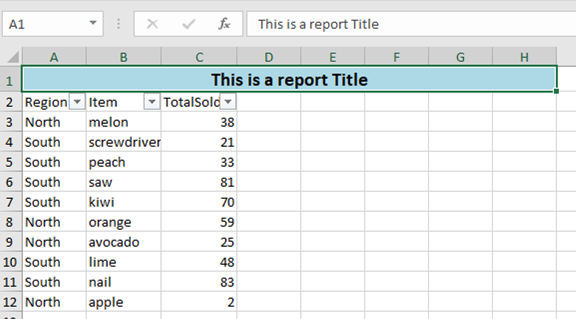
|
||||||
|
|
||||||
|
# What's new 6.1.0
|
||||||
|
|
||||||
|
Thank you to [James O'Neill](https://github.com/jhoneill)
|
||||||
|
- Instead of specifying a path provides an Excel Package object (from `Open-ExcelPackage`), using this avoids re-reading the whole file when importing multiple parts of it. To allow multiple read operations `Import-Excel` does NOT close the package, and you should use `Close-ExcelPackage -noSave` to close it.
|
||||||
|
|
||||||
|
# What's new 6.0.0
|
||||||
|
|
||||||
|
Thank you to [James O'Neill](https://github.com/jhoneill) for the optimizations, and refactoring leading to a ***~10x*** speed increase. Thanks to [ili101](https://github.com/ili101) for earlier PRs that provided the ground work for this.
|
||||||
|
|
||||||
|
* Performance improvement to `Export-Excel` see [#506](https://github.com/dfinke/ImportExcel/issues/506) and [#555](https://github.com/dfinke/ImportExcel/issues/555). This has meant taking code in Add-CellValue back into process block of `Export-Excel`, as the overhead of calling the function was a lot greater than time executing the code inside it. [Blog post to follow](https://jamesone111.wordpress.com/). Some tests are showing a ***~10x*** speed increase. [#572](https://github.com/dfinke/ImportExcel/issues/572) was about a broken #region tag in this part of the code and that has been cleaned up in the process.
|
||||||
|
|
||||||
|
* `Export-Excel` now has an -InputObject parameter (this was previously -TargetData , which is now an alias for InputObject).
|
||||||
|
If the `inputobject` is an array, each item will be inserted, so you can run `export-excel -inputobject $x` rather than `$x | Export-Excel`, and if it is a `system.data.datatable` object it will be inserted directly rather than cell-by-cell. `Send-SQLDataToExcel` takes advantage of this new functionality. There are simple tests for these new items
|
||||||
|
|
||||||
|
* `Export-Excel` previously assumed `-Now` if there were no other parameters, it will now assume `-Now` if there is no `-Path` or `-ExcelPackage`.
|
||||||
|
The .PSD1 file now itemizes the items exported by the module [#557](https://github.com/dfinke/ImportExcel/issues/557)
|
||||||
|
|
||||||
|
# What's new 5.4.5
|
||||||
|
|
||||||
|
Thank you to [James O'Neill](https://github.com/jhoneill) for the great additions.
|
||||||
|
|
||||||
|
- Modified Send-SQLDataToExcel so it creates tables and ranges itself; previously it relied on export-excel to do this which cause problems when adding data to an existing sheet (#555)
|
||||||
|
- Added new command Add-ExcelDataValidation which will apply different data-validation rules to ranges of cells
|
||||||
|
- Changed the export behavior so that (1) attempts to convert to a number only apply if the the value was a string; (2) Nulls are no longer converted to an empty string (3) there is a specific check for URIs and not just text which is a valid URI. Using UNC names in hyperlinks remains problematic.
|
||||||
|
- Changed the behavior of AutoSize in export excel so it only applies to the exported columns. Previously if something was exported next to pre-existing data, AutoSize would resize the whole sheet, potentially undoing things which had been set on the earlier data. If anyone relied on this behavior they will need to explicitly tell the sheet to auto size with $sheet.cells.autofitColumns. (where $sheet points to the sheet, it might be $ExcelPackage.Workbook.Worksheets['Name'])
|
||||||
|
- In Compare-Worksheet,the Key for comparing the sheets can now be written as a hash table with an expression - it is used with a Group-Object command so if it is valid in Group-Object it should be accepted; this allows the creation of composite keys when data being compared doesn't have a column which uniquely identifies rows.
|
||||||
|
- In Set-ExcelRange , added a 'Locked' option equivalent to the checkbox on the Protection Tab of the format cells dialog box in Excel.
|
||||||
|
- Created a Set-WorksheetProtection function. This gives the same options the protection dialog in Excel but is 0.9 release at the moment.
|
||||||
|
|
||||||
|
## New Example
|
||||||
|
|
||||||
|
- Added [MutipleValidations.ps1](https://github.com/dfinke/ImportExcel/blob/master/Examples/ExcelDataValidation/MutipleValidations.ps1). Culled from the `tests`.
|
||||||
|
|
||||||
|
# What's new 5.4.4
|
||||||
|
|
||||||
|
- Fix issue when only a single property is piped into Export-Excel
|
||||||
|
- Fix issue in `Copy-ExcelWorksheet`, close the `$Stream`
|
||||||
|
|
||||||
|
# What's new 5.4.3
|
||||||
|
|
||||||
|
- Added Remove-Worksheet: Removes one or more worksheets from one or more workbooks
|
||||||
|
|
||||||
|
# What's new 5.4.2
|
||||||
|
|
||||||
|
- Added parameters -GroupDateRow and -GroupDatePart & -GroupNumericRow, -GroupNumericMin, -GroupNumericMax and -GroupNumericInterval
|
||||||
|
to Add-PivotTable and New-PivotTableDefinition. The date ones gather dates of the same year and/or quarter and/or month and/or day etc.
|
||||||
|
the number ones group numbers into bands, starting at Min, and going up steps specified by Interval. Added tests and help for these.
|
||||||
|
- Set-ExcelRow and Set-ExcelColumn now check that the worksheet name they passed exists in the workbook.
|
||||||
|
|
||||||
|
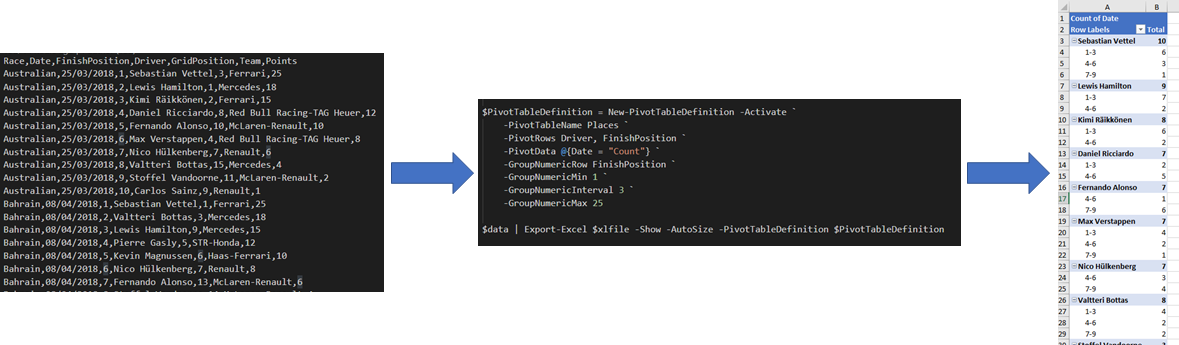
|
||||||
|
|
||||||
|
# What's new 5.4.0
|
||||||
|
|
||||||
- Thank you to Conrad Agramont, Twitter: [@AGramont](https://twitter.com/@AGramont) for the `AddMultiWorkSheet.ps1` example. Much appreciated!
|
- Thank you to Conrad Agramont, Twitter: [@AGramont](https://twitter.com/@AGramont) for the `AddMultiWorkSheet.ps1` example. Much appreciated!
|
||||||
- Fixed several more bugs where parameters were ignored if passed a zero value
|
- Fixed several more bugs where parameters were ignored if passed a zero value
|
||||||
@@ -65,7 +125,7 @@ Install-Module ImportExcel
|
|||||||
|
|
||||||
# What's new 5.3.4
|
# What's new 5.3.4
|
||||||
|
|
||||||
- HotFix for parameter PivotTableSyle should be PivotTableStyle https://github.com/dfinke/ImportExcel/issues/453
|
- HotFix for parameter PivotTableStyle should be PivotTableStyle https://github.com/dfinke/ImportExcel/issues/453
|
||||||
|
|
||||||
# What's new 5.3.3
|
# What's new 5.3.3
|
||||||
|
|
||||||
@@ -949,4 +1009,4 @@ You can also find EPPLus on [Nuget](https://www.nuget.org/packages/EPPlus/).
|
|||||||
|
|
||||||
* Using `-IncludePivotTable`, if that pivot table name exists, you'll get an error.
|
* Using `-IncludePivotTable`, if that pivot table name exists, you'll get an error.
|
||||||
* Investigating a solution
|
* Investigating a solution
|
||||||
* *Workaround* delete the Excel file first, then do the export
|
* *Workaround* delete the Excel file first, then do the export
|
||||||
@@ -1,34 +1,45 @@
|
|||||||
Function Remove-WorkSheet {
|
Function Remove-WorkSheet {
|
||||||
Param (
|
<#
|
||||||
$Path,
|
.SYNOPSIS
|
||||||
$WorksheetName
|
Removes one or more worksheets from one or more workbooks
|
||||||
|
.EXAMPLE
|
||||||
|
C:\> Remove-WorkSheet -Path Test1.xlsx -WorksheetName Sheet1
|
||||||
|
Removes the worksheet named 'Sheet1' from 'Test1.xlsx'
|
||||||
|
|
||||||
|
C:\> Remove-WorkSheet -Path Test1.xlsx -WorksheetName Sheet1,Target1
|
||||||
|
Removes the worksheet named 'Sheet1' and 'Target1' from 'Test1.xlsx'
|
||||||
|
|
||||||
|
C:\> Remove-WorkSheet -Path Test1.xlsx -WorksheetName Sheet1,Target1 -Show
|
||||||
|
Removes the worksheets and then launches the xlsx in Excel
|
||||||
|
|
||||||
|
C:\> dir c:\reports\*.xlsx | Remove-WorkSheet
|
||||||
|
Removes 'Sheet1' from all the xlsx files in the c:\reports directory
|
||||||
|
|
||||||
|
#>
|
||||||
|
[cmdletbinding(SupportsShouldProcess=$true)]
|
||||||
|
param(
|
||||||
|
# [Parameter(ValueFromPipelineByPropertyName)]
|
||||||
|
[Parameter(ValueFromPipelineByPropertyName)]
|
||||||
|
[Alias('Path')]
|
||||||
|
$FullName,
|
||||||
|
[String[]]$WorksheetName = "Sheet1",
|
||||||
|
[Switch]$Show
|
||||||
)
|
)
|
||||||
|
|
||||||
$Path = (Resolve-Path $Path).ProviderPath
|
Process {
|
||||||
|
if (!$FullName) {
|
||||||
$Excel = New-Object -TypeName OfficeOpenXml.ExcelPackage $Path
|
throw "Remove-WorkSheet requires the and Excel file"
|
||||||
|
|
||||||
$workSheet = $Excel.Workbook.Worksheets[$WorkSheetName]
|
|
||||||
|
|
||||||
if($workSheet) {
|
|
||||||
if($Excel.Workbook.Worksheets.Count -gt 1) {
|
|
||||||
$Excel.Workbook.Worksheets.Delete($workSheet)
|
|
||||||
} else {
|
|
||||||
throw "Cannot delete $WorksheetName. A workbook must contain at least one visible worksheet"
|
|
||||||
}
|
}
|
||||||
|
|
||||||
} else {
|
$pkg = Open-ExcelPackage -Path $FullName
|
||||||
throw "$WorksheetName not found"
|
|
||||||
|
if ($pkg) {
|
||||||
|
foreach ($wsn in $WorksheetName) {
|
||||||
|
if ($PSCmdlet.ShouldProcess($FullName,"Remove Sheet $wsn")) {
|
||||||
|
$pkg.Workbook.Worksheets.Delete($wsn)
|
||||||
|
}
|
||||||
|
}
|
||||||
|
Close-ExcelPackage -ExcelPackage $pkg -Show:$Show
|
||||||
|
}
|
||||||
}
|
}
|
||||||
|
}
|
||||||
$Excel.Save()
|
|
||||||
$Excel.Dispose()
|
|
||||||
}
|
|
||||||
|
|
||||||
|
|
||||||
Import-Module .\ImportExcel.psd1 -Force
|
|
||||||
|
|
||||||
$names = Get-ExcelSheetInfo C:\Temp\testDelete.xlsx
|
|
||||||
$names | Foreach-Object { Remove-WorkSheet C:\Temp\testDelete.xlsx $_.Name}
|
|
||||||
|
|
||||||
##Remove-WorkSheet C:\Temp\testDelete.xlsx sheet6
|
|
||||||
@@ -1,297 +1,175 @@
|
|||||||
Function Send-SQLDataToExcel {
|
Function Send-SQLDataToExcel {
|
||||||
<#
|
<#
|
||||||
.SYNOPSIS
|
.SYNOPSIS
|
||||||
Inserts a DataTable - returned by SQL query into an ExcelSheet, more efficiently than sending it via Export-Excel
|
Inserts a DataTable - returned by a SQL query - into an ExcelSheet
|
||||||
.DESCRIPTION
|
.DESCRIPTION
|
||||||
This command can accept a data table object or take a SQL statement and run it against a database connection.
|
This command takes a SQL statement and run it against a database connection; for the connection it accepts either
|
||||||
If running a SQL statement, the accepts either
|
* an object representing a session with a SQL server or ODBC database, or
|
||||||
* an object representing a session with a SQL server or ODBC database, or
|
* a connection string to make a session (if -MSSQLServer is specified it uses the SQL Native client,
|
||||||
* a connection String to make a session.
|
and -Connection can be a server name instead of a detailed connection string. Without this switch it uses ODBC)
|
||||||
The command takes most of the parameters of Export-Excel, and after inserting the table into the worksheet it
|
The command takes all the parameters of Export-Excel, except for -InputObject (alias TargetData); after
|
||||||
calls Export-Excel to carry out other tasks on the sheet. It is more efficient to do this than to get data-rows
|
fetching the data it calls Export-Excel with the data as the value of InputParameter and whichever of
|
||||||
and pipe them into Export-Excel, stripped off the database 'housekeeping' properties.
|
Export-Excel's parameters it was passed; for details of these parameters see the help for Export-Excel.
|
||||||
.PARAMETER DataTable
|
.PARAMETER Session
|
||||||
A System.Data.DataTable object containing the data to be inserted into the spreadsheet without running a query.
|
An active ODBC Connection or SQL connection object representing a session with a database which will be queried to get the data .
|
||||||
.PARAMETER Session
|
.PARAMETER Connection
|
||||||
An active ODBC Connection or SQL connection object representing a session with a database which will be queried to get the data .
|
A database connection string to be used to create a database session; either
|
||||||
.PARAMETER Connection
|
* A Data source name written in the form DSN=ODBC_Data_Source_Name, or
|
||||||
A database connection string to be used to create a database session; either
|
* A full ODBC or SQL Native Client Connection string, or
|
||||||
* A Data source name written in the form DSN=ODBC_Data_Source_Name, or
|
* The name of a SQL server.
|
||||||
* A full odbc or SQL Connection string, or
|
.PARAMETER MSSQLServer
|
||||||
* The name of a SQL server.
|
Specifies the connection string is for SQL server, not ODBC.
|
||||||
.PARAMETER MSSQLServer
|
.PARAMETER SQL
|
||||||
Specifies the connection string is for SQL server, not ODBC.
|
The SQL query to run against the session which was passed in -Session or set up from -Connection.
|
||||||
.PARAMETER SQL
|
.PARAMETER Database
|
||||||
The SQL query to run against the session which was passed in -Session or set up from -Connection.
|
Switches to a specific database on a SQL server.
|
||||||
.PARAMETER Database
|
.PARAMETER QueryTimeout
|
||||||
Switches to a specific database on a SQL server.
|
Override the default query time of 30 seconds.
|
||||||
.PARAMETER QueryTimeout
|
.PARAMETER DataTable
|
||||||
Override the default query time of 30 seconds.
|
A System.Data.DataTable object containing the data to be inserted into the spreadsheet without running a query.
|
||||||
.PARAMETER Path
|
This remains supported to avoid breaking older scripts, but if you have a DataTable object you can pass the it
|
||||||
Path to a new or existing .XLSX file.
|
into Export-Excel using -InputObject.
|
||||||
.PARAMETER WorkSheetName
|
|
||||||
The name of a sheet within the workbook - "Sheet1" by default.
|
|
||||||
.PARAMETER KillExcel
|
|
||||||
Closes Excel - prevents errors writing to the file because Excel has it open.
|
|
||||||
.PARAMETER Title
|
|
||||||
Text of a title to be placed in the top left cell.
|
|
||||||
.PARAMETER TitleBold
|
|
||||||
Sets the title in boldface type.
|
|
||||||
.PARAMETER TitleSize
|
|
||||||
Sets the point size for the title.
|
|
||||||
.PARAMETER TitleBackgroundColor
|
|
||||||
Sets the cell background color for the title cell.
|
|
||||||
.PARAMETER TitleFillPattern
|
|
||||||
Sets the fill pattern for the title cell.
|
|
||||||
.PARAMETER Password
|
|
||||||
Sets password protection on the workbook.
|
|
||||||
.PARAMETER IncludePivotTable
|
|
||||||
Adds a Pivot table using the data in the worksheet.
|
|
||||||
.PARAMETER PivotTableName
|
|
||||||
If a Pivot table is created from command line parameters, specificies the name of the new sheet holding the pivot. If Omitted this will be "WorksheetName-PivotTable"
|
|
||||||
.PARAMETER PivotRows
|
|
||||||
Name(s) columns from the spreadhseet which will provide the Row name(s) in a pivot table created from command line parameters.
|
|
||||||
.PARAMETER PivotColumns
|
|
||||||
Name(s) columns from the spreadhseet which will provide the Column name(s) in a pivot table created from command line parameters.
|
|
||||||
.PARAMETER PivotFilter
|
|
||||||
Name(s) columns from the spreadhseet which will provide the Filter name(s) in a pivot table created from command line parameters.
|
|
||||||
.PARAMETER PivotData
|
|
||||||
In a pivot table created from command line parameters, the fields to use in the table body is given as a Hash table in the form ColumnName = Average|Count|CountNums|Max|Min|Product|None|StdDev|StdDevP|Sum|Var|VarP .
|
|
||||||
.PARAMETER PivotDataToColumn
|
|
||||||
If there are multiple datasets in a PivotTable, by default they are shown seperatate rows under the given row heading; this switch makes them seperate columns.
|
|
||||||
.PARAMETER NoTotalsInPivot
|
|
||||||
In a pivot table created from command line parameters, prevents the addition of totals to rows and columns.
|
|
||||||
.PARAMETER IncludePivotChart
|
|
||||||
Include a chart with the Pivot table - implies -IncludePivotTable.
|
|
||||||
.PARAMETER ChartType
|
|
||||||
The type for Pivot chart (one of Excel's defined chart types)
|
|
||||||
.PARAMETER NoLegend
|
|
||||||
Exclude the legend from the pivot chart.
|
|
||||||
.PARAMETER ShowCategory
|
|
||||||
Add category labels to the pivot chart.
|
|
||||||
.PARAMETER ShowPercent
|
|
||||||
Add Percentage labels to the pivot chart.
|
|
||||||
.PARAMETER PivotTableDefinition
|
|
||||||
Instead of describing a single pivot table with mutliple commandline paramters; you can use a HashTable in the form PivotTableName = Definition;
|
|
||||||
Definition is itself a hashtable with Sheet PivotTows, PivotColumns, PivotData, IncludePivotChart and ChartType values.
|
|
||||||
.PARAMETER ConditionalFormat
|
|
||||||
One or more conditional formatting rules defined with New-ConditionalFormattingIconSet.
|
|
||||||
.PARAMETER ConditionalText
|
|
||||||
Applies a 'Conditional formatting rule' in Excel on all the cells. When specific conditions are met a rule is triggered.
|
|
||||||
.PARAMETER BoldTopRow
|
|
||||||
Makes the top Row boldface.
|
|
||||||
.PARAMETER NoHeader
|
|
||||||
Does not put field names at the top of columns.
|
|
||||||
.PARAMETER RangeName
|
|
||||||
Makes the data in the worksheet a named range.
|
|
||||||
.PARAMETER AutoNameRange
|
|
||||||
Makes each column a named range.
|
|
||||||
.PARAMETER TableName
|
|
||||||
Makes the data in the worksheet a table with a name applies a style to it. Name must not contain spaces.
|
|
||||||
.PARAMETER TableStyle
|
|
||||||
Selects the style for the named table - defaults to 'Medium6'.
|
|
||||||
.PARAMETER BarChart
|
|
||||||
Creates a "quick" bar chart using the first text column as labels and the first numeric column as values
|
|
||||||
.PARAMETER ColumnChart
|
|
||||||
Creates a "quick" column chart using the first text column as labels and the first numeric column as values
|
|
||||||
.PARAMETER LineChart
|
|
||||||
Creates a "quick" line chart using the first text column as labels and the first numeric column as values
|
|
||||||
.PARAMETER PieChart
|
|
||||||
Creates a "quick" pie chart using the first text column as labels and the first numeric column as values
|
|
||||||
.PARAMETER ExcelChartDefinition
|
|
||||||
A hash table containing ChartType, Title, NoLegend, ShowCategory, ShowPercent, Yrange, Xrange and SeriesHeader for one or more [non-pivot] charts.
|
|
||||||
.PARAMETER StartRow
|
|
||||||
Row to start adding data. 1 by default. Row 1 will contain the title if any. Then headers will appear (Unless -No header is specified) then the data appears.
|
|
||||||
.PARAMETER StartColumn
|
|
||||||
Column to start adding data - 1 by default.
|
|
||||||
.PARAMETER FreezeTopRow
|
|
||||||
Freezes headers etc. in the top row.
|
|
||||||
.PARAMETER FreezeFirstColumn
|
|
||||||
Freezes titles etc. in the left column.
|
|
||||||
.PARAMETER FreezeTopRowFirstColumn
|
|
||||||
Freezes top row and left column (equivalent to Freeze pane 2,2 ).
|
|
||||||
.PARAMETER FreezePane
|
|
||||||
Freezes panes at specified coordinates (in the form RowNumber , ColumnNumber).
|
|
||||||
.PARAMETER AutoFilter
|
|
||||||
Enables the 'Filter' in Excel on the complete header row. So users can easily sort, filter and/or search the data in the select column from within Excel.
|
|
||||||
.PARAMETER AutoSize
|
|
||||||
Sizes the width of the Excel column to the maximum width needed to display all the containing data in that cell.
|
|
||||||
.PARAMETER Show
|
|
||||||
Opens the Excel file immediately after creation. Convenient for viewing the results instantly without having to search for the file first.
|
|
||||||
.PARAMETER CellStyleSB
|
|
||||||
A script block which is run at the end of the process to apply styles to cells (although it can be used for other purposes).
|
|
||||||
The script block is given three paramaters; an object containing the current worksheet, the Total number of Rows and the number of the last column.
|
|
||||||
.PARAMETER ReturnRange
|
|
||||||
If specified, Export-Excel returns the range of added cells in the format "A1:Z100"
|
|
||||||
.PARAMETER PassThru
|
|
||||||
If specified, Export-Excel returns an object representing the Excel package without saving the package first. To save it you need to call the save or Saveas method or send it back to Export-Excel.
|
|
||||||
|
|
||||||
.EXAMPLE
|
.EXAMPLE
|
||||||
C:\> Send-SQLDataToExcel -MsSQLserver -Connection localhost -SQL "select name,type,type_desc from [master].[sys].[all_objects]" -Path .\temp.xlsx -WorkSheetname master -AutoSize -FreezeTopRow -AutoFilter -BoldTopRow
|
C:\> Send-SQLDataToExcel -MsSQLserver -Connection localhost -SQL "select name,type,type_desc from [master].[sys].[all_objects]" -Path .\temp.xlsx -WorkSheetname master -AutoSize -FreezeTopRow -AutoFilter -BoldTopRow
|
||||||
|
|
||||||
Connects to the local SQL server and selects 3 columns from [Sys].[all_objects] and exports then to a sheet named master with some basic header management
|
Connects to the local SQL server and selects 3 columns from [Sys].[all_objects] and exports then to a sheet named master with some basic header management
|
||||||
.EXAMPLE
|
.EXAMPLE
|
||||||
|
C:\> $dbPath = 'C:\Users\James\Documents\Database1.accdb'
|
||||||
|
C:\> $Connection = "Driver={Microsoft Access Driver (*.mdb, *.accdb)};Dbq=$dbPath;"
|
||||||
C:\> $SQL="SELECT top 25 Name,Length From TestData ORDER BY Length DESC"
|
C:\> $SQL="SELECT top 25 Name,Length From TestData ORDER BY Length DESC"
|
||||||
C:\> $Connection = ' Driver={Microsoft Access Driver (*.mdb, *.accdb)};Dbq=C:\Users\James\Documents\Database1.accdb;'
|
|
||||||
|
|
||||||
C:\> Send-SQLDataToExcel -Connection $connection -SQL $sql -path .\demo1.xlsx -WorkSheetname "Sizes" -AutoSize
|
C:\> Send-SQLDataToExcel -Connection $connection -SQL $sql -path .\demo1.xlsx -WorkSheetname "Sizes" -AutoSize
|
||||||
|
|
||||||
This declares a SQL statement and creates an ODBC connection string to read from an Access file and extracts data from it and sends it to a new worksheet
|
This creates an ODBC connection string to read from an Access file and a SQL Statement to extracts data from it,
|
||||||
|
and sends the resulting data to a new worksheet
|
||||||
|
|
||||||
.EXAMPLE
|
.EXAMPLE
|
||||||
C:\> $SQL="SELECT top 25 DriverName, Count(RaceDate) as Races, Count(Win) as Wins, Count(Pole) as Poles, Count(FastestLap) as Fastlaps FROM Results GROUP BY DriverName ORDER BY (count(win)) DESC"
|
C:\> $dbPath = 'C:\users\James\Documents\f1Results.xlsx'
|
||||||
C:\> $Connection = 'Driver={Microsoft Excel Driver (*.xls, *.xlsx, *.xlsm, *.xlsb)};Dbq=C:\users\James\Documents\f1Results.xlsx;'
|
C:\> $Connection = "Driver={Microsoft Excel Driver (*.xls, *.xlsx, *.xlsm, *.xlsb)};Dbq=$dbPath;"
|
||||||
|
C:\> $SQL="SELECT top 25 DriverName, Count(RaceDate) as Races, Count(Win) as Wins, Count(Pole) as Poles, Count(FastestLap) as Fastlaps " +
|
||||||
|
" FROM Results GROUP BY DriverName ORDER BY (count(win)) DESC"
|
||||||
|
|
||||||
C:\> Send-SQLDataToExcel -Connection $connection -SQL $sql -path .\demo1.xlsx -WorkSheetname "Winners" -AutoSize -AutoNameRange -ConditionalFormat @{DataBarColor="Blue"; Range="Wins"}
|
C:\> Send-SQLDataToExcel -Connection $connection -SQL $sql -path .\demo2.xlsx -WorkSheetname "Winners" -AutoSize -AutoNameRange -ConditionalFormat @{DataBarColor="Blue"; Range="Wins"}
|
||||||
|
|
||||||
This declares a SQL statement and creates an ODBC connection string to read from an Excel file, it then runs the statement and outputs the resulting data to a new spreadsheet.
|
Similar to the previous example this creates a connection string, this time for an Excel file, and runs
|
||||||
|
a SQL statement to get a list of motor-racing results, outputting the resulting data to a new spreadsheet.
|
||||||
The spreadsheet is formatted and a data bar added to show make the drivers' wins clearer.
|
The spreadsheet is formatted and a data bar added to show make the drivers' wins clearer.
|
||||||
(the F1 results database is available from https://1drv.ms/x/s!AhfYu7-CJv4ehNdZWxJE9LMAX_N5sg )
|
(the F1 results database is available from https://1drv.ms/x/s!AhfYu7-CJv4ehNdZWxJE9LMAX_N5sg )
|
||||||
.EXAMPLE
|
.EXAMPLE
|
||||||
C:\> $SQL = "SELECT top 25 DriverName, Count(RaceDate) as Races, Count(Win) as Wins, Count(Pole) as Poles, Count(FastestLap) as Fastlaps FROM Results GROUP BY DriverName ORDER BY (count(win)) DESC"
|
C:\> $dbPath = 'C:\users\James\Documents\f1Results.xlsx'
|
||||||
C:\> Get-SQL -Session F1 -excel -Connection "C:\Users\mcp\OneDrive\public\f1\f1Results.xlsx" -sql $sql -OutputVariable Table | out-null
|
C:\> $SQL = "SELECT top 25 DriverName, Count(RaceDate) as Races, Count(Win) as Wins, Count(Pole) as Poles, Count(FastestLap) as Fastlaps " +
|
||||||
|
" FROM Results GROUP BY DriverName ORDER BY (count(win)) DESC"
|
||||||
|
C:\> $null = Get-SQL -Session F1 -excel -Connection $dbPath -sql $sql -OutputVariable Table
|
||||||
|
|
||||||
C:\> Send-SQLDataToExcel -DataTable $Table -Path ".\demo3.xlsx" -WorkSheetname Gpwinners -autosize -TableName winners -TableStyle Light6 -show
|
C:\> Send-SQLDataToExcel -DataTable $Table -Path ".\demo3.xlsx" -WorkSheetname Gpwinners -autosize -TableName winners -TableStyle Light6 -show
|
||||||
|
|
||||||
This uses Get-SQL (at least V1.1 - download from the gallery with Install-Module -Name GetSQL - note the function is Get-SQL the module is GetSQL without the "-" )
|
This uses Get-SQL (at least V1.1 - download from the PowerShell gallery with Install-Module -Name GetSQL -
|
||||||
to simplify making database connections and building /submitting SQL statements.
|
note the function is Get-SQL the module is GetSQL without the "-" )
|
||||||
Here it uses the same SQL statement as before; -OutputVariable leaves a System.Data.DataTable object in $table
|
Get-SQL simplify making database connections and building /submitting SQL statements.
|
||||||
|
Here Get-SQL uses the same SQL statement as before; -OutputVariable leaves a System.Data.DataTable object in $table
|
||||||
and Send-SQLDataToExcel puts $table into the worksheet and sets it as an Excel table.
|
and Send-SQLDataToExcel puts $table into the worksheet and sets it as an Excel table.
|
||||||
|
The command is equivalent to running
|
||||||
|
C:\> Export-Excel -inputObject $Table -Path ".\demo3.xlsx" -WorkSheetname Gpwinners -autosize -TableName winners -TableStyle Light6 -show
|
||||||
|
This is quicker than using
|
||||||
|
C:\> Get-SQL <parameters> | export-excel -ExcludeProperty rowerror,rowstate,table,itemarray,haserrors <parameters>
|
||||||
(the F1 results database is available from https://1drv.ms/x/s!AhfYu7-CJv4ehNdZWxJE9LMAX_N5sg )
|
(the F1 results database is available from https://1drv.ms/x/s!AhfYu7-CJv4ehNdZWxJE9LMAX_N5sg )
|
||||||
.EXAMPLE
|
.EXAMPLE
|
||||||
C:\> $SQL = "SELECT top 25 DriverName, Count(Win) as Wins FROM Results GROUP BY DriverName ORDER BY (count(win)) DESC"
|
C:\> $SQL = "SELECT top 25 DriverName, Count(Win) as Wins FROM Results GROUP BY DriverName ORDER BY (count(win)) DESC"
|
||||||
C:\> Send-SQLDataToExcel -Session $DbSessions["f1"] -SQL $sql -Path ".\demo3.xlsx" -WorkSheetname Gpwinners -autosize -ColumnChart
|
C:\> Send-SQLDataToExcel -Session $DbSessions["f1"] -SQL $sql -Path ".\demo3.xlsx" -WorkSheetname Gpwinners -ClearSheet -autosize -ColumnChart
|
||||||
|
|
||||||
Like the previous example, this uses Get-SQL (download from the gallery with Install-Module -Name GetSQL). It uses the connection which Get-SQL made rather than an ODFBC connection string
|
Like the previous example, this uses Get-SQL (download from the gallery with Install-Module -Name GetSQL).
|
||||||
|
It uses the database session which Get-SQL created, rather than an ODBC connection string.
|
||||||
|
The Session parameter can either be a object (as shown here), or the name used by Get-SQL ("F1" in this case).
|
||||||
Here the data is presented as a quick chart.
|
Here the data is presented as a quick chart.
|
||||||
.EXAMPLE
|
.EXAMPLE
|
||||||
C:\> Send-SQLDataToExcel -path .\demo3.xlsx -WorkSheetname "LR" -Connection "DSN=LR" -sql "SELECT name AS CollectionName FROM AgLibraryCollection Collection ORDER BY CollectionName"
|
C:\> Send-SQLDataToExcel -path .\demo4.xlsx -WorkSheetname "LR" -Connection "DSN=LR" -sql "SELECT name AS CollectionName FROM AgLibraryCollection Collection ORDER BY CollectionName"
|
||||||
|
|
||||||
This example uses an Existing ODBC datasource name "LR" which maps to an adobe lightroom database and gets a list of collection names into a worksheet
|
This example uses an Existing ODBC datasource name "LR" which maps to an adobe lightroom database and gets a list of collection names into a worksheet
|
||||||
|
|
||||||
|
.Link
|
||||||
|
Export-Excel
|
||||||
#>
|
#>
|
||||||
[CmdletBinding()]
|
[CmdletBinding(DefaultParameterSetName="none")]
|
||||||
[Diagnostics.CodeAnalysis.SuppressMessageAttribute("PSAvoidUsingPlainTextForPassword","")]
|
[Diagnostics.CodeAnalysis.SuppressMessageAttribute('PSAvoidGlobalVars', '', Justification="Allowed to use DBSessions Global variable from GETSQL Module")]
|
||||||
param (
|
|
||||||
[Parameter(ParameterSetName="SQLConnection", Mandatory=$true)]
|
param (
|
||||||
[Parameter(ParameterSetName="ODBCConnection",Mandatory=$true)]
|
[Parameter(ParameterSetName="SQLConnection", Mandatory=$true)]
|
||||||
|
[Parameter(ParameterSetName="ODBCConnection", Mandatory=$true)]
|
||||||
$Connection,
|
$Connection,
|
||||||
[Parameter(ParameterSetName="ExistingSession",Mandatory=$true)]
|
[Parameter(ParameterSetName="ExistingSession", Mandatory=$true)]
|
||||||
[System.Data.Common.DbConnection]$Session,
|
$Session,
|
||||||
[Parameter(ParameterSetName="SQLConnection",Mandatory=$true)]
|
[Parameter(ParameterSetName="SQLConnection", Mandatory=$true)]
|
||||||
[switch]$MsSQLserver,
|
[switch]$MsSQLserver,
|
||||||
[Parameter(ParameterSetName="SQLConnection")]
|
[Parameter(ParameterSetName="SQLConnection")]
|
||||||
[String]$DataBase,
|
[String]$DataBase,
|
||||||
[Parameter(ParameterSetName="SQLConnection", Mandatory=$true)]
|
[Parameter(ParameterSetName="SQLConnection", Mandatory=$true)]
|
||||||
[Parameter(ParameterSetName="ODBCConnection",Mandatory=$true)]
|
[Parameter(ParameterSetName="ODBCConnection", Mandatory=$true)]
|
||||||
[Parameter(ParameterSetName="ExistingSession",Mandatory=$true)]
|
[Parameter(ParameterSetName="ExistingSession", Mandatory=$true)]
|
||||||
[string]$SQL,
|
[string]$SQL,
|
||||||
[int]$QueryTimeout,
|
[int]$QueryTimeout,
|
||||||
[Parameter(ParameterSetName="Pre-FetchedData",Mandatory=$true)]
|
[Parameter(ParameterSetName="Pre-FetchedData", Mandatory=$true)]
|
||||||
[System.Data.DataTable]$DataTable,
|
[System.Data.DataTable]$DataTable
|
||||||
$Path,
|
|
||||||
[String]$WorkSheetname = 'Sheet1',
|
|
||||||
[Switch]$KillExcel,
|
|
||||||
[Switch]$Show,
|
|
||||||
[String]$Title,
|
|
||||||
[OfficeOpenXml.Style.ExcelFillStyle]$TitleFillPattern = 'None',
|
|
||||||
[Switch]$TitleBold,
|
|
||||||
[Int]$TitleSize = 22,
|
|
||||||
$TitleBackgroundColor,
|
|
||||||
[String]$Password,
|
|
||||||
[Hashtable]$PivotTableDefinition,
|
|
||||||
[Switch]$IncludePivotTable,
|
|
||||||
[String[]]$PivotRows,
|
|
||||||
[String[]]$PivotColumns,
|
|
||||||
$PivotData,
|
|
||||||
[String[]]$PivotFilter,
|
|
||||||
[Switch]$PivotDataToColumn,
|
|
||||||
[Switch]$NoTotalsInPivot,
|
|
||||||
[Switch]$IncludePivotChart,
|
|
||||||
[OfficeOpenXml.Drawing.Chart.eChartType]$ChartType = 'Pie',
|
|
||||||
[Switch]$NoLegend,
|
|
||||||
[Switch]$ShowCategory,
|
|
||||||
[Switch]$ShowPercent,
|
|
||||||
[Switch]$AutoSize,
|
|
||||||
[Switch]$FreezeTopRow,
|
|
||||||
[Switch]$FreezeFirstColumn,
|
|
||||||
[Switch]$FreezeTopRowFirstColumn,
|
|
||||||
[Int[]]$FreezePane,
|
|
||||||
[Switch]$AutoFilter,
|
|
||||||
[Switch]$BoldTopRow,
|
|
||||||
[Switch]$NoHeader,
|
|
||||||
[String]$RangeName,
|
|
||||||
[String]$TableName,
|
|
||||||
[OfficeOpenXml.Table.TableStyles]$TableStyle = 'Medium6',
|
|
||||||
[Switch]$Barchart,
|
|
||||||
[Switch]$PieChart,
|
|
||||||
[Switch]$LineChart ,
|
|
||||||
[Switch]$ColumnChart ,
|
|
||||||
[Object[]]$ExcelChartDefinition,
|
|
||||||
[Switch]$AutoNameRange,
|
|
||||||
[Object[]]$ConditionalFormat,
|
|
||||||
[Object[]]$ConditionalText,
|
|
||||||
[ScriptBlock]$CellStyleSB,
|
|
||||||
[Int]$StartRow = 1,
|
|
||||||
[Int]$StartColumn = 1,
|
|
||||||
[Switch]$ReturnRange,
|
|
||||||
[Switch]$Passthru
|
|
||||||
)
|
)
|
||||||
|
#Import the parameters from Export-Excel, we will pass InputObject, and we have the common parameters so exclude those,
|
||||||
if ($KillExcel) {
|
#and re-write the [Parmameter] attribute on each one to avoid parameterSetName here competing with the settings in Export excel.
|
||||||
Get-Process excel -ErrorAction Ignore | Stop-Process
|
#The down side of this that impossible parameter combinations won't be filtered out and need to be caught later.
|
||||||
while (Get-Process excel -ErrorAction Ignore) {Start-Sleep -Milliseconds 250}
|
DynamicParam {
|
||||||
}
|
$ParameterAttribute = "System.Management.Automation.ParameterAttribute"
|
||||||
|
$RuntimeDefinedParam = "System.Management.Automation.RuntimeDefinedParameter"
|
||||||
#We were either given a session object or a connection string (with, optionally a MSSQLServer parameter)
|
$paramDictionary = New-Object -TypeName System.Management.Automation.RuntimeDefinedParameterDictionary
|
||||||
# If we got -MSSQLServer, create a SQL connection, if we didn't but we got -Connection create an ODBC connection
|
$attributeCollection = New-Object -TypeName System.Collections.ObjectModel.Collection[System.Attribute]
|
||||||
if ($MsSQLserver -and $Connection) {
|
$attributeCollection.Add((New-Object -TypeName $ParameterAttribute -Property @{ ParameterSetName = "__AllParameterSets" ;Mandatory = $false}))
|
||||||
if ($Connection -notmatch "=") {$Connection = "server=$Connection;trusted_connection=true;timeout=60"}
|
foreach ($P in (Get-Command -Name Export-Excel).Parameters.values.where({$_.name -notmatch 'Verbose|Debug|Action$|Variable$|Buffer$|TargetData$|InputObject$'})) {
|
||||||
$Session = New-Object -TypeName System.Data.SqlClient.SqlConnection -ArgumentList $Connection
|
$paramDictionary.Add($p.Name, (New-Object -TypeName $RuntimeDefinedParam -ArgumentList $p.name, $p.ParameterType, $attributeCollection ) )
|
||||||
if ($Session.State -ne 'Open') {$Session.Open()}
|
|
||||||
if ($DataBase) {$Session.ChangeDatabase($DataBase) }
|
|
||||||
}
|
|
||||||
elseif ($Connection) {
|
|
||||||
$Session = New-Object -TypeName System.Data.Odbc.OdbcConnection -ArgumentList $Connection ; $Session.ConnectionTimeout = 30
|
|
||||||
}
|
|
||||||
|
|
||||||
If ($session) {
|
|
||||||
#A session was either passed in or just created. If it's a SQL one make a SQL DataAdapter, otherwise make an ODBC one
|
|
||||||
if ($Session.GetType().name -match "SqlConnection") {
|
|
||||||
$dataAdapter = New-Object -TypeName System.Data.SqlClient.SqlDataAdapter -ArgumentList (
|
|
||||||
New-Object -TypeName System.Data.SqlClient.SqlCommand -ArgumentList $SQL, $Session)
|
|
||||||
}
|
}
|
||||||
else {
|
return $paramDictionary
|
||||||
$dataAdapter = New-Object -TypeName System.Data.Odbc.OdbcDataAdapter -ArgumentList (
|
|
||||||
New-Object -TypeName System.Data.Odbc.OdbcCommand -ArgumentList $SQL, $Session )
|
|
||||||
}
|
|
||||||
if ($QueryTimeout) {$dataAdapter.SelectCommand.CommandTimeout = $ServerTimeout}
|
|
||||||
|
|
||||||
#Both adapter types output the same kind of table, create one and fill it from the adapter
|
|
||||||
$DataTable = New-Object -TypeName System.Data.DataTable
|
|
||||||
$rowCount = $dataAdapter.fill($dataTable)
|
|
||||||
Write-Verbose -Message "Query returned $rowCount row(s)"
|
|
||||||
}
|
}
|
||||||
if ($DataTable.Rows.Count) {
|
process {
|
||||||
#ExportExcel user a -NoHeader parameter so that's what we use here, but needs to be the other way around.
|
#Dynamic params mean we can get passed parameter combination Export-Excel will reject, so throw here, rather than get data and then have Export-Excel error.
|
||||||
$printHeaders = -not $NoHeader
|
if ($PSBoundParameters.Path -and $PSBoundParameters.ExcelPackage) {
|
||||||
if ($Title) {$r = $StartRow +1 }
|
throw 'Parameter error: you cannot specify both a path and an Excel Package.'
|
||||||
else {$r = $StartRow}
|
return
|
||||||
#Get our Excel sheet and fill it with the data
|
}
|
||||||
$excelPackage = Export-Excel -Path $Path -WorkSheetname $WorkSheetname -PassThru
|
if ($PSBoundParameters.AutoFilter -and ($PSBoundParameters.TableName -or $PSBoundParameters.TableStyle)) {
|
||||||
$excelPackage.Workbook.Worksheets[$WorkSheetname].Cells[$r,$StartColumn].LoadFromDataTable($dataTable, $printHeaders ) | Out-Null
|
Write-Warning "Tables are automatically auto-filtered, -AutoFilter will be ignored"
|
||||||
|
$null = $PSBoundParameters.Remove('AutoFilter')
|
||||||
#Apply date format
|
}
|
||||||
for ($c=0 ; $c -lt $DataTable.Columns.Count ; $c++) {
|
#We were either given a session object or a connection string (with, optionally a MSSQLServer parameter)
|
||||||
if ($DataTable.Columns[$c].DataType -eq [datetime]) {
|
#If we got -MSSQLServer, create a SQL connection, if we didn't but we got -Connection create an ODBC connection
|
||||||
Set-ExcelColumn -Worksheet $excelPackage.Workbook.Worksheets[$WorkSheetname] -Column ($c +1) -NumberFormat 'Date-Time'
|
if ($MsSQLserver -and $Connection) {
|
||||||
|
if ($Connection -notmatch '=') {$Connection = "server=$Connection;trusted_connection=true;timeout=60"}
|
||||||
|
$Session = New-Object -TypeName System.Data.SqlClient.SqlConnection -ArgumentList $Connection
|
||||||
|
if ($Session.State -ne 'Open') {$Session.Open()}
|
||||||
|
if ($DataBase) {$Session.ChangeDatabase($DataBase) }
|
||||||
|
}
|
||||||
|
elseif ($Connection) {
|
||||||
|
$Session = New-Object -TypeName System.Data.Odbc.OdbcConnection -ArgumentList $Connection ; $Session.ConnectionTimeout = 30
|
||||||
|
}
|
||||||
|
if ($Session) {
|
||||||
|
#A session was either passed in or just created. If it's a SQL one make a SQL DataAdapter, otherwise make an ODBC one
|
||||||
|
if ($Session -is [String] -and $Global:DbSessions[$Session]) {$Session = $Global:DbSessions[$Session]}
|
||||||
|
if ($Session.GetType().name -match "SqlConnection") {
|
||||||
|
$dataAdapter = New-Object -TypeName System.Data.SqlClient.SqlDataAdapter -ArgumentList (
|
||||||
|
New-Object -TypeName System.Data.SqlClient.SqlCommand -ArgumentList $SQL, $Session)
|
||||||
}
|
}
|
||||||
}
|
else {
|
||||||
|
$dataAdapter = New-Object -TypeName System.Data.Odbc.OdbcDataAdapter -ArgumentList (
|
||||||
|
New-Object -TypeName System.Data.Odbc.OdbcCommand -ArgumentList $SQL, $Session )
|
||||||
|
}
|
||||||
|
if ($QueryTimeout) {$dataAdapter.SelectCommand.CommandTimeout = $QueryTimeout}
|
||||||
|
|
||||||
#Call export-excel with any parameters which don't relate to the SQL query
|
#Both adapter types output the same kind of table, create one and fill it from the adapter
|
||||||
"Connection", "Database" , "Session", "MsSQLserver", "Destination" , "SQL" , "DataTable", "Path" | ForEach-Object {$null = $PSBoundParameters.Remove($_) }
|
$DataTable = New-Object -TypeName System.Data.DataTable
|
||||||
Export-Excel -ExcelPackage $excelPackage @PSBoundParameters
|
$rowCount = $dataAdapter.fill($dataTable)
|
||||||
|
Write-Verbose -Message "Query returned $rowCount row(s)"
|
||||||
|
}
|
||||||
|
if ($DataTable.Rows.Count) {
|
||||||
|
#Call export-excel removing parameters which relate to the SQL query, and keeping the rest.
|
||||||
|
'Connection' , 'Database' , 'Session' , 'MsSQLserver' , 'SQL' , 'DataTable' , 'QueryTimeout' | ForEach-Object {$null = $PSBoundParameters.Remove($_) }
|
||||||
|
Export-Excel @PSBoundParameters -InputObject $DataTable
|
||||||
|
}
|
||||||
|
else {Write-Warning -Message ' No Data to insert.' }
|
||||||
|
#If we were passed a connection and opened a session, close that session.
|
||||||
|
if ($Connection) {$Session.close() }
|
||||||
}
|
}
|
||||||
else {Write-Warning -Message "No Data to insert."}
|
}
|
||||||
#If we were passed a connection and opened a session, close that session.
|
|
||||||
if ($Connection) {$Session.close() }
|
|
||||||
}
|
|
||||||
@@ -1,4 +1,7 @@
|
|||||||
function Set-CellStyle {
|
[Diagnostics.CodeAnalysis.SuppressMessageAttribute('PSUseShouldProcessForStateChangingFunctions', '', Scope='Function', Target='Set*', Justification='Does not change system state')]
|
||||||
|
param()
|
||||||
|
|
||||||
|
function Set-CellStyle {
|
||||||
param(
|
param(
|
||||||
$WorkSheet,
|
$WorkSheet,
|
||||||
$Row,
|
$Row,
|
||||||
|
|||||||
@@ -44,6 +44,8 @@
|
|||||||
[cmdletbinding()]
|
[cmdletbinding()]
|
||||||
[Alias("Set-Column")]
|
[Alias("Set-Column")]
|
||||||
[OutputType([OfficeOpenXml.ExcelColumn],[String])]
|
[OutputType([OfficeOpenXml.ExcelColumn],[String])]
|
||||||
|
[Diagnostics.CodeAnalysis.SuppressMessageAttribute('PSUseShouldProcessForStateChangingFunctions', '',Justification='Does not change system state')]
|
||||||
|
[Diagnostics.CodeAnalysis.SuppressMessageAttribute('PSUseDeclaredVarsMoreThanAssignments', '', Justification="Variables created for script block which may be passed as a parameter, but not used in the script")]
|
||||||
Param (
|
Param (
|
||||||
#If specifying the worksheet by name, the ExcelPackage object which contains the worksheet also needs to be passed.
|
#If specifying the worksheet by name, the ExcelPackage object which contains the worksheet also needs to be passed.
|
||||||
[Parameter(ParameterSetName="Package",Mandatory=$true)]
|
[Parameter(ParameterSetName="Package",Mandatory=$true)]
|
||||||
@@ -121,7 +123,12 @@
|
|||||||
|
|
||||||
begin {
|
begin {
|
||||||
#if we were passed a package object and a worksheet name , get the worksheet.
|
#if we were passed a package object and a worksheet name , get the worksheet.
|
||||||
if ($ExcelPackage) {$Worksheet = $ExcelPackage.Workbook.Worksheets[$Worksheetname] }
|
if ($ExcelPackage) {
|
||||||
|
if ($ExcelPackage.Workbook.Worksheets.Name -notcontains $Worksheetname) {
|
||||||
|
throw "The Workbook does not contain a sheet named '$Worksheetname'"
|
||||||
|
}
|
||||||
|
else {$Worksheet = $ExcelPackage.Workbook.Worksheets[$Worksheetname] }
|
||||||
|
}
|
||||||
|
|
||||||
#In a script block to build a formula, we may want any of corners or the column name,
|
#In a script block to build a formula, we may want any of corners or the column name,
|
||||||
#if Column and Startrow aren't specified, assume first unused column, and first row
|
#if Column and Startrow aren't specified, assume first unused column, and first row
|
||||||
@@ -133,7 +140,7 @@
|
|||||||
process {
|
process {
|
||||||
if ($null -eq $workSheet.Dimension) {Write-Warning "Can't format an empty worksheet."; return}
|
if ($null -eq $workSheet.Dimension) {Write-Warning "Can't format an empty worksheet."; return}
|
||||||
if ($Column -eq 0 ) {$Column = $endColumn + 1 }
|
if ($Column -eq 0 ) {$Column = $endColumn + 1 }
|
||||||
$columnName = [OfficeOpenXml.ExcelCellAddress]::new(1,$column).Address -replace "1",""
|
$columnName = (New-Object 'OfficeOpenXml.ExcelCellAddress' @(1, $column)).Address -replace "1",""
|
||||||
Write-Verbose -Message "Updating Column $columnName"
|
Write-Verbose -Message "Updating Column $columnName"
|
||||||
#If there is a heading, insert it and use it as the name for a range (if we're creating one)
|
#If there is a heading, insert it and use it as the name for a range (if we're creating one)
|
||||||
if ($PSBoundParameters.ContainsKey('Heading')) {
|
if ($PSBoundParameters.ContainsKey('Heading')) {
|
||||||
@@ -151,10 +158,11 @@
|
|||||||
if ($PSBoundParameters.ContainsKey('Value')) { foreach ($row in ($StartRow..$endRow)) {
|
if ($PSBoundParameters.ContainsKey('Value')) { foreach ($row in ($StartRow..$endRow)) {
|
||||||
if ($Value -is [scriptblock]) { #re-create the script block otherwise variables from this function are out of scope.
|
if ($Value -is [scriptblock]) { #re-create the script block otherwise variables from this function are out of scope.
|
||||||
$cellData = & ([scriptblock]::create( $Value ))
|
$cellData = & ([scriptblock]::create( $Value ))
|
||||||
Write-Verbose -Message $cellData
|
if ($null -eq $cellData) {Write-Verbose -Message "Script block evaluates to null."}
|
||||||
|
else {Write-Verbose -Message "Script block evaluates to '$cellData'"}
|
||||||
}
|
}
|
||||||
else { $cellData = $Value}
|
else { $cellData = $Value}
|
||||||
if ($cellData -match "^=") { $Worksheet.Cells[$Row, $Column].Formula = ($cellData -replace '^=','') } #EPPlus likes formulas with no = sign; Excel doesn't care
|
if ($cellData -match "^=") { $Worksheet.Cells[$Row, $Column].Formula = ($cellData -replace '^=','') } #EPPlus likes formulas with no = sign; Excel doesn't care
|
||||||
elseif ( [System.Uri]::IsWellFormedUriString($cellData , [System.UriKind]::Absolute)) {
|
elseif ( [System.Uri]::IsWellFormedUriString($cellData , [System.UriKind]::Absolute)) {
|
||||||
# Save a hyperlink : internal links can be in the form xl://sheet!E419 (use A1 as goto sheet), or xl://RangeName
|
# Save a hyperlink : internal links can be in the form xl://sheet!E419 (use A1 as goto sheet), or xl://RangeName
|
||||||
if ($cellData -match "^xl://internal/") {
|
if ($cellData -match "^xl://internal/") {
|
||||||
@@ -163,13 +171,13 @@
|
|||||||
$h = New-Object -TypeName OfficeOpenXml.ExcelHyperLink -ArgumentList $referenceAddress , $display
|
$h = New-Object -TypeName OfficeOpenXml.ExcelHyperLink -ArgumentList $referenceAddress , $display
|
||||||
$Worksheet.Cells[$Row, $Column].HyperLink = $h
|
$Worksheet.Cells[$Row, $Column].HyperLink = $h
|
||||||
}
|
}
|
||||||
else {$Worksheet.Cells[$Row, $Column].HyperLink = $cellData }
|
else {$Worksheet.Cells[$Row, $Column].HyperLink = $cellData }
|
||||||
$Worksheet.Cells[$Row, $Column].Style.Font.Color.SetColor([System.Drawing.Color]::Blue)
|
|
||||||
$Worksheet.Cells[$Row, $Column].Style.Font.UnderLine = $true
|
$Worksheet.Cells[$Row, $Column].Style.Font.UnderLine = $true
|
||||||
|
$Worksheet.Cells[$Row, $Column].Style.Font.Color.SetColor([System.Drawing.Color]::Blue)
|
||||||
}
|
}
|
||||||
else { $Worksheet.Cells[$Row, $Column].Value = $cellData }
|
else { $Worksheet.Cells[$Row, $Column].Value = $cellData }
|
||||||
if ($cellData -is [datetime]) { $Worksheet.Cells[$Row, $Column].Style.Numberformat.Format = 'm/d/yy h:mm' } # This is not a custom format, but a preset recognized as date and localized.
|
if ($cellData -is [datetime]) { $Worksheet.Cells[$Row, $Column].Style.Numberformat.Format = 'm/d/yy h:mm' } # This is not a custom format, but a preset recognized as date and localized.
|
||||||
if ($cellData -is [timespan]) { $Worksheet.Cells[$Row, $Column].Style.Numberformat.Format = '[h]:mm:ss' }
|
if ($cellData -is [timespan]) { $Worksheet.Cells[$Row, $Column].Style.Numberformat.Format = '[h]:mm:ss' }
|
||||||
}}
|
}}
|
||||||
|
|
||||||
#region Apply formatting
|
#region Apply formatting
|
||||||
|
|||||||
17
Set-Row.ps1
17
Set-Row.ps1
@@ -33,6 +33,8 @@
|
|||||||
[cmdletbinding()]
|
[cmdletbinding()]
|
||||||
[Alias("Set-Row")]
|
[Alias("Set-Row")]
|
||||||
[OutputType([OfficeOpenXml.ExcelRow],[String])]
|
[OutputType([OfficeOpenXml.ExcelRow],[String])]
|
||||||
|
[Diagnostics.CodeAnalysis.SuppressMessageAttribute('PSUseShouldProcessForStateChangingFunctions', '',Justification='Does not change system state')]
|
||||||
|
[Diagnostics.CodeAnalysis.SuppressMessageAttribute('PSUseDeclaredVarsMoreThanAssignments', '', Justification="Variables created for script block which may be passed as a parameter, but not used in the script")]
|
||||||
Param (
|
Param (
|
||||||
#An Excel package object - e.g. from Export-Excel -PassThru - requires a sheet name.
|
#An Excel package object - e.g. from Export-Excel -PassThru - requires a sheet name.
|
||||||
[Parameter(ParameterSetName="Package",Mandatory=$true)]
|
[Parameter(ParameterSetName="Package",Mandatory=$true)]
|
||||||
@@ -116,8 +118,12 @@
|
|||||||
)
|
)
|
||||||
begin {
|
begin {
|
||||||
#if we were passed a package object and a worksheet name , get the worksheet.
|
#if we were passed a package object and a worksheet name , get the worksheet.
|
||||||
if ($ExcelPackage) {$Worksheet = $ExcelPackage.Workbook.worksheets[$Worksheetname] }
|
if ($ExcelPackage) {
|
||||||
|
if ($ExcelPackage.Workbook.Worksheets.Name -notcontains $Worksheetname) {
|
||||||
|
throw "The Workbook does not contain a sheet named '$Worksheetname'"
|
||||||
|
}
|
||||||
|
else {$Worksheet = $ExcelPackage.Workbook.Worksheets[$Worksheetname] }
|
||||||
|
}
|
||||||
#In a script block to build a formula, we may want any of corners or the columnname,
|
#In a script block to build a formula, we may want any of corners or the columnname,
|
||||||
#if row and start column aren't specified assume first unused row, and first column
|
#if row and start column aren't specified assume first unused row, and first column
|
||||||
if (-not $StartColumn) {$StartColumn = $Worksheet.Dimension.Start.Column }
|
if (-not $StartColumn) {$StartColumn = $Worksheet.Dimension.Start.Column }
|
||||||
@@ -139,11 +145,12 @@
|
|||||||
#Fill in the data
|
#Fill in the data
|
||||||
if ($PSBoundParameters.ContainsKey('Value')) {foreach ($column in ($StartColumn..$endColumn)) {
|
if ($PSBoundParameters.ContainsKey('Value')) {foreach ($column in ($StartColumn..$endColumn)) {
|
||||||
#We might want the column name in a script block
|
#We might want the column name in a script block
|
||||||
$columnName = [OfficeOpenXml.ExcelCellAddress]::new(1,$column).Address -replace "1",""
|
$columnName = (New-Object -TypeName OfficeOpenXml.ExcelCellAddress @(1,$column)).Address -replace "1",""
|
||||||
if ($Value -is [scriptblock] ) {
|
if ($Value -is [scriptblock] ) {
|
||||||
#re-create the script block otherwise variables from this function are out of scope.
|
#re-create the script block otherwise variables from this function are out of scope.
|
||||||
$cellData = & ([scriptblock]::create( $Value ))
|
$cellData = & ([scriptblock]::create( $Value ))
|
||||||
Write-Verbose -Message $cellData
|
if ($null -eq $cellData) {Write-Verbose -Message "Script block evaluates to null."}
|
||||||
|
else {Write-Verbose -Message "Script block evaluates to '$cellData'"}
|
||||||
}
|
}
|
||||||
else{$cellData = $Value}
|
else{$cellData = $Value}
|
||||||
if ($cellData -match "^=") { $Worksheet.Cells[$Row, $column].Formula = ($cellData -replace '^=','') } #EPPlus likes formulas with no = sign; Excel doesn't care
|
if ($cellData -match "^=") { $Worksheet.Cells[$Row, $column].Formula = ($cellData -replace '^=','') } #EPPlus likes formulas with no = sign; Excel doesn't care
|
||||||
@@ -172,7 +179,7 @@
|
|||||||
if ($PSBoundParameters.ContainsKey($p)) {$params[$p] = $PSBoundParameters[$p]}
|
if ($PSBoundParameters.ContainsKey($p)) {$params[$p] = $PSBoundParameters[$p]}
|
||||||
}
|
}
|
||||||
if ($params.Count) {
|
if ($params.Count) {
|
||||||
$theRange = [OfficeOpenXml.ExcelAddress]::New($Row, $StartColumn, $Row, $endColumn)
|
$theRange = New-Object -TypeName OfficeOpenXml.ExcelAddress @($Row, $StartColumn, $Row, $endColumn)
|
||||||
Set-ExcelRange -WorkSheet $Worksheet -Range $theRange @params
|
Set-ExcelRange -WorkSheet $Worksheet -Range $theRange @params
|
||||||
}
|
}
|
||||||
#endregion
|
#endregion
|
||||||
|
|||||||
81
Set-WorkSheetProtection.ps1
Normal file
81
Set-WorkSheetProtection.ps1
Normal file
@@ -0,0 +1,81 @@
|
|||||||
|
Function Set-WorkSheetProtection {
|
||||||
|
[Cmdletbinding()]
|
||||||
|
<#
|
||||||
|
.Synopsis
|
||||||
|
Sets protection on the worksheet
|
||||||
|
.Description
|
||||||
|
|
||||||
|
.Example
|
||||||
|
Set-WorkSheetProtection -WorkSheet $planSheet -IsProtected -AllowAll -AllowInsertColumns:$false -AllowDeleteColumns:$false -UnLockAddress "A:N"
|
||||||
|
Turns on protection for the worksheet in $planSheet, checks all the allow boxes excel Insert and Delete columns and unlocks columns A-N
|
||||||
|
#>
|
||||||
|
[Diagnostics.CodeAnalysis.SuppressMessageAttribute('PSUseShouldProcessForStateChangingFunctions', '',Justification='Does not change system state')]
|
||||||
|
param (
|
||||||
|
#The worksheet where protection is to be applied.
|
||||||
|
[Parameter(Mandatory=$true)]
|
||||||
|
[OfficeOpenXml.ExcelWorksheet]$WorkSheet ,
|
||||||
|
#Value of the "Protect Worksheet and Contents of locked cells" check box. Initially FALSE. use -IsProtected:$false to turn off it it has been switched on
|
||||||
|
[switch]$IsProtected,
|
||||||
|
#If provided sets all the ALLOW options to true or false and then allows them to be changed individually
|
||||||
|
[switch]$AllowAll,
|
||||||
|
#Opposite of the value in the 'Select locked cells' check box. Set to allow when Protect is first enabled
|
||||||
|
[switch]$BlockSelectLockedCells,
|
||||||
|
#Opposite of the value in the 'Select unlocked cells' check box. Set to allow when Protect is first enabled
|
||||||
|
[switch]$BlockSelectUnlockedCells,
|
||||||
|
#Value of the 'Format Cells' check box. Set to block when Protect is first enabled
|
||||||
|
[switch]$AllowFormatCells,
|
||||||
|
#Value of the 'Format Columns' check box. Set to block when Protect is first enabled
|
||||||
|
[switch]$AllowFormatColumns,
|
||||||
|
#Value of the 'Format Rows' check box. Set to block when Protect is first enabled
|
||||||
|
[switch]$AllowFormatRows,
|
||||||
|
#Value of the 'Insert Columns' check box. Set to block when Protect is first enabled
|
||||||
|
[switch]$AllowInsertColumns,
|
||||||
|
#Value of the 'Insert Columns' check box. Set to block when Protect is first enabled
|
||||||
|
[switch]$AllowInsertRows,
|
||||||
|
#Value of the 'Insert Hyperlinks' check box. Set to block when Protect is first enabled
|
||||||
|
[switch]$AllowInsertHyperlinks,
|
||||||
|
#Value of the 'Delete Columns' check box. Set to block when Protect is first enabled
|
||||||
|
[switch]$AllowDeleteColumns,
|
||||||
|
#Value of the 'Delete Rows' check box. Set to block when Protect is first enabled
|
||||||
|
[switch]$AllowDeleteRows,
|
||||||
|
#Value of the 'Sort' check box. Set to block when Protect is first enabled
|
||||||
|
[switch]$AllowSort,
|
||||||
|
#Value of the 'Use AutoFilter' check box. Set to block when Protect is first enabled
|
||||||
|
[switch]$AllowAutoFilter,
|
||||||
|
#Value of the 'Use PivotTable and PivotChart' check box. Set to block when Protect is first enabled
|
||||||
|
[switch]$AllowPivotTables,
|
||||||
|
##Opposite of the value in the 'Edit objects' check box. Set to allow when Protect is first enabled
|
||||||
|
[switch]$BlockEditObject,
|
||||||
|
##Opposite of the value in the 'Edit Scenarios' check box. Set to allow when Protect is first enabled
|
||||||
|
[switch]$BlockEditScenarios,
|
||||||
|
#Address range for cells to lock in the form "A:Z" or "1:10" or "A1:Z10"
|
||||||
|
[string]$LockAddress,
|
||||||
|
#Address range for cells to Unlock in the form "A:Z" or "1:10" or "A1:Z10"
|
||||||
|
[string]$UnLockAddress
|
||||||
|
)
|
||||||
|
|
||||||
|
if ($PSBoundParameters.ContainsKey('isprotected') -and $IsProtected -eq $false) {$worksheet.Protection.IsProtected = $false}
|
||||||
|
elseif ($IsProtected) {
|
||||||
|
$worksheet.Protection.IsProtected = $true
|
||||||
|
foreach ($ParName in @('AllowFormatCells',
|
||||||
|
'AllowFormatColumns', 'AllowFormatRows',
|
||||||
|
'AllowInsertColumns', 'AllowInsertRows', 'AllowInsertHyperlinks',
|
||||||
|
'AllowDeleteColumns', 'AllowDeleteRows',
|
||||||
|
'AllowSort' , 'AllowAutoFilter', 'AllowPivotTables')) {
|
||||||
|
if ($AllowAll -and -not $PSBoundParameters.ContainsKey($Parname)) {$worksheet.Protection.$ParName = $true}
|
||||||
|
elseif ($PSBoundParameters[$ParName] -eq $true ) {$worksheet.Protection.$ParName = $true}
|
||||||
|
}
|
||||||
|
if ($BlockSelectLockedCells) {$worksheet.Protection.AllowSelectLockedCells = $false }
|
||||||
|
if ($BlockSelectUnlockedCells) {$worksheet.Protection.AllowSelectUnLockedCells = $false }
|
||||||
|
if ($BlockEditObject) {$worksheet.Protection.AllowEditObject = $false }
|
||||||
|
if ($BlockEditScenarios) {$worksheet.Protection.AllowEditScenarios = $false }
|
||||||
|
}
|
||||||
|
Else {Write-Warning -Message "You haven't said if you want to turn protection off, or on." }
|
||||||
|
|
||||||
|
if ($UnlockAddress) {
|
||||||
|
Set-ExcelRange -Range $WorkSheet.cells[$UnlockAddress] -Locked:$false
|
||||||
|
}
|
||||||
|
if ($lockAddress) {
|
||||||
|
Set-ExcelRange -Range $WorkSheet.cells[$UnlockAddress] -Locked
|
||||||
|
}
|
||||||
|
}
|
||||||
125
SetFormat.ps1
125
SetFormat.ps1
@@ -1,4 +1,4 @@
|
|||||||
Function Set-ExcelRange {
|
function Set-ExcelRange {
|
||||||
<#
|
<#
|
||||||
.SYNOPSIS
|
.SYNOPSIS
|
||||||
Applies number, font, alignment and/or color formatting, values or formulas to a range of Excel cells.
|
Applies number, font, alignment and/or color formatting, values or formulas to a range of Excel cells.
|
||||||
@@ -32,6 +32,7 @@
|
|||||||
#>
|
#>
|
||||||
[cmdletbinding()]
|
[cmdletbinding()]
|
||||||
[Alias("Set-Format")]
|
[Alias("Set-Format")]
|
||||||
|
[Diagnostics.CodeAnalysis.SuppressMessageAttribute('PSUseShouldProcessForStateChangingFunctions', '',Justification='Does not change system state')]
|
||||||
Param (
|
Param (
|
||||||
#One or more row(s), Column(s) and/or block(s) of cells to format.
|
#One or more row(s), Column(s) and/or block(s) of cells to format.
|
||||||
[Parameter(ValueFromPipeline = $true,Position=0)]
|
[Parameter(ValueFromPipeline = $true,Position=0)]
|
||||||
@@ -55,6 +56,7 @@
|
|||||||
#Style for the right border.
|
#Style for the right border.
|
||||||
[OfficeOpenXml.Style.ExcelBorderStyle]$BorderRight,
|
[OfficeOpenXml.Style.ExcelBorderStyle]$BorderRight,
|
||||||
#Colour for the text - if none is specified it will be left as it is.
|
#Colour for the text - if none is specified it will be left as it is.
|
||||||
|
[Alias('ForegroundColor')]
|
||||||
$FontColor,
|
$FontColor,
|
||||||
#Value for the cell.
|
#Value for the cell.
|
||||||
$Value,
|
$Value,
|
||||||
@@ -104,11 +106,15 @@
|
|||||||
#Set cells to a fixed height (rows or ranges only).
|
#Set cells to a fixed height (rows or ranges only).
|
||||||
[float]$Height,
|
[float]$Height,
|
||||||
#Hide a row or column (not a range); use -Hidden:$false to unhide.
|
#Hide a row or column (not a range); use -Hidden:$false to unhide.
|
||||||
[Switch]$Hidden
|
[Switch]$Hidden,
|
||||||
|
#Locks cells. Cells are locked by default use -locked:$false on the whole sheet and then lock specific ones, and enable protection on the sheet.
|
||||||
|
[Switch]$Locked,
|
||||||
|
#Merges cells - it is recommended that you explicitly set -HorizontalAlignment
|
||||||
|
[Switch]$Merge
|
||||||
)
|
)
|
||||||
process {
|
process {
|
||||||
if ($Range -is [Array]) {
|
if ($Range -is [Array]) {
|
||||||
[void]$PSBoundParameters.Remove("Range")
|
$null = $PSBoundParameters.Remove("Range")
|
||||||
$Range | Set-ExcelRange @PSBoundParameters
|
$Range | Set-ExcelRange @PSBoundParameters
|
||||||
}
|
}
|
||||||
else {
|
else {
|
||||||
@@ -117,8 +123,8 @@
|
|||||||
elseif ($WorkSheet -and ($Range -is [string] -or $Range -is [OfficeOpenXml.ExcelAddress])) {
|
elseif ($WorkSheet -and ($Range -is [string] -or $Range -is [OfficeOpenXml.ExcelAddress])) {
|
||||||
$Range = $WorkSheet.Cells[$Range]
|
$Range = $WorkSheet.Cells[$Range]
|
||||||
}
|
}
|
||||||
elseif ($Range -is [string]) {Write-Warning -Message "The range pararameter you have specified also needs a worksheet parameter."}
|
elseif ($Range -is [string]) {Write-Warning -Message "The range pararameter you have specified also needs a worksheet parameter." ;return}
|
||||||
|
#else we assume Range is a range.
|
||||||
if ($ResetFont) {
|
if ($ResetFont) {
|
||||||
$Range.Style.Font.Color.SetColor( ([System.Drawing.Color]::Black))
|
$Range.Style.Font.Color.SetColor( ([System.Drawing.Color]::Black))
|
||||||
$Range.Style.Font.Bold = $false
|
$Range.Style.Font.Bold = $false
|
||||||
@@ -165,6 +171,9 @@
|
|||||||
if ($PSBoundParameters.ContainsKey('VerticalAlignment')) {
|
if ($PSBoundParameters.ContainsKey('VerticalAlignment')) {
|
||||||
$Range.Style.VerticalAlignment = $VerticalAlignment
|
$Range.Style.VerticalAlignment = $VerticalAlignment
|
||||||
}
|
}
|
||||||
|
if ($PSBoundParameters.ContainsKey('Merge')) {
|
||||||
|
$Range.Merge = [boolean]$Merge
|
||||||
|
}
|
||||||
if ($PSBoundParameters.ContainsKey('Value')) {
|
if ($PSBoundParameters.ContainsKey('Value')) {
|
||||||
if ($Value -match '^=') {$PSBoundParameters["Formula"] = $Value -replace '^=','' }
|
if ($Value -match '^=') {$PSBoundParameters["Formula"] = $Value -replace '^=','' }
|
||||||
else {
|
else {
|
||||||
@@ -241,11 +250,14 @@
|
|||||||
$Range -is [OfficeOpenXml.ExcelColumn] ) {$Range.Hidden = [boolean]$Hidden}
|
$Range -is [OfficeOpenXml.ExcelColumn] ) {$Range.Hidden = [boolean]$Hidden}
|
||||||
else {Write-Warning -Message ("Can hide a row or a column but not a {0} object" -f ($Range.GetType().name)) }
|
else {Write-Warning -Message ("Can hide a row or a column but not a {0} object" -f ($Range.GetType().name)) }
|
||||||
}
|
}
|
||||||
|
if ($PSBoundParameters.ContainsKey('Locked')) {
|
||||||
|
$Range.Style.Locked=$Locked
|
||||||
|
}
|
||||||
}
|
}
|
||||||
}
|
}
|
||||||
}
|
}
|
||||||
|
|
||||||
Function NumberFormatCompletion {
|
function NumberFormatCompletion {
|
||||||
param($commandName, $parameterName, $wordToComplete, $commandAst, $fakeBoundParameter)
|
param($commandName, $parameterName, $wordToComplete, $commandAst, $fakeBoundParameter)
|
||||||
$numformats = [ordered]@{
|
$numformats = [ordered]@{
|
||||||
"General" = "General" # format ID 0
|
"General" = "General" # format ID 0
|
||||||
@@ -288,6 +300,7 @@ Function NumberFormatCompletion {
|
|||||||
if (Get-Command -ErrorAction SilentlyContinue -name Register-ArgumentCompleter) {
|
if (Get-Command -ErrorAction SilentlyContinue -name Register-ArgumentCompleter) {
|
||||||
Register-ArgumentCompleter -CommandName Add-ConditionalFormatting -ParameterName NumberFormat -ScriptBlock $Function:NumberFormatCompletion
|
Register-ArgumentCompleter -CommandName Add-ConditionalFormatting -ParameterName NumberFormat -ScriptBlock $Function:NumberFormatCompletion
|
||||||
Register-ArgumentCompleter -CommandName Export-Excel -ParameterName NumberFormat -ScriptBlock $Function:NumberFormatCompletion
|
Register-ArgumentCompleter -CommandName Export-Excel -ParameterName NumberFormat -ScriptBlock $Function:NumberFormatCompletion
|
||||||
|
Register-ArgumentCompleter -CommandName New-ExcelStyle -ParameterName NumberFormat -ScriptBlock $Function:NumberFormatCompletion
|
||||||
Register-ArgumentCompleter -CommandName Set-ExcelRange -ParameterName NumberFormat -ScriptBlock $Function:NumberFormatCompletion
|
Register-ArgumentCompleter -CommandName Set-ExcelRange -ParameterName NumberFormat -ScriptBlock $Function:NumberFormatCompletion
|
||||||
Register-ArgumentCompleter -CommandName Set-ExcelColumn -ParameterName NumberFormat -ScriptBlock $Function:NumberFormatCompletion
|
Register-ArgumentCompleter -CommandName Set-ExcelColumn -ParameterName NumberFormat -ScriptBlock $Function:NumberFormatCompletion
|
||||||
Register-ArgumentCompleter -CommandName Set-ExcelRow -ParameterName NumberFormat -ScriptBlock $Function:NumberFormatCompletion
|
Register-ArgumentCompleter -CommandName Set-ExcelRow -ParameterName NumberFormat -ScriptBlock $Function:NumberFormatCompletion
|
||||||
@@ -299,7 +312,27 @@ if (Get-Command -ErrorAction SilentlyContinue -name Register-ArgumentCompleter)
|
|||||||
Register-ArgumentCompleter -CommandName Add-ExcelChart -ParameterName YAxisNumberformat -ScriptBlock $Function:NumberFormatCompletion
|
Register-ArgumentCompleter -CommandName Add-ExcelChart -ParameterName YAxisNumberformat -ScriptBlock $Function:NumberFormatCompletion
|
||||||
}
|
}
|
||||||
|
|
||||||
Function Expand-NumberFormat {
|
function ListFonts {
|
||||||
|
param($commandName, $parameterName, $wordToComplete, $commandAst, $fakeBoundParameter)
|
||||||
|
if (-not $script:FontFamilies) {
|
||||||
|
$script:FontFamilies = @("","")
|
||||||
|
try {
|
||||||
|
$script:FontFamilies = (New-Object System.Drawing.Text.InstalledFontCollection).Families.Name
|
||||||
|
}
|
||||||
|
catch {}
|
||||||
|
}
|
||||||
|
$script:FontFamilies.where({$_ -Gt "" -and $_ -like "$wordToComplete*"} ) | ForEach-Object {
|
||||||
|
New-Object -TypeName System.Management.Automation.CompletionResult -ArgumentList "'$_'" , $_ ,
|
||||||
|
([System.Management.Automation.CompletionResultType]::ParameterValue) , $_
|
||||||
|
}
|
||||||
|
}
|
||||||
|
if (Get-Command -ErrorAction SilentlyContinue -name Register-ArgumentCompleter) {
|
||||||
|
Register-ArgumentCompleter -CommandName New-ExcelStyle -ParameterName FontName -ScriptBlock $Function:ListFonts
|
||||||
|
Register-ArgumentCompleter -CommandName Set-ExcelColumn -ParameterName FontName -ScriptBlock $Function:ListFonts
|
||||||
|
Register-ArgumentCompleter -CommandName Set-ExcelRange -ParameterName FontName -ScriptBlock $Function:ListFonts
|
||||||
|
Register-ArgumentCompleter -CommandName Set-ExcelRow -ParameterName FontName -ScriptBlock $Function:ListFonts
|
||||||
|
}
|
||||||
|
function Expand-NumberFormat {
|
||||||
<#
|
<#
|
||||||
.SYNOPSIS
|
.SYNOPSIS
|
||||||
Converts short names for number formats to the formatting strings used in Excel
|
Converts short names for number formats to the formatting strings used in Excel
|
||||||
@@ -375,3 +408,81 @@ Function Expand-NumberFormat {
|
|||||||
Default {return $NumberFormat}
|
Default {return $NumberFormat}
|
||||||
}
|
}
|
||||||
}
|
}
|
||||||
|
|
||||||
|
function New-ExcelStyle {
|
||||||
|
param (
|
||||||
|
[Alias("Address")]
|
||||||
|
$Range ,
|
||||||
|
#Number format to apply to cells e.g. "dd/MM/yyyy HH:mm", "£#,##0.00;[Red]-£#,##0.00", "0.00%" , "##/##" , "0.0E+0" etc.
|
||||||
|
[Alias("NFormat")]
|
||||||
|
$NumberFormat,
|
||||||
|
#Style of border to draw around the range.
|
||||||
|
[OfficeOpenXml.Style.ExcelBorderStyle]$BorderAround,
|
||||||
|
#Color of the border.
|
||||||
|
$BorderColor=[System.Drawing.Color]::Black,
|
||||||
|
#Style for the bottom border.
|
||||||
|
[OfficeOpenXml.Style.ExcelBorderStyle]$BorderBottom,
|
||||||
|
#Style for the top border.
|
||||||
|
[OfficeOpenXml.Style.ExcelBorderStyle]$BorderTop,
|
||||||
|
#Style for the left border.
|
||||||
|
[OfficeOpenXml.Style.ExcelBorderStyle]$BorderLeft,
|
||||||
|
#Style for the right border.
|
||||||
|
[OfficeOpenXml.Style.ExcelBorderStyle]$BorderRight,
|
||||||
|
#Colour for the text - if none is specified it will be left as it is.
|
||||||
|
[Alias('ForegroundColor')]
|
||||||
|
$FontColor,
|
||||||
|
#Value for the cell.
|
||||||
|
$Value,
|
||||||
|
#Formula for the cell.
|
||||||
|
$Formula,
|
||||||
|
#Specifies formula should be an array formula (a.k.a CSE [ctrl-shift-enter] formula).
|
||||||
|
[Switch]$ArrayFormula,
|
||||||
|
#Clear Bold, Italic, StrikeThrough and Underline and set color to Black.
|
||||||
|
[Switch]$ResetFont,
|
||||||
|
#Make text bold; use -Bold:$false to remove bold.
|
||||||
|
[Switch]$Bold,
|
||||||
|
#Make text italic; use -Italic:$false to remove italic.
|
||||||
|
[Switch]$Italic,
|
||||||
|
#Underline the text using the underline style in -UnderlineType; use -Underline:$false to remove underlining.
|
||||||
|
[Switch]$Underline,
|
||||||
|
#Specifies whether underlining should be single or double, normal or accounting mode. The default is "Single".
|
||||||
|
[OfficeOpenXml.Style.ExcelUnderLineType]$UnderLineType = [OfficeOpenXml.Style.ExcelUnderLineType]::Single,
|
||||||
|
#Strike through text; use -Strikethru:$false to remove Strike through
|
||||||
|
[Switch]$StrikeThru,
|
||||||
|
#Subscript or Superscript (or none).
|
||||||
|
[OfficeOpenXml.Style.ExcelVerticalAlignmentFont]$FontShift,
|
||||||
|
#Font to use - Excel defaults to Calibri.
|
||||||
|
[String]$FontName,
|
||||||
|
#Point size for the text.
|
||||||
|
[float]$FontSize,
|
||||||
|
#Change background color.
|
||||||
|
$BackgroundColor,
|
||||||
|
#Background pattern - Solid by default.
|
||||||
|
[OfficeOpenXml.Style.ExcelFillStyle]$BackgroundPattern = [OfficeOpenXml.Style.ExcelFillStyle]::Solid ,
|
||||||
|
#Secondary color for background pattern.
|
||||||
|
[Alias("PatternColour")]
|
||||||
|
$PatternColor,
|
||||||
|
#Turn on Text-Wrapping; use -WrapText:$false to turn off wrapping.
|
||||||
|
[Switch]$WrapText,
|
||||||
|
#Position cell contents to Left, Right, Center etc. default is 'General'.
|
||||||
|
[OfficeOpenXml.Style.ExcelHorizontalAlignment]$HorizontalAlignment,
|
||||||
|
#Position cell contents to Top, Bottom or Center.
|
||||||
|
[OfficeOpenXml.Style.ExcelVerticalAlignment]$VerticalAlignment,
|
||||||
|
#Degrees to rotate text. Up to +90 for anti-clockwise ("upwards"), or to -90 for clockwise.
|
||||||
|
[ValidateRange(-90, 90)]
|
||||||
|
[int]$TextRotation ,
|
||||||
|
#Autofit cells to width (columns or ranges only).
|
||||||
|
[Alias("AutoFit")]
|
||||||
|
[Switch]$AutoSize,
|
||||||
|
#Set cells to a fixed width (columns or ranges only), ignored if Autosize is specified.
|
||||||
|
[float]$Width,
|
||||||
|
#Set cells to a fixed height (rows or ranges only).
|
||||||
|
[float]$Height,
|
||||||
|
#Hide a row or column (not a range); use -Hidden:$false to unhide.
|
||||||
|
[Switch]$Hidden,
|
||||||
|
#Locks cells. Cells are locked by default use -locked:$false on the whole sheet and then lock specific ones, and enable protection on the sheet.
|
||||||
|
[Switch]$Locked,
|
||||||
|
[Switch]$Merge
|
||||||
|
)
|
||||||
|
$PSBoundParameters
|
||||||
|
}
|
||||||
@@ -1,6 +1,11 @@
|
|||||||
|
[Diagnostics.CodeAnalysis.SuppressMessageAttribute('PSUseShouldProcessForStateChangingFunctions', '', Scope='Function', Target='Update*', Justification='Does not change system state')]
|
||||||
|
[Diagnostics.CodeAnalysis.SuppressMessageAttribute('PSUseSingularNouns', '', Scope='Function', Target='Update*', Justification='Property would be incorrect')]
|
||||||
|
|
||||||
|
param()
|
||||||
|
|
||||||
Function Update-FirstObjectProperties {
|
Function Update-FirstObjectProperties {
|
||||||
<#
|
<#
|
||||||
.SYNOPSIS
|
.SYNOPSIS
|
||||||
Updates the first object to contain all the properties of the object with the most properties in the array.
|
Updates the first object to contain all the properties of the object with the most properties in the array.
|
||||||
|
|
||||||
.DESCRIPTION
|
.DESCRIPTION
|
||||||
@@ -30,7 +35,7 @@ Function Update-FirstObjectProperties {
|
|||||||
$Array = $Obj1, $Obj2, $Obj3
|
$Array = $Obj1, $Obj2, $Obj3
|
||||||
$Array | Out-GridView -Title 'Not showing Member3 and Member4'
|
$Array | Out-GridView -Title 'Not showing Member3 and Member4'
|
||||||
$Array | Update-FirstObjectProperties | Out-GridView -Title 'All properties are visible'
|
$Array | Update-FirstObjectProperties | Out-GridView -Title 'All properties are visible'
|
||||||
|
|
||||||
Updates the fist object of the array by adding Member3 and Member4.
|
Updates the fist object of the array by adding Member3 and Member4.
|
||||||
|
|
||||||
.EXAMPLE
|
.EXAMPLE
|
||||||
@@ -79,7 +84,7 @@ Function Update-FirstObjectProperties {
|
|||||||
$Union = @()
|
$Union = @()
|
||||||
$Input | ForEach-Object {
|
$Input | ForEach-Object {
|
||||||
If ($Union.Count) {
|
If ($Union.Count) {
|
||||||
$_ | Get-Member | Where {-not ($Union[0] | Get-Member $_.Name)} | ForEach-Object {
|
$_ | Get-Member | Where-Object {-not ($Union[0] | Get-Member $_.Name)} | ForEach-Object {
|
||||||
$Union[0] | Add-Member -MemberType NoteProperty -Name $_.Name -Value $Null
|
$Union[0] | Add-Member -MemberType NoteProperty -Name $_.Name -Value $Null
|
||||||
}
|
}
|
||||||
}
|
}
|
||||||
|
|||||||
@@ -51,8 +51,15 @@ Describe "Compare Worksheet" {
|
|||||||
Context "Setting the background to highlight different rows, use of grid view." {
|
Context "Setting the background to highlight different rows, use of grid view." {
|
||||||
BeforeAll {
|
BeforeAll {
|
||||||
$useGrid = ($PSVersionTable.PSVersion.Major -LE 5)
|
$useGrid = ($PSVersionTable.PSVersion.Major -LE 5)
|
||||||
$null = Compare-WorkSheet "$env:temp\Server1.xlsx" "$env:temp\Server2.xlsx" -BackgroundColor ([System.Drawing.Color]::LightGreen) -GridView:$useGrid
|
if ($useGrid) {
|
||||||
if ($useGrid) {Start-Sleep -sec 5; [System.Windows.Forms.SendKeys]::Sendwait("%{F4}") }
|
$ModulePath = (Get-Command -Name 'Compare-WorkSheet').Module.Path
|
||||||
|
$PowerShellExec = if ($PSEdition -eq 'Core') {'pwsh.exe'} else {'powershell.exe'}
|
||||||
|
$PowerShellPath = Join-Path -Path $PSHOME -ChildPath $PowerShellExec
|
||||||
|
. $PowerShellPath -Command ("Import-Module $ModulePath; " + '$null = Compare-WorkSheet "$env:temp\Server1.xlsx" "$env:temp\Server2.xlsx" -BackgroundColor ([System.Drawing.Color]::LightGreen) -GridView; Start-Sleep -sec 5')
|
||||||
|
}
|
||||||
|
else {
|
||||||
|
$null = Compare-WorkSheet "$env:temp\Server1.xlsx" "$env:temp\Server2.xlsx" -BackgroundColor ([System.Drawing.Color]::LightGreen) -GridView:$useGrid
|
||||||
|
}
|
||||||
$xl1 = Open-ExcelPackage -Path "$env:temp\Server1.xlsx"
|
$xl1 = Open-ExcelPackage -Path "$env:temp\Server1.xlsx"
|
||||||
$xl2 = Open-ExcelPackage -Path "$env:temp\Server2.xlsx"
|
$xl2 = Open-ExcelPackage -Path "$env:temp\Server2.xlsx"
|
||||||
$s1Sheet = $xl1.Workbook.Worksheets[1]
|
$s1Sheet = $xl1.Workbook.Worksheets[1]
|
||||||
@@ -107,7 +114,7 @@ Describe "Compare Worksheet" {
|
|||||||
|
|
||||||
Context "More complex comparison: output check and different worksheet names " {
|
Context "More complex comparison: output check and different worksheet names " {
|
||||||
BeforeAll {
|
BeforeAll {
|
||||||
[System.Collections.ArrayList]$s = get-service | Select-Object -first 25 -Property RequiredServices, CanPauseAndContinue, CanShutdown, CanStop,
|
[System.Collections.ArrayList]$s = get-service | Select-Object -first 25 -Property RequiredServices, CanPauseAndContinue, CanShutdown, CanStop,
|
||||||
DisplayName, DependentServices, MachineName, ServiceName, ServicesDependedOn, ServiceHandle, Status, ServiceType, StartType -ExcludeProperty Name
|
DisplayName, DependentServices, MachineName, ServiceName, ServicesDependedOn, ServiceHandle, Status, ServiceType, StartType -ExcludeProperty Name
|
||||||
$s | Export-Excel -Path $env:temp\server1.xlsx -WorkSheetname Server1
|
$s | Export-Excel -Path $env:temp\server1.xlsx -WorkSheetname Server1
|
||||||
#$s is a zero based array, excel rows are 1 based and excel has a header row so Excel rows will be 2 + index in $s
|
#$s is a zero based array, excel rows are 1 based and excel has a header row so Excel rows will be 2 + index in $s
|
||||||
@@ -321,7 +328,7 @@ Describe "Merge Multiple sheets" {
|
|||||||
$ws.Cells[12,9 ].Value | Should be $ws.Cells[12,5].Value
|
$ws.Cells[12,9 ].Value | Should be $ws.Cells[12,5].Value
|
||||||
$ws.Cells[12,10].Value | Should be $ws.Cells[12,6].Value
|
$ws.Cells[12,10].Value | Should be $ws.Cells[12,6].Value
|
||||||
}
|
}
|
||||||
it "Creared Conditional formatting rules " {
|
it "Created Conditional formatting rules " {
|
||||||
$cf=$ws.ConditionalFormatting
|
$cf=$ws.ConditionalFormatting
|
||||||
$cf.Count | Should be 17
|
$cf.Count | Should be 17
|
||||||
$cf[16].Address.Address | Should be 'B2:B1048576'
|
$cf[16].Address.Address | Should be 'B2:B1048576'
|
||||||
|
|||||||
@@ -1,6 +1,6 @@
|
|||||||
Import-Module $PSScriptRoot\..\ImportExcel.psd1 -Force
|
Import-Module $PSScriptRoot\..\ImportExcel.psd1 -Force
|
||||||
|
|
||||||
$xlFile = ".\testSQL.xlsx"
|
$xlFile = "$env:TEMP\testSQL.xlsx"
|
||||||
|
|
||||||
Describe "ConvertFrom-ExcelToSQLInsert" {
|
Describe "ConvertFrom-ExcelToSQLInsert" {
|
||||||
|
|
||||||
|
|||||||
@@ -2,10 +2,10 @@ $path1 = "$env:TEMP\Test1.xlsx"
|
|||||||
$path2 = "$env:TEMP\Test2.xlsx"
|
$path2 = "$env:TEMP\Test2.xlsx"
|
||||||
Remove-item -Path $path1, $path2 -ErrorAction SilentlyContinue
|
Remove-item -Path $path1, $path2 -ErrorAction SilentlyContinue
|
||||||
|
|
||||||
$ProcRange = Get-Process | Export-Excel $path1 -DisplayPropertySet -WorkSheetname Processes -ReturnRange
|
$ProcRange = Get-Process | Export-Excel $path1 -DisplayPropertySet -WorkSheetname Processes -ReturnRange
|
||||||
|
|
||||||
if ((Get-Culture).NumberFormat.CurrencySymbol -eq "<EFBFBD>") {$OtherCurrencySymbol = "$"}
|
if ((Get-Culture).NumberFormat.CurrencySymbol -eq "£") {$OtherCurrencySymbol = "$"}
|
||||||
else {$OtherCurrencySymbol = "<EFBFBD>"}
|
else {$OtherCurrencySymbol = "£"}
|
||||||
[PSCustOmobject][Ordered]@{
|
[PSCustOmobject][Ordered]@{
|
||||||
Date = Get-Date
|
Date = Get-Date
|
||||||
Formula1 = '=SUM(F2:G2)'
|
Formula1 = '=SUM(F2:G2)'
|
||||||
@@ -31,7 +31,7 @@ else {$OtherCurrencySymbol = "
|
|||||||
Link2 = "https://github.com/dfinke/ImportExcel" # Links are not copied correctly, hopefully this will be fixed at some future date
|
Link2 = "https://github.com/dfinke/ImportExcel" # Links are not copied correctly, hopefully this will be fixed at some future date
|
||||||
} | Export-Excel -NoNumberConversion IPAddress, StrLeadZero, StrAltPhone2 -WorkSheetname MixedTypes -Path $path2
|
} | Export-Excel -NoNumberConversion IPAddress, StrLeadZero, StrAltPhone2 -WorkSheetname MixedTypes -Path $path2
|
||||||
Describe "Copy-Worksheet" {
|
Describe "Copy-Worksheet" {
|
||||||
Context "Simplest copy"{
|
Context "Simplest copy" {
|
||||||
BeforeAll {
|
BeforeAll {
|
||||||
Copy-ExcelWorkSheet -SourceWorkbook $path1 -DestinationWorkbook $path2
|
Copy-ExcelWorkSheet -SourceWorkbook $path1 -DestinationWorkbook $path2
|
||||||
$excel = Open-ExcelPackage -Path $path2
|
$excel = Open-ExcelPackage -Path $path2
|
||||||
@@ -43,12 +43,12 @@ Describe "Copy-Worksheet" {
|
|||||||
$ws.Dimension.Address | should be $ProcRange
|
$ws.Dimension.Address | should be $ProcRange
|
||||||
}
|
}
|
||||||
}
|
}
|
||||||
Context "Mixed types using a package object"{
|
Context "Mixed types using a package object" {
|
||||||
BeforeAll {
|
BeforeAll {
|
||||||
Copy-ExcelWorkSheet -SourceWorkbook $excel -DestinationWorkbook $excel -DestinationWorkSheet "CopyOfMixedTypes"
|
Copy-ExcelWorkSheet -SourceWorkbook $excel -DestinationWorkbook $excel -DestinationWorkSheet "CopyOfMixedTypes"
|
||||||
Close-ExcelPackage -ExcelPackage $excel
|
Close-ExcelPackage -ExcelPackage $excel
|
||||||
$excel = Open-ExcelPackage -Path $path2
|
$excel = Open-ExcelPackage -Path $path2
|
||||||
$ws = $Excel.Workbook.Worksheets[3]
|
$ws = $Excel.Workbook.Worksheets[3]
|
||||||
}
|
}
|
||||||
it "Copied a worksheet, giving the expected name, number of rows and number of columns " {
|
it "Copied a worksheet, giving the expected name, number of rows and number of columns " {
|
||||||
$Excel.Workbook.Worksheets.count | Should be 3
|
$Excel.Workbook.Worksheets.count | Should be 3
|
||||||
@@ -60,29 +60,57 @@ Describe "Copy-Worksheet" {
|
|||||||
it "Copied the expected data into the worksheet " {
|
it "Copied the expected data into the worksheet " {
|
||||||
$ws.Cells[2, 1].Value.Gettype().name | Should be 'DateTime'
|
$ws.Cells[2, 1].Value.Gettype().name | Should be 'DateTime'
|
||||||
$ws.Cells[2, 2].Formula | Should be 'SUM(F2:G2)'
|
$ws.Cells[2, 2].Formula | Should be 'SUM(F2:G2)'
|
||||||
$ws.Cells[2, 5].Value.GetType().name | Should be 'String'
|
$ws.Cells[2, 5].Value.GetType().name | Should be 'String'
|
||||||
$ws.Cells[2, 6].Value.GetType().name | Should be 'String'
|
$ws.Cells[2, 6].Value.GetType().name | Should be 'String'
|
||||||
$ws.Cells[2, 18].Value.GetType().name | Should be 'String'
|
$ws.Cells[2, 18].Value.GetType().name | Should be 'String'
|
||||||
($ws.Cells[2, 11].Value -is [valuetype] ) | Should be $true
|
($ws.Cells[2, 11].Value -is [valuetype] ) | Should be $true
|
||||||
($ws.Cells[2, 12].Value -is [valuetype] ) | Should be $true
|
($ws.Cells[2, 12].Value -is [valuetype] ) | Should be $true
|
||||||
($ws.Cells[2, 13].Value -is [valuetype] ) | Should be $true
|
($ws.Cells[2, 13].Value -is [valuetype] ) | Should be $true
|
||||||
$ws.Cells[2, 11].Value | Should beLessThan 0
|
$ws.Cells[2, 11].Value | Should beLessThan 0
|
||||||
$ws.Cells[2, 12].Value | Should beLessThan 0
|
$ws.Cells[2, 12].Value | Should beLessThan 0
|
||||||
$ws.Cells[2, 13].Value | Should beLessThan 0
|
$ws.Cells[2, 13].Value | Should beLessThan 0
|
||||||
if ((Get-Culture).NumberFormat.NumberGroupSeparator -EQ ",") {
|
if ((Get-Culture).NumberFormat.NumberGroupSeparator -EQ ",") {
|
||||||
($ws.Cells[2, 8].Value -is [valuetype] ) | Should be $true
|
($ws.Cells[2, 8].Value -is [valuetype] ) | Should be $true
|
||||||
$ws.Cells[2, 9].Value.GetType().name | Should be 'String'
|
$ws.Cells[2, 9].Value.GetType().name | Should be 'String'
|
||||||
}
|
}
|
||||||
elseif ((Get-Culture).NumberFormat.NumberGroupSeparator -EQ ".") {
|
elseif ((Get-Culture).NumberFormat.NumberGroupSeparator -EQ ".") {
|
||||||
($ws.Cells[2, 9].Value -is [valuetype] ) | Should be $true
|
($ws.Cells[2, 9].Value -is [valuetype] ) | Should be $true
|
||||||
$ws.Cells[2, 8].Value.GetType().name | Should be 'String'
|
$ws.Cells[2, 8].Value.GetType().name | Should be 'String'
|
||||||
}
|
}
|
||||||
($ws.Cells[2, 14].Value -is [valuetype] ) | Should be $true
|
($ws.Cells[2, 14].Value -is [valuetype] ) | Should be $true
|
||||||
$ws.Cells[2, 15].Value.GetType().name | Should be 'String'
|
$ws.Cells[2, 15].Value.GetType().name | Should be 'String'
|
||||||
$ws.Cells[2, 16].Value.GetType().name | Should be 'String'
|
$ws.Cells[2, 16].Value.GetType().name | Should be 'String'
|
||||||
$ws.Cells[2, 17].Value.GetType().name | Should be 'String'
|
$ws.Cells[2, 17].Value.GetType().name | Should be 'String'
|
||||||
($ws.Cells[2, 19].Value -is [valuetype] ) | Should be $true
|
($ws.Cells[2, 19].Value -is [valuetype] ) | Should be $true
|
||||||
($ws.Cells[2, 20].Value -is [valuetype] ) | Should be $true
|
($ws.Cells[2, 20].Value -is [valuetype] ) | Should be $true
|
||||||
}
|
}
|
||||||
}
|
}
|
||||||
|
|
||||||
|
Context "Copy worksheet should close all files" {
|
||||||
|
BeforeAll {
|
||||||
|
$xlfile = "$env:TEMP\reports.xlsx"
|
||||||
|
$xlfileArchive = "$env:TEMP\reportsArchive.xlsx"
|
||||||
|
|
||||||
|
rm $xlfile -ErrorAction SilentlyContinue
|
||||||
|
rm $xlfileArchive -ErrorAction SilentlyContinue
|
||||||
|
|
||||||
|
$sheets = echo 1.1.2019 1.2.2019 1.3.2019 1.4.2019 1.5.2019
|
||||||
|
|
||||||
|
$sheets | ForEach-Object {
|
||||||
|
"Hello World" | Export-Excel $xlfile -WorksheetName $_
|
||||||
|
}
|
||||||
|
}
|
||||||
|
|
||||||
|
it "Should copy and remove sheets" {
|
||||||
|
$targetSheets = echo 1.1.2019 1.4.2019
|
||||||
|
|
||||||
|
$targetSheets | ForEach-Object {
|
||||||
|
Copy-ExcelWorkSheet -SourceWorkbook $xlfile -DestinationWorkbook $xlfileArchive -SourceWorkSheet $_ -DestinationWorkSheet $_
|
||||||
|
}
|
||||||
|
|
||||||
|
$targetSheets | ForEach-Object { Remove-WorkSheet -FullName $xlfile -WorksheetName $_ }
|
||||||
|
|
||||||
|
(Get-ExcelSheetInfo -Path $xlfile ).Count | Should Be 3
|
||||||
|
}
|
||||||
|
}
|
||||||
}
|
}
|
||||||
@@ -9,7 +9,7 @@ Describe ExportExcel {
|
|||||||
$path = "$env:TEMP\Test.xlsx"
|
$path = "$env:TEMP\Test.xlsx"
|
||||||
Remove-item -Path $path -ErrorAction SilentlyContinue
|
Remove-item -Path $path -ErrorAction SilentlyContinue
|
||||||
#Test with a maximum of 100 processes for speed; export all properties, then export smaller subsets.
|
#Test with a maximum of 100 processes for speed; export all properties, then export smaller subsets.
|
||||||
$processes = Get-Process | select-object -first 100 -Property * -excludeProperty Parent
|
$processes = Get-Process | where {$_.StartTime} | Select-Object -first 100 -Property * -excludeProperty Parent
|
||||||
$propertyNames = $Processes[0].psobject.properties.name
|
$propertyNames = $Processes[0].psobject.properties.name
|
||||||
$rowcount = $Processes.Count
|
$rowcount = $Processes.Count
|
||||||
$Processes | Export-Excel $path #-show
|
$Processes | Export-Excel $path #-show
|
||||||
@@ -135,7 +135,7 @@ Describe ExportExcel {
|
|||||||
it "Created the worksheet with the expected name, number of rows and number of columns " {
|
it "Created the worksheet with the expected name, number of rows and number of columns " {
|
||||||
$ws.Name | Should be "sheet1"
|
$ws.Name | Should be "sheet1"
|
||||||
$ws.Dimension.Columns | Should be 1
|
$ws.Dimension.Columns | Should be 1
|
||||||
$ws.Dimension.Rows | Should be 12
|
$ws.Dimension.End.Row | Should be 12
|
||||||
}
|
}
|
||||||
|
|
||||||
it "Set the default style for the sheet as expected " {
|
it "Set the default style for the sheet as expected " {
|
||||||
@@ -966,8 +966,9 @@ Describe ExportExcel {
|
|||||||
$ws.Tables["FileSize"].Address.Address | Should be "G2:H16" #Insert at row 2, Column 7, 14 rows x 2 columns of data
|
$ws.Tables["FileSize"].Address.Address | Should be "G2:H16" #Insert at row 2, Column 7, 14 rows x 2 columns of data
|
||||||
$ws.Tables["FileSize"].StyleName | Should be "TableStyleMedium2"
|
$ws.Tables["FileSize"].StyleName | Should be "TableStyleMedium2"
|
||||||
}
|
}
|
||||||
it "Created the ExtSize table in the right place with the right size " {
|
it "Created the ExtSize table in the right place with the right size and style " {
|
||||||
$ws.Tables["ExtSize"].Address.Address | Should be "A2:B14" #tile, then 12 rows x 2 columns of data
|
$ws.Tables["ExtSize"].Address.Address | Should be "A2:B14" #tile, then 12 rows x 2 columns of data
|
||||||
|
$ws.Tables["ExtSize"].StyleName | Should be "TableStyleMedium6"
|
||||||
}
|
}
|
||||||
it "Created the ExtCount table in the right place with the right size " {
|
it "Created the ExtCount table in the right place with the right size " {
|
||||||
$ws.Tables["ExtCount"].Address.Address | Should be "D2:E12" #title, then 10 rows x 2 columns of data
|
$ws.Tables["ExtCount"].Address.Address | Should be "D2:E12" #title, then 10 rows x 2 columns of data
|
||||||
|
|||||||
@@ -1,50 +1,60 @@
|
|||||||
$scriptPath = Split-Path -Path $MyInvocation.MyCommand.path -Parent
|
$scriptPath = Split-Path -Path $MyInvocation.MyCommand.path -Parent
|
||||||
$dataPath = Join-Path -Path $scriptPath -ChildPath "First10Races.csv"
|
$dataPath = Join-Path -Path $scriptPath -ChildPath "First10Races.csv"
|
||||||
|
|
||||||
Describe "Creating small named ranges with hyperlinks" {
|
Describe "Creating small named ranges with hyperlinks" {
|
||||||
BeforeAll {
|
BeforeAll {
|
||||||
$path = "$env:TEMP\Results.xlsx"
|
$path = "$env:TEMP\Results.xlsx"
|
||||||
Remove-Item -Path $path -ErrorAction SilentlyContinue
|
Remove-Item -Path $path -ErrorAction SilentlyContinue
|
||||||
#Read race results, and group by race name : export 1 row to get headers, leaving enough rows aboce to put in a link for each race
|
#Read race results, and group by race name : export 1 row to get headers, leaving enough rows aboce to put in a link for each race
|
||||||
$results = Import-Csv -Path $dataPath | Group-Object -Property RACE
|
$results = Import-Csv -Path $dataPath |
|
||||||
$topRow = $lastDataRow = 1 + $results.Count
|
Select-Object Race, @{n = "Date"; e = {[datetime]::ParseExact($_.date, "dd/MM/yyyy", (Get-Culture))}}, FinishPosition, Driver, GridPosition, Team, Points |
|
||||||
$excel = $results[0].Group[0] | Export-Excel -Path $path -StartRow $TopRow -BoldTopRow -PassThru
|
Group-Object -Property RACE
|
||||||
|
$topRow = $lastDataRow = 1 + $results.Count
|
||||||
|
$excel = $results[0].Group[0] | Export-Excel -Path $path -StartRow $TopRow -BoldTopRow -PassThru
|
||||||
|
|
||||||
#export each group (race) below the last one, without headers, and create a range for each using the group name (Race)
|
#export each group (race) below the last one, without headers, and create a range for each using the group name (Race)
|
||||||
foreach ($r in $results) {
|
foreach ($r in $results) {
|
||||||
$excel = $R.Group | Export-Excel -ExcelPackage $excel -NoHeader -StartRow ($lastDataRow +1) -RangeName $R.Name -PassThru -AutoSize
|
$excel = $R.Group | Export-Excel -ExcelPackage $excel -NoHeader -StartRow ($lastDataRow + 1) -RangeName $R.Name -PassThru -AutoSize
|
||||||
$lastDataRow += $R.Group.Count
|
$lastDataRow += $R.Group.Count
|
||||||
}
|
}
|
||||||
$worksheet = $excel.Workbook.Worksheets[1]
|
$worksheet = $excel.Workbook.Worksheets[1]
|
||||||
$columns = $worksheet.Dimension.Columns
|
$columns = $worksheet.Dimension.Columns
|
||||||
|
|
||||||
1..$columns | ForEach-Object {Add-ExcelName -Range $worksheet.cells[$topRow,$_,$lastDataRow,$_]} #Test Add-Excel Name on its own (outside Export-Excel)
|
1..$columns | ForEach-Object {Add-ExcelName -Range $worksheet.cells[$topRow, $_, $lastDataRow, $_]} #Test Add-Excel Name on its own (outside Export-Excel)
|
||||||
|
|
||||||
$scwarnVar = $null
|
$scwarnVar = $null
|
||||||
Set-ExcelColumn -Worksheet $worksheet -StartRow $topRow -Heading "PlacesGained/Lost" `
|
Set-ExcelColumn -Worksheet $worksheet -StartRow $topRow -Heading "PlacesGained/Lost" `
|
||||||
-Value "=GridPosition-FinishPosition" -AutoNameRange -WarningVariable scWarnVar -WarningAction SilentlyContinue #Test as many set column options as possible.
|
-Value "=GridPosition-FinishPosition" -AutoNameRange -WarningVariable scWarnVar -WarningAction SilentlyContinue #Test as many set column options as possible.
|
||||||
$columns ++
|
$columns ++
|
||||||
|
|
||||||
#create a table which covers all the data. And define a pivot table which uses the same address range.
|
#create a table which covers all the data. And define a pivot table which uses the same address range.
|
||||||
$table = Add-ExcelTable -PassThru -Range $worksheet.cells[$topRow,1,$lastDataRow,$columns] -TableName "AllResults" -TableStyle Light4 `
|
$table = Add-ExcelTable -PassThru -Range $worksheet.cells[$topRow, 1, $lastDataRow, $columns] -TableName "AllResults" -TableStyle Light4 `
|
||||||
-ShowHeader -ShowFilter -ShowColumnStripes -ShowRowStripes:$false -ShowFirstColumn:$false -ShowLastColumn:$false -ShowTotal:$false #Test Add-ExcelTable outside export-Excel with as many options as possible.
|
-ShowHeader -ShowFilter -ShowColumnStripes -ShowRowStripes:$false -ShowFirstColumn:$false -ShowLastColumn:$false -ShowTotal:$false #Test Add-ExcelTable outside export-Excel with as many options as possible.
|
||||||
$pt = New-PivotTableDefinition -PivotTableName Analysis -SourceWorkSheet $worksheet -SourceRange $table.address.address -PivotRows Driver -PivotData @{Points="SUM"} -PivotTotals None
|
$pt = New-PivotTableDefinition -PivotTableName Analysis -SourceWorkSheet $worksheet -SourceRange $table.address.address -PivotRows Driver -PivotData @{Points = "SUM"} -PivotTotals None
|
||||||
|
|
||||||
$cf = Add-ConditionalFormatting -Address $worksheet.cells[$topRow,$columns,$lastDataRow,$columns] -ThreeIconsSet Arrows -Passthru #Test using cells[r1,c1,r2,c2]
|
$cf = Add-ConditionalFormatting -Address $worksheet.cells[$topRow, $columns, $lastDataRow, $columns] -ThreeIconsSet Arrows -Passthru #Test using cells[r1,c1,r2,c2]
|
||||||
$cf.Icon2.Type = $cf.Icon3.Type = "Num"
|
$cf.Icon2.Type = $cf.Icon3.Type = "Num"
|
||||||
$cf.Icon2.Value = 0
|
$cf.Icon2.Value = 0
|
||||||
$cf.Icon3.Value = 1
|
$cf.Icon3.Value = 1
|
||||||
Add-ConditionalFormatting -Address $worksheet.cells["FinishPosition"] -RuleType Equal -ConditionValue 1 -ForeGroundColor ([System.Drawing.Color]::Purple) -Bold -Priority 1 -StopIfTrue #Test Priority and stopIfTrue and using range name
|
Add-ConditionalFormatting -Address $worksheet.cells["FinishPosition"] -RuleType Equal -ConditionValue 1 -ForeGroundColor ([System.Drawing.Color]::Purple) -Bold -Priority 1 -StopIfTrue #Test Priority and stopIfTrue and using range name
|
||||||
Add-ConditionalFormatting -Address $worksheet.Cells["GridPosition"] -RuleType ThreeColorScale -Reverse #Test Reverse
|
Add-ConditionalFormatting -Address $worksheet.Cells["GridPosition"] -RuleType ThreeColorScale -Reverse #Test Reverse
|
||||||
$ct = New-ConditionalText -Text "Ferrari"
|
$ct = New-ConditionalText -Text "Ferrari"
|
||||||
$ct2 = New-ConditionalText -Range $worksheet.Names["FinishPosition"].Address -ConditionalType LessThanOrEqual -Text 3 -ConditionalText ([System.Drawing.Color]::Red) -Background ([System.Drawing.Color]::White) #Test new-conditionalText in shortest and longest forms.
|
$ct2 = New-ConditionalText -Range $worksheet.Names["FinishPosition"].Address -ConditionalType LessThanOrEqual -Text 3 -ConditionalText ([System.Drawing.Color]::Red) -Background ([System.Drawing.Color]::White) #Test new-conditionalText in shortest and longest forms.
|
||||||
#Create links for each group name (race) and Export them so they start at Cell A1; create a pivot table with definition just created, save the file and open in Excel
|
#Create links for each group name (race) and Export them so they start at Cell A1; create a pivot table with definition just created, save the file and open in Excel
|
||||||
$results | ForEach-Object {(New-Object -TypeName OfficeOpenXml.ExcelHyperLink -ArgumentList "Sheet1!$($_.Name)" , "$($_.name) GP")} | #Test Exporting Hyperlinks with display property.
|
$excel = $results | ForEach-Object {(New-Object -TypeName OfficeOpenXml.ExcelHyperLink -ArgumentList "Sheet1!$($_.Name)" , "$($_.name) GP")} | #Test Exporting Hyperlinks with display property.
|
||||||
Export-Excel -ExcelPackage $excel -AutoSize -PivotTableDefinition $pt -Calculate -ConditionalFormat $ct,$ct2 #Test conditional text rules in conditional format (orignally icon sets only )
|
Export-Excel -ExcelPackage $excel -AutoSize -PivotTableDefinition $pt -Calculate -ConditionalFormat $ct, $ct2 -PassThru #Test conditional text rules in conditional format (orignally icon sets only )
|
||||||
|
|
||||||
|
$null = Add-WorkSheet -ExcelPackage $excel -WorksheetName "Points1"
|
||||||
|
Add-PivotTable -PivotTableName "Points1" -Address $excel.Points1.Cells["A1"] -ExcelPackage $excel -SourceWorkSheet sheet1 -SourceRange $excel.Sheet1.Tables[0].Address.Address -PivotRows Driver, Date -PivotData @{Points = "SUM"} -GroupDateRow Date -GroupDatePart Years, Months
|
||||||
|
|
||||||
|
$null = Add-WorkSheet -ExcelPackage $excel -WorksheetName "Places1"
|
||||||
|
$newpt = Add-PivotTable -PivotTableName "Places1" -Address $excel.Places1.Cells["A1"] -ExcelPackage $excel -SourceWorkSheet sheet1 -SourceRange $excel.Sheet1.Tables[0].Address.Address -PivotRows Driver, FinishPosition -PivotData @{Date = "Count"} -GroupNumericRow FinishPosition -GroupNumericMin 1 -GroupNumericMax 25 -GroupNumericInterval 3 -PassThru
|
||||||
|
$newpt.RowFields[0].SubTotalFunctions = [OfficeOpenXml.Table.PivotTable.eSubTotalFunctions]::None
|
||||||
|
Close-ExcelPackage -ExcelPackage $excel
|
||||||
|
|
||||||
$excel = Open-ExcelPackage $path
|
$excel = Open-ExcelPackage $path
|
||||||
$sheet = $excel.Workbook.Worksheets[1]
|
$sheet = $excel.Workbook.Worksheets[1]
|
||||||
$m = $results | measure -sum -Property count
|
$m = $results | Measure-Object -sum -Property count
|
||||||
$expectedRows = 1 + $m.count + $m.sum
|
$expectedRows = 1 + $m.count + $m.sum
|
||||||
}
|
}
|
||||||
Context "Creating hyperlinks" {
|
Context "Creating hyperlinks" {
|
||||||
@@ -62,14 +72,14 @@ Describe "Creating small named ranges with hyperlinks" {
|
|||||||
}
|
}
|
||||||
Context "Adding calculated column" {
|
Context "Adding calculated column" {
|
||||||
It "Populated the cells with the right heading and formulas " {
|
It "Populated the cells with the right heading and formulas " {
|
||||||
$sheet.Cells[( $results.Count),$columns] | Should benullorEmpty
|
$sheet.Cells[( $results.Count), $columns] | Should benullorEmpty
|
||||||
$sheet.Cells[(1+$results.Count),$columns].Value | Should be "PlacesGained/Lost"
|
$sheet.Cells[(1 + $results.Count), $columns].Value | Should be "PlacesGained/Lost"
|
||||||
$sheet.Cells[(2+$results.Count),$columns].Formula | should be "GridPosition-FinishPosition"
|
$sheet.Cells[(2 + $results.Count), $columns].Formula | should be "GridPosition-FinishPosition"
|
||||||
$sheet.Names["PlacesGained_Lost"] | should not benullorEmpty
|
$sheet.Names["PlacesGained_Lost"] | should not benullorEmpty
|
||||||
}
|
}
|
||||||
It "Performed the calculation " {
|
It "Performed the calculation " {
|
||||||
$placesMade = $Sheet.Cells[(2+$results.Count),5].value - $Sheet.Cells[(2+$results.Count),3].value
|
$placesMade = $Sheet.Cells[(2 + $results.Count), 5].value - $Sheet.Cells[(2 + $results.Count), 3].value
|
||||||
$sheet.Cells[(2+$results.Count),$columns].value | Should be $placesmade
|
$sheet.Cells[(2 + $results.Count), $columns].value | Should be $placesmade
|
||||||
}
|
}
|
||||||
It "Applied ConditionalFormatting, including StopIfTrue, Priority and Reverse " {
|
It "Applied ConditionalFormatting, including StopIfTrue, Priority and Reverse " {
|
||||||
$sheet.ConditionalFormatting[0].Address.Start.Column | should be $columns
|
$sheet.ConditionalFormatting[0].Address.Start.Column | should be $columns
|
||||||
@@ -98,4 +108,32 @@ Describe "Creating small named ranges with hyperlinks" {
|
|||||||
$sheet.Tables[0].ShowRowStripes | should not be $true
|
$sheet.Tables[0].ShowRowStripes | should not be $true
|
||||||
}
|
}
|
||||||
}
|
}
|
||||||
|
Context "Adding Pivot tables" {
|
||||||
|
it "Added a worksheet with a pivot table grouped by date " {
|
||||||
|
$excel.Points1 | should not beNullOrEmpty
|
||||||
|
$excel.Points1.PivotTables.Count | should be 1
|
||||||
|
$pt = $excel.Points1.PivotTables[0]
|
||||||
|
$pt.RowFields.Count | should be 3
|
||||||
|
$pt.RowFields[0].name | should be "Driver"
|
||||||
|
$pt.RowFields[0].Grouping | should benullorEmpty
|
||||||
|
$pt.RowFields[1].name | should be "years"
|
||||||
|
$pt.RowFields[1].Grouping | should not benullorEmpty
|
||||||
|
$pt.RowFields[2].name | should be "date"
|
||||||
|
$pt.RowFields[2].Grouping | should not benullorEmpty
|
||||||
|
}
|
||||||
|
it "Added a worksheet with a pivot table grouped by Number " {
|
||||||
|
$excel.Places1 | should not beNullOrEmpty
|
||||||
|
$excel.Places1.PivotTables.Count | should be 1
|
||||||
|
$pt = $excel.Places1.PivotTables[0]
|
||||||
|
$pt.RowFields.Count | should be 2
|
||||||
|
$pt.RowFields[0].name | should be "Driver"
|
||||||
|
$pt.RowFields[0].Grouping | should benullorEmpty
|
||||||
|
$pt.RowFields[0].SubTotalFunctions.ToString() | should be "None"
|
||||||
|
$pt.RowFields[1].name | should be "FinishPosition"
|
||||||
|
$pt.RowFields[1].Grouping | should not benullorEmpty
|
||||||
|
$pt.RowFields[1].Grouping.Start | should be 1
|
||||||
|
$pt.RowFields[1].Grouping.End | should be 25
|
||||||
|
$pt.RowFields[1].Grouping.Interval | should be 3
|
||||||
|
}
|
||||||
|
}
|
||||||
}
|
}
|
||||||
@@ -17,8 +17,8 @@ Describe "Tests" {
|
|||||||
$data[1].p1 | Should be "b"
|
$data[1].p1 | Should be "b"
|
||||||
}
|
}
|
||||||
|
|
||||||
It "Should read fast < 2000 milliseconds" {
|
It "Should read fast < 2100 milliseconds" {
|
||||||
$timer.TotalMilliseconds | should BeLessThan 2000
|
$timer.TotalMilliseconds | should BeLessThan 2100
|
||||||
}
|
}
|
||||||
|
|
||||||
It "Should read larger xlsx, 4k rows 1 col < 3000 milliseconds" {
|
It "Should read larger xlsx, 4k rows 1 col < 3000 milliseconds" {
|
||||||
@@ -29,4 +29,14 @@ Describe "Tests" {
|
|||||||
$timer.TotalMilliseconds | should BeLessThan 3000
|
$timer.TotalMilliseconds | should BeLessThan 3000
|
||||||
}
|
}
|
||||||
|
|
||||||
|
It "Should be able to open, read and close as seperate actions" {
|
||||||
|
$timer = Measure-Command {
|
||||||
|
$excel = Open-ExcelPackage $PSScriptRoot\Simple.xlsx
|
||||||
|
$data = Import-Excel -ExcelPackage $excel
|
||||||
|
Close-ExcelPackage -ExcelPackage $excel -NoSave}
|
||||||
|
$timer.TotalMilliseconds | should BeLessThan 2100
|
||||||
|
$data.count | Should be 2
|
||||||
|
$data[0].p1 | Should be "a"
|
||||||
|
$data[1].p1 | Should be "b"
|
||||||
|
}
|
||||||
}
|
}
|
||||||
79
__tests__/InputItemParameter.tests.ps1
Normal file
79
__tests__/InputItemParameter.tests.ps1
Normal file
@@ -0,0 +1,79 @@
|
|||||||
|
Describe "Exporting with -Inputobject" {
|
||||||
|
BeforeAll {
|
||||||
|
$path = "$env:TEMP\Results.xlsx"
|
||||||
|
Remove-Item -Path $path -ErrorAction SilentlyContinue
|
||||||
|
#Read race results, and group by race name : export 1 row to get headers, leaving enough rows aboce to put in a link for each race
|
||||||
|
$results = ((Get-Process) + (Get-Process -id $PID)) | Select-Object -last 10 -Property Name, cpu, pm, handles, StartTime
|
||||||
|
$DataTable = [System.Data.DataTable]::new('Test')
|
||||||
|
$null = $DataTable.Columns.Add('Name')
|
||||||
|
$null = $DataTable.Columns.Add('CPU', [double])
|
||||||
|
$null = $DataTable.Columns.Add('PM', [Long])
|
||||||
|
$null = $DataTable.Columns.Add('Handles', [Int])
|
||||||
|
$null = $DataTable.Columns.Add('StartTime', [DateTime])
|
||||||
|
foreach ($r in $results) {
|
||||||
|
$null = $DataTable.Rows.Add($r.name, $r.CPU, $R.PM, $r.Handles, $r.StartTime)
|
||||||
|
}
|
||||||
|
export-excel -Path $path -InputObject $results -WorksheetName Sheet1 -RangeName "Whole"
|
||||||
|
export-excel -Path $path -InputObject $DataTable -WorksheetName Sheet2 -AutoNameRange
|
||||||
|
Send-SQLDataToExcel -path $path -DataTable $DataTable -WorkSheetname Sheet3 -TableName "Data"
|
||||||
|
$excel = Open-ExcelPackage $path
|
||||||
|
$sheet = $excel.Sheet1
|
||||||
|
}
|
||||||
|
Context "Array of processes" {
|
||||||
|
it "Put the correct rows and columns into the sheet " {
|
||||||
|
$sheet.Dimension.Rows | should be ($results.Count + 1)
|
||||||
|
$sheet.Dimension.Columns | should be 5
|
||||||
|
$sheet.cells["A1"].Value | should be "Name"
|
||||||
|
$sheet.cells["E1"].Value | should be "StartTime"
|
||||||
|
$sheet.cells["A3"].Value | should be $results[1].Name
|
||||||
|
}
|
||||||
|
it "Created a range for the whole sheet " {
|
||||||
|
$sheet.Names[0].Name | should be "Whole"
|
||||||
|
$sheet.Names[0].Start.Address | should be "A1"
|
||||||
|
$sheet.Names[0].End.row | should be ($results.Count + 1)
|
||||||
|
$sheet.Names[0].End.Column | should be 5
|
||||||
|
}
|
||||||
|
it "Formatted date fields with date type " {
|
||||||
|
$sheet.Cells["E11"].Style.Numberformat.NumFmtID | should be 22
|
||||||
|
}
|
||||||
|
}
|
||||||
|
$sheet = $excel.Sheet2
|
||||||
|
Context "Table of processes" {
|
||||||
|
it "Put the correct rows and columns into the sheet " {
|
||||||
|
$sheet.Dimension.Rows | should be ($results.Count + 1)
|
||||||
|
$sheet.Dimension.Columns | should be 5
|
||||||
|
$sheet.cells["A1"].Value | should be "Name"
|
||||||
|
$sheet.cells["E1"].Value | should be "StartTime"
|
||||||
|
$sheet.cells["A3"].Value | should be $results[1].Name
|
||||||
|
}
|
||||||
|
it "Created named ranges for each column " {
|
||||||
|
$sheet.Names.count | should be 5
|
||||||
|
$sheet.Names[0].Name | should be "Name"
|
||||||
|
$sheet.Names[1].Start.Address | should be "B2"
|
||||||
|
$sheet.Names[2].End.row | should be ($results.Count + 1)
|
||||||
|
$sheet.Names[3].End.Column | should be 4
|
||||||
|
$sheet.Names[4].Start.Column | should be 5
|
||||||
|
}
|
||||||
|
it "Formatted date fields with date type " {
|
||||||
|
$sheet.Cells["E11"].Style.Numberformat.NumFmtID | should be 22
|
||||||
|
}
|
||||||
|
}
|
||||||
|
$sheet = $excel.Sheet3
|
||||||
|
Context "Table of processes via Send-SQLDataToExcel" {
|
||||||
|
it "Put the correct rows and columns into the sheet " {
|
||||||
|
$sheet.Dimension.Rows | should be ($results.Count + 1)
|
||||||
|
$sheet.Dimension.Columns | should be 5
|
||||||
|
$sheet.cells["A1"].Value | should be "Name"
|
||||||
|
$sheet.cells["E1"].Value | should be "StartTime"
|
||||||
|
$sheet.cells["A3"].Value | should be $results[1].Name
|
||||||
|
}
|
||||||
|
it "Created a table " {
|
||||||
|
$sheet.Tables.count | should be 1
|
||||||
|
$sheet.Tables[0].Name | should be "Data"
|
||||||
|
$sheet.Tables[0].Columns[4].name | should be "StartTime"
|
||||||
|
}
|
||||||
|
it "Formatted date fields with date type " {
|
||||||
|
$sheet.Cells["E11"].Style.Numberformat.NumFmtID | should be 22
|
||||||
|
}
|
||||||
|
}
|
||||||
|
}
|
||||||
@@ -91,12 +91,12 @@ Describe "Join Worksheet part 1" {
|
|||||||
}
|
}
|
||||||
$path = "$env:TEMP\Test.xlsx"
|
$path = "$env:TEMP\Test.xlsx"
|
||||||
Remove-item -Path $path -ErrorAction SilentlyContinue
|
Remove-item -Path $path -ErrorAction SilentlyContinue
|
||||||
IF ($PSVersionTable.PSVersion.Major -gt 5) {Write-warning -message "Part 2 Does not run on V6"; return}
|
#switched to CIM objects so test runs on V6
|
||||||
Describe "Join Worksheet part 2" {
|
Describe "Join Worksheet part 2" {
|
||||||
Get-WmiObject -Class win32_logicaldisk |
|
Get-CimInstance -ClassName win32_logicaldisk |
|
||||||
Select-Object -Property DeviceId,VolumeName, Size,Freespace |
|
Select-Object -Property DeviceId,VolumeName, Size,Freespace |
|
||||||
Export-Excel -Path $path -WorkSheetname Volumes -NumberFormat "0,000"
|
Export-Excel -Path $path -WorkSheetname Volumes -NumberFormat "0,000"
|
||||||
Get-NetAdapter |
|
Get-CimInstance -Namespace root/StandardCimv2 -class MSFT_NetAdapter |
|
||||||
Select-Object -Property Name,InterfaceDescription,MacAddress,LinkSpeed |
|
Select-Object -Property Name,InterfaceDescription,MacAddress,LinkSpeed |
|
||||||
Export-Excel -Path $path -WorkSheetname NetAdapters
|
Export-Excel -Path $path -WorkSheetname NetAdapters
|
||||||
|
|
||||||
@@ -122,6 +122,6 @@ Describe "Join Worksheet part 2" {
|
|||||||
$ws.Cells["A$NextRow"].Value | Should be $excel.Workbook.Worksheets[2].Cells["A2"].value
|
$ws.Cells["A$NextRow"].Value | Should be $excel.Workbook.Worksheets[2].Cells["A2"].value
|
||||||
$ws.Cells["B$NextRow"].Value | Should be $excel.Workbook.Worksheets[2].Cells["B2"].value
|
$ws.Cells["B$NextRow"].Value | Should be $excel.Workbook.Worksheets[2].Cells["B2"].value
|
||||||
}
|
}
|
||||||
}
|
}
|
||||||
}
|
}
|
||||||
|
|
||||||
|
|||||||
78
__tests__/Remove-WorkSheet.tests.ps1
Normal file
78
__tests__/Remove-WorkSheet.tests.ps1
Normal file
@@ -0,0 +1,78 @@
|
|||||||
|
#Requires -Modules Pester
|
||||||
|
Import-Module $PSScriptRoot\..\ImportExcel.psd1 -Force
|
||||||
|
|
||||||
|
Describe "Remove Worksheet" {
|
||||||
|
Context "Remove a worksheet output" {
|
||||||
|
BeforeEach {
|
||||||
|
# Create three sheets
|
||||||
|
$data = ConvertFrom-Csv @"
|
||||||
|
Name,Age
|
||||||
|
Jane,10
|
||||||
|
John,20
|
||||||
|
"@
|
||||||
|
$xlFile1 = "$env:TEMP\RemoveWorsheet1.xlsx"
|
||||||
|
Remove-Item $xlFile1 -ErrorAction SilentlyContinue
|
||||||
|
|
||||||
|
$data | Export-Excel -Path $xlFile1 -WorksheetName Target1
|
||||||
|
$data | Export-Excel -Path $xlFile1 -WorksheetName Target2
|
||||||
|
$data | Export-Excel -Path $xlFile1 -WorksheetName Target3
|
||||||
|
$data | Export-Excel -Path $xlFile1 -WorksheetName Sheet1
|
||||||
|
|
||||||
|
$xlFile2 = "$env:TEMP\RemoveWorsheet2.xlsx"
|
||||||
|
Remove-Item $xlFile2 -ErrorAction SilentlyContinue
|
||||||
|
|
||||||
|
$data | Export-Excel -Path $xlFile2 -WorksheetName Target1
|
||||||
|
$data | Export-Excel -Path $xlFile2 -WorksheetName Target2
|
||||||
|
$data | Export-Excel -Path $xlFile2 -WorksheetName Target3
|
||||||
|
$data | Export-Excel -Path $xlFile2 -WorksheetName Sheet1
|
||||||
|
}
|
||||||
|
|
||||||
|
it "Should throw about the Path" {
|
||||||
|
{Remove-WorkSheet} | Should throw 'Remove-WorkSheet requires the and Excel file'
|
||||||
|
}
|
||||||
|
|
||||||
|
it "Should delete Target2" {
|
||||||
|
Remove-WorkSheet -Path $xlFile1 -WorksheetName Target2
|
||||||
|
|
||||||
|
$actual = Get-ExcelSheetInfo -Path $xlFile1
|
||||||
|
|
||||||
|
$actual.Count | Should Be 3
|
||||||
|
$actual[0].Name | Should Be "Target1"
|
||||||
|
$actual[1].Name | Should Be "Target3"
|
||||||
|
$actual[2].Name | Should Be "Sheet1"
|
||||||
|
}
|
||||||
|
|
||||||
|
it "Should delete Sheet1" {
|
||||||
|
Remove-WorkSheet -Path $xlFile1
|
||||||
|
|
||||||
|
$actual = Get-ExcelSheetInfo -Path $xlFile1
|
||||||
|
|
||||||
|
$actual.Count | Should Be 3
|
||||||
|
$actual[0].Name | Should Be "Target1"
|
||||||
|
$actual[1].Name | Should Be "Target2"
|
||||||
|
$actual[2].Name | Should Be "Target3"
|
||||||
|
}
|
||||||
|
|
||||||
|
it "Should delete multiple sheets" {
|
||||||
|
Remove-WorkSheet -Path $xlFile1 -WorksheetName Target1, Sheet1
|
||||||
|
|
||||||
|
$actual = Get-ExcelSheetInfo -Path $xlFile1
|
||||||
|
|
||||||
|
$actual.Count | Should Be 2
|
||||||
|
$actual[0].Name | Should Be "Target2"
|
||||||
|
$actual[1].Name | Should Be "Target3"
|
||||||
|
}
|
||||||
|
|
||||||
|
it "Should delete sheet from multiple workbooks" {
|
||||||
|
|
||||||
|
Get-ChildItem "$env:TEMP\RemoveWorsheet*.xlsx" | Remove-WorkSheet
|
||||||
|
|
||||||
|
$actual = Get-ExcelSheetInfo -Path $xlFile1
|
||||||
|
|
||||||
|
$actual.Count | Should Be 3
|
||||||
|
$actual[0].Name | Should Be "Target1"
|
||||||
|
$actual[1].Name | Should Be "Target2"
|
||||||
|
$actual[2].Name | Should Be "Target3"
|
||||||
|
}
|
||||||
|
}
|
||||||
|
}
|
||||||
@@ -34,7 +34,7 @@ Describe "Number format expansion and setting" {
|
|||||||
$x.ListItemText | Should be "Percentage"
|
$x.ListItemText | Should be "Percentage"
|
||||||
}
|
}
|
||||||
}
|
}
|
||||||
Context "Expand-NumberFormat function" {
|
Context "Expand-NumberFormat function" {
|
||||||
It "Expanded named number formats as expected " {
|
It "Expanded named number formats as expected " {
|
||||||
$r = [regex]::Escape([cultureinfo]::CurrentCulture.NumberFormat.CurrencySymbol)
|
$r = [regex]::Escape([cultureinfo]::CurrentCulture.NumberFormat.CurrencySymbol)
|
||||||
Expand-NumberFormat 'Currency' | Should match "^[$r\(\)\[\] RED0#\?\-;,.]+$"
|
Expand-NumberFormat 'Currency' | Should match "^[$r\(\)\[\] RED0#\?\-;,.]+$"
|
||||||
@@ -55,7 +55,7 @@ Describe "Number format expansion and setting" {
|
|||||||
$n = [datetime]::Now.ToOADate()
|
$n = [datetime]::Now.ToOADate()
|
||||||
|
|
||||||
$excel = 1..32 | ForEach-Object {$n} | Export-Excel -Path $path -show -WorksheetName s2 -PassThru
|
$excel = 1..32 | ForEach-Object {$n} | Export-Excel -Path $path -show -WorksheetName s2 -PassThru
|
||||||
$ws = $excel.Workbook.Worksheets[1]
|
$ws = $excel.Workbook.Worksheets[1]
|
||||||
Set-ExcelRange -WorkSheet $ws -Range "A1" -numberFormat 'General'
|
Set-ExcelRange -WorkSheet $ws -Range "A1" -numberFormat 'General'
|
||||||
Set-ExcelRange -WorkSheet $ws -Range "A2" -numberFormat 'Number'
|
Set-ExcelRange -WorkSheet $ws -Range "A2" -numberFormat 'Number'
|
||||||
Set-ExcelRange -WorkSheet $ws -Range "A3" -numberFormat 'Percentage'
|
Set-ExcelRange -WorkSheet $ws -Range "A3" -numberFormat 'Percentage'
|
||||||
@@ -91,40 +91,40 @@ Describe "Number format expansion and setting" {
|
|||||||
Close-ExcelPackage -ExcelPackage $excel
|
Close-ExcelPackage -ExcelPackage $excel
|
||||||
|
|
||||||
$excel = Open-ExcelPackage -Path $path
|
$excel = Open-ExcelPackage -Path $path
|
||||||
$ws = $excel.Workbook.Worksheets[1]
|
$ws = $excel.Workbook.Worksheets[1]
|
||||||
}
|
}
|
||||||
|
|
||||||
It "Set formats which translate to the correct format ID " {
|
It "Set formats which translate to the correct format ID " {
|
||||||
$ws.Cells[ 1,1].Style.Numberformat.NumFmtID | Should be 0 # Set as General
|
$ws.Cells[ 1, 1].Style.Numberformat.NumFmtID | Should be 0 # Set as General
|
||||||
$ws.Cells[20,1].Style.Numberformat.NumFmtID | Should be 1 # Set as 0
|
$ws.Cells[20, 1].Style.Numberformat.NumFmtID | Should be 1 # Set as 0
|
||||||
$ws.Cells[ 2,1].Style.Numberformat.NumFmtID | Should be 2 # Set as "Number"
|
$ws.Cells[ 2, 1].Style.Numberformat.NumFmtID | Should be 2 # Set as "Number"
|
||||||
$ws.Cells[21,1].Style.Numberformat.NumFmtID | Should be 2 # Set as 0.00
|
$ws.Cells[21, 1].Style.Numberformat.NumFmtID | Should be 2 # Set as 0.00
|
||||||
$ws.Cells[22,1].Style.Numberformat.NumFmtID | Should be 3 # Set as #,##0
|
$ws.Cells[22, 1].Style.Numberformat.NumFmtID | Should be 3 # Set as #,##0
|
||||||
$ws.Cells[23,1].Style.Numberformat.NumFmtID | Should be 4 # Set as #,##0.00
|
$ws.Cells[23, 1].Style.Numberformat.NumFmtID | Should be 4 # Set as #,##0.00
|
||||||
$ws.Cells[26,1].Style.Numberformat.NumFmtID | Should be 9 # Set as 0%
|
$ws.Cells[26, 1].Style.Numberformat.NumFmtID | Should be 9 # Set as 0%
|
||||||
$ws.Cells[27,1].Style.Numberformat.NumFmtID | Should be 10 # Set as 0.00%
|
$ws.Cells[27, 1].Style.Numberformat.NumFmtID | Should be 10 # Set as 0.00%
|
||||||
$ws.Cells[ 3,1].Style.Numberformat.NumFmtID | Should be 10 # Set as "Percentage"
|
$ws.Cells[ 3, 1].Style.Numberformat.NumFmtID | Should be 10 # Set as "Percentage"
|
||||||
$ws.Cells[28,1].Style.Numberformat.NumFmtID | Should be 11 # Set as 0.00E+00
|
$ws.Cells[28, 1].Style.Numberformat.NumFmtID | Should be 11 # Set as 0.00E+00
|
||||||
$ws.Cells[ 4,1].Style.Numberformat.NumFmtID | Should be 11 # Set as "Scientific"
|
$ws.Cells[ 4, 1].Style.Numberformat.NumFmtID | Should be 11 # Set as "Scientific"
|
||||||
$ws.Cells[ 5,1].Style.Numberformat.NumFmtID | Should be 12 # Set as "Fraction"
|
$ws.Cells[ 5, 1].Style.Numberformat.NumFmtID | Should be 12 # Set as "Fraction"
|
||||||
$ws.Cells[29,1].Style.Numberformat.NumFmtID | Should be 12 # Set as # ?/?
|
$ws.Cells[29, 1].Style.Numberformat.NumFmtID | Should be 12 # Set as # ?/?
|
||||||
$ws.Cells[30,1].Style.Numberformat.NumFmtID | Should be 13 # Set as # ??/?
|
$ws.Cells[30, 1].Style.Numberformat.NumFmtID | Should be 13 # Set as # ??/?
|
||||||
$ws.Cells[ 6,1].Style.Numberformat.NumFmtID | Should be 14 # Set as "Short date"
|
$ws.Cells[ 6, 1].Style.Numberformat.NumFmtID | Should be 14 # Set as "Short date"
|
||||||
$ws.Cells[17,1].Style.Numberformat.NumFmtID | Should be 15 # Set as d-mmm-yy
|
$ws.Cells[17, 1].Style.Numberformat.NumFmtID | Should be 15 # Set as d-mmm-yy
|
||||||
$ws.Cells[18,1].Style.Numberformat.NumFmtID | Should be 16 # Set as d-mmm
|
$ws.Cells[18, 1].Style.Numberformat.NumFmtID | Should be 16 # Set as d-mmm
|
||||||
$ws.Cells[19,1].Style.Numberformat.NumFmtID | Should be 17 # Set as mmm-yy
|
$ws.Cells[19, 1].Style.Numberformat.NumFmtID | Should be 17 # Set as mmm-yy
|
||||||
$ws.Cells[12,1].Style.Numberformat.NumFmtID | Should be 18 # Set as h:mm AM/PM
|
$ws.Cells[12, 1].Style.Numberformat.NumFmtID | Should be 18 # Set as h:mm AM/PM
|
||||||
$ws.Cells[13,1].Style.Numberformat.NumFmtID | Should be 19 # Set as h:mm:ss AM/PM
|
$ws.Cells[13, 1].Style.Numberformat.NumFmtID | Should be 19 # Set as h:mm:ss AM/PM
|
||||||
$ws.Cells[ 7,1].Style.Numberformat.NumFmtID | Should be 20 # Set as "Short time"
|
$ws.Cells[ 7, 1].Style.Numberformat.NumFmtID | Should be 20 # Set as "Short time"
|
||||||
$ws.Cells[ 8,1].Style.Numberformat.NumFmtID | Should be 21 # Set as "Long time"
|
$ws.Cells[ 8, 1].Style.Numberformat.NumFmtID | Should be 21 # Set as "Long time"
|
||||||
$ws.Cells[ 9,1].Style.Numberformat.NumFmtID | Should be 22 # Set as "Date-time"
|
$ws.Cells[ 9, 1].Style.Numberformat.NumFmtID | Should be 22 # Set as "Date-time"
|
||||||
$ws.Cells[14,1].Style.Numberformat.NumFmtID | Should be 45 # Set as mm:ss
|
$ws.Cells[14, 1].Style.Numberformat.NumFmtID | Should be 45 # Set as mm:ss
|
||||||
$ws.Cells[15,1].Style.Numberformat.NumFmtID | Should be 46 # Set as [h]:mm:ss
|
$ws.Cells[15, 1].Style.Numberformat.NumFmtID | Should be 46 # Set as [h]:mm:ss
|
||||||
$ws.Cells[16,1].Style.Numberformat.NumFmtID | Should be 47 # Set as mmss.0
|
$ws.Cells[16, 1].Style.Numberformat.NumFmtID | Should be 47 # Set as mmss.0
|
||||||
$ws.Cells[11,1].Style.Numberformat.NumFmtID | Should be 49 # Set as "Text"
|
$ws.Cells[11, 1].Style.Numberformat.NumFmtID | Should be 49 # Set as "Text"
|
||||||
$ws.Cells[31,1].Style.Numberformat.NumFmtID | Should be 49 # Set as @
|
$ws.Cells[31, 1].Style.Numberformat.NumFmtID | Should be 49 # Set as @
|
||||||
$ws.Cells[24,1].Style.Numberformat.Format | Should be '#,' # Whole thousands
|
$ws.Cells[24, 1].Style.Numberformat.Format | Should be '#,' # Whole thousands
|
||||||
$ws.Cells[25,1].Style.Numberformat.Format | Should be '#.0,,' # Millions
|
$ws.Cells[25, 1].Style.Numberformat.Format | Should be '#.0,,' # Millions
|
||||||
}
|
}
|
||||||
}
|
}
|
||||||
}
|
}
|
||||||
@@ -162,7 +162,7 @@ Describe "Set-ExcelColumn, Set-ExcelRow and Set-ExcelRange" {
|
|||||||
Context "Set-ExcelRow and Set-ExcelColumn" {
|
Context "Set-ExcelRow and Set-ExcelColumn" {
|
||||||
it "Set a row and a column to have zero width/height " {
|
it "Set a row and a column to have zero width/height " {
|
||||||
$r | Should not beNullorEmpty
|
$r | Should not beNullorEmpty
|
||||||
# $c | Should not beNullorEmpty ## can't see why but this test breaks in appveyor
|
# $c | Should not beNullorEmpty ## can't see why but this test breaks in appveyor
|
||||||
$ws.Column(1).width | Should be 0
|
$ws.Column(1).width | Should be 0
|
||||||
$ws.Row(5).height | Should be 0
|
$ws.Row(5).height | Should be 0
|
||||||
}
|
}
|
||||||
@@ -239,10 +239,10 @@ Describe "Set-ExcelColumn, Set-ExcelRow and Set-ExcelRange" {
|
|||||||
$c = Set-ExcelColumn -PassThru -Worksheet $ws -Heading "NextBirthday" -Value {
|
$c = Set-ExcelColumn -PassThru -Worksheet $ws -Heading "NextBirthday" -Value {
|
||||||
$bmonth = $worksheet.Cells["C$Row"].value.month ; $bDay = $worksheet.Cells["C$Row"].value.day
|
$bmonth = $worksheet.Cells["C$Row"].value.month ; $bDay = $worksheet.Cells["C$Row"].value.day
|
||||||
$cMonth = [datetime]::Now.Month ; $cday = [datetime]::Now.day ; $cyear = [datetime]::Now.Year
|
$cMonth = [datetime]::Now.Month ; $cday = [datetime]::Now.day ; $cyear = [datetime]::Now.Year
|
||||||
if (($cmonth -gt $bmonth) -or (($cMonth -eq $bmonth) -and ($cday -ge $bDay))){
|
if (($cmonth -gt $bmonth) -or (($cMonth -eq $bmonth) -and ($cday -ge $bDay))) {
|
||||||
[datetime]::new($cyear+1, $bmonth, $bDay)
|
[datetime]::new($cyear + 1, $bmonth, $bDay)
|
||||||
}
|
}
|
||||||
else {[datetime]::new($cyear, $bmonth, $bday) }
|
else {[datetime]::new($cyear, $bmonth, $bday) }
|
||||||
}
|
}
|
||||||
Set-ExcelColumn -Worksheet $ws -Heading "Age" -Value "=INT((NOW()-DateOfBirth)/365)"
|
Set-ExcelColumn -Worksheet $ws -Heading "Age" -Value "=INT((NOW()-DateOfBirth)/365)"
|
||||||
# Test Piping column Numbers into Set excelColumn
|
# Test Piping column Numbers into Set excelColumn
|
||||||
@@ -253,7 +253,7 @@ Describe "Set-ExcelColumn, Set-ExcelRow and Set-ExcelRange" {
|
|||||||
Close-ExcelPackage -ExcelPackage $excel -Calculate
|
Close-ExcelPackage -ExcelPackage $excel -Calculate
|
||||||
$excel = Open-ExcelPackage $path
|
$excel = Open-ExcelPackage $path
|
||||||
$ws = $excel.Workbook.Worksheets["Sheet1"]
|
$ws = $excel.Workbook.Worksheets["Sheet1"]
|
||||||
}
|
}
|
||||||
It "Inserted Hyperlinks " {
|
It "Inserted Hyperlinks " {
|
||||||
$ws.Cells["D2"].Hyperlink | Should not beNullorEmpty
|
$ws.Cells["D2"].Hyperlink | Should not beNullorEmpty
|
||||||
$ws.Cells["D2"].Style.Font.UnderLine | Should be $true
|
$ws.Cells["D2"].Style.Font.UnderLine | Should be $true
|
||||||
@@ -281,14 +281,14 @@ Describe "Set-ExcelColumn, Set-ExcelRow and Set-ExcelRange" {
|
|||||||
}
|
}
|
||||||
}
|
}
|
||||||
|
|
||||||
Describe "Conditional Formatting" {
|
Describe "Conditional Formatting" {
|
||||||
BeforeAll {
|
BeforeAll {
|
||||||
Remove-Item $path
|
Remove-Item $path
|
||||||
$data = Get-Process | Where-Object company | Select-Object company,name,pm,handles,*mem*
|
$data = Get-Process | Where-Object company | Select-Object company, name, pm, handles, *mem*
|
||||||
$cfmt = New-ConditionalFormattingIconSet -Range "c:c" -ConditionalFormat ThreeIconSet -IconType Arrows
|
$cfmt = New-ConditionalFormattingIconSet -Range "c:c" -ConditionalFormat ThreeIconSet -IconType Arrows
|
||||||
$data | Export-Excel -path $Path -AutoSize -ConditionalFormat $cfmt
|
$data | Export-Excel -path $Path -AutoSize -ConditionalFormat $cfmt
|
||||||
$excel = Open-ExcelPackage -Path $path
|
$excel = Open-ExcelPackage -Path $path
|
||||||
$ws = $excel.Workbook.Worksheets[1]
|
$ws = $excel.Workbook.Worksheets[1]
|
||||||
}
|
}
|
||||||
Context "Using a pre-prepared 3 Arrows rule" {
|
Context "Using a pre-prepared 3 Arrows rule" {
|
||||||
it "Set the right type, IconSet and range " {
|
it "Set the right type, IconSet and range " {
|
||||||
@@ -318,23 +318,61 @@ ID,Product,Quantity,Price,Total
|
|||||||
12012,Pliers,3,14.99,44.97
|
12012,Pliers,3,14.99,44.97
|
||||||
"@
|
"@
|
||||||
|
|
||||||
Describe "Table Formatting" {
|
Describe "AutoNameRange data with a single property name" {
|
||||||
|
BeforeEach {
|
||||||
|
$xlfile = "$Env:TEMP\testNamedRange.xlsx"
|
||||||
|
Remove-Item $xlfile -ErrorAction SilentlyContinue
|
||||||
|
}
|
||||||
|
|
||||||
|
it "Should have a single item as a named range" {
|
||||||
|
$excel = ConvertFrom-Csv @"
|
||||||
|
Sold
|
||||||
|
1
|
||||||
|
2
|
||||||
|
3
|
||||||
|
4
|
||||||
|
"@ | Export-Excel $xlfile -PassThru -AutoNameRange
|
||||||
|
|
||||||
|
$ws = $excel.Workbook.Worksheets["Sheet1"]
|
||||||
|
|
||||||
|
$ws.Names.Count | Should Be 1
|
||||||
|
$ws.Names[0].Name | Should Be 'Sold'
|
||||||
|
}
|
||||||
|
|
||||||
|
it "Should have a more than a single item as a named range" {
|
||||||
|
$excel = ConvertFrom-Csv @"
|
||||||
|
Sold,ID
|
||||||
|
1,a
|
||||||
|
2,b
|
||||||
|
3,c
|
||||||
|
4,d
|
||||||
|
"@ | Export-Excel $xlfile -PassThru -AutoNameRange
|
||||||
|
|
||||||
|
$ws = $excel.Workbook.Worksheets["Sheet1"]
|
||||||
|
|
||||||
|
$ws.Names.Count | Should Be 2
|
||||||
|
$ws.Names[0].Name | Should Be 'Sold'
|
||||||
|
$ws.Names[1].Name | Should Be 'ID'
|
||||||
|
}
|
||||||
|
}
|
||||||
|
|
||||||
|
Describe "Table Formatting" {
|
||||||
BeforeAll {
|
BeforeAll {
|
||||||
Remove-Item $path
|
Remove-Item $path
|
||||||
$excel = $data2 | Export-excel -path $path -WorksheetName Hardware -AutoNameRange -AutoSize -BoldTopRow -FreezeTopRow -PassThru
|
$excel = $data2 | Export-excel -path $path -WorksheetName Hardware -AutoNameRange -AutoSize -BoldTopRow -FreezeTopRow -PassThru
|
||||||
$ws = $excel.Workbook.Worksheets[1]
|
$ws = $excel.Workbook.Worksheets[1]
|
||||||
#test showfilter & TotalSettings
|
#test showfilter & TotalSettings
|
||||||
$Table = Add-ExcelTable -PassThru -Range $ws.Cells[$($ws.Dimension.address)] -TableStyle Light1 -TableName HardwareTable -TotalSettings @{"Total"="Sum"} -ShowFirstColumn -ShowFilter:$false
|
$Table = Add-ExcelTable -PassThru -Range $ws.Cells[$($ws.Dimension.address)] -TableStyle Light1 -TableName HardwareTable -TotalSettings @{"Total" = "Sum"} -ShowFirstColumn -ShowFilter:$false
|
||||||
#test expnading named number formats
|
#test expnading named number formats
|
||||||
Set-ExcelColumn -Worksheet $ws -Column 4 -NumberFormat 'Currency'
|
Set-ExcelColumn -Worksheet $ws -Column 4 -NumberFormat 'Currency'
|
||||||
Set-ExcelColumn -Worksheet $ws -Column 5 -NumberFormat 'Currency'
|
Set-ExcelColumn -Worksheet $ws -Column 5 -NumberFormat 'Currency'
|
||||||
$PtDef =New-PivotTableDefinition -PivotTableName Totals -PivotRows Product -PivotData @{"Total"="Sum"} -PivotNumberFormat Currency -PivotTotals None -PivotTableStyle Dark2
|
$PtDef = New-PivotTableDefinition -PivotTableName Totals -PivotRows Product -PivotData @{"Total" = "Sum"} -PivotNumberFormat Currency -PivotTotals None -PivotTableStyle Dark2
|
||||||
Export-excel -ExcelPackage $excel -WorksheetName Hardware -PivotTableDefinition $PtDef
|
Export-excel -ExcelPackage $excel -WorksheetName Hardware -PivotTableDefinition $PtDef
|
||||||
$excel= Open-ExcelPackage -Path $path
|
$excel = Open-ExcelPackage -Path $path
|
||||||
$ws1 = $excel.Workbook.Worksheets["Hardware"]
|
$ws1 = $excel.Workbook.Worksheets["Hardware"]
|
||||||
$ws2 = $excel.Workbook.Worksheets["Totals"]
|
$ws2 = $excel.Workbook.Worksheets["Totals"]
|
||||||
}
|
}
|
||||||
Context "Setting and not clearing when Export-Excel touches the file again."{
|
Context "Setting and not clearing when Export-Excel touches the file again." {
|
||||||
it "Set the Table Options " {
|
it "Set the Table Options " {
|
||||||
$ws1.Tables[0].Address.Address | should be "A1:E16"
|
$ws1.Tables[0].Address.Address | should be "A1:E16"
|
||||||
$ws1.Tables[0].Name | should be "HardwareTable"
|
$ws1.Tables[0].Name | should be "HardwareTable"
|
||||||
@@ -352,8 +390,4 @@ Describe "Table Formatting" {
|
|||||||
$ws2.PivotTables[0].StyleName | Should be "PivotStyleDark2"
|
$ws2.PivotTables[0].StyleName | Should be "PivotStyleDark2"
|
||||||
}
|
}
|
||||||
}
|
}
|
||||||
}
|
}
|
||||||
|
|
||||||
|
|
||||||
|
|
||||||
|
|
||||||
58
__tests__/Validation.tests.ps1
Normal file
58
__tests__/Validation.tests.ps1
Normal file
@@ -0,0 +1,58 @@
|
|||||||
|
$data = ConvertFrom-Csv -InputObject @"
|
||||||
|
ID,Product,Quantity,Price
|
||||||
|
12001,Nails,37,3.99
|
||||||
|
12002,Hammer,5,12.10
|
||||||
|
12003,Saw,12,15.37
|
||||||
|
12010,Drill,20,8
|
||||||
|
12011,Crowbar,7,23.48
|
||||||
|
"@
|
||||||
|
|
||||||
|
$path = "$Env:TEMP\DataValidation.xlsx"
|
||||||
|
|
||||||
|
Describe "Data validation and protection" {
|
||||||
|
Context "Data Validation rules" {
|
||||||
|
BeforeAll {
|
||||||
|
Remove-Item $path -ErrorAction SilentlyContinue
|
||||||
|
$excelPackage = $Data | export-excel -WorksheetName "Sales" -path $path -PassThru
|
||||||
|
$excelPackage = @('Chisel','Crowbar','Drill','Hammer','Nails','Saw','Screwdriver','Wrench') |
|
||||||
|
Export-excel -ExcelPackage $excelPackage -WorksheetName Values -PassThru
|
||||||
|
|
||||||
|
$VParams = @{WorkSheet = $excelPackage.sales; ShowErrorMessage=$true; ErrorStyle='stop'; ErrorTitle='Invalid Data' }
|
||||||
|
Add-ExcelDataValidationRule @VParams -Range 'B2:B1001' -ValidationType List -Formula 'values!$a$1:$a$10' -ErrorBody "You must select an item from the list.`r`nYou can add to the list on the values page" #Bucket
|
||||||
|
Add-ExcelDataValidationRule @VParams -Range 'E2:E1001' -ValidationType Integer -Operator between -Value 0 -Value2 10000 -ErrorBody 'Quantity must be a whole number between 0 and 10000'
|
||||||
|
Close-ExcelPackage -ExcelPackage $excelPackage
|
||||||
|
|
||||||
|
$excelPackage = Open-ExcelPackage -Path $path
|
||||||
|
$ws = $excelPackage.Sales
|
||||||
|
}
|
||||||
|
It "Created the expected number of rules " {
|
||||||
|
$ws.DataValidations.count | Should be 2
|
||||||
|
}
|
||||||
|
It "Created a List validation rule against a range of Cells " {
|
||||||
|
$ws.DataValidations[0].ValidationType.Type.tostring() | Should be 'List'
|
||||||
|
$ws.DataValidations[0].Formula.ExcelFormula | Should be 'values!$a$1:$a$10'
|
||||||
|
$ws.DataValidations[0].Formula2 | Should benullorempty
|
||||||
|
$ws.DataValidations[0].Operator.tostring() | should be 'any'
|
||||||
|
}
|
||||||
|
It "Created an integer validation rule for values between X and Y " {
|
||||||
|
$ws.DataValidations[1].ValidationType.Type.tostring() | Should be 'Whole'
|
||||||
|
$ws.DataValidations[1].Formula.Value | Should be 0
|
||||||
|
$ws.DataValidations[1].Formula2.value | Should not benullorempty
|
||||||
|
$ws.DataValidations[1].Operator.tostring() | should be 'between'
|
||||||
|
}
|
||||||
|
It "Set Error behaviors for both rules " {
|
||||||
|
$ws.DataValidations[0].ErrorStyle.tostring() | Should be 'stop'
|
||||||
|
$ws.DataValidations[1].ErrorStyle.tostring() | Should be 'stop'
|
||||||
|
$ws.DataValidations[0].AllowBlank | Should be $true
|
||||||
|
$ws.DataValidations[1].AllowBlank | Should be $true
|
||||||
|
$ws.DataValidations[0].ShowErrorMessage | Should be $true
|
||||||
|
$ws.DataValidations[1].ShowErrorMessage | Should be $true
|
||||||
|
$ws.DataValidations[0].ErrorTitle | Should not benullorempty
|
||||||
|
$ws.DataValidations[1].ErrorTitle | Should not benullorempty
|
||||||
|
$ws.DataValidations[0].Error | Should not benullorempty
|
||||||
|
$ws.DataValidations[1].Error | Should not benullorempty
|
||||||
|
}
|
||||||
|
}
|
||||||
|
|
||||||
|
|
||||||
|
}
|
||||||
@@ -12,4 +12,4 @@ steps:
|
|||||||
trigger:
|
trigger:
|
||||||
paths:
|
paths:
|
||||||
exclude:
|
exclude:
|
||||||
- README.md
|
- README.md
|
||||||
|
|||||||
@@ -69,6 +69,8 @@
|
|||||||
Only the unchanged rows are highlighted.
|
Only the unchanged rows are highlighted.
|
||||||
#>
|
#>
|
||||||
[cmdletbinding(DefaultParameterSetName)]
|
[cmdletbinding(DefaultParameterSetName)]
|
||||||
|
[Diagnostics.CodeAnalysis.SuppressMessageAttribute('PSAvoidUsingWriteHost', '', Justification="Write host used for sub-warning level message to operator which does not form output")]
|
||||||
|
[Diagnostics.CodeAnalysis.SuppressMessageAttribute('PSUseDeclaredVarsMoreThanAssignments', '', Justification="False positives when initializing variable in begin block")]
|
||||||
Param(
|
Param(
|
||||||
#First file to compare.
|
#First file to compare.
|
||||||
[parameter(Mandatory=$true,Position=0)]
|
[parameter(Mandatory=$true,Position=0)]
|
||||||
@@ -191,7 +193,7 @@
|
|||||||
}
|
}
|
||||||
}
|
}
|
||||||
#if font color was specified, set it on changed properties where the same key appears in both sheets.
|
#if font color was specified, set it on changed properties where the same key appears in both sheets.
|
||||||
if ($diff -and $FontColor -and ($propList -contains $Key) ) {
|
if ($diff -and $FontColor -and (($propList -contains $Key) -or ($key -is [hashtable])) ) {
|
||||||
$updates = $diff.where({$_.SideIndicator -ne "=="}) | Group-object -Property $Key | Where-Object {$_.count -eq 2}
|
$updates = $diff.where({$_.SideIndicator -ne "=="}) | Group-object -Property $Key | Where-Object {$_.count -eq 2}
|
||||||
if ($updates) {
|
if ($updates) {
|
||||||
$XL1 = Open-ExcelPackage -path $Referencefile
|
$XL1 = Open-ExcelPackage -path $Referencefile
|
||||||
@@ -219,11 +221,9 @@
|
|||||||
}
|
}
|
||||||
elseif ($diff -and $FontColor) {Write-Warning -Message "To match rows to set changed cells, you must specify -Key and it must match one of the included properties." }
|
elseif ($diff -and $FontColor) {Write-Warning -Message "To match rows to set changed cells, you must specify -Key and it must match one of the included properties." }
|
||||||
|
|
||||||
#if nothing was found write a message which wont be redirected
|
#if nothing was found write a message which will not be redirected
|
||||||
if (-not $diff) {Write-Host "Comparison of $Referencefile::$worksheet1 and $Differencefile::$WorkSheet2 returned no results." }
|
if (-not $diff) {Write-Host "Comparison of $Referencefile::$worksheet1 and $Differencefile::$WorkSheet2 returned no results." }
|
||||||
|
|
||||||
|
|
||||||
|
|
||||||
if ($Show) {
|
if ($Show) {
|
||||||
Start-Process -FilePath $Referencefile
|
Start-Process -FilePath $Referencefile
|
||||||
if (-not $oneFile) { Start-Process -FilePath $Differencefile }
|
if (-not $oneFile) { Start-Process -FilePath $Differencefile }
|
||||||
|
|||||||
BIN
images/GroupingNumeric.png
Normal file
BIN
images/GroupingNumeric.png
Normal file

Binary file not shown.
|
After Width: | Height: | Size: 200 KiB |
BIN
images/NewExcelStyle.png
Normal file
BIN
images/NewExcelStyle.png
Normal file

Binary file not shown.
|
After Width: | Height: | Size: 49 KiB |
BIN
images/exportstockinfo.gif
Normal file
BIN
images/exportstockinfo.gif
Normal file

Binary file not shown.
|
After Width: | Height: | Size: 3.2 MiB |
74
plot.ps1
74
plot.ps1
@@ -1,6 +1,8 @@
|
|||||||
|
[Diagnostics.CodeAnalysis.SuppressMessageAttribute('PSUseDeclaredVarsMoreThanAssignments', '', Justification="False positives")]
|
||||||
|
param()
|
||||||
class PSPlot {
|
class PSPlot {
|
||||||
hidden $path
|
hidden $path
|
||||||
hidden $pkg
|
hidden $pkg
|
||||||
hidden $ws
|
hidden $ws
|
||||||
hidden $chart
|
hidden $chart
|
||||||
|
|
||||||
@@ -11,62 +13,62 @@ class PSPlot {
|
|||||||
}
|
}
|
||||||
|
|
||||||
[PSPlot] Plot($yValues) {
|
[PSPlot] Plot($yValues) {
|
||||||
|
|
||||||
$this.NewChart()
|
$this.NewChart()
|
||||||
|
|
||||||
$xValues = 0..$yValues.Count
|
$xValues = 0..$yValues.Count
|
||||||
|
|
||||||
$xCol = 'A'
|
$xCol = 'A'
|
||||||
$yCol = 'B'
|
$yCol = 'B'
|
||||||
|
|
||||||
$this.AddDataToSheet($xCol,$yCol,'x','y',$xValues,$yValues)
|
$this.AddDataToSheet($xCol,$yCol,'x','y',$xValues,$yValues)
|
||||||
$this.AddSeries($xCol,$yCol,$yValues)
|
$this.AddSeries($xCol,$yCol,$yValues)
|
||||||
$this.SetChartPosition($yCol)
|
$this.SetChartPosition($yCol)
|
||||||
|
|
||||||
return $this
|
return $this
|
||||||
}
|
}
|
||||||
|
|
||||||
[PSPlot] Plot($yValues,[string]$options) {
|
[PSPlot] Plot($yValues,[string]$options) {
|
||||||
$this.NewChart()
|
$this.NewChart()
|
||||||
|
|
||||||
$xValues = 0..$yValues.Count
|
$xValues = 0..$yValues.Count
|
||||||
|
|
||||||
$xCol = 'A'
|
$xCol = 'A'
|
||||||
$yCol = 'B'
|
$yCol = 'B'
|
||||||
|
|
||||||
$this.AddDataToSheet($xCol,$yCol,'x','y',$xValues,$yValues)
|
$this.AddDataToSheet($xCol,$yCol,'x','y',$xValues,$yValues)
|
||||||
$this.AddSeries($xCol,$yCol,$yValues)
|
$this.AddSeries($xCol,$yCol,$yValues)
|
||||||
|
|
||||||
$this.SetMarkerInfo($options)
|
$this.SetMarkerInfo($options)
|
||||||
$this.SetChartPosition($yCol)
|
$this.SetChartPosition($yCol)
|
||||||
|
|
||||||
return $this
|
return $this
|
||||||
}
|
}
|
||||||
|
|
||||||
[PSPlot] Plot($xValues,$yValues) {
|
[PSPlot] Plot($xValues,$yValues) {
|
||||||
|
|
||||||
$this.NewChart()
|
$this.NewChart()
|
||||||
|
|
||||||
$xCol = 'A'
|
$xCol = 'A'
|
||||||
$yCol = 'B'
|
$yCol = 'B'
|
||||||
|
|
||||||
$this.AddDataToSheet($xCol,$yCol,'x','y',$xValues,$yValues)
|
$this.AddDataToSheet($xCol,$yCol,'x','y',$xValues,$yValues)
|
||||||
$this.AddSeries($xCol,$yCol,$yValues)
|
$this.AddSeries($xCol,$yCol,$yValues)
|
||||||
|
|
||||||
$this.SetChartPosition($yCol)
|
$this.SetChartPosition($yCol)
|
||||||
|
|
||||||
return $this
|
return $this
|
||||||
}
|
}
|
||||||
|
|
||||||
[PSPlot] Plot($xValues,$yValues,[string]$options) {
|
[PSPlot] Plot($xValues,$yValues,[string]$options) {
|
||||||
$this.NewChart()
|
$this.NewChart()
|
||||||
|
|
||||||
$xCol = 'A'
|
$xCol = 'A'
|
||||||
$yCol = 'B'
|
$yCol = 'B'
|
||||||
|
|
||||||
$this.AddDataToSheet($xCol,$yCol,'x','y',$xValues,$yValues)
|
$this.AddDataToSheet($xCol,$yCol,'x','y',$xValues,$yValues)
|
||||||
$this.AddSeries($xCol,$yCol,$yValues)
|
$this.AddSeries($xCol,$yCol,$yValues)
|
||||||
|
|
||||||
$this.SetMarkerInfo($options)
|
$this.SetMarkerInfo($options)
|
||||||
|
|
||||||
$this.SetChartPosition($yCol)
|
$this.SetChartPosition($yCol)
|
||||||
@@ -75,19 +77,19 @@ class PSPlot {
|
|||||||
}
|
}
|
||||||
|
|
||||||
[PSPlot] Plot($xValues,$yValues,$x1Values,$y1Values) {
|
[PSPlot] Plot($xValues,$yValues,$x1Values,$y1Values) {
|
||||||
|
|
||||||
$this.NewChart()
|
$this.NewChart()
|
||||||
|
|
||||||
$xCol = 'A'
|
$xCol = 'A'
|
||||||
$yCol = 'B'
|
$yCol = 'B'
|
||||||
|
|
||||||
$this.AddDataToSheet($xCol,$yCol,'x','y',$xValues,$yValues)
|
$this.AddDataToSheet($xCol,$yCol,'x','y',$xValues,$yValues)
|
||||||
$this.AddSeries($xCol,$yCol,$yValues)
|
$this.AddSeries($xCol,$yCol,$yValues)
|
||||||
|
|
||||||
$xCol=$this.GetNextColumnName($yCol)
|
$xCol=$this.GetNextColumnName($yCol)
|
||||||
$yCol=$this.GetNextColumnName($xCol)
|
$yCol=$this.GetNextColumnName($xCol)
|
||||||
|
|
||||||
$this.AddDataToSheet($xCol,$yCol,'x1','y1',$x1Values,$y1Values)
|
$this.AddDataToSheet($xCol,$yCol,'x1','y1',$x1Values,$y1Values)
|
||||||
$this.AddSeries($xCol,$yCol,$y1Values)
|
$this.AddSeries($xCol,$yCol,$y1Values)
|
||||||
|
|
||||||
$this.SetChartPosition($yCol)
|
$this.SetChartPosition($yCol)
|
||||||
@@ -96,32 +98,32 @@ class PSPlot {
|
|||||||
}
|
}
|
||||||
|
|
||||||
[PSPlot] Plot($xValues,$yValues,$x1Values,$y1Values,$x2Values,$y2Values) {
|
[PSPlot] Plot($xValues,$yValues,$x1Values,$y1Values,$x2Values,$y2Values) {
|
||||||
|
|
||||||
$this.NewChart()
|
$this.NewChart()
|
||||||
|
|
||||||
$xCol = 'A'
|
$xCol = 'A'
|
||||||
$yCol = 'B'
|
$yCol = 'B'
|
||||||
|
|
||||||
$this.AddDataToSheet($xCol,$yCol,'x','y',$xValues,$yValues)
|
$this.AddDataToSheet($xCol,$yCol,'x','y',$xValues,$yValues)
|
||||||
$this.AddSeries($xCol,$yCol,$yValues)
|
$this.AddSeries($xCol,$yCol,$yValues)
|
||||||
|
|
||||||
$xCol=$this.GetNextColumnName($yCol)
|
$xCol=$this.GetNextColumnName($yCol)
|
||||||
$yCol=$this.GetNextColumnName($xCol)
|
$yCol=$this.GetNextColumnName($xCol)
|
||||||
|
|
||||||
$this.AddDataToSheet($xCol,$yCol,'x1','y1',$x1Values,$y1Values)
|
$this.AddDataToSheet($xCol,$yCol,'x1','y1',$x1Values,$y1Values)
|
||||||
$this.AddSeries($xCol,$yCol,$y1Values)
|
$this.AddSeries($xCol,$yCol,$y1Values)
|
||||||
|
|
||||||
$xCol=$this.GetNextColumnName($yCol)
|
$xCol=$this.GetNextColumnName($yCol)
|
||||||
$yCol=$this.GetNextColumnName($xCol)
|
$yCol=$this.GetNextColumnName($xCol)
|
||||||
|
|
||||||
$this.AddDataToSheet($xCol,$yCol,'x2','y2',$x2Values,$y2Values)
|
$this.AddDataToSheet($xCol,$yCol,'x2','y2',$x2Values,$y2Values)
|
||||||
$this.AddSeries($xCol,$yCol,$y2Values)
|
$this.AddSeries($xCol,$yCol,$y2Values)
|
||||||
|
|
||||||
$this.SetChartPosition($yCol)
|
$this.SetChartPosition($yCol)
|
||||||
|
|
||||||
return $this
|
return $this
|
||||||
}
|
}
|
||||||
|
|
||||||
[PSPLot] SetChartPosition($yCol) {
|
[PSPLot] SetChartPosition($yCol) {
|
||||||
$columnNumber = $this.GetColumnNumber($yCol)+1
|
$columnNumber = $this.GetColumnNumber($yCol)+1
|
||||||
$this.chart.SetPosition(1,0,$columnNumber,0)
|
$this.chart.SetPosition(1,0,$columnNumber,0)
|
||||||
@@ -131,29 +133,29 @@ class PSPlot {
|
|||||||
|
|
||||||
AddSeries($xCol,$yCol,$yValues) {
|
AddSeries($xCol,$yCol,$yValues) {
|
||||||
$yRange = "{0}2:{0}{1}" -f $yCol,($yValues.Count+1)
|
$yRange = "{0}2:{0}{1}" -f $yCol,($yValues.Count+1)
|
||||||
$xRange = "{0}2:{0}{1}" -f $xCol,($yValues.Count+1)
|
$xRange = "{0}2:{0}{1}" -f $xCol,($yValues.Count+1)
|
||||||
$Series=$this.chart.Series.Add($yRange,$xRange)
|
$Series=$this.chart.Series.Add($yRange,$xRange)
|
||||||
}
|
}
|
||||||
|
|
||||||
hidden SetMarkerInfo([string]$options) {
|
hidden SetMarkerInfo([string]$options) {
|
||||||
$c=$options.Substring(0,1)
|
$c=$options.Substring(0,1)
|
||||||
$m=$options.Substring(1)
|
$m=$options.Substring(1)
|
||||||
|
|
||||||
$cmap=@{r='red';g='green';b='blue';i='indigo';v='violet';c='cyan'}
|
$cmap=@{r='red';g='green';b='blue';i='indigo';v='violet';c='cyan'}
|
||||||
$mmap=@{Ci='Circle';Da='Dash';di='diamond';do='dot';pl='plus';sq='square';tr='triangle'}
|
$mmap=@{Ci='Circle';Da='Dash';di='diamond';do='dot';pl='plus';sq='square';tr='triangle'}
|
||||||
|
|
||||||
$this.chart.Series[0].Marker = $mmap.$m
|
$this.chart.Series[0].Marker = $mmap.$m
|
||||||
$this.chart.Series[0].MarkerColor = $cmap.$c
|
$this.chart.Series[0].MarkerColor = $cmap.$c
|
||||||
$this.chart.Series[0].MarkerLineColor = $cmap.$c
|
$this.chart.Series[0].MarkerLineColor = $cmap.$c
|
||||||
}
|
}
|
||||||
|
|
||||||
hidden [string]GetNextColumnName($columnName) {
|
hidden [string]GetNextColumnName($columnName) {
|
||||||
return $this.GetColumnName($this.GetColumnNumber($columnName)+1)
|
return $this.GetColumnName($this.GetColumnNumber($columnName)+1)
|
||||||
}
|
}
|
||||||
|
|
||||||
hidden [int]GetColumnNumber($columnName) {
|
hidden [int]GetColumnNumber($columnName) {
|
||||||
$sum=0
|
$sum=0
|
||||||
|
|
||||||
$columnName.ToCharArray() |
|
$columnName.ToCharArray() |
|
||||||
ForEach-Object {
|
ForEach-Object {
|
||||||
$sum*=26
|
$sum*=26
|
||||||
@@ -179,20 +181,20 @@ class PSPlot {
|
|||||||
$count=$yValues.Count
|
$count=$yValues.Count
|
||||||
$this.ws.Cells["$($xColumn)1"].Value=$xHeader
|
$this.ws.Cells["$($xColumn)1"].Value=$xHeader
|
||||||
$this.ws.Cells["$($yColumn)1"].Value=$yHeader
|
$this.ws.Cells["$($yColumn)1"].Value=$yHeader
|
||||||
|
|
||||||
for ($idx= 0; $idx-lt $count; $idx++) {
|
for ($idx= 0; $idx-lt $count; $idx++) {
|
||||||
$row=$idx+2
|
$row=$idx+2
|
||||||
$this.ws.Cells["$($xColumn)$($row)"].Value=$xValues[$idx]
|
$this.ws.Cells["$($xColumn)$($row)"].Value=$xValues[$idx]
|
||||||
$this.ws.Cells["$($yColumn)$($row)"].Value=$yValues[$idx]
|
$this.ws.Cells["$($yColumn)$($row)"].Value=$yValues[$idx]
|
||||||
}
|
}
|
||||||
}
|
}
|
||||||
|
|
||||||
hidden NewChart() {
|
hidden NewChart() {
|
||||||
$chartType="XYScatter"
|
$chartType="XYScatter"
|
||||||
#$chartType="line"
|
#$chartType="line"
|
||||||
$this.chart=$this.ws.Drawings.AddChart("plot", $chartType)
|
$this.chart=$this.ws.Drawings.AddChart("plot", $chartType)
|
||||||
$this.chart.Title.Text = 'Plot'
|
$this.chart.Title.Text = 'Plot'
|
||||||
$this.chart.Legend.Remove()
|
$this.chart.Legend.Remove()
|
||||||
$this.SetChartSize(300,300)
|
$this.SetChartSize(300,300)
|
||||||
}
|
}
|
||||||
|
|
||||||
|
|||||||
Reference in New Issue
Block a user