mirror of
https://github.com/dfinke/ImportExcel.git
synced 2025-12-15 07:43:23 +00:00
Compare commits
42 Commits
| Author | SHA1 | Date | |
|---|---|---|---|

|
b99b7ba799 | ||
|
|
17b5d2caec | ||
|
|
6add16aa9f | ||
|
|
9aa0192ee6 | ||
|
|
fa25d1ac06 | ||
|
|
8131eee50f | ||
|
|
3ce485a144 | ||
|
|
bb1b413ada | ||
|
|
08078410dc | ||
|
|
3edcc0bdfb | ||
|
|
25081f84c1 | ||
|
|
668e3c982c | ||
|
|
98cf7e03c1 | ||
|
|
5b5c1c6fce | ||
|
|
4383916090 | ||

|
7c2bbf9595 | ||
|
|
48ca35b9ff | ||
|
|
68be3c3483 | ||
|
|
78326b4258 | ||
|
|
94b10b6f51 | ||
|
|
8ac9815e83 | ||
|
|
b3184d36a9 | ||
|
|
e58265075a | ||
|
|
453b2d8963 | ||
|
|
bc816851c9 | ||
|
|
b0a68e3445 | ||
|
|
8a1d0b0cf8 | ||
|
|
26f55251e2 | ||
|
|
0f9b308d53 | ||
|
|
847c9a1dc4 | ||
|
|
b488ffc700 | ||
|
|
3ec2481750 | ||
|
|
2d26c854d9 | ||
|
|
a4348ddca7 | ||
|
|
6bfdea6d3e | ||
|
|
cfd3db5803 | ||
|
|
f20a9de3df | ||
|
|
978e8d38b5 | ||
|
|
e7d2b528e5 | ||
|
|
899a8215e5 | ||
|
|
b06e9e35b7 | ||
|
|
6c7f00b031 |
@@ -1,4 +1,9 @@
|
|||||||
Function Add-ConditionalFormatting {
|
try {
|
||||||
|
#ensure that color and font lookups are available
|
||||||
|
[void] [System.Reflection.Assembly]::LoadWithPartialName("System.Drawing")
|
||||||
|
}
|
||||||
|
catch {}
|
||||||
|
Function Add-ConditionalFormatting {
|
||||||
<#
|
<#
|
||||||
.Synopsis
|
.Synopsis
|
||||||
Adds conditional formatting to all or part of a worksheet.
|
Adds conditional formatting to all or part of a worksheet.
|
||||||
@@ -105,7 +110,7 @@
|
|||||||
[OfficeOpenXml.ConditionalFormatting.eExcelConditionalFormattingRuleType]$RuleType ,
|
[OfficeOpenXml.ConditionalFormatting.eExcelConditionalFormattingRuleType]$RuleType ,
|
||||||
#Text color for matching objects
|
#Text color for matching objects
|
||||||
[Parameter(ParameterSetName = "NamedRule")]
|
[Parameter(ParameterSetName = "NamedRule")]
|
||||||
[Alias("ForegroundColour")]
|
[Alias("ForegroundColour","FontColor")]
|
||||||
$ForegroundColor,
|
$ForegroundColor,
|
||||||
#Color for databar type charts
|
#Color for databar type charts
|
||||||
[Parameter(Mandatory = $true, ParameterSetName = "DataBar")]
|
[Parameter(Mandatory = $true, ParameterSetName = "DataBar")]
|
||||||
@@ -185,7 +190,7 @@
|
|||||||
$Address = "$($Address.Row):$($Address.Row)"
|
$Address = "$($Address.Row):$($Address.Row)"
|
||||||
}
|
}
|
||||||
elseif ($Address -is [OfficeOpenXml.ExcelColumn]) {
|
elseif ($Address -is [OfficeOpenXml.ExcelColumn]) {
|
||||||
$Address = [OfficeOpenXml.ExcelAddress]::new(1,$address.ColumnMin,1,$address.ColumnMax).Address -replace '1',''
|
$Address = (New-Object 'OfficeOpenXml.ExcelAddress' @(1, $address.ColumnMin, 1, $address.ColumnMax).Address) -replace '1',''
|
||||||
if ($Address -notmatch ':') {$Address = "$Address`:$Address"}
|
if ($Address -notmatch ':') {$Address = "$Address`:$Address"}
|
||||||
}
|
}
|
||||||
if ( $Address -is [string] -and $Address -match "!") {$Address = $Address -replace '^.*!',''}
|
if ( $Address -is [string] -and $Address -match "!") {$Address = $Address -replace '^.*!',''}
|
||||||
|
|||||||
@@ -69,9 +69,9 @@
|
|||||||
}
|
}
|
||||||
else {
|
else {
|
||||||
#We should accept, a worksheet and a name of a range or a cell address; a table; the address of a table; a named range; a row, a column or .Cells[ ]
|
#We should accept, a worksheet and a name of a range or a cell address; a table; the address of a table; a named range; a row, a column or .Cells[ ]
|
||||||
if (-not $WorkSheet -and $Range.worksheet) {$WorkSheet = $Range.worksheet}
|
if (-not $WorkSheet -and $Range.worksheet) {$WorkSheet = $Range.worksheet}
|
||||||
if ($Range.Address) {$Range = $Range.Address}
|
if ($Range.Address) {$Range = $Range.Address}
|
||||||
|
|
||||||
if ($Range -isnot [string] -or -not $WorkSheet) {Write-Warning -Message "You need to provide a worksheet and range of cells." ;return}
|
if ($Range -isnot [string] -or -not $WorkSheet) {Write-Warning -Message "You need to provide a worksheet and range of cells." ;return}
|
||||||
#else we assume Range is a range.
|
#else we assume Range is a range.
|
||||||
|
|
||||||
|
|||||||
@@ -27,6 +27,10 @@ if (Get-Command -Name register-argumentCompleter -ErrorAction SilentlyContinue)
|
|||||||
Register-ArgumentCompleter -CommandName New-ConditionalText -ParameterName PatternColor -ScriptBlock $Function:ColorCompletion
|
Register-ArgumentCompleter -CommandName New-ConditionalText -ParameterName PatternColor -ScriptBlock $Function:ColorCompletion
|
||||||
Register-ArgumentCompleter -CommandName New-ConditionalText -ParameterName BackgroundColor -ScriptBlock $Function:ColorCompletion
|
Register-ArgumentCompleter -CommandName New-ConditionalText -ParameterName BackgroundColor -ScriptBlock $Function:ColorCompletion
|
||||||
Register-ArgumentCompleter -CommandName New-ConditionalText -ParameterName ConditionalTextColor -ScriptBlock $Function:ColorCompletion
|
Register-ArgumentCompleter -CommandName New-ConditionalText -ParameterName ConditionalTextColor -ScriptBlock $Function:ColorCompletion
|
||||||
|
Register-ArgumentCompleter -CommandName New-ExcelStyle -ParameterName BackgroundColor -ScriptBlock $Function:ColorCompletion
|
||||||
|
Register-ArgumentCompleter -CommandName New-ExcelStyle -ParameterName FontColor -ScriptBlock $Function:ColorCompletion
|
||||||
|
Register-ArgumentCompleter -CommandName New-ExcelStyle -ParameterName BorderColor -ScriptBlock $Function:ColorCompletion
|
||||||
|
Register-ArgumentCompleter -CommandName New-ExcelStyle -ParameterName PatternColor -ScriptBlock $Function:ColorCompletion
|
||||||
Register-ArgumentCompleter -CommandName Set-ExcelRange -ParameterName BackgroundColor -ScriptBlock $Function:ColorCompletion
|
Register-ArgumentCompleter -CommandName Set-ExcelRange -ParameterName BackgroundColor -ScriptBlock $Function:ColorCompletion
|
||||||
Register-ArgumentCompleter -CommandName Set-ExcelRange -ParameterName FontColor -ScriptBlock $Function:ColorCompletion
|
Register-ArgumentCompleter -CommandName Set-ExcelRange -ParameterName FontColor -ScriptBlock $Function:ColorCompletion
|
||||||
Register-ArgumentCompleter -CommandName Set-ExcelRange -ParameterName BorderColor -ScriptBlock $Function:ColorCompletion
|
Register-ArgumentCompleter -CommandName Set-ExcelRange -ParameterName BorderColor -ScriptBlock $Function:ColorCompletion
|
||||||
@@ -37,5 +41,4 @@ if (Get-Command -Name register-argumentCompleter -ErrorAction SilentlyContinue)
|
|||||||
Register-ArgumentCompleter -CommandName Set-ExcelRow -ParameterName BackgroundColor -ScriptBlock $Function:ColorCompletion
|
Register-ArgumentCompleter -CommandName Set-ExcelRow -ParameterName BackgroundColor -ScriptBlock $Function:ColorCompletion
|
||||||
Register-ArgumentCompleter -CommandName Set-ExcelRow -ParameterName FontColor -ScriptBlock $Function:ColorCompletion
|
Register-ArgumentCompleter -CommandName Set-ExcelRow -ParameterName FontColor -ScriptBlock $Function:ColorCompletion
|
||||||
Register-ArgumentCompleter -CommandName Set-ExcelRow -ParameterName PatternColor -ScriptBlock $Function:ColorCompletion
|
Register-ArgumentCompleter -CommandName Set-ExcelRow -ParameterName PatternColor -ScriptBlock $Function:ColorCompletion
|
||||||
|
|
||||||
}
|
}
|
||||||
@@ -3,7 +3,7 @@ function ConvertFrom-ExcelData {
|
|||||||
.SYNOPSIS
|
.SYNOPSIS
|
||||||
Reads data from a sheet, and for each row, calls a custom scriptblock with a list of property names and the row of data.
|
Reads data from a sheet, and for each row, calls a custom scriptblock with a list of property names and the row of data.
|
||||||
|
|
||||||
|
|
||||||
.EXAMPLE
|
.EXAMPLE
|
||||||
ConvertFrom-ExcelData .\testSQLGen.xlsx {
|
ConvertFrom-ExcelData .\testSQLGen.xlsx {
|
||||||
param($propertyNames, $record)
|
param($propertyNames, $record)
|
||||||
|
|||||||
@@ -10,7 +10,7 @@ $PSVersionTable.PSVersion
|
|||||||
|
|
||||||
## Create the zip before the tests run
|
## Create the zip before the tests run
|
||||||
## Otherwise the EPPlus.dll is in use after the Pester run
|
## Otherwise the EPPlus.dll is in use after the Pester run
|
||||||
$ModuleVersion = (Get-Content -Raw .\ImportExcel.psd1) | Invoke-Expression | ForEach-Object ModuleVersion
|
$ModuleVersion = (Invoke-Command -ScriptBlock ([scriptblock]::Create((Get-Content -Raw .\ImportExcel.psd1)))).moduleVersion
|
||||||
|
|
||||||
if (!$DontCreateZip) {
|
if (!$DontCreateZip) {
|
||||||
$dest = "ImportExcel-{0}-{1}.zip" -f $ModuleVersion, (Get-Date).ToString("yyyyMMddHHmmss")
|
$dest = "ImportExcel-{0}-{1}.zip" -f $ModuleVersion, (Get-Date).ToString("yyyyMMddHHmmss")
|
||||||
|
|||||||
21
Examples/Charts/ChartAndTrendlines.ps1
Normal file
21
Examples/Charts/ChartAndTrendlines.ps1
Normal file
@@ -0,0 +1,21 @@
|
|||||||
|
# Creates a worksheet, addes a chart and then a Linear trendline
|
||||||
|
|
||||||
|
$xlfile = "$env:TEMP\trendLine.xlsx"
|
||||||
|
Remove-Item $xlfile -ErrorAction SilentlyContinue
|
||||||
|
|
||||||
|
$data = ConvertFrom-Csv @"
|
||||||
|
Region,Item,TotalSold
|
||||||
|
West,screws,60
|
||||||
|
South,lemon,48
|
||||||
|
South,apple,71
|
||||||
|
East,screwdriver,70
|
||||||
|
East,kiwi,32
|
||||||
|
West,screwdriver,1
|
||||||
|
South,melon,21
|
||||||
|
East,apple,79
|
||||||
|
South,apple,68
|
||||||
|
South,avocado,73
|
||||||
|
"@
|
||||||
|
|
||||||
|
$cd = New-ExcelChartDefinition -XRange Region -YRange TotalSold -ChartType ColumnClustered -ChartTrendLine Linear
|
||||||
|
$data | Export-Excel $xlfile -ExcelChartDefinition $cd -AutoNameRange -Show
|
||||||
27
Examples/Charts/NumberOfVisitors.ps1
Normal file
27
Examples/Charts/NumberOfVisitors.ps1
Normal file
@@ -0,0 +1,27 @@
|
|||||||
|
$xlfile = "$env:TEMP\visitors.xlsx"
|
||||||
|
Remove-Item $xlfile -ErrorAction SilentlyContinue
|
||||||
|
|
||||||
|
$data = ConvertFrom-Csv @"
|
||||||
|
Week, TotalVisitors
|
||||||
|
1,11916
|
||||||
|
2,11665
|
||||||
|
3,13901
|
||||||
|
4,15444
|
||||||
|
5,21592
|
||||||
|
6,15057
|
||||||
|
7,26187
|
||||||
|
8,20662
|
||||||
|
9,28935
|
||||||
|
10,32443
|
||||||
|
"@
|
||||||
|
|
||||||
|
$cd = New-ExcelChartDefinition `
|
||||||
|
-XRange Week `
|
||||||
|
-YRange TotalVisitors `
|
||||||
|
-Title "No. Of Visitors" `
|
||||||
|
-ChartType ColumnClustered `
|
||||||
|
-NoLegend `
|
||||||
|
-ChartTrendLine Linear
|
||||||
|
|
||||||
|
$data | Export-Excel $xlfile -Show -AutoNameRange -AutoSize -TableName Visitors -ExcelChartDefinition $cd
|
||||||
|
|
||||||
@@ -1,6 +1,6 @@
|
|||||||
try {. $PSScriptRoot\..\..\LoadPSD1.ps1} catch {}
|
try {. $PSScriptRoot\..\..\LoadPSD1.ps1} catch {}
|
||||||
|
|
||||||
$f = ".\dashboard.xlsx"
|
$f = "$env:temp\dashboard.xlsx"
|
||||||
Remove-Item $f -ErrorAction Ignore
|
Remove-Item $f -ErrorAction Ignore
|
||||||
|
|
||||||
$data = @"
|
$data = @"
|
||||||
@@ -69,4 +69,4 @@ Set-Format -Address $sheet1.Cells["I10"] -Formula "=Sum(I3:I8)" -Bold
|
|||||||
Set-Format -Address $sheet1.Cells["M10"] -Formula "=Sum(M3:M8)" -Bold
|
Set-Format -Address $sheet1.Cells["M10"] -Formula "=Sum(M3:M8)" -Bold
|
||||||
Set-Format -Address $sheet1.Cells["O10"] -Formula "=Sum(O3:O8)" -Bold
|
Set-Format -Address $sheet1.Cells["O10"] -Formula "=Sum(O3:O8)" -Bold
|
||||||
|
|
||||||
Close-ExcelPackage $excel -Show
|
Close-ExcelPackage $excel -Show
|
||||||
|
|||||||
26
Examples/InteractWithOtherModules/Pester/Analyze_that.ps1
Normal file
26
Examples/InteractWithOtherModules/Pester/Analyze_that.ps1
Normal file
@@ -0,0 +1,26 @@
|
|||||||
|
param(
|
||||||
|
$PesterTestsPath = "$PSScriptRoot\..\..\..\__tests__\"
|
||||||
|
)
|
||||||
|
|
||||||
|
$xlfile = "$env:Temp\testResults.xlsx"
|
||||||
|
Remove-Item $xlfile -ErrorAction SilentlyContinue
|
||||||
|
|
||||||
|
$xlparams = @{
|
||||||
|
Path = $xlfile
|
||||||
|
InputObject = (Invoke-Pester -Script $PesterTestsPath -PassThru).TestResult | Sort-Object describe
|
||||||
|
WorksheetName = 'FullResults'
|
||||||
|
|
||||||
|
IncludePivotTable = $true
|
||||||
|
PivotRows = 'Describe'
|
||||||
|
PivotColumns = 'Passed'
|
||||||
|
PivotData = @{'Passed' = 'Count' }
|
||||||
|
|
||||||
|
IncludePivotChart = $true
|
||||||
|
ChartType = 'BarClustered'
|
||||||
|
|
||||||
|
AutoSize = $true
|
||||||
|
AutoFilter = $true
|
||||||
|
Activate = $true
|
||||||
|
}
|
||||||
|
|
||||||
|
Export-Excel -Show @xlparams
|
||||||
@@ -0,0 +1,62 @@
|
|||||||
|
<#
|
||||||
|
.Synopsis
|
||||||
|
Runs PsScriptAnalyzer against one or more folders and pivots the results to form a report.
|
||||||
|
|
||||||
|
.Example
|
||||||
|
Analyze_this.ps1
|
||||||
|
Invokes script analyzer on the current directory; creates a file in $env:temp and opens it in Excel
|
||||||
|
.Example
|
||||||
|
Analyze_this.ps1 -xlfile ..\mymodule.xlsx -quiet
|
||||||
|
Invokes script analyzer on the current directory; creates a file in the parent directory but does not open it
|
||||||
|
.Example
|
||||||
|
"." , (dir 'C:\Program Files\WindowsPowerShell\Modules\ImportExcel\') | .\examples\ScriptAnalyzer\Analyze_this.ps1
|
||||||
|
run from a developemnt directory for importExcel it will produce a report for that directory compared against installed versions
|
||||||
|
this creates the file in the default location and opens it
|
||||||
|
#>
|
||||||
|
[CmdletBinding()]
|
||||||
|
param (
|
||||||
|
[parameter(ValueFromPipeline = $true)]
|
||||||
|
$Path = $PWD,
|
||||||
|
$xlfile = "$env:TEMP\ScriptAnalyzer.xlsx",
|
||||||
|
$ChartType = 'BarClustered' ,
|
||||||
|
$PivotColumns = 'Location',
|
||||||
|
[switch]$Quiet
|
||||||
|
)
|
||||||
|
|
||||||
|
begin {
|
||||||
|
Remove-Item -Path $xlfile -ErrorAction SilentlyContinue
|
||||||
|
$xlparams = @{
|
||||||
|
Path = $xlfile
|
||||||
|
WorksheetName = 'FullResults'
|
||||||
|
AutoSize = $true
|
||||||
|
AutoFilter = $true
|
||||||
|
Activate = $true
|
||||||
|
Show = (-not $Quiet)
|
||||||
|
}
|
||||||
|
$pivotParams = @{
|
||||||
|
PivotTableName = 'BreakDown'
|
||||||
|
PivotData = @{RuleName = 'Count' }
|
||||||
|
PivotRows = 'Severity', 'RuleName'
|
||||||
|
PivotColumns = 'Location'
|
||||||
|
PivotTotals = 'Rows'
|
||||||
|
}
|
||||||
|
$dirsToProcess = @()
|
||||||
|
}
|
||||||
|
process {
|
||||||
|
if ($path.fullName) {$dirsToProcess += $path.fullName}
|
||||||
|
elseif ($path.path) {$dirsToProcess += $path.Path}
|
||||||
|
else {$dirsToProcess += $path}
|
||||||
|
}
|
||||||
|
|
||||||
|
end {
|
||||||
|
$pivotParams['-PivotChartDefinition'] = New-ExcelChartDefinition -ChartType $chartType -Column (1 + $dirsToProcess.Count) -Title "Script analysis" -LegendBold
|
||||||
|
$xlparams['PivotTableDefinition'] = New-PivotTableDefinition @pivotParams
|
||||||
|
|
||||||
|
$dirsToProcess | ForEach-Object {
|
||||||
|
$dirName = (Resolve-Path -Path $_) -replace "^.*\\(.*?)\\(.*?)$", '$1-$2'
|
||||||
|
Write-Progress -Activity "Running Script Analyzer" -CurrentOperation $dirName
|
||||||
|
Invoke-ScriptAnalyzer -Path $_ -ErrorAction SilentlyContinue |
|
||||||
|
Add-Member -MemberType NoteProperty -Name Location -Value $dirName -PassThru
|
||||||
|
} | Export-Excel @xlparams
|
||||||
|
Write-Progress -Activity "Running Script Analyzer" -Completed
|
||||||
|
}
|
||||||
35
Examples/Styles/MultipleStyles.ps1
Normal file
35
Examples/Styles/MultipleStyles.ps1
Normal file
@@ -0,0 +1,35 @@
|
|||||||
|
try { . $PSScriptRoot\..\..\LoadPSD1.ps1 } catch { }
|
||||||
|
|
||||||
|
$xlfile = "$env:TEMP\test.xlsx"
|
||||||
|
Remove-Item $xlfile -ErrorAction SilentlyContinue
|
||||||
|
|
||||||
|
$data = ConvertFrom-Csv @"
|
||||||
|
Region,Item,TotalSold
|
||||||
|
North,melon,38
|
||||||
|
South,screwdriver,21
|
||||||
|
South,peach,33
|
||||||
|
South,saw,81
|
||||||
|
South,kiwi,70
|
||||||
|
North,orange,59
|
||||||
|
North,avocado,25
|
||||||
|
South,lime,48
|
||||||
|
South,nail,83
|
||||||
|
North,apple,2
|
||||||
|
"@
|
||||||
|
|
||||||
|
$styleParams = @{
|
||||||
|
FontSize = 13
|
||||||
|
Bold = $true
|
||||||
|
}
|
||||||
|
|
||||||
|
$styles = $(
|
||||||
|
New-ExcelStyle -BackgroundColor LightBlue -FontSize 14 -Bold -Range "A1:H1" -HorizontalAlignment Center -Merge
|
||||||
|
|
||||||
|
New-ExcelStyle -BackgroundColor LimeGreen -Range "B10" @styleParams
|
||||||
|
New-ExcelStyle -BackgroundColor PeachPuff -Range "B5" @styleParams
|
||||||
|
New-ExcelStyle -BackgroundColor Orange -Range "B8" @styleParams
|
||||||
|
New-ExcelStyle -BackgroundColor Red -Range "B12" @styleParams
|
||||||
|
)
|
||||||
|
|
||||||
|
$reportTitle = "This is a report Title"
|
||||||
|
$data | Export-Excel $xlfile -Show -AutoSize -AutoFilter -Title $reportTitle -Style $styles
|
||||||
23
Examples/Styles/NewExcelStyle.ps1
Normal file
23
Examples/Styles/NewExcelStyle.ps1
Normal file
@@ -0,0 +1,23 @@
|
|||||||
|
# https://raw.githubusercontent.com/dfinke/ImportExcel/master/images/NewExcelStyle.png
|
||||||
|
try { . $PSScriptRoot\..\..\LoadPSD1.ps1 } catch { }
|
||||||
|
|
||||||
|
$xlfile = "$env:TEMP\test.xlsx"
|
||||||
|
Remove-Item $xlfile -ErrorAction SilentlyContinue
|
||||||
|
|
||||||
|
$data = ConvertFrom-Csv @"
|
||||||
|
Region,Item,TotalSold
|
||||||
|
North,melon,38
|
||||||
|
South,screwdriver,21
|
||||||
|
South,peach,33
|
||||||
|
South,saw,81
|
||||||
|
South,kiwi,70
|
||||||
|
North,orange,59
|
||||||
|
North,avocado,25
|
||||||
|
South,lime,48
|
||||||
|
South,nail,83
|
||||||
|
North,apple,2
|
||||||
|
"@
|
||||||
|
|
||||||
|
$reportTitle = "This is a report Title"
|
||||||
|
$style = New-ExcelStyle -BackgroundColor LightBlue -FontSize 14 -Bold -Range "A1:H1" -HorizontalAlignment Center -Merge
|
||||||
|
$data | Export-Excel $xlfile -Show -AutoSize -AutoFilter -Title $reportTitle -Style $style
|
||||||
38
Examples/VBA/HelloWorldVBA.ps1
Normal file
38
Examples/VBA/HelloWorldVBA.ps1
Normal file
@@ -0,0 +1,38 @@
|
|||||||
|
$xlfile = "$env:temp\test.xlsm"
|
||||||
|
Remove-Item $xlfile -ErrorAction SilentlyContinue
|
||||||
|
|
||||||
|
$Excel = ConvertFrom-Csv @"
|
||||||
|
Region,Item,TotalSold
|
||||||
|
West,screwdriver,98
|
||||||
|
West,kiwi,19
|
||||||
|
North,kiwi,47
|
||||||
|
West,screws,48
|
||||||
|
West,avocado,52
|
||||||
|
East,avocado,40
|
||||||
|
South,drill,61
|
||||||
|
North,orange,92
|
||||||
|
South,drill,29
|
||||||
|
South,saw,36
|
||||||
|
"@ | Export-Excel $xlfile -PassThru -AutoSize
|
||||||
|
|
||||||
|
$wb = $Excel.Workbook
|
||||||
|
$sheet = $wb.Worksheets["Sheet1"]
|
||||||
|
$wb.CreateVBAProject()
|
||||||
|
|
||||||
|
$code = @"
|
||||||
|
Public Function HelloWorld() As String
|
||||||
|
HelloWorld = "Hello World"
|
||||||
|
End Function
|
||||||
|
|
||||||
|
Public Function DoSum() As Integer
|
||||||
|
DoSum = Application.Sum(Range("C:C"))
|
||||||
|
End Function
|
||||||
|
"@
|
||||||
|
|
||||||
|
$module = $wb.VbaProject.Modules.AddModule("PSExcelModule")
|
||||||
|
$module.Code = $code
|
||||||
|
|
||||||
|
Set-Format -WorkSheet $sheet -Range "h7" -Formula "HelloWorld()" -AutoSize
|
||||||
|
Set-Format -WorkSheet $sheet -Range "h8" -Formula "DoSum()" -AutoSize
|
||||||
|
|
||||||
|
Close-ExcelPackage $Excel -Show
|
||||||
111
Export-Excel.ps1
111
Export-Excel.ps1
@@ -84,9 +84,9 @@
|
|||||||
.PARAMETER RangeName
|
.PARAMETER RangeName
|
||||||
Makes the data in the worksheet a named range.
|
Makes the data in the worksheet a named range.
|
||||||
.PARAMETER TableName
|
.PARAMETER TableName
|
||||||
Makes the data in the worksheet a table with a name, and applies a style to it. Name must not contain spaces.
|
Makes the data in the worksheet a table with a name, and applies a style to it. The name must not contain spaces. If a style is specified without a name, table1, table2 etc. will be used.
|
||||||
.PARAMETER TableStyle
|
.PARAMETER TableStyle
|
||||||
Selects the style for the named table - defaults to 'Medium6'.
|
Selects the style for the named table - if a name is specified without a style, 'Medium6' is used as a default.
|
||||||
.PARAMETER BarChart
|
.PARAMETER BarChart
|
||||||
Creates a "quick" bar chart using the first text column as labels and the first numeric column as values
|
Creates a "quick" bar chart using the first text column as labels and the first numeric column as values
|
||||||
.PARAMETER ColumnChart
|
.PARAMETER ColumnChart
|
||||||
@@ -418,15 +418,15 @@
|
|||||||
.LINK
|
.LINK
|
||||||
https://github.com/dfinke/ImportExcel
|
https://github.com/dfinke/ImportExcel
|
||||||
#>
|
#>
|
||||||
[CmdletBinding(DefaultParameterSetName = 'Default')]
|
[CmdletBinding(DefaultParameterSetName = 'Now')]
|
||||||
[OutputType([OfficeOpenXml.ExcelPackage])]
|
[OutputType([OfficeOpenXml.ExcelPackage])]
|
||||||
[Diagnostics.CodeAnalysis.SuppressMessageAttribute("PSAvoidUsingPlainTextForPassword", "")]
|
[Diagnostics.CodeAnalysis.SuppressMessageAttribute("PSAvoidUsingPlainTextForPassword", "")]
|
||||||
Param(
|
Param(
|
||||||
[Parameter(ParameterSetName = "Default", Position = 0)]
|
|
||||||
[Parameter(ParameterSetName = "Table" , Position = 0)]
|
[Parameter(Mandatory = $true, ParameterSetName = "Path", Position = 0)]
|
||||||
[String]$Path,
|
[String]$Path,
|
||||||
[Parameter(Mandatory = $true, ParameterSetName = "PackageDefault")]
|
[Parameter(Mandatory = $true, ParameterSetName = "Package")]
|
||||||
[Parameter(Mandatory = $true, ParameterSetName = "PackageTable")]
|
|
||||||
[OfficeOpenXml.ExcelPackage]$ExcelPackage,
|
[OfficeOpenXml.ExcelPackage]$ExcelPackage,
|
||||||
[Parameter(ValueFromPipeline = $true)]
|
[Parameter(ValueFromPipeline = $true)]
|
||||||
[Alias('TargetData')]
|
[Alias('TargetData')]
|
||||||
@@ -462,8 +462,8 @@
|
|||||||
[Switch]$FreezeFirstColumn,
|
[Switch]$FreezeFirstColumn,
|
||||||
[Switch]$FreezeTopRowFirstColumn,
|
[Switch]$FreezeTopRowFirstColumn,
|
||||||
[Int[]]$FreezePane,
|
[Int[]]$FreezePane,
|
||||||
[Parameter(ParameterSetName = 'Default')]
|
|
||||||
[Parameter(ParameterSetName = 'PackageDefault')]
|
|
||||||
[Switch]$AutoFilter,
|
[Switch]$AutoFilter,
|
||||||
[Switch]$BoldTopRow,
|
[Switch]$BoldTopRow,
|
||||||
[Switch]$NoHeader,
|
[Switch]$NoHeader,
|
||||||
@@ -478,11 +478,11 @@
|
|||||||
elseif ($_[0] -notmatch '[a-z]') { throw 'Tablename starts with an invalid character.' }
|
elseif ($_[0] -notmatch '[a-z]') { throw 'Tablename starts with an invalid character.' }
|
||||||
else { $true }
|
else { $true }
|
||||||
})]
|
})]
|
||||||
[Parameter(ParameterSetName = 'Table' , Mandatory = $true, ValueFromPipelineByPropertyName)]
|
|
||||||
[Parameter(ParameterSetName = 'PackageTable' , Mandatory = $true, ValueFromPipelineByPropertyName)]
|
|
||||||
[String]$TableName,
|
[String]$TableName,
|
||||||
[Parameter(ParameterSetName = 'Table')]
|
|
||||||
[Parameter(ParameterSetName = 'PackageTable')]
|
|
||||||
[OfficeOpenXml.Table.TableStyles]$TableStyle,
|
[OfficeOpenXml.Table.TableStyles]$TableStyle,
|
||||||
[Switch]$Barchart,
|
[Switch]$Barchart,
|
||||||
[Switch]$PieChart,
|
[Switch]$PieChart,
|
||||||
@@ -499,6 +499,7 @@
|
|||||||
[Switch]$AutoNameRange,
|
[Switch]$AutoNameRange,
|
||||||
[Int]$StartRow = 1,
|
[Int]$StartRow = 1,
|
||||||
[Int]$StartColumn = 1,
|
[Int]$StartColumn = 1,
|
||||||
|
[alias('PT')]
|
||||||
[Switch]$PassThru,
|
[Switch]$PassThru,
|
||||||
[String]$Numberformat = 'General',
|
[String]$Numberformat = 'General',
|
||||||
[string[]]$ExcludeProperty,
|
[string[]]$ExcludeProperty,
|
||||||
@@ -507,6 +508,7 @@
|
|||||||
[String[]]$NoNumberConversion,
|
[String[]]$NoNumberConversion,
|
||||||
[Object[]]$ConditionalFormat,
|
[Object[]]$ConditionalFormat,
|
||||||
[Object[]]$ConditionalText,
|
[Object[]]$ConditionalText,
|
||||||
|
[Object[]]$Style,
|
||||||
[ScriptBlock]$CellStyleSB,
|
[ScriptBlock]$CellStyleSB,
|
||||||
#If there is already content in the workbook the sheet with the PivotTable will not be active UNLESS Activate is specified
|
#If there is already content in the workbook the sheet with the PivotTable will not be active UNLESS Activate is specified
|
||||||
[switch]$Activate,
|
[switch]$Activate,
|
||||||
@@ -793,9 +795,12 @@
|
|||||||
Add-ExcelName -RangeName $targetRangeName -Range $ws.Cells[$targetRow, ($StartColumn + $c ), $LastRow, ($StartColumn + $c )]
|
Add-ExcelName -RangeName $targetRangeName -Range $ws.Cells[$targetRow, ($StartColumn + $c ), $LastRow, ($StartColumn + $c )]
|
||||||
try {#this test can throw with some names, surpress any error
|
try {#this test can throw with some names, surpress any error
|
||||||
if ([OfficeOpenXml.FormulaParsing.ExcelUtilities.ExcelAddressUtil]::IsValidAddress(($targetRangeName -replace '\W' , '_' ))) {
|
if ([OfficeOpenXml.FormulaParsing.ExcelUtilities.ExcelAddressUtil]::IsValidAddress(($targetRangeName -replace '\W' , '_' ))) {
|
||||||
Write-Warning "AutoNameRange: Property name '$targetRangeName' is also a valid Excel address and may cause issues. Consider renaming the property name."
|
Write-Warning -Message "AutoNameRange: Property name '$targetRangeName' is also a valid Excel address and may cause issues. Consider renaming the property."
|
||||||
}
|
}
|
||||||
} Catch {}
|
}
|
||||||
|
Catch {
|
||||||
|
Write-Warning -Message "AutoNameRange: Testing '$targetRangeName' caused an error. This should be harmless, but a change of property name may be needed.."
|
||||||
|
}
|
||||||
}
|
}
|
||||||
}
|
}
|
||||||
catch {Write-Warning -Message "Failed adding named ranges to worksheet '$WorksheetName': $_" }
|
catch {Write-Warning -Message "Failed adding named ranges to worksheet '$WorksheetName': $_" }
|
||||||
@@ -803,14 +808,17 @@
|
|||||||
#Empty string is not allowed as a name for ranges or tables.
|
#Empty string is not allowed as a name for ranges or tables.
|
||||||
if ($RangeName) { Add-ExcelName -Range $ws.Cells[$dataRange] -RangeName $RangeName}
|
if ($RangeName) { Add-ExcelName -Range $ws.Cells[$dataRange] -RangeName $RangeName}
|
||||||
|
|
||||||
if ($TableName) {
|
#Allow table to be inserted by specifying Name, or Style or both; only process autoFilter if there is no table (they clash).
|
||||||
|
if ($TableName) {
|
||||||
if ($PSBoundParameters.ContainsKey('TableStyle')) {
|
if ($PSBoundParameters.ContainsKey('TableStyle')) {
|
||||||
Add-ExcelTable -Range $ws.Cells[$dataRange] -TableName $TableName -TableStyle $TableStyle
|
Add-ExcelTable -Range $ws.Cells[$dataRange] -TableName $TableName -TableStyle $TableStyle
|
||||||
}
|
}
|
||||||
else {Add-ExcelTable -Range $ws.Cells[$dataRange] -TableName $TableName}
|
else {Add-ExcelTable -Range $ws.Cells[$dataRange] -TableName $TableName}
|
||||||
}
|
}
|
||||||
|
elseif ($PSBoundParameters.ContainsKey('TableStyle')) {
|
||||||
if ($AutoFilter) {
|
Add-ExcelTable -Range $ws.Cells[$dataRange] -TableName "" -TableStyle $TableStyle
|
||||||
|
}
|
||||||
|
elseif ($AutoFilter) {
|
||||||
try {
|
try {
|
||||||
$ws.Cells[$dataRange].AutoFilter = $true
|
$ws.Cells[$dataRange].AutoFilter = $true
|
||||||
Write-Verbose -Message "Enabled autofilter. "
|
Write-Verbose -Message "Enabled autofilter. "
|
||||||
@@ -1016,7 +1024,10 @@
|
|||||||
}
|
}
|
||||||
catch {throw "Error applying conditional formatting to worksheet $_"}
|
catch {throw "Error applying conditional formatting to worksheet $_"}
|
||||||
}
|
}
|
||||||
|
foreach ($s in $Style) {
|
||||||
|
if (-not $s.Range) {$s["Range"] = $ws.Dimension.Address }
|
||||||
|
Set-ExcelRange -WorkSheet $ws @s
|
||||||
|
}
|
||||||
if ($CellStyleSB) {
|
if ($CellStyleSB) {
|
||||||
try {
|
try {
|
||||||
$TotalRows = $ws.Dimension.Rows
|
$TotalRows = $ws.Dimension.Rows
|
||||||
@@ -1235,7 +1246,7 @@ function Select-Worksheet {
|
|||||||
}
|
}
|
||||||
}
|
}
|
||||||
|
|
||||||
Function Add-ExcelName {
|
function Add-ExcelName {
|
||||||
<#
|
<#
|
||||||
.SYNOPSIS
|
.SYNOPSIS
|
||||||
Adds a named-range to an existing Excel worksheet.
|
Adds a named-range to an existing Excel worksheet.
|
||||||
@@ -1299,9 +1310,8 @@ function Add-ExcelTable {
|
|||||||
#The range of cells to assign to a table.
|
#The range of cells to assign to a table.
|
||||||
[Parameter(Mandatory=$true)]
|
[Parameter(Mandatory=$true)]
|
||||||
[OfficeOpenXml.ExcelRange]$Range,
|
[OfficeOpenXml.ExcelRange]$Range,
|
||||||
#The name for the Table - this should be unqiue in the Workbook.
|
#The name for the Table - this should be unqiue in the Workbook - auto generated names will be used if this is left empty.
|
||||||
[Parameter(Mandatory=$true)]
|
[String]$TableName = "",
|
||||||
[String]$TableName,
|
|
||||||
#The Style for the table, by default "Medium6" is used
|
#The Style for the table, by default "Medium6" is used
|
||||||
[OfficeOpenXml.Table.TableStyles]$TableStyle = 'Medium6',
|
[OfficeOpenXml.Table.TableStyles]$TableStyle = 'Medium6',
|
||||||
#By default the header row is shown - it can be turned off with -ShowHeader:$false.
|
#By default the header row is shown - it can be turned off with -ShowHeader:$false.
|
||||||
@@ -1324,32 +1334,37 @@ function Add-ExcelTable {
|
|||||||
[Switch]$PassThru
|
[Switch]$PassThru
|
||||||
)
|
)
|
||||||
try {
|
try {
|
||||||
if ([OfficeOpenXml.FormulaParsing.ExcelUtilities.ExcelAddressUtil]::IsValidAddress($TableName)) {
|
if ($TableName -eq "" -or $null -eq $TableName) {
|
||||||
Write-Warning -Message "$tableName reads as an Excel address, and so is not allowed as a table name."
|
$tbl = $Range.Worksheet.Tables.Add($Range, "")
|
||||||
return
|
|
||||||
}
|
|
||||||
if ($tableName -notMatch '^[A-Z]') {
|
|
||||||
Write-Warning -Message "$tableName is not allowed as a table name because it does not begin with a letter."
|
|
||||||
return
|
|
||||||
}
|
|
||||||
if ($TableName -match "\W") {
|
|
||||||
Write-Warning -Message "At least one character in $TableName is illegal in a table name and will be replaced with '_' . "
|
|
||||||
$TableName = $TableName -replace '\W', '_'
|
|
||||||
}
|
|
||||||
$ws = $Range.Worksheet
|
|
||||||
#if the table exists in this worksheet, update it.
|
|
||||||
if ($ws.Tables[$TableName]) {
|
|
||||||
$tbl =$ws.Tables[$TableName]
|
|
||||||
$tbl.TableXml.table.ref = $Range.Address
|
|
||||||
Write-Verbose -Message "Re-defined table '$TableName', now at $($Range.Address)."
|
|
||||||
}
|
|
||||||
elseif ($ws.Workbook.Worksheets.Tables.Name -contains $TableName) {
|
|
||||||
Write-Warning -Message "The Table name '$TableName' is already used on a different worksheet."
|
|
||||||
return
|
|
||||||
}
|
}
|
||||||
else {
|
else {
|
||||||
$tbl = $ws.Tables.Add($Range, $TableName)
|
if ([OfficeOpenXml.FormulaParsing.ExcelUtilities.ExcelAddressUtil]::IsValidAddress($TableName)) {
|
||||||
Write-Verbose -Message "Defined table '$TableName' at $($Range.Address)"
|
Write-Warning -Message "$TableName reads as an Excel address, and so is not allowed as a table name."
|
||||||
|
return
|
||||||
|
}
|
||||||
|
if ($TableName -notMatch '^[A-Z]') {
|
||||||
|
Write-Warning -Message "$TableName is not allowed as a table name because it does not begin with a letter."
|
||||||
|
return
|
||||||
|
}
|
||||||
|
if ($TableName -match "\W") {
|
||||||
|
Write-Warning -Message "At least one character in $TableName is illegal in a table name and will be replaced with '_' . "
|
||||||
|
$TableName = $TableName -replace '\W', '_'
|
||||||
|
}
|
||||||
|
$ws = $Range.Worksheet
|
||||||
|
#if the table exists in this worksheet, update it.
|
||||||
|
if ($ws.Tables[$TableName]) {
|
||||||
|
$tbl =$ws.Tables[$TableName]
|
||||||
|
$tbl.TableXml.table.ref = $Range.Address
|
||||||
|
Write-Verbose -Message "Re-defined table '$TableName', now at $($Range.Address)."
|
||||||
|
}
|
||||||
|
elseif ($ws.Workbook.Worksheets.Tables.Name -contains $TableName) {
|
||||||
|
Write-Warning -Message "The Table name '$TableName' is already used on a different worksheet."
|
||||||
|
return
|
||||||
|
}
|
||||||
|
else {
|
||||||
|
$tbl = $ws.Tables.Add($Range, $TableName)
|
||||||
|
Write-Verbose -Message "Defined table '$($tbl.Name)' at $($Range.Address)"
|
||||||
|
}
|
||||||
}
|
}
|
||||||
#it seems that show total changes some of the others, so the sequence matters.
|
#it seems that show total changes some of the others, so the sequence matters.
|
||||||
if ($PSBoundParameters.ContainsKey('ShowHeader')) {$tbl.ShowHeader = [bool]$ShowHeader}
|
if ($PSBoundParameters.ContainsKey('ShowHeader')) {$tbl.ShowHeader = [bool]$ShowHeader}
|
||||||
@@ -1358,7 +1373,7 @@ function Add-ExcelTable {
|
|||||||
foreach ($k in $TotalSettings.keys) {
|
foreach ($k in $TotalSettings.keys) {
|
||||||
if (-not $tbl.Columns[$k]) {Write-Warning -Message "Table does not have a Column '$k'."}
|
if (-not $tbl.Columns[$k]) {Write-Warning -Message "Table does not have a Column '$k'."}
|
||||||
elseif ($TotalSettings[$k] -notin @("Average", "Count", "CountNums", "Max", "Min", "None", "StdDev", "Sum", "Var") ) {
|
elseif ($TotalSettings[$k] -notin @("Average", "Count", "CountNums", "Max", "Min", "None", "StdDev", "Sum", "Var") ) {
|
||||||
Write-wanring "'$($TotalSettings[$k])' is not a valid total function."
|
Write-Warning -Message "'$($TotalSettings[$k])' is not a valid total function."
|
||||||
}
|
}
|
||||||
else {$tbl.Columns[$k].TotalsRowFunction = $TotalSettings[$k]}
|
else {$tbl.Columns[$k].TotalsRowFunction = $TotalSettings[$k]}
|
||||||
}
|
}
|
||||||
|
|||||||
@@ -1,49 +1,49 @@
|
|||||||
<#
|
<#
|
||||||
.Synopsis
|
.Synopsis
|
||||||
Exports the charts in an Excel spreadSheet
|
Exports the charts in an Excel spreadSheet
|
||||||
.Example
|
.Example
|
||||||
Export-Charts .\test.xlsx
|
Export-Charts .\test.xlsx
|
||||||
Exports the charts in test.xlsx to JPEG files in the current directory.
|
Exports the charts in test.xlsx to JPEG files in the current directory.
|
||||||
|
|
||||||
.Example
|
.Example
|
||||||
Export-Charts -path .\test,xlsx -destination [System.Environment+SpecialFolder]::MyDocuments -outputType PNG -passthrough
|
Export-Charts -path .\test,xlsx -destination [System.Environment+SpecialFolder]::MyDocuments -outputType PNG -passthrough
|
||||||
Exports the charts to PNG files in MyDocuments , and returns file objects representing the newly created files
|
Exports the charts to PNG files in MyDocuments , and returns file objects representing the newly created files
|
||||||
|
|
||||||
#>
|
#>
|
||||||
Param (
|
Param (
|
||||||
#Path to the Excel file whose chars we will export.
|
#Path to the Excel file whose chars we will export.
|
||||||
$Path = "C:\Users\public\Documents\stats.xlsx",
|
$Path = "C:\Users\public\Documents\stats.xlsx",
|
||||||
#If specified, output file objects representing the image files
|
#If specified, output file objects representing the image files
|
||||||
[switch]$Passthru,
|
[switch]$Passthru,
|
||||||
#Format to write - JPG by default
|
#Format to write - JPG by default
|
||||||
[ValidateSet("JPG","PNG","GIF")]
|
[ValidateSet("JPG","PNG","GIF")]
|
||||||
$OutputType = "JPG",
|
$OutputType = "JPG",
|
||||||
#Folder to write image files to (defaults to same one as the Excel file is in)
|
#Folder to write image files to (defaults to same one as the Excel file is in)
|
||||||
$Destination
|
$Destination
|
||||||
)
|
)
|
||||||
|
|
||||||
#if no output folder was specified, set destination to the folder where the Excel file came from
|
#if no output folder was specified, set destination to the folder where the Excel file came from
|
||||||
if (-not $Destination) {$Destination = Split-Path -Path $Path -Parent }
|
if (-not $Destination) {$Destination = Split-Path -Path $Path -Parent }
|
||||||
|
|
||||||
#Call up Excel and tell it to open the file.
|
#Call up Excel and tell it to open the file.
|
||||||
try { $excelApp = New-Object -ComObject "Excel.Application" }
|
try { $excelApp = New-Object -ComObject "Excel.Application" }
|
||||||
catch { Write-Warning "Could not start Excel application - which usually means it is not installed." ; return }
|
catch { Write-Warning "Could not start Excel application - which usually means it is not installed." ; return }
|
||||||
|
|
||||||
try { $excelWorkBook = $excelApp.Workbooks.Open($Path) }
|
try { $excelWorkBook = $excelApp.Workbooks.Open($Path) }
|
||||||
catch { Write-Warning -Message "Could not Open $Path." ; return }
|
catch { Write-Warning -Message "Could not Open $Path." ; return }
|
||||||
|
|
||||||
#For each worksheet, for each chart, jump to the chart, create a filename of "WorksheetName_ChartTitle.jpg", and export the file.
|
#For each worksheet, for each chart, jump to the chart, create a filename of "WorksheetName_ChartTitle.jpg", and export the file.
|
||||||
foreach ($excelWorkSheet in $excelWorkBook.Worksheets) {
|
foreach ($excelWorkSheet in $excelWorkBook.Worksheets) {
|
||||||
#note somewhat unusual way of telling excel we want all the charts.
|
#note somewhat unusual way of telling excel we want all the charts.
|
||||||
foreach ($excelchart in $excelWorkSheet.ChartObjects([System.Type]::Missing)) {
|
foreach ($excelchart in $excelWorkSheet.ChartObjects([System.Type]::Missing)) {
|
||||||
#if you don't go to the chart the image will be zero size !
|
#if you don't go to the chart the image will be zero size !
|
||||||
$excelApp.Goto($excelchart.TopLeftCell,$true)
|
$excelApp.Goto($excelchart.TopLeftCell,$true)
|
||||||
$imagePath = Join-Path -Path $Destination -ChildPath ($excelWorkSheet.Name + "_" + ($excelchart.Chart.ChartTitle.Text -split "\s\d\d:\d\d,")[0] + ".$OutputType")
|
$imagePath = Join-Path -Path $Destination -ChildPath ($excelWorkSheet.Name + "_" + ($excelchart.Chart.ChartTitle.Text -split "\s\d\d:\d\d,")[0] + ".$OutputType")
|
||||||
if ( $excelchart.Chart.Export($imagePath, $OutputType, $false) ) { # Export returs true/false for success/failure
|
if ( $excelchart.Chart.Export($imagePath, $OutputType, $false) ) { # Export returs true/false for success/failure
|
||||||
if ($Passthru) {Get-Item -Path $imagePath } # when succesful return a file object (-Passthru) or print a verbose message, write warning for any failures
|
if ($Passthru) {Get-Item -Path $imagePath } # when succesful return a file object (-Passthru) or print a verbose message, write warning for any failures
|
||||||
else {Write-Verbose -Message "Exported $imagePath"}
|
else {Write-Verbose -Message "Exported $imagePath"}
|
||||||
}
|
}
|
||||||
else {Write-Warning -Message "Failure exporting $imagePath" }
|
else {Write-Warning -Message "Failure exporting $imagePath" }
|
||||||
}
|
}
|
||||||
}
|
}
|
||||||
$excelApp.DisplayAlerts = $false
|
$excelApp.DisplayAlerts = $false
|
||||||
|
|||||||
@@ -29,7 +29,7 @@ Function Get-ExcelSheetInfo {
|
|||||||
$stream = New-Object -TypeName System.IO.FileStream -ArgumentList $Path,'Open','Read','ReadWrite'
|
$stream = New-Object -TypeName System.IO.FileStream -ArgumentList $Path,'Open','Read','ReadWrite'
|
||||||
$xl = New-Object -TypeName OfficeOpenXml.ExcelPackage -ArgumentList $stream
|
$xl = New-Object -TypeName OfficeOpenXml.ExcelPackage -ArgumentList $stream
|
||||||
$workbook = $xl.Workbook
|
$workbook = $xl.Workbook
|
||||||
|
|
||||||
if ($workbook -and $workbook.Worksheets) {
|
if ($workbook -and $workbook.Worksheets) {
|
||||||
$workbook.Worksheets |
|
$workbook.Worksheets |
|
||||||
Select-Object -Property name,index,hidden,@{
|
Select-Object -Property name,index,hidden,@{
|
||||||
|
|||||||
@@ -1,8 +1,8 @@
|
|||||||
Function Get-ExcelWorkbookInfo {
|
Function Get-ExcelWorkbookInfo {
|
||||||
<#
|
<#
|
||||||
.SYNOPSIS
|
.SYNOPSIS
|
||||||
Retrieve information of an Excel workbook.
|
Retrieve information of an Excel workbook.
|
||||||
.DESCRIPTION
|
.DESCRIPTION
|
||||||
The Get-ExcelWorkbookInfo cmdlet retrieves information (LastModifiedBy, LastPrinted, Created, Modified, ...) fron an Excel workbook. These are the same details that are visible in Windows Explorer when right clicking the Excel file, selecting Properties and check the Details tabpage.
|
The Get-ExcelWorkbookInfo cmdlet retrieves information (LastModifiedBy, LastPrinted, Created, Modified, ...) fron an Excel workbook. These are the same details that are visible in Windows Explorer when right clicking the Excel file, selecting Properties and check the Details tabpage.
|
||||||
.PARAMETER Path
|
.PARAMETER Path
|
||||||
Specifies the path to the Excel file. This parameter is required.
|
Specifies the path to the Excel file. This parameter is required.
|
||||||
@@ -10,22 +10,22 @@
|
|||||||
Get-ExcelWorkbookInfo .\Test.xlsx
|
Get-ExcelWorkbookInfo .\Test.xlsx
|
||||||
|
|
||||||
CorePropertiesXml : #document
|
CorePropertiesXml : #document
|
||||||
Title :
|
Title :
|
||||||
Subject :
|
Subject :
|
||||||
Author : Konica Minolta User
|
Author : Konica Minolta User
|
||||||
Comments :
|
Comments :
|
||||||
Keywords :
|
Keywords :
|
||||||
LastModifiedBy : Bond, James (London) GBR
|
LastModifiedBy : Bond, James (London) GBR
|
||||||
LastPrinted : 2017-01-21T12:36:11Z
|
LastPrinted : 2017-01-21T12:36:11Z
|
||||||
Created : 17/01/2017 13:51:32
|
Created : 17/01/2017 13:51:32
|
||||||
Category :
|
Category :
|
||||||
Status :
|
Status :
|
||||||
ExtendedPropertiesXml : #document
|
ExtendedPropertiesXml : #document
|
||||||
Application : Microsoft Excel
|
Application : Microsoft Excel
|
||||||
HyperlinkBase :
|
HyperlinkBase :
|
||||||
AppVersion : 14.0300
|
AppVersion : 14.0300
|
||||||
Company : Secret Service
|
Company : Secret Service
|
||||||
Manager :
|
Manager :
|
||||||
Modified : 10/02/2017 12:45:37
|
Modified : 10/02/2017 12:45:37
|
||||||
CustomPropertiesXml : #document
|
CustomPropertiesXml : #document
|
||||||
|
|
||||||
@@ -35,8 +35,8 @@
|
|||||||
|
|
||||||
.LINK
|
.LINK
|
||||||
https://github.com/dfinke/ImportExcel
|
https://github.com/dfinke/ImportExcel
|
||||||
#>
|
#>
|
||||||
|
|
||||||
[CmdletBinding()]
|
[CmdletBinding()]
|
||||||
Param (
|
Param (
|
||||||
[Alias('FullName')]
|
[Alias('FullName')]
|
||||||
@@ -52,12 +52,12 @@
|
|||||||
$xl = New-Object -TypeName OfficeOpenXml.ExcelPackage -ArgumentList $stream
|
$xl = New-Object -TypeName OfficeOpenXml.ExcelPackage -ArgumentList $stream
|
||||||
$workbook = $xl.Workbook
|
$workbook = $xl.Workbook
|
||||||
$workbook.Properties
|
$workbook.Properties
|
||||||
|
|
||||||
$stream.Close()
|
$stream.Close()
|
||||||
$stream.Dispose()
|
$stream.Dispose()
|
||||||
$xl.Dispose()
|
$xl.Dispose()
|
||||||
$xl = $null
|
$xl = $null
|
||||||
}
|
}
|
||||||
Catch {
|
Catch {
|
||||||
throw "Failed retrieving Excel workbook information for '$Path': $_"
|
throw "Failed retrieving Excel workbook information for '$Path': $_"
|
||||||
}
|
}
|
||||||
|
|||||||
@@ -11,7 +11,7 @@ function Get-HtmlTable {
|
|||||||
)
|
)
|
||||||
|
|
||||||
$r = Invoke-WebRequest $url -UseDefaultCredentials: $UseDefaultCredentials
|
$r = Invoke-WebRequest $url -UseDefaultCredentials: $UseDefaultCredentials
|
||||||
|
|
||||||
$table = $r.ParsedHtml.getElementsByTagName("table")[$tableIndex]
|
$table = $r.ParsedHtml.getElementsByTagName("table")[$tableIndex]
|
||||||
$propertyNames=$Header
|
$propertyNames=$Header
|
||||||
$totalRows=@($table.rows).count
|
$totalRows=@($table.rows).count
|
||||||
@@ -19,7 +19,7 @@ function Get-HtmlTable {
|
|||||||
for ($idx = $FirstDataRow; $idx -lt $totalRows; $idx++) {
|
for ($idx = $FirstDataRow; $idx -lt $totalRows; $idx++) {
|
||||||
|
|
||||||
$row = $table.rows[$idx]
|
$row = $table.rows[$idx]
|
||||||
$cells = @($row.cells)
|
$cells = @($row.cells)
|
||||||
|
|
||||||
if(!$propertyNames) {
|
if(!$propertyNames) {
|
||||||
if($cells[0].tagName -eq 'th') {
|
if($cells[0].tagName -eq 'th') {
|
||||||
@@ -28,7 +28,7 @@ function Get-HtmlTable {
|
|||||||
$propertyNames = @(1..($cells.Count + 2) | Foreach-Object { "P$_" })
|
$propertyNames = @(1..($cells.Count + 2) | Foreach-Object { "P$_" })
|
||||||
}
|
}
|
||||||
continue
|
continue
|
||||||
}
|
}
|
||||||
|
|
||||||
$result = [ordered]@{}
|
$result = [ordered]@{}
|
||||||
|
|
||||||
|
|||||||
@@ -96,7 +96,7 @@ function ConvertFrom-ExcelColumnName {
|
|||||||
$sum
|
$sum
|
||||||
}
|
}
|
||||||
|
|
||||||
ipmo .\ImportExcel.psd1 -Force
|
Import-Module .\ImportExcel.psd1 -Force
|
||||||
|
|
||||||
#Get-ExcelTableName .\testTable.xlsx | Get-ExcelTable .\testTable.xlsx
|
#Get-ExcelTableName .\testTable.xlsx | Get-ExcelTable .\testTable.xlsx
|
||||||
Get-ExcelTable .\testTable.xlsx Table3
|
Get-ExcelTable .\testTable.xlsx Table3
|
||||||
@@ -2,19 +2,19 @@
|
|||||||
function Import-Html {
|
function Import-Html {
|
||||||
[CmdletBinding()]
|
[CmdletBinding()]
|
||||||
param(
|
param(
|
||||||
$url,
|
$url,
|
||||||
$index,
|
$index,
|
||||||
$Header,
|
$Header,
|
||||||
[int]$FirstDataRow=0,
|
[int]$FirstDataRow=0,
|
||||||
[Switch]$UseDefaultCredentials
|
[Switch]$UseDefaultCredentials
|
||||||
)
|
)
|
||||||
|
|
||||||
$xlFile = [System.IO.Path]::GetTempFileName() -replace "tmp","xlsx"
|
$xlFile = [System.IO.Path]::GetTempFileName() -replace "tmp","xlsx"
|
||||||
rm $xlFile -ErrorAction Ignore
|
Remove-Item $xlFile -ErrorAction Ignore
|
||||||
|
|
||||||
Write-Verbose "Exporting to Excel file $($xlFile)"
|
Write-Verbose "Exporting to Excel file $($xlFile)"
|
||||||
|
|
||||||
$data = Get-HtmlTable -url $url -tableIndex $index -Header $Header -FirstDataRow $FirstDataRow -UseDefaultCredentials: $UseDefaultCredentials
|
$data = Get-HtmlTable -url $url -tableIndex $index -Header $Header -FirstDataRow $FirstDataRow -UseDefaultCredentials: $UseDefaultCredentials
|
||||||
|
|
||||||
$data | Export-Excel $xlFile -Show -AutoSize
|
$data | Export-Excel $xlFile -Show -AutoSize
|
||||||
}
|
}
|
||||||
@@ -4,7 +4,7 @@
|
|||||||
RootModule = 'ImportExcel.psm1'
|
RootModule = 'ImportExcel.psm1'
|
||||||
|
|
||||||
# Version number of this module.
|
# Version number of this module.
|
||||||
ModuleVersion = '6.0.0'
|
ModuleVersion = '6.2.1'
|
||||||
|
|
||||||
# ID used to uniquely identify this module
|
# ID used to uniquely identify this module
|
||||||
GUID = '60dd4136-feff-401a-ba27-a84458c57ede'
|
GUID = '60dd4136-feff-401a-ba27-a84458c57ede'
|
||||||
@@ -103,6 +103,7 @@ Check out the How To Videos https://www.youtube.com/watch?v=U3Ne_yX4tYo&list=PL5
|
|||||||
'New-ConditionalFormattingIconSet',
|
'New-ConditionalFormattingIconSet',
|
||||||
'New-ConditionalText',
|
'New-ConditionalText',
|
||||||
'New-ExcelChartDefinition',
|
'New-ExcelChartDefinition',
|
||||||
|
'New-ExcelStyle',
|
||||||
'New-PivotTableDefinition',
|
'New-PivotTableDefinition',
|
||||||
'New-Plot',
|
'New-Plot',
|
||||||
'New-PSItem',
|
'New-PSItem',
|
||||||
|
|||||||
123
ImportExcel.psm1
123
ImportExcel.psm1
@@ -5,7 +5,7 @@ Add-Type -Path "$($PSScriptRoot)\EPPlus.dll"
|
|||||||
. $PSScriptRoot\Charting.ps1
|
. $PSScriptRoot\Charting.ps1
|
||||||
. $PSScriptRoot\ColorCompletion.ps1
|
. $PSScriptRoot\ColorCompletion.ps1
|
||||||
. $PSScriptRoot\ConvertExcelToImageFile.ps1
|
. $PSScriptRoot\ConvertExcelToImageFile.ps1
|
||||||
. $PSScriptRoot\Compare-WorkSheet.ps1
|
. $PSScriptRoot\compare-workSheet.ps1
|
||||||
. $PSScriptRoot\ConvertFromExcelData.ps1
|
. $PSScriptRoot\ConvertFromExcelData.ps1
|
||||||
. $PSScriptRoot\ConvertFromExcelToSQLInsert.ps1
|
. $PSScriptRoot\ConvertFromExcelToSQLInsert.ps1
|
||||||
. $PSScriptRoot\ConvertToExcelXlsx.ps1
|
. $PSScriptRoot\ConvertToExcelXlsx.ps1
|
||||||
@@ -22,8 +22,8 @@ Add-Type -Path "$($PSScriptRoot)\EPPlus.dll"
|
|||||||
. $PSScriptRoot\Import-Html.ps1
|
. $PSScriptRoot\Import-Html.ps1
|
||||||
. $PSScriptRoot\InferData.ps1
|
. $PSScriptRoot\InferData.ps1
|
||||||
. $PSScriptRoot\Invoke-Sum.ps1
|
. $PSScriptRoot\Invoke-Sum.ps1
|
||||||
. $PSScriptRoot\Join-WorkSheet.ps1
|
. $PSScriptRoot\Join-Worksheet.ps1
|
||||||
. $PSScriptRoot\Merge-Worksheet.ps1
|
. $PSScriptRoot\Merge-worksheet.ps1
|
||||||
. $PSScriptRoot\New-ConditionalFormattingIconSet.ps1
|
. $PSScriptRoot\New-ConditionalFormattingIconSet.ps1
|
||||||
. $PSScriptRoot\New-ConditionalText.ps1
|
. $PSScriptRoot\New-ConditionalText.ps1
|
||||||
. $PSScriptRoot\New-ExcelChart.ps1
|
. $PSScriptRoot\New-ExcelChart.ps1
|
||||||
@@ -32,7 +32,7 @@ Add-Type -Path "$($PSScriptRoot)\EPPlus.dll"
|
|||||||
. $PSScriptRoot\Pivot.ps1
|
. $PSScriptRoot\Pivot.ps1
|
||||||
. $PSScriptRoot\PivotTable.ps1
|
. $PSScriptRoot\PivotTable.ps1
|
||||||
. $PSScriptRoot\RemoveWorksheet.ps1
|
. $PSScriptRoot\RemoveWorksheet.ps1
|
||||||
. $PSScriptRoot\Send-SQLDataToExcel.ps1
|
. $PSScriptRoot\Send-SqlDataToExcel.ps1
|
||||||
. $PSScriptRoot\Set-CellStyle.ps1
|
. $PSScriptRoot\Set-CellStyle.ps1
|
||||||
. $PSScriptRoot\Set-Column.ps1
|
. $PSScriptRoot\Set-Column.ps1
|
||||||
. $PSScriptRoot\Set-Row.ps1
|
. $PSScriptRoot\Set-Row.ps1
|
||||||
@@ -45,9 +45,10 @@ Add-Type -Path "$($PSScriptRoot)\EPPlus.dll"
|
|||||||
New-Alias -Name Use-ExcelData -Value "ConvertFrom-ExcelData" -Force
|
New-Alias -Name Use-ExcelData -Value "ConvertFrom-ExcelData" -Force
|
||||||
|
|
||||||
if ($PSVersionTable.PSVersion.Major -ge 5) {
|
if ($PSVersionTable.PSVersion.Major -ge 5) {
|
||||||
. $PSScriptRoot\Plot.ps1
|
. $PSScriptRoot\plot.ps1
|
||||||
|
|
||||||
Function New-Plot {
|
Function New-Plot {
|
||||||
|
[Diagnostics.CodeAnalysis.SuppressMessageAttribute('PSUseShouldProcessForStateChangingFunctions', '', Justification='New-Plot does not change system state')]
|
||||||
Param()
|
Param()
|
||||||
|
|
||||||
[PSPlot]::new()
|
[PSPlot]::new()
|
||||||
@@ -73,7 +74,11 @@ function Import-Excel {
|
|||||||
|
|
||||||
.PARAMETER Path
|
.PARAMETER Path
|
||||||
Specifies the path to the Excel file.
|
Specifies the path to the Excel file.
|
||||||
|
.PARAMETER ExcelPackage
|
||||||
|
Instead of specifying a path provides an Excel Package object (from Open-ExcelPackage)
|
||||||
|
Using this avoids re-reading the whole file when importing multiple parts of it.
|
||||||
|
To allow multiple read operations Import-Excel does NOT close the package, and you should use
|
||||||
|
Close-ExcelPackage -noSave to close it.
|
||||||
.PARAMETER WorksheetName
|
.PARAMETER WorksheetName
|
||||||
Specifies the name of the worksheet in the Excel workbook to import. By default, if no name is provided, the first worksheet will be imported.
|
Specifies the name of the worksheet in the Excel workbook to import. By default, if no name is provided, the first worksheet will be imported.
|
||||||
|
|
||||||
@@ -82,19 +87,15 @@ function Import-Excel {
|
|||||||
|
|
||||||
.PARAMETER HeaderName
|
.PARAMETER HeaderName
|
||||||
Specifies custom property names to use, instead of the values defined in the column headers of the TopRow.
|
Specifies custom property names to use, instead of the values defined in the column headers of the TopRow.
|
||||||
|
If you provide fewer header names than there are columns of data in the worksheet, then data will only be imported from that number of columns - the others will be ignored.
|
||||||
In case you provide less header names than there is data in the worksheet, then only the data with a corresponding header name will be imported and the data without header name will be disregarded.
|
If you provide more header names than there are columns of data in the worksheet, it will result in blank properties being added to the objects returned.
|
||||||
|
|
||||||
In case you provide more header names than there is data in the worksheet, then all data will be imported and all objects will have all the property names you defined in the header names. As such, the last properties will be blanc as there is no data for them.
|
|
||||||
|
|
||||||
.PARAMETER NoHeader
|
.PARAMETER NoHeader
|
||||||
Automatically generate property names (P1, P2, P3, ..) instead of the ones defined in the column headers of the TopRow.
|
Automatically generate property names (P1, P2, P3, ..) instead of the ones defined in the column headers of the TopRow.
|
||||||
|
|
||||||
This switch is best used when you want to import the complete worksheet ‘as is’ and are not concerned with the property names.
|
This switch is best used when you want to import the complete worksheet ‘as is’ and are not concerned with the property names.
|
||||||
|
|
||||||
.PARAMETER StartRow
|
.PARAMETER StartRow
|
||||||
The row from where we start to import data, all rows above the StartRow are disregarded. By default this is the first row.
|
The row from where we start to import data, all rows above the StartRow are disregarded. By default this is the first row.
|
||||||
|
|
||||||
When the parameters ‘-NoHeader’ and ‘-HeaderName’ are not provided, this row will contain the column headers that will be used as property names. When one of both parameters are provided, the property names are automatically created and this row will be treated as a regular row containing data.
|
When the parameters ‘-NoHeader’ and ‘-HeaderName’ are not provided, this row will contain the column headers that will be used as property names. When one of both parameters are provided, the property names are automatically created and this row will be treated as a regular row containing data.
|
||||||
|
|
||||||
.PARAMETER EndRow
|
.PARAMETER EndRow
|
||||||
@@ -261,20 +262,28 @@ function Import-Excel {
|
|||||||
.NOTES
|
.NOTES
|
||||||
#>
|
#>
|
||||||
|
|
||||||
[CmdLetBinding(DefaultParameterSetName)]
|
[CmdLetBinding()]
|
||||||
[Diagnostics.CodeAnalysis.SuppressMessageAttribute("PSAvoidUsingPlainTextForPassword", "")]
|
[Diagnostics.CodeAnalysis.SuppressMessageAttribute("PSAvoidUsingPlainTextForPassword", "")]
|
||||||
Param (
|
Param (
|
||||||
[Alias('FullName')]
|
[Alias('FullName')]
|
||||||
[Parameter(ValueFromPipelineByPropertyName, ValueFromPipeline, Position = 0, Mandatory)]
|
[Parameter(ParameterSetName = "PathA", Mandatory, ValueFromPipelineByPropertyName, ValueFromPipeline, Position = 0 )]
|
||||||
|
[Parameter(ParameterSetName = "PathB", Mandatory, ValueFromPipelineByPropertyName, ValueFromPipeline, Position = 0 )]
|
||||||
|
[Parameter(ParameterSetName = "PathC", Mandatory, ValueFromPipelineByPropertyName, ValueFromPipeline, Position = 0 )]
|
||||||
[ValidateScript( {(Test-Path -Path $_ -PathType Leaf) -and ($_ -match '.xls$|.xlsx$|.xlsm$')})]
|
[ValidateScript( {(Test-Path -Path $_ -PathType Leaf) -and ($_ -match '.xls$|.xlsx$|.xlsm$')})]
|
||||||
[String]$Path,
|
[String]$Path,
|
||||||
|
[Parameter(ParameterSetName = "PackageA", Mandatory)]
|
||||||
|
[Parameter(ParameterSetName = "PackageB", Mandatory)]
|
||||||
|
[Parameter(ParameterSetName = "PackageC", Mandatory)]
|
||||||
|
[OfficeOpenXml.ExcelPackage]$ExcelPackage,
|
||||||
[Alias('Sheet')]
|
[Alias('Sheet')]
|
||||||
[Parameter(Position = 1)]
|
[Parameter(Position = 1)]
|
||||||
[ValidateNotNullOrEmpty()]
|
[ValidateNotNullOrEmpty()]
|
||||||
[String]$WorksheetName,
|
[String]$WorksheetName,
|
||||||
[Parameter(ParameterSetName = 'B', Mandatory)]
|
[Parameter(ParameterSetName = 'PathB' , Mandatory)]
|
||||||
|
[Parameter(ParameterSetName = 'PackageB', Mandatory)]
|
||||||
[String[]]$HeaderName ,
|
[String[]]$HeaderName ,
|
||||||
[Parameter(ParameterSetName = 'C', Mandatory)]
|
[Parameter(ParameterSetName = 'PathC' , Mandatory)]
|
||||||
|
[Parameter(ParameterSetName = 'PackageC', Mandatory)]
|
||||||
[Switch]$NoHeader ,
|
[Switch]$NoHeader ,
|
||||||
[Alias('HeaderRow', 'TopRow')]
|
[Alias('HeaderRow', 'TopRow')]
|
||||||
[ValidateRange(1, 9999)]
|
[ValidateRange(1, 9999)]
|
||||||
@@ -289,14 +298,14 @@ function Import-Excel {
|
|||||||
[ValidateNotNullOrEmpty()]
|
[ValidateNotNullOrEmpty()]
|
||||||
[String]$Password
|
[String]$Password
|
||||||
)
|
)
|
||||||
Begin {
|
begin {
|
||||||
$sw = [System.Diagnostics.Stopwatch]::StartNew()
|
$sw = [System.Diagnostics.Stopwatch]::StartNew()
|
||||||
Function Get-PropertyNames {
|
Function Get-PropertyNames {
|
||||||
<#
|
<#
|
||||||
.SYNOPSIS
|
.SYNOPSIS
|
||||||
Create objects containing the column number and the column name for each of the different header types.
|
Create objects containing the column number and the column name for each of the different header types.
|
||||||
#>
|
#>
|
||||||
|
[Diagnostics.CodeAnalysis.SuppressMessageAttribute('PSUseSingularNouns', '', Justification="Name would be incorrect, and command is not exported")]
|
||||||
Param (
|
Param (
|
||||||
[Parameter(Mandatory)]
|
[Parameter(Mandatory)]
|
||||||
[Int[]]$Columns,
|
[Int[]]$Columns,
|
||||||
@@ -320,8 +329,8 @@ function Import-Excel {
|
|||||||
}
|
}
|
||||||
}
|
}
|
||||||
else {
|
else {
|
||||||
if ($StartRow -eq 0) {
|
if ($StartRow -lt 1) {
|
||||||
throw 'The top row can never be equal to 0 when we need to retrieve headers from the worksheet.'
|
throw 'The top row can never be less than 1 when we need to retrieve headers from the worksheet.' ; return
|
||||||
}
|
}
|
||||||
|
|
||||||
foreach ($C in $Columns) {
|
foreach ($C in $Columns) {
|
||||||
@@ -330,43 +339,24 @@ function Import-Excel {
|
|||||||
}
|
}
|
||||||
}
|
}
|
||||||
Catch {
|
Catch {
|
||||||
throw "Failed creating property names: $_"
|
throw "Failed creating property names: $_" ; return
|
||||||
}
|
}
|
||||||
}
|
}
|
||||||
}
|
}
|
||||||
|
|
||||||
Process {
|
process {
|
||||||
#region Open file
|
if ($path) {
|
||||||
|
$stream = New-Object -TypeName System.IO.FileStream -ArgumentList $Path, 'Open', 'Read', 'ReadWrite'
|
||||||
|
if ($Password) {$ExcelPackage = New-Object -TypeName OfficeOpenXml.ExcelPackage -ArgumentList $stream , $Password }
|
||||||
|
else {$ExcelPackage = New-Object -TypeName OfficeOpenXml.ExcelPackage -ArgumentList $stream}
|
||||||
|
}
|
||||||
try {
|
try {
|
||||||
$Path = (Resolve-Path $Path).ProviderPath
|
#Select worksheet
|
||||||
Write-Verbose "Import Excel workbook '$Path' with worksheet '$Worksheetname'"
|
if (-not $WorksheetName) { $Worksheet = $ExcelPackage.Workbook.Worksheets[1] }
|
||||||
$Stream = New-Object -TypeName System.IO.FileStream -ArgumentList $Path, 'Open', 'Read', 'ReadWrite'
|
elseif(-not ($Worksheet = $ExcelPackage.Workbook.Worksheets[$WorkSheetName])) {
|
||||||
}
|
throw "Worksheet '$WorksheetName' not found, the workbook only contains the worksheets '$($ExcelPackage.Workbook.Worksheets)'. If you only wish to select the first worksheet, please remove the '-WorksheetName' parameter." ; return
|
||||||
Catch {throw "Could not open $Path ; $_ "}
|
}
|
||||||
|
|
||||||
if ($Password) {
|
|
||||||
Try {
|
|
||||||
$Excel = New-Object -TypeName OfficeOpenXml.ExcelPackage
|
|
||||||
$excel.Load( $Stream, $Password)
|
|
||||||
}
|
|
||||||
Catch { throw "Could not read $Path with the provided password." }
|
|
||||||
}
|
|
||||||
else {
|
|
||||||
try {$Excel = New-Object -TypeName OfficeOpenXml.ExcelPackage -ArgumentList $Stream}
|
|
||||||
Catch {throw "Failed to read $Path"}
|
|
||||||
}
|
|
||||||
#endregion
|
|
||||||
Try {
|
|
||||||
#region Select worksheet
|
|
||||||
if ($WorksheetName) {
|
|
||||||
if (-not ($Worksheet = $Excel.Workbook.Worksheets[$WorkSheetName])) {
|
|
||||||
throw "Worksheet '$WorksheetName' not found, the workbook only contains the worksheets '$($Excel.Workbook.Worksheets)'. If you only wish to select the first worksheet, please remove the '-WorksheetName' parameter."
|
|
||||||
}
|
|
||||||
}
|
|
||||||
else {
|
|
||||||
$Worksheet = $Excel.Workbook.Worksheets | Select-Object -First 1
|
|
||||||
}
|
|
||||||
#endregion
|
|
||||||
Write-Debug $sw.Elapsed.TotalMilliseconds
|
Write-Debug $sw.Elapsed.TotalMilliseconds
|
||||||
#region Get rows and columns
|
#region Get rows and columns
|
||||||
#If we are doing dataonly it is quicker to work out which rows to ignore before processing the cells.
|
#If we are doing dataonly it is quicker to work out which rows to ignore before processing the cells.
|
||||||
@@ -374,7 +364,7 @@ function Import-Excel {
|
|||||||
if (-not $EndColumn) {$EndColumn = $Worksheet.Dimension.End.Column }
|
if (-not $EndColumn) {$EndColumn = $Worksheet.Dimension.End.Column }
|
||||||
$endAddress = [OfficeOpenXml.ExcelAddress]::TranslateFromR1C1("R[$EndRow]C[$EndColumn]", 0, 0)
|
$endAddress = [OfficeOpenXml.ExcelAddress]::TranslateFromR1C1("R[$EndRow]C[$EndColumn]", 0, 0)
|
||||||
if ($DataOnly) {
|
if ($DataOnly) {
|
||||||
#If we are using headers startrow will be the headerrow so examine data from startRow + 1,
|
#If we are using headers startrow will be the header-row so examine data from startRow + 1,
|
||||||
if ($NoHeader) {$range = "A" + ($StartRow ) + ":" + $endAddress }
|
if ($NoHeader) {$range = "A" + ($StartRow ) + ":" + $endAddress }
|
||||||
else {$range = "A" + ($StartRow + 1 ) + ":" + $endAddress }
|
else {$range = "A" + ($StartRow + 1 ) + ":" + $endAddress }
|
||||||
#We're going to look at every cell and build 2 hash tables holding rows & columns which contain data.
|
#We're going to look at every cell and build 2 hash tables holding rows & columns which contain data.
|
||||||
@@ -390,17 +380,17 @@ function Import-Excel {
|
|||||||
$columns = ($StartColumn..$EndColumn).Where( {$colHash[$_]})
|
$columns = ($StartColumn..$EndColumn).Where( {$colHash[$_]})
|
||||||
}
|
}
|
||||||
else {
|
else {
|
||||||
$Columns = $StartColumn..$EndColumn ; if ($StartColumn -gt $EndColumn) {Write-Warning -Message "Selecting columns $StartColumn to $EndColumn might give odd results."}
|
$Columns = $StartColumn .. $EndColumn ; if ($StartColumn -gt $EndColumn) {Write-Warning -Message "Selecting columns $StartColumn to $EndColumn might give odd results."}
|
||||||
if ($NoHeader) {$Rows = ( $StartRow)..$EndRow ; if ($StartRow -gt $EndRow) {Write-Warning -Message "Selecting rows $StartRow to $EndRow might give odd results."} }
|
if ($NoHeader) {$Rows = $StartRow..$EndRow ; if ($StartRow -gt $EndRow) {Write-Warning -Message "Selecting rows $StartRow to $EndRow might give odd results."} }
|
||||||
else {$Rows = (1 + $StartRow)..$EndRow ; if ($StartRow -ge $EndRow) {Write-Warning -Message "Selecting $StartRow as the header with data in $(1+$StartRow) to $EndRow might give odd results."}}
|
else {$Rows = (1 + $StartRow)..$EndRow ; if ($StartRow -ge $EndRow) {Write-Warning -Message "Selecting $StartRow as the header with data in $(1+$StartRow) to $EndRow might give odd results."}}
|
||||||
}
|
}
|
||||||
#endregion
|
#endregion
|
||||||
#region Create property names
|
#region Create property names
|
||||||
if ((-not $Columns) -or (-not ($PropertyNames = Get-PropertyNames -Columns $Columns -StartRow $StartRow))) {
|
if ((-not $Columns) -or (-not ($PropertyNames = Get-PropertyNames -Columns $Columns -StartRow $StartRow))) {
|
||||||
throw "No column headers found on top row '$StartRow'. If column headers in the worksheet are not a requirement then please use the '-NoHeader' or '-HeaderName' parameter."
|
throw "No column headers found on top row '$StartRow'. If column headers in the worksheet are not a requirement then please use the '-NoHeader' or '-HeaderName' parameter."; return
|
||||||
}
|
}
|
||||||
if ($Duplicates = $PropertyNames | Group-Object Value | Where-Object Count -GE 2) {
|
if ($Duplicates = $PropertyNames | Group-Object Value | Where-Object Count -GE 2) {
|
||||||
throw "Duplicate column headers found on row '$StartRow' in columns '$($Duplicates.Group.Column)'. Column headers must be unique, if this is not a requirement please use the '-NoHeader' or '-HeaderName' parameter."
|
throw "Duplicate column headers found on row '$StartRow' in columns '$($Duplicates.Group.Column)'. Column headers must be unique, if this is not a requirement please use the '-NoHeader' or '-HeaderName' parameter."; return
|
||||||
}
|
}
|
||||||
#endregion
|
#endregion
|
||||||
Write-Debug $sw.Elapsed.TotalMilliseconds
|
Write-Debug $sw.Elapsed.TotalMilliseconds
|
||||||
@@ -425,14 +415,9 @@ function Import-Excel {
|
|||||||
}
|
}
|
||||||
Write-Debug $sw.Elapsed.TotalMilliseconds
|
Write-Debug $sw.Elapsed.TotalMilliseconds
|
||||||
}
|
}
|
||||||
Catch {
|
catch { throw "Failed importing the Excel workbook '$Path' with worksheet '$Worksheetname': $_"; return }
|
||||||
throw "Failed importing the Excel workbook '$Path' with worksheet '$Worksheetname': $_"
|
finally {
|
||||||
}
|
if ($Path) {$stream.close(); $ExcelPackage.Dispose() }
|
||||||
Finally {
|
|
||||||
$Stream.Close()
|
|
||||||
$Stream.Dispose()
|
|
||||||
$Excel.Dispose()
|
|
||||||
$Excel = $null
|
|
||||||
}
|
}
|
||||||
}
|
}
|
||||||
}
|
}
|
||||||
@@ -474,8 +459,8 @@ function ConvertFrom-ExcelSheet {
|
|||||||
)
|
)
|
||||||
|
|
||||||
$Path = (Resolve-Path $Path).Path
|
$Path = (Resolve-Path $Path).Path
|
||||||
$stream = New-Object -TypeName System.IO.FileStream -ArgumentList $Path, "Open", "Read", "ReadWrite"
|
$Stream = New-Object -TypeName System.IO.FileStream -ArgumentList $Path, "Open", "Read", "ReadWrite"
|
||||||
$xl = New-Object -TypeName OfficeOpenXml.ExcelPackage -ArgumentList $stream
|
$xl = New-Object -TypeName OfficeOpenXml.ExcelPackage -ArgumentList $Stream
|
||||||
$workbook = $xl.Workbook
|
$workbook = $xl.Workbook
|
||||||
|
|
||||||
$targetSheets = $workbook.Worksheets | Where-Object {$_.Name -like $SheetName}
|
$targetSheets = $workbook.Worksheets | Where-Object {$_.Name -like $SheetName}
|
||||||
@@ -494,8 +479,8 @@ function ConvertFrom-ExcelSheet {
|
|||||||
Import-Excel $Path -Sheet $($sheet.Name) | Export-Csv @params
|
Import-Excel $Path -Sheet $($sheet.Name) | Export-Csv @params
|
||||||
}
|
}
|
||||||
|
|
||||||
$stream.Close()
|
$Stream.Close()
|
||||||
$stream.Dispose()
|
$Stream.Dispose()
|
||||||
$xl.Dispose()
|
$xl.Dispose()
|
||||||
}
|
}
|
||||||
|
|
||||||
@@ -531,7 +516,7 @@ Function WorksheetArgumentCompleter {
|
|||||||
param($commandName, $parameterName, $wordToComplete, $commandAst, $fakeBoundParameter)
|
param($commandName, $parameterName, $wordToComplete, $commandAst, $fakeBoundParameter)
|
||||||
$xlPath = $fakeBoundParameter['Path']
|
$xlPath = $fakeBoundParameter['Path']
|
||||||
if (Test-Path -Path $xlPath) {
|
if (Test-Path -Path $xlPath) {
|
||||||
$xlpkg = Open-ExcelPackage -Path $xlPath
|
$xlpkg = Open-ExcelPackage -ReadOnly -Path $xlPath
|
||||||
$WorksheetNames = $xlPkg.Workbook.Worksheets.Name
|
$WorksheetNames = $xlPkg.Workbook.Worksheets.Name
|
||||||
Close-ExcelPackage -nosave -ExcelPackage $xlpkg
|
Close-ExcelPackage -nosave -ExcelPackage $xlpkg
|
||||||
$WorksheetNames.where( {$_ -like "*$wordToComplete*"}) | foreach-object {
|
$WorksheetNames.where( {$_ -like "*$wordToComplete*"}) | foreach-object {
|
||||||
|
|||||||
@@ -1,5 +1,5 @@
|
|||||||
<#
|
<#
|
||||||
.SYNOPSIS
|
.SYNOPSIS
|
||||||
Download the module files from GitHub.
|
Download the module files from GitHub.
|
||||||
|
|
||||||
.DESCRIPTION
|
.DESCRIPTION
|
||||||
@@ -90,7 +90,7 @@ Process {
|
|||||||
}
|
}
|
||||||
|
|
||||||
$WebClient = New-Object System.Net.WebClient
|
$WebClient = New-Object System.Net.WebClient
|
||||||
|
|
||||||
$Files | ForEach-Object {
|
$Files | ForEach-Object {
|
||||||
$WebClient.DownloadFile("$GitPath/$_","$installDirectory\$_")
|
$WebClient.DownloadFile("$GitPath/$_","$installDirectory\$_")
|
||||||
Write-Verbose "$ModuleName installed module file '$_'"
|
Write-Verbose "$ModuleName installed module file '$_'"
|
||||||
|
|||||||
@@ -18,7 +18,7 @@ function Invoke-Sum {
|
|||||||
$h.$key=[ordered]@{}
|
$h.$key=[ordered]@{}
|
||||||
}
|
}
|
||||||
|
|
||||||
foreach($m in $measure) {
|
foreach($m in $measure) {
|
||||||
$value = $item.$m
|
$value = $item.$m
|
||||||
if($value -is [string] -or $value -is [System.Enum]) {
|
if($value -is [string] -or $value -is [System.Enum]) {
|
||||||
$value = 1
|
$value = 1
|
||||||
@@ -27,15 +27,15 @@ function Invoke-Sum {
|
|||||||
$h.$key.$m+=$value
|
$h.$key.$m+=$value
|
||||||
}
|
}
|
||||||
}
|
}
|
||||||
|
|
||||||
foreach ($entry in $h.GetEnumerator()){
|
foreach ($entry in $h.GetEnumerator()){
|
||||||
|
|
||||||
$nh=[ordered]@{Name=$entry.key}
|
$nh=[ordered]@{Name=$entry.key}
|
||||||
|
|
||||||
foreach ($item in $entry.value.getenumerator()) {
|
foreach ($item in $entry.value.getenumerator()) {
|
||||||
$nh.($item.key)=$item.value
|
$nh.($item.key)=$item.value
|
||||||
}
|
}
|
||||||
|
|
||||||
[pscustomobject]$nh
|
[pscustomobject]$nh
|
||||||
}
|
}
|
||||||
}
|
}
|
||||||
@@ -1,3 +1,3 @@
|
|||||||
if((Get-Module -list ImportExcel) -eq $null) {
|
if($null -eq (Get-Module -ListAvailable ImportExcel) ) {
|
||||||
Import-Module $PSScriptRoot\ImportExcel.psd1 -force
|
Import-Module $PSScriptRoot\ImportExcel.psd1 -force
|
||||||
}
|
}
|
||||||
@@ -316,10 +316,10 @@
|
|||||||
}
|
}
|
||||||
|
|
||||||
Function Merge-MultipleSheets {
|
Function Merge-MultipleSheets {
|
||||||
<#
|
<#
|
||||||
.Synopsis
|
.Synopsis
|
||||||
Merges Worksheets into a single Worksheet with differences marked up.
|
Merges Worksheets into a single Worksheet with differences marked up.
|
||||||
.Description
|
.Description
|
||||||
The Merge Worksheet command combines two sheets. Merge-MultipleSheets is
|
The Merge Worksheet command combines two sheets. Merge-MultipleSheets is
|
||||||
designed to merge more than two. So if asked to merge sheets A,B,C which
|
designed to merge more than two. So if asked to merge sheets A,B,C which
|
||||||
contain Services, with a Name, Displayname and Start mode, where "Name" is
|
contain Services, with a Name, Displayname and Start mode, where "Name" is
|
||||||
@@ -353,30 +353,32 @@ Function Merge-MultipleSheets {
|
|||||||
sheet. However if Sheet B is the reference sheet, A and C will be seen to
|
sheet. However if Sheet B is the reference sheet, A and C will be seen to
|
||||||
have an item removed; and if B is processed before C, the extra item is
|
have an item removed; and if B is processed before C, the extra item is
|
||||||
known when C is processed and so C is considered to be missing that item.
|
known when C is processed and so C is considered to be missing that item.
|
||||||
.Example
|
.Example
|
||||||
dir Server*.xlsx | Merge-MulipleSheets -WorksheetName Services -OutputFile Test2.xlsx -OutputSheetName Services -Show
|
dir Server*.xlsx | Merge-MulipleSheets -WorksheetName Services -OutputFile Test2.xlsx -OutputSheetName Services -Show
|
||||||
Here we are auditing servers and each one has a workbook in the current
|
Here we are auditing servers and each one has a workbook in the current
|
||||||
directory which contains a "Services" Worksheet (the result of
|
directory which contains a "Services" Worksheet (the result of
|
||||||
Get-WmiObject -Class win32_service | Select-Object -Property Name, Displayname, Startmode)
|
Get-WmiObject -Class win32_service | Select-Object -Property Name, Displayname, Startmode)
|
||||||
No key is specified so the key is assumed to be the "Name" column.
|
No key is specified so the key is assumed to be the "Name" column.
|
||||||
The files are merged and the result is opened on completion.
|
The files are merged and the result is opened on completion.
|
||||||
.Example
|
.Example
|
||||||
dir Serv*.xlsx | Merge-MulipleSheets -WorksheetName Software -Key "*" -ExcludeProperty Install* -OutputFile Test2.xlsx -OutputSheetName Software -Show
|
dir Serv*.xlsx | Merge-MulipleSheets -WorksheetName Software -Key "*" -ExcludeProperty Install* -OutputFile Test2.xlsx -OutputSheetName Software -Show
|
||||||
The server audit files in the previous example also have "Software" worksheet,
|
The server audit files in the previous example also have "Software" worksheet,
|
||||||
but no single field on that sheet works as a key. Specifying "*" for the key
|
but no single field on that sheet works as a key. Specifying "*" for the key
|
||||||
produces a compound key using all non-excluded fields (and the installation
|
produces a compound key using all non-excluded fields (and the installation
|
||||||
date and file location are excluded).
|
date and file location are excluded).
|
||||||
.Example
|
.Example
|
||||||
Merge-MulipleSheets -Path hotfixes.xlsx -WorksheetName Serv* -Key hotfixid -OutputFile test2.xlsx -OutputSheetName hotfixes -HideRowNumbers -Show
|
Merge-MulipleSheets -Path hotfixes.xlsx -WorksheetName Serv* -Key hotfixid -OutputFile test2.xlsx -OutputSheetName hotfixes -HideRowNumbers -Show
|
||||||
This time all the servers have written their hotfix information to their own
|
This time all the servers have written their hotfix information to their own
|
||||||
worksheets in a shared Excel workbook named "Hotfixes.xlsx" (the information was
|
worksheets in a shared Excel workbook named "Hotfixes.xlsx" (the information was
|
||||||
obtained by running Get-Hotfix | Sort-Object -Property description,hotfixid | Select-Object -Property Description,HotfixID)
|
obtained by running Get-Hotfix | Sort-Object -Property description,hotfixid | Select-Object -Property Description,HotfixID)
|
||||||
This ignores any sheets which are not named "Serv*", and uses the HotfixID as
|
This ignores any sheets which are not named "Serv*", and uses the HotfixID as
|
||||||
the key; in this version the row numbers are hidden.
|
the key; in this version the row numbers are hidden.
|
||||||
#>
|
#>
|
||||||
[cmdletbinding()]
|
[cmdletbinding()]
|
||||||
#[Alias("Merge-MulipleSheets")] #There was a spelling error in the first release. This was there to ensure things didn't break but intelisense gave the alias first.
|
[Diagnostics.CodeAnalysis.SuppressMessageAttribute('PSUseDeclaredVarsMoreThanAssignments', '', Justification="False positives when initializing variable in begin block")]
|
||||||
param (
|
[Diagnostics.CodeAnalysis.SuppressMessageAttribute('PSUseSingularNouns', '', Justification="MultipleSheet would be incorrect")]
|
||||||
|
#[Alias("Merge-MulipleSheets")] #There was a spelling error in the first release. This was there to ensure things didn't break but intelisense gave the alias first.
|
||||||
|
param (
|
||||||
#Paths to the files to be merged. Files are also accepted
|
#Paths to the files to be merged. Files are also accepted
|
||||||
[Parameter(Mandatory=$true,ValueFromPipeline=$true)]
|
[Parameter(Mandatory=$true,ValueFromPipeline=$true)]
|
||||||
$Path ,
|
$Path ,
|
||||||
@@ -418,9 +420,9 @@ Function Merge-MultipleSheets {
|
|||||||
#If specified, opens the output workbook.
|
#If specified, opens the output workbook.
|
||||||
[Switch]$Show
|
[Switch]$Show
|
||||||
)
|
)
|
||||||
begin { $filestoProcess = @() }
|
begin { $filestoProcess = @() }
|
||||||
process { $filestoProcess += $Path}
|
process { $filestoProcess += $Path}
|
||||||
end {
|
end {
|
||||||
if ($filestoProcess.Count -eq 1 -and $WorksheetName -match '\*') {
|
if ($filestoProcess.Count -eq 1 -and $WorksheetName -match '\*') {
|
||||||
Write-Progress -Activity "Merging sheets" -CurrentOperation "Expanding * to names of sheets in $($filestoProcess[0]). "
|
Write-Progress -Activity "Merging sheets" -CurrentOperation "Expanding * to names of sheets in $($filestoProcess[0]). "
|
||||||
$excel = Open-ExcelPackage -Path $filestoProcess
|
$excel = Open-ExcelPackage -Path $filestoProcess
|
||||||
@@ -532,5 +534,5 @@ Function Merge-MultipleSheets {
|
|||||||
if ($Passthru) {$excel}
|
if ($Passthru) {$excel}
|
||||||
else {Close-ExcelPackage -ExcelPackage $excel -Show:$Show}
|
else {Close-ExcelPackage -ExcelPackage $excel -Show:$Show}
|
||||||
Write-Progress -Activity "Merging sheets" -Completed
|
Write-Progress -Activity "Merging sheets" -Completed
|
||||||
}
|
}
|
||||||
}
|
}
|
||||||
|
|||||||
@@ -27,6 +27,7 @@ function New-ConditionalFormattingIconSet {
|
|||||||
Add-Add-ConditionalFormatting
|
Add-Add-ConditionalFormatting
|
||||||
New-ConditionalText
|
New-ConditionalText
|
||||||
#>
|
#>
|
||||||
|
[Diagnostics.CodeAnalysis.SuppressMessageAttribute('PSUseShouldProcessForStateChangingFunctions', '',Justification='Does not change system State')]
|
||||||
param(
|
param(
|
||||||
[Parameter(Mandatory=$true)]
|
[Parameter(Mandatory=$true)]
|
||||||
$Range,
|
$Range,
|
||||||
|
|||||||
@@ -39,11 +39,11 @@ function New-ConditionalText {
|
|||||||
"Finish Position". The range could be written -Range "C:C" to specify a
|
"Finish Position". The range could be written -Range "C:C" to specify a
|
||||||
named column, or -Range "C2:C102" to specify certain cells in the column.
|
named column, or -Range "C2:C102" to specify certain cells in the column.
|
||||||
.Link
|
.Link
|
||||||
Add-Add-ConditionalFormatting
|
Add-ConditionalFormatting
|
||||||
New-ConditionalFormattingIconSet
|
New-ConditionalFormattingIconSet
|
||||||
#>
|
#>
|
||||||
|
|
||||||
[cmdletbinding()]
|
[cmdletbinding()]
|
||||||
|
[Diagnostics.CodeAnalysis.SuppressMessageAttribute('PSUseShouldProcessForStateChangingFunctions', '',Justification='Does not change system State')]
|
||||||
param(
|
param(
|
||||||
#[Parameter(Mandatory=$true)]
|
#[Parameter(Mandatory=$true)]
|
||||||
[Alias("ConditionValue")]
|
[Alias("ConditionValue")]
|
||||||
|
|||||||
@@ -97,10 +97,12 @@
|
|||||||
#>
|
#>
|
||||||
[Alias("New-ExcelChart")] #This was the former name. The new name reflects that we are defining a chart, not making one in the workbook.
|
[Alias("New-ExcelChart")] #This was the former name. The new name reflects that we are defining a chart, not making one in the workbook.
|
||||||
[cmdletbinding()]
|
[cmdletbinding()]
|
||||||
|
[Diagnostics.CodeAnalysis.SuppressMessageAttribute('PSUseShouldProcessForStateChangingFunctions', '', Justification = 'Does not change system State')]
|
||||||
param(
|
param(
|
||||||
$Title = "Chart Title",
|
$Title = "Chart Title",
|
||||||
$Header,
|
$Header,
|
||||||
[OfficeOpenXml.Drawing.Chart.eChartType]$ChartType = "ColumnStacked",
|
[OfficeOpenXml.Drawing.Chart.eChartType]$ChartType = "ColumnStacked",
|
||||||
|
[OfficeOpenXml.Drawing.Chart.eTrendLine[]]$ChartTrendLine,
|
||||||
$XRange,
|
$XRange,
|
||||||
$YRange,
|
$YRange,
|
||||||
$Width = 500,
|
$Width = 500,
|
||||||
@@ -137,11 +139,12 @@
|
|||||||
$YMinValue,
|
$YMinValue,
|
||||||
[OfficeOpenXml.Drawing.Chart.eAxisPosition]$YAxisPosition
|
[OfficeOpenXml.Drawing.Chart.eAxisPosition]$YAxisPosition
|
||||||
)
|
)
|
||||||
if ( $Header ) {Write-Warning "The header parameter is ignored."} #Nothing was done with it when creating a chart.
|
if ( $Header ) { Write-Warning "The header parameter is ignored." } #Nothing was done with it when creating a chart.
|
||||||
#might be able to do [PSCustomObject]$PsboundParameters, the defaults here match those in Add-Excel Chart
|
#might be able to do [PSCustomObject]$PsboundParameters, the defaults here match those in Add-Excel Chart
|
||||||
[PSCustomObject]@{
|
[PSCustomObject]@{
|
||||||
Title = $Title
|
Title = $Title
|
||||||
ChartType = $ChartType
|
ChartType = $ChartType
|
||||||
|
ChartTrendLine = $ChartTrendLine
|
||||||
XRange = $XRange
|
XRange = $XRange
|
||||||
YRange = $YRange
|
YRange = $YRange
|
||||||
Width = $Width
|
Width = $Width
|
||||||
@@ -150,14 +153,14 @@
|
|||||||
RowOffSetPixels = $RowOffSetPixels
|
RowOffSetPixels = $RowOffSetPixels
|
||||||
Column = $Column
|
Column = $Column
|
||||||
ColumnOffSetPixels = $ColumnOffSetPixels
|
ColumnOffSetPixels = $ColumnOffSetPixels
|
||||||
LegendPosition = $LegendPosition
|
LegendPosition = $LegendPosition
|
||||||
LegendSize = $LegendSize
|
LegendSize = $LegendSize
|
||||||
Legendbold = $LegendBold
|
Legendbold = $LegendBold
|
||||||
NoLegend = $NoLegend -as [Boolean]
|
NoLegend = $NoLegend -as [Boolean]
|
||||||
ShowCategory = $ShowCategory -as [Boolean]
|
ShowCategory = $ShowCategory -as [Boolean]
|
||||||
ShowPercent = $ShowPercent -as [Boolean]
|
ShowPercent = $ShowPercent -as [Boolean]
|
||||||
SeriesHeader = $SeriesHeader
|
SeriesHeader = $SeriesHeader
|
||||||
TitleBold = $TitleBold -as [Boolean]
|
TitleBold = $TitleBold -as [Boolean]
|
||||||
TitleSize = $TitleSize
|
TitleSize = $TitleSize
|
||||||
XAxisTitleText = $XAxisTitleText
|
XAxisTitleText = $XAxisTitleText
|
||||||
XAxisTitleBold = $XAxisTitleBold -as [Boolean]
|
XAxisTitleBold = $XAxisTitleBold -as [Boolean]
|
||||||
@@ -169,7 +172,7 @@
|
|||||||
XMinValue = $XMinValue
|
XMinValue = $XMinValue
|
||||||
XAxisPosition = $XAxisPosition
|
XAxisPosition = $XAxisPosition
|
||||||
YAxisTitleText = $YAxisTitleText
|
YAxisTitleText = $YAxisTitleText
|
||||||
YAxisTitleBold = $YAxisTitleBold -as [Boolean]
|
YAxisTitleBold = $YAxisTitleBold -as [Boolean]
|
||||||
YAxisTitleSize = $YAxisTitleSize
|
YAxisTitleSize = $YAxisTitleSize
|
||||||
YAxisNumberformat = $YAxisNumberformat
|
YAxisNumberformat = $YAxisNumberformat
|
||||||
YMajorUnit = $YMajorUnit
|
YMajorUnit = $YMajorUnit
|
||||||
@@ -325,24 +328,25 @@ function Add-ExcelChart {
|
|||||||
and is marked off in units of 0.25 shown to two decimal places.
|
and is marked off in units of 0.25 shown to two decimal places.
|
||||||
The key will for the chart will be at the bottom in 8 point bold type and the line will be named "Sin(x)".
|
The key will for the chart will be at the bottom in 8 point bold type and the line will be named "Sin(x)".
|
||||||
#>
|
#>
|
||||||
[cmdletbinding(DefaultParameterSetName='Worksheet')]
|
[cmdletbinding(DefaultParameterSetName = 'Worksheet')]
|
||||||
[OutputType([OfficeOpenXml.Drawing.Chart.ExcelChart])]
|
[OutputType([OfficeOpenXml.Drawing.Chart.ExcelChart])]
|
||||||
param(
|
param(
|
||||||
[Parameter(ParameterSetName='Workshet',Mandatory=$true)]
|
[Parameter(ParameterSetName = 'Workshet', Mandatory = $true)]
|
||||||
[OfficeOpenXml.ExcelWorksheet]$Worksheet,
|
[OfficeOpenXml.ExcelWorksheet]$Worksheet,
|
||||||
[Parameter(ParameterSetName='PivotTable',Mandatory=$true)]
|
[Parameter(ParameterSetName = 'PivotTable', Mandatory = $true)]
|
||||||
[OfficeOpenXml.Table.PivotTable.ExcelPivotTable]$PivotTable ,
|
[OfficeOpenXml.Table.PivotTable.ExcelPivotTable]$PivotTable ,
|
||||||
[String]$Title,
|
[String]$Title,
|
||||||
#$Header, Not used but referenced previously
|
#$Header, Not used but referenced previously
|
||||||
[OfficeOpenXml.Drawing.Chart.eChartType]$ChartType = "ColumnStacked",
|
[OfficeOpenXml.Drawing.Chart.eChartType]$ChartType = "ColumnStacked",
|
||||||
|
[OfficeOpenXml.Drawing.Chart.eTrendLine[]]$ChartTrendLine,
|
||||||
$XRange,
|
$XRange,
|
||||||
$YRange,
|
$YRange,
|
||||||
[int]$Width = 500,
|
[int]$Width = 500,
|
||||||
[int]$Height = 350,
|
[int]$Height = 350,
|
||||||
[int]$Row = 0,
|
[int]$Row = 0,
|
||||||
[int]$RowOffSetPixels = 10,
|
[int]$RowOffSetPixels = 10,
|
||||||
[int]$Column = 6,
|
[int]$Column = 6,
|
||||||
[int]$ColumnOffSetPixels = 5,
|
[int]$ColumnOffSetPixels = 5,
|
||||||
[OfficeOpenXml.Drawing.Chart.eLegendPosition]$LegendPosition,
|
[OfficeOpenXml.Drawing.Chart.eLegendPosition]$LegendPosition,
|
||||||
$LegendSize,
|
$LegendSize,
|
||||||
[Switch]$LegendBold,
|
[Switch]$LegendBold,
|
||||||
@@ -371,11 +375,11 @@ function Add-ExcelChart {
|
|||||||
$YMinValue,
|
$YMinValue,
|
||||||
[OfficeOpenXml.Drawing.Chart.eAxisPosition]$YAxisPosition,
|
[OfficeOpenXml.Drawing.Chart.eAxisPosition]$YAxisPosition,
|
||||||
[Switch]$PassThru
|
[Switch]$PassThru
|
||||||
)
|
)
|
||||||
try {
|
try {
|
||||||
if ($PivotTable) {
|
if ($PivotTable) {
|
||||||
$Worksheet = $PivotTable.WorkSheet
|
$Worksheet = $PivotTable.WorkSheet
|
||||||
$chart = $Worksheet.Drawings.AddChart(("Chart" + $PivotTable.Name ),$ChartType,$PivotTable)
|
$chart = $Worksheet.Drawings.AddChart(("Chart" + $PivotTable.Name ), $ChartType, $PivotTable)
|
||||||
}
|
}
|
||||||
else {
|
else {
|
||||||
$ChartName = 'Chart' + (Split-Path -Leaf ([System.IO.path]::GetTempFileName())) -replace 'tmp|\.', ''
|
$ChartName = 'Chart' + (Split-Path -Leaf ([System.IO.path]::GetTempFileName())) -replace 'tmp|\.', ''
|
||||||
@@ -383,75 +387,85 @@ function Add-ExcelChart {
|
|||||||
$chartDefCount = @($YRange).Count
|
$chartDefCount = @($YRange).Count
|
||||||
if ($chartDefCount -eq 1) {
|
if ($chartDefCount -eq 1) {
|
||||||
$Series = $chart.Series.Add($YRange, $XRange)
|
$Series = $chart.Series.Add($YRange, $XRange)
|
||||||
if ($SeriesHeader) { $Series.Header = $SeriesHeader}
|
if ($ChartTrendLine) {
|
||||||
else { $Series.Header = 'Series 1'}
|
if ($ChartType -notmatch "stacked|3D$|pie|Doughnut|Cone|Cylinder|Pyramid") {
|
||||||
|
foreach ($trendLine in $ChartTrendLine) {
|
||||||
|
$null = $Series.TrendLines.Add($trendLine)
|
||||||
|
}
|
||||||
|
}
|
||||||
|
else {
|
||||||
|
Write-Warning "Chart trend line is not supported for chart type: $ChartType"
|
||||||
|
}
|
||||||
|
}
|
||||||
|
if ($SeriesHeader) { $Series.Header = $SeriesHeader }
|
||||||
|
else { $Series.Header = 'Series 1' }
|
||||||
}
|
}
|
||||||
else {
|
else {
|
||||||
for ($idx = 0; $idx -lt $chartDefCount; $idx += 1) {
|
for ($idx = 0; $idx -lt $chartDefCount; $idx += 1) {
|
||||||
if ($Yrange.count -eq $xrange.count) {
|
if ($Yrange.count -eq $xrange.count) {
|
||||||
$Series = $chart.Series.Add($YRange[$idx], $XRange[$idx])
|
$Series = $chart.Series.Add($YRange[$idx], $XRange[$idx])
|
||||||
}
|
}
|
||||||
else {
|
else {
|
||||||
$Series = $chart.Series.Add($YRange[$idx], $XRange)
|
$Series = $chart.Series.Add($YRange[$idx], $XRange)
|
||||||
}
|
}
|
||||||
if ($SeriesHeader.Count -gt 0) {
|
if ($SeriesHeader.Count -gt 0) {
|
||||||
if ($SeriesHeader[$idx] -match '^=') {$Series.HeaderAddress = $SeriesHeader[$idx] -replace '^=',''}
|
if ($SeriesHeader[$idx] -match '^=') { $Series.HeaderAddress = $SeriesHeader[$idx] -replace '^=', '' }
|
||||||
else {$Series.Header = $SeriesHeader[$idx] }
|
else { $Series.Header = $SeriesHeader[$idx] }
|
||||||
}
|
}
|
||||||
else { $Series.Header = "Series $($idx)"}
|
else { $Series.Header = "Series $($idx)" }
|
||||||
}
|
}
|
||||||
}
|
}
|
||||||
}
|
}
|
||||||
if ($Title) {
|
if ($Title) {
|
||||||
$chart.Title.Text = $Title
|
$chart.Title.Text = $Title
|
||||||
if ($TitleBold) {$chart.Title.Font.Bold = $true}
|
if ($TitleBold) { $chart.Title.Font.Bold = $true }
|
||||||
if ($TitleSize) {$chart.Title.Font.Size = $TitleSize}
|
if ($TitleSize) { $chart.Title.Font.Size = $TitleSize }
|
||||||
}
|
}
|
||||||
if ($NoLegend) { $chart.Legend.Remove() }
|
if ($NoLegend) { $chart.Legend.Remove() }
|
||||||
else {
|
else {
|
||||||
if ($PSBoundParameters.ContainsKey('LegendPosition')) {$chart.Legend.Position = $LegendPosition}
|
if ($PSBoundParameters.ContainsKey('LegendPosition')) { $chart.Legend.Position = $LegendPosition }
|
||||||
if ($PSBoundParameters.ContainsKey('LegendBold')) {$chart.Legend.Font.Bold = [boolean]$LegendBold}
|
if ($PSBoundParameters.ContainsKey('LegendBold')) { $chart.Legend.Font.Bold = [boolean]$LegendBold }
|
||||||
if ($LegendSize) {$chart.Legend.Font.Size = $LegendSize}
|
if ($LegendSize) { $chart.Legend.Font.Size = $LegendSize }
|
||||||
}
|
}
|
||||||
|
|
||||||
if ($XAxisTitleText) {
|
if ($XAxisTitleText) {
|
||||||
$chart.XAxis.Title.Text = $XAxisTitleText
|
$chart.XAxis.Title.Text = $XAxisTitleText
|
||||||
if ($PSBoundParameters.ContainsKey('XAxisTitleBold')) {
|
if ($PSBoundParameters.ContainsKey('XAxisTitleBold')) {
|
||||||
$chart.XAxis.Title.Font.Bold = [boolean]$XAxisTitleBold
|
$chart.XAxis.Title.Font.Bold = [boolean]$XAxisTitleBold
|
||||||
}
|
}
|
||||||
if ($XAxisTitleSize) {$chart.XAxis.Title.Font.Size = $XAxisTitleSize}
|
if ($XAxisTitleSize) { $chart.XAxis.Title.Font.Size = $XAxisTitleSize }
|
||||||
}
|
}
|
||||||
if ($XAxisPosition) {Write-Warning "X-axis position is not being set propertly at the moment, parameter ignored" }
|
if ($XAxisPosition) { Write-Warning "X-axis position is not being set propertly at the moment, parameter ignored" }
|
||||||
#$chart.ChartXml.chartSpace.chart.plotArea.catAx.axPos.val = $XAxisPosition.ToString().substring(0,1)}
|
#$chart.ChartXml.chartSpace.chart.plotArea.catAx.axPos.val = $XAxisPosition.ToString().substring(0,1)}
|
||||||
if ($XMajorUnit) {$chart.XAxis.MajorUnit = $XMajorUnit}
|
if ($XMajorUnit) { $chart.XAxis.MajorUnit = $XMajorUnit }
|
||||||
if ($XMinorUnit) {$chart.XAxis.MinorUnit = $XMinorUnit}
|
if ($XMinorUnit) { $chart.XAxis.MinorUnit = $XMinorUnit }
|
||||||
if ($null -ne $XMinValue) {$chart.XAxis.MinValue = $XMinValue}
|
if ($null -ne $XMinValue) { $chart.XAxis.MinValue = $XMinValue }
|
||||||
if ($null -ne $XMaxValue) {$chart.XAxis.MaxValue = $XMaxValue}
|
if ($null -ne $XMaxValue) { $chart.XAxis.MaxValue = $XMaxValue }
|
||||||
if ($XAxisNumberformat) {$chart.XAxis.Format = (Expand-NumberFormat $XAxisNumberformat)}
|
if ($XAxisNumberformat) { $chart.XAxis.Format = (Expand-NumberFormat $XAxisNumberformat) }
|
||||||
|
|
||||||
if ($YAxisTitleText) {
|
if ($YAxisTitleText) {
|
||||||
$chart.YAxis.Title.Text = $YAxisTitleText
|
$chart.YAxis.Title.Text = $YAxisTitleText
|
||||||
if ($PSBoundParameters.ContainsKey('YAxisTitleBold')) {
|
if ($PSBoundParameters.ContainsKey('YAxisTitleBold')) {
|
||||||
$chart.YAxis.Title.Font.Bold = [boolean]$YAxisTitleBold
|
$chart.YAxis.Title.Font.Bold = [boolean]$YAxisTitleBold
|
||||||
}
|
}
|
||||||
if ($YAxisTitleSize) {$chart.YAxis.Title.Font.Size = $YAxisTitleSize}
|
if ($YAxisTitleSize) { $chart.YAxis.Title.Font.Size = $YAxisTitleSize }
|
||||||
}
|
}
|
||||||
if ($YAxisPosition) {Write-Warning "Y-axis position is not being set propertly at the moment, parameter ignored" }
|
if ($YAxisPosition) { Write-Warning "Y-axis position is not being set propertly at the moment, parameter ignored" }
|
||||||
#$chart.ChartXml.chartSpace.chart.plotArea.valAx.axPos.val= $YAxisPosition.ToString().substring(0,1)}
|
#$chart.ChartXml.chartSpace.chart.plotArea.valAx.axPos.val= $YAxisPosition.ToString().substring(0,1)}
|
||||||
if ($YMajorUnit) {$chart.YAxis.MajorUnit = $YMajorUnit}
|
if ($YMajorUnit) { $chart.YAxis.MajorUnit = $YMajorUnit }
|
||||||
if ($YMinorUnit) {$chart.YAxis.MinorUnit = $YMinorUnit}
|
if ($YMinorUnit) { $chart.YAxis.MinorUnit = $YMinorUnit }
|
||||||
if ($null -ne $YMinValue){$chart.YAxis.MinValue = $YMinValue}
|
if ($null -ne $YMinValue) { $chart.YAxis.MinValue = $YMinValue }
|
||||||
if ($null -ne $YMaxValue){$chart.YAxis.MaxValue = $YMaxValue}
|
if ($null -ne $YMaxValue) { $chart.YAxis.MaxValue = $YMaxValue }
|
||||||
if ($YAxisNumberformat) {$chart.YAxis.Format = (Expand-NumberFormat $YAxisNumberformat)}
|
if ($YAxisNumberformat) { $chart.YAxis.Format = (Expand-NumberFormat $YAxisNumberformat) }
|
||||||
if ($null -ne $chart.Datalabel) {
|
if ($null -ne $chart.Datalabel) {
|
||||||
$chart.Datalabel.ShowCategory = [boolean]$ShowCategory
|
$chart.Datalabel.ShowCategory = [boolean]$ShowCategory
|
||||||
$chart.Datalabel.ShowPercent = [boolean]$ShowPercent
|
$chart.Datalabel.ShowPercent = [boolean]$ShowPercent
|
||||||
}
|
}
|
||||||
|
|
||||||
$chart.SetPosition($Row, $RowOffsetPixels, $Column, $ColumnOffsetPixels)
|
$chart.SetPosition($Row, $RowOffsetPixels, $Column, $ColumnOffsetPixels)
|
||||||
$chart.SetSize($Width, $Height)
|
$chart.SetSize($Width, $Height)
|
||||||
|
|
||||||
if ($PassThru) {return $chart}
|
if ($PassThru) { return $chart }
|
||||||
}
|
}
|
||||||
catch {Write-Warning -Message "Failed adding Chart to worksheet '$($WorkSheet).name': $_"}
|
catch { Write-Warning -Message "Failed adding Chart to worksheet '$($WorkSheet).name': $_" }
|
||||||
}
|
}
|
||||||
|
|||||||
@@ -1,3 +1,5 @@
|
|||||||
|
[Diagnostics.CodeAnalysis.SuppressMessageAttribute('PSUseShouldProcessForStateChangingFunctions', '', Scope='Function', Target='New*', Justification='Does not change system State')]
|
||||||
|
param()
|
||||||
function New-PSItem {
|
function New-PSItem {
|
||||||
|
|
||||||
$totalArgs = $args.Count
|
$totalArgs = $args.Count
|
||||||
|
|||||||
@@ -312,6 +312,7 @@ function New-PivotTableDefinition {
|
|||||||
|
|
||||||
This is a re-work of one of the examples in Export-Excel - instead of writing out the pivot definition hash table it is built by calling New-PivotTableDefinition.
|
This is a re-work of one of the examples in Export-Excel - instead of writing out the pivot definition hash table it is built by calling New-PivotTableDefinition.
|
||||||
#>
|
#>
|
||||||
|
[Diagnostics.CodeAnalysis.SuppressMessageAttribute('PSUseShouldProcessForStateChangingFunctions', '',Justification='Does not change system State')]
|
||||||
param(
|
param(
|
||||||
[Parameter(Mandatory)]
|
[Parameter(Mandatory)]
|
||||||
[Alias("PivtoTableName")]#Previous typo - use alias to avoid breaking scripts
|
[Alias("PivtoTableName")]#Previous typo - use alias to avoid breaking scripts
|
||||||
|
|||||||
14
README.md
14
README.md
@@ -53,6 +53,20 @@ Install-Module ImportExcel -scope CurrentUser
|
|||||||
Install-Module ImportExcel
|
Install-Module ImportExcel
|
||||||
```
|
```
|
||||||
|
|
||||||
|
# What's new 6.2.0
|
||||||
|
Thank you to [James O'Neill](https://github.com/jhoneill)
|
||||||
|
|
||||||
|
- Fixed, Import-Excel can read xlsx files even if already open in Excel
|
||||||
|
- Added `New-ExcelStyle`, plus `-Style` to `Export-Excel` and `-Merge` to `Set-ExcelRange`
|
||||||
|
- Added [Style Examples](https://github.com/dfinke/ImportExcel/tree/master/Examples/Styles)
|
||||||
|
|
||||||
|
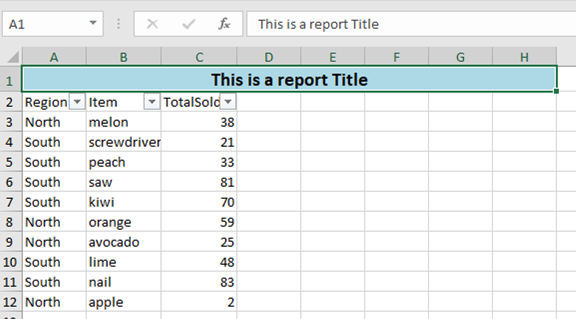
|
||||||
|
|
||||||
|
# What's new 6.1.0
|
||||||
|
|
||||||
|
Thank you to [James O'Neill](https://github.com/jhoneill)
|
||||||
|
- Instead of specifying a path provides an Excel Package object (from `Open-ExcelPackage`), using this avoids re-reading the whole file when importing multiple parts of it. To allow multiple read operations `Import-Excel` does NOT close the package, and you should use `Close-ExcelPackage -noSave` to close it.
|
||||||
|
|
||||||
# What's new 6.0.0
|
# What's new 6.0.0
|
||||||
|
|
||||||
Thank you to [James O'Neill](https://github.com/jhoneill) for the optimizations, and refactoring leading to a ***~10x*** speed increase. Thanks to [ili101](https://github.com/ili101) for earlier PRs that provided the ground work for this.
|
Thank you to [James O'Neill](https://github.com/jhoneill) for the optimizations, and refactoring leading to a ***~10x*** speed increase. Thanks to [ili101](https://github.com/ili101) for earlier PRs that provided the ground work for this.
|
||||||
|
|||||||
@@ -15,7 +15,8 @@
|
|||||||
C:\> dir c:\reports\*.xlsx | Remove-WorkSheet
|
C:\> dir c:\reports\*.xlsx | Remove-WorkSheet
|
||||||
Removes 'Sheet1' from all the xlsx files in the c:\reports directory
|
Removes 'Sheet1' from all the xlsx files in the c:\reports directory
|
||||||
|
|
||||||
#>
|
#>
|
||||||
|
[cmdletbinding(SupportsShouldProcess=$true)]
|
||||||
param(
|
param(
|
||||||
# [Parameter(ValueFromPipelineByPropertyName)]
|
# [Parameter(ValueFromPipelineByPropertyName)]
|
||||||
[Parameter(ValueFromPipelineByPropertyName)]
|
[Parameter(ValueFromPipelineByPropertyName)]
|
||||||
@@ -34,9 +35,10 @@
|
|||||||
|
|
||||||
if ($pkg) {
|
if ($pkg) {
|
||||||
foreach ($wsn in $WorksheetName) {
|
foreach ($wsn in $WorksheetName) {
|
||||||
$pkg.Workbook.Worksheets.Delete($wsn)
|
if ($PSCmdlet.ShouldProcess($FullName,"Remove Sheet $wsn")) {
|
||||||
|
$pkg.Workbook.Worksheets.Delete($wsn)
|
||||||
|
}
|
||||||
}
|
}
|
||||||
|
|
||||||
Close-ExcelPackage -ExcelPackage $pkg -Show:$Show
|
Close-ExcelPackage -ExcelPackage $pkg -Show:$Show
|
||||||
}
|
}
|
||||||
}
|
}
|
||||||
|
|||||||
@@ -90,6 +90,8 @@
|
|||||||
Export-Excel
|
Export-Excel
|
||||||
#>
|
#>
|
||||||
[CmdletBinding(DefaultParameterSetName="none")]
|
[CmdletBinding(DefaultParameterSetName="none")]
|
||||||
|
[Diagnostics.CodeAnalysis.SuppressMessageAttribute('PSAvoidGlobalVars', '', Justification="Allowed to use DBSessions Global variable from GETSQL Module")]
|
||||||
|
|
||||||
param (
|
param (
|
||||||
[Parameter(ParameterSetName="SQLConnection", Mandatory=$true)]
|
[Parameter(ParameterSetName="SQLConnection", Mandatory=$true)]
|
||||||
[Parameter(ParameterSetName="ODBCConnection", Mandatory=$true)]
|
[Parameter(ParameterSetName="ODBCConnection", Mandatory=$true)]
|
||||||
|
|||||||
@@ -1,4 +1,7 @@
|
|||||||
function Set-CellStyle {
|
[Diagnostics.CodeAnalysis.SuppressMessageAttribute('PSUseShouldProcessForStateChangingFunctions', '', Scope='Function', Target='Set*', Justification='Does not change system state')]
|
||||||
|
param()
|
||||||
|
|
||||||
|
function Set-CellStyle {
|
||||||
param(
|
param(
|
||||||
$WorkSheet,
|
$WorkSheet,
|
||||||
$Row,
|
$Row,
|
||||||
|
|||||||
@@ -44,6 +44,8 @@
|
|||||||
[cmdletbinding()]
|
[cmdletbinding()]
|
||||||
[Alias("Set-Column")]
|
[Alias("Set-Column")]
|
||||||
[OutputType([OfficeOpenXml.ExcelColumn],[String])]
|
[OutputType([OfficeOpenXml.ExcelColumn],[String])]
|
||||||
|
[Diagnostics.CodeAnalysis.SuppressMessageAttribute('PSUseShouldProcessForStateChangingFunctions', '',Justification='Does not change system state')]
|
||||||
|
[Diagnostics.CodeAnalysis.SuppressMessageAttribute('PSUseDeclaredVarsMoreThanAssignments', '', Justification="Variables created for script block which may be passed as a parameter, but not used in the script")]
|
||||||
Param (
|
Param (
|
||||||
#If specifying the worksheet by name, the ExcelPackage object which contains the worksheet also needs to be passed.
|
#If specifying the worksheet by name, the ExcelPackage object which contains the worksheet also needs to be passed.
|
||||||
[Parameter(ParameterSetName="Package",Mandatory=$true)]
|
[Parameter(ParameterSetName="Package",Mandatory=$true)]
|
||||||
@@ -138,7 +140,7 @@
|
|||||||
process {
|
process {
|
||||||
if ($null -eq $workSheet.Dimension) {Write-Warning "Can't format an empty worksheet."; return}
|
if ($null -eq $workSheet.Dimension) {Write-Warning "Can't format an empty worksheet."; return}
|
||||||
if ($Column -eq 0 ) {$Column = $endColumn + 1 }
|
if ($Column -eq 0 ) {$Column = $endColumn + 1 }
|
||||||
$columnName = [OfficeOpenXml.ExcelCellAddress]::new(1,$column).Address -replace "1",""
|
$columnName = (New-Object 'OfficeOpenXml.ExcelCellAddress' @(1, $column)).Address -replace "1",""
|
||||||
Write-Verbose -Message "Updating Column $columnName"
|
Write-Verbose -Message "Updating Column $columnName"
|
||||||
#If there is a heading, insert it and use it as the name for a range (if we're creating one)
|
#If there is a heading, insert it and use it as the name for a range (if we're creating one)
|
||||||
if ($PSBoundParameters.ContainsKey('Heading')) {
|
if ($PSBoundParameters.ContainsKey('Heading')) {
|
||||||
|
|||||||
@@ -33,6 +33,8 @@
|
|||||||
[cmdletbinding()]
|
[cmdletbinding()]
|
||||||
[Alias("Set-Row")]
|
[Alias("Set-Row")]
|
||||||
[OutputType([OfficeOpenXml.ExcelRow],[String])]
|
[OutputType([OfficeOpenXml.ExcelRow],[String])]
|
||||||
|
[Diagnostics.CodeAnalysis.SuppressMessageAttribute('PSUseShouldProcessForStateChangingFunctions', '',Justification='Does not change system state')]
|
||||||
|
[Diagnostics.CodeAnalysis.SuppressMessageAttribute('PSUseDeclaredVarsMoreThanAssignments', '', Justification="Variables created for script block which may be passed as a parameter, but not used in the script")]
|
||||||
Param (
|
Param (
|
||||||
#An Excel package object - e.g. from Export-Excel -PassThru - requires a sheet name.
|
#An Excel package object - e.g. from Export-Excel -PassThru - requires a sheet name.
|
||||||
[Parameter(ParameterSetName="Package",Mandatory=$true)]
|
[Parameter(ParameterSetName="Package",Mandatory=$true)]
|
||||||
@@ -143,7 +145,7 @@
|
|||||||
#Fill in the data
|
#Fill in the data
|
||||||
if ($PSBoundParameters.ContainsKey('Value')) {foreach ($column in ($StartColumn..$endColumn)) {
|
if ($PSBoundParameters.ContainsKey('Value')) {foreach ($column in ($StartColumn..$endColumn)) {
|
||||||
#We might want the column name in a script block
|
#We might want the column name in a script block
|
||||||
$columnName = [OfficeOpenXml.ExcelCellAddress]::new(1,$column).Address -replace "1",""
|
$columnName = (New-Object -TypeName OfficeOpenXml.ExcelCellAddress @(1,$column)).Address -replace "1",""
|
||||||
if ($Value -is [scriptblock] ) {
|
if ($Value -is [scriptblock] ) {
|
||||||
#re-create the script block otherwise variables from this function are out of scope.
|
#re-create the script block otherwise variables from this function are out of scope.
|
||||||
$cellData = & ([scriptblock]::create( $Value ))
|
$cellData = & ([scriptblock]::create( $Value ))
|
||||||
@@ -177,7 +179,7 @@
|
|||||||
if ($PSBoundParameters.ContainsKey($p)) {$params[$p] = $PSBoundParameters[$p]}
|
if ($PSBoundParameters.ContainsKey($p)) {$params[$p] = $PSBoundParameters[$p]}
|
||||||
}
|
}
|
||||||
if ($params.Count) {
|
if ($params.Count) {
|
||||||
$theRange = [OfficeOpenXml.ExcelAddress]::New($Row, $StartColumn, $Row, $endColumn)
|
$theRange = New-Object -TypeName OfficeOpenXml.ExcelAddress @($Row, $StartColumn, $Row, $endColumn)
|
||||||
Set-ExcelRange -WorkSheet $Worksheet -Range $theRange @params
|
Set-ExcelRange -WorkSheet $Worksheet -Range $theRange @params
|
||||||
}
|
}
|
||||||
#endregion
|
#endregion
|
||||||
|
|||||||
@@ -9,6 +9,7 @@
|
|||||||
Set-WorkSheetProtection -WorkSheet $planSheet -IsProtected -AllowAll -AllowInsertColumns:$false -AllowDeleteColumns:$false -UnLockAddress "A:N"
|
Set-WorkSheetProtection -WorkSheet $planSheet -IsProtected -AllowAll -AllowInsertColumns:$false -AllowDeleteColumns:$false -UnLockAddress "A:N"
|
||||||
Turns on protection for the worksheet in $planSheet, checks all the allow boxes excel Insert and Delete columns and unlocks columns A-N
|
Turns on protection for the worksheet in $planSheet, checks all the allow boxes excel Insert and Delete columns and unlocks columns A-N
|
||||||
#>
|
#>
|
||||||
|
[Diagnostics.CodeAnalysis.SuppressMessageAttribute('PSUseShouldProcessForStateChangingFunctions', '',Justification='Does not change system state')]
|
||||||
param (
|
param (
|
||||||
#The worksheet where protection is to be applied.
|
#The worksheet where protection is to be applied.
|
||||||
[Parameter(Mandatory=$true)]
|
[Parameter(Mandatory=$true)]
|
||||||
|
|||||||
114
SetFormat.ps1
114
SetFormat.ps1
@@ -1,4 +1,4 @@
|
|||||||
Function Set-ExcelRange {
|
function Set-ExcelRange {
|
||||||
<#
|
<#
|
||||||
.SYNOPSIS
|
.SYNOPSIS
|
||||||
Applies number, font, alignment and/or color formatting, values or formulas to a range of Excel cells.
|
Applies number, font, alignment and/or color formatting, values or formulas to a range of Excel cells.
|
||||||
@@ -32,6 +32,7 @@
|
|||||||
#>
|
#>
|
||||||
[cmdletbinding()]
|
[cmdletbinding()]
|
||||||
[Alias("Set-Format")]
|
[Alias("Set-Format")]
|
||||||
|
[Diagnostics.CodeAnalysis.SuppressMessageAttribute('PSUseShouldProcessForStateChangingFunctions', '',Justification='Does not change system state')]
|
||||||
Param (
|
Param (
|
||||||
#One or more row(s), Column(s) and/or block(s) of cells to format.
|
#One or more row(s), Column(s) and/or block(s) of cells to format.
|
||||||
[Parameter(ValueFromPipeline = $true,Position=0)]
|
[Parameter(ValueFromPipeline = $true,Position=0)]
|
||||||
@@ -55,6 +56,7 @@
|
|||||||
#Style for the right border.
|
#Style for the right border.
|
||||||
[OfficeOpenXml.Style.ExcelBorderStyle]$BorderRight,
|
[OfficeOpenXml.Style.ExcelBorderStyle]$BorderRight,
|
||||||
#Colour for the text - if none is specified it will be left as it is.
|
#Colour for the text - if none is specified it will be left as it is.
|
||||||
|
[Alias('ForegroundColor')]
|
||||||
$FontColor,
|
$FontColor,
|
||||||
#Value for the cell.
|
#Value for the cell.
|
||||||
$Value,
|
$Value,
|
||||||
@@ -106,7 +108,9 @@
|
|||||||
#Hide a row or column (not a range); use -Hidden:$false to unhide.
|
#Hide a row or column (not a range); use -Hidden:$false to unhide.
|
||||||
[Switch]$Hidden,
|
[Switch]$Hidden,
|
||||||
#Locks cells. Cells are locked by default use -locked:$false on the whole sheet and then lock specific ones, and enable protection on the sheet.
|
#Locks cells. Cells are locked by default use -locked:$false on the whole sheet and then lock specific ones, and enable protection on the sheet.
|
||||||
[Switch]$Locked
|
[Switch]$Locked,
|
||||||
|
#Merges cells - it is recommended that you explicitly set -HorizontalAlignment
|
||||||
|
[Switch]$Merge
|
||||||
)
|
)
|
||||||
process {
|
process {
|
||||||
if ($Range -is [Array]) {
|
if ($Range -is [Array]) {
|
||||||
@@ -167,6 +171,9 @@
|
|||||||
if ($PSBoundParameters.ContainsKey('VerticalAlignment')) {
|
if ($PSBoundParameters.ContainsKey('VerticalAlignment')) {
|
||||||
$Range.Style.VerticalAlignment = $VerticalAlignment
|
$Range.Style.VerticalAlignment = $VerticalAlignment
|
||||||
}
|
}
|
||||||
|
if ($PSBoundParameters.ContainsKey('Merge')) {
|
||||||
|
$Range.Merge = [boolean]$Merge
|
||||||
|
}
|
||||||
if ($PSBoundParameters.ContainsKey('Value')) {
|
if ($PSBoundParameters.ContainsKey('Value')) {
|
||||||
if ($Value -match '^=') {$PSBoundParameters["Formula"] = $Value -replace '^=','' }
|
if ($Value -match '^=') {$PSBoundParameters["Formula"] = $Value -replace '^=','' }
|
||||||
else {
|
else {
|
||||||
@@ -250,7 +257,7 @@
|
|||||||
}
|
}
|
||||||
}
|
}
|
||||||
|
|
||||||
Function NumberFormatCompletion {
|
function NumberFormatCompletion {
|
||||||
param($commandName, $parameterName, $wordToComplete, $commandAst, $fakeBoundParameter)
|
param($commandName, $parameterName, $wordToComplete, $commandAst, $fakeBoundParameter)
|
||||||
$numformats = [ordered]@{
|
$numformats = [ordered]@{
|
||||||
"General" = "General" # format ID 0
|
"General" = "General" # format ID 0
|
||||||
@@ -293,6 +300,7 @@ Function NumberFormatCompletion {
|
|||||||
if (Get-Command -ErrorAction SilentlyContinue -name Register-ArgumentCompleter) {
|
if (Get-Command -ErrorAction SilentlyContinue -name Register-ArgumentCompleter) {
|
||||||
Register-ArgumentCompleter -CommandName Add-ConditionalFormatting -ParameterName NumberFormat -ScriptBlock $Function:NumberFormatCompletion
|
Register-ArgumentCompleter -CommandName Add-ConditionalFormatting -ParameterName NumberFormat -ScriptBlock $Function:NumberFormatCompletion
|
||||||
Register-ArgumentCompleter -CommandName Export-Excel -ParameterName NumberFormat -ScriptBlock $Function:NumberFormatCompletion
|
Register-ArgumentCompleter -CommandName Export-Excel -ParameterName NumberFormat -ScriptBlock $Function:NumberFormatCompletion
|
||||||
|
Register-ArgumentCompleter -CommandName New-ExcelStyle -ParameterName NumberFormat -ScriptBlock $Function:NumberFormatCompletion
|
||||||
Register-ArgumentCompleter -CommandName Set-ExcelRange -ParameterName NumberFormat -ScriptBlock $Function:NumberFormatCompletion
|
Register-ArgumentCompleter -CommandName Set-ExcelRange -ParameterName NumberFormat -ScriptBlock $Function:NumberFormatCompletion
|
||||||
Register-ArgumentCompleter -CommandName Set-ExcelColumn -ParameterName NumberFormat -ScriptBlock $Function:NumberFormatCompletion
|
Register-ArgumentCompleter -CommandName Set-ExcelColumn -ParameterName NumberFormat -ScriptBlock $Function:NumberFormatCompletion
|
||||||
Register-ArgumentCompleter -CommandName Set-ExcelRow -ParameterName NumberFormat -ScriptBlock $Function:NumberFormatCompletion
|
Register-ArgumentCompleter -CommandName Set-ExcelRow -ParameterName NumberFormat -ScriptBlock $Function:NumberFormatCompletion
|
||||||
@@ -304,7 +312,27 @@ if (Get-Command -ErrorAction SilentlyContinue -name Register-ArgumentCompleter)
|
|||||||
Register-ArgumentCompleter -CommandName Add-ExcelChart -ParameterName YAxisNumberformat -ScriptBlock $Function:NumberFormatCompletion
|
Register-ArgumentCompleter -CommandName Add-ExcelChart -ParameterName YAxisNumberformat -ScriptBlock $Function:NumberFormatCompletion
|
||||||
}
|
}
|
||||||
|
|
||||||
Function Expand-NumberFormat {
|
function ListFonts {
|
||||||
|
param($commandName, $parameterName, $wordToComplete, $commandAst, $fakeBoundParameter)
|
||||||
|
if (-not $script:FontFamilies) {
|
||||||
|
$script:FontFamilies = @("","")
|
||||||
|
try {
|
||||||
|
$script:FontFamilies = (New-Object System.Drawing.Text.InstalledFontCollection).Families.Name
|
||||||
|
}
|
||||||
|
catch {}
|
||||||
|
}
|
||||||
|
$script:FontFamilies.where({$_ -Gt "" -and $_ -like "$wordToComplete*"} ) | ForEach-Object {
|
||||||
|
New-Object -TypeName System.Management.Automation.CompletionResult -ArgumentList "'$_'" , $_ ,
|
||||||
|
([System.Management.Automation.CompletionResultType]::ParameterValue) , $_
|
||||||
|
}
|
||||||
|
}
|
||||||
|
if (Get-Command -ErrorAction SilentlyContinue -name Register-ArgumentCompleter) {
|
||||||
|
Register-ArgumentCompleter -CommandName New-ExcelStyle -ParameterName FontName -ScriptBlock $Function:ListFonts
|
||||||
|
Register-ArgumentCompleter -CommandName Set-ExcelColumn -ParameterName FontName -ScriptBlock $Function:ListFonts
|
||||||
|
Register-ArgumentCompleter -CommandName Set-ExcelRange -ParameterName FontName -ScriptBlock $Function:ListFonts
|
||||||
|
Register-ArgumentCompleter -CommandName Set-ExcelRow -ParameterName FontName -ScriptBlock $Function:ListFonts
|
||||||
|
}
|
||||||
|
function Expand-NumberFormat {
|
||||||
<#
|
<#
|
||||||
.SYNOPSIS
|
.SYNOPSIS
|
||||||
Converts short names for number formats to the formatting strings used in Excel
|
Converts short names for number formats to the formatting strings used in Excel
|
||||||
@@ -380,3 +408,81 @@ Function Expand-NumberFormat {
|
|||||||
Default {return $NumberFormat}
|
Default {return $NumberFormat}
|
||||||
}
|
}
|
||||||
}
|
}
|
||||||
|
|
||||||
|
function New-ExcelStyle {
|
||||||
|
param (
|
||||||
|
[Alias("Address")]
|
||||||
|
$Range ,
|
||||||
|
#Number format to apply to cells e.g. "dd/MM/yyyy HH:mm", "£#,##0.00;[Red]-£#,##0.00", "0.00%" , "##/##" , "0.0E+0" etc.
|
||||||
|
[Alias("NFormat")]
|
||||||
|
$NumberFormat,
|
||||||
|
#Style of border to draw around the range.
|
||||||
|
[OfficeOpenXml.Style.ExcelBorderStyle]$BorderAround,
|
||||||
|
#Color of the border.
|
||||||
|
$BorderColor=[System.Drawing.Color]::Black,
|
||||||
|
#Style for the bottom border.
|
||||||
|
[OfficeOpenXml.Style.ExcelBorderStyle]$BorderBottom,
|
||||||
|
#Style for the top border.
|
||||||
|
[OfficeOpenXml.Style.ExcelBorderStyle]$BorderTop,
|
||||||
|
#Style for the left border.
|
||||||
|
[OfficeOpenXml.Style.ExcelBorderStyle]$BorderLeft,
|
||||||
|
#Style for the right border.
|
||||||
|
[OfficeOpenXml.Style.ExcelBorderStyle]$BorderRight,
|
||||||
|
#Colour for the text - if none is specified it will be left as it is.
|
||||||
|
[Alias('ForegroundColor')]
|
||||||
|
$FontColor,
|
||||||
|
#Value for the cell.
|
||||||
|
$Value,
|
||||||
|
#Formula for the cell.
|
||||||
|
$Formula,
|
||||||
|
#Specifies formula should be an array formula (a.k.a CSE [ctrl-shift-enter] formula).
|
||||||
|
[Switch]$ArrayFormula,
|
||||||
|
#Clear Bold, Italic, StrikeThrough and Underline and set color to Black.
|
||||||
|
[Switch]$ResetFont,
|
||||||
|
#Make text bold; use -Bold:$false to remove bold.
|
||||||
|
[Switch]$Bold,
|
||||||
|
#Make text italic; use -Italic:$false to remove italic.
|
||||||
|
[Switch]$Italic,
|
||||||
|
#Underline the text using the underline style in -UnderlineType; use -Underline:$false to remove underlining.
|
||||||
|
[Switch]$Underline,
|
||||||
|
#Specifies whether underlining should be single or double, normal or accounting mode. The default is "Single".
|
||||||
|
[OfficeOpenXml.Style.ExcelUnderLineType]$UnderLineType = [OfficeOpenXml.Style.ExcelUnderLineType]::Single,
|
||||||
|
#Strike through text; use -Strikethru:$false to remove Strike through
|
||||||
|
[Switch]$StrikeThru,
|
||||||
|
#Subscript or Superscript (or none).
|
||||||
|
[OfficeOpenXml.Style.ExcelVerticalAlignmentFont]$FontShift,
|
||||||
|
#Font to use - Excel defaults to Calibri.
|
||||||
|
[String]$FontName,
|
||||||
|
#Point size for the text.
|
||||||
|
[float]$FontSize,
|
||||||
|
#Change background color.
|
||||||
|
$BackgroundColor,
|
||||||
|
#Background pattern - Solid by default.
|
||||||
|
[OfficeOpenXml.Style.ExcelFillStyle]$BackgroundPattern = [OfficeOpenXml.Style.ExcelFillStyle]::Solid ,
|
||||||
|
#Secondary color for background pattern.
|
||||||
|
[Alias("PatternColour")]
|
||||||
|
$PatternColor,
|
||||||
|
#Turn on Text-Wrapping; use -WrapText:$false to turn off wrapping.
|
||||||
|
[Switch]$WrapText,
|
||||||
|
#Position cell contents to Left, Right, Center etc. default is 'General'.
|
||||||
|
[OfficeOpenXml.Style.ExcelHorizontalAlignment]$HorizontalAlignment,
|
||||||
|
#Position cell contents to Top, Bottom or Center.
|
||||||
|
[OfficeOpenXml.Style.ExcelVerticalAlignment]$VerticalAlignment,
|
||||||
|
#Degrees to rotate text. Up to +90 for anti-clockwise ("upwards"), or to -90 for clockwise.
|
||||||
|
[ValidateRange(-90, 90)]
|
||||||
|
[int]$TextRotation ,
|
||||||
|
#Autofit cells to width (columns or ranges only).
|
||||||
|
[Alias("AutoFit")]
|
||||||
|
[Switch]$AutoSize,
|
||||||
|
#Set cells to a fixed width (columns or ranges only), ignored if Autosize is specified.
|
||||||
|
[float]$Width,
|
||||||
|
#Set cells to a fixed height (rows or ranges only).
|
||||||
|
[float]$Height,
|
||||||
|
#Hide a row or column (not a range); use -Hidden:$false to unhide.
|
||||||
|
[Switch]$Hidden,
|
||||||
|
#Locks cells. Cells are locked by default use -locked:$false on the whole sheet and then lock specific ones, and enable protection on the sheet.
|
||||||
|
[Switch]$Locked,
|
||||||
|
[Switch]$Merge
|
||||||
|
)
|
||||||
|
$PSBoundParameters
|
||||||
|
}
|
||||||
@@ -1,6 +1,11 @@
|
|||||||
|
[Diagnostics.CodeAnalysis.SuppressMessageAttribute('PSUseShouldProcessForStateChangingFunctions', '', Scope='Function', Target='Update*', Justification='Does not change system state')]
|
||||||
|
[Diagnostics.CodeAnalysis.SuppressMessageAttribute('PSUseSingularNouns', '', Scope='Function', Target='Update*', Justification='Property would be incorrect')]
|
||||||
|
|
||||||
|
param()
|
||||||
|
|
||||||
Function Update-FirstObjectProperties {
|
Function Update-FirstObjectProperties {
|
||||||
<#
|
<#
|
||||||
.SYNOPSIS
|
.SYNOPSIS
|
||||||
Updates the first object to contain all the properties of the object with the most properties in the array.
|
Updates the first object to contain all the properties of the object with the most properties in the array.
|
||||||
|
|
||||||
.DESCRIPTION
|
.DESCRIPTION
|
||||||
@@ -30,7 +35,7 @@ Function Update-FirstObjectProperties {
|
|||||||
$Array = $Obj1, $Obj2, $Obj3
|
$Array = $Obj1, $Obj2, $Obj3
|
||||||
$Array | Out-GridView -Title 'Not showing Member3 and Member4'
|
$Array | Out-GridView -Title 'Not showing Member3 and Member4'
|
||||||
$Array | Update-FirstObjectProperties | Out-GridView -Title 'All properties are visible'
|
$Array | Update-FirstObjectProperties | Out-GridView -Title 'All properties are visible'
|
||||||
|
|
||||||
Updates the fist object of the array by adding Member3 and Member4.
|
Updates the fist object of the array by adding Member3 and Member4.
|
||||||
|
|
||||||
.EXAMPLE
|
.EXAMPLE
|
||||||
@@ -79,7 +84,7 @@ Function Update-FirstObjectProperties {
|
|||||||
$Union = @()
|
$Union = @()
|
||||||
$Input | ForEach-Object {
|
$Input | ForEach-Object {
|
||||||
If ($Union.Count) {
|
If ($Union.Count) {
|
||||||
$_ | Get-Member | Where {-not ($Union[0] | Get-Member $_.Name)} | ForEach-Object {
|
$_ | Get-Member | Where-Object {-not ($Union[0] | Get-Member $_.Name)} | ForEach-Object {
|
||||||
$Union[0] | Add-Member -MemberType NoteProperty -Name $_.Name -Value $Null
|
$Union[0] | Add-Member -MemberType NoteProperty -Name $_.Name -Value $Null
|
||||||
}
|
}
|
||||||
}
|
}
|
||||||
|
|||||||
49
__tests__/AddTrendlinesToAChart.tests.ps1
Normal file
49
__tests__/AddTrendlinesToAChart.tests.ps1
Normal file
@@ -0,0 +1,49 @@
|
|||||||
|
Describe "Test adding trendlines to charts" {
|
||||||
|
BeforeAll {
|
||||||
|
$script:data = ConvertFrom-Csv @"
|
||||||
|
Region,Item,TotalSold
|
||||||
|
West,screws,60
|
||||||
|
South,lemon,48
|
||||||
|
South,apple,71
|
||||||
|
East,screwdriver,70
|
||||||
|
East,kiwi,32
|
||||||
|
West,screwdriver,1
|
||||||
|
South,melon,21
|
||||||
|
East,apple,79
|
||||||
|
South,apple,68
|
||||||
|
South,avocado,73
|
||||||
|
"@
|
||||||
|
|
||||||
|
}
|
||||||
|
|
||||||
|
BeforeEach {
|
||||||
|
$xlfile = "$env:TEMP\trendLine.xlsx"
|
||||||
|
Remove-Item $xlfile -ErrorAction SilentlyContinue
|
||||||
|
}
|
||||||
|
|
||||||
|
It "Should add a linear trendline" {
|
||||||
|
|
||||||
|
$cd = New-ExcelChartDefinition -XRange Region -YRange TotalSold -ChartType ColumnClustered -ChartTrendLine Linear
|
||||||
|
$data | Export-Excel $xlfile -ExcelChartDefinition $cd -AutoNameRange
|
||||||
|
|
||||||
|
$excel = Open-ExcelPackage -Path $xlfile
|
||||||
|
$ws = $excel.Workbook.Worksheets["Sheet1"]
|
||||||
|
|
||||||
|
$ws.Drawings[0].Series.TrendLines.Type | Should Be 'Linear'
|
||||||
|
|
||||||
|
Close-ExcelPackage $excel
|
||||||
|
}
|
||||||
|
|
||||||
|
It "Should add a MovingAvgerage trendline" {
|
||||||
|
|
||||||
|
$cd = New-ExcelChartDefinition -XRange Region -YRange TotalSold -ChartType ColumnClustered -ChartTrendLine MovingAvgerage
|
||||||
|
$data | Export-Excel $xlfile -ExcelChartDefinition $cd -AutoNameRange
|
||||||
|
|
||||||
|
$excel = Open-ExcelPackage -Path $xlfile
|
||||||
|
$ws = $excel.Workbook.Worksheets["Sheet1"]
|
||||||
|
|
||||||
|
$ws.Drawings[0].Series.TrendLines.Type | Should Be 'MovingAvgerage'
|
||||||
|
|
||||||
|
Close-ExcelPackage $excel
|
||||||
|
}
|
||||||
|
}
|
||||||
@@ -114,7 +114,7 @@ Describe "Compare Worksheet" {
|
|||||||
|
|
||||||
Context "More complex comparison: output check and different worksheet names " {
|
Context "More complex comparison: output check and different worksheet names " {
|
||||||
BeforeAll {
|
BeforeAll {
|
||||||
[System.Collections.ArrayList]$s = get-service | Select-Object -first 25 -Property RequiredServices, CanPauseAndContinue, CanShutdown, CanStop,
|
[System.Collections.ArrayList]$s = get-service | Select-Object -first 25 -Property RequiredServices, CanPauseAndContinue, CanShutdown, CanStop,
|
||||||
DisplayName, DependentServices, MachineName, ServiceName, ServicesDependedOn, ServiceHandle, Status, ServiceType, StartType -ExcludeProperty Name
|
DisplayName, DependentServices, MachineName, ServiceName, ServicesDependedOn, ServiceHandle, Status, ServiceType, StartType -ExcludeProperty Name
|
||||||
$s | Export-Excel -Path $env:temp\server1.xlsx -WorkSheetname Server1
|
$s | Export-Excel -Path $env:temp\server1.xlsx -WorkSheetname Server1
|
||||||
#$s is a zero based array, excel rows are 1 based and excel has a header row so Excel rows will be 2 + index in $s
|
#$s is a zero based array, excel rows are 1 based and excel has a header row so Excel rows will be 2 + index in $s
|
||||||
@@ -328,7 +328,7 @@ Describe "Merge Multiple sheets" {
|
|||||||
$ws.Cells[12,9 ].Value | Should be $ws.Cells[12,5].Value
|
$ws.Cells[12,9 ].Value | Should be $ws.Cells[12,5].Value
|
||||||
$ws.Cells[12,10].Value | Should be $ws.Cells[12,6].Value
|
$ws.Cells[12,10].Value | Should be $ws.Cells[12,6].Value
|
||||||
}
|
}
|
||||||
it "Creared Conditional formatting rules " {
|
it "Created Conditional formatting rules " {
|
||||||
$cf=$ws.ConditionalFormatting
|
$cf=$ws.ConditionalFormatting
|
||||||
$cf.Count | Should be 17
|
$cf.Count | Should be 17
|
||||||
$cf[16].Address.Address | Should be 'B2:B1048576'
|
$cf[16].Address.Address | Should be 'B2:B1048576'
|
||||||
|
|||||||
@@ -1,6 +1,6 @@
|
|||||||
Import-Module $PSScriptRoot\..\ImportExcel.psd1 -Force
|
Import-Module $PSScriptRoot\..\ImportExcel.psd1 -Force
|
||||||
|
|
||||||
$xlFile = ".\testSQL.xlsx"
|
$xlFile = "$env:TEMP\testSQL.xlsx"
|
||||||
|
|
||||||
Describe "ConvertFrom-ExcelToSQLInsert" {
|
Describe "ConvertFrom-ExcelToSQLInsert" {
|
||||||
|
|
||||||
|
|||||||
@@ -29,4 +29,14 @@ Describe "Tests" {
|
|||||||
$timer.TotalMilliseconds | should BeLessThan 3000
|
$timer.TotalMilliseconds | should BeLessThan 3000
|
||||||
}
|
}
|
||||||
|
|
||||||
|
It "Should be able to open, read and close as seperate actions" {
|
||||||
|
$timer = Measure-Command {
|
||||||
|
$excel = Open-ExcelPackage $PSScriptRoot\Simple.xlsx
|
||||||
|
$data = Import-Excel -ExcelPackage $excel
|
||||||
|
Close-ExcelPackage -ExcelPackage $excel -NoSave}
|
||||||
|
$timer.TotalMilliseconds | should BeLessThan 2100
|
||||||
|
$data.count | Should be 2
|
||||||
|
$data[0].p1 | Should be "a"
|
||||||
|
$data[1].p1 | Should be "b"
|
||||||
|
}
|
||||||
}
|
}
|
||||||
@@ -91,12 +91,12 @@ Describe "Join Worksheet part 1" {
|
|||||||
}
|
}
|
||||||
$path = "$env:TEMP\Test.xlsx"
|
$path = "$env:TEMP\Test.xlsx"
|
||||||
Remove-item -Path $path -ErrorAction SilentlyContinue
|
Remove-item -Path $path -ErrorAction SilentlyContinue
|
||||||
IF ($PSVersionTable.PSVersion.Major -gt 5) {Write-warning -message "Part 2 Does not run on V6"; return}
|
#switched to CIM objects so test runs on V6
|
||||||
Describe "Join Worksheet part 2" {
|
Describe "Join Worksheet part 2" {
|
||||||
Get-WmiObject -Class win32_logicaldisk |
|
Get-CimInstance -ClassName win32_logicaldisk |
|
||||||
Select-Object -Property DeviceId,VolumeName, Size,Freespace |
|
Select-Object -Property DeviceId,VolumeName, Size,Freespace |
|
||||||
Export-Excel -Path $path -WorkSheetname Volumes -NumberFormat "0,000"
|
Export-Excel -Path $path -WorkSheetname Volumes -NumberFormat "0,000"
|
||||||
Get-NetAdapter |
|
Get-CimInstance -Namespace root/StandardCimv2 -class MSFT_NetAdapter |
|
||||||
Select-Object -Property Name,InterfaceDescription,MacAddress,LinkSpeed |
|
Select-Object -Property Name,InterfaceDescription,MacAddress,LinkSpeed |
|
||||||
Export-Excel -Path $path -WorkSheetname NetAdapters
|
Export-Excel -Path $path -WorkSheetname NetAdapters
|
||||||
|
|
||||||
@@ -122,6 +122,6 @@ Describe "Join Worksheet part 2" {
|
|||||||
$ws.Cells["A$NextRow"].Value | Should be $excel.Workbook.Worksheets[2].Cells["A2"].value
|
$ws.Cells["A$NextRow"].Value | Should be $excel.Workbook.Worksheets[2].Cells["A2"].value
|
||||||
$ws.Cells["B$NextRow"].Value | Should be $excel.Workbook.Worksheets[2].Cells["B2"].value
|
$ws.Cells["B$NextRow"].Value | Should be $excel.Workbook.Worksheets[2].Cells["B2"].value
|
||||||
}
|
}
|
||||||
}
|
}
|
||||||
}
|
}
|
||||||
|
|
||||||
|
|||||||
@@ -12,4 +12,4 @@ steps:
|
|||||||
trigger:
|
trigger:
|
||||||
paths:
|
paths:
|
||||||
exclude:
|
exclude:
|
||||||
- README.md
|
- README.md
|
||||||
|
|||||||
@@ -69,6 +69,8 @@
|
|||||||
Only the unchanged rows are highlighted.
|
Only the unchanged rows are highlighted.
|
||||||
#>
|
#>
|
||||||
[cmdletbinding(DefaultParameterSetName)]
|
[cmdletbinding(DefaultParameterSetName)]
|
||||||
|
[Diagnostics.CodeAnalysis.SuppressMessageAttribute('PSAvoidUsingWriteHost', '', Justification="Write host used for sub-warning level message to operator which does not form output")]
|
||||||
|
[Diagnostics.CodeAnalysis.SuppressMessageAttribute('PSUseDeclaredVarsMoreThanAssignments', '', Justification="False positives when initializing variable in begin block")]
|
||||||
Param(
|
Param(
|
||||||
#First file to compare.
|
#First file to compare.
|
||||||
[parameter(Mandatory=$true,Position=0)]
|
[parameter(Mandatory=$true,Position=0)]
|
||||||
@@ -219,11 +221,9 @@
|
|||||||
}
|
}
|
||||||
elseif ($diff -and $FontColor) {Write-Warning -Message "To match rows to set changed cells, you must specify -Key and it must match one of the included properties." }
|
elseif ($diff -and $FontColor) {Write-Warning -Message "To match rows to set changed cells, you must specify -Key and it must match one of the included properties." }
|
||||||
|
|
||||||
#if nothing was found write a message which wont be redirected
|
#if nothing was found write a message which will not be redirected
|
||||||
if (-not $diff) {Write-Host "Comparison of $Referencefile::$worksheet1 and $Differencefile::$WorkSheet2 returned no results." }
|
if (-not $diff) {Write-Host "Comparison of $Referencefile::$worksheet1 and $Differencefile::$WorkSheet2 returned no results." }
|
||||||
|
|
||||||
|
|
||||||
|
|
||||||
if ($Show) {
|
if ($Show) {
|
||||||
Start-Process -FilePath $Referencefile
|
Start-Process -FilePath $Referencefile
|
||||||
if (-not $oneFile) { Start-Process -FilePath $Differencefile }
|
if (-not $oneFile) { Start-Process -FilePath $Differencefile }
|
||||||
|
|||||||
BIN
images/NewExcelStyle.png
Normal file
BIN
images/NewExcelStyle.png
Normal file

Binary file not shown.
|
After Width: | Height: | Size: 49 KiB |
74
plot.ps1
74
plot.ps1
@@ -1,6 +1,8 @@
|
|||||||
|
[Diagnostics.CodeAnalysis.SuppressMessageAttribute('PSUseDeclaredVarsMoreThanAssignments', '', Justification="False positives")]
|
||||||
|
param()
|
||||||
class PSPlot {
|
class PSPlot {
|
||||||
hidden $path
|
hidden $path
|
||||||
hidden $pkg
|
hidden $pkg
|
||||||
hidden $ws
|
hidden $ws
|
||||||
hidden $chart
|
hidden $chart
|
||||||
|
|
||||||
@@ -11,62 +13,62 @@ class PSPlot {
|
|||||||
}
|
}
|
||||||
|
|
||||||
[PSPlot] Plot($yValues) {
|
[PSPlot] Plot($yValues) {
|
||||||
|
|
||||||
$this.NewChart()
|
$this.NewChart()
|
||||||
|
|
||||||
$xValues = 0..$yValues.Count
|
$xValues = 0..$yValues.Count
|
||||||
|
|
||||||
$xCol = 'A'
|
$xCol = 'A'
|
||||||
$yCol = 'B'
|
$yCol = 'B'
|
||||||
|
|
||||||
$this.AddDataToSheet($xCol,$yCol,'x','y',$xValues,$yValues)
|
$this.AddDataToSheet($xCol,$yCol,'x','y',$xValues,$yValues)
|
||||||
$this.AddSeries($xCol,$yCol,$yValues)
|
$this.AddSeries($xCol,$yCol,$yValues)
|
||||||
$this.SetChartPosition($yCol)
|
$this.SetChartPosition($yCol)
|
||||||
|
|
||||||
return $this
|
return $this
|
||||||
}
|
}
|
||||||
|
|
||||||
[PSPlot] Plot($yValues,[string]$options) {
|
[PSPlot] Plot($yValues,[string]$options) {
|
||||||
$this.NewChart()
|
$this.NewChart()
|
||||||
|
|
||||||
$xValues = 0..$yValues.Count
|
$xValues = 0..$yValues.Count
|
||||||
|
|
||||||
$xCol = 'A'
|
$xCol = 'A'
|
||||||
$yCol = 'B'
|
$yCol = 'B'
|
||||||
|
|
||||||
$this.AddDataToSheet($xCol,$yCol,'x','y',$xValues,$yValues)
|
$this.AddDataToSheet($xCol,$yCol,'x','y',$xValues,$yValues)
|
||||||
$this.AddSeries($xCol,$yCol,$yValues)
|
$this.AddSeries($xCol,$yCol,$yValues)
|
||||||
|
|
||||||
$this.SetMarkerInfo($options)
|
$this.SetMarkerInfo($options)
|
||||||
$this.SetChartPosition($yCol)
|
$this.SetChartPosition($yCol)
|
||||||
|
|
||||||
return $this
|
return $this
|
||||||
}
|
}
|
||||||
|
|
||||||
[PSPlot] Plot($xValues,$yValues) {
|
[PSPlot] Plot($xValues,$yValues) {
|
||||||
|
|
||||||
$this.NewChart()
|
$this.NewChart()
|
||||||
|
|
||||||
$xCol = 'A'
|
$xCol = 'A'
|
||||||
$yCol = 'B'
|
$yCol = 'B'
|
||||||
|
|
||||||
$this.AddDataToSheet($xCol,$yCol,'x','y',$xValues,$yValues)
|
$this.AddDataToSheet($xCol,$yCol,'x','y',$xValues,$yValues)
|
||||||
$this.AddSeries($xCol,$yCol,$yValues)
|
$this.AddSeries($xCol,$yCol,$yValues)
|
||||||
|
|
||||||
$this.SetChartPosition($yCol)
|
$this.SetChartPosition($yCol)
|
||||||
|
|
||||||
return $this
|
return $this
|
||||||
}
|
}
|
||||||
|
|
||||||
[PSPlot] Plot($xValues,$yValues,[string]$options) {
|
[PSPlot] Plot($xValues,$yValues,[string]$options) {
|
||||||
$this.NewChart()
|
$this.NewChart()
|
||||||
|
|
||||||
$xCol = 'A'
|
$xCol = 'A'
|
||||||
$yCol = 'B'
|
$yCol = 'B'
|
||||||
|
|
||||||
$this.AddDataToSheet($xCol,$yCol,'x','y',$xValues,$yValues)
|
$this.AddDataToSheet($xCol,$yCol,'x','y',$xValues,$yValues)
|
||||||
$this.AddSeries($xCol,$yCol,$yValues)
|
$this.AddSeries($xCol,$yCol,$yValues)
|
||||||
|
|
||||||
$this.SetMarkerInfo($options)
|
$this.SetMarkerInfo($options)
|
||||||
|
|
||||||
$this.SetChartPosition($yCol)
|
$this.SetChartPosition($yCol)
|
||||||
@@ -75,19 +77,19 @@ class PSPlot {
|
|||||||
}
|
}
|
||||||
|
|
||||||
[PSPlot] Plot($xValues,$yValues,$x1Values,$y1Values) {
|
[PSPlot] Plot($xValues,$yValues,$x1Values,$y1Values) {
|
||||||
|
|
||||||
$this.NewChart()
|
$this.NewChart()
|
||||||
|
|
||||||
$xCol = 'A'
|
$xCol = 'A'
|
||||||
$yCol = 'B'
|
$yCol = 'B'
|
||||||
|
|
||||||
$this.AddDataToSheet($xCol,$yCol,'x','y',$xValues,$yValues)
|
$this.AddDataToSheet($xCol,$yCol,'x','y',$xValues,$yValues)
|
||||||
$this.AddSeries($xCol,$yCol,$yValues)
|
$this.AddSeries($xCol,$yCol,$yValues)
|
||||||
|
|
||||||
$xCol=$this.GetNextColumnName($yCol)
|
$xCol=$this.GetNextColumnName($yCol)
|
||||||
$yCol=$this.GetNextColumnName($xCol)
|
$yCol=$this.GetNextColumnName($xCol)
|
||||||
|
|
||||||
$this.AddDataToSheet($xCol,$yCol,'x1','y1',$x1Values,$y1Values)
|
$this.AddDataToSheet($xCol,$yCol,'x1','y1',$x1Values,$y1Values)
|
||||||
$this.AddSeries($xCol,$yCol,$y1Values)
|
$this.AddSeries($xCol,$yCol,$y1Values)
|
||||||
|
|
||||||
$this.SetChartPosition($yCol)
|
$this.SetChartPosition($yCol)
|
||||||
@@ -96,32 +98,32 @@ class PSPlot {
|
|||||||
}
|
}
|
||||||
|
|
||||||
[PSPlot] Plot($xValues,$yValues,$x1Values,$y1Values,$x2Values,$y2Values) {
|
[PSPlot] Plot($xValues,$yValues,$x1Values,$y1Values,$x2Values,$y2Values) {
|
||||||
|
|
||||||
$this.NewChart()
|
$this.NewChart()
|
||||||
|
|
||||||
$xCol = 'A'
|
$xCol = 'A'
|
||||||
$yCol = 'B'
|
$yCol = 'B'
|
||||||
|
|
||||||
$this.AddDataToSheet($xCol,$yCol,'x','y',$xValues,$yValues)
|
$this.AddDataToSheet($xCol,$yCol,'x','y',$xValues,$yValues)
|
||||||
$this.AddSeries($xCol,$yCol,$yValues)
|
$this.AddSeries($xCol,$yCol,$yValues)
|
||||||
|
|
||||||
$xCol=$this.GetNextColumnName($yCol)
|
$xCol=$this.GetNextColumnName($yCol)
|
||||||
$yCol=$this.GetNextColumnName($xCol)
|
$yCol=$this.GetNextColumnName($xCol)
|
||||||
|
|
||||||
$this.AddDataToSheet($xCol,$yCol,'x1','y1',$x1Values,$y1Values)
|
$this.AddDataToSheet($xCol,$yCol,'x1','y1',$x1Values,$y1Values)
|
||||||
$this.AddSeries($xCol,$yCol,$y1Values)
|
$this.AddSeries($xCol,$yCol,$y1Values)
|
||||||
|
|
||||||
$xCol=$this.GetNextColumnName($yCol)
|
$xCol=$this.GetNextColumnName($yCol)
|
||||||
$yCol=$this.GetNextColumnName($xCol)
|
$yCol=$this.GetNextColumnName($xCol)
|
||||||
|
|
||||||
$this.AddDataToSheet($xCol,$yCol,'x2','y2',$x2Values,$y2Values)
|
$this.AddDataToSheet($xCol,$yCol,'x2','y2',$x2Values,$y2Values)
|
||||||
$this.AddSeries($xCol,$yCol,$y2Values)
|
$this.AddSeries($xCol,$yCol,$y2Values)
|
||||||
|
|
||||||
$this.SetChartPosition($yCol)
|
$this.SetChartPosition($yCol)
|
||||||
|
|
||||||
return $this
|
return $this
|
||||||
}
|
}
|
||||||
|
|
||||||
[PSPLot] SetChartPosition($yCol) {
|
[PSPLot] SetChartPosition($yCol) {
|
||||||
$columnNumber = $this.GetColumnNumber($yCol)+1
|
$columnNumber = $this.GetColumnNumber($yCol)+1
|
||||||
$this.chart.SetPosition(1,0,$columnNumber,0)
|
$this.chart.SetPosition(1,0,$columnNumber,0)
|
||||||
@@ -131,29 +133,29 @@ class PSPlot {
|
|||||||
|
|
||||||
AddSeries($xCol,$yCol,$yValues) {
|
AddSeries($xCol,$yCol,$yValues) {
|
||||||
$yRange = "{0}2:{0}{1}" -f $yCol,($yValues.Count+1)
|
$yRange = "{0}2:{0}{1}" -f $yCol,($yValues.Count+1)
|
||||||
$xRange = "{0}2:{0}{1}" -f $xCol,($yValues.Count+1)
|
$xRange = "{0}2:{0}{1}" -f $xCol,($yValues.Count+1)
|
||||||
$Series=$this.chart.Series.Add($yRange,$xRange)
|
$Series=$this.chart.Series.Add($yRange,$xRange)
|
||||||
}
|
}
|
||||||
|
|
||||||
hidden SetMarkerInfo([string]$options) {
|
hidden SetMarkerInfo([string]$options) {
|
||||||
$c=$options.Substring(0,1)
|
$c=$options.Substring(0,1)
|
||||||
$m=$options.Substring(1)
|
$m=$options.Substring(1)
|
||||||
|
|
||||||
$cmap=@{r='red';g='green';b='blue';i='indigo';v='violet';c='cyan'}
|
$cmap=@{r='red';g='green';b='blue';i='indigo';v='violet';c='cyan'}
|
||||||
$mmap=@{Ci='Circle';Da='Dash';di='diamond';do='dot';pl='plus';sq='square';tr='triangle'}
|
$mmap=@{Ci='Circle';Da='Dash';di='diamond';do='dot';pl='plus';sq='square';tr='triangle'}
|
||||||
|
|
||||||
$this.chart.Series[0].Marker = $mmap.$m
|
$this.chart.Series[0].Marker = $mmap.$m
|
||||||
$this.chart.Series[0].MarkerColor = $cmap.$c
|
$this.chart.Series[0].MarkerColor = $cmap.$c
|
||||||
$this.chart.Series[0].MarkerLineColor = $cmap.$c
|
$this.chart.Series[0].MarkerLineColor = $cmap.$c
|
||||||
}
|
}
|
||||||
|
|
||||||
hidden [string]GetNextColumnName($columnName) {
|
hidden [string]GetNextColumnName($columnName) {
|
||||||
return $this.GetColumnName($this.GetColumnNumber($columnName)+1)
|
return $this.GetColumnName($this.GetColumnNumber($columnName)+1)
|
||||||
}
|
}
|
||||||
|
|
||||||
hidden [int]GetColumnNumber($columnName) {
|
hidden [int]GetColumnNumber($columnName) {
|
||||||
$sum=0
|
$sum=0
|
||||||
|
|
||||||
$columnName.ToCharArray() |
|
$columnName.ToCharArray() |
|
||||||
ForEach-Object {
|
ForEach-Object {
|
||||||
$sum*=26
|
$sum*=26
|
||||||
@@ -179,20 +181,20 @@ class PSPlot {
|
|||||||
$count=$yValues.Count
|
$count=$yValues.Count
|
||||||
$this.ws.Cells["$($xColumn)1"].Value=$xHeader
|
$this.ws.Cells["$($xColumn)1"].Value=$xHeader
|
||||||
$this.ws.Cells["$($yColumn)1"].Value=$yHeader
|
$this.ws.Cells["$($yColumn)1"].Value=$yHeader
|
||||||
|
|
||||||
for ($idx= 0; $idx-lt $count; $idx++) {
|
for ($idx= 0; $idx-lt $count; $idx++) {
|
||||||
$row=$idx+2
|
$row=$idx+2
|
||||||
$this.ws.Cells["$($xColumn)$($row)"].Value=$xValues[$idx]
|
$this.ws.Cells["$($xColumn)$($row)"].Value=$xValues[$idx]
|
||||||
$this.ws.Cells["$($yColumn)$($row)"].Value=$yValues[$idx]
|
$this.ws.Cells["$($yColumn)$($row)"].Value=$yValues[$idx]
|
||||||
}
|
}
|
||||||
}
|
}
|
||||||
|
|
||||||
hidden NewChart() {
|
hidden NewChart() {
|
||||||
$chartType="XYScatter"
|
$chartType="XYScatter"
|
||||||
#$chartType="line"
|
#$chartType="line"
|
||||||
$this.chart=$this.ws.Drawings.AddChart("plot", $chartType)
|
$this.chart=$this.ws.Drawings.AddChart("plot", $chartType)
|
||||||
$this.chart.Title.Text = 'Plot'
|
$this.chart.Title.Text = 'Plot'
|
||||||
$this.chart.Legend.Remove()
|
$this.chart.Legend.Remove()
|
||||||
$this.SetChartSize(300,300)
|
$this.SetChartSize(300,300)
|
||||||
}
|
}
|
||||||
|
|
||||||
|
|||||||
Reference in New Issue
Block a user