mirror of
https://github.com/dfinke/ImportExcel.git
synced 2025-12-31 23:53:19 +00:00

792 lines
30 KiB
Markdown
792 lines
30 KiB
Markdown
PowerShell Import-Excel
|
||
-
|
||
|
||
Install from the [PowerShell Gallery](https://www.powershellgallery.com/packages/ImportExcel/).
|
||
|
||
This PowerShell Module allows you to read and write Excel files without installing Microsoft Excel on your system. No need to bother with the cumbersome Excel COM-object. Creating Tables, Pivot Tables, Charts and much more has just become a lot easier.
|
||
|
||

|
||
|
||
# How to Vidoes
|
||
* [PowerShell Excel Module - ImportExcel](https://www.youtube.com/watch?v=U3Ne_yX4tYo&list=PL5uoqS92stXioZw-u-ze_NtvSo0k0K0kq)
|
||
|
||
Installation
|
||
-
|
||
#### [PowerShell V5](https://www.microsoft.com/en-us/download/details.aspx?id=50395) and Later
|
||
You can install the `ImportExcel` module directly from the PowerShell Gallery
|
||
|
||
* [Recommended] Install to your personal PowerShell Modules folder
|
||
```PowerShell
|
||
Install-Module ImportExcel -scope CurrentUser
|
||
```
|
||
* [Requires Elevation] Install for Everyone (computer PowerShell Modules folder)
|
||
```PowerShell
|
||
Install-Module ImportExcel
|
||
```
|
||
|
||
#### PowerShell V4 and Earlier
|
||
To install to your personal modules folder (e.g. ~\Documents\WindowsPowerShell\Modules), run:
|
||
|
||
```PowerShell
|
||
iex (new-object System.Net.WebClient).DownloadString('https://raw.github.com/dfinke/ImportExcel/master/Install.ps1')
|
||
```
|
||
|
||
# What's new
|
||
|
||
- [James O'Neill](https://twitter.com/jamesoneill) added `Compare-Worksheet`
|
||
- Compares two worksheets with the same name in different files.
|
||
|
||
#### 4/22/2018
|
||
Thanks to the community yet again
|
||
- [ili101](https://github.com/ili101) for fixes and features
|
||
- Removed `[PSPlot]` as OutputType. Fixes it throwing an error
|
||
- [Nasir Zubair](https://github.com/nzubair) added `ConvertEmptyStringsToNull` to the function `ConvertFrom-ExcelToSQLInsert`
|
||
- If specified, cells without any data are replaced with NULL, instead of an empty string. This is to address behviors in certain DBMS where an empty string is insert as 0 for INT column, instead of a NULL value.
|
||
|
||
|
||
#### 4/10/2018
|
||
-New parameter `-ReZip`. It ReZips the xlsx so it can be imported to PowerBI
|
||
|
||
Thanks to [Justin Grote](https://github.com/JustinGrote) for finding and fixing the error that Excel files created do not import to PowerBI online. Plus, thank you to [CrashM](https://github.com/CrashM) for confirming the fix.
|
||
|
||
Super helpful!
|
||
|
||
#### 3/31/2018
|
||
- Updated `Set-Format`
|
||
* Added parameters to set borders for cells, including top, bottm, left and right
|
||
* Added parameters to set `value` and `formula`
|
||
|
||
```powershell
|
||
$data = @"
|
||
From,To,RDollars,RPercent,MDollars,MPercent,Revenue,Margin
|
||
Atlanta,New York,3602000,.0809,955000,.09,245,65
|
||
New York,Washington,4674000,.105,336000,.03,222,16
|
||
Chicago,New York,4674000,.0804,1536000,.14,550,43
|
||
New York,Philadelphia,12180000,.1427,-716000,-.07,321,-25
|
||
New York,San Francisco,3221000,.0629,1088000,.04,436,21
|
||
New York,Phoneix,2782000,.0723,467000,.10,674,33
|
||
"@
|
||
```
|
||
|
||

|
||
|
||
|
||
- Added `-PivotFilter` parameter, allows you to set up a filter so you can drill down into a subset of the overall dataset.
|
||
|
||
```powershell
|
||
$data =@"
|
||
Region,Area,Product,Units,Cost
|
||
North,A1,Apple,100,.5
|
||
South,A2,Pear,120,1.5
|
||
East,A3,Grape,140,2.5
|
||
West,A4,Banana,160,3.5
|
||
North,A1,Pear,120,1.5
|
||
North,A1,Grape,140,2.5
|
||
"@
|
||
```
|
||
|
||

|
||
|
||
|
||
#### 3/14/2018
|
||
- Thank you to [James O'Neill](https://twitter.com/jamesoneill), fixed bugs with ChangeDatabase parameter which would prevent it working
|
||
|
||
####
|
||
* Added -Force to New-Alias
|
||
* Add example to set the background color of a column
|
||
* Supports excluding Row Grand Totals for PivotTables
|
||
* Allow xlsm files to be read
|
||
* Fix `Set-Column.ps1`, `Set-Row.ps1`, `SetFormat.ps1`, `formatting.ps1` **$falsee** and **$BorderRound**
|
||
#### 1/1/2018
|
||
* Added switch `[Switch]$NoTotalsInPivot`. Allows hiding of the row totals in the pivot table.
|
||
Thanks you to [jameseholt](https://github.com/jameseholt) for the request.
|
||
|
||
```powershell
|
||
get-process | where Company | select Company, Handles, WorkingSet |
|
||
export-excel C:\temp\testColumnGrand.xlsx `
|
||
-Show -ClearSheet -KillExcel `
|
||
-IncludePivotTable -PivotRows Company -PivotData @{"Handles"="average"} -NoTotalsInPivot
|
||
```
|
||
|
||
* Fixed when using certain a `ChartType` for the Pivot Table Chart, would throw an error
|
||
* Fixed - when you specify a file, and the directory does not exit, it now creates it
|
||
|
||
#### 11/23/2017
|
||
More great additions and thanks to [James O'Neill](https://twitter.com/jamesoneill)
|
||
|
||
* Added `Convert-XlRangeToImage` Gets the specified part of an Excel file and exports it as an image
|
||
* Fixed a typo in the message at line 373.
|
||
* Now catch an attempt to both clear the sheet and append to it.
|
||
* Fixed some issues when appending to sheets where the header isn't in row 1 or the data doesn't start in column 1.
|
||
* Added support for more settings when creating a pivot chart.
|
||
* Corrected a typo PivotTableName was PivtoTableName in definition of New-PivotTableDefinition
|
||
* Add-ConditionalFormat and Set-Format added to the parameters so each has the choice of working more like the other.
|
||
* Added Set-Row and Set-Column - fill a formula down or across.
|
||
* Added Send-SQLDataToExcel. Insert a rowset and then call Export-Excel for ranges, charts, pivots etc
|
||
|
||
#### 10/30/2017
|
||
Huge thanks to [James O'Neill](https://twitter.com/jamesoneill). PowerShell aficionado. He always brings a flare when working with PowerShell. This is no exception.
|
||
|
||
(Check out the examples `help Export-Excel -Examples`)
|
||
|
||
* New parameter `Package` allows an ExcelPackage object returned by `-passThru` to be passed in
|
||
* New parameter `ExcludeProperty` to remove unwanted properties without needing to go through `select-object`
|
||
* New parameter `Append` code to read the existing headers and move the insertion point below the current data
|
||
* New parameter `ClearSheet` which removes the worksheet and any past data
|
||
|
||
* Remove any existing Pivot table before trying to [re]create it
|
||
* Check for inserting a pivot table so if `-InsertPivotChart` is specified it implies `-InsertPivotTable`
|
||
|
||
(Check out the examples `help Export-Excel -Examples`)
|
||
|
||
* New function `Export-Charts` (requires Excel to be installed) - Export Excel charts out as JPG files
|
||
* New function `Add-ConditionalFormatting` Adds contitional formatting to worksheet
|
||
* New function `Set-Format` Applies Number, font, alignment and colour formatting to a range of Excel Cells
|
||
* `ColorCompletion` an argument completer for `Colors` for params across functions
|
||
|
||
I also worked out the parameters so you can do this, which is the same as passing `-Now`. It creates an Excel file name for you, does an auto fit and sets up filters.
|
||
|
||
`ps | select Company, Handles | Export-Excel`
|
||
|
||
#### 10/13/2017
|
||
Added `New-PivotTableDefinition`. You can create and wire up a PivotTable to a WorkSheet. You can also create as many PivotTable Worksheets to point a one Worksheet. Or, you create many Worksheets and many corresponding PivotTable Worksheets.
|
||
|
||
Here you can create a WorkSheet with the data from `Get-Service`. Then create four PivotTables, pointing to the data each pivoting on a differnt dimension and showing a differnet chart
|
||
|
||
```powershell
|
||
$base = @{
|
||
SourceWorkSheet = 'gsv'
|
||
PivotData = @{'Status' = 'count'}
|
||
IncludePivotChart = $true
|
||
}
|
||
|
||
$ptd = [ordered]@{}
|
||
|
||
$ptd += New-PivotTableDefinition @base servicetype -PivotRows servicetype -ChartType Area3D
|
||
$ptd += New-PivotTableDefinition @base status -PivotRows status -ChartType PieExploded3D
|
||
$ptd += New-PivotTableDefinition @base starttype -PivotRows starttype -ChartType BarClustered3D
|
||
$ptd += New-PivotTableDefinition @base canstop -PivotRows canstop -ChartType ConeColStacked
|
||
|
||
Get-Service | Export-Excel -path $file -WorkSheetname gsv -Show -PivotTableDefinition $ptd
|
||
```
|
||
|
||
#### 10/4/2017
|
||
Thanks to https://github.com/ili101 :
|
||
- Fix Bug, Unable to find type [PSPlot]
|
||
- Fix Bug, AutoFilter with TableName create corrupted Excel file.
|
||
|
||
#### 10/2/2017
|
||
Thanks to [Jeremy Brun](https://github.com/jeremytbrun)
|
||
Fixed issues related to use of -Title parameter combined with column formatting parameters.
|
||
- [Issue #182](https://github.com/dfinke/ImportExcel/issues/182)
|
||
- [Issue #89](https://github.com/dfinke/ImportExcel/issues/89)
|
||
|
||
#### 9/28/2017 (Version 4.0.1)
|
||
- Added a new parameter called `Password` to import password protected files
|
||
- Added even more `Pester` tests for a more robust and bug free module
|
||
- Renamed parameter 'TopRow' to 'StartRow'
|
||
This allows us to be more concise when new parameters ('StartColumn', ..) will be added in the future Your code will not break after the update, because we added an alias for backward compatibility
|
||
|
||
Special thanks to [robinmalik](https://github.com/robinmalik) for providing us with [the code](https://github.com/dfinke/ImportExcel/issues/174) to implement this new feature. A high five to [DarkLite1](https://github.com/DarkLite1) for the implementation.
|
||
|
||
#### 9/12/2017 (Version 4.0.0)
|
||
|
||
Super thanks and hat tip to [DarkLite1](https://github.com/DarkLite1). There is now a new and improved `Import-Excel`, not only in functionality, but also improved readability, examples and more. Not only that, he's been running it in production in his company for a number of weeks!
|
||
|
||
*Added* `Update-FirstObjectProperties` Updates the first object to contain all the properties of the object with the most properties in the array. Check out the help.
|
||
|
||
|
||
***Breaking Changes***: Due to a big portion of the code that is rewritten some slightly different behavior can be expected from the `Import-Excel` function. This is especially true for importing empty Excel files with or without using the `TopRow` parameter. To make sure that your code is still valid, please check the examples in the help or the accompanying `Pester` test file.
|
||
|
||
|
||
Moving forward, we are planning to include automatic testing with the help of `Pester`, `Appveyor` and `Travis`. From now on any changes in the module will have to be accompanied by the corresponding `Pester` tests to avoid breakages of code and functionality. This is in preparation for new features coming down the road.
|
||
|
||
#### 7/3/2017
|
||
Thanks to [Mikkel Nordberg](https://www.linkedin.com/in/mikkelnordberg). He contributed a `ConvertTo-ExcelXlsx`. To use it, Excel needs to be installed. The function converts the older Excel file format ending in `.xls` to the new format ending in `.xlsx`.
|
||
|
||
#### 6/15/2017
|
||
Huge thank you to [DarkLite1](https://github.com/DarkLite1)! Refactoring of code, adding help, adding features, fixing bugs. Specifically this long outstanding one:
|
||
|
||
[Export-Excel: Numeric values not correct](https://github.com/dfinke/ImportExcel/issues/168)
|
||
|
||
It is fantastic to work with people like `DarkLite1` in the community, to help make the module so much better. A hat to you.
|
||
|
||
Another shout out to [Damian Reeves](https://twitter.com/DamReev)! His questions turn into great features. He asked if it was possible to import an Excel worksheet and transform the data into SQL `INSERT` statements. We can now answer that question with a big YES!
|
||
|
||
```PowerShell
|
||
ConvertFrom-ExcelToSQLInsert People .\testSQLGen.xlsx
|
||
```
|
||
|
||
```
|
||
INSERT INTO People ('First', 'Last', 'The Zip') Values('John', 'Doe', '12345');
|
||
INSERT INTO People ('First', 'Last', 'The Zip') Values('Jim', 'Doe', '12345');
|
||
INSERT INTO People ('First', 'Last', 'The Zip') Values('Tom', 'Doe', '12345');
|
||
INSERT INTO People ('First', 'Last', 'The Zip') Values('Harry', 'Doe', '12345');
|
||
INSERT INTO People ('First', 'Last', 'The Zip') Values('Jane', 'Doe', '12345');
|
||
```
|
||
## Bonus Points
|
||
Use the underlying `ConvertFrom-ExcelData` function and you can use a scriptblock to format the data however you want.
|
||
|
||
```PowerShell
|
||
ConvertFrom-ExcelData .\testSQLGen.xlsx {
|
||
param($propertyNames, $record)
|
||
|
||
$reportRecord = @()
|
||
foreach ($pn in $propertyNames) {
|
||
$reportRecord += "{0}: {1}" -f $pn, $record.$pn
|
||
}
|
||
$reportRecord +=""
|
||
$reportRecord -join "`r`n"
|
||
}
|
||
```
|
||
Generates
|
||
|
||
```
|
||
First: John
|
||
Last: Doe
|
||
The Zip: 12345
|
||
|
||
First: Jim
|
||
Last: Doe
|
||
The Zip: 12345
|
||
|
||
First: Tom
|
||
Last: Doe
|
||
The Zip: 12345
|
||
|
||
First: Harry
|
||
Last: Doe
|
||
The Zip: 12345
|
||
|
||
First: Jane
|
||
Last: Doe
|
||
The Zip: 12345
|
||
```
|
||
|
||
#### 2/2/2017
|
||
Thank you to [DarkLite1](https://github.com/DarkLite1) for more updates
|
||
* TableName with parameter validation, throws an error when the TableName:
|
||
- Starts with something else then a letter
|
||
- Is NULL or empty
|
||
- Contains spaces
|
||
- Numeric parsing now uses `CurrentInfo` to use the system settings
|
||
|
||
#### 2/14/2017
|
||
Big thanks to [DarkLite1](https://github.com/DarkLite1) for some great updates
|
||
* `-DataOnly` switch added to `Import-Excel`. When used it will only generate objects for rows that contain text values, not for empty rows or columns.
|
||
|
||
* `Get-ExcelWorkBookInfo` - retrieves information of an Excel workbook.
|
||
```
|
||
Get-ExcelWorkbookInfo .\Test.xlsx
|
||
|
||
CorePropertiesXml : #document
|
||
Title :
|
||
Subject :
|
||
Author : Konica Minolta User
|
||
Comments :
|
||
Keywords :
|
||
LastModifiedBy : Bond, James (London) GBR
|
||
LastPrinted : 2017-01-21T12:36:11Z
|
||
Created : 17/01/2017 13:51:32
|
||
Category :
|
||
Status :
|
||
ExtendedPropertiesXml : #document
|
||
Application : Microsoft Excel
|
||
HyperlinkBase :
|
||
AppVersion : 14.0300
|
||
Company : Secret Service
|
||
Manager :
|
||
Modified : 10/02/2017 12:45:37
|
||
CustomPropertiesXml : #document
|
||
```
|
||
|
||
#### 12/22/2016
|
||
- Added `-Now` switch. This short cuts the process, automatically creating a temp file and enables the `-Show`, `-AutoFilter`, `-AutoSize` switches.
|
||
|
||
```PowerShell
|
||
Get-Process | Select Company, Handles | Export-Excel -Now
|
||
```
|
||
|
||
- Added ScriptBlocks for coloring cells. Check out [Examples](https://github.com/dfinke/ImportExcel/tree/master/Examples/FormatCellStyles)
|
||
|
||
```PowerShell
|
||
Get-Process |
|
||
Select-Object Company,Handles,PM, NPM|
|
||
Export-Excel $xlfile -Show -AutoSize -CellStyleSB {
|
||
param(
|
||
$workSheet,
|
||
$totalRows,
|
||
$lastColumn
|
||
)
|
||
|
||
Set-CellStyle $workSheet 1 $LastColumn Solid Cyan
|
||
|
||
foreach($row in (2..$totalRows | Where-Object {$_ % 2 -eq 0})) {
|
||
Set-CellStyle $workSheet $row $LastColumn Solid Gray
|
||
}
|
||
|
||
foreach($row in (2..$totalRows | Where-Object {$_ % 2 -eq 1})) {
|
||
Set-CellStyle $workSheet $row $LastColumn Solid LightGray
|
||
}
|
||
}
|
||
```
|
||

|
||
|
||
#### 9/28/2016
|
||
[Fixed](https://github.com/dfinke/ImportExcel/pull/126) PowerShell 3.0 compatibility. Thanks to [headsphere](https://github.com/headsphere). He used `$obj.PSObject.Methods[$target]` snytax to make it backward compatible. PS v4.0 and later allow `$obj.$target`.
|
||
|
||
Thank you to [xelsirko](https://github.com/xelsirko) for fixing - *Import-module importexcel gives version warning if started inside background job*
|
||
|
||
#### 8/12/2016
|
||
[Fixed](https://github.com/dfinke/ImportExcel/issues/115) reading the headers from cells, moved from using `Text` property to `Value` property.
|
||
|
||
#### 7/30/2016
|
||
* Added `Copy-ExcelWorksheet`. Let's you copy a work sheet from one Excel workbook to another.
|
||
|
||
#### 7/21/2016
|
||
* Fixes `Import-Excel` #68
|
||
|
||
#### 7/7/2016
|
||
[Attila Mihalicz](https://github.com/attilamihalicz) fixed two issues
|
||
|
||
* Removing extra spaces after the backtick
|
||
* Uninitialized variable $idx leaks into the pipeline when `-TableName` parameter is used
|
||
|
||
Thanks Attila.
|
||
|
||
|
||
#### 7/1/2016
|
||
* Pushed 2.2.7 fixed resolve path in Get-ExcelSheetInfo
|
||
* Fixed [Casting Error in Export-Excel](https://github.com/dfinke/ImportExcel/issues/108)
|
||
* For `Import-Excel` change Resolve-Path to return ProviderPath for use with UNC
|
||
|
||
#### 6/01/2016
|
||
* Added -UseDefaultCredentials to both `Import-Html` and `Get-HtmlTable`
|
||
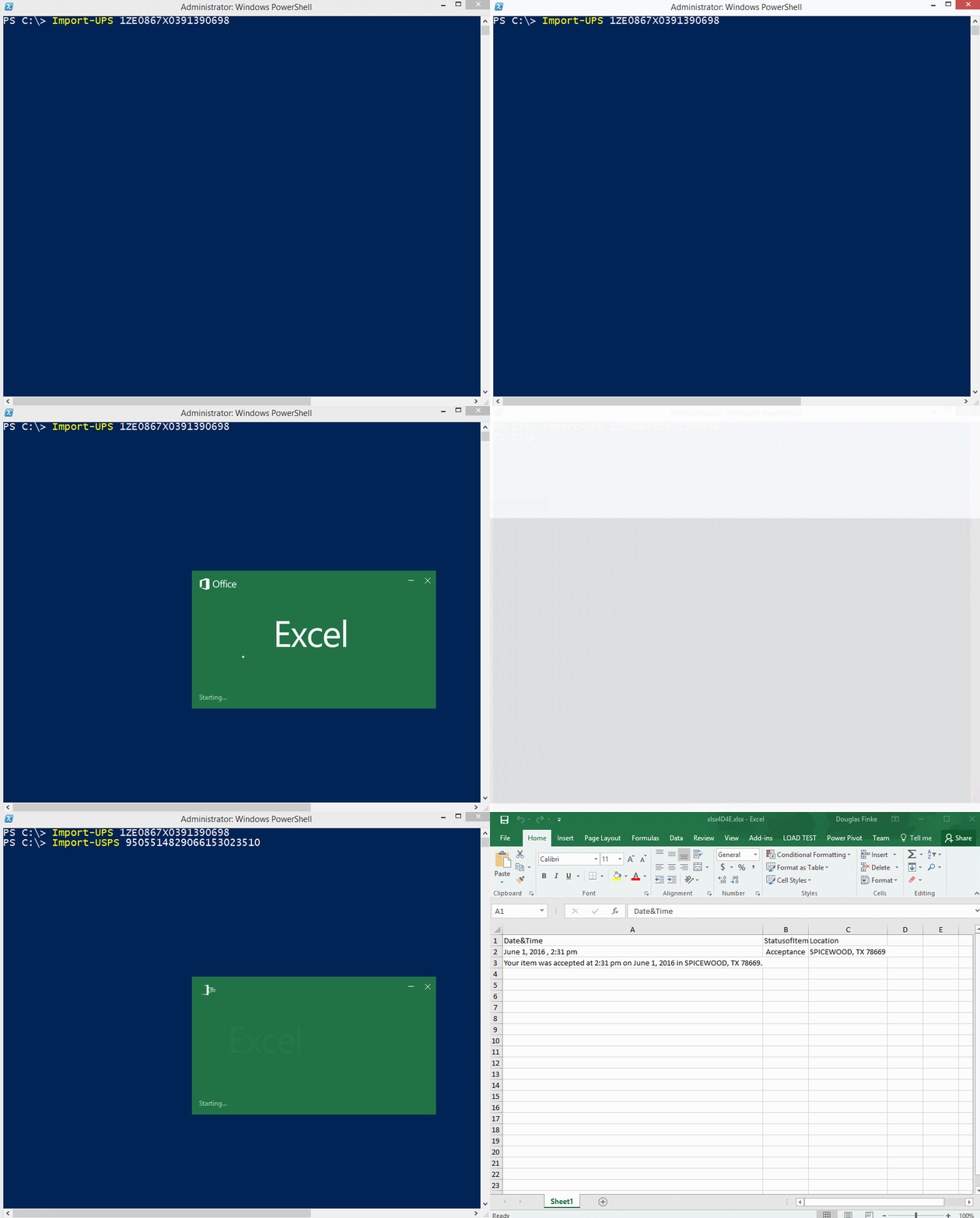
* New functions, `Import-UPS` and `Import-USPS`. Pass in a valid tracking # and it scrapes the page for the delivery details
|
||
|
||
|
||
|
||
#### 4/30/2016
|
||
Huge thank you to [Willie Möller](https://github.com/W1M0R)
|
||
|
||
* He added a version check so the PowerShell Classes don't cause issues for downlevel version of PowerShell
|
||
* He also contributed the first Pester tests for the module. Super! Check them out, they'll be the way tests will be implemented going forward
|
||
|
||
#### 4/18/2016
|
||
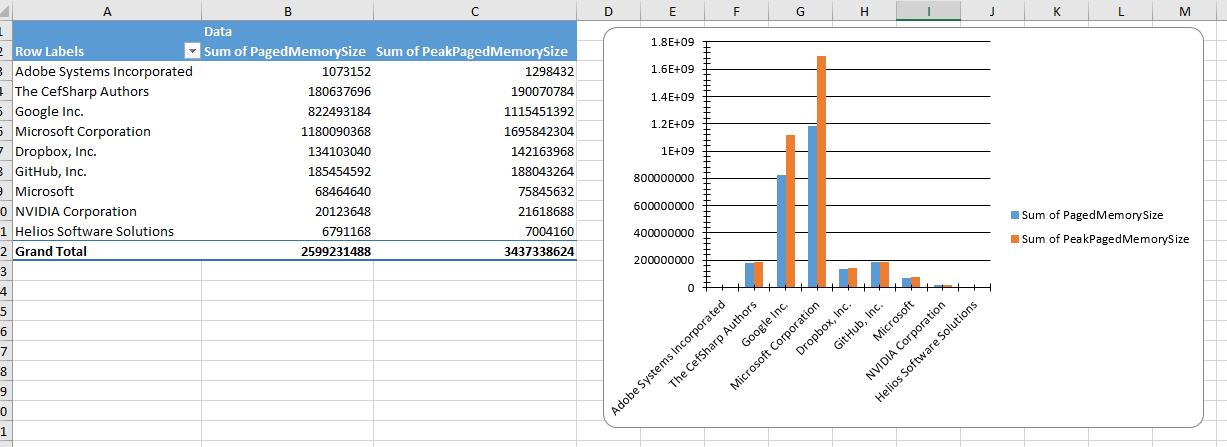
Thanks to [Paul Williams](https://github.com/pauldalewilliams) for this feature. Now data can be transposed to columns for better charting.
|
||
|
||
```PowerShell
|
||
$file = "C:\Temp\ps.xlsx"
|
||
rm $file -ErrorAction Ignore
|
||
|
||
ps |
|
||
where company |
|
||
select Company,PagedMemorySize,PeakPagedMemorySize |
|
||
Export-Excel $file -Show -AutoSize `
|
||
-IncludePivotTable `
|
||
-IncludePivotChart `
|
||
-ChartType ColumnClustered `
|
||
-PivotRows Company `
|
||
-PivotData @{PagedMemorySize='sum';PeakPagedMemorySize='sum'}
|
||
```
|
||
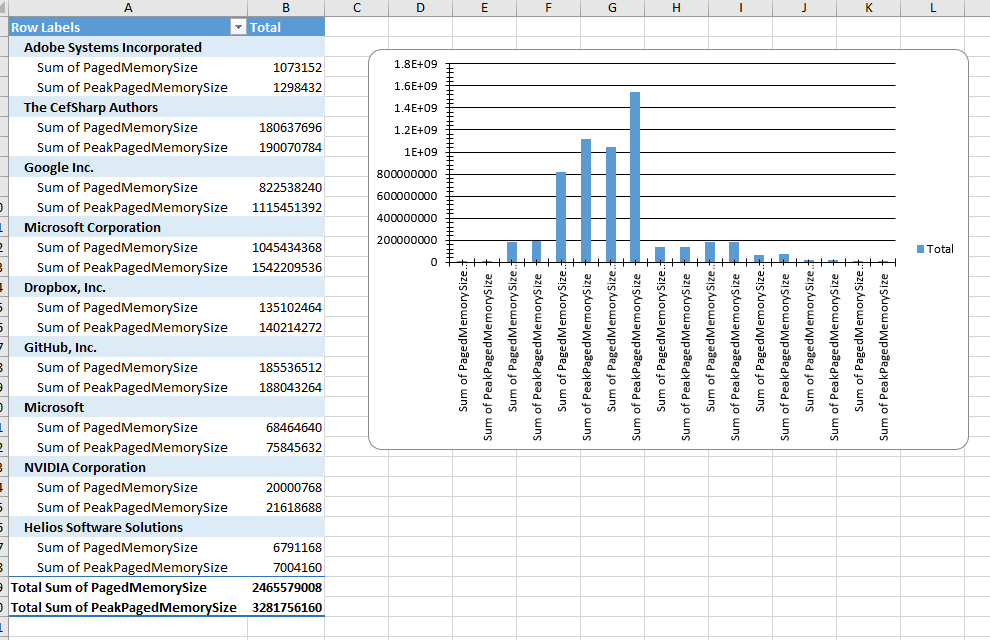
|
||
|
||
|
||
Add `-PivotDataToColumn`
|
||
|
||
```PowerShell
|
||
$file = "C:\Temp\ps.xlsx"
|
||
rm $file -ErrorAction Ignore
|
||
|
||
ps |
|
||
where company |
|
||
select Company,PagedMemorySize,PeakPagedMemorySize |
|
||
Export-Excel $file -Show -AutoSize `
|
||
-IncludePivotTable `
|
||
-IncludePivotChart `
|
||
-ChartType ColumnClustered `
|
||
-PivotRows Company `
|
||
-PivotData @{PagedMemorySize='sum';PeakPagedMemorySize='sum'} `
|
||
-PivotDataToColumn
|
||
```
|
||
And here is the new chart view
|
||
|
||
#### 4/7/2016
|
||
Made more methods fluent
|
||
```
|
||
$t=Get-Range 0 5 .2
|
||
|
||
$t2=$t|%{$_*$_}
|
||
$t3=$t|%{$_*$_*$_}
|
||
|
||
(New-Plot).
|
||
Plot($t,$t, $t,$t2, $t,$t3).
|
||
SetChartPosition("i").
|
||
SetChartSize(500,500).
|
||
Title("Hello World").
|
||
Show()
|
||
```
|
||
#### 3/31/2016
|
||
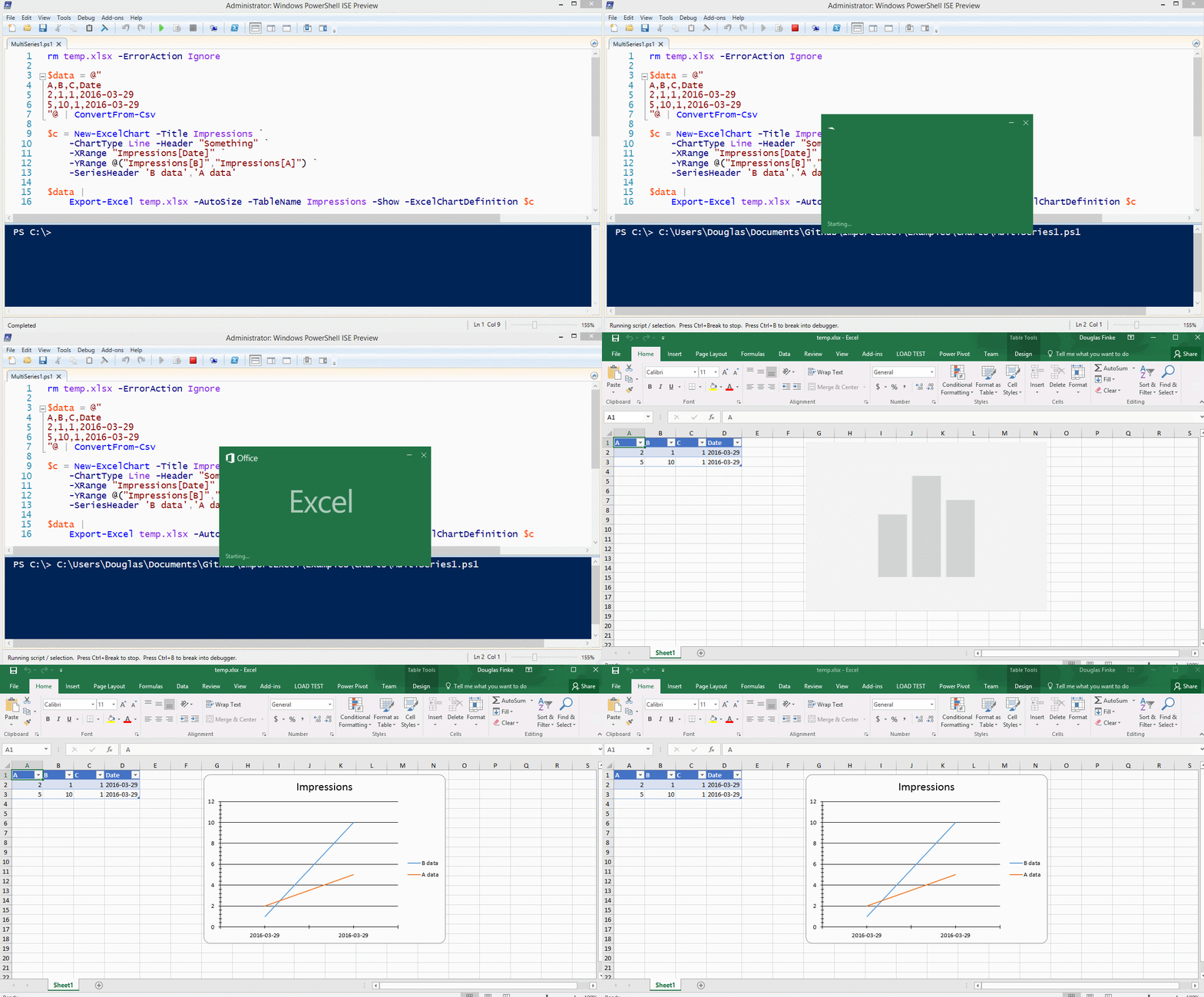
* Thanks to [redoz](https://github.com/redoz) Multi Series Charts are now working
|
||
|
||
Also check out how you can create a table and then with Excel notation, index into the data for charting `"Impressions[A]"`
|
||
|
||
```
|
||
$data = @"
|
||
A,B,C,Date
|
||
2,1,1,2016-03-29
|
||
5,10,1,2016-03-29
|
||
"@ | ConvertFrom-Csv
|
||
|
||
$c = New-ExcelChart -Title Impressions `
|
||
-ChartType Line -Header "Something" `
|
||
-XRange "Impressions[Date]" `
|
||
-YRange @("Impressions[B]","Impressions[A]")
|
||
|
||
$data |
|
||
Export-Excel temp.xlsx -AutoSize -TableName Impressions -Show -ExcelChartDefinition $c
|
||
```
|
||
|
||
|
||
#### 3/26/2016
|
||
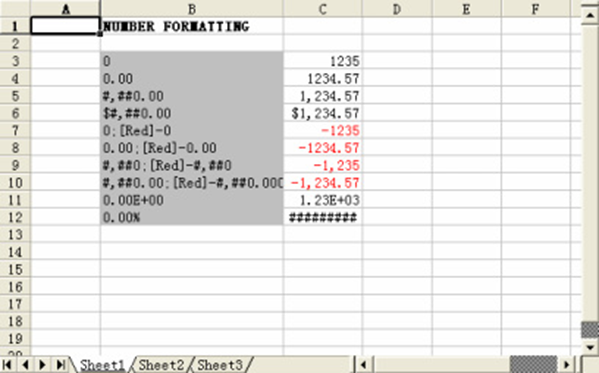
* Added `NumberFormat` parameter
|
||
|
||
```
|
||
$data |
|
||
Export-Excel -Path $file -Show -NumberFormat '[Blue]$#,##0.00;[Red]-$#,##0.00'
|
||
```
|
||
|
||
|
||
|
||
#### 3/18/2016
|
||
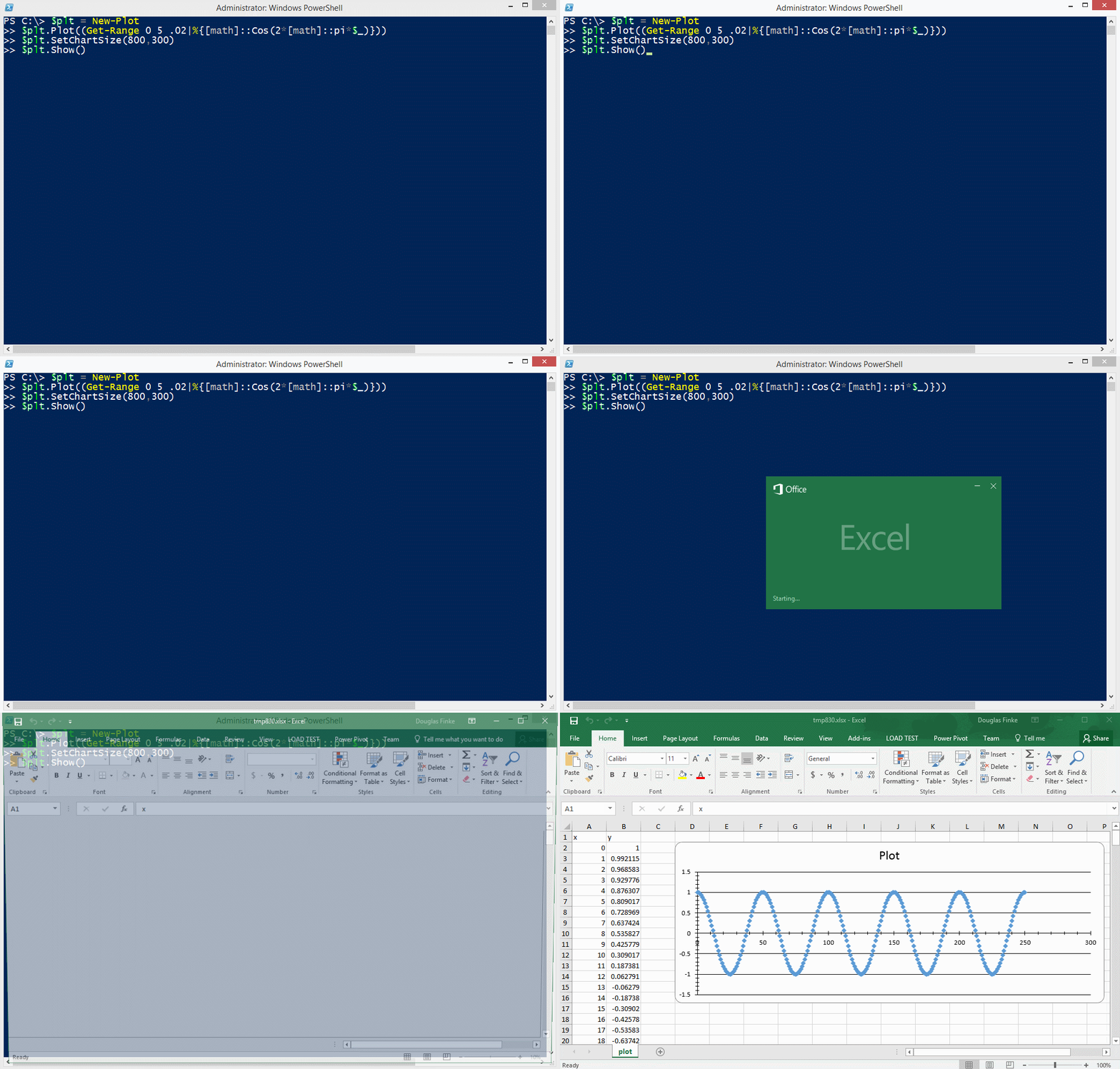
* Added `Get-Range`, `New-Plot` and Plot Cos example
|
||
* Updated EPPlus DLL. Allows markers to be changed and colored
|
||
* Handles and warns if auto name range names are also valid Excel ranges
|
||
|
||
|
||
|
||
#### 3/7/2016
|
||
* Added `Header` and `FirstDataRow` for `Import-Html`
|
||
|
||
#### 3/2/2016
|
||
* Added `GreaterThan`, `GreaterThanOrEqual`, `LessThan`, `LessThanOrEqual` to `New-ConditionalText`
|
||
|
||
```PowerShell
|
||
echo 489 668 299 777 860 151 119 497 234 788 |
|
||
Export-Excel c:\temp\test.xlsx -Show `
|
||
-ConditionalText (New-ConditionalText -ConditionalType GreaterThan 525)
|
||
```
|
||

|
||
|
||
#### 2/22/2016
|
||
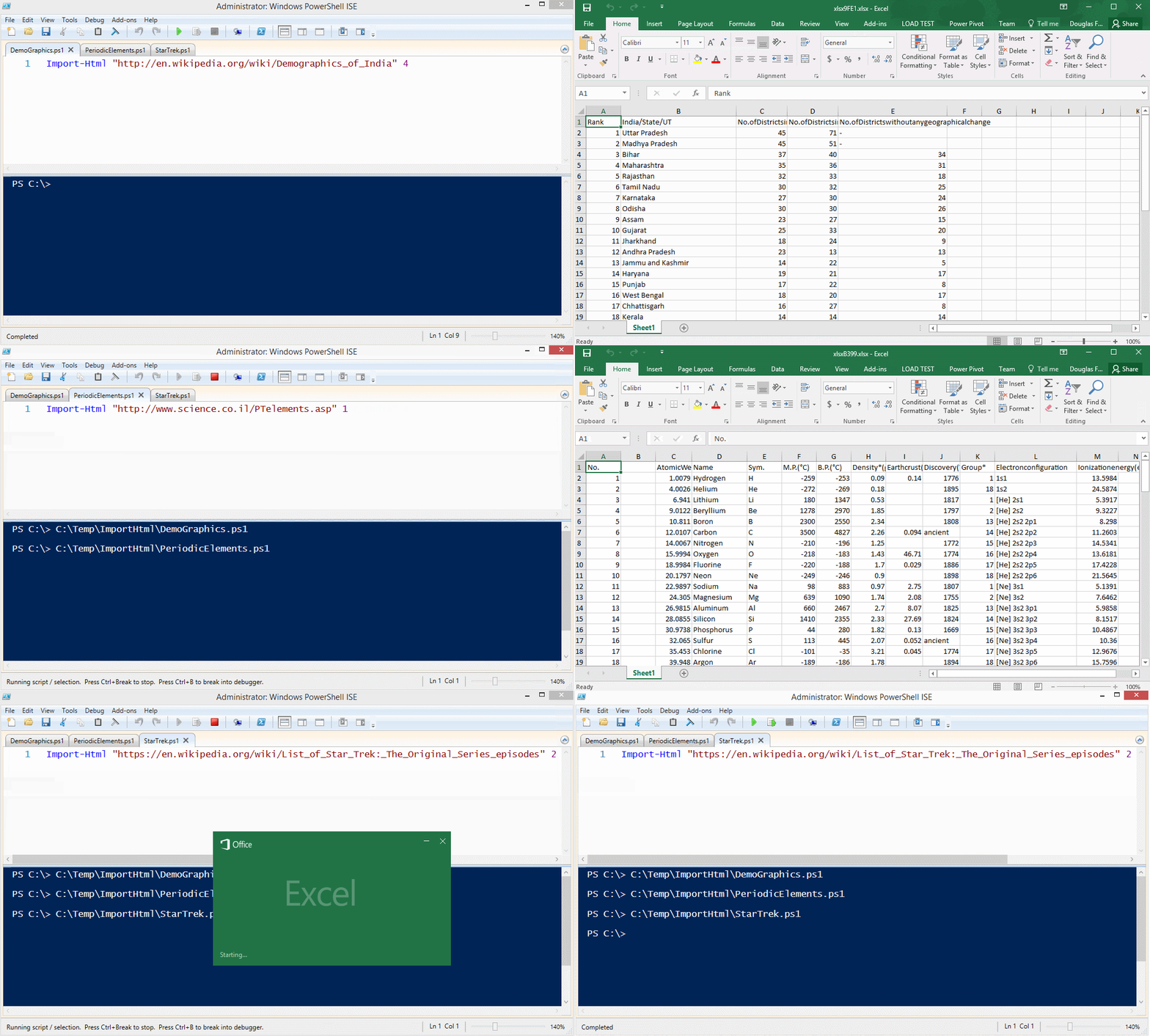
* `Import-Html` using Lee Holmes [Extracting Tables from PowerShell’s Invoke-WebRequest](http://www.leeholmes.com/blog/2015/01/05/extracting-tables-from-PowerShells-invoke-webrequest/)
|
||
|
||
|
||
|
||
#### 2/17/2016
|
||
* Added Conditional Text types of `Equal` and `NotEqual`
|
||
* Phone #'s like '+33 011 234 34' will be now be handled correctly
|
||
|
||
## Try *PassThru*
|
||
|
||
```PowerShell
|
||
$file = "C:\Temp\passthru.xlsx"
|
||
rm $file -ErrorAction Ignore
|
||
|
||
$xlPkg = $(
|
||
New-PSItem north 10
|
||
New-PSItem east 20
|
||
New-PSItem west 30
|
||
New-PSItem south 40
|
||
) | Export-Excel $file -PassThru
|
||
|
||
$ws=$xlPkg.Workbook.Worksheets[1]
|
||
|
||
$ws.Cells["A3"].Value = "Hello World"
|
||
$ws.Cells["B3"].Value = "Updating cells"
|
||
$ws.Cells["D1:D5"].Value = "Data"
|
||
|
||
$ws.Cells.AutoFitColumns()
|
||
|
||
$xlPkg.Save()
|
||
$xlPkg.Dispose()
|
||
|
||
Invoke-Item $file
|
||
```
|
||
|
||
## Result
|
||

|
||
|
||
#### 1/18/2016
|
||
|
||
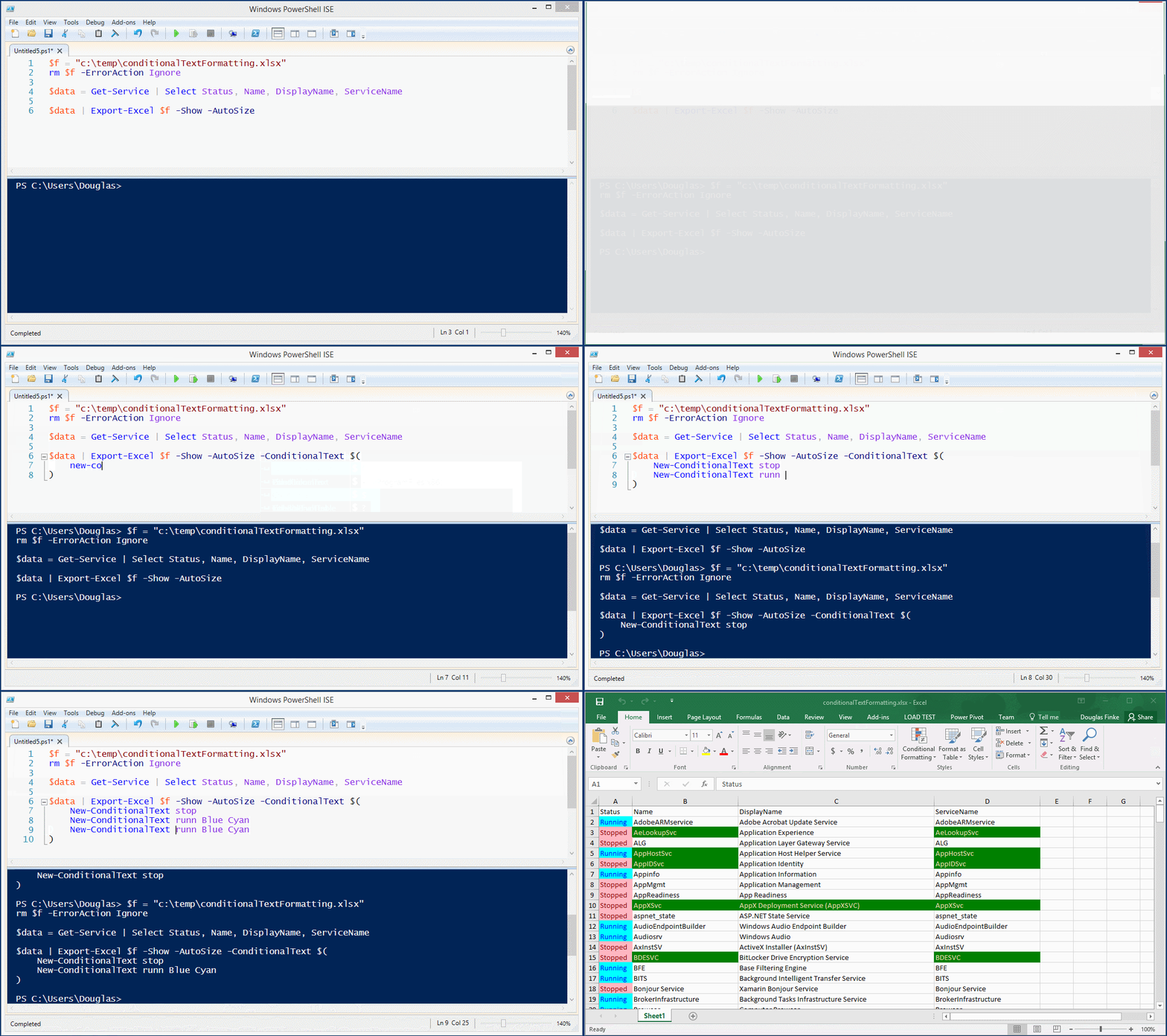
* Added `Conditional Text Formatting`. [Boe Prox](https://twitter.com/proxb) posted about [HTML Reporting, Part 2: Take Your Reporting a Step Further](https://mcpmag.com/articles/2016/01/14/html-reporting-part-2.aspx) and colorized cells. Great idea, now part of the PowerShell Excel module.
|
||
|
||
|
||
|
||
#### 1/7/2016
|
||
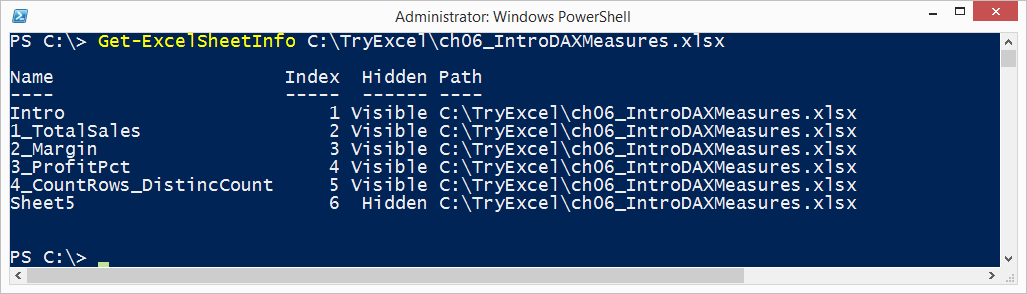
* Added `Get-ExcelSheetInfo` - Great contribution from *Johan Åkerström* check him out on [GitHub](https://github.com/CosmosKey) and [Twitter](https://twitter.com/neptune443)
|
||
|
||
|
||
|
||
#### 12/26/2015
|
||
|
||
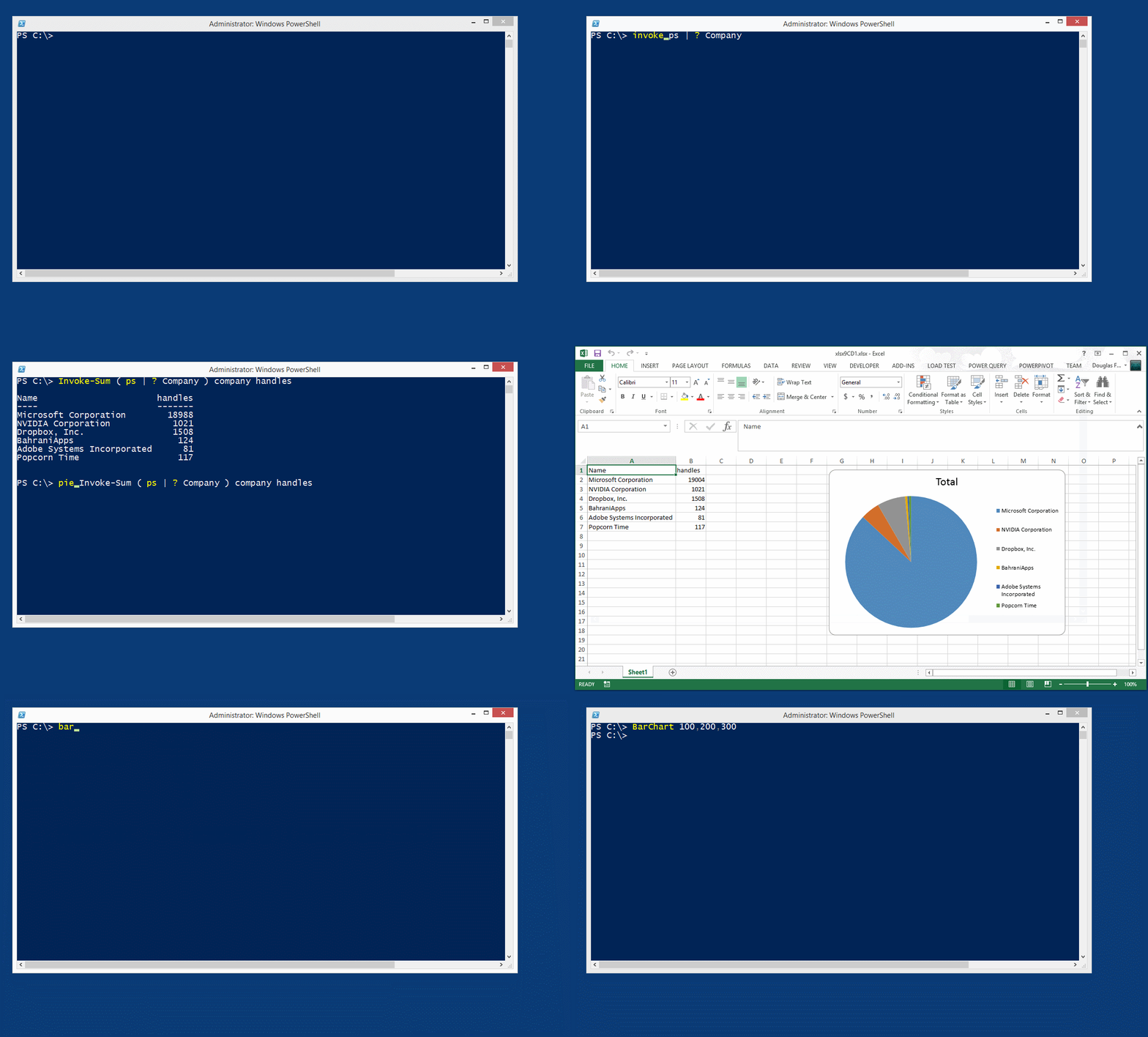
* Added `NoLegend`, `Show-Category`, `ShowPercent` for all charts including Pivot Charts
|
||
* Updated PieChart, BarChart, ColumnChart and Line chart to work with the pipeline and added `NoLegend`, `Show-Category`, `ShowPercent`
|
||
|
||
#### 12/17/2015
|
||
|
||
These new features open the door for really sophisticated work sheet creation.
|
||
|
||
Stay tuned for a [blog post](http://www.dougfinke.com/blog/) and examples.
|
||
|
||
***Quick List***
|
||
* StartRow, StartColumn for placing data anywhere in a sheet
|
||
* New-ExcelChart - Add charts to a sheet, multiple series for a chart, locate the chart anywhere on the sheet
|
||
* AutoNameRange, Use functions and/or calculations in a cell
|
||
* Quick charting using PieChart, BarChart, ColumnChart and more
|
||
|
||
|
||
|
||
#### 10/20/2015
|
||
|
||
Big bug fix for version 3.0 PowerShell folks!
|
||
|
||
This technique fails in 3.0 and works in 4.0 and later.
|
||
```PowerShell
|
||
$m="substring"
|
||
"hello".$m(2,1)
|
||
```
|
||
|
||
Adding `.invoke` works in 3.0 and later.
|
||
|
||
```PowerShell
|
||
$m="substring"
|
||
"hello".$m.invoke(2,1)
|
||
```
|
||
|
||
A ***big thank you*** to [DarkLite1](https://github.com/DarkLite1) for adding the help to Export-Excel.
|
||
|
||
Added `-HeaderRow` parameter. Sometimes the heading does not start in Row 1.
|
||
|
||
|
||
#### 10/16/2015
|
||
|
||
Fixes [Export-Excel generates corrupt Excel file](https://github.com/dfinke/ImportExcel/issues/46)
|
||
|
||
#### 10/15/2015
|
||
|
||
`Import-Excel` has a new parameter `NoHeader`. If data in the sheet does not have headers and you don't want to supply your own, `Import-Excel` will generate the property name.
|
||
|
||
`Import-Excel` now returns `.Value` rather than `.Text`
|
||
|
||
|
||
#### 10/1/2015
|
||
|
||
Merged ValidateSet for Encoding and Extension. Thank you [Irwin Strachan](https://github.com/irwins).
|
||
|
||
#### 9/30/2015
|
||
|
||
Export-Excel can now handle data that is **not** an object
|
||
|
||
echo a b c 1 $true 2.1 1/1/2015 | Export-Excel c:\temp\test.xlsx -Show
|
||
Or
|
||
|
||
dir -Name | Export-Excel c:\temp\test.xlsx -Show
|
||
|
||
#### 9/25/2015
|
||
|
||
**Hide worksheets**
|
||
Got a great request from [forensicsguy20012004](https://github.com/forensicsguy20012004) to hide worksheets. You create a few pivotables, generate charts and then pivotable worksheets don't need to be visible.
|
||
|
||
`Export-Excel` now has a `-HideSheet` parameter that takes and array of worksheet names and hides them.
|
||
|
||
##### Example
|
||
Here, you create four worksheets named `PM`,`Handles`,`Services` and `Files`.
|
||
|
||
The last line creates the `Files` sheet and then hides the `Handles`,`Services` sheets.
|
||
|
||
$p = Get-Process
|
||
|
||
$p|select company, pm | Export-Excel $xlFile -WorkSheetname PM
|
||
$p|select company, handles| Export-Excel $xlFile -WorkSheetname Handles
|
||
Get-Service| Export-Excel $xlFile -WorkSheetname Services
|
||
|
||
dir -File | Export-Excel $xlFile -WorkSheetname Files -Show -HideSheet Handles, Services
|
||
|
||
|
||
**Note** There is a bug in EPPlus that does not let you hide the first worksheet created. Hopefully it'll resolved soon.
|
||
|
||
#### 9/11/2015
|
||
|
||
Added Conditional formatting. See [TryConditional.ps1](https://github.com/dfinke/ImportExcel/blob/master/TryConditional.ps1) as an example.
|
||
|
||
Or, check out the short ***"How To"*** video.
|
||
|
||
[](http://www.dougfinke.com/videos/excelpsmodule/excelpsmodule.mp4)
|
||
|
||
|
||
#### 8/21/2015
|
||
* Now import Excel sheets even if the file is open in Excel. Thank you [Francois Lachance-Guillemette](https://github.com/francoislg)
|
||
|
||
#### 7/09/2015
|
||
* For -PivotRows you can pass a `hashtable` with the name of the property and the type of calculation. `Sum`, `Average`, `Max`, `Min`, `Product`, `StdDev`, `StdDevp`, `Var`, `Varp`
|
||
|
||
```PowerShell
|
||
Get-Service |
|
||
Export-Excel "c:\temp\test.xlsx" `
|
||
-Show `
|
||
-IncludePivotTable `
|
||
-PivotRows status `
|
||
-PivotData @{status='count'}
|
||
```
|
||
|
||
#### 6/16/2015 (Thanks [Justin](https://github.com/zippy1981))
|
||
* Improvements to PivotTable overwriting
|
||
* Added two parameters to Export-Excel
|
||
* RangeName - Turns the data piped to Export-Excel into a named range.
|
||
* TableName - Turns the data piped to Export-Excel into an excel table.
|
||
|
||
Examples
|
||
|
||
Get-Process|Export-Excel foo.xlsx -Verbose -IncludePivotTable -TableName "Processes" -Show
|
||
Get-Process|Export-Excel foo.xlsx -Verbose -IncludePivotTable -RangeName "Processes" -Show
|
||
|
||
|
||
#### 5/25/2015
|
||
* Fixed null header problem
|
||
|
||
#### 5/17/2015
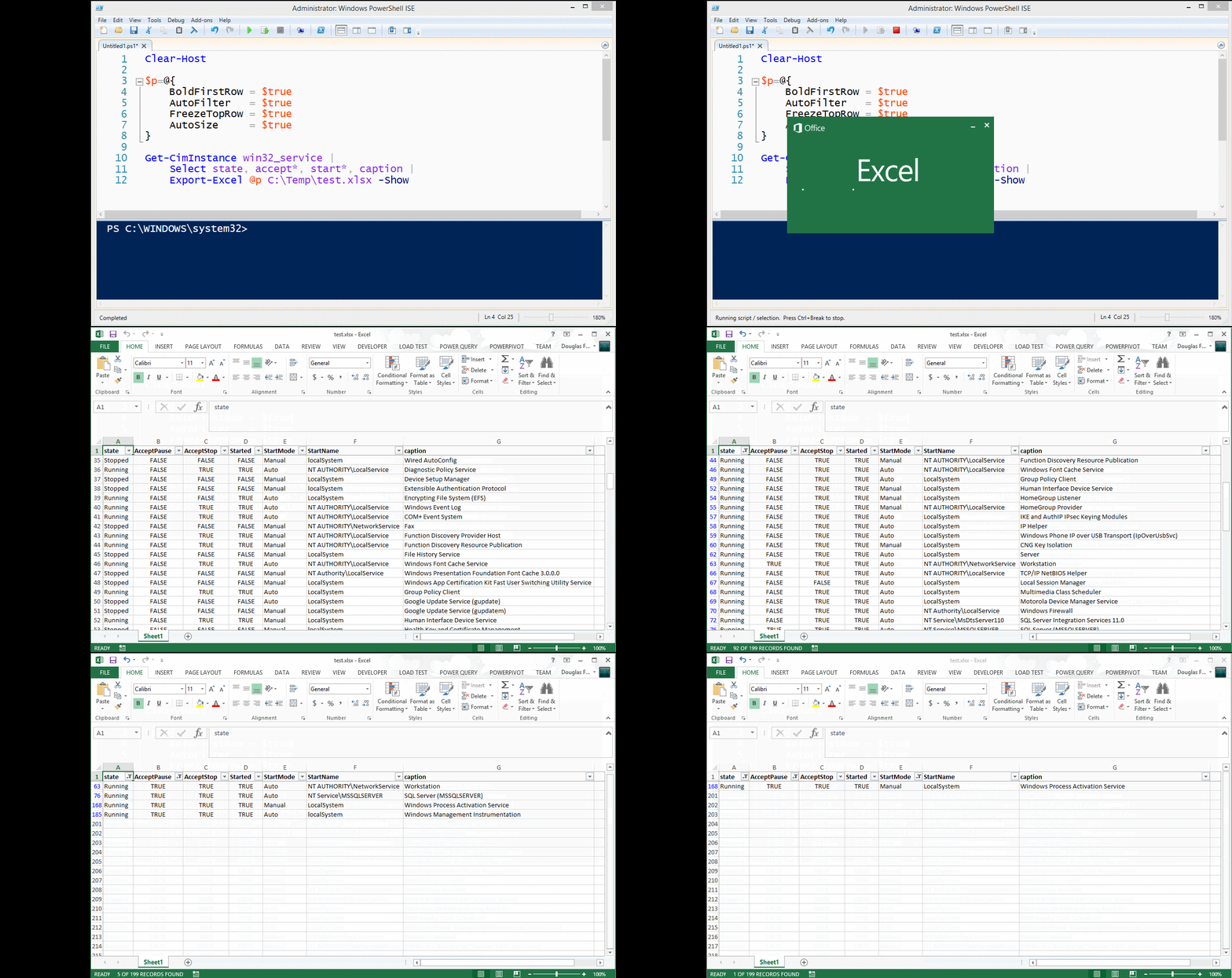
|
||
* Added three parameters:
|
||
* FreezeTopRow - Freezes the first row of the data
|
||
* AutoFilter - Enables filtering for the data in the sheet
|
||
* BoldTopRow - Bolds the top row of data, the column headers
|
||
|
||
Example
|
||
|
||
Get-CimInstance win32_service |
|
||
select state, accept*, start*, caption |
|
||
Export-Excel test.xlsx -Show -BoldTopRow -AutoFilter -FreezeTopRow -AutoSize
|
||
|
||
|
||
|
||
|
||
#### 5/4/2015
|
||
* Published to PowerShell Gallery. In PowerShell v5 use `Find-Module importexcel` then `Find-Module importexcel | Install-Module`
|
||
|
||
|
||
#### 4/27/2015
|
||
* datetime properties were displaying as ints, now are formatted
|
||
|
||
#### 4/25/2015
|
||
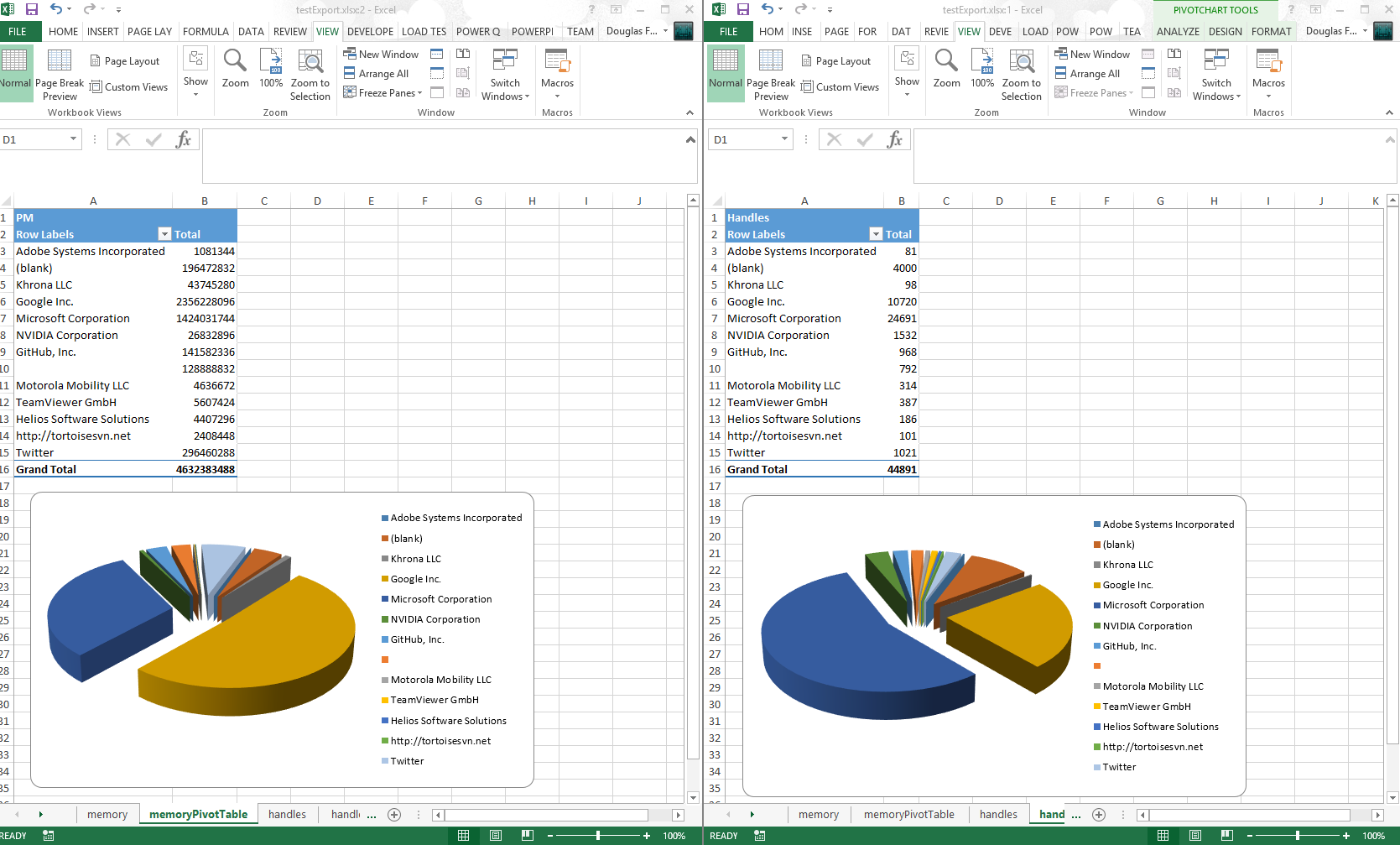
* Now you can create multiple Pivot tables in one pass
|
||
* Thanks to [pscookiemonster](https://twitter.com/pscookiemonster), he submitted a repro case to the EPPlus CodePlex project and got it fixed
|
||
|
||
#### Example
|
||
|
||
$ps = ps
|
||
|
||
$ps |
|
||
Export-Excel .\testExport.xlsx -WorkSheetname memory `
|
||
-IncludePivotTable -PivotRows Company -PivotData PM `
|
||
-IncludePivotChart -ChartType PieExploded3D
|
||
$ps |
|
||
Export-Excel .\testExport.xlsx -WorkSheetname handles `
|
||
-IncludePivotTable -PivotRows Company -PivotData Handles `
|
||
-IncludePivotChart -ChartType PieExploded3D -Show
|
||
|
||
|
||
|
||
#### 4/20/2015
|
||
* Included and embellished [Claus Nielsen](https://github.com/Claustn) function to take all sheets in an Excel file workbook and create a text file for each `ConvertFrom-ExcelSheet`
|
||
* Renamed `Export-MultipleExcelSheets` to `ConvertFrom-ExcelSheet`
|
||
|
||
#### 4/13/2015
|
||
* You can add a title to the Excel "Report" `Title`, `TitleFillPattern`, `TitleBold`, `TitleSize`, `TitleBackgroundColor`
|
||
* Thanks to [Irwin Strachan](http://pshirwin.wordpress.com) for this and other great suggestions, testing and more
|
||
|
||
|
||
#### 4/10/2015
|
||
* Renamed `AutoFitColumns` to `AutoSize`
|
||
* Implemented `Export-MultipleExcelSheets`
|
||
* Implemented `-Password` for a worksheet
|
||
* Replaced `-Force` switch with `-NoClobber` switch
|
||
* Added examples for `Get-Help`
|
||
* If Pivot table is requested, that sheet becomes the tab selected
|
||
|
||
#### 4/8/2015
|
||
* Implemented exporting data to **named sheets** via the -WorkSheetname parameter.
|
||
|
||
Examples
|
||
-
|
||
`gsv | Export-Excel .\test.xlsx -WorkSheetname Services`
|
||
|
||
`dir -file | Export-Excel .\test.xlsx -WorkSheetname Files`
|
||
|
||
`ps | Export-Excel .\test.xlsx -WorkSheetname Processes -IncludePivotTable -Show -PivotRows Company -PivotData PM`
|
||
|
||
#### Convert (All or Some) Excel Sheets to Text files
|
||
|
||
Reads each sheet in TestSheets.xlsx and outputs it to the data directory as the sheet name with the extension .txt
|
||
|
||
ConvertFrom-ExcelSheet .\TestSheets.xlsx .\data
|
||
|
||
Reads and outputs sheets like Sheet10 and Sheet20 form TestSheets.xlsx and outputs it to the data directory as the sheet name with the extension .txt
|
||
|
||
ConvertFrom-ExcelSheet .\TestSheets.xlsx .\data sheet?0
|
||
|
||
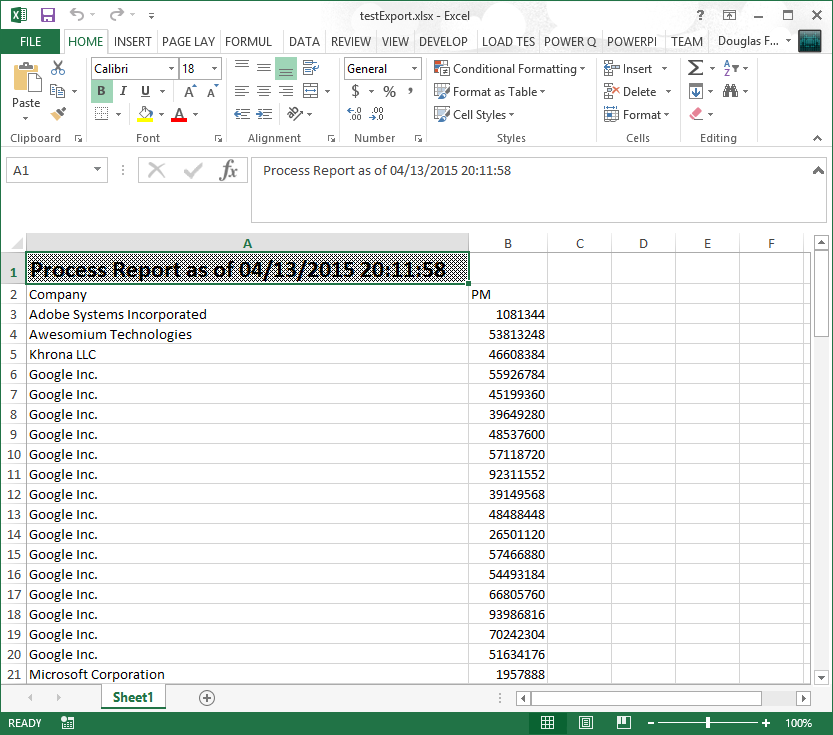
#### Example Adding a Title
|
||
You can set the pattern, size and of if the title is bold.
|
||
|
||
$p=@{
|
||
Title = "Process Report as of $(Get-Date)"
|
||
TitleFillPattern = "LightTrellis"
|
||
TitleSize = 18
|
||
TitleBold = $true
|
||
|
||
Path = "$pwd\testExport.xlsx"
|
||
Show = $true
|
||
AutoSize = $true
|
||
}
|
||
|
||
Get-Process |
|
||
Where Company | Select Company, PM |
|
||
Export-Excel @p
|
||
|
||
|
||
|
||
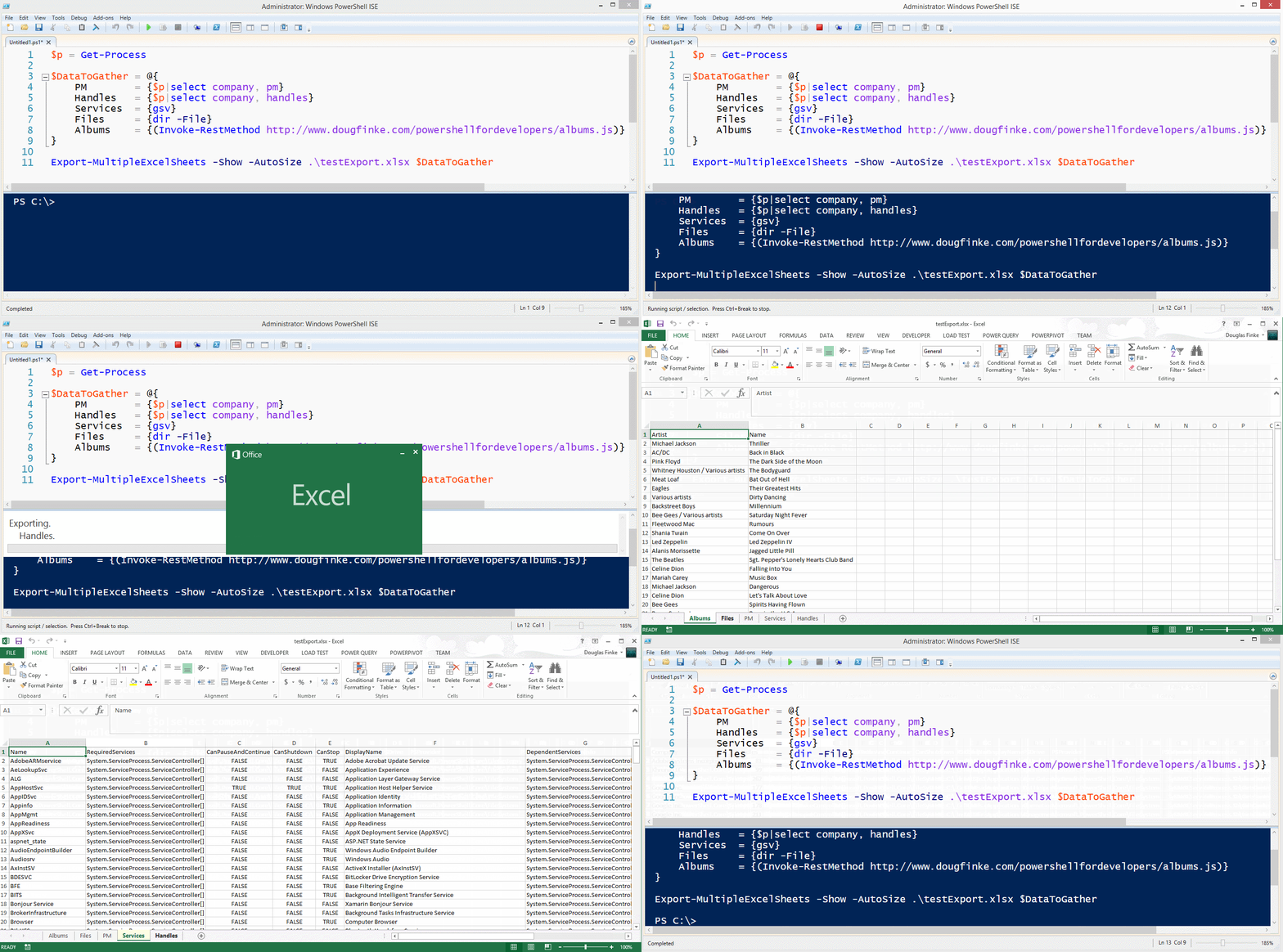
#### Example Export-MultipleExcelSheets
|
||
|
||
|
||
$p = Get-Process
|
||
|
||
$DataToGather = @{
|
||
PM = {$p|select company, pm}
|
||
Handles = {$p|select company, handles}
|
||
Services = {gsv}
|
||
Files = {dir -File}
|
||
Albums = {(Invoke-RestMethod http://www.dougfinke.com/PowerShellfordevelopers/albums.js)}
|
||
}
|
||
|
||
Export-MultipleExcelSheets -Show -AutoSize .\testExport.xlsx $DataToGather
|
||
|
||
|
||
|
||
***NOTE*** If the sheet exists when using *-WorkSheetname* parameter, it will be deleted and then added with the new data.
|
||
|
||
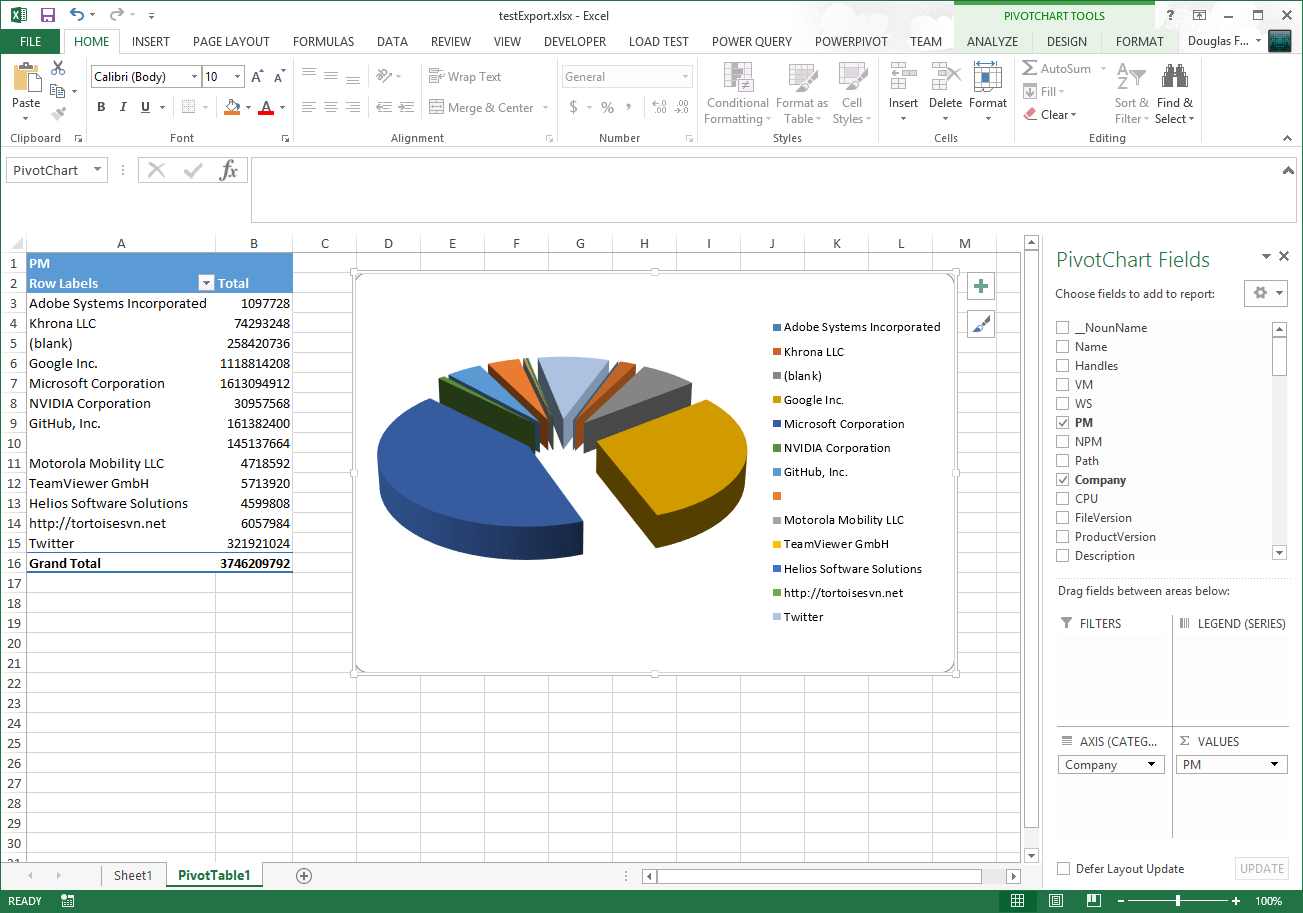
## Get-Process Exported to Excel
|
||
|
||
### Total Physical Memory Grouped By Company
|
||
|
||
|
||
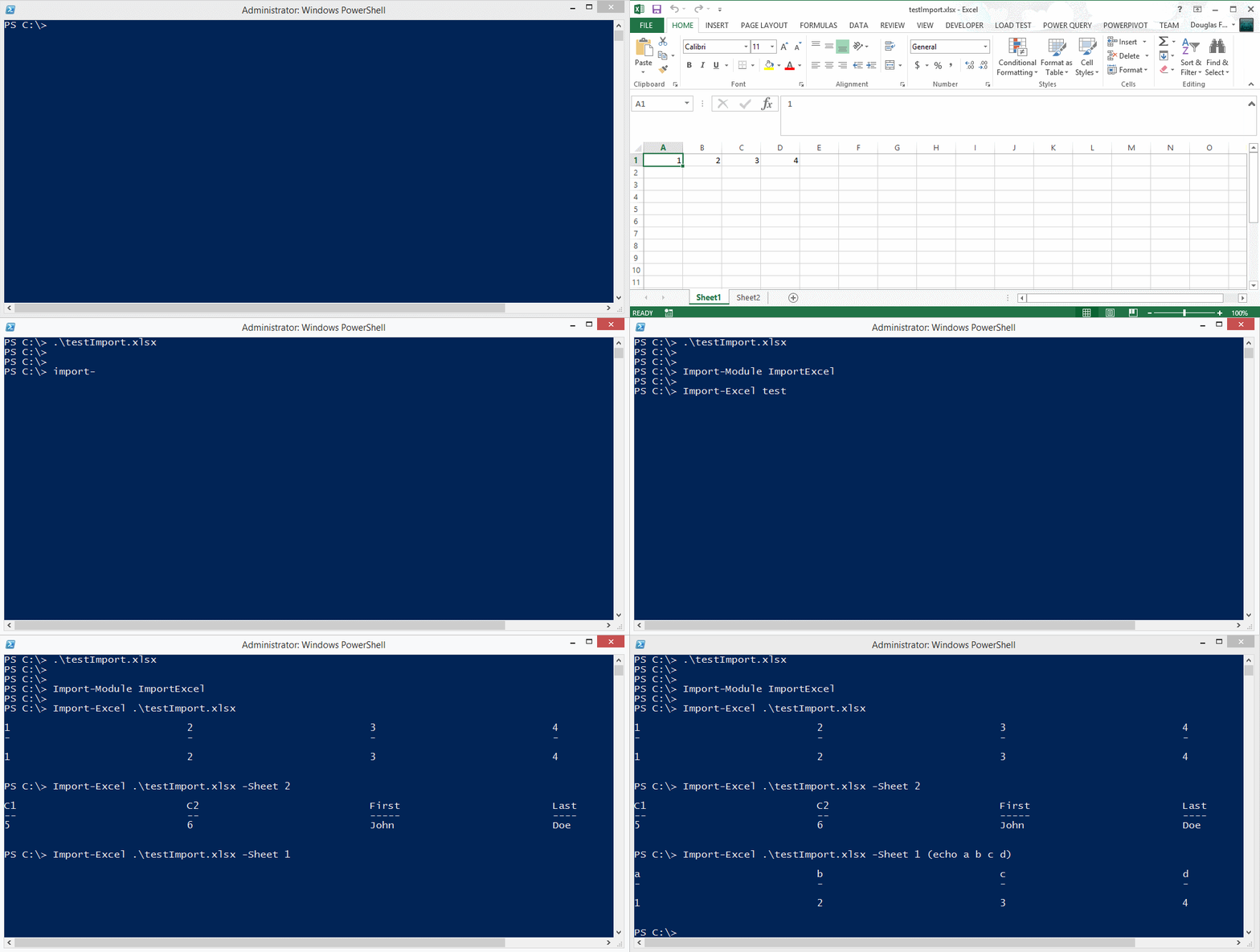
## Importing data from an Excel spreadsheet
|
||
|
||
|
||
|
||
You can also find EPPLus on [Nuget](https://www.nuget.org/packages/EPPlus/).
|
||
|
||
## Known Issues
|
||
|
||
* Using `-IncludePivotTable`, if that pivot table name exists, you'll get an error.
|
||
* Investigating a solution
|
||
* *Workaround* delete the Excel file first, then do the export
|