mirror of
https://github.com/dfinke/ImportExcel.git
synced 2025-12-15 15:53:32 +00:00

237 lines
8.1 KiB
Markdown
237 lines
8.1 KiB
Markdown
PowerShell Import-Excel
|
|
-
|
|
|
|
This PowerShell Module wraps the .NET [EPPlus DLL](http://epplus.codeplex.com/) (included). Easily integrate reading and writing Excel spreadsheets into PowerShell, without launching Excel in the background. You can also automate the creation of Pivot Tables and Charts.
|
|
|
|
Install
|
|
-
|
|
There are two ways to install this module. If you are running PowerShell V5
|
|
|
|
Install-Module -Name ImportExcel
|
|
|
|
Otherwise
|
|
To install in your personal modules folder (e.g. ~\Documents\WindowsPowerShell\Modules), run:
|
|
|
|
```powershell
|
|
iex (new-object System.Net.WebClient).DownloadString('https://raw.github.com/dfinke/ImportExcel/master/Install.ps1')
|
|
```
|
|
|
|
Know Issues
|
|
-
|
|
* Using `-IncludePivotTable`, if that pivot table name exists, you'll get an error.
|
|
* Investigating a solution
|
|
* *Workaround* delete the Excel file first, then do the export
|
|
|
|
What's new
|
|
-
|
|
|
|
#### 10/1/2015
|
|
|
|
Merged ValidateSet for Encoding and Extension. Thank you [Irwin Strachan](https://github.com/irwins).
|
|
|
|
#### 9/30/2015
|
|
|
|
Export-Excel can now handle data that is **not** an object
|
|
|
|
echo a b c 1 $true 2.1 1/1/2015 | Export-Excel c:\temp\test.xlsx -Show
|
|
Or
|
|
|
|
dir -Name | Export-Excel c:\temp\test.xlsx -Show
|
|
|
|
#### 9/25/2015
|
|
|
|
**Hide worksheets**
|
|
Got a great request from [forensicsguy20012004](https://github.com/forensicsguy20012004) to hide worksheets. You create a few pivotables, generate charts and then pivotable worksheets don't need to be visible.
|
|
|
|
`Export-Excel` now has a `-HideSheet` parameter that takes and array of worksheet names and hides them.
|
|
|
|
##### Example
|
|
Here, you create four worksheets named `PM`,`Handles`,`Services` and `Files`.
|
|
|
|
The last line creates the `Files` sheet and then hides the `Handles`,`Services` sheets.
|
|
|
|
$p = Get-Process
|
|
|
|
$p|select company, pm | Export-Excel $xlFile -WorkSheetname PM
|
|
$p|select company, handles| Export-Excel $xlFile -WorkSheetname Handles
|
|
Get-Service| Export-Excel $xlFile -WorkSheetname Services
|
|
|
|
dir -File | Export-Excel $xlFile -WorkSheetname Files -Show -HideSheet Handles, Services
|
|
|
|
|
|
**Note** There is a bug in EPPlus that does not let you hide the first worksheet created. Hopefully it'll resolved soon.
|
|
|
|
#### 9/11/2015
|
|
|
|
Added Conditional formatting. See [TryConditional.ps1](https://github.com/dfinke/ImportExcel/blob/master/TryConditional.ps1) as an example.
|
|
|
|
Or, check out the short ***"How To"*** video.
|
|
|
|
[](http://www.dougfinke.com/videos/excelpsmodule/excelpsmodule.mp4)
|
|
|
|
|
|
#### 8/21/2015
|
|
* Now import Excel sheets even if the file is open in Excel. Thank you [Francois Lachance-Guillemette](https://github.com/francoislg)
|
|
|
|
#### 7/09/2015
|
|
* For -PivotRows you can pass a `hashtable` with the name of the property and the type of calculation. `Sum`, `Average`, `Max`, `Min`, `Product`, `StdDev`, `StdDevp`, `Var`, `Varp`
|
|
|
|
```powershell
|
|
Get-Service |
|
|
Export-Excel "c:\temp\test.xlsx" `
|
|
-Show `
|
|
-IncludePivotTable `
|
|
-PivotRows status `
|
|
-PivotData @{status='count'}
|
|
```
|
|
|
|
#### 6/16/2015 (Thanks [Justin](https://github.com/zippy1981))
|
|
* Improvements to PivotTable overwriting
|
|
* Added two parameters to Export-Excel
|
|
* RangeName - Turns the data piped to Export-Excel into a named range.
|
|
* TableName - Turns the data piped to Export-Excel into an excel table.
|
|
|
|
Examples
|
|
|
|
Get-Process|Export-Excel foo.xlsx -Verbose -IncludePivotTable -TableName "Processes" -Show
|
|
Get-Process|Export-Excel foo.xlsx -Verbose -IncludePivotTable -RangeName "Processes" -Show
|
|
|
|
|
|
#### 5/25/2015
|
|
* Fixed null header problem
|
|
|
|
#### 5/17/2015
|
|
* Added three parameters:
|
|
* FreezeTopRow - Freezes the first row of the data
|
|
* AutoFilter - Enables filtering for the data in the sheet
|
|
* BoldTopRow - Bolds the top row of data, the column headers
|
|
|
|
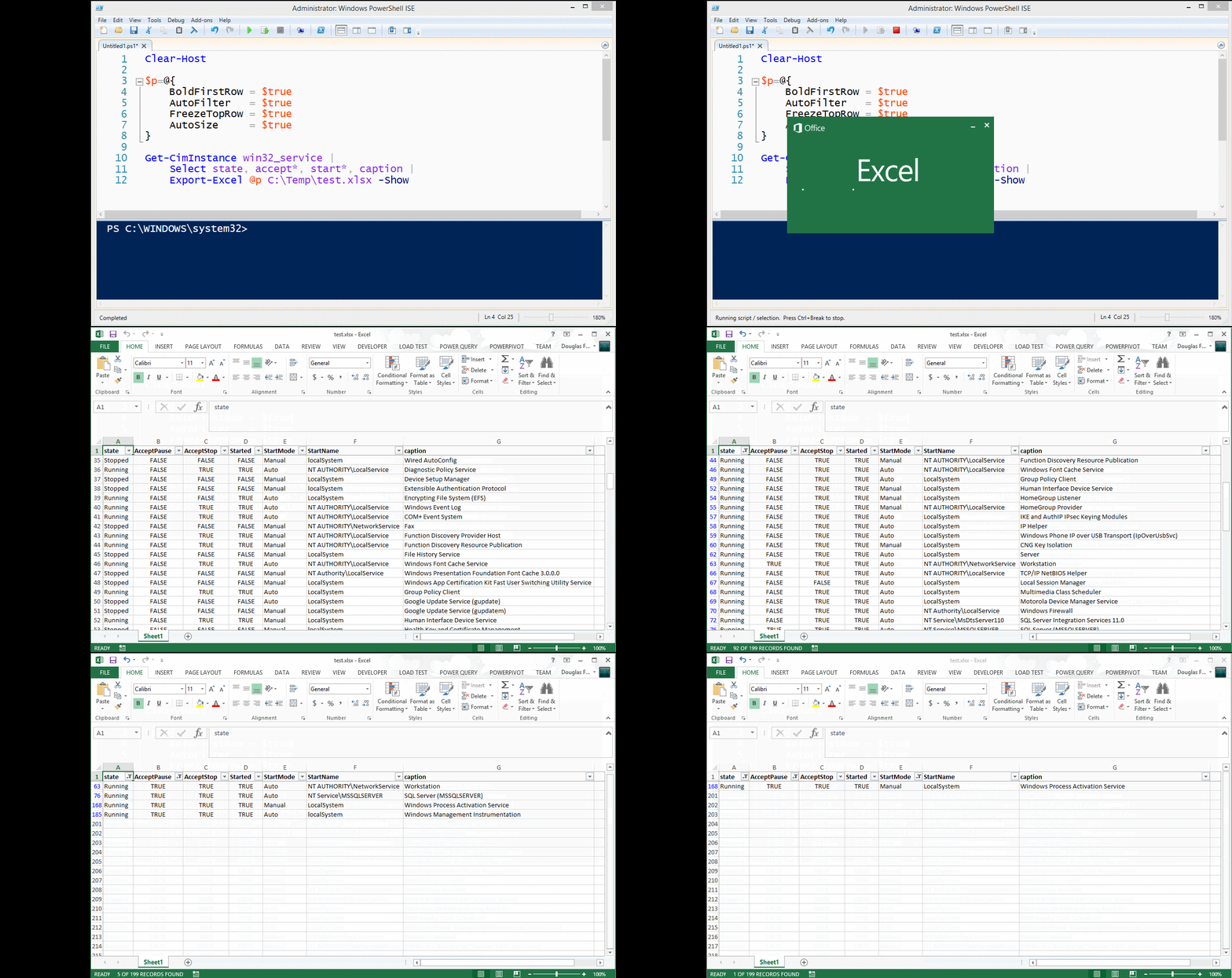
Example
|
|
|
|
Get-CimInstance win32_service |
|
|
select state, accept*, start*, caption |
|
|
Export-Excel test.xlsx -Show -BoldTopRow -AutoFilter -FreezeTopRow -AutoSize
|
|
|
|
|
|
|
|
|
|
#### 5/4/2015
|
|
* Published to PowerShell Gallery. In PowerShell v5 use `Find-Module importexcel` then `Find-Module importexcel | Install-Module`
|
|
|
|
|
|
#### 4/27/2015
|
|
* datetime properties were displaying as ints, now are formatted
|
|
|
|
#### 4/25/2015
|
|
* Now you can create multiple Pivot tables in one pass
|
|
* Thanks to [pscookiemonster](https://twitter.com/pscookiemonster), he submitted a repro case to the EPPlus CodePlex project and got it fixed
|
|
|
|
#### Example
|
|
|
|
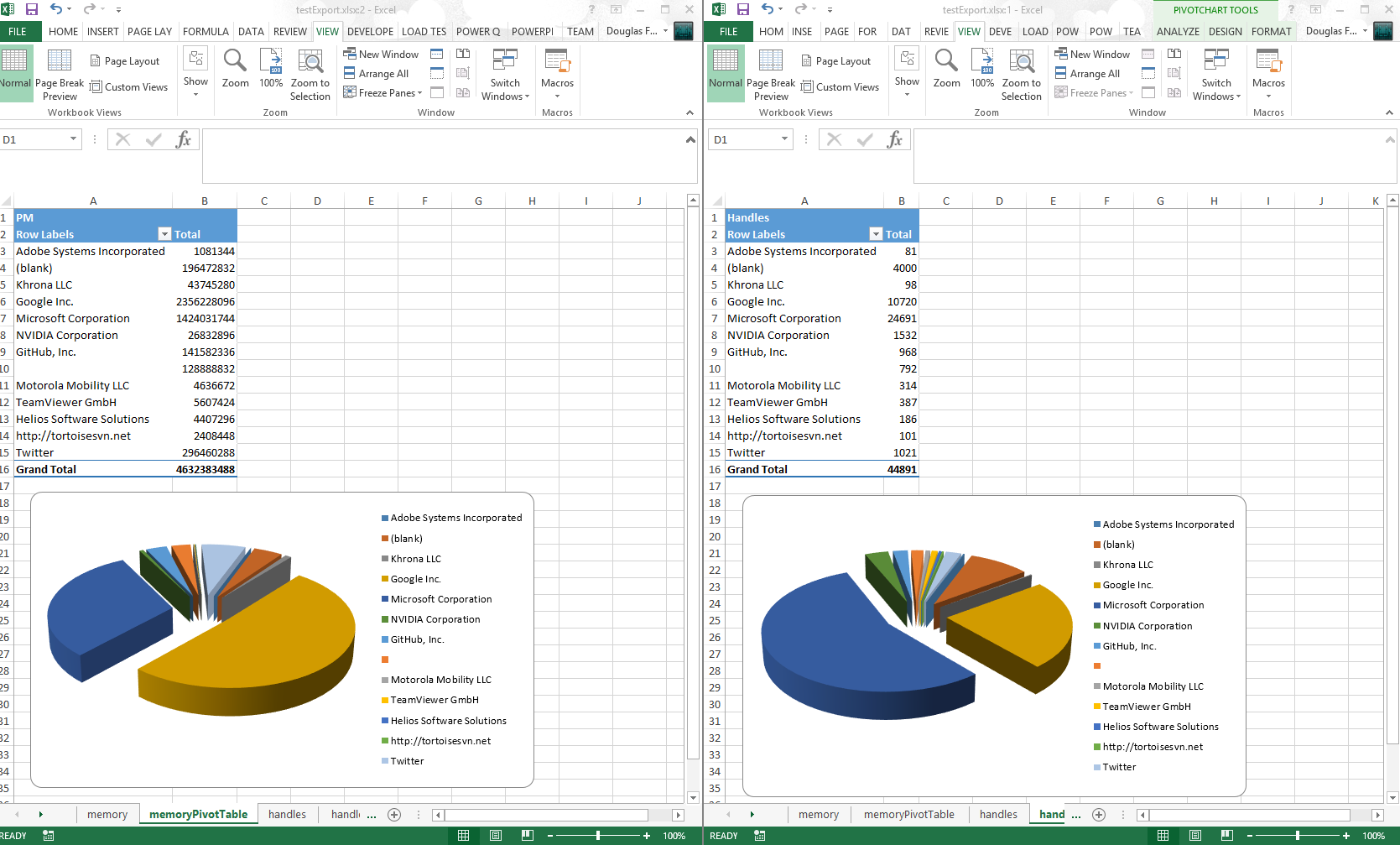
$ps = ps
|
|
|
|
$ps |
|
|
Export-Excel .\testExport.xlsx -WorkSheetname memory `
|
|
-IncludePivotTable -PivotRows Company -PivotData PM `
|
|
-IncludePivotChart -ChartType PieExploded3D
|
|
$ps |
|
|
Export-Excel .\testExport.xlsx -WorkSheetname handles `
|
|
-IncludePivotTable -PivotRows Company -PivotData Handles `
|
|
-IncludePivotChart -ChartType PieExploded3D -Show
|
|
|
|
|
|
|
|
#### 4/20/2015
|
|
* Included and embellished [Claus Nielsen](https://github.com/Claustn) function to take all sheets in an Excel file workbook and create a text file for each `ConvertFrom-ExcelSheet`
|
|
* Renamed `Export-MultipleExcelSheets` to `ConvertFrom-ExcelSheet`
|
|
|
|
#### 4/13/2015
|
|
* You can add a title to the Excel "Report" `Title`, `TitleFillPattern`, `TitleBold`, `TitleSize`, `TitleBackgroundColor`
|
|
* Thanks to [Irwin Strachan](http://pshirwin.wordpress.com) for this and other great suggestions, testing and more
|
|
|
|
|
|
#### 4/10/2015
|
|
* Renamed `AutoFitColumns` to `AutoSize`
|
|
* Implemented `Export-MultipleExcelSheets`
|
|
* Implemented `-Password` for a worksheet
|
|
* Replaced `-Force` switch with `-NoClobber` switch
|
|
* Added examples for `Get-Help`
|
|
* If Pivot table is requested, that sheet becomes the tab selected
|
|
|
|
#### 4/8/2015
|
|
* Implemented exporting data to **named sheets** via the -WorkSheename parameter.
|
|
|
|
Examples
|
|
-
|
|
`gsv | Export-Excel .\test.xlsx -WorkSheetname Services`
|
|
|
|
`dir -file | Export-Excel .\test.xlsx -WorkSheetname Files`
|
|
|
|
`ps | Export-Excel .\test.xlsx -WorkSheetname Processes -IncludePivotTable -Show -PivotRows Company -PivotData PM`
|
|
|
|
#### Convert (All or Some) Excel Sheets to Text files
|
|
|
|
Reads each sheet in TestSheets.xlsx and outputs it to the data directory as the sheet name with the extension .txt
|
|
|
|
ConvertFrom-ExcelSheet .\TestSheets.xlsx .\data
|
|
|
|
Reads and outputs sheets like Sheet10 and Sheet20 form TestSheets.xlsx and outputs it to the data directory as the sheet name with the extension .txt
|
|
|
|
ConvertFrom-ExcelSheet .\TestSheets.xlsx .\data sheet?0
|
|
|
|
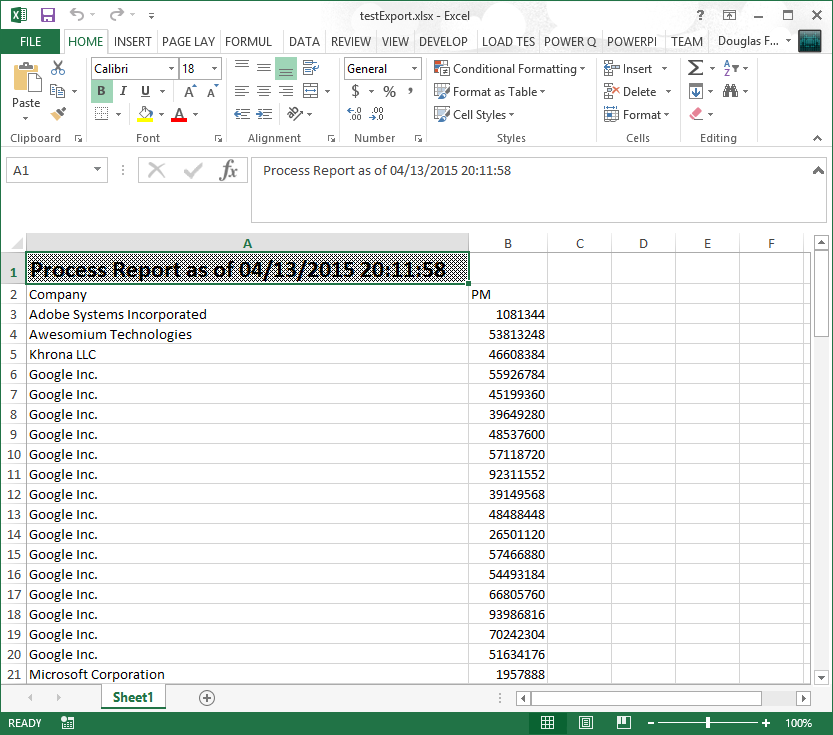
#### Example Adding a Title
|
|
You can set the pattern, size and of if the title is bold.
|
|
|
|
$p=@{
|
|
Title = "Process Report as of $(Get-Date)"
|
|
TitleFillPattern = "LightTrellis"
|
|
TitleSize = 18
|
|
TitleBold = $true
|
|
|
|
Path = "$pwd\testExport.xlsx"
|
|
Show = $true
|
|
AutoSize = $true
|
|
}
|
|
|
|
Get-Process |
|
|
Where Company | Select Company, PM |
|
|
Export-Excel @p
|
|
|
|
|
|
|
|
#### Example Export-MultipleExcelSheets
|
|
|
|
|
|
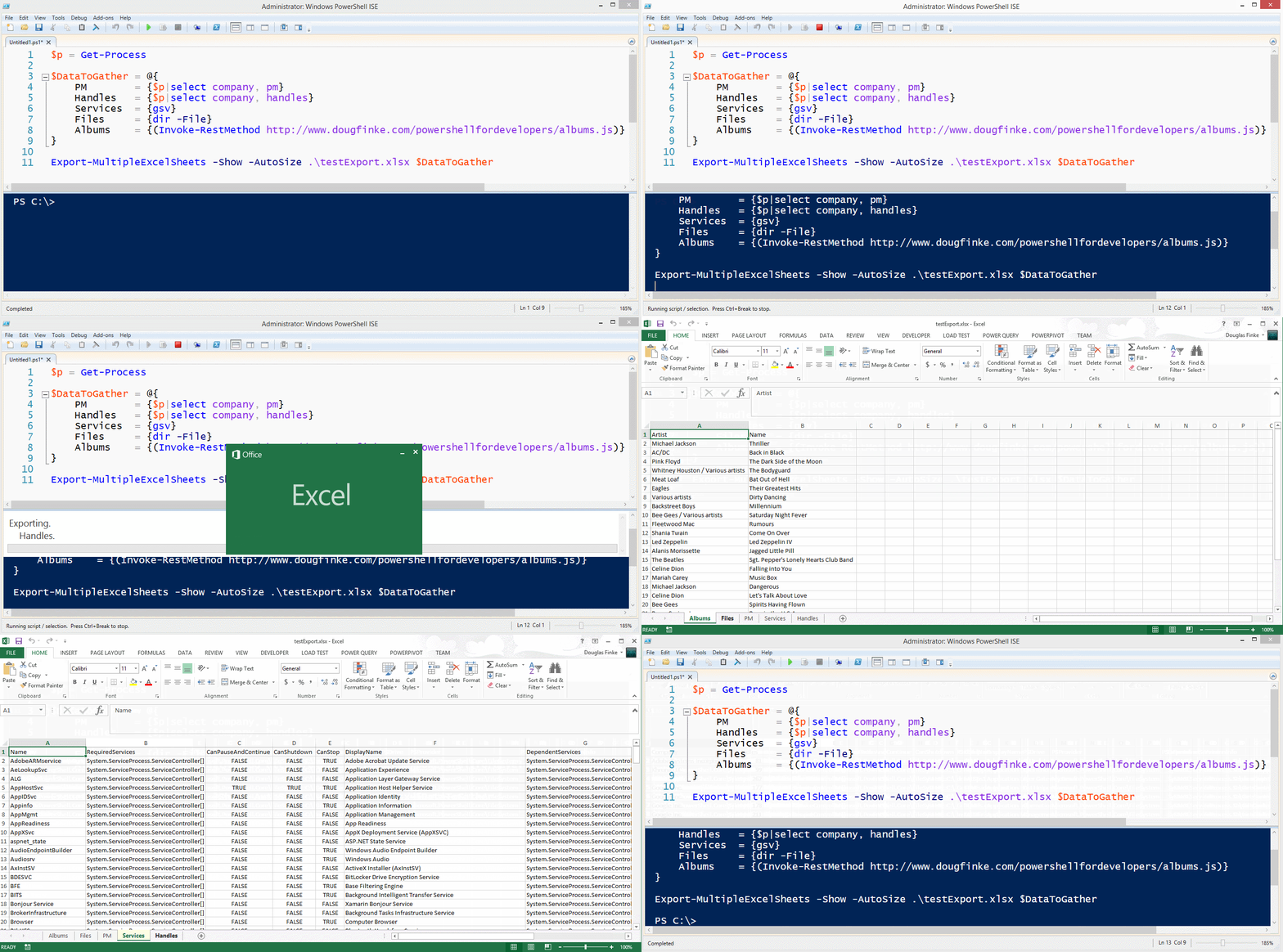
$p = Get-Process
|
|
|
|
$DataToGather = @{
|
|
PM = {$p|select company, pm}
|
|
Handles = {$p|select company, handles}
|
|
Services = {gsv}
|
|
Files = {dir -File}
|
|
Albums = {(Invoke-RestMethod http://www.dougfinke.com/powershellfordevelopers/albums.js)}
|
|
}
|
|
|
|
Export-MultipleExcelSheets -Show -AutoSize .\testExport.xlsx $DataToGather
|
|
|
|
|
|
|
|
***NOTE*** If the sheet exists when using *-WorkSheetname* parameter, it will be deleted and then added with the new data.
|
|
|
|
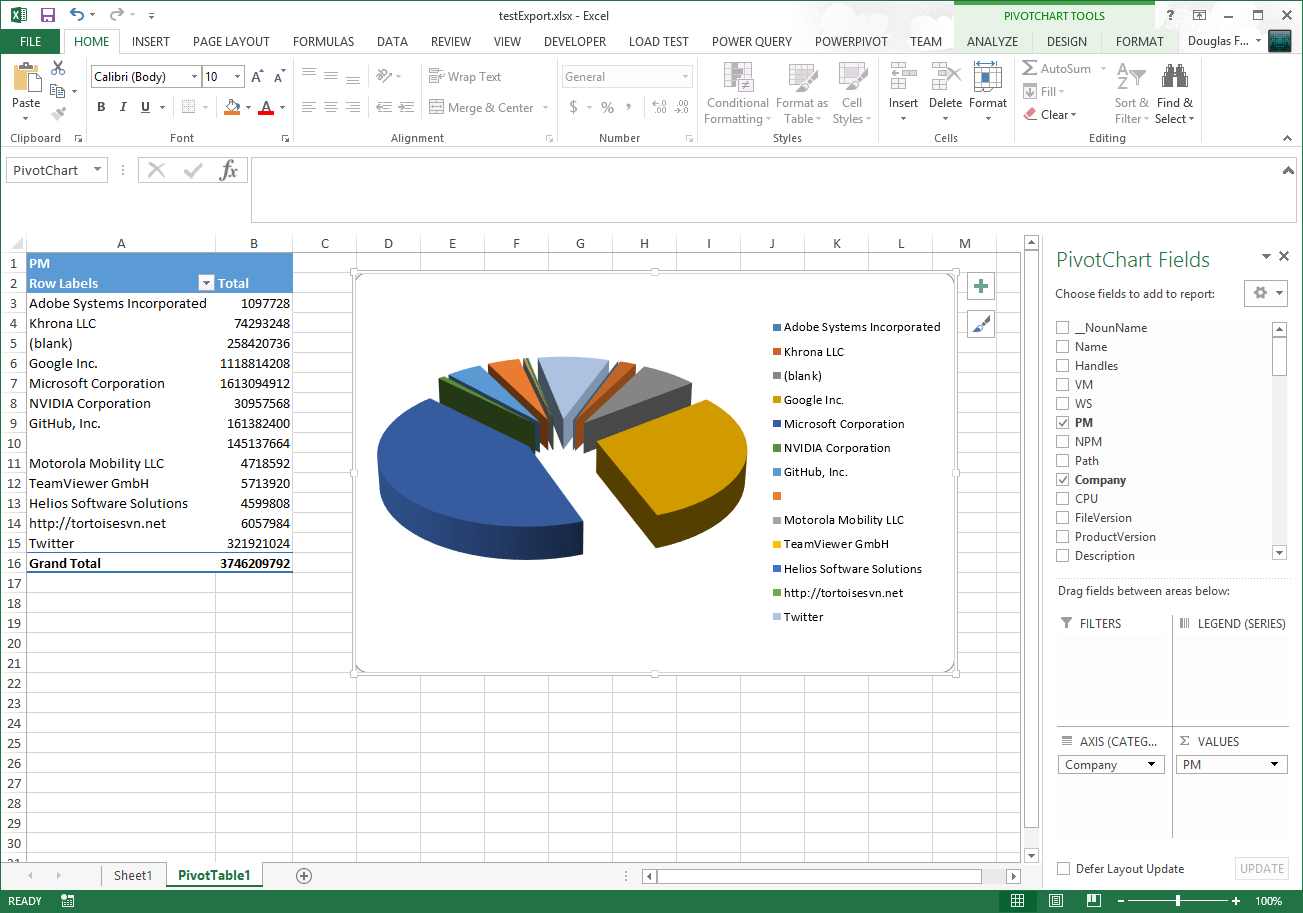
Get-Process Exported to Excel
|
|
-
|
|
### Total Physical Memory Grouped By Company
|
|
|
|
|
|
PowerShell Excel EPPlus Video
|
|
-
|
|
Click on this image to watch the short video.
|
|
|
|
[](http://dougfinke.com/powershellvideos/ExportExcel/ExportExcel.html)
|
|
|
|
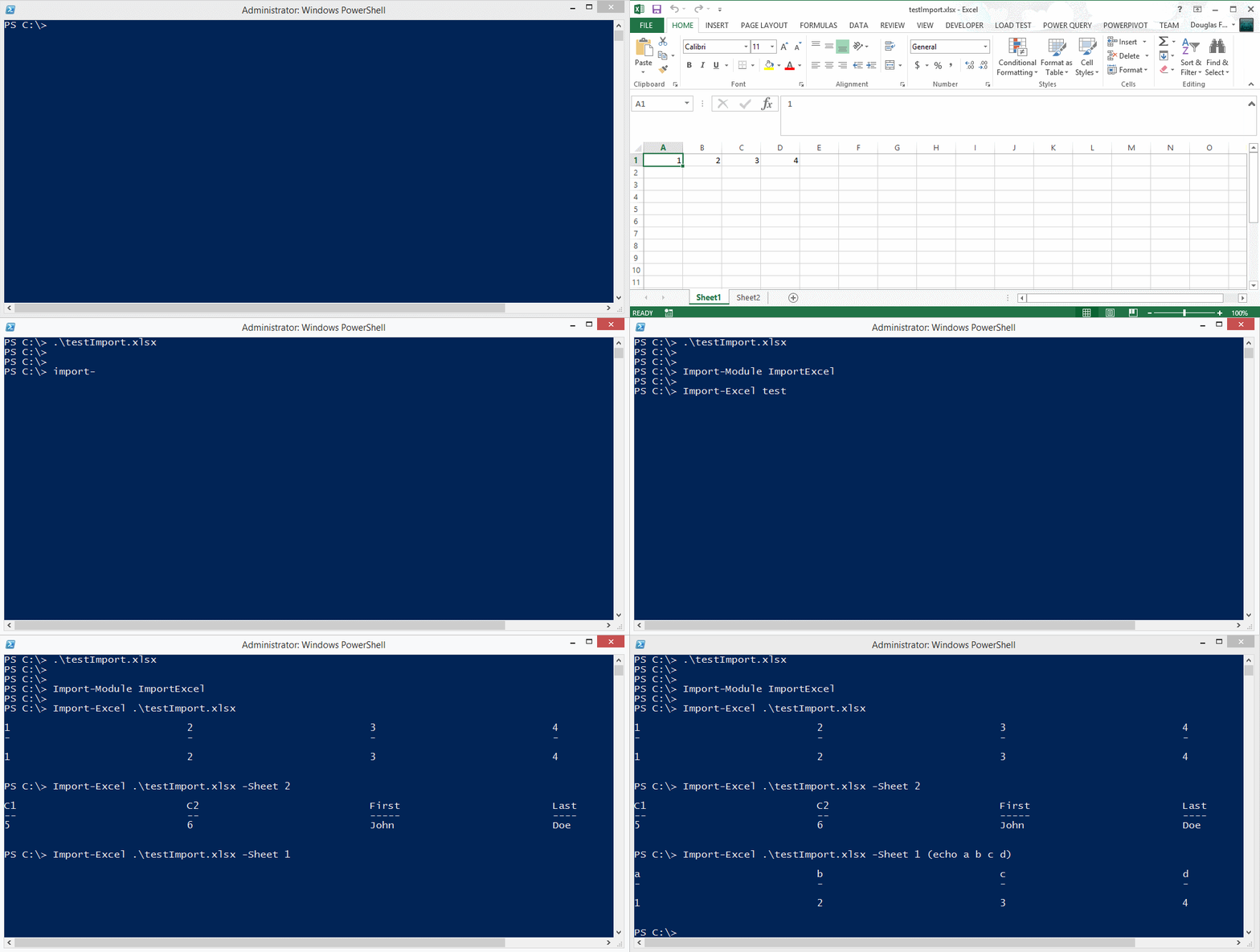
### Importing data from an Excel spreadsheet
|
|
|
|
|
|
|
|
You can also find EPPLus on [Nuget](https://www.nuget.org/packages/EPPlus/).
|